What's New in Kustomer: Enhancements Make It Easier to Deliver Great CX This Summer


Summer vacation season is here, but customers do not take time off and neither do the teams that serve them. CX teams do not just handle customer conversations; they manage configurations, maintain knowledge bases, pull reports, route calls, moderate social channels, and collaborate across tools, all while staying focused on the customer in front of them. This quarter, Kustomer shipped 25+ enhancements designed to reduce that overhead and make it easier for everyone, from reps to admins to managers, to deliver great CX.
Click to view the webinar recording here.
What We Named, and Why It Matters
Earlier this month, we announced new names for our AI products. The previous names described audiences. The new names describe what those products actually do.
Kustomer Concierge is AI for Customers. A concierge does not deflect; a concierge resolves, anticipating needs, acting on context, and handling interactions from start to finish.
Kustomer Envoy is AI for Reps. A tool assists, but an envoy represents. Before a rep types a single word, Envoy surfaces the full picture: order history, open issues, sentiment, and churn risk, so every rep shows up fully prepared.
Kustomer Architect is for all of the AI Assistants; AI that helps admins build, test, deploy, and continuously improve CX operations. It works across the platform, in search, workflows, reporting, so your team does not have to.
These names reflect a broader capability set than what the previous generation could deliver, and what follows is a look at what makes that real this quarter.
Underpinning all of it: Kustomer has achieved ISO 42001 certification, the international standard for AI Management Systems. It is independent, third-party validation that we have the processes, controls, and governance in place to build and operate AI responsibly.
Kustomer Concierge
Kustomer Concierge was recently named Personalized AI Agent Solution of the Year at the 2026 AI Breakthrough Awards, and the category name captures what makes Concierge different. Most AI agents in customer service start every conversation from zero. Concierge starts with everything it already knows: purchase history, prior conversations, account status, and behavioral signals. That complete customer context is what makes resolution possible, not just response.
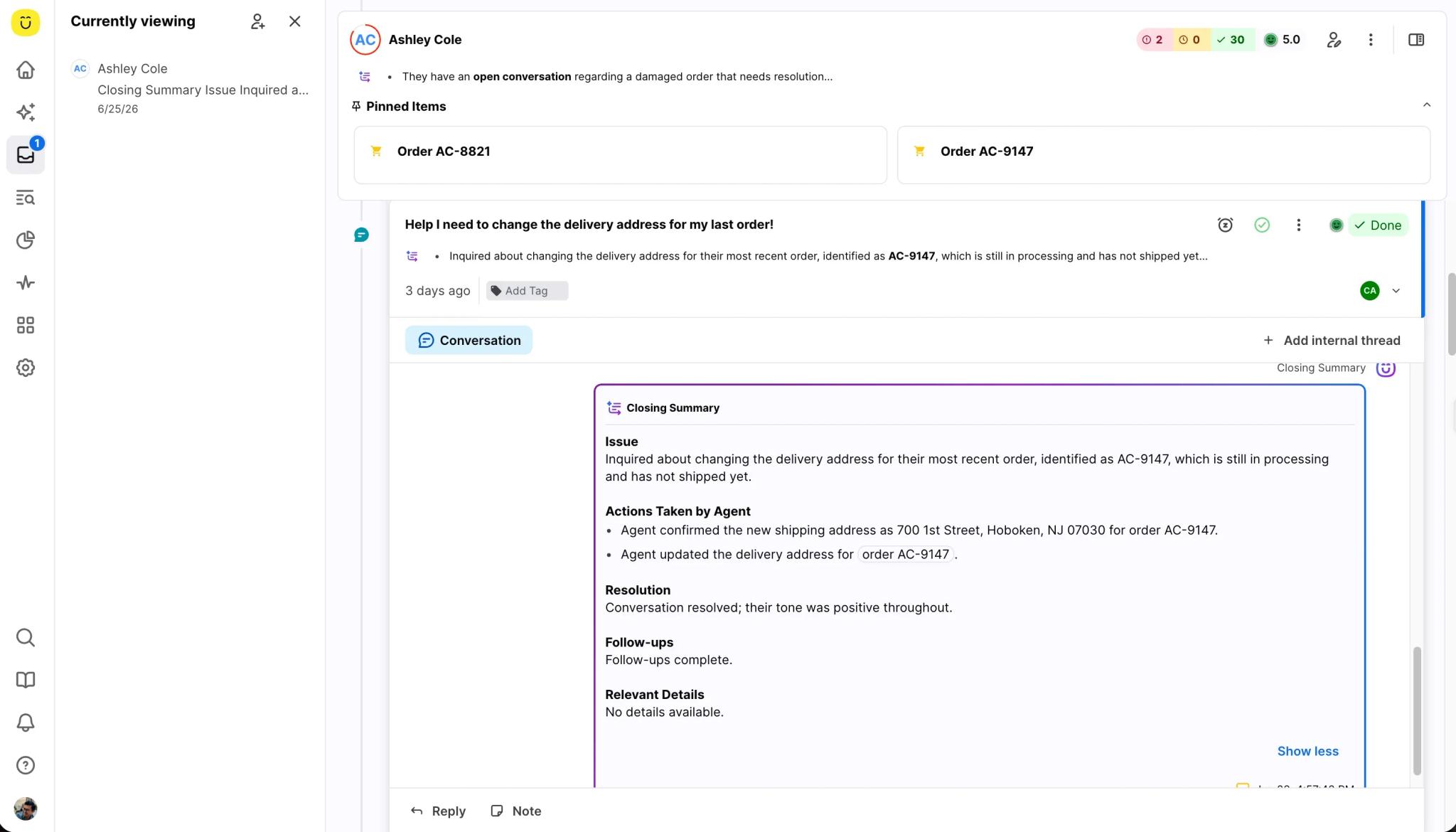
To see what that looks like in practice, consider a scenario from our webinar. A customer named Ashley realizes at 11 p.m. that her order is shipping to her old address. She contacts support, and Concierge already knows who she is, what she ordered, and when it is scheduled to ship. It confirms the order can still be changed and updates the delivery information across systems, with no human agent involved and no ticket sitting in a morning queue. The issue is resolved because Kustomer Concierge had the context to act, not just respond.
One Concierge For All Brands
Running multiple brands used to mean building a separate AI automation for each one, with separate knowledge sources, separate configurations, and separate maintenance overhead for every brand you operate.
Kustomer Concierge now detects the brand from conversation context and selects the right knowledge source automatically, so one configuration covers all of your brands. Untagged knowledge sources serve as a fallback across all of them, which means there are no gaps and no manual routing decisions required.
Version Controls and Rollbacks
Every team that iterates on its AI configuration will eventually ship a change that underperforms, and until now, undoing that meant digging through settings and hoping you remembered what had changed.
Kustomer Concierge now has full version history with side-by-side comparison and one-click rollback. If a change underperforms, you are back to a previous version in seconds. The lower cost of making a mistake means teams are more willing to iterate and improve their AI, which is exactly the dynamic that produces better outcomes over time.
AI Access To Defined Data Fields
When Kustomer Concierge calls for data, it sometimes has to infer what arguments to pass. For most situations that works fine, but for something like a customer account ID, inference is not what you want.
Deterministic Context Variables let admins pass structured fields directly into tool calls as fixed, preset arguments, removing inference from the equation entirely. The result is more reliable tool execution and more predictable outcomes, and this capability is available for both Kustomer Concierge and Envoy tools.
Less Manual Maintenance
Two improvements ship together this quarter with one thing in common: your AI stays current without anyone on your team having to manually maintain it.
Kustomer Concierge can now select from multi-level list attribute values when categorizing conversations, which means one tool handles all categories rather than requiring a separate tool per category. And knowledge sources backed by public URLs now re-index automatically every night, so your AI answers stay current without anyone needing to trigger a manual sync. Admins can also configure URL prefix filters to control exactly what gets indexed.
Kustomer Architect
Concierge Evaluations
Testing Kustomer Concierge used to require deep product knowledge, significant manual effort, and time that most teams simply do not have. The practical result was untested edge cases, silent failures, and configurations that degraded slowly without anyone noticing.
The Evaluations Architect lives inside the Concierge test screen and changes that entirely. It surfaces coverage gaps automatically, including the scenarios your team has not thought to test. It runs the evaluations, explains what failed and why, and recommends the specific procedure updates that would fix each issue. Validating and iterating on AI agent quality now takes minutes rather than hours.
Concierge Upgrade Helper
The Concierge Upgrade Helper has one specific job: if you are still on AI for Customers 1.0 and want to move to Concierge, this is your on-ramp.
Give Architect your existing 1.0 configuration and 30 days of conversation history, and it will analyze both and generate a complete Concierge setup procedures, custom guidance, and everything else you need. When we tested this feature with a customer who had configured 30 AI agents with AI for Customers 1.0, the entire migration process to Kustomer Concierge was completed in under five minutes. The Upgrade Helper is currently in Beta and rolling out through Professional Services, so reach out to your CSM to get started.
Data Explorer: Plan Mode
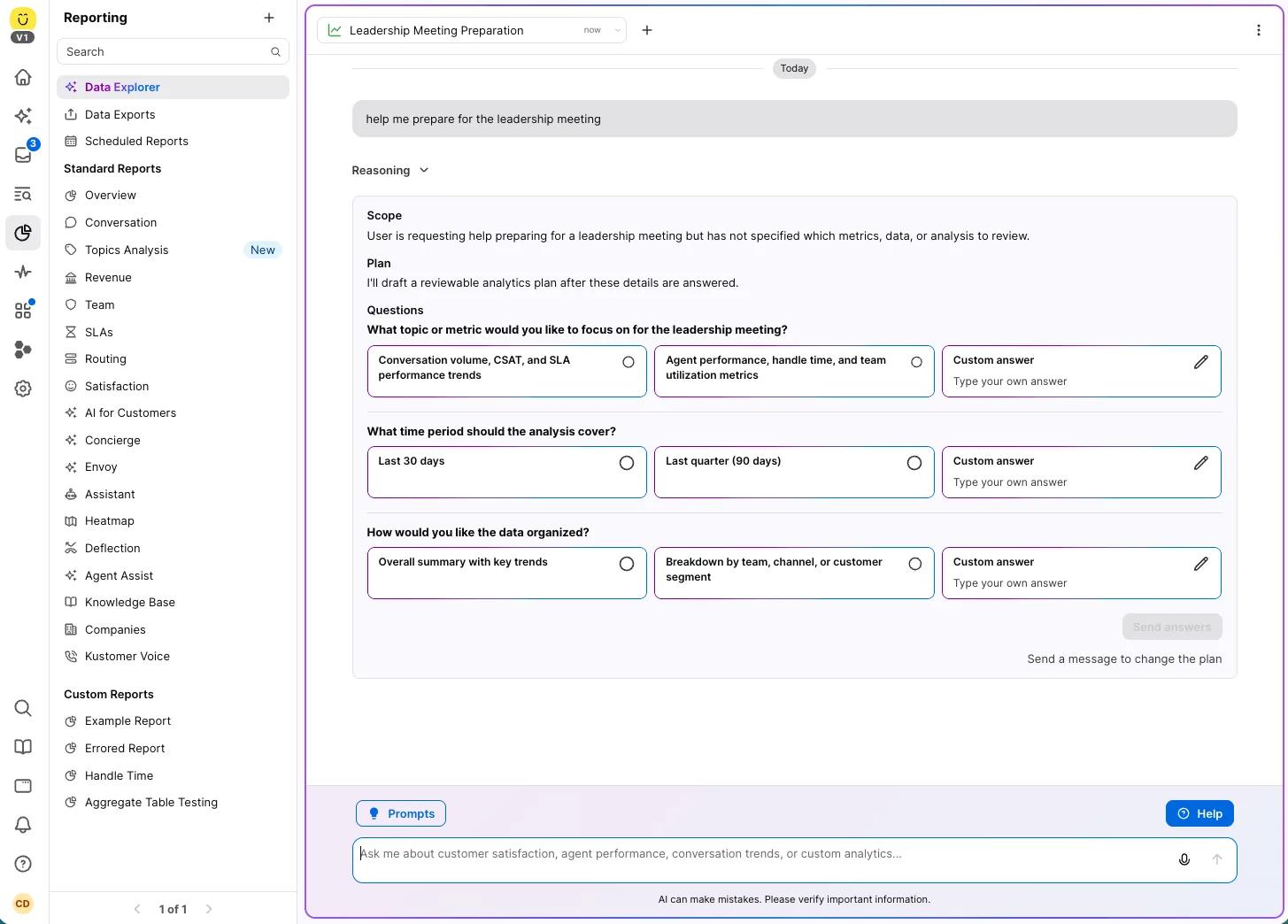
Plan Mode for Data Explorer (now in Beta) represents a meaningful change in how Kustomer AI handles complex data questions.
Here is what it looks like in practice: you ask Data Explorer for the status of your warranty procedures. Instead of returning a single answer that may miss the point, it surfaces a plan showing you what it intends to query, which data it will pull, and what it expects to find. You review and approve, then it executes. Results come back as focused metrics with visible reasoning, and charts are clickable so you can inspect the records behind any number. Your session persists if you navigate away, and suggested next steps appear as clickable buttons to keep the analysis moving forward.
Kustomer Envoy
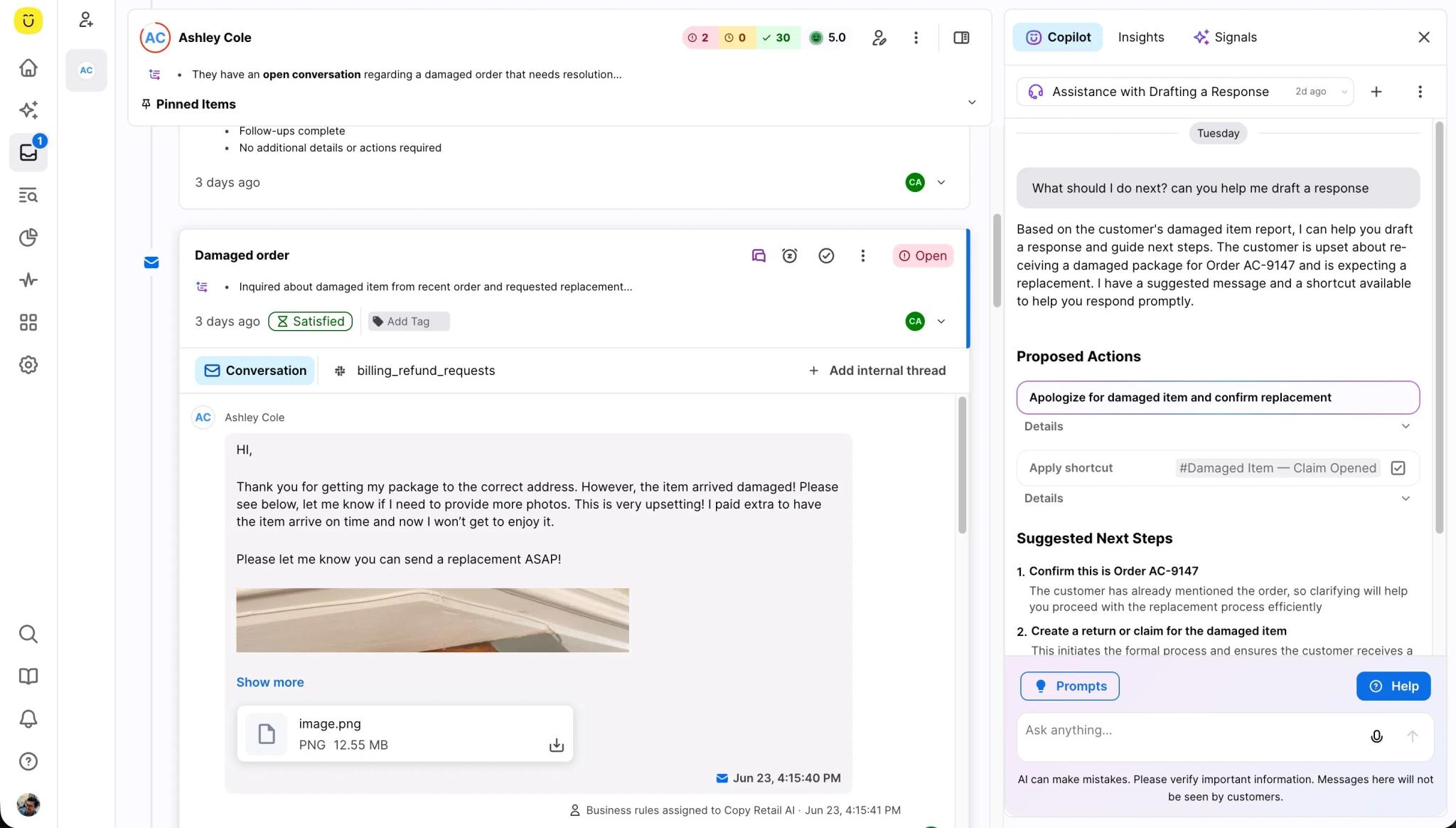
When a conversation about a damaged package gets escalated to a human rep, Envoy does not hand them a blank screen. Before the rep types a word, Signals surfaces historical transaction patterns, account health, and at-risk status so the rep already understands the situation. Copilot then helps draft a response, applies the appropriate shortcut, and surfaces the apology and next steps the situation calls for so the rep can focus on the customer rather than on piecing together context.
The combined effect is that your newest agent has access to the same context and guidance as your most experienced one, on every conversation.
Copilot Respects Permissions
When a rep uses Copilot to search the knowledge base, they now only see articles they are authorized to view. The access controls already configured in your KB team restrictions, user restrictions are enforced automatically inside Copilot, with no additional configuration required. Sensitive internal articles stay internal, and confidential content stays confidential.
Platform
Custom Attribute Sorting in Search
You can now sort any search by custom attributes LTV, renewal date, account tier, or any other attribute you have built which means the data you have always stored in Kustomer is now accessible the way you actually want to use it.
Aggregate Table Chart
The Aggregate Table Chart is now generally available in the Custom Report Builder. This is the multi-column, multi-metric comparison table that most teams have been building by hand in spreadsheets every week, now available natively in Kustomer with up to 10 independently configured metric columns and no exporting required.
Consistent AHT Calculation That’s Configurable
Average Handle Time is now generally available across every Kustomer reporting surface Custom Reporting, Standard Reports, the Home dashboard, Data Explorer, and the API all powered by a single unified calculation engine. That means the AHT number is consistent regardless of where you look at it, and Handled By segmentation lets you break it down by agent or team. If your organization has specific requirements for how AHT should be calculated, that is configurable at the org level in Settings.
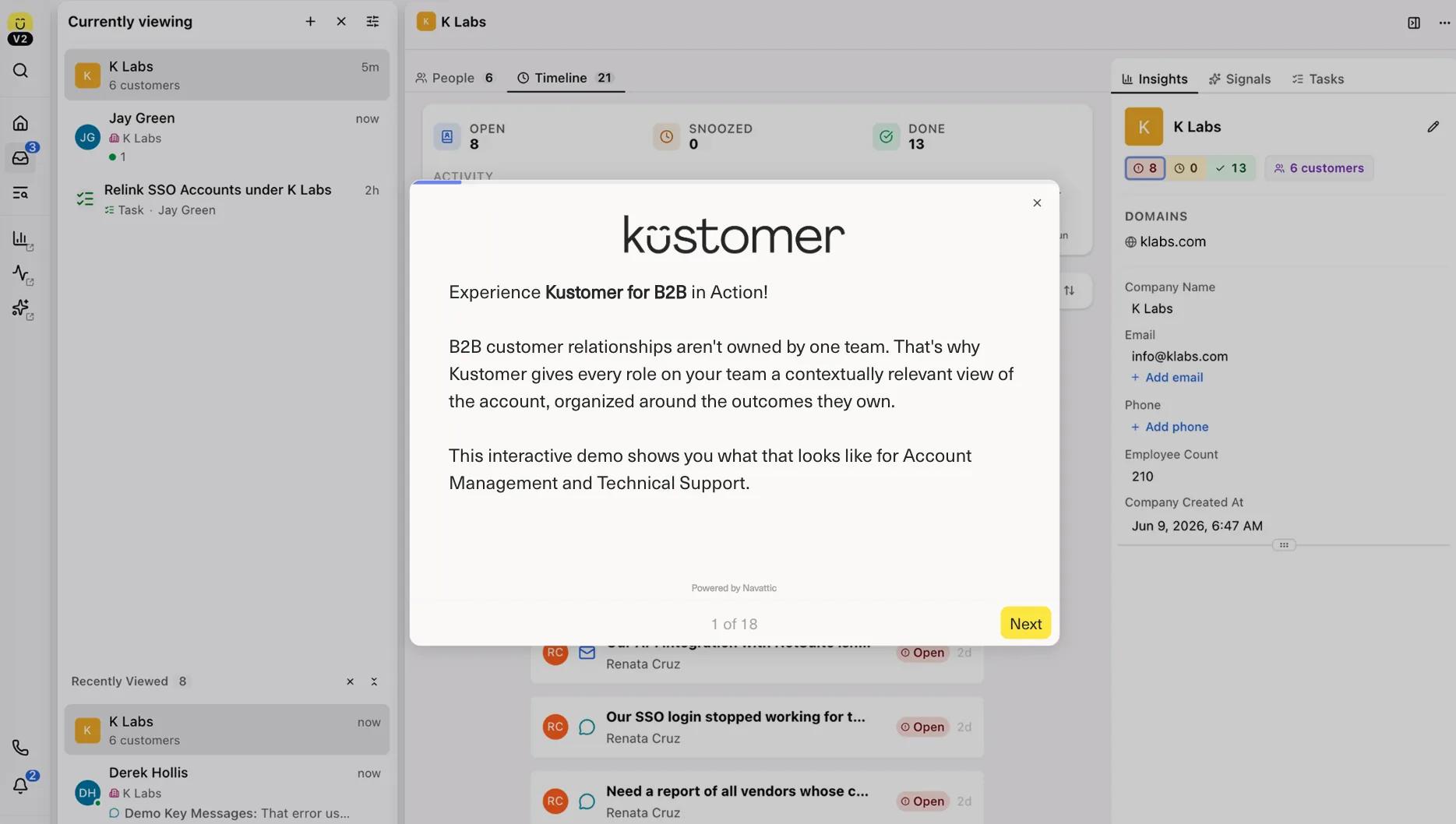
Account-Level Views (Coming Soon)
Certain B2C and B2B support teams require account-level views that centralize conversations with multiple users that belong to that account. This quarter our team is working on a new Dashboard, Timeline, and Signals offering to meet the account-level view requirement. These features are being expanded to surface all conversations and interactions related to one organization in one place, sentiment and history across contacts, and an AI-generated account health summary from Signals. If your team manages complex, multi-user relationships, this is built for you.
Check out this click-through demo of how Kustomer helps B2B Tech companies.
Channels
Facebook Comment Moderation
Reps responsible for social service can now hide, unhide, and delete Facebook Page comments directly from the Kustomer Timeline without ever leaving the platform. When a comment is deleted in Kustomer, it is removed from Facebook itself, so there is no need to context switch between tools or perform the same action twice.
Chat Carousels
When a chat message contains two or more URL links, those link previews now display as a horizontal swipeable carousel instead of stacking vertically. It is a cleaner experience for the customer and works across the web chat widget and iOS, Android, and React Native SDKs.
Amazon SES Email
Amazon SES is now available as a native email provider for Kustomer, currently in Limited Availability. Better deliverability on a more scalable, resilient infrastructure is the first benefit. The second is compliance: Amazon SES gives healthcare and financial services customers a HIPAA and PCI-compliant email channel without any workarounds. Contact your CSM to discuss migration options.
Voice: Routing by Customer Attribute
Voice routing can now branch based on customer data, so you can configure conditions using any customer attribute VIP status, account tier, region and callers are automatically routed to the right queue, hear the right IVR prompt, and receive the right fallback handling. A VIP customer calling about an urgent issue reaches your priority queue automatically, with no manual triage required. This requires Voice with Customer Assist enabled; no migration is needed for existing Voice setups.
Voice: Call Rejection and Timeout Reporting
The Routing report now includes two new metrics: Call Rejections, which are calls actively declined by a rep, and Call Timeouts, which are calls that went unanswered within the allotted time. Before today, limited visibility into why calls were not being handled made it difficult to coach or improve. Historical data is available going back to March 2026, and no configuration is required to access these metrics.
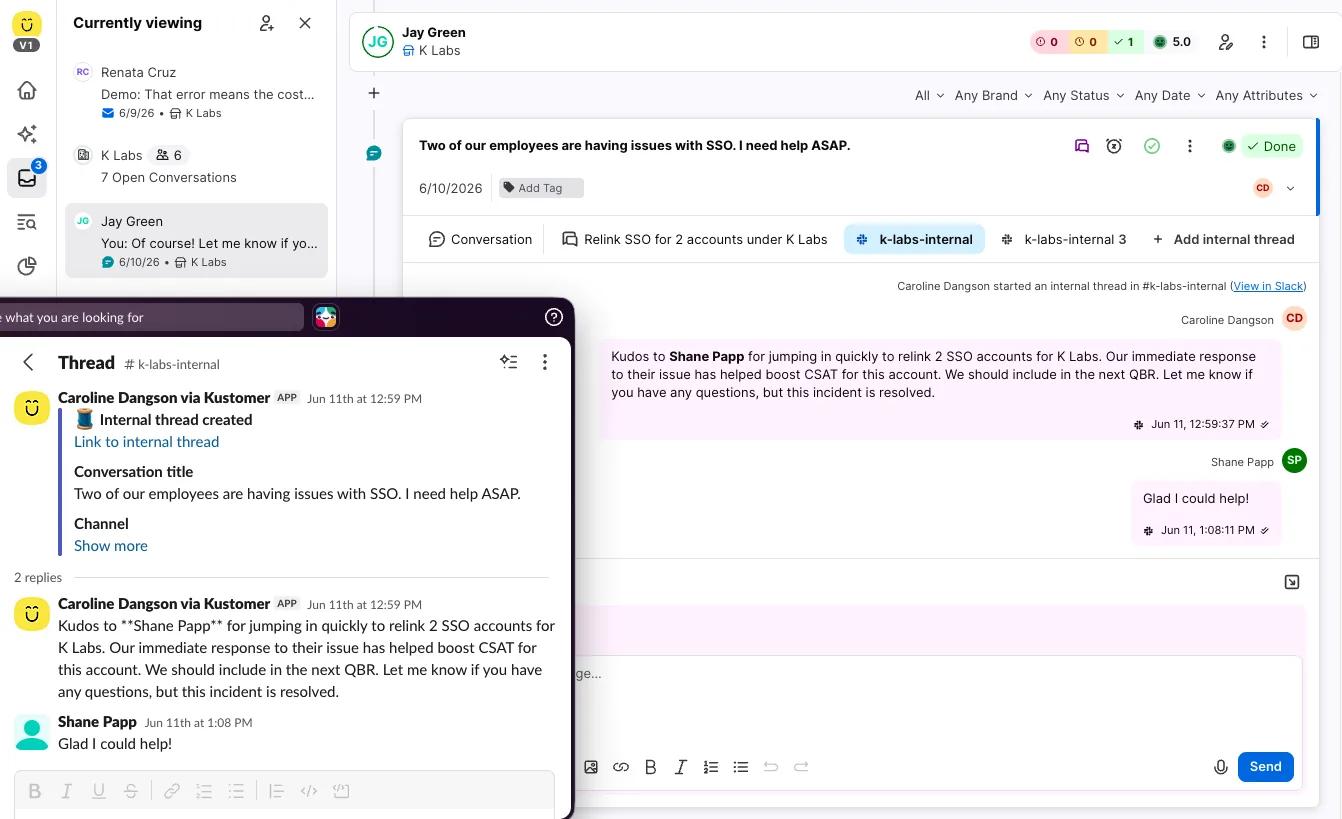
Internal Threads with Slack
Reps can now start a Slack thread from any Kustomer conversation, select the target channel, and have replies sync back into Kustomer automatically. The full internal discussion of who was consulted, what was said, how long each step took lives alongside the customer record, so no context is lost between tools.
What Comes Next
Our next Kustomer Quarterly webinar will be in September to cover Q3 product innovation.
Until then, if you have questions about any of these releases or want to get access to a beta feature, reach out to your Customer Success Manager.
Remember to check out the Product Updates section of our website for detailed information on what is released by month.
If you are not yet a customer but want to explore more, book a meeting with us here.