One View, Every Stakeholder: Company Timeline, Signals & Insights
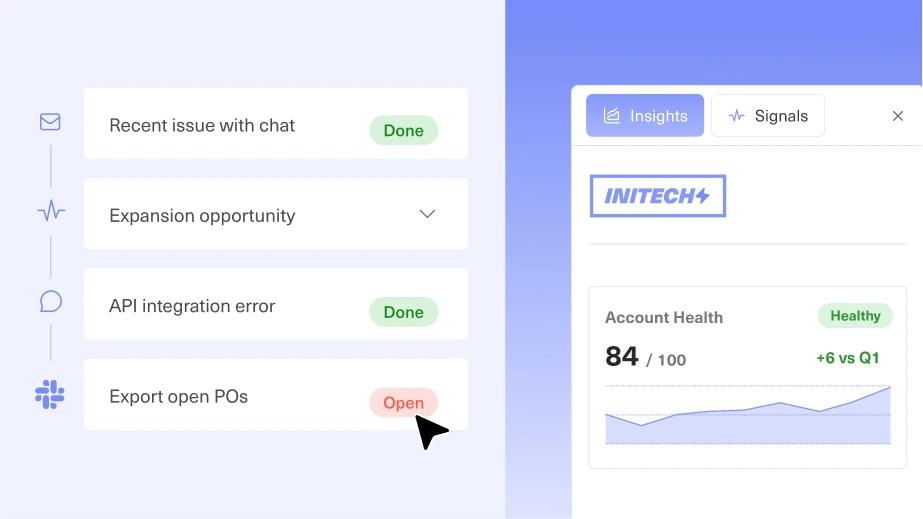
Kustomer's new Company Timeline brings every conversation, contact, and risk signal into a single account-level view that includes Company Signals and Insights, so teams stop reacting and start anticipating.
In B2B, your customer is never really one person, and the team serving them isn't either. It's a support agent who runs into an issue helping one of their contacts, unaware that three other conversations are already open at that same account. It's a Customer Success Manager (CSM) walking into a critical renewal call without knowing support has spent the month fielding escalations from three different stakeholders. It's a Chief Revenue Officer or Chief Customer Officer stepping in on an escalated account to lower the temperature, and having to piece together the full history in real time. Different people, same account, and no shared picture of what's actually happening.
That gap doesn't just slow people down, it hides risk. A support leader can't tell a healthy account from a silently churning one until the cancellation email arrives. A key stakeholder can go quiet for weeks and nobody notices until the renewal is already in jeopardy. The problem isn't effort, it's that no one has a single place where the whole account story lives.
None of this is a people problem. It's an architecture problem. Most customer service platforms were built around the individual ticket and the individual contact, not the account as a whole. That leaves teams reconstructing the same context over and over, account by account, conversation by conversation, instead of seeing it once and acting on it.
Why the Siloed View Falls Short
Ask a support leader how a key account is doing and the honest answer is usually: "let me pull a few reports and get back to you." Conversation history lives in one place. Contact records live in another. Sentiment and risk are somewhere in a spreadsheet, if they're tracked at all. Even today, most B2B support platforms treat the company as a flat list of contacts, not a living account with history, health, and momentum.
That forces teams into a reactive posture. Sentiment declines quietly across several stakeholders before anyone notices. Ticket volume climbs for weeks before it gets flagged as a pattern. A key contact goes silent for over two months, and nobody catches it until the renewal is already in jeopardy. Teams don't lack effort; they lack a place where the full account story actually lives.
Introducing Company Timeline, Insights, and Signals
The Company Timeline is Kustomer's answer: one connected home for everything happening at an account, built around three capabilities that work together.
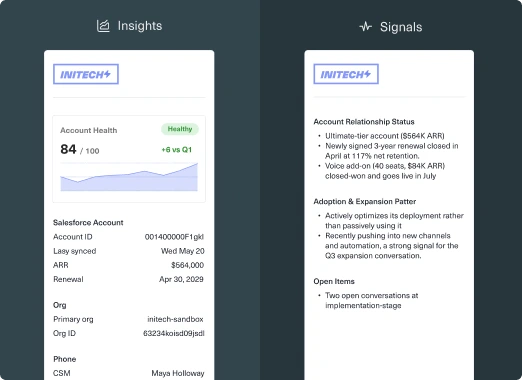
The Company Timeline rolls up every conversation, task, and event across every contact at an account into a single chronological feed. Before an agent, CSM, or Technical Account Manager (TAM) opens a single conversation, they already have context. Company Signals puts AI on top of both, reading across the entire account to flag what a human would otherwise have to notice on their own. It's available as part of Kustomer Envoy. Company Insights gives that same account a clear snapshot: sentiment, Customer Satisfaction Score (CSAT), Annual Recurring Revenue (ARR), and open escalations, all visible at a glance. Together, they replace a scattered set of reports and gut instinct with one connected view of account health that anyone can open and immediately understand.
Company Timeline: Every Interaction, One View
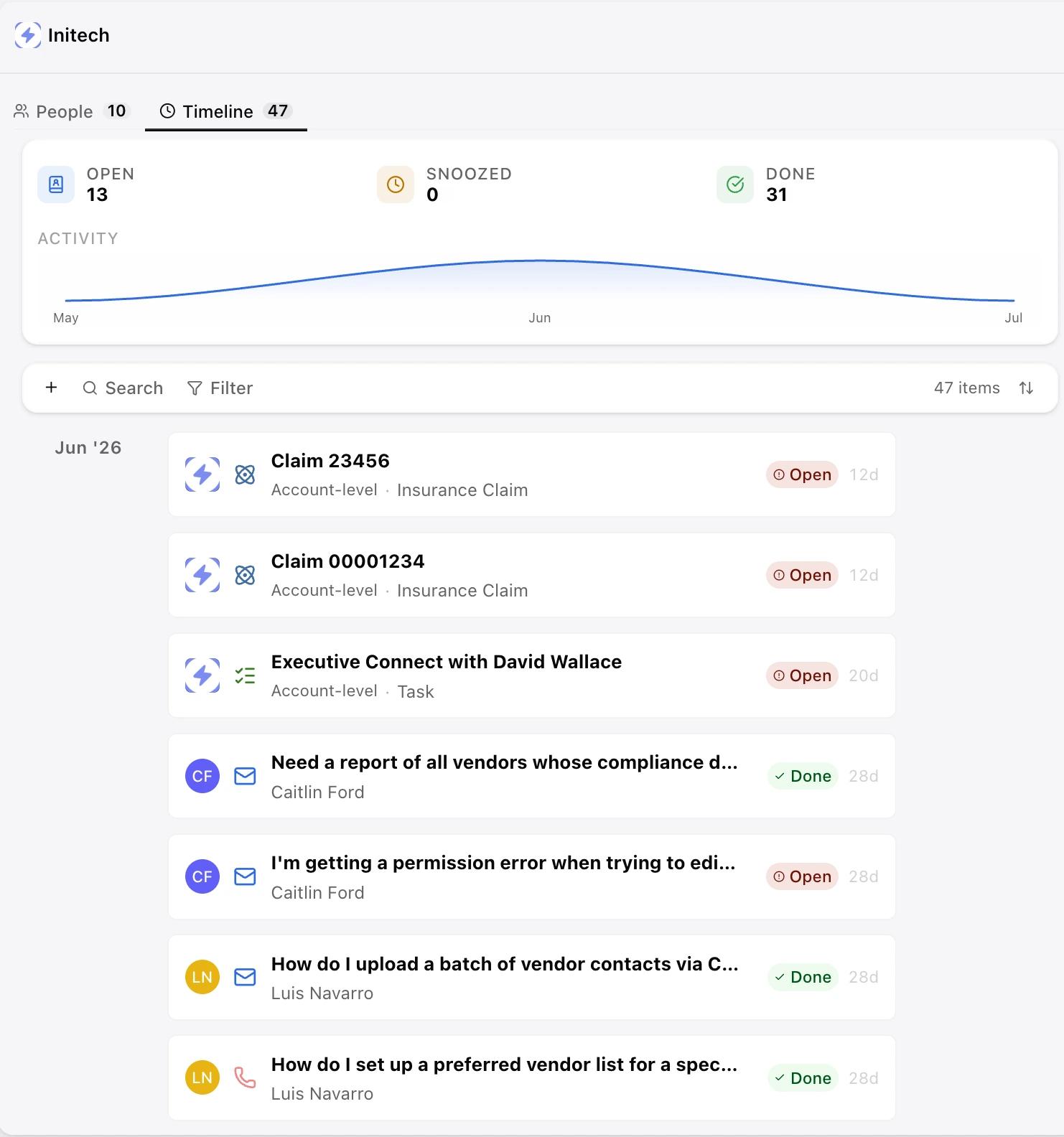
The Timeline aggregates every conversation, account-level task, and event across every contact at a company, in chronological order. Each item shows the contact, the channel, the status, and an AI-generated summary of what the conversation was actually about, so anyone can filter to open issues, sort by date, or scan snoozed and closed items without hunting across individual records.
A People tab sits alongside it, listing every contact at the account with their open, closed, and in-progress conversation counts, plus an AI-generated summary at the contact level. If you're picking up an account that isn't normally yours, you can get up to speed on any stakeholder in seconds, not minutes or hours spent piecing together their history.
Company Insights: Account Health at a Glance
Company Insights turns the Timeline's raw activity into a dashboard. It includes:
- Sentiment trend
- CSAT
- Support engagement
- Contract tier and ARR
- A running count of open escalations, all specific to that account, not averaged across your whole book of business.
Instead of exporting reports before a Quarterly Business Review (QBR) or a renewal call, a CSM or support leader opens the account and sees, immediately, whether it's trending toward risk or toward expansion, and why.
Company Signals: AI That Reads the Whole Account
This is where the platform goes beyond just displaying information and starts doing the work of noticing it. Signals reads across the entire account, every contact and every conversation, and surfaces what matters, not just what's recent.
That means catching a key stakeholder who's gone quiet for weeks with open issues still unresolved. Flagging new contacts who've just entered the account, like a newly added executive sponsor. Surfacing rising negative sentiment across multiple contacts before it becomes a churn conversation, or a volume spike before a customer has to call and complain about it. Signals doesn't just point at a data point; it tells the team what to do next, from starting a conversation to preparing for a QBR.
Company Signals is available to customers on Kustomer Envoy.
What This Means for Your Team
For frontline agents: Full contact and account history before you even open a conversation, with no more piecing together context from four different tabs.
For CSMs and TAMs: Account health, sentiment, and renewal signals in one place, so you walk into every call already informed instead of catching up in real time.
For support leaders and executives: An account-level view of risk and health across your book of business, so "how's that account doing" has an answer in seconds, not a follow-up meeting.
A Day With Company Timeline
Picture a CSM opening an account ahead of a renewal call. The health score shows 88 out of 100: healthy, though sentiment has drifted neutral. The Insights panel shows support volume up sharply over the last 30 days and two open escalations awaiting action. Before the CSM even opens a conversation, Signals has already flagged it: one contact has been silent for weeks with unresolved issues on the table, while another stakeholder is showing strong engagement.
That CSM doesn't walk into the renewal call hoping nothing comes up. They walk in already knowing where the risk is, who's disengaged, and what to raise, because the account already told them.
"We built Kustomer on the belief that great customer service starts with complete context. In B2C, that meant knowing the individual. In B2B, it means knowing the account: its history, its health, its risks. Company Timeline, Signals and Insights are that belief, built into the product."
Brad Birnbaum
Co-Founder and CEO, Kustomer
Get Started
New to Kustomer? Book a demo to get a personalized look at our Company Timeline, Insights, and Signals. Already a Kustomer customer? Company Timeline and Company Insights are live in your workspace now, just enable the new Kustomer Experience user interface. To turn on Company Signals, reach out to your Customer Success Manager about adding Kustomer Envoy, or visit our Knowledge Base for setup details.