
18 new ways to get more from Kustomer
One thing needs action from your admins. Email infrastructure is moving to Amazon SES, and Postmark is retired as an email provider on May 1, 2027. If your team sends or receives email through Postmark, migrate before then to avoid interruption to your email channel.
Read the migration guide →The short version
Over the past 30 days we shipped improvements across AI, reporting and the platform. These releases share a goal: helping your team turn customer context into better service. AI answers more reliably and more safely, Reporting Assistant explains more, and routing and channels get sharper.
AI gives better answers, more safely
Knowledge rank fusion promotes the most relevant source instead of trusting one search system, and AI actions now stay aligned with each user's permissions.
Reporting answers questions instead of showing charts
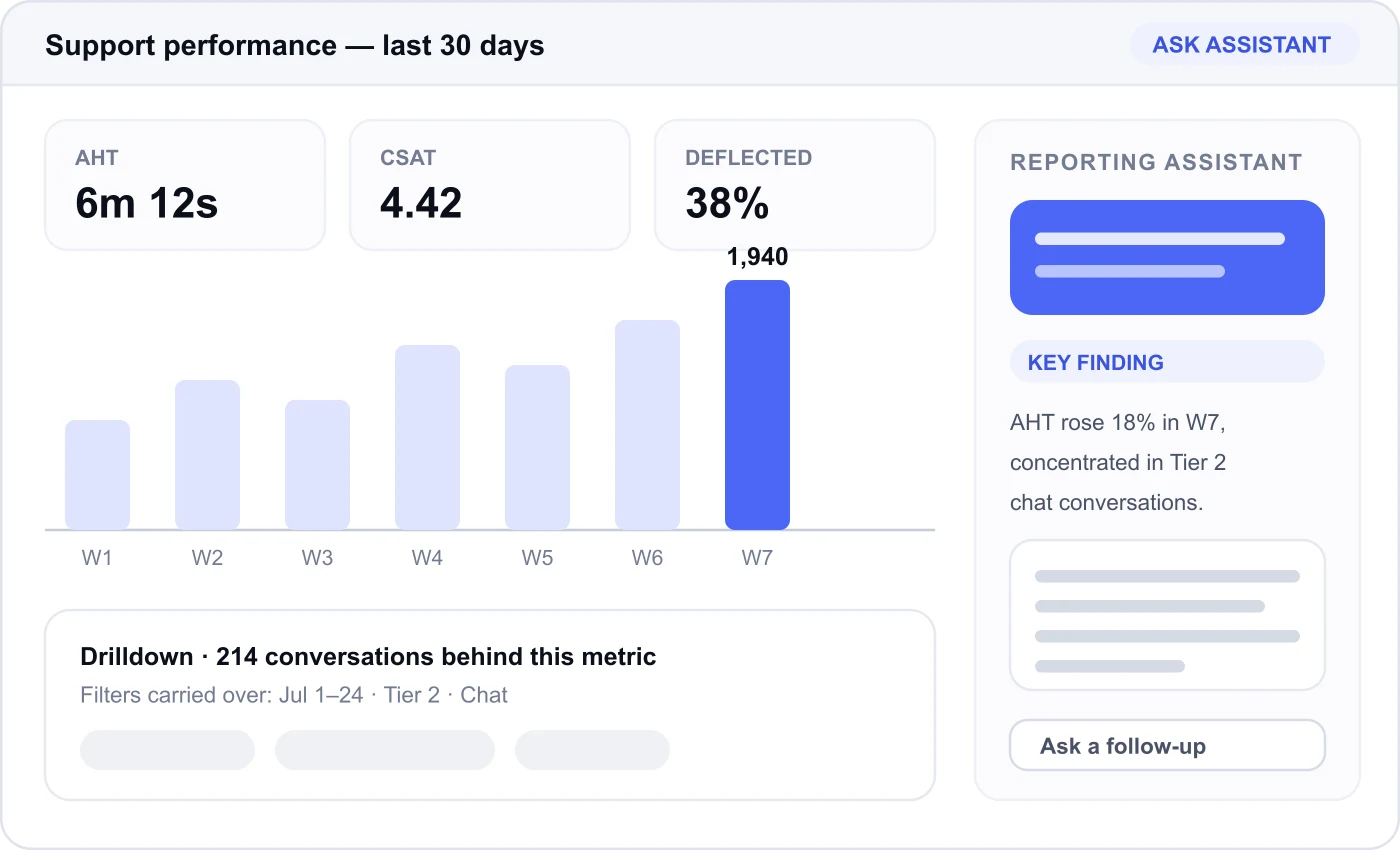
Analyze a whole report or a single chart, and drill down without losing your filters.
Routing and channels get sharper
Workflows can branch on skills and update them mid-conversation, agents can moderate Facebook comments without leaving Kustomer, and Internal Threads are hardened against email loops and invalid sends.
Smarter, more capable AI
6 releasesSharper knowledge retrieval, and the permission model to keep more capable AI safe.
1. Surface better answers from your knowledge
Kustomer AI now uses improved ranking to combine results from your knowledge base and other connected knowledge sources. Instead of trusting the ordering produced by one search system, it evaluates results across sources and promotes the information most likely to answer the question.
Why it matters.
This matters most if you have a large or distributed knowledge collection where several articles contain similar language. Better ranking distinguishes a broadly related article from the one that actually addresses the issue.
How to use it.
Nothing to configure. Monitor answer quality and make sure your best content is current, ranking can only promote what exists.
2. Knowledge rank fusion, now across production
The improved knowledge-ranking strategy has been expanded across production environments, so more organizations benefit from stronger retrieval without restructuring their knowledge base or changing existing AI procedures.
Why it matters.
Rank fusion improves relevance by combining the strengths of multiple result sets. When different searches surface useful content, the system weighs those signals together rather than picking one winner blindly.
How to use it.
If you use AI-powered knowledge retrieval, spot-check your most frequently cited articles this month.
3. Give AI the right context with less noise
We improved how much knowledge content is supplied to AI during a conversation. Rather than hydrating an unnecessarily large portion of a document, Kustomer focuses on a controlled set of the most relevant sections.
Why it matters.
More content does not produce a better answer. Excess information distracts the model, buries the key facts and slows the response. Focused retrieval keeps AI closer to the question while still giving it enough to answer accurately.
How to use it.
Particularly useful if you keep long policy documents or detailed troubleshooting guides in your knowledge base.
4. Keep AI actions aligned with user permissions
Expanded AI capabilities demand equally strong access controls. Kustomer AI now applies more comprehensive authorization checks so supported tools stay aligned with the permissions of the person using them.
Why it matters.
If a user cannot perform an action directly, AI must not become the way around that restriction. These controls let you adopt more capable AI while keeping your existing governance and role-based access model intact.
How to use it.
Keep applying least-privilege principles and re-review roles as new AI workflows are introduced.
5. Improve how AI determines whether work is complete
Goal validation helps an AI agent decide whether it completed the request, needs to keep working, or should escalate. We improved this so the system better recognizes completion boundaries, escalations, and cases where a response incorrectly implies a tool was used.
Why it matters.
A polished response is not a completed task. If the customer asked to update an address, the interaction is not a success because AI explained how addresses can be changed. Stronger validation means more trustworthy automation outcomes, and more honest reporting.
How to use it.
Review your automation success metrics after this lands; some previously “resolved” conversations will reclassify, and that reclassification is the point.
6. Use AI assistance on imported conversations
Copilot now works more reliably with conversations imported into Kustomer, so organizations migrating from another system get value from their historical customer data instead of limiting AI assistance to conversations created after the migration.
Why it matters.
Imported conversations carry context about prior issues, preferences and recurring needs. Making that available to AI helps agents understand established relationships sooner rather than starting every long-time customer from zero.
How to use it.
If you are mid-migration, evaluate Copilot against a representative sample of imported conversations before cutover.
Reporting that moves from insight to action
9 releasesNine changes aimed at one thing: getting from “that number looks wrong” to “here's why.”
7. Analyze an entire report with Reporting Assistant
Reporting Assistant can now examine a complete custom report and give a conversational explanation of its most important findings. Instead of reading each chart independently, ask for an overall analysis and get a synthesis of trends, changes and potential areas of concern.
Why it matters.
This is the difference between a report and an answer. It is built for the manager preparing a weekly review, investigating a performance change, or hunting a pattern across several related metrics.
How to use it.
Open Reporting Assistant from a custom report and ask “What changed most significantly?” or “Which areas should I investigate first?”
8. Analyze reports built from multiple data sources
Some custom reports combine information backed by different data systems. Reporting Assistant now coordinates analysis across those sources and brings the results together into a single response.
Why it matters.
Users no longer need to know which backend produced each chart or reconcile separate analyses by hand. Analysts can still inspect the underlying detail while operational leaders get one unified explanation.
How to use it.
Point it at your busiest mixed-source dashboard, the one nobody wants to interpret in a meeting.
9. Investigate a specific chart
Ask Reporting Assistant to analyze an individual chart without analyzing the entire report. Ideal when one metric looks unusual, or when a broader report already pointed you somewhere.
Why it matters.
A narrower scope produces a sharper explanation. The assistant can address that chart's movement, dimensions and comparisons without dragging in unrelated report data.
How to use it.
Use it the moment you notice an unexpected jump in handle time, a satisfaction dip, or a shift in automation performance.
10. Explore agent performance in more detail
New drilldown capabilities make it easier to move from high-level agent performance metrics to the conversations and events behind those numbers.
Why it matters.
A summary metric shows that performance changed; it rarely explains why. Drilldowns supply the evidence needed to spot coaching opportunities, process problems, or behaviours worth copying across the team.
How to use it.
Bring these into performance reviews and quality sessions. The goal is reporting as a tool for improvement, not a passive scorecard.
11. Understand automation performance
Expanded automation drilldowns provide more detail about procedure execution, errors and outcomes, so teams can see where automations succeed, where they fail, and where customers hit unnecessary friction.
Why it matters.
A high-level error rate can now lead to a focused investigation of the affected procedures and conversations. That's how you tell an isolated issue apart from a recurring design problem.
How to use it.
Automation owners should review these drilldowns after every launch or modification. Early visibility on failures is cheaper than a customer finding them.
12. Keep report filters applied during drilldowns
We improved how page and report filters are honored when users move into detailed analytics views. The selected date range, team, channel or other scope is retained more consistently as the analysis moves from summary to supporting data.
Why it matters.
Losing a filter during a drilldown produces misleading results, because the detail no longer represents the population the metric described. Keeping it makes the link between summary and conversation trustworthy.
How to use it.
Nothing to configure, but if you previously worked around this by re-applying filters manually, you can stop.
13. Create more faithful saved reports and exports
Improvements to report generation help saved reports and exports preserve the metrics, dimensions, custom fields, percentages and chart structure of the original analysis more accurately.
Why it matters.
Less manual correction after asking Reporting Assistant to produce or export a result, and output that is safe to send to a stakeholder who wasn't in the original reporting conversation.
How to use it.
When an analysis produces something useful, save or export it: the artifact now stays faithful to what you reviewed.
14. Maintain date ranges across follow-up questions
Reporting Assistant now preserves selected date windows more reliably across clarifying questions and follow-up analysis, so you can continue a conversation without restating the reporting period.
Why it matters.
Exploratory analysis is one answer leading to five more questions. Holding the time frame steady while you change dimensions removes a real risk: accidentally comparing two different periods and drawing the wrong conclusion.
How to use it.
Just keep asking. Restate the period only when you actually want to change it.
15. Get clearer analysis progress and next steps
Longer analyses now report progress more clearly, so you know the assistant is still working and what stage it has reached. Once complete, improved next-step suggestions help you keep exploring.
Why it matters.
Better progress communication removes the uncertainty of a long request. Suggested next steps make advanced reporting approachable for people who know what outcome they need but not the best follow-up question.
How to use it.
Treat the suggestions as starting points: pick one, or use it as inspiration for something more specific to your operation.
Platform & channels
3 releasesRouting logic, channel coverage, and safer email collaboration.
16. Skill-based routing in Workflows
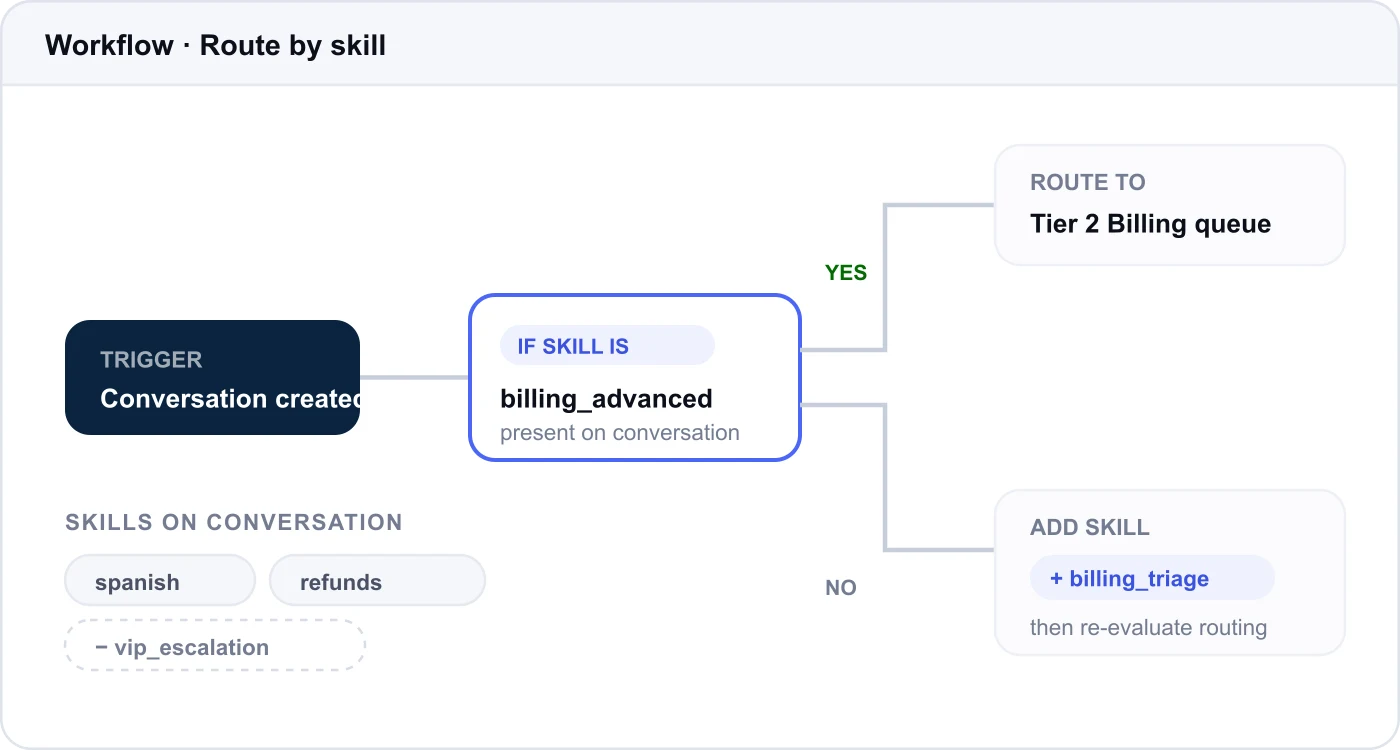
Workflows can now add and remove skills on a conversation, and skills can be used as workflow conditions to branch routing logic based on a conversation's current skill state.
Why it matters.
Routing stops being a single decision made at intake. A workflow can inspect what a conversation already needs, adjust it, and re-route: that's how you express escalation and specialization rules without duplicating queues.
How to use it.
Available to all customers using skills-based routing.
17. Facebook comment moderation
Agents can now moderate comments on Facebook Page posts without leaving Kustomer. Directly from the conversation timeline they can hide, unhide and delete Facebook comments, and hidden comments are clearly labelled in the timeline.
Why it matters.
Public comment threads are a brand risk that moves fast. Handling them in the same place as the conversation, with clear labelling of what is currently visible to the public, removes the tab-switching and the guesswork.
How to use it.
No setup beyond your existing Facebook Page connection.
18. Prevent email loops and invalid sends
New safeguards detect conditions that would produce failed sends or recursive email loops: invalid recipient lists, excessive recipients, unsupported domains, and attempts to send an Internal Thread back to an address belonging to the same thread system.
Why it matters.
These protections stop a problematic message before it creates duplicate activity or confusing delivery behaviour. The agent gets a clear failure up front instead of discovering it after the conversation has fragmented.
How to use it.
Configure your allowed recipient domains, and brief agents on what to do when a recipient is blocked by policy.
Availability may vary by plan, configuration, region and rollout status. Review your organization's AI, Reporting Assistant and workflow settings to see which capabilities are relevant to your workflows. Begin with a focused use case, measure the impact, and expand from there.