Zendesk AI vs Fin AI: A Head-to-Head Comparison for 2026


Your support queue just crossed 200 open tickets, and three of them are from the same customer who keeps getting bounced between a bot and an agent.
The AI that was supposed to handle it gave a confident but wrong answer about your refund policy, the customer escalated, and now your team is stuck fixing a problem that should have never reached them in the first place.
This is the reality for many support teams in 2026.
And when you start shopping for a better setup, two names show up everywhere – Zendesk and Intercom's Fin AI. For good reasons, too:
- Zendesk AI gives you the full enterprise backbone, with SLAs, routing, automations, and more integrations than you'll ever need.
- Fin AI strips that weight away and puts a fast, AI-native agent at the center of every customer conversation.
But spend a few months with either one and the trade-offs start to surface. Zendesk costs more than the pricing page suggests, and Fin AI does less than the marketing implies.
We'll unpack both of those issues in detail, put the two platforms head-to-head feature by feature, from pricing to AI depth to long-term fit, and show you what a better fit looks like for teams that are done choosing between power and flexibility.
Zendesk AI vs Fin AI: General Overview
Zendesk AI Agents Overview
Zendesk launched in 2007 as an enterprise helpdesk software and has since grown into one of the most widely used support platforms on the market.
The product is built around structured ticketing and omnichannel support, with automation workflows, SLA management, routing logic, and one of the largest integration ecosystems in the space.
The AI side of Zendesk is divided into two tiers, with different capabilities at each level.
There's the AI function that comes baked into every Suite plan, which covers the basics. Then Zendesk offers Advanced AI, a paid add-on that unlocks the more powerful features like AI-powered agent assistants, intelligent triage, and expanded automation.
It's widely seen as the more powerful option of the two, but also the one that demands more time, budget, and technical resources to get the most out of.
How Zendesk AI works
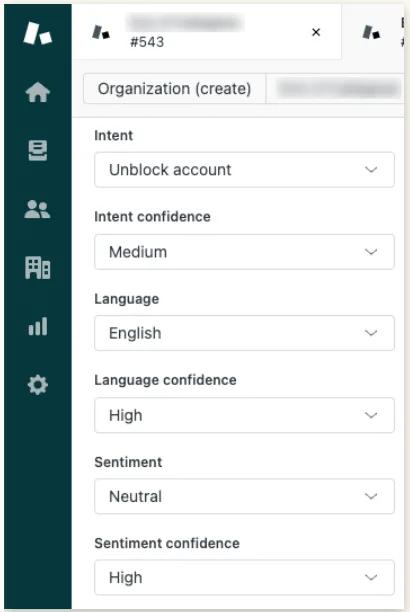
It all starts with a customer message. Chat, email, or the help center form, it doesn't matter – Zendesk logs the ticket and runs it through the classification layer, which reads intent, detects sentiment, flags the language, and tags everything for the rest of the system to work with.
From there, the AI Agent steps in and tries to resolve the conversation on its own. It pulls from your help center articles, macros, past tickets, and any backend systems you've connected, drafts a response, and sends it to the customer.
If the customer confirms the issue was handled or closes the conversation without following up, Zendesk counts it as an automated resolution.
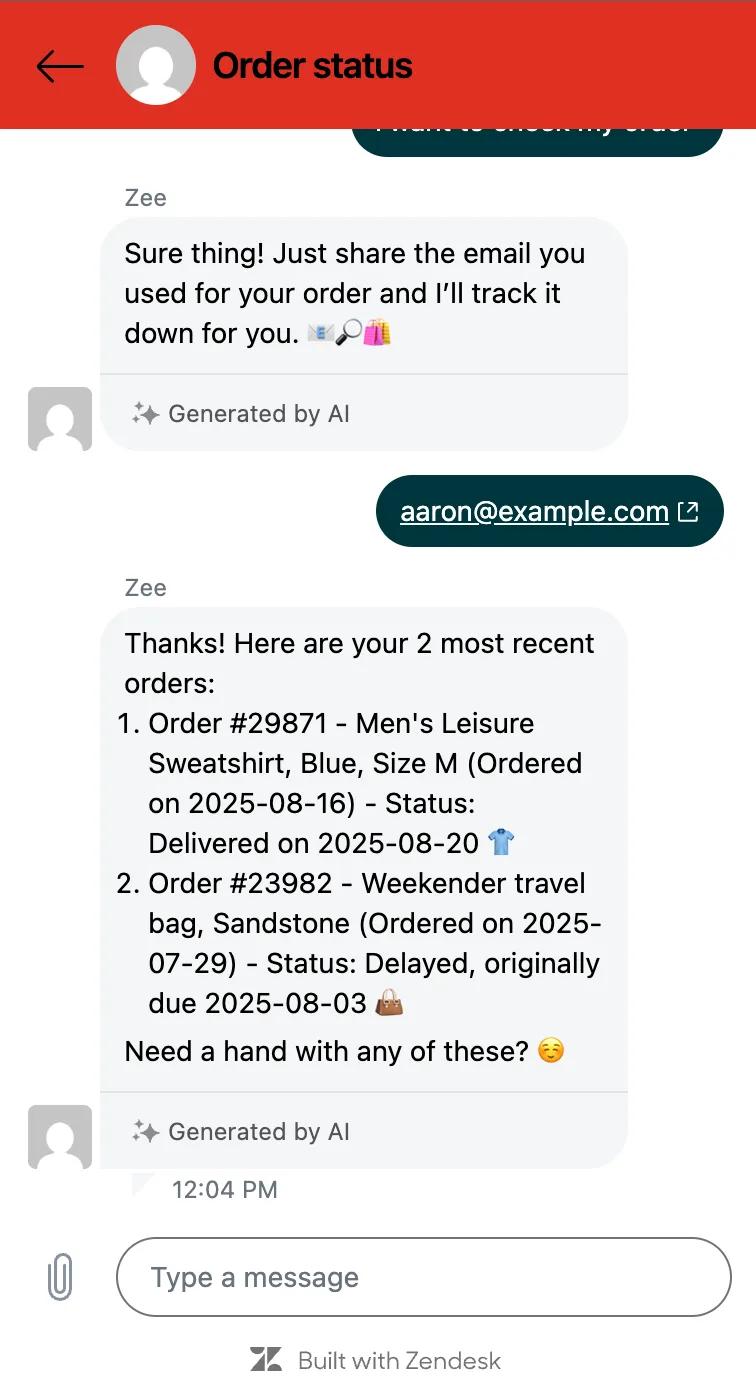
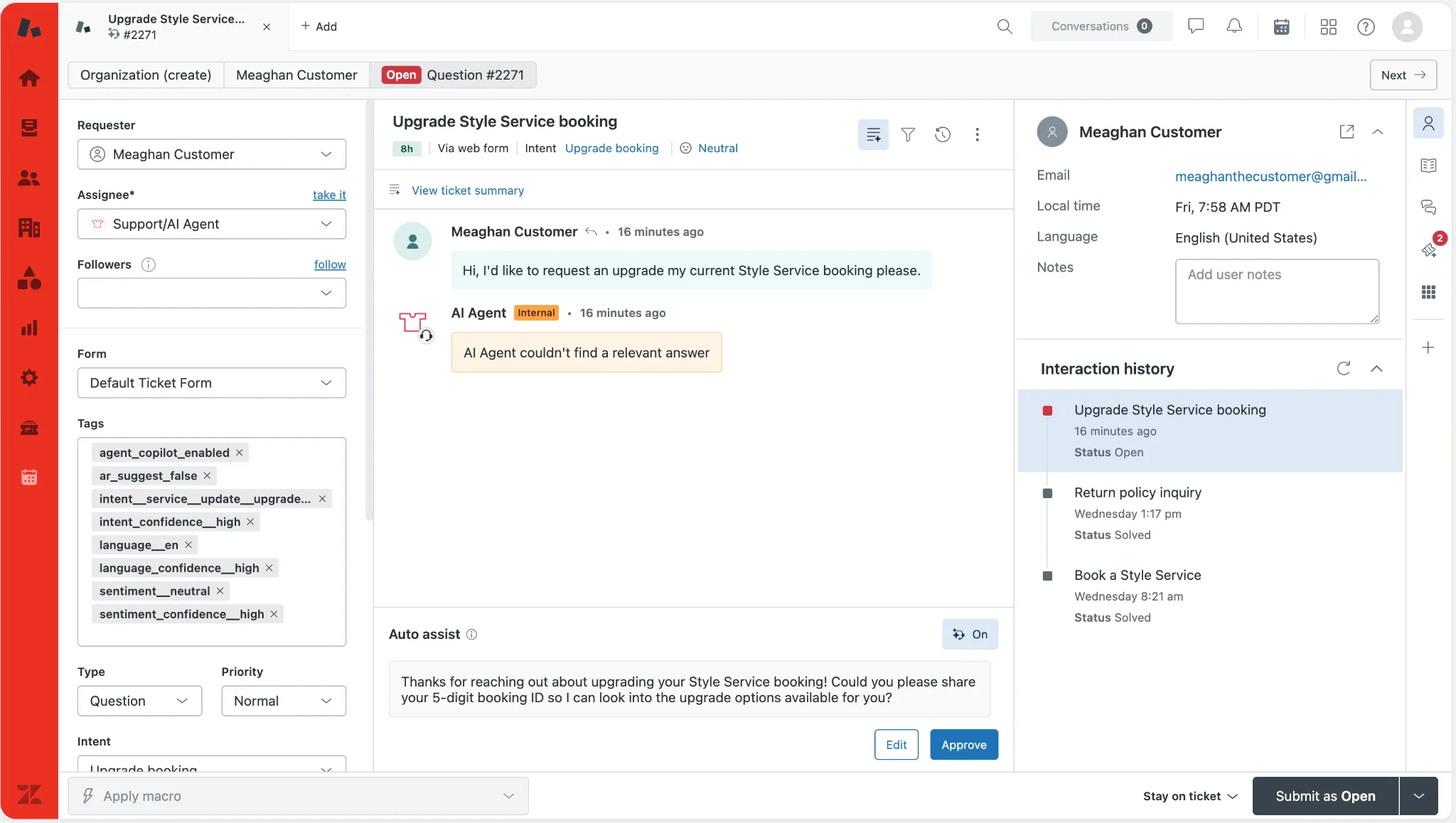
When the AI Agent isn't confident, or the customer explicitly asks for a human, the ticket is handed off to a live agent with the full conversation context already attached, and that's where Copilot comes in.
It suggests replies, surfaces the right macros, summarizes long threads, and can execute actions like refunds or order lookups once it's wired into your backend systems.
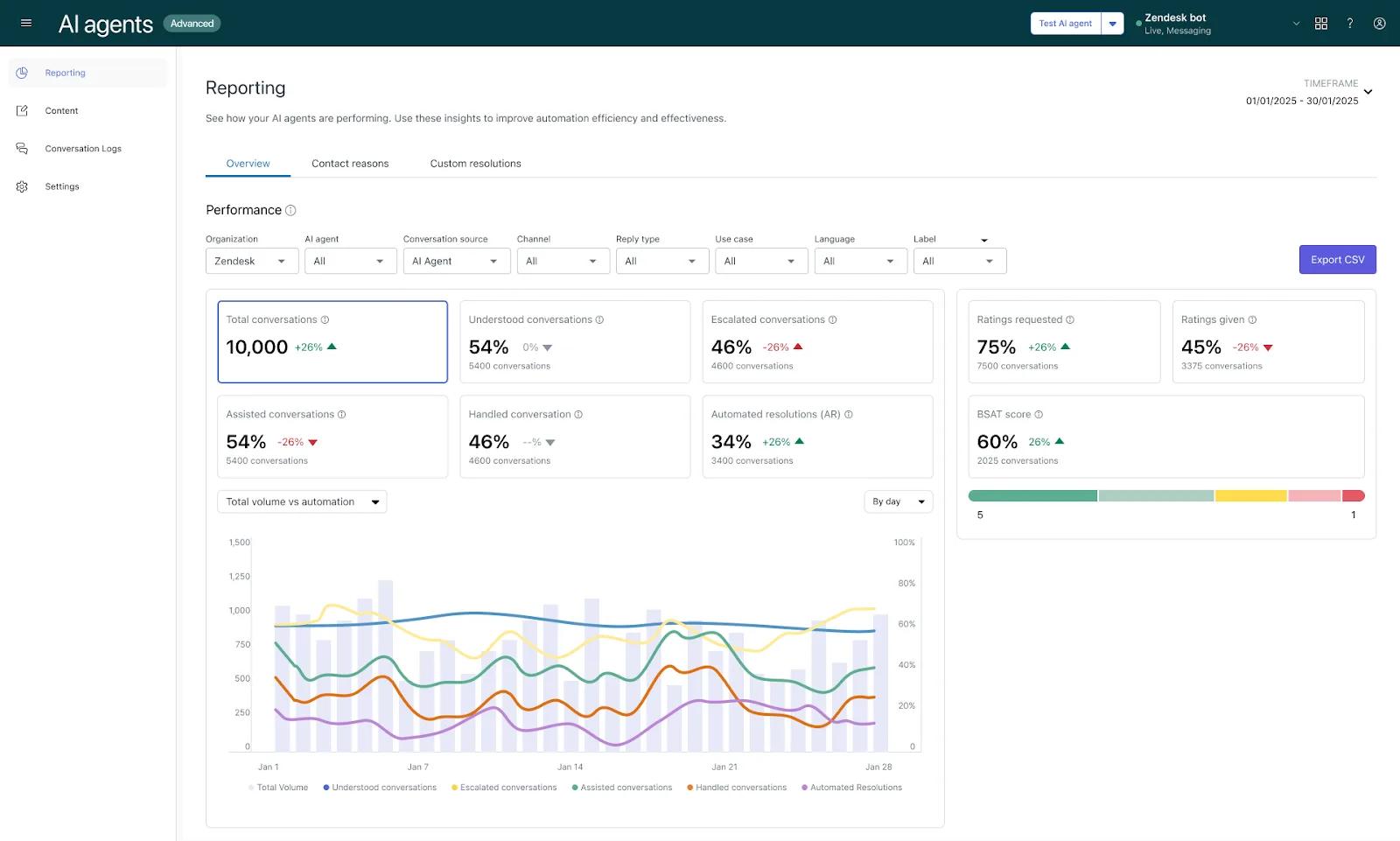
Everything the AI does gets logged in Zendesk's native reporting. You can pull resolution rates, deflection percentages, sentiment trends over time, and the automated resolution counts that show up on your invoice at the end of the month.
💡Zendesk is best for: support teams looking to add AI capabilities on top of an existing ticketing setup.
Related reading → Top 20 Zendesk Alternatives & Competitors (Ranked & Rated)
Fin AI Agent Overview
Fin is Intercom's autonomous AI agent, launched in 2023 and now the centerpiece of their product strategy.
Fin runs on Intercom's own AI infrastructure (Fin Apex 1.0, fin-cx-retrieval, fin-cx-reranker) built on top of frontier models from OpenAI and Anthropic.
OpenAI's GPT line is doing most of the heavy lifting, and Anthropic's Claude is handling specific reasoning tasks, and it's designed to close conversations end-to-end without handing off to a human.
Fin also doesn't require the full Intercom stack to run. It can plug into Zendesk, Salesforce, or HubSpot as a standalone chatbot, or sit natively inside Intercom alongside the rest of the platform's inbox, messaging, and help center tools.
How Fin AI works
Fin relies on a single AI agent to manage the entire conversation, from reading the incoming message to writing the reply. Zendesk runs the same process through a chain of systems, and that structural difference comes through in almost everything downstream.
Everything Fin does during a conversation runs on the content you feed it before it ever starts.
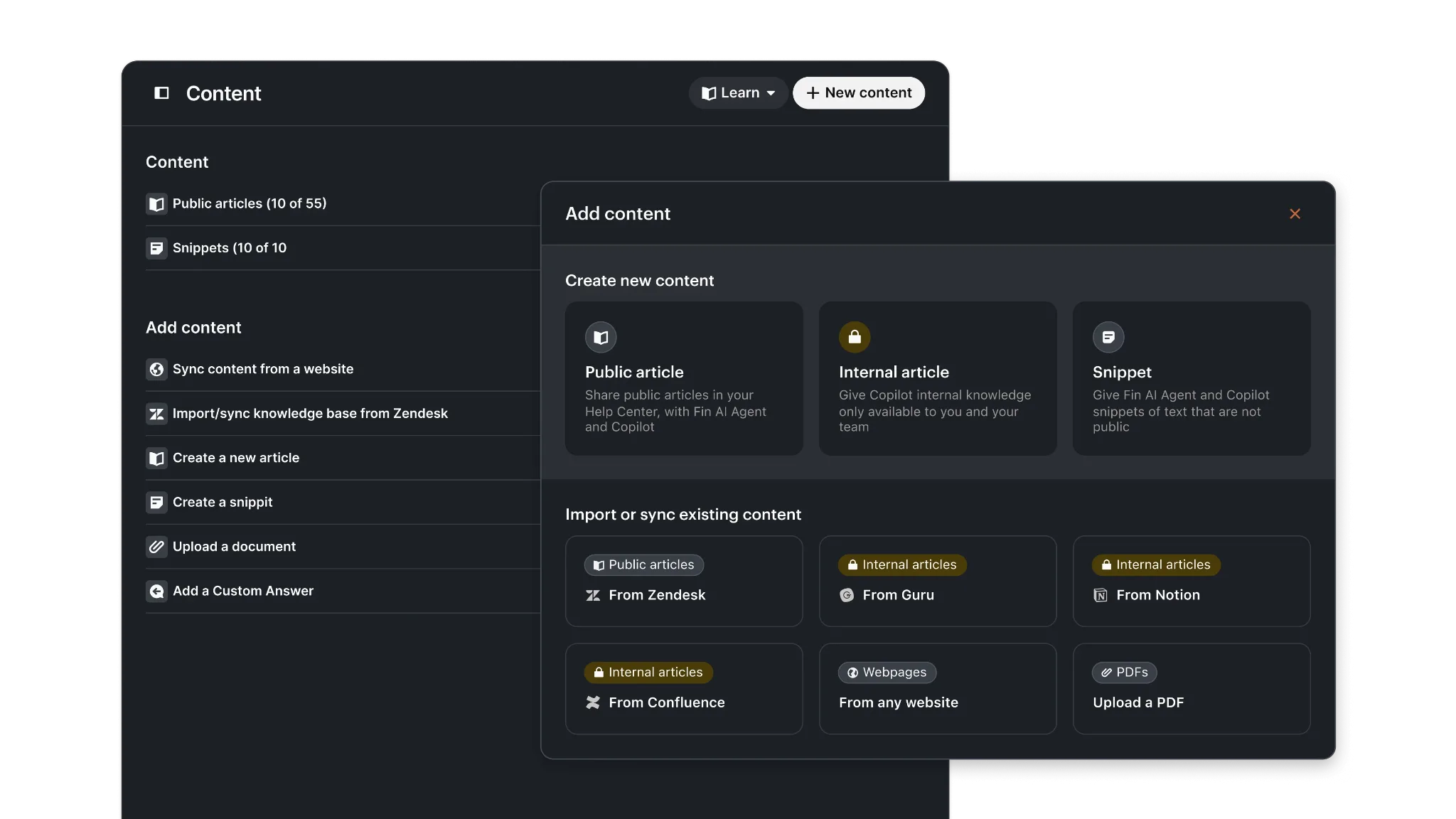
The agent ingests help center articles, public URLs, PDFs, past conversations, and any custom files you upload, then indexes all of it into a knowledge layer it can reason over in real time.
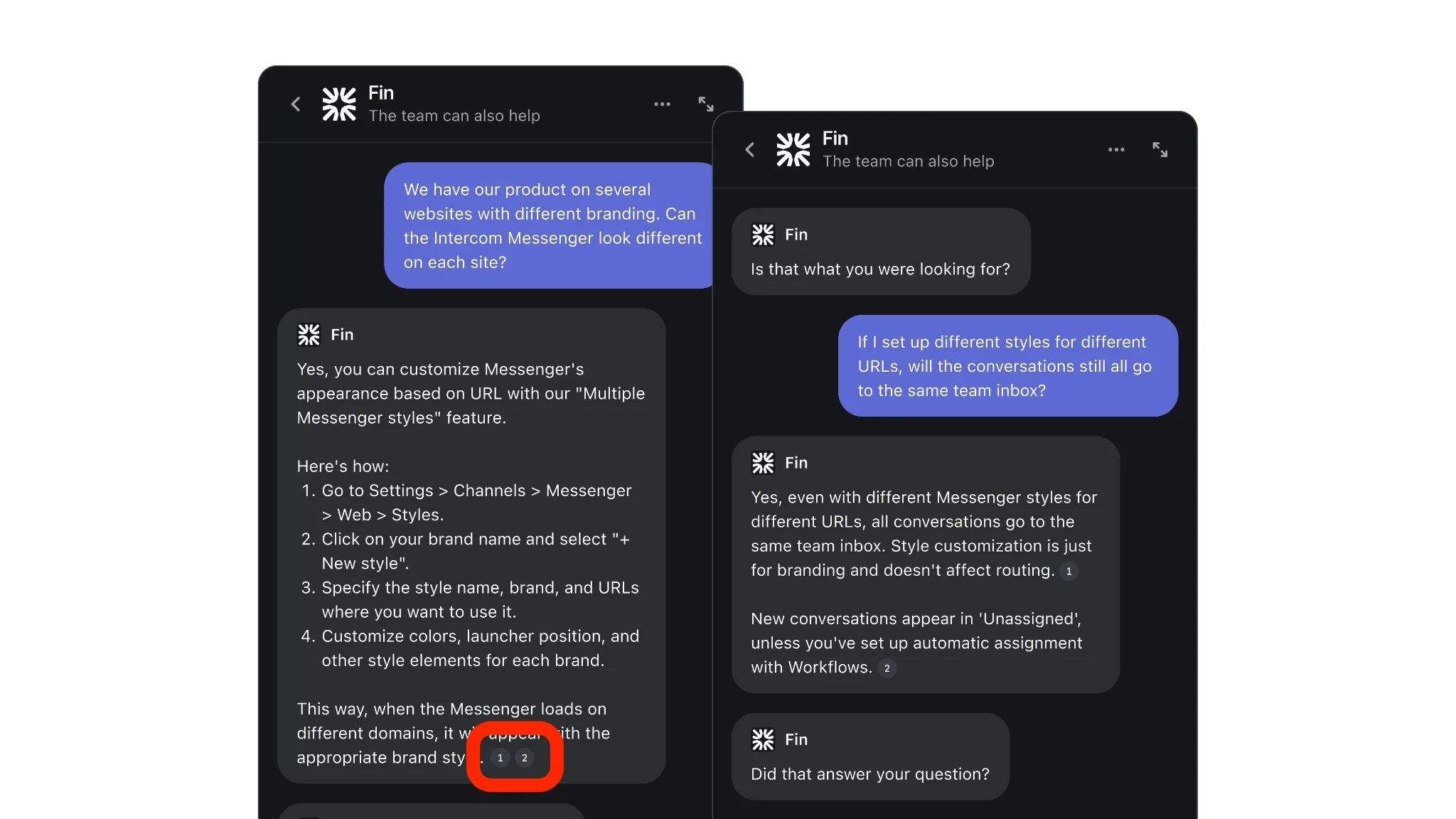
When a customer opens a conversation, Fin reads the question, pulls the relevant context from its sources, and generates an answer in a single step. That single-pass design is what makes Fin faster to set up than most enterprise AI agents, since there's no separate classification layer to train, tune, or maintain upstream.
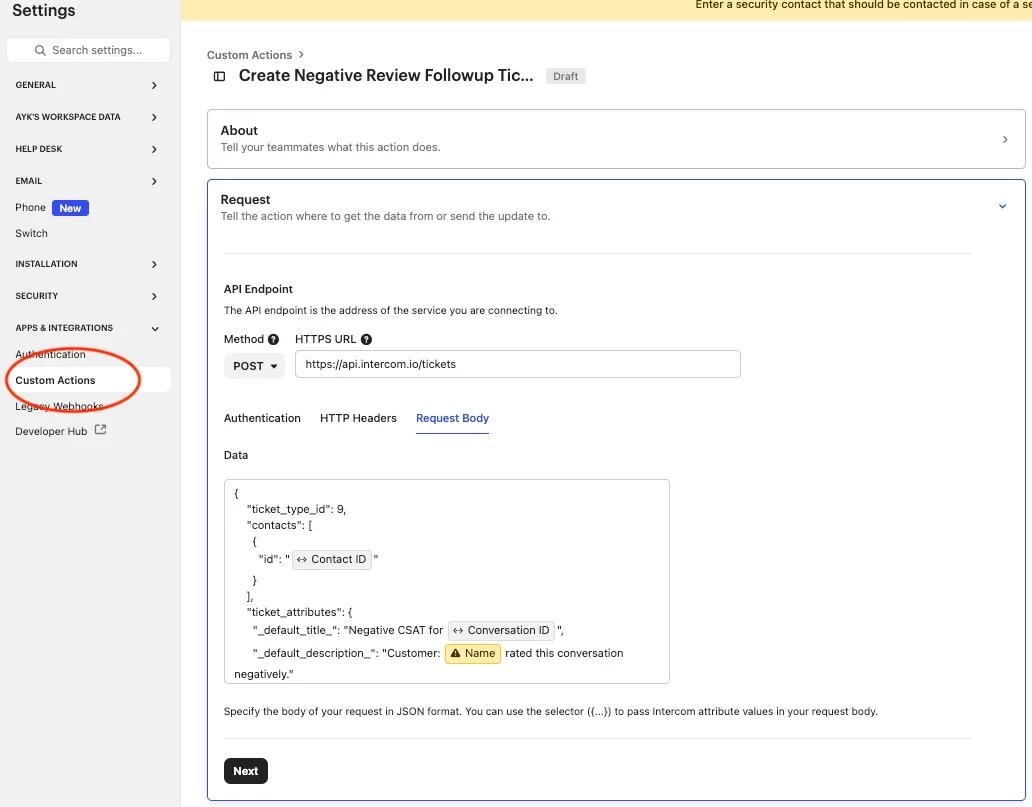
Anything more ambitious than answering questions runs through custom actions. These are workflows admins wire up to connect Fin to your backend systems for things like order lookups, refunds, account updates, or creating tickets in external tools.
Without actions in place, the agent is capped at informational responses, which cover a lot of basic ticket deflection but not much else.
💡Fin AI is best for: support teams with clean help center content and contained support scopes who want a fast, autonomous AI agent with minimal upfront configuration.
Zendesk AI vs Fin AI: Key Differences
Now that we've covered both platforms on their own, here's how they compare side by side:
Zendesk is Better When
You Need One Platform Running the Whole Support Operation
Zendesk was built as a full support platform, and the AI was added on top. Everything human agents need to work a ticket from start to finish is inside one product, from the channels customers reach you on to the tools agents work in.
Fin is AI-first, so it was never built to cover that ground on its own, and instead plugs into a support platform that a team already has in place.
You can buy Fin on its own and connect it to Zendesk, Salesforce, HubSpot, or Freshdesk. Even if you're already on Intercom's helpdesk, Fin is a separate line item on the bill. The AI and the support platform are treated as two different products.
You're Running Multi-Brand or Multi-Region Support
Zendesk has always assumed that a single support operation might need to cover several brands, regions, or product lines, and that's baked into the product.
With their platform, each brand gets its own help center, support emails, messaging widgets, and voice channels, all managed from one account. Each ticket is also tagged by brand so that admins can run different routing rules, SLAs, and reports for every brand from the same account.
The way Fin's workspaces are built isn't great for multi-brand operations.
Each Intercom workspace only supports one Fin personality. So if you want different tones or behaviors across your brands, you have to run Fin in a separate workspace for each one.
You also can't copy Help Center settings between workspaces, so every brand has to be set up on its own.
Your Support Lead Reports to Leadership Weekly
Zendesk Explore gives you a full analytics suite built for operational reporting. You can track SLA performance by team, measure time-to-resolution by channel, monitor agent workload in real time, and build custom dashboards that break down every layer of your support operation.
That depth is important when your support agent lead sits in a weekly meeting with a VP and needs to show exactly where the bottlenecks are, how response times are trending, and whether the team is hitting its targets.
Fin's reporting has improved over the past year, with the Performance Dashboard for resolution metrics and the Optimize Dashboard for finding content gaps. But almost all of it is built around the AI agent's performance, not the support operation it sits inside.
That's useful for tuning the bot, but it doesn't give you the full operational picture that a support manager needs to run a team and report upward.
Fin AI is Better When
You Can't Wait Months for a Rollout
The whole point of Fin is that it works with the support platform you already have. So it’s only natural that you’ll have a much faster setup compared to a heavy platform like Zendesk.
You connect your help center content, set rules for how the agent should behave, and the AI chatbot is ready to start responding to customers.
Zendesk AI solution takes longer to stand up because it's part of a larger platform. Getting AI Agents configured across channels, wired into backend systems, and tested properly can usually take several weeks (sometimes months).
You Want the Strongest AI Model Under the Hood
Fin runs on an AI-first infrastructure that Intercom built specifically for customer support. Fin Apex 1.0 is their proprietary generative model, fin-cx-retrieval handles the knowledge lookup, and fin-cx-reranker scores the retrieved content before it goes into a response.
All three models are part of the Fin AI Engine, which is patented and engineered around customer queries from the ground up.
Zendesk runs on a mix of OpenAI's GPT-4o and its own intent models. It's a capable setup, but it's the same general architecture most CX vendors are working with, and Zendesk doesn't publish proprietary CX-specific models the way Intercom does.
You Want the AI to Be Low-Maintenance
When Fin can't resolve a conversation, it flags the reason and suggests how to fix it.
The Optimize Dashboard keeps a running list of those failed conversations, maps them to missing or weak content, and uses Suggestions to write new help center articles that admins can approve with a single click.
That tight loop (Fin fails, Fin flags it, Fin drafts the fix) means the AI gets better without someone needing to comb through transcripts manually.
Zendesk has similar tools, and they surface gaps well enough. But the workflow is more distributed across dashboards, and there's no equivalent to Suggestions drafting content for you.
Learn more → Zendesk vs. Intercom: 2026 Comparison & Better Options
Zendesk vs Fin AI – Side-by-Side Summary
| Zendesk | Fin AI | |
| Best for | Support teams that want one platform running the whole operation | Teams that already have a helpdesk and want a strong AI layer on top of it |
| Core product | Full support platform with AI built in | An AI agent that plugs into an existing support platform |
| AI model | OpenAI's GPT-4o paired with Zendesk's own intent models | Proprietary Fin AI Engine, including Fin Apex 1.0, fin-cx-retrieval, and fin-cx-reranker |
| Starting pricing | Suite plans from $55/agent/month, plus $1.50 to $2 per automated resolution | $0.99 per resolution, with a $49.50 monthly minimum when running standalone |
| Pricing structure | Seat-based plans with AI add-ons (Copilot, QA, WFM) and per-AR fees | Per-resolution pricing, charged only when Fin closes the conversation |
| Setup time | Weeks for teams configuring Zendesk from scratch; shorter for existing Zendesk customers | Under an hour for teams already on Zendesk, Salesforce, HubSpot, or Freshdesk |
| Channels | Web, mobile, email, voice (Zendesk Talk), messaging, and social | Web, mobile, email, voice (Fin Voice), messaging, WhatsApp, Instagram, Facebook |
| Voice | Native cloud call center with IVR, call recording, queues, and warm transfers | AI answers calls and forwards unresolved ones to an external phone system |
| Multi-brand support | Native, with separate help centers, emails, SLAs, and workflows per brand from one account | Supported, but requires a separate Intercom workspace per brand |
| Reporting | Full analytics suite (Zendesk Explore) covering SLAs, agent workload, and operational metrics | AI-focused reporting through the Performance and Optimize Dashboards |
| Works with other helpdesks | No, Zendesk AI runs only inside Zendesk | Yes, plugs into Zendesk, Salesforce, HubSpot, and Freshdesk |
| Integration ecosystem | 1,500+ apps in the Zendesk Marketplace | Data Connectors and Fin Tasks for tools like Shopify, Stripe, Salesforce, and Jira |
| Language support | 80+ languages for AI Agents | 45 languages, with performance varying outside that list |
A Better AI Alternative for Modern CX Teams: Kustomer
So you've got Zendesk on one side, giving you the whole support platform, but with long rollouts, configuration that never really ends, and an unpredictable pricing structure.
And then you've got Fin AI on the other side, quick to set up and genuinely good at the AI part, but you still need a helpdesk underneath it, and you're essentially running two systems that were never designed to be one.
That's where Kustomer comes in, built to be the full support platform and the modern AI layer in one product.
With it, you don’t have to:
- Pay for AI as a stack of add-ons, because Kustomer's pricing includes the full platform and all AI in a single conversation-based rate.
- Give up multi-brand support to get a modern AI, because Kustomer handles multiple brands natively with AI that respects each brand's tone and rules.
- Pay extra for a phone system to get AI voice working, because Kustomer AI Voice is native to the platform and included in every plan.
- Pay more every time the AI does its job, because Kustomer's rate per conversation stays the same whether AI or a human handles it.
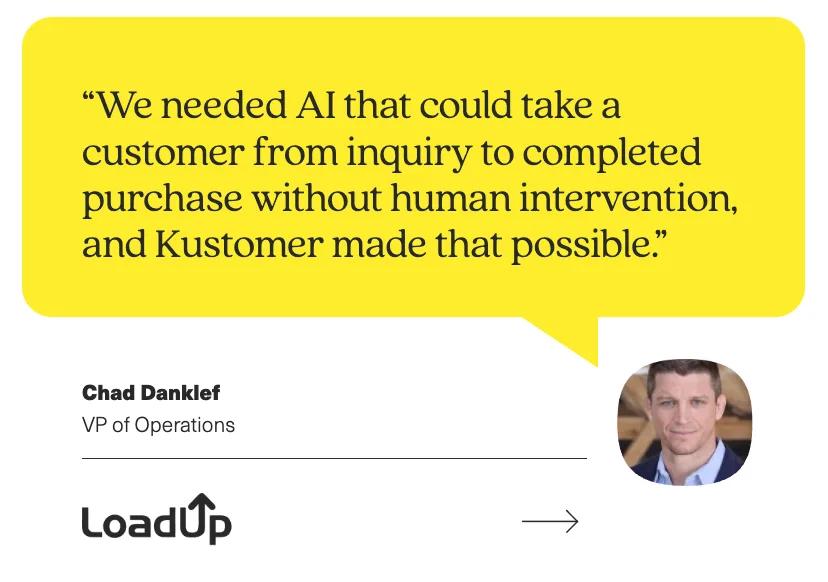
You don't have to take our word for it either. LoadUp is a good example of a team putting all of this into practice.
Every quote they sent used to require human review, which slowed response times and forced the team to scale headcount whenever demand grew.
After bringing in Kustomer, LoadUp's AI agent became the first point of contact for 100% of inbound SMS sales inquiries. A third of those are now resolved end-to-end by the AI, with customers getting booked without ever talking to a human. CSAT went up 5% in the process.
Zendesk AI Deep Dive: Key Use Cases, Pros & Cons, Pricing and Customer Reviews
Key Use Cases
- Enterprise support operations: If you're running support at real enterprise scale, Zendesk gives you the depth to match. Intelligent Triage auto-tags every ticket by intent and sentiment, and the routing layer handles tiered escalations and multi-team workflows natively.
- Multi-brand or multi-region support: Running several brands, regions, or product lines from the same support operation is where Zendesk's architecture really pays off. You get separate help centers, SLAs, routing, and reporting for each brand, all managed from a single account.
- Support ops with strict governance and compliance needs: If you're running a support operation that answers to compliance, security, or legal reviews, Zendesk's admin layer is one of the most developed in the category. You can lock certain fields to certain roles, track who changed what and when, and limit access down to specific ticket types or customer segments.
Learn more → Zendesk Features Mega Teardown: Advantages & Disadvantages
Pros
- Complete customer context in one view: Pulling up a customer's full support history is instant on Zendesk, which reviewers describe as one of the platform's most useful day-to-day features. Agents walk into every conversation with context already in front of them. [Read Full G2 Review]
- Noticeably better AI than before: The jump in Zendesk's generative AI is one of the most common compliments in recent reviews. Users specifically call out how much more natural the conversations feel since the bot moved off scripted logic, and how well it recovers when a customer goes off-script. [Read Full G2 Review]
- Pre-built replies are a time-saver: For teams that field the same question 50 times a day, macros are often cited as one of Zendesk's most useful features. They trigger a pre-built response with one click, which keeps replies consistent and shaves real time off each ticket. [Read Full G2 Review]
- Easy to build custom tools in-house: Zendesk's App Builder gives support ops leads a way to extend the platform without relying on a developer. The tools are quick to set up, intuitive to configure, and often translate to real improvements in ticket handling time. [Read Full G2 Review]
Cons
- No native shift-based assignment: For teams working rotating schedules or on-call rotations, there's no built-in way to route tickets based on who's actively working. Most teams end up stitching together workarounds with tags, groups, and triggers instead. [Read Full G2 Review]
- Implementation is its own project: Zendesk is powerful once it's configured, but getting there takes work. Teams without a dedicated admin usually end up bringing in outside help to get workflows, routing, and SLA policies set up properly. [Read Full G2 Review]
- No back button in chat conversations: If a customer goes down the wrong path in a bot flow, Zendesk's chat UI doesn't give them a way to step back and correct it. The only option is to restart the whole conversation, which adds friction that most customers aren't willing to tolerate. [Read Full G2 Review]
- Slow technical support from Zendesk itself: For a platform this size, response times from the Zendesk support team often take longer than teams expect, especially on technical issues. It's one of the more common frustrations in reviews, especially when admins are blocked on something specific. [Read Full G2 Review]
Pricing
Zendesk's pricing is where a lot of its users run into problems and get their first unwelcome surprise. Since the headline number looks reasonable, but the real bill lands somewhere very different by the time you've added all the paid add-ons that almost every modern CX team needs.
Let's break it all down:
Zendesk sells its customer service product as the Zendesk Suite, with four tiers built to cover everything from small teams to enterprise. The higher you go, the more you unlock in automation, reporting, and admin control.
- Support Team: $19 per agent/month (email-only support)
- Suite Team: $55 per agent/month
- Suite Professional: $115 per agent/month
- Suite Enterprise: $169 per agent/month
Zendesk also offers two newer Suite + Copilot bundles that include Copilot in the base price:
- Suite + Copilot Professional: $155 per agent/month
- Suite + Copilot Enterprise: $209 per agent/month
However, a fair chunk of what serious support operations need isn't bundled into the Suite plans; it's sold as per-agent add-ons that stack on top of whichever tier you're subscribed to.
- Copilot: $50
- Workforce Management: $25
- Quality Assurance: $35
- Workforce Engagement Bundle (WFM + QA combined): $50
- Advanced Data Privacy and Protection: $50
On top of all that, there's also per-resolution AI pricing. Zendesk includes between 5 and 15 free automated resolutions per agent per month, depending on your Suite tier, and charges $1.50 per additional resolution on annual contracts or $2.00 pay-as-you-go.
⚠️ Which is why a real monthly bill might look something like this
Say you're running a 20-agent support team on Suite Professional. That's $2,300 a month for seats alone. Add using AI Copilot across the team ($1,000) and Quality Assurance ($700), and you're at $4,000 a month before voice or compliance is even in the picture.
From there, it keeps stacking. Zendesk Talk gets billed separately on a per-minute basis for teams that need voice. Advanced Data Privacy and Protection adds another $1,000 a month for teams with compliance requirements. And every automated resolution past the free allowance adds another $1.50 to $2 to the bill.
By the time a 20-agent enterprise setup with voice, AI, QA, and compliance is fully configured, the monthly cost comes out somewhere in the $6,000 to $9,000 range, depending on volume and channels.
That's $300 to $450 per agent per month, which is a long way from the $115 Suite Professional headline.
Who this works for
This usually isn’t a problem for enterprise buyers that run hundreds of agents, as they can pick only the add-ons they need. It's the mid-market teams that feel the gap, usually the ones expecting the base tier to cover most of what they need.
⚠️ Editor’s Note → Zendesk's AI is going to restructure its pricing soon. A phased rollout will remove the Essential and Advanced tier split and move everything into a single AI offering.
Zendesk AI User Sentiment
Zendesk's reviews are quite divided across the board. On one side, you have teams that have been running on it for years and still swear by it, like this G2 user:
“We’ve been using Zendesk for user support for a couple of years now. It’s been a good platform for managing our users and their support needs. The ticketing system is reliable and helps keep everything organised, especially when handling a high volume of tickets.”
But then again, you have Adam saying this on Reddit:
“Zendesk’s AI features have gotten better, but it’s hard to justify spending thousands per month when you only need a few of the features.”
And it's not only pricing that gets brought up either. A fair number of reviews call out specific features that haven't lived up to their cost, like this test of Copilot:
“We did a test of Copilot, and it didn’t meet expectations. We have a really detailed knowledge base, but Copilot didn’t add any value vs the basic AI.”
The takeaway: Most reviews point back to the same underlying tension. Zendesk is a genuinely capable platform for teams that need real operational depth, but the depth comes with a setup burden and a pricing structure that rarely matches what the sales page promises.
A better alternative to Zendesk AI: Kustomer AI
Zendesk AI works well for the teams it's built for, but it's not the right fit for everyone.
The layered pricing, the setup work, and the admin overhead that come with the depth are common enough that teams looking at Zendesk often end up comparing it against platforms that take a different approach.
Kustomer is one of them, and it was designed to avoid most of the problems Zendesk teams spend years working around.
With it, you get:
- One conversation-based rate that covers the full platform, with AI, voice, and multi-brand support included from day one.
- A platform you can roll out in days, with AI built in from day one.
- Unlimited agent seats across every plan, so scaling the team doesn't pull the monthly bill up with it.
- A customer timeline that treats every interaction on each channel as a single thread, rather than a ticket-first structure that fragments context.
And there are real teams that have already made the switch. Terra Kaffe is one of them.
Terra Kaffe switched from Zendesk to Kustomer as the best solution for getting a complete view of the customer’s overall journey with the brand.
“We found ourselves constantly with several tabs open just to track prior conversations with a customer, as they weren’t linked. Because we service a high-consideration, high price point, and high-touch product, we found that customers tend to reach out multiple times with questions or feedback. Historical conversations being segmented made customers feel like we had no insight into their broader relationship with us.” — Cate Marques, CXO
Fin AI Deep Dive: Key Use Cases, Pros & Cons, Pricing and Customer Reviews
Key Use Cases
- Teams that already have a helpdesk and just need a stronger AI layer: Fin runs on top of Zendesk, Salesforce, HubSpot, and Freshdesk natively, so you don’t have to replace your platform. It automatically picks up your existing assignment rules, automations, and reporting.
- Fast-moving SaaS and e-commerce companies with strong help center content: Fin works best when the knowledge base is well-maintained. For teams in that profile, it can resolve a meaningful share of conversations end-to-end without a human stepping in.
- Teams that want AI live without a long implementation phase: Fin is one of the fastest AI agents to deploy. Setup usually takes around an hour, and the rollout loop itself (Train, Test, Deploy, Analyze) is packaged as a structured product flow called the Fin Flywheel.
Pros
- Fast, responsive performance: Reviewers consistently mention that Fin feels quick in day-to-day use, with responses landing without noticeable lag. Intercom's support team also gets regular credit for being genuinely helpful when teams run into issues. [Read Full G2 Review]
- Multi-source responses with images: Fin can pull from multiple knowledge sources in the same response and mix images alongside the text. Reviewers say this makes answers noticeably easier for customers to follow. [Read Full G2 Review]
- Handles customer questions accurately: Users mention how well Fin grasps customer questions and finds relevant answers in the help content without heavy tuning. It's one of the reasons setup feels as fast as it does for teams with clean docs. [Read Full G2 Review]
- Tone that fits your brand: Admins can set specific guidance on how Fin communicates, including tone of voice, word choices, and brand-specific rules. [Read Full G2 Review]
Cons
- Language support is uneven: Fin does well in English, but users consistently mention that results get less reliable in certain other languages. This might be a serious drawback if you're supporting an international customer base. [Read Full G2 Review]
- No simple way to correct individual answers: Users say that when Fin phrases something wrong based on a help article, there's no clean mechanism to fix just that specific detail. Admins end up editing source content instead, which affects every future answer. [Read Full G2 Review]
- Not as plug-and-play as the platform suggests: Fin's basic setup is genuinely fast, but the more powerful integrations (Stripe MCP, Procedures, and similar) require Python, API knowledge, and data transformation work to deploy. [Read Full G2 Review]
- Loses track of the channel a customer is on: Fin occasionally fails to recognize that a customer is already in a live chat, and tells them to reach out through email if they want to speak with a person. [Read Full G2 Review]
Pricing
Pricing is the part where Fin most clearly separates itself from legacy support software. There are no seat fees, no per-resolution add-ons layered onto per-agent costs, just a flat $0.99 every time Fin resolves something.
The actual picture underneath is a little more complicated. Let’s get into it:
You can get Fin in two configurations. Either as a standalone version, where Fin runs on top of your existing helpdesk (Zendesk, Salesforce, HubSpot, or Freshdesk) at $0.99 per outcome, with a 50-outcome minimum each month.
Or you can get it inside Intercom's own Customer Service Suite, where the $0.99 per outcome stays, but you also pay $29 to $139 per helpdesk seat per month, depending on your Intercom plan.
Like Zendesk, Fin has paid add-ons for features that aren't bundled with the core product.
Fin Pro is $99 per 1,000 analyzed conversations per month for QA, monitors, and AI recommendations. Copilot, the AI assistant for human reps, is another $35 per user per month. Neither is included in the core Fin price.
⚠️ Run the numbers on a real 20-agent team, and it looks like this:
For a 20-agent team on the Advanced plan, Intercom seats alone run $1,700 a month at $85 per agent. Add 5,000 Fin outcomes at $0.99 each, and you're at $6,650.
Turning on Copilot across the team pushes the monthly cost to around $7,350, and that's before Fin Pro gets added for analytics.
The cost can add up so much that when asked about Fin AI’s pricing on Reddit, this user said:
“Oh god, we just got rid of Fin. Cost way too much and didn't even work the way we needed it to.”
Who this works for
This pricing model usually works well for smaller and mid-market teams with steady support volume. The math gets harder for enterprise operations, where every additional resolution Fin handles adds directly to the bill.
Fin AI User Sentiment
First impressions of Fin are almost always positive. Teams that have run it in production for longer have more layered takes, like this Reddit user who tested it against an escalation-first AI:
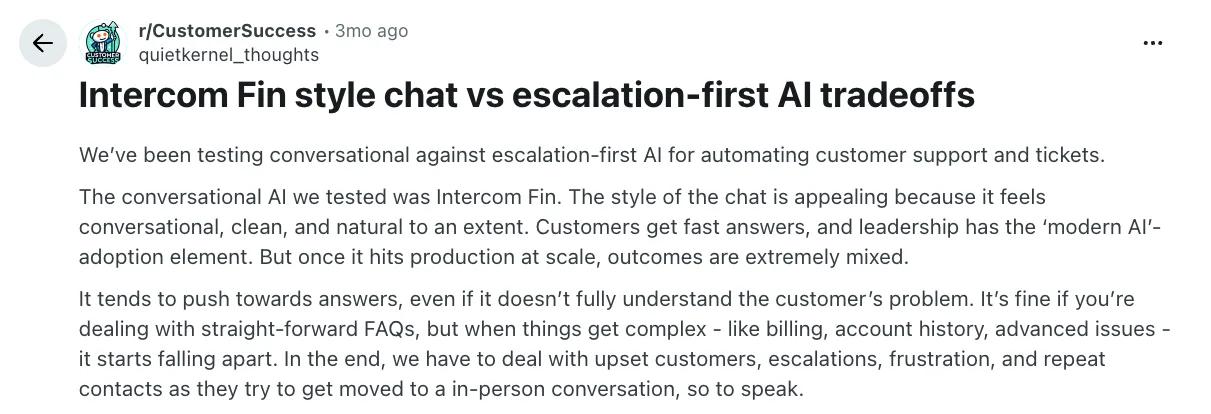
What's interesting is that the failure mode the first reviewer describes isn't a bug Intercom can quietly fix with a prompt update. It's baked into how Fin was built in the first place, which is something another user mentioned in a different thread:
“Fin often struggles not just because it hallucinates, but because it can’t handle multi-step workflows — it’s built as a single agent, so without sub-agents or specialized roles, it loses context fast.”
The takeaway: Fin is strong when support stays close to the use cases it was designed for. Push it past those, into complex workflows or high-volume operations, and the limits show up quickly. That's not a reason to avoid it, but it's worth planning around before rollout.
Alternative to Fin AI: Kustomer AI
Fin is one of the strongest AI agents on the market, but it's only part of the support stack.
Teams running it eventually realize they're still managing two products – Fin for the AI and another platform for everything else the support operation needs.
Kustomer’s design avoids that split entirely. The AI agents are native to the support platform, so there's no second product to manage alongside it.
With it, you get:
- An AI agent that lives inside the same product as your tickets, workflows, and reports, so you're not managing the AI and the helpdesk as two separate systems.
- Pricing that doesn't climb as the AI gets better at its job, since every conversation costs the same regardless of who handles it.
- AI agents have the full customer history and conversation context behind every reply, so complex cases don't break down once they get past the first message.
- Decision trees and guardrails that govern the AI's behavior at every turn, so a quick fix to one answer doesn't mean editing the article behind it.
Everlane is a good example of a team that ran into similar issues that Fin AI creates, and resolved them by switching to Kustomer.
Their previous CX platform couldn't keep up with the personalization Everlane wanted to build into the customer experience. Maintenance was cumbersome, scalability was limited, and there was no clean way to layer AI on top of the operation.
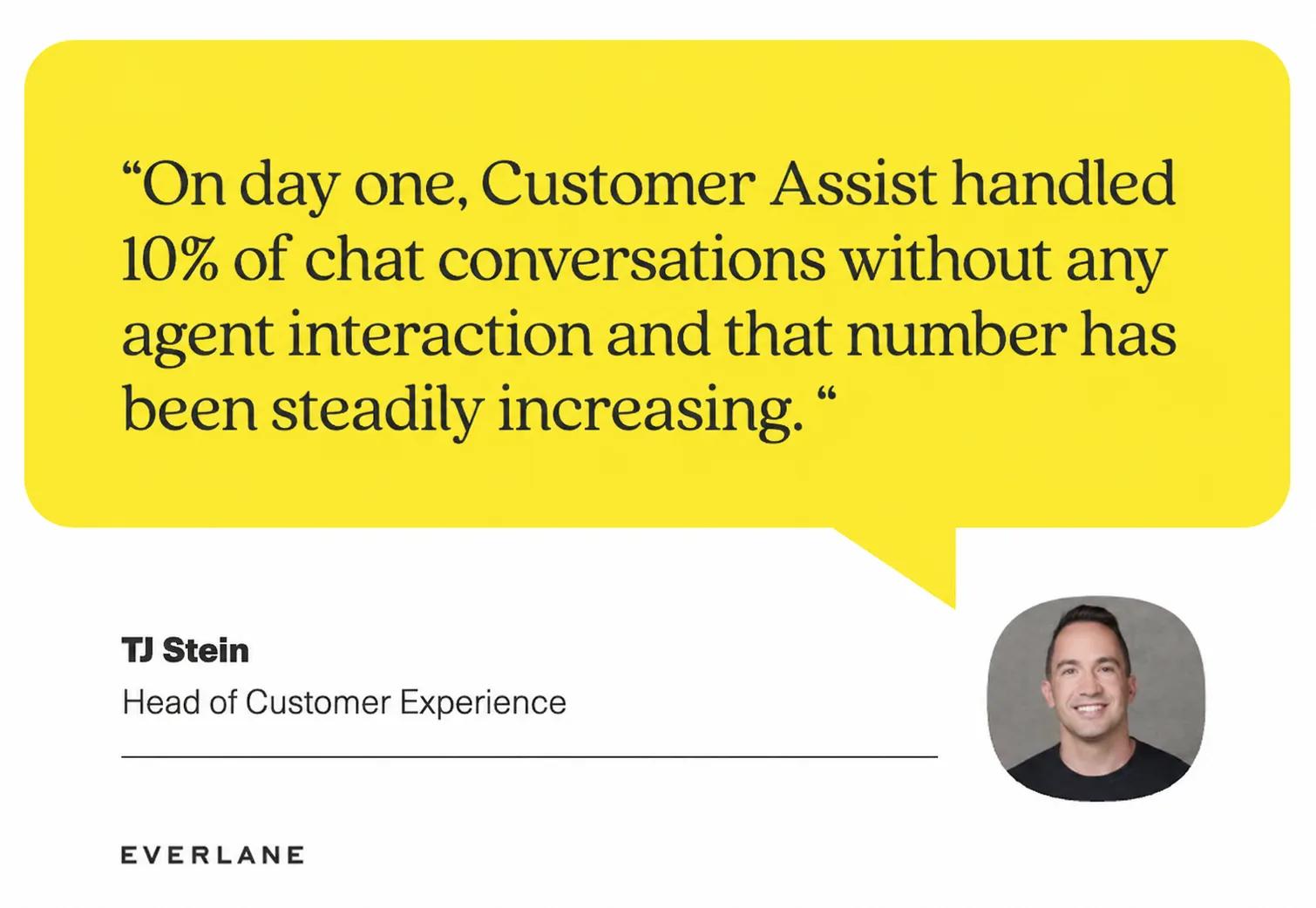
After moving to Kustomer, Everlane saw a 4x increase in live service deflection from the AI alone, alongside 25% in agent time savings from automated workflows.
Key Features to Look for in AI Agents for Customer Service
When you're evaluating AI agents for customer service, these are the features that make the biggest difference in day-to-day operations:
- Native access to the full customer record: AI that operates from a customer's complete history (orders, past conversations, account status) handles complex cases more reliably. A unified customer timeline gives the AI the same context a senior agent would have.
- Multi-step workflows: Most real support questions involve more than one step. AI agents that can run multi-step workflows across your backend systems handle the verification, lookup, and action work that keeps a customer's request from bouncing back to a human.
- Decision trees and guardrails: Refunds, escalations, and compliance-related responses need predictable behavior. The right AI combines generative flexibility with deterministic decision logic that admins can configure.
- Native voice support: A lot of enterprise support volume still comes through phone, and AI handling those calls should run on the same platform as the rest of the operation. Native AI voice agents keep transcripts, summaries, and call data in the same customer record.
- Agent assist for human reps: AI handles a share of conversations, but humans still take the rest. Platforms with strong agent-assist tools surface customer context, suggest replies, and shorten handle time on the cases that need a human touch.
- Multi-brand configuration: Supporting multiple brands from one operation means the AI has to handle different tones, content, and rules for each. The right setup keeps that all in a single account, with brand-aware logic baked into the AI's behavior.
- Built-in performance monitoring: AI deployments tend to plateau without good visibility into what's working and what isn't. The strongest products track resolution rates, escalation patterns, and CSAT trends in-platform.
How to Choose the Right AI Agent Solution for Your Needs
If your support team is operating at real enterprise scale, Zendesk usually makes the most sense. The platform has the depth to handle layered SLAs, multi-brand setups, and the kind of routing logic that breaks lighter tools in production.
The pricing structure and the admin overhead aren't pretty, but for support teams running on complex workflows and operational reporting, Zendesk does the job better than most.
Zendesk is also the safer choice if:
- You're running multi-brand or multi-region support from a single account
- Your support lead reports SLA performance and operational metrics to leadership weekly
- Your team needs deep workflow automation, granular permissions, and tight admin governance
If you already have a helpdesk place and just need modern AI on top, Fin is a better match. The model is sharper, the setup is faster, and you don't have to replace anything you're already running.
Complex multi-step workflows and enterprise-volume support aren't Fin's territory, but for teams with an existing helpdesk and a need for strong AI quickly, it's one of the cleanest options out there.
Fin makes more sense when:
- You're already running on Zendesk, Salesforce, HubSpot, or Freshdesk and don't want to migrate
- Speed to deployment matters more than configuration depth
- Your support volume is steady, and your help center content is in good shape
Where both products run into the same wall is the AI-native, unified experience. Zendesk has built genuinely capable AI, but it sits on top of a ticketing core designed in 2007. Fin has the AI built right, but it can't run a support operation on its own.
Kustomer was designed around that idea from day one. The AI agents and the platform are part of the same system; the unified customer timeline feeds both, and pricing is structured so the cost doesn't grow every time the AI gets better at its job.
You Deserve Better Than Two Disconnected Tools (or One Outdated One)
...Because Zendesk and Fin AI both ask you to settle for one of those two.
- One gives you a heavy support platform with AI stitched onto a 2007-era core.
- The other gives you a modern and robust AI, but only if you're already running someone else's helpdesk underneath it.
Underneath all of that is the same problem. The AI and the support operation are two separate things, sold separately, configured separately, and stitched together at the end.
Luckily, Kustomer's unified design can take care of all that.
It's a CX platform where the AI agents and the support operation share the same product, the same customer data, and the same workflows. No separate AI tier, no add-on for the things that should be standard.
When both pieces are built to work together, here's what changes:
- Implementation moves faster because the AI and the platform don't have to be stitched together by your team after the fact.
- Reporting covers the whole picture, with AI resolution rates, agent productivity, and SLA performance all sitting in the same dashboards.
- The AI gets smarter from real customer interactions, not just from what's written in the help center.
- One platform, one bill, one support team to call when something needs fixing or auditing.
It's why companies like Hopper, Everlane, and Aplazo have moved off legacy platforms and onto Kustomer.
You don't have to settle for half a solution, and you don't have to wait years for the legacy platform to catch up either.
One platform. AI built in. Ready to see what it looks like? Get a demo.