Average Handle Time, Upgraded: More Control, More Confidence, More Clarity
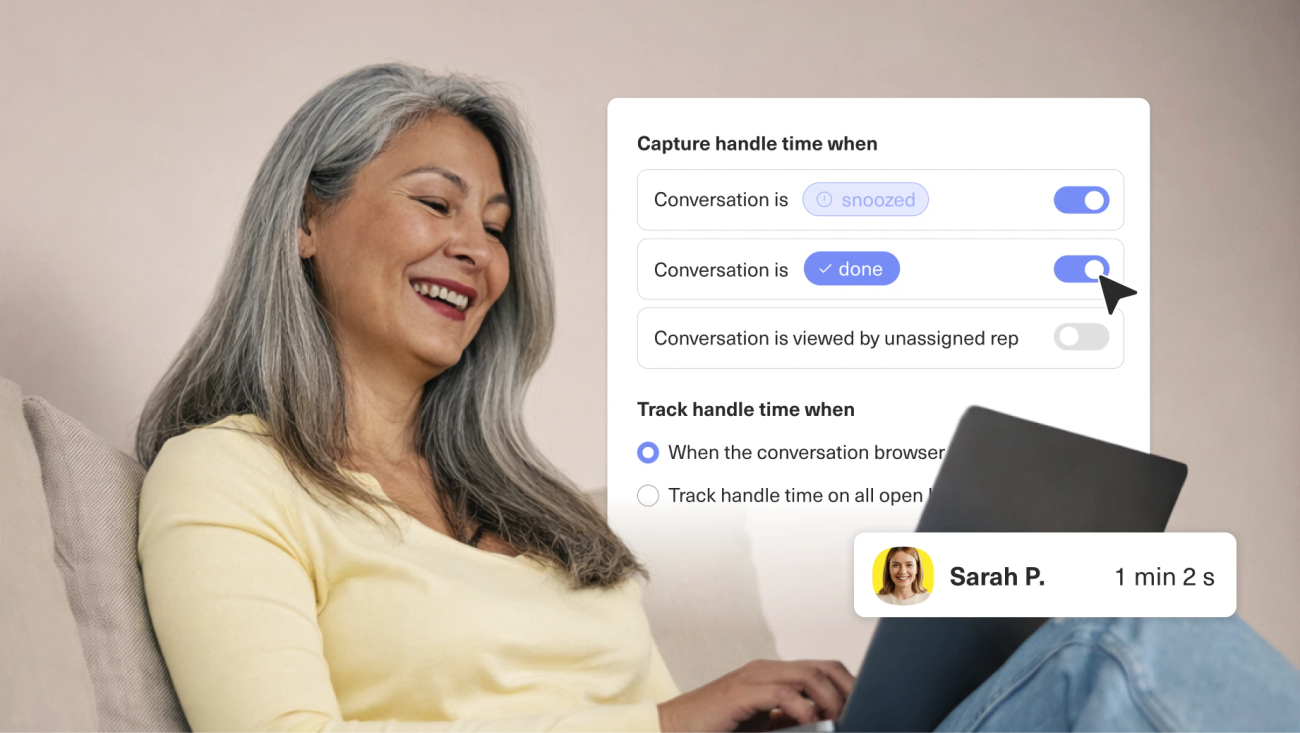
Average Handle Time is one of the most important metrics in customer support, but only if it actually reflects the way your team works. Every operation is different. Some teams need to exclude Snoozed conversations. Others want to track time across all open tabs, not just the one in focus. And everyone needs to be able to slice that number by the attributes that matter to their business: channel, queue, brand, team.
For too long, AHT hasn't given you that control. Time accumulated on conversations that were Snoozed or already marked Done. A rep reviewing a ticket without taking any action still moved the needle. And when you tried to dig deeper, to break it down by channel, by queue, by brand, the segmentation simply wasn't there. The same metric showed different numbers depending on where you looked.
AHT should be a metric that gives you confidence in your coaching conversations, your staffing decisions, and your efficiency benchmarks. That means giving you the control to define it in a way that reflects your business, and making sure that definition holds consistently everywhere you go.
AHT That's Built Around Your Business
Every support operation defines efficiency a little differently, and now AHT can reflect that. You can configure how handle time is tracked, when it pauses, and how it behaves when a rep returns to a conversation, all from a single settings panel that applies consistently across your entire reporting suite.
The result is a metric shaped around how your team actually works.
Now You're in Control: Configurable AHT Built Around How Your Team Works
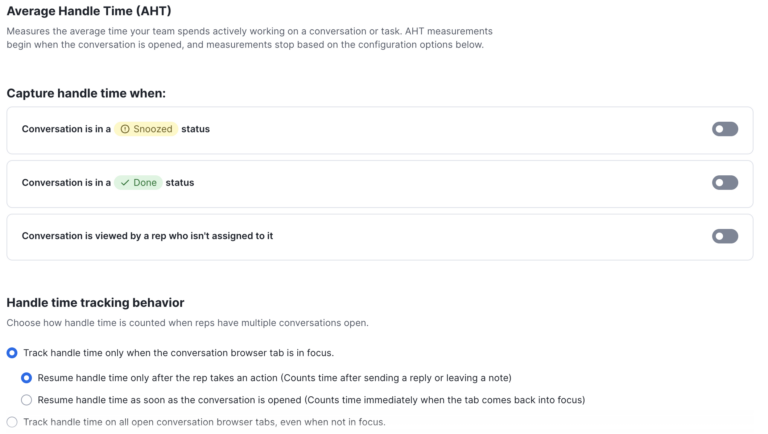
The new AHT experience gives admins a dedicated settings panel where you can define what handle time means for your organization, and have that definition applied consistently everywhere.
Tracking behavior is now a choice. You can track handle time only when a conversation tab is in focus (the default), or capture time across all open conversation tabs regardless of which one is active. Neither option is wrong, it depends on how your team operates.
You can also configure exactly when the clock should pause with three independent stop conditions:
- When a conversation is in Snoozed status
- When it's in Done status
- When it's being viewed by a rep who isn't assigned to it.
Toggle any combination that fits your workflow. And for teams using focus-only tracking, you now control conversation return behavior, whether handle time resumes the moment a rep comes back to a tab, or only after they take a real action like sending a reply or leaving a note.
Conversation return behavior: Resume on return, or only after the rep takes an action
Tracking behavior: Choose focus-only or all-open-tabs accumulation
Stop conditions: Independently toggle Snoozed, Done, and unassigned-viewer pauses
Deeper Data, Everywhere You Need It
- Handle Time is now a first-class metric on the Conversation dataset in Custom Reporting. That means you can segment AHT by any default or custom conversation attribute, channel, brand, queue, tags, SLA status, satisfaction rating, and much more. The old Conversation Views (Handle Time) dataset is gone, and existing charts built on it are automatically migrated. There’s no action required on your end.
- A new Handled By dimension lets you attribute time to the specific agents who actually accumulated it, not just whoever is assigned to the conversation. This matters for coaching. Knowing that two different reps spent five and seven minutes on the same conversation tells a very different story than a single aggregate number tied to the assignee.
- And for teams that pull data programmatically: Custom Reporting, Standard Reports, the Home Dashboard, Data Explorer, and the Reporting API now all use the same calculation logic. One number, everywhere.
- Finally, a note on terminology: the Work Item metric previously labeled 'Handle Time' has been renamed to Ownership Duration to eliminate confusion with Conversation Handle Time. No API field keys are changing, so existing integrations continue to work without modification.
- Conversation dataset segmentation: Slice AHT by any attribute, channel, brand, queue, tags, SLA, satisfaction, and more
- Handled By dimension: See exactly which agent accumulated time on each conversation
- Unified calculation: The same number across Custom Reports, Standard Reports, Home Dashboard, Data Explorer, and the API
- Auto-migration: Existing charts are updated automatically, no rebuilding required
- Ownership Duration: Work Item handle time is renamed for clarity; no integration changes needed
What This Means for Your Team, Day to Day
For supervisors, this is the coaching data you've been waiting for. You can now see handle time broken down by channel to understand where delays are actually happening. And the numbers you're looking at match what your operations team members see in their reports.
For operations leaders, the unified calculation removes the guesswork. You're no longer reconciling different numbers from different surfaces. Staffing models built on AHT data are now grounded in a consistent, configurable definition that reflects how your team actually works.
For agents, the change is simpler: the number finally reflects real work. Depending on how your org has configured AHT, passive time — like reviewing snoozed conversations or closed tickets — may no longer pad your stats. Your performance data is designed to measure what it's supposed to measure.
Availability
The enhanced AHT experience is available to all Kustomer customers. You can learn more about configuring it in our help center.
New to Kustomer? Schedule a demo to see how a reporting suite built around your workflow can change the way you lead your team.