How to Reduce Support Tickets with AI: 8 Proven Strategies


For years, customer support teams have treated AI simply as a faster way to organize the queue. Legacy ticketing systems use artificial intelligence to categorize incoming complaints and route them to human support agents. But sorting a ticket faster does not actually eliminate the work, nor does it significantly lower your operational costs.
To truly optimize your support operations and prevent agent burnout, you need to shift from reactive ticket management to proactive ticket deflection. This requires deploying AI agents that can actually resolve customer issues autonomously, intercept repetitive queries before they reach your helpdesk, and streamline workflows behind the scenes.
Here are eight proven strategies to reduce support tickets and scale your customer experience using modern, AI-powered tools.
1. Deploy Agentic AI to Execute Backend Workflows Autonomously
Instead of using a bot to collect information and hand it off to a human, deploy AI agents that connect directly to your backend systems via APIs. When a customer needs to process a refund, change a shipping address, or manage password resets, the AI can securely authenticate the user and execute the task independently. This turns a multi-touch support ticket into a zero-touch resolution.
As one user in a Reddit discussion about AI support tools noted, simply drafting replies hits a ceiling quickly: "The real unlock is when AI can actually resolve the issue end-to-end across your systems, not just suggest what to say." Handling actual workflows instead of just generating text is what drives true ticket deflection.
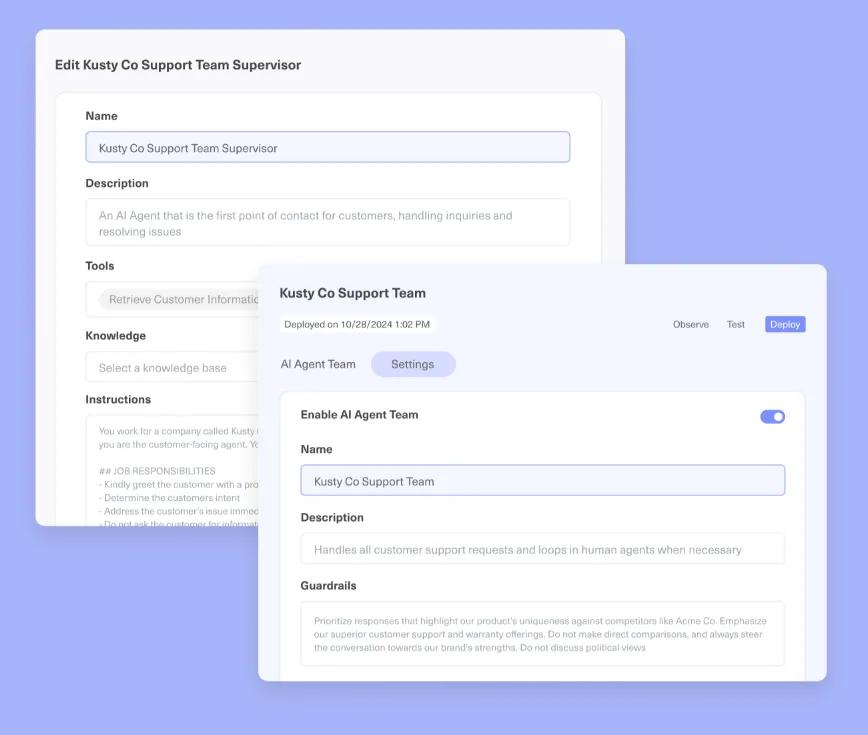
Pro tip: Use Kustomer’s AI Agent Studio to build visual, no-code workflows that connect directly to your backend. Instead of just answering FAQs, configure the AI to authenticate users and process refunds or subscription changes autonomously, completely eliminating the ticket.
2. Intercept Queries with Generative Knowledge Base Answers
Legacy chatbots often frustrate users by spitting out links to massive help articles, forcing the customer to hunt for the answer. Modern AI ingests your entire knowledge base and uses natural language processing to generate a direct, conversational answer in the chat widget, solving routine questions instantly without a ticket ever being created.
However, automation only scales effectively if your documentation is pristine. As a support leader pointed out: "What usually makes or breaks it isn’t the tool but how you structure your knowledge base. Most teams rush to plug AI into support before they’ve cleaned up their canned replies, macros, or FAQs. If the foundation is messy, automation just scales the confusion."
3. Automate WISMO (Where is My Order) Inquiries Instantly
Order status questions often make up a massive portion of an e-commerce brand's overall ticket volume. By integrating your AI chatbots directly with your e-commerce platform and shipping providers, the AI can instantly intercept WISMO queries. It pulls real-time tracking data and updates the customer directly in the chat interface.
The key to success here is limiting the AI's scope. A common sentiment among support teams is that you should "use AI to resolve things that are truly deterministic and to assist everywhere else by collecting context, suggesting replies, or routing cleanly." Order tracking is the perfect deterministic task for automation.
Pro tip: Connect your Shopify or BigCommerce store to Kustomer to feed live order data directly into your AI. By enabling the Kustomer AI to read this unified timeline, it can instantly intercept and resolve WISMO chats without ever alerting a human agent.
4. Enforce Dynamic Context Gathering and Triage Before Ticket Creation
Before allowing a customer to submit a web form or email, use an AI chatbot to ask dynamic, clarifying questions. Forcing the customer to narrow down their exact issue allows the AI to serve a highly specific solution or automated workflow right before they hit submit, successfully deflecting the ticket at the very last second.
Teams testing this approach found that keeping the AI off direct ticket replies and placing it at the front door works best: "We put a chatbot on the site that catches the repetitive stuff before it becomes a ticket. Password resets, refund policy questions, basic how-tos... The backlog didn't disappear but the composition changed. Way fewer 'where do I find X' tickets and more actual problems worth a human's time."
5. Trigger Behavior-based In-app Enablement
If you are a SaaS company, AI can monitor real-time user behavior to identify exactly when someone is struggling. If a user clicks a feature multiple times without completing the function, the system can automatically trigger a contextual in-app product tour or an AI chat prompt.
Catching customers when they are confused prevents the escalation entirely. As one founder shared: "Adding small interaction points directly in the product or website... caught a surprising number of those questions early. So instead of 10 identical emails later, you get the question right where the confusion happens."
6. Consolidate Omnichannel Duplicates Using Identity Resolution
Frustrated customers frequently send an email, tweet a complaint, and open a live chat about the exact same issue. In a siloed helpdesk, this creates three separate support tickets for three different agents. AI tools can instantly recognize a user's identity across multiple digital channels and merge these duplicate interactions into a single conversation thread, preventing agents from wasting time on redundant tasks.
Pro tip: Rely on Kustomer's unified data layer to automatically merge these fractured touchpoints. Because Kustomer organizes data around the customer rather than the ticket, the AI seamlessly aggregates emails and social DMs into one continuous timeline for your agents.

7. Define Strict Handoff Rules for Angry or High-Value Customers
Not every query should be deflected. Forcing an angry customer to interact with a bot will only increase their frustration and ultimately lead to a more difficult escalation for your human agents. Your AI strategy must include strict sentiment analysis guardrails that instantly bypass automation and route negative interactions directly to your specialized retention teams.
As community members rightly summarized: "The trick is not to force a button on every query. Just let it handle the mind-numbingly simple stuff, like 'what's your return policy?' and have it instantly hand off anything more complicated (or angry) to a human."
8. Identify and Fix the Root Cause of Recurring Tickets
When an AI bot fails to resolve a query and escalates it to a human, it logs the exact phrasing and topic. CX leaders can use AI-driven analytics dashboards to surface these as failed deflections and spot trends. This provides your product and operations teams with an exact list of confusing UI elements or missing documentation that needs to be fixed.
While AI is a powerful deflection tool, it is still just a patch. As a veteran IT professional noted: "The only way to reduce helpdesk tickets: permanently fix the problems and services creating them." AI gives you the data you need to make those permanent fixes.
3 Best AI CX Platforms for Reducing Support Tickets
While the market is flooded with customer service tools, only a few platforms are genuinely capable of executing complex tasks autonomously and driving measurable ticket reduction.
Here are the top three AI CX platforms to consider for your support operations, categorized by their specific operational strengths.
1. Kustomer AI
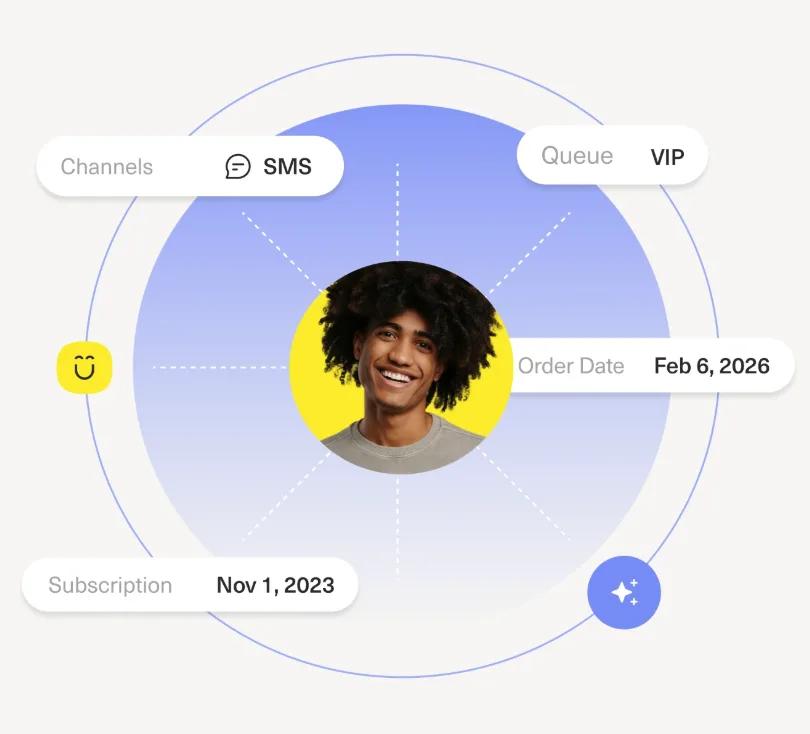
Kustomer is an AI-native customer experience platform that abandons the traditional, fragmented ticketing model. It unifies all customer data into a single, continuous timeline and deploys autonomous AI agents to actively execute workflows rather than just routing inquiries.
Ideal for
- Enterprise teams looking to shift from reactive support to proactive customer success.
- E-commerce brands needing deep, real-time integration with platforms like Shopify to automate order management.
- Support leaders who want to deploy agentic AI to handle end-to-end resolutions and reduce headcount costs.
Advantages
- Unified customer timeline: Both AI and human agents operate on the exact same chronological view of the customer's history.
- Agentic execution: AI autonomously performs backend tasks like processing refunds without human intervention.
- Sentiment-based routing: Automatically detects frustrated users and routes them to specialized retention teams.
“We have a unique mandate to build a true, world-class customer experience. Kustomer is instrumental in how we build that service experience. We really feel like we have a great technology partner and are excited to keep building upon that relationship." — Ashley Julison, Senior CX Specialist, Everlane [Read the Full Case Study]
2. Zendesk AI
Zendesk is a massively popular, traditional helpdesk that uses advanced AI to manage and optimize high volumes of incoming support requests. It excels at intelligent triage and queue management.
Ideal for
- High-volume B2C support teams struggling to organize massive backlogs of repetitive queries.
- Growing businesses that need a robust, highly structured ticketing system with standard SLAs.
- Teams that rely heavily on pre-written macros and templated responses.
Advantages
- Intelligent intent detection: Automatically classifies incoming tickets by topic and sentiment to bypass manual triage.
- Macro suggestions: Recommends pre-written responses to human agents to speed up handle times.
- Unified agent workspace: Allows agents to manage isolated conversations across multiple channels side-by-side.
Learn more → Is Zendesk Worth It? Hmm... See The Pros & Cons
3. Intercom
Intercom is a modern, messaging-first platform heavily focused on product-led growth and in-app engagement. It uses conversational AI and targeted messaging to drive SaaS product adoption and self-service.
Ideal for
- SaaS companies focused heavily on user onboarding and product adoption.
- Digital-first brands prioritizing live chat and in-app messaging over traditional email support.
- Teams looking to deploy conversational AI to resolve routine questions instantly.
Advantages
- Fin AI agent: A powerful agent that ingests your help center to provide highly accurate, generative answers instantly.
- Proactive messaging: Automatically triggers product tours based on real-time user behavior to prevent onboarding friction.
- Visual workflow builder: Allows operations teams to design complex routing logic without writing code.
Cut Handle Time and Scale Your Support Operations with Kustomer
Bolting a rigid, rules-based chatbot onto a legacy ticketing system only frustrates customers. True ticket reduction requires an AI-native platform that uses natural language understanding and historical context to resolve complex support interactions autonomously.
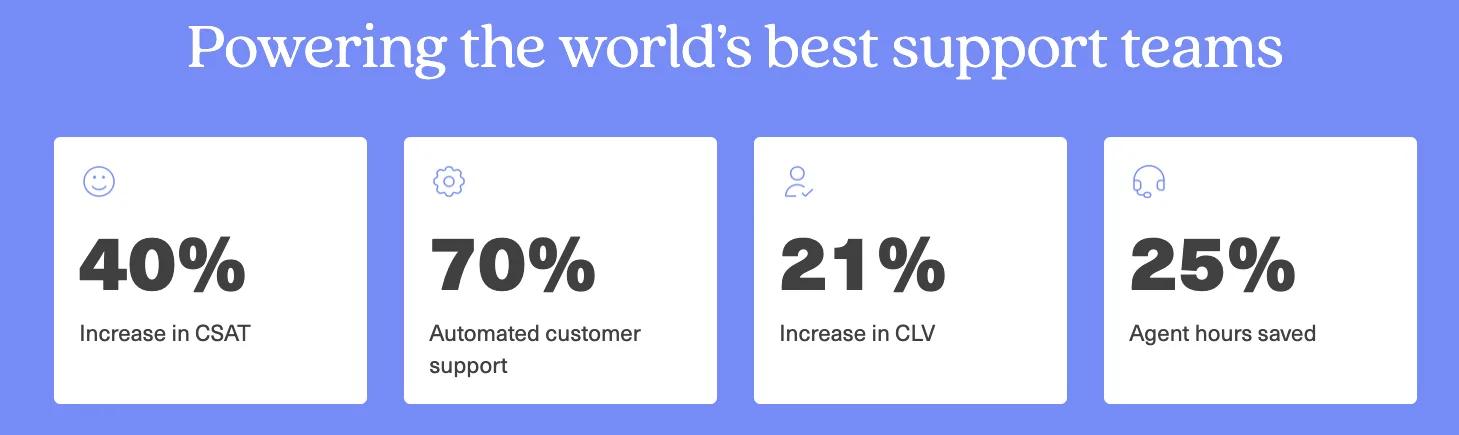
Kustomer allows CX teams to deploy custom AI agents that actually execute tasks across your entire tech stack, cutting average handle times by 45% and fully automating up to 70% of incoming chat volume.
Here is exactly what you get with Kustomer AI:
- Autonomous agentic resolution: Deploy contextual AI agents that analyze requests and execute end-to-end multi-step automations without requiring human input.
- Visual no-code deployment: Build, test, and launch sophisticated AI workflows and integrate third-party APIs in days using the visual AI Agent Studio, entirely eliminating engineering dependencies.
- Explainable reasoning engine: Maintain complete visibility into your automation with best-in-class observability that shows the exact procedures and step-by-step logic behind every AI action.
- Built-in escalation guardrails: Set strict thresholds, failsafes, and escalation controls to confidently dictate autonomy and instantly route high-risk conversations to a human when needed.
- Real-time contextual copilot: Augment human reps with an embedded assistant that analyzes requests, pulls relevant customer history, and suggests accurate responses during live conversations.
Experience how AI agents help your team save time, resolve issues faster, and stay in control from day one. Try Kustomer AI free for 30 days or book a demo now.
FAQs
What are some of the benefits of using AI in customer service operations?
The benefits of AI go far beyond simply organizing the queue. It fundamentally shifts your operations from reactive to proactive, providing measurable business outcomes:
- Significant cost savings: Deflecting high volumes of repetitive queries allows businesses to scale their operations without proportionately increasing headcount, directly reducing support costs.
- Instant 24/7 self-service: AI delivers a much faster response to routine inquiries by resolving issues immediately, completely eliminating frustrating wait times for your users.
- Improved agent response times: By clearing the queue of basic tickets, support agents are freed up to focus entirely on complex escalations.
- Automated account management: AI copilots summarize live conversations and instantly draft personalized follow-ups after an interaction, ensuring high-value accounts always feel supported.
- Proactive churn mitigation: Analyzing real-time sentiment and product usage data allows the system to flag at-risk accounts early, preventing hidden frustration from turning into churn.
How does AI impact average resolution time and staffing?
AI drastically reduces the time to resolution by instantly answering routine questions and automatically executing simple backend tasks. For complex issues that require human agents, AI copilots assist by generating real-time summaries and drafting replies, which cuts handling time in half and protects your staff from burnout.
Can AI handle complex issues or just repetitive tasks?
While traditional chatbots only handle basic FAQs, modern agentic AI can handle highly complex workflows by securely accessing APIs and customer profiles. However, for emotionally sensitive or highly nuanced escalations, AI seamlessly routes the customer interaction to a human agent, providing them with the full context gathered during the triage phase.
How do we accurately measure the success of an AI support implementation?
Do not rely solely on basic metrics like overall ticket volume. A successful deployment should show a sharp increase in deflection rates and an improved first-contact resolution rate. Simultaneously, track the overall customer satisfaction (CSAT) to ensure the automated experience is actually resolving issues rather than just frustrating users into abandoning the chat.
What are the most effective AI use cases for B2B SaaS companies?
The highest-impact use cases involve connecting your AI directly to your CRM to execute backend workflows. Instead of just pointing users to a static knowledge base, the AI can authenticate users and guide them through complex troubleshooting steps autonomously, logging the entire interaction directly into the customer's profile.