


Customers really don’t want to contact support. They want their problems solved. Waiting for email responses, sitting in chat queues, or navigating phone trees feels like friction they’d rather avoid.
If they could find the answer themselves in 30 seconds, they would. Rather than over-explaining their situation to an agent who asks them to verify information the company should already know.
Studies also consistently show 70%+ of customers attempt self-service before contacting support [*]. They’re already trying to help themselves.
And when you do implement a self-service tool, the question becomes —is it good enough to help customers solve their problems?
Because bad self-service is worse than no self-service. A chatbot that can’t understand basic questions infuriates customers, or a help center organized in ways that make sense to your team but confuse customers creates the appearance of self-service without the substance.
Customers try, fail, and contact support angrier than if you’d just given them a clear path to human help from the beginning.
This breakdown evaluates 11 self-service platforms based on whether they actually resolve customer issues or just add steps before inevitable escalation to agents.
What is Customer Self-Service Software?
A customer self-service software gives customers the tools to resolve issues, find information, and complete actions on their own without contacting support agents.
It connects customer-facing interfaces (like help centers or bots) to backend systems such as order management, billing, or CRM platforms. This allows customers to read information, and also take action.
Example of how customer self-service software works:
Let’s say a customer purchases running shoes from your e-commerce store. Two weeks later, they realized they ordered the wrong size.
The customer can search “exchange shoes” in your help center, find an article explaining the process, click a link to the self-service exchange portal, log in to see their recent orders, select the wrong-size shoes, choose the correct size, confirm the exchange, and receive an automated confirmation with a return shipping label.
Total time: 3 minutes. Agent time consumed: zero.
The software handled the entire resolution by providing accessible information, leading to the customer getting a faster resolution. Your support team saved time for issues that actually require human judgment.
Why is Customer Self-Service Important?
Support costs become predictable and scalable
With human-only support, costs increase unpredictably as volume spikes. For example, during product launches, or seasonal demand—any event driving customer inquiries requires rapidly hiring and training agents or accepting degraded service levels.
Self-service provides cost stability because routine inquiries resolve at essentially fixed cost regardless of volume.
Your knowledge base can handle 100 searches or 10,000 searches for the same operational expense. Your chatbot can serve 50 customers simultaneously or 500 without linear cost increases. This predictability makes business planning more reliable and margins more sustainable as you scale.
Data shows what customers need (and don’t need)
Self-service platforms generate valuable intelligence about customer behavior and needs. The search queries reveal what questions customers are asking. While failed searches identify knowledge gaps where documentation is missing or inadequate.
The same is the case for chatbot conversation. Patterns show where automation breaks down and requires human intervention.
This information directly informs product development, documentation priorities, and support process improvements.
Resolution speed matters for customer satisfaction
Customers with simple questions shouldn’t have to wait hours or days for templated email responses.
A well-designed knowledge base provides answers in seconds. An effective chatbot resolves common issues immediately. Self-service portals let customers complete actions—tracking shipments, downloading invoices, updating payment methods—the moment they need them rather than during support team business hours.
This speed directly impacts satisfaction. Customers rate experiences based on effort required, and instant self-service resolution represents the lowest effort possible.
24/7 availability without increasing headcount
Customers have problems outside business hours. They need help on weekends, late at night, during holidays—times when staffing support teams is operationally difficult and expensive.
Self-service tools work continuously without requiring around-the-clock agent availability. A customer in a different timezone can find answers at 3 AM their local time. Someone troubleshooting an urgent issue on Sunday can access help documentation and automated tools without waiting until Monday when your team returns.
This availability improves experience significantly for global customer bases or time-sensitive issues.
Types of Customer Self-Service Channels
- Knowledge bases and help centers: These are searchable libraries of FAQs, how-to guides, and video tutorials, where customers find answers to questions about your products, policies, and processes.
- AI-powered chatbots and virtual assistants: AI assistants understand natural language questions and provide instant responses based on your documentation and common inquiry patterns.
- For example, when a customer asks “how do I cancel my subscription,” the bot walks them through the cancellation process step-by-step without human involvement.
- Customer portals: These let people view account information, track orders, download invoices, update payment methods, or modify subscriptions through self-service interfaces.
- Automated workflows: They enable customers to complete common tasks independently—e.g., resetting passwords, changing delivery addresses, scheduling appointments, or requesting refunds—through guided processes that don’t require agent assistance.
- Community forums: Peer-to-peer support spaces where customers help each other by sharing solutions, troubleshooting advice, product tips, and expertise. When one customer solves a problem, others with the same issue benefit from that shared knowledge without waiting for official support responses.
- Interactive voice response (IVR) systems: Automated phone menus that handle routine inquiries through voice commands or keypad inputs. Customers check account balances, make payments, track order status, schedule callbacks, or get answers to common questions without speaking to agents.
Key Features to Look for in a Customer Self-Service Platform
Intelligent knowledge discovery
At the foundation of self-service is discoverability. A strong platform must make answers easy to find.
This means search that understands intent, handles typos, ranks relevant content accurately, and improves over time based on behavior. Customers shouldn’t need to guess the exact wording of your article title.
🔖Quick tip: Look for platforms that track search queries and highlight gaps in content, so the system becomes smarter with use.
Conversational AI workflow builders
Instead of just deploying a basic bot, you need backend tools to build and manage automated workflows. Look for platforms that allow your team to map out complex resolutions—like processing a return or upgrading a tier—without writing code. The backend should connect directly to your CRM to execute these tasks autonomously.
Advanced analytics and reporting
You need to know exactly where your self-service breaks down. Look for analytics and reporting dashboards that track search success rates, common drop-off points, and time-to-resolution so you can eliminate dead ends in the customer journey.
🔖Quick tip: Set up automated alerts for frequent zero-result searches to instantly identify and patch missing knowledge base documentation.
Gen AI-assisted knowledge base creation
Writing and updating help articles is historically a massive bottleneck. Generative AI tools automatically draft documentation, summarize successful agent resolutions into new articles, and suggest content updates based on trending issues.
Omnichannel deployment and snap-ins
Your self-service capabilities shouldn't be locked inside a single portal. The platform should offer pre-built widgets and snap-ins that let you embed knowledge articles and workflows directly into your product interface, mobile app, or checkout flow without requiring heavy developer lift.
🔖Quick tip: Ensure your self-service widget maintains the user's session history across devices, so they don't have to restart their troubleshooting process if they switch from their phone to their desktop.
AI-based routing and ticketing
When self-service inevitably fails, the handoff must be completely seamless. AI should automatically categorize the issue, capture the customer's self-serve attempts, and route the ticket to the best-equipped human agent.
Recommended read → 12 Best AI Ticket Routing and Triage Tools for 2026
Unified customer views and shared inboxes
Agents need the full story the second a ticket opens. If a customer escalates from a workflow, a shared inbox and unified profile should immediately display their history, recent purchases, and the exact steps they already took in the portal so the customer never has to repeat themselves.
🔖Quick tip: Look for platforms that integrate deeply with your CRM. A self-serve tool is only as effective as the customer data it can instantly pull and display to your agents.
Feature request management
Give customers a direct line to product development without clogging up your support queue. A structured submission backend captures user feedback effectively, categorizes it by product area, and keeps your support tickets focused on actual troubleshooting.
11 Best Customer Self-Service Platforms on the Market Right Now
Customers tolerate self-service only when it works faster than a human agent. The moment a platform forces them into a loop of irrelevant articles or dead-end chatbot responses, you lose their trust.
The 11 platforms below are evaluated on their ability to provide actual resolution, not just ticket deflection.
- Kustomer
- Zendesk
- HubSpot Service Hub
- Freshdesk
- LiveAgent
- Help Scout
- Zoho Desk
- Gorgias
- Intercom
- Gladly
- Salesforce Service Cloud
Here is a quick comparison to help you narrow down your options before diving into the detailed breakdowns.
| Primary Focus | Best For | Pricing & Free Trial | |
| Kustomer | CRM-first support and unified timelines | E-commerce brands with complex workflows | Starts at $89/user/month (annual only). No free trial. |
| Zendesk | Highly customizable, massive scale help desk | Large enterprises needing deep flexibility | Starts at $19/agent/month. 14-day free trial. |
| HubSpot Service Hub | CRM-connected service portals | B2B companies already using HubSpot | Free plan available. Paid starts at $15/seat/month. 14-day free trial. |
| Freshdesk | Accessible, affordable AI support | Small to mid-sized businesses | Free for up to 2 agents. Paid starts at $15/agent/month. 14-day free trial. |
| LiveAgent | Speed, live chat, and simple portals | Budget-conscious teams | Starts at $9/agent/month. 14 or 30-day free trial. |
| Help Scout | Invisible, context-aware self-service | SaaS companies wanting in-app help | Starts at $22/user/month. 15-day free trial. |
| Zoho Desk | Context-aware, ecosystem-integrated support | Businesses using Zoho applications | Free plan available. Paid starts at $14/agent/month. 15-day free trial. |
| Gorgias | E-commerce automated resolutions | Retail brands using Shopify or Magento | Starts at $10/month (volume-based). 7-day free trial. |
| Intercom | Chat-first, highly autonomous AI agents | Tech companies and digital brands | Starts at $29/seat/month. 14-day free trial. |
| Gladly | Lifelong, people-centric conversation threads | High-end consumer brands | Flat rate around $150/agent/month. No standard free trial (demo required). |
| Salesforce Service Cloud | Enterprise-grade security and custom portals | Global enterprises and regulated industries | Starts at $25/user/month. 30-day free trial. |
1. Kustomer
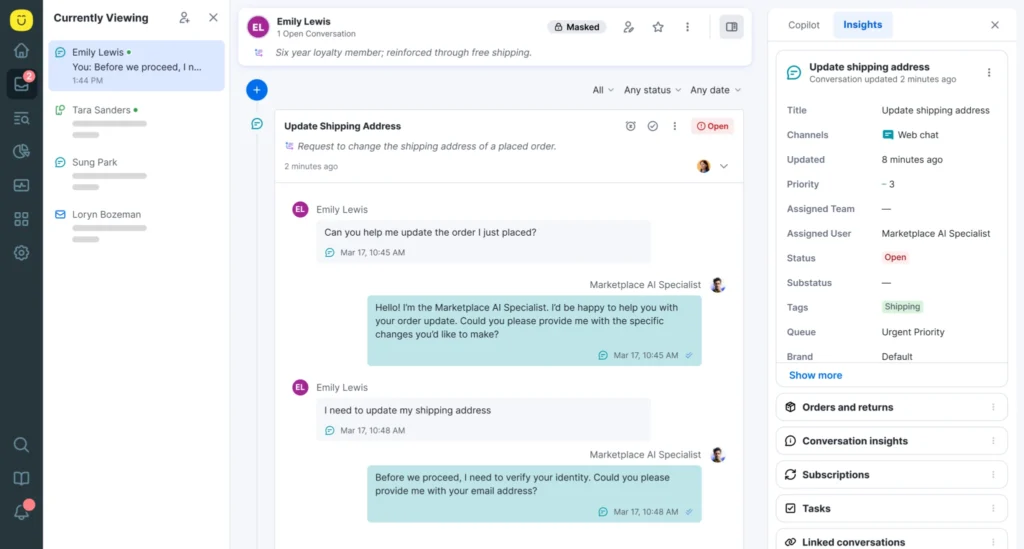
Kustomer is a CRM-first support platform designed to give your team a complete, chronological view of the customer's history. For self-service, this means its AI agents and automated workflows can pull from a deep well of unified data—such as recent orders, shipping statuses, and past conversations—to resolve issues without asking the customer to verify information you already have. It is particularly powerful for e-commerce brands that want AI assistants to execute complex tasks like returns or exchanges autonomously.
Key features
- Unified customer timeline: It aggregates every interaction and transaction into a single chronological view, ensuring self-service bots have full context before ever routing a ticket to an agent.
- Conversational AI workflows: You can build multi-step automations that take action in third-party systems (like processing a refund) rather than just deflecting users with help articles.
- Proactive support tools: It allows you to trigger automated messages or self-serve prompts based on real-time customer behavior on your website or app.
- Team pulse dashboard: Managers get real-time visibility into what agents are working on and the current state of queues, allowing them to instantly reallocate resources during volume spikes.
Advantages of Using Kustomer
- Multi-agent team architecture: Instead of relying on one generic chatbot, Kustomer allows you to deploy highly specialized AI agents (e.g., a billing agent, a returns agent, and a technical support agent) that collaborate and hand off tasks seamlessly.
- Built-in AI observability: Kustomer includes native AI observability assistants that actively map your workflows, detect conflicting logic, and explain exactly why an AI agent made a specific decision, giving CX leaders total control over their automations.
- KIQ agent assist: Our AI copilot reads the live customer timeline and instantly generates highly accurate, tone-adjusted responses for human agents, complete with automatic two-way translation in over 50 languages.
- Native conversational voice AI. Rather than forcing you to integrate external voice tools, Kustomer features built-in AI voice capabilities that scale omnichannel resolution without adding bloat to your tech stack.
- Native CRM architecture: Unlike legacy platforms like Zendesk that treat each interaction as an isolated ticket, Kustomer centers everything around a lifelong, continuous customer profile so context is never lost.
- Deep business process automation: Kustomer’s workflow engine autonomously handles complex, multi-step backend actions—such as processing a return or upgrading a subscription—without human input.
What are Real Users Saying about the value of Kustomer
- HexClad: "We pull every omnichannel customer touchpoint into Kustomer, which gives our agents a complete view of our customer. So, whenever someone reaches out with an issue, our agents can quickly see what's going on and solve the problem." — Michael Ludwig, Head of Customer Experience at HexClad [Read Case Study]
- Smalls: "Kustomer has been with us through every stage of our growth. As our business evolved, we've been able to mold the platform right alongside it—to fit new processes, integrate new tools, and meet our customers where they are." — Sarah Inbar, Director of Customer Support, Smalls [Read Case Study]
- Hopper: "Kustomer was the perfect mix of being resilient for scale and built for the needs of a modern service team." — Jo Lai, Head of CX, Hopper [Read Case Study]
Kustomer Pricing
Kustomer pricing is seat-based, with annual billing, starting at $89 per user/month for the Enterprise plan and $139 per user/month for the Ultimate plan. AI features are billed as add-ons, costing $0.60 per engaged customer conversation and $40 per agent/month for internal AI assistance.
2. Zendesk
Zendesk is the legacy giant of the customer service space, known for its massive scale and highly customizable backend. Its self-service capabilities are robust, allowing you to spin up multiple help centers for different brands, deploy AI agents, and build highly specific routing rules. While it requires more setup than out-of-the-box tools, it offers the flexibility needed for large enterprises handling complex, multi-layered support operations.
Key Features
- Zendesk AI and Copilot: It uses advanced machine learning to automate resolutions, triage incoming tickets, and guide customers to the right self-serve channels instantly.
- Multi-brand help centers: You can build and manage up to 300 distinct, branded knowledge bases from a single unified backend.
- Massive integration marketplace: It connects with virtually every business tool available, allowing you to embed self-service capabilities into nearly any existing workflow.
User Reviews
- G2 and Capterra ratings: 4.3/5 on G2 and 4.4/5 on Capterra.
- Biggest advantage: Zendesk offers an incredibly flexible, multi-brand backend with a massive marketplace of integrations, allowing large enterprises to build highly customized self-service routing. [*]
- Biggest limitation: The platform has a notoriously steep learning curve for administrators, and unlocking advanced AI capabilities requires expensive, higher-tier plans. [*]
Recommended read → Is Zendesk Worth It? Hmm... See The Pros & Cons
Zendesk Pricing
Zendesk offers multiple tiers, with core Suite plans ranging from $55 per agent/month to $169+ per agent/month on annual contracts. Advanced AI features, such as automated resolutions (beyond a small free allowance) and the Copilot add-on, require additional usage-based fees or a flat $50 per agent/month upcharge.
3. HubSpot Service Hub
Service Hub is built directly on top of HubSpot’s CRM, making it the ideal choice if your marketing and sales teams already use the platform. Its self-service strength lies in this connectivity; customer portals and knowledge bases are seamlessly tied to the exact data your sales team sees. It excels in B2B environments where clients need a dedicated portal to check on long-term project statuses, billing, or technical documentation.
Key Features
- Seamless CRM connectivity: Because it shares a database with HubSpot's marketing and sales tools, self-service portals always reflect the most up-to-date customer account information.
- Dynamic customer portals: It provides secure, logged-in environments where clients can view ticket progress, access restricted knowledge base articles, and manage their accounts.
- Customer feedback and NPS tracking: It automatically deploys satisfaction surveys immediately after a customer interacts with a self-service workflow, capturing crucial performance data.
User Reviews
- G2 and Capterra ratings: 4.4/5 on G2 and 4.5/5 on Capterra.
- Biggest advantage: It shares a native database with HubSpot's marketing and sales tools, ensuring customer portals and service reps always have the most up-to-date account context. [*]
- Biggest limitation: It lacks deep e-commerce functionality, and the pricing scales steeply as you add more seats and advanced workflows. [*]
HubSpot Service Hub Pricing
HubSpot Service Hub offers a free tier with basic tools, while premium plans scale from a $15 per seat/month Starter tier up to Professional ($90/seat/month) and Enterprise ($130+/seat/month) levels. Pricing is heavily dependent on the number of required seats and the complexity of the automated workflows you need.
Recommended read → 10 Best HubSpot Service Hub Alternatives to Consider in 2026
4. Freshdesk
Freshdesk, part of the Freshworks ecosystem, is known for being highly accessible, affordable, and quick to deploy. Its self-service offering centers around a clean, federated knowledge base and its "Freddy AI" bot, which handles routine queries efficiently. It is a pragmatic choice for small to mid-sized businesses that need to launch effective support channels quickly without a dedicated development team.
Key Features
- Freddy AI agent: A generative AI bot that reads your existing knowledge base and website to deliver conversational answers to customers instantly.
- No-code bot builder: It allows support leaders to visually map out automated decision trees and resolution paths without needing technical expertise.
- Federated knowledge base: Customers can search for answers across your help center, community forums, and external domains from a single search bar.
User Reviews
- G2 and Capterra ratings: 4.4/5 on G2 and 4.5/5 on Capterra.
- Biggest advantage: It offers an intuitive and user-friendly interface and a generous free tier, making it incredibly fast and affordable for small teams to deploy a federated knowledge base. [*]
- Biggest limitation: The most powerful AI features and complex automation tools are gated behind the highest-priced enterprise tiers. [*]
Freshdesk Pricing
Freshdesk is highly affordable, offering a free tier for up to 10 agents with basic ticketing needs. Paid plans range from $15 to $79 per agent/month, with advanced AI features and complex automation tools gated behind the higher-tier Pro and Enterprise plans.
Recommended read → 17 Best Freshdesk Alternatives for 2026 (Based on Real Users)
5. LiveAgent
LiveAgent is a traditional, highly functional help desk that prioritizes speed and live chat capabilities. While its self-service portal and knowledge base tools are simpler than enterprise competitors, they are highly reliable and extremely easy to set up. It is best suited for budget-conscious teams that want a straightforward, no-nonsense platform to host FAQs, community forums, and a basic customer portal.
Key Features
- Advanced live chat widget: Its highly customizable chat widget doubles as a self-service gateway, allowing customers to search the knowledge base before initiating a chat.
- Built-in customer portal: It provides a simple, secure space where customers can log in to view their past tickets, track progress, and read private articles.
- Universal shared inbox: Regardless of whether a customer tried to self-serve via the portal, forum, or chat, the agent sees the entire journey in one continuous thread.
User Reviews
- G2 and Capterra ratings: 4.5/5 on G2 and 4.7/5 on Capterra.
- Biggest advantage: It provides a highly reliable, budget-friendly platform with a powerful live chat widget that doubles as a self-service gateway for customers. [*]
- Biggest limitation: The user interface feels dated compared to modern alternatives, and it lacks advanced autonomous AI agents. [*]
LiveAgent Pricing
LiveAgent is one of the most budget-friendly options on the market, starting at $9 to $15 per agent/month for basic ticketing and chat. The fully featured enterprise-level tier caps out at $59 per agent/month, making it highly predictable for growing teams.
6. Help Scout
Help Scout is designed to feel invisible to the customer; it functions exactly like a standard email conversation, removing the friction of ticket numbers and forced portal logins. Its self-service power comes from "Beacon," a highly customizable widget you embed directly into your website or app. It is ideal for SaaS companies and customer-centric brands that want to offer self-help strictly in the context of where the user is currently working.
Key Features
- Beacon embed widget: A localized self-service tool that surfaces relevant help articles based on the specific web page or app screen the customer is currently viewing.
- Docs knowledge base: A streamlined, highly SEO-optimized article builder that natively feeds answers directly into the Beacon widget.
- Invisible ticketing: It removes clunky help desk formatting (like automated "Your ticket has been received" emails), making the transition from self-service failure to human help feel entirely natural.
User Reviews
- G2 and Capterra ratings: 4.4/5 on G2 and 4.6/5 on Capterra.
- Biggest advantage: The Beacon widget seamlessly embeds help articles directly into your app or website, providing context-aware self-service that feels completely invisible and natural. [*]
- Biggest limitation: It does not natively support voice routing or highly complex IT ticketing workflows. [*]
Help Scout Pricing
Help Scout keeps pricing simple with three straightforward tiers: Standard ($22 per user/month), Plus ($44 per user/month), and Pro ($65 per user/month). All plans include the Docs knowledge base and Beacon widget, though advanced reporting and API access are reserved for the higher tiers.
7. Zoho Desk
Zoho Desk is a highly capable, context-aware support platform that fits seamlessly into the broader suite of Zoho business applications. Its self-service capabilities are powered by Zia, Zoho's AI assistant, which can talk to customers, analyze sentiment, and tag tickets automatically. It is a very strong contender for businesses already using Zoho CRM, offering enterprise-grade automation at a fraction of the cost of larger competitors.
Key Features
- Zia AI assistant: It interacts with customers to solve problems using the knowledge base, while also assisting agents by analyzing ticket sentiment and suggesting responses.
- Ecosystem integration: It natively connects with Zoho CRM and other Zoho tools, allowing self-service portals to trigger actions across your entire business software stack.
- Context-aware ticket routing: If self-service fails, the platform automatically routes the ticket to the agent with the specific skills required to solve that exact issue.
User Reviews
- G2 and Capterra ratings: 4.4/5 on G2 and 4.5/5 on Capterra.
- Biggest advantage: It offers an incredibly cost-effective, context-aware support platform that integrates natively with the entire ecosystem of Zoho business applications. [*]
- Biggest limitation: The initial backend configuration is time-consuming, and the interface can feel clunky or overwhelming for new administrators. [*]
Zoho Desk Pricing
Zoho Desk is exceptionally cost-effective, offering a free version for minimal use cases and paid plans starting at roughly $14 per agent/month. The top-tier Enterprise plan, which includes the Zia AI and multi-brand portals, costs around $40 to $50 per agent/month.
Recommended read → 10 Best Zoho Desk Alternatives & Competitors for 2026
8. Gorgias
Gorgias is built exclusively for e-commerce, featuring incredibly deep integrations with platforms like Shopify, Magento, and BigCommerce. Its self-service tools are designed specifically to handle the most common retail queries: "Where is my order?", returns, and exchanges. By connecting directly to your storefront's backend, its AI agents can physically alter orders, process refunds, and issue store credit without human intervention.
Key Features
- Deep e-commerce integration: It pulls live storefront data into the support interface, allowing bots and customers to manage active orders directly.
- Automated order management: Customers can use self-serve chat flows to edit their shipping address, cancel an order, or process a return instantly.
- Revenue-focused analytics: It tracks exactly how much revenue your self-service flows and support interactions are generating or saving the business.
User Reviews
- G2 and Capterra ratings: 4.6/5 on G2 and 4.7/5 on Capterra.
- Biggest advantage: Unmatched native integrations with Shopify and Magento allow its bots to physically alter orders, process refunds, and issue store credit without human intervention. [*]
- Biggest limitation: It is built strictly for e-commerce, making it a poor fit for B2B or SaaS companies, and its analytics and reporting features require some fine-tuning to get right. [*]
Gorgias Pricing
Gorgias uses a volume-based pricing model based on the number of billable tickets per month, rather than charging per agent seat. Plans start at $10/month for 50 tickets and scale up to $900/month for 5,000 tickets, with AI-automated resolutions carrying an additional fee of roughly $0.90 to $1.00 per successful interaction.
Recommended read → Top 17 Gorgias Alternatives & Competitors for 2026
9. Intercom
Intercom revolutionized the chat-first support model and remains the leader in conversational, in-app customer service. Its standout self-service feature is Fin, a state-of-the-art AI agent that resolves complex queries with incredibly high accuracy by reading your existing documentation. It is the premier choice for tech companies and modern digital brands that want to resolve issues through a sleek, conversational interface rather than static web pages.
Key Features
- Fin AI agent: A highly autonomous bot that requires zero training; you simply point it at your help center, and it immediately begins resolving customer questions in natural language.
- In-app messaging and tours: It allows you to proactively guide users through your software with visual product tours, stopping confusion before a ticket is ever created.
- Visual bot builder: You can design complex, conditional logic workflows to capture data and route users without touching a single line of code.
User Reviews
- G2 and Capterra ratings: 4.5/5 on G2 and 4.5/5 on Capterra.
- Biggest advantage: Its Fin AI agent delivers industry-leading conversational self-service with zero training required, instantly resolving complex queries by reading your existing documentation. [*]
- Biggest limitation: It is one of the most expensive platforms on the market, especially when factoring in the flat fee charged for every successful AI resolution. [*]
Intercom Pricing
Intercom requires a core platform subscription ranging from $29 to $132 per seat/month. The Fin AI agent operates on a strict outcome-based model, charging a flat $0.99 for every resolution it successfully handles without agent intervention.
Recommended read → 20 Best Intercom Alternatives & Competitors for 2026
10. Gladly
Gladly is a help desk software that abandons the traditional concept of tickets entirely, focusing instead on continuous, lifelong customer conversations. For self-service, this means every interaction a customer has with a bot, FAQ page, or IVR system is seamlessly appended to their single, ongoing profile. It is favored by high-end consumer brands that want self-service to feel like a premium, highly personalized concierge experience rather than a deflection tactic.
Key Features
- Lifelong conversation threads: It eliminates duplicate tickets; every self-serve attempt and agent interaction spanning years is visible in one continuous scroll.
- People-centric routing: The platform recognizes the customer across all channels (voice, chat, social media) and instantly matches them to the appropriate self-serve flow or dedicated human agent.
- Native voice and SMS: Unlike platforms that treat phone calls as an afterthought, Gladly natively builds voice IVR and text messaging into its core self-service routing.
User Reviews
- G2 and Capterra ratings: 4.7/5 on G2 and 4.8/5 on Capterra.
- Biggest advantage: It abandons isolated tickets in favor of a single, lifelong conversation thread per customer, seamlessly blending self-service attempts with native voice and SMS routing. [*]
- Biggest limitation: It doesn’t offer as many reporting options as other platforms. For example, it can’t always extract detailed performance data for agents or ticket trends. [*]
Gladly Pricing
Gladly operates on a straightforward, flat-rate enterprise pricing model, typically charging around $150 per agent/month. This all-inclusive approach avoids the complex add-on fees common in the industry, granting full access to its omnichannel and self-service capabilities.
11. Salesforce Service Cloud
Service Cloud is the ultimate enterprise solution, offering unparalleled power, security, and complexity. Its self-service capabilities are driven by Einstein AI and the Experience Cloud, allowing massive organizations to build highly secure, custom-coded portals for clients, partners, and employees. It is the default choice for global enterprises, financial institutions, and healthcare companies that require strict compliance and limitless customization.
Key Features
- Einstein AI capabilities: It leverages Salesforce's proprietary AI to predict customer needs, automate complex data entry, and power highly intelligent self-service chatbots.
- Complex process automation: You can build automated workflows that span across multiple distinct business units, databases, and external enterprise systems.
- Enterprise-grade scalability: It is built to securely handle millions of simultaneous self-service interactions, with robust compliance protocols for highly regulated industries.
User Reviews
- G2 and Capterra ratings: 4.3/5 on G2 and 4.4/5 on Capterra.
- Biggest advantage: It provides unmatched enterprise-grade scalability, security, and the ability to build limitlessly customized self-service portals via the Experience Cloud. [*]
- Biggest limitation: The total cost of ownership is extremely high, and the platform's immense complexity requires dedicated, certified Salesforce administrators to deploy and maintain. [*]
Recommended read → The Top 16 Gladly Alternatives & Competitors for 2026 (Updated)
Salesforce Service Cloud Pricing
Service Cloud offers a basic Starter plan at $25 per user/month, but mid-sized to large organizations typically require the Enterprise ($165/user/month) or Unlimited ($330/user/month) tiers. Deploying full self-service portals and advanced Einstein AI features often requires purchasing additional add-ons and investing heavily in implementation.
Recommended read → Top 10 Salesforce Service Cloud Alternatives for 2026
How to Choose the Best Customer Self-Service Platform for Your Needs?
Selecting the right software comes down to how well it actually resolves problems rather than just deflecting tickets. Here is what you need to evaluate:
Assess the Depth of its AI Capabilities
Every platform claims to use AI, but you need to know if it simply suggests articles or actually does the work. Look for intent-aware bots, generative AI that automatically updates your knowledge base, and autonomous agents capable of executing multi-step backend tasks.
🔖Quick tip: Ask the vendor to build and demonstrate a complex, multi-step resolution live during your sales call, rather than relying on their pre-recorded sandbox demo.
Ensure Seamless Integration with Your Current Tech Stack
A self-service portal isolated from your main database creates data silos and frustrates users. The platform must connect natively or via robust APIs to your CRM, billing, and ticketing systems so customers can take real action, like processing a return or upgrading an account.
Calculate the True Total Cost of Ownership (TCO)
The base subscription fee is rarely the final price you pay. Factor in the hidden costs of implementation, developer resources for custom integrations, mandatory add-on fees for advanced AI features, and potential price spikes based on your ticket volume.
🔖Quick tip: Request a pricing projection based on your historical peak season ticket volume, not just your monthly average, to avoid unexpected overage charges.
Prioritize Ease of Use for Both Customers and Agents
If the front-end interface is clunky, customers will bypass it and immediately flood your support queue. At the same time, the backend must be intuitive enough for your support leaders to update help articles, adjust bot workflows, and review analytics without needing constant IT assistance.
🔖Quick tip: Have a non-technical support manager attempt to build a basic automated chat workflow during the trial period to gauge the platform's actual ease of use.
Reduce Support Costs by 40% with Kustomer
Bad self-service creates friction. Good self-service acts as an extension of your product, resolving issues instantly and reducing customer service costs by up to 40%.
Kustomer achieves this by unifying your CRM data, AI chatbots, and knowledge base into a single engine. Consider a customer trying to add a new medication to their pet's subscription. Instead of submitting a ticket and waiting for an email, they find your article on Google. When they land on the page, Kustomer’s AI proactively steps in, pulls up their subscription via their email, processes the uploaded prescription, and updates the plan directly inside the chat window. The issue is resolved in minutes, and zero agent time is consumed.
Here is how Kustomer powers this level of autonomy:
- AI chatbot workflows: Personalize responses 24/7 using intent detection, CRM data, and knowledge base information, all deployed through a user-friendly interface.
- Automated AI resolutions: Connect with third-party data sources to automate complex actions and resolutions across any channel without requiring a human agent.
- Search engine optimized knowledge base: Capture customers where their journey actually begins with SEO-friendly titles, keywords, and tags, customized for different audiences using a visual theme builder.
The impact on support teams is immediate. As Dave Weiner, Head of Customer Experience at Makesy, noted, in the first week post-launch, their Kustomer-powered self-service chatbot successfully resolved 48 tickets without connecting customers to an agent. Within three months, that number grew to 71. Makesy’s customer service agents are no longer overwhelmed, and they’ve received higher customer reviews based on positive customer interactions.
Ready to give your customers instant solutions at their fingertips? Schedule a demo today to see how intelligent self-service can transform your support operations.
Frequently Asked Questions
What are some customer self-service best practices?
Keep your knowledge base updated weekly. Use simple, jargon-free language. Always offer an "escape hatch" to a human agent if the self-service option fails. Optimize every article for mobile reading.
What are some examples of customer self-service?
Common examples include an FAQ page on a website, a chatbot that resets your password, a customer portal where you can download past invoices, or an automated return center where you print your own shipping label.
How does a self-service portal improve customer satisfaction?
A well-designed customer self-service portal empowers users to find answers instantly, which is exactly what modern consumers prefer. By providing in-depth articles and step-by-step guides for common questions, you eliminate the frustration of waiting on hold. This immediate access to help significantly boosts customer satisfaction and strengthens customer relationships by showing that you value their time.
Can AI-powered chatbots handle complex customer inquiries?
Yes. Modern AI-powered chatbots have evolved beyond simple scripts. They can analyze customer data and behavior to understand context. While they excel at handling routine customer queries, they are also smart enough to recognize when a human is needed. In those cases, they streamline the handoff to support agents, passing along the full history to ensure a seamless user experience.
How does self-service impact ticket volume and support costs?
Implementing robust self-service solutions dramatically reduces ticket volume by allowing customers to solve common issues on their own. This allows your contact center to operate more efficiently, as service teams are no longer bogged down by repetitive tasks. Instead, they can focus on high-value customer interactions that drive retention and revenue, optimizing your overall business needs.
Is it difficult to integrate a self-service platform with my existing tools?
Most modern platforms (including Kustomer), offer a robust API that allows for easy integration with your existing tools. A truly scalable customer support platform will adapt to your tech stack, ensuring that your self-service experience remains consistent as you grow.


