Customers hate waiting in queue, and your agents hate answering the exact same questions all day. When support volume spikes, traditional deflection tactics—like hiding the contact button or forcing users through a maze of static help articles—only frustrate your buyers further.
The solution is not blocking the customer. It is resolving their issue before they ever need to submit a ticket.
AI ticket deflection flips the traditional support model. Instead of pushing customers away, intelligent AI agents actively step in to solve routine problems instantly, drastically reducing your support volume while actually improving the customer experience.
What is AI Ticket Deflection?
AI ticket deflection is the practice of resolving customer questions and issues before they turn into support tickets, entirely without human agent intervention.
Instead of simply deflecting customers—which traditionally means making it so hard to contact support that they just give up—modern ticket deflection uses intelligent virtual agents, AI-powered chatbots, and automated workflows to actively solve the user's problem on the spot.
The ultimate goal of this strategy is two-fold:
- Reduce your overall support volume: Stop repetitive, tier-1 inquiries from ever hitting your human agents' queues.
- Handle routine issues automatically: Free your human agents to focus exclusively on complex, high-value problem-solving and emotionally sensitive escalations.
Traditional Deflection vs. AI Deflection: What Is the Difference?
Legacy deflection is built on the assumption that waiting in a queue is inevitable, so systems are designed to just organize the line. AI deflection is predictive and aims to prevent the wait entirely.
Here is a quick breakdown of how the two approaches compare:
| Feature | Traditional Deflection | AI-Powered Deflection |
| Core approach | Reactive; relies on static resources. | Predictive; resolves issues upfront. |
| Interaction style | Keyword-based search requiring exact phrasing. | Conversational; understands natural language intent. |
| Customer output | Links to static information and FAQ pages. | Autonomous execution of end-to-end workflows. |
| Success metric | Tracks false deflection (customer abandonment). | Measures true resolution (customer problem actually solved). |
To understand why this shift is so important for your customer experience, here are the core differences in practice:
- Reactive versus predictive: Traditional deflection relies on static resources like FAQ pages, community forums, and help centers, whereas AI deflection anticipates customer needs and proactively resolves issues upfront.
- Search versus conversation: Legacy setups require customers to know exactly what to search for, whereas AI understands conversational nuances, context, and messy phrasing to provide highly relevant answers.
- Information versus action: Traditional chatbots typically just route users to knowledge base articles or self-service portals, whereas modern AI agents complete end-to-end workflows autonomously to act on behalf of the customer.
- False deflection versus true resolution: Traditional tracking often counts a customer abandoning a search as a successful deflection, whereas AI customer service platforms focus on verifying that the customer's problem was actually solved.
How AI Ticket Deflection Works
Modern AI deflection tools move far beyond simply providing links to articles. They act as autonomous agents that understand natural language, detect customer intent, and execute actual tasks.
Here is how the underlying technology resolves issues automatically:
- Intent detection and context: Large language models analyze incoming queries in real-time to accurately predict resolution paths and understand context, even when customer phrasing is messy or unclear.
- Action execution: Through deep API integrations, AI agents connect securely to external systems like your CRM or payment gateways to autonomously perform actions such as processing refunds, updating account details, or checking order statuses.
- Proactive detection: Predictive suggestion systems anticipate customer needs based on behavior and proactively launch automated responses at scale, frequently resolving issues before a formal ticket is even initiated.
The Benefits of AI Ticket Deflection
The shift from manual triage to autonomous resolution directly impacts your bottom line. Here is exactly how AI ticket deflection transforms your support operations:
- Reduced support backlogs: It filters out repetitive, tier-1 inquiries—which often make up 50% to 80% of volume—before they hit the queue, stabilizing your operations during product launches, outages, or seasonal peaks.
- Lower operational costs: By resolving a massive portion of inquiries automatically, Artificial Intelligence helps to directly lower the cost per ticket, with companies often seeing a 23% to 28% reduction in overall support costs.
- Improved customer experience and CSAT: Customers receive instant, 24/7 assistance without waiting in queues, and this fast, accurate resolution drives higher customer satisfaction scores and long-term brand loyalty.
- Higher agent productivity and morale: With the noise of repetitive questions cleared, support agents focus their time on complex, rewarding problem-solving, which reduces burnout and lowers staff turnover.
Related reading → 7 Benefits of Using AI in Customer Service
How to Implement an AI Ticket Deflection Strategy: 5 Essential Steps
Deploying AI successfully requires more than just flipping a switch. You need a structured approach to ensure the system resolves issues accurately without frustrating your customers.
Here is how to implement it:
1. Audit Your Current Workflow
Before introducing AI, you must understand where your human agents are wasting the most time. Export your last 90 days of ticket data and categorize it by intent, average handle time (AHT), and resolution rate.
Pro tip 💡 Do not try to automate everything at once. Identify the top five most repetitive, low-complexity inquiries (like order tracking, password resets, or basic return policies) and make those your initial automation targets.
2. Restructure Your Knowledge Base for Machine Reading
AI is only as intelligent as the data it retrieves. If your help center is filled with dense, outdated PDF manuals, the AI will struggle to extract precise answers. Rewrite your targeted frequently asked questions (FAQs) into clean, skimmable articles with clear headings and bullet points.
Pro tip 💡 Write your articles using the exact natural language and phrasing your customers use when they submit a ticket, rather than relying on internal corporate jargon.
3. Train AI with Real Content
Do not rely solely on sterile help center articles for training. Feed the AI system with messy, real-world data straight from your front lines. Import thousands of successfully resolved historical tickets, live chat transcripts, and CRM notes so the model learns how to handle typos, frustration, and your brand's specific tone of voice.
4. Execute a Phased, Low-Risk Rollout
Never go fully autonomous on day one. Start by deploying the AI internally in a supervised copilot mode, where it drafts suggested replies for your human agents to review, edit, and approve.
Once your agents verify the AI's accuracy is consistently high, transition to limited public autonomy. Allow the bot to fully resolve only the lowest-risk intents first, closely monitoring the success rate before scaling up to handle more complex workflows.
5. Combine AI with Human Escalation
No matter how smart the AI gets, it will inevitably encounter issues it cannot solve. Define rigid triggers for immediate human handoff, such as detected customer anger, repeated fallback responses, or high-value account interactions.
Pro tip 💡Ensure your platform instantly passes the entire AI conversation transcript and all relevant CRM data to the human agent. The fastest way to ruin a customer experience is forcing them to repeat their problem after the bot fails.
6 Proven Strategies to Improve Your Ticket Deflection Rate [with Real Examples]
To maximize your AI deflection rate and actually resolve issues, you must actively optimize your setup. Here are 6 proven strategies to improve your automation workflows and drive higher ROI:
1. Update Your AI's Memory for Peak Periods
Before major product launches, Black Friday sales, or marketing campaigns, explicitly retrain your AI. Feed it your newest product release notes, pricing changes, and updated shipping policies. If the AI does not know about your latest promotion, it will immediately fail and escalate the ticket. Proactive training ensures your bot can handle the inevitable volume surges autonomously.
2. Target Your Highest-Cost Intents First
Do not try to automate every single customer query at once. Label incoming tickets by their estimated handling cost and focus your automation on the most expensive, time-consuming workflows first.
LoadUp used Kustomer AI to target one of their most time-intensive workflows: generating quotes. By automating the quoting process and managing end-to-end SMS conversations, they delivered instant accuracy that scaled revenue and deflected massive amounts of manual work without requiring additional headcount. [Read the Full Case Study]
3. Create a Continuous Human-in-the-Loop Training Cycle
AI models degrade if they are not maintained. Use your closed tickets weekly to continuously fine-tune the AI. Have your best human agents review interactions where the AI hesitated or provided a suboptimal answer, and feed the corrected responses back into the system. This turns your customer support team into AI trainers who organically improve the bot's accuracy over time.
4. Leverage Escalations to Close Knowledge Gaps
Every time your AI fails to resolve an issue and escalates it to a human, treat it as a critical data point. Build an internal deflection board to track the specific topics or intents where the AI frequently gets stuck. Use these insights to write new, targeted help center articles so the bot has the documentation it needs to solve those exact issues automatically the next time they arise.
5. Deploy Proactive AI Interventions
Do not wait for the customer to navigate to your contact page. Anticipate customer needs by triggering automated responses based on user behavior. If a user lingers on a checkout page, encounters a payment error, or visits your cancellation policy, trigger a proactive chat prompt offering an instant, automated workflow.
Everlane implemented Kustomer to power proactive conversational chat. By stepping in and pulling approved policy guidelines instantly, Everlane's AI handled 10% of chat conversations without any agent interaction on day one. This proactive approach ultimately drove a massive 4X increase in their live service deflection rate. [Read the Full Case Study]
Related reading → Move beyond basic AI. Our guide has the top best practices for using AI in customer service to empower agents, improve CX, and get real results.
6. Connect Your CRM for Instant Personalization
If your chatbot has to ask a logged-in user for their email address or order number, you have already created a poor customer experience. Integrate your AI directly with your backend systems so it can instantly recognize the user, pull their live order history, and execute the resolution workflow immediately.
Makesy deployed Kustomer’s CRM-connected conversational assistant to power their self-service. Because the AI had immediate access to customer data, it fully resolved 48 tickets in its first week without a single human escalation. Within three months, that number grew to 71, completely removing the burden of repetitive, manual lookups from their human agents. [Read the Full Case Study]
![A yellow speech bubble with a testimonial: “[Kustomer] boosts our response time, encourages interactivity, and shows the benefits of AI in customer service.” Below is a photo of a woman labeled Kristen Contreras, Customer Service Manager.](https://www.kustomer.com/wp-content/uploads/2060/12/kustomer-case-study-makesy.png)
How to Accurately Measure AI Ticket Deflection Success
To accurately measure success, you must shift your focus from tracking avoided tickets to tracking actual resolutions. Here is how to measure the true impact of your AI:
- Establish a human baseline: Calculate your current human-powered self-service score by dividing total help center visitors by total tickets submitted to understand your starting point.
- Calculate your AI resolution rate: Track the number of conversations fully resolved by the AI without human handoff by dividing successful AI resolutions by total AI conversations handled.
- Track escalations and fallback rates: Monitor exactly how often the AI gets stuck and passes the conversation to a human, as high fallback rates highlight a direct need for better knowledge base documentation.
- Translate deflection into ROI: Input your AI metrics into an analytics dashboard to calculate tangible business metrics like total agent hours saved and your new reduced cost per ticket.
✨Turn insights into staffing, coaching, and process decisions with Kustomer analytics
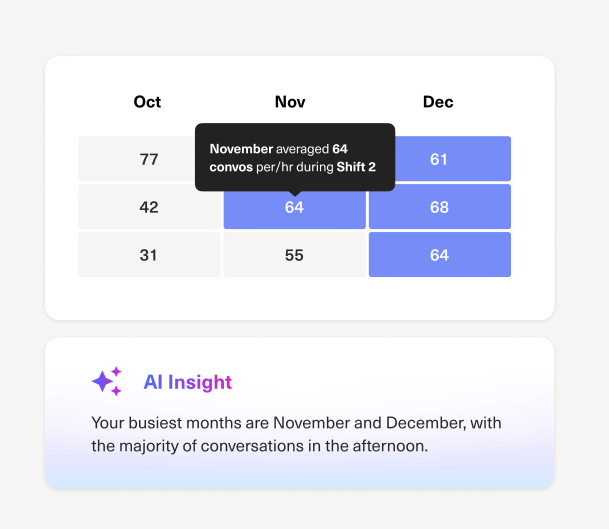
Go beyond “what happened” to understand which teams are struggling, where backlogs form, and which workflows need attention, then use those insights to adjust schedules, refine routing, and coach agents with confidence.

Top 5 Tools for AI-powered Ticket Deflection
Here are the top tools available for deploying AI deflection at scale.
1. Kustomer
Kustomer is an intelligent, CRM-first CX platform engineered to resolve customer issues from day one, rather than simply deflecting them. By tying every customer interaction, transaction, and behavioral data point into a single unified timeline, Kustomer gives its AI the exact context it needs to take action. It layers powerful intelligence onto your current CX stack, delivering smarter automation without disrupting the customer journey.
Key features
- Unified data foundation: Aggregates all omnichannel conversations, data, and history into one source of truth, ensuring the AI never asks a customer for information you already have.
- Intelligent orchestration: Uses real-time intent detection to adapt to the customer's context and seamlessly route every interaction to the right resource, rather than forcing users through rigid scripts.
- Deep workflow integration: Embeds AI directly into your CX workflows, allowing bots to connect to your backend systems and autonomously execute multi-step actions.
- Proactive rep signals: Surfaces real-time customer insights and contextual guidance directly in the agent's workspace, the moment a conversation is escalated.
- Trust and compliance built-in: Provides transparent, explainable AI decisions with built-in oversight and human-in-the-loop controls to protect your brand.
- Guided no-code setup: It allows CX teams to design, test, and evolve complex orchestration journeys from day one using a visual interface without needing developer support.
Why Kustomer stands out
- Eliminates the siloed ticket: Unlike legacy platforms that treat issues in a vacuum, Kustomer's continuous CRM architecture means the AI actually understands the customer's history and physically alters their account to resolve the problem.
- Automates highly transactional workflows: Instead of just linking to a help article, Kustomer connects to your backend to autonomously troubleshoot issues. Bulletproof used Kustomer's custom workflows to automatically resolve common delivery problems, drastically reducing their inbound transactional volume and freeing up advocates for high-value tasks.
- Executes complex order management autonomously: Kustomer connects your data systems to handle advanced AI workflows. Coterie Baby integrated Kustomer's AI tools for order management and automated dashboards, allowing their customer support team to reduce wait times and provide instant answers to customers.
- Transforms retail support with AI insights: Kustomer combines a customer-first platform with AI-powered agent tools. Lulu's used Kustomer to empower their support teams to respond faster, stay present, and deliver better omnichannel customer experiences at scale.
- Provides seamless human handoffs: When an issue is too complex for AI, Kustomer passes the entire conversation history and CRM context to the human agent instantly, ensuring the customer never has to repeat themselves.
2. Intercom (Fin)
Intercom is a highly popular chat-first platform that excels in the B2B SaaS space. Its AI engine, Fin, requires very little manual training and allows teams to rapidly deploy conversational self-service across multiple digital channels.
Key features
- Omnichannel deployment: It supports seamless AI integration across voice, web chat, and messaging apps like WhatsApp.
- Rapid setup: It ingests your existing help center and sets up in under an hour to begin resolving queries immediately.
- High resolution rate: It autonomously resolves an average of 67% of routine customer queries.
Pros
- Provides industry-leading conversational accuracy right out of the box.
- Offers an incredibly fast time-to-value for digital-native teams.
Cons
- It is one of the most expensive platforms on the market due to its per-resolution pricing model.
- The interface is less optimized for traditional, long-form email ticketing.
Learn more → 20 Best Intercom Alternatives & Competitors for 2026
3. Zendesk AI Agents
Zendesk is a legacy giant offering a mature, highly customizable platform for large enterprises. Its AI agents are designed to handle massive ticket volumes across global support operations with complex routing requirements.
Key features
- Multilingual support: It automatically translates and resolves queries in over 80 different languages.
- Massive integration ecosystem: It deeply integrates with over 1,000 marketplace applications to connect your entire tech stack.
- Advanced intent detection: It analyzes incoming messages to identify sentiment and route unresolved tickets to the exact right specialized agent.
Pros
- Offers unmatched scalability and customization for Fortune 500 companies.
- Provides a highly flexible backend for organizations with complex routing rules.
Cons
- The backend has a notoriously steep learning curve and often requires dedicated developers to maintain.
- Advanced AI capabilities require expensive, high-tier add-on packages.
Learn more → Is Zendesk Worth It? Hmm... See The Pros & Cons
4. Ada
Ada is an AI-driven automation platform focused heavily on e-commerce and fintech companies. It specializes in resolving highly complex issues by tapping directly into billing and CRM systems.
Key features
- Proprietary reasoning engine: It utilizes a custom AI architecture to resolve up to 83% of customer issues autonomously.
- Deep billing integrations: It connects seamlessly with backend payment gateways to automate workflows like refunds and subscription changes.
- Omnichannel consistency: It deploys the same intelligent workflows across web, mobile, social, and SMS.
Pros
- Excels at automating highly complex, multi-step transactional workflows.
- Delivers massive ROI for high-volume retail and financial brands.
Cons
- The platform can be overkill and prohibitively expensive for smaller teams with simpler support needs.
- It lacks some of the native, human-agent workspace features found in all-in-one helpdesks.
5. Decagon
Decagon is a newer, rapidly scaling platform designed specifically for fast-growing digital companies. It focuses on using natural language to build out complex resolution flows quickly.
Key features
- Agent operating procedures (AOPs): It uses plain English instructions rather than code to teach the AI how to handle specific, complex customer issues.
- High deflection rate: It averages a 70% true deflection rate across its deployed customer base.
- Proactive analytics: It provides real-time dashboards that highlight exactly where the AI is failing so teams can adjust quickly.
Pros
- Incredibly easy to train and deploy complex workflows using natural language.
- Highly effective for scaling tech companies that need rapid adjustments.
Cons
- As a newer platform, it lacks the decades of enterprise-grade security and compliance certifications of legacy tools.
- Its integration ecosystem is smaller compared to industry giants like Zendesk.
Automate Your Ticket Resolution with Kustomer
Scaling your support operation shouldn't mean sacrificing the personal touch. While AI autonomously resolves your routine inquiries, your human agents need the exact right context to handle complex escalations quickly and build genuine relationships.
Kustomer combines powerful AI automation with a unified CRM timeline. Instead of treating buyers like isolated ticket numbers, your agents see a complete, holistic history of every interaction, purchase, and preference in one place.
Take Vuori, the premium performance apparel brand. They needed a platform that allowed them to scale efficiently without losing their highly personalized approach.
Chad Warren, Senior Manager of Customer Service at Vuori, credits Kustomer's unified platform for their success: "If you look at what it means to be in a great relationship with someone, it's remembering their favorite things, remembering what they said to you last week. And Kustomer allows you to do that because of the timeline view."
By giving their team this continuous context, Vuori cut their agent onboarding time by nearly 20% and maintained the rapid, personalized responses required to drive consistently high CSAT scores.
Eliminate your ticket backlog and free up your agents today. Try Kustomer AI free for 30 days.
Frequently Asked Questions (FAQs)
What is a good ticket deflection rate?
A strong AI deflection rate typically falls between 20% and 40% for established brands, though highly optimized platforms can push this to 60% or higher for routine e-commerce queries. By resolving these common questions upfront, you ensure fewer tickets enter your core ticketing system, which translates directly into measurable cost savings.
However, you should prioritize measuring your true resolution rate over your raw deflection rate to ensure customers are actually getting their problems solved, not just abandoning the chat.
Does ticket deflection negatively impact customer satisfaction?
Traditional deflection—making it hard to contact support—ruins customer satisfaction. AI-powered ticket deflection actually elevates the entire support experience. By providing users with instant, 24/7 self-service options, it drastically reduces average response times and solves problems without forcing customers to wait hours or days in an email queue.
What are the most common use cases for AI deflection?
The highest-ROI use cases involve automating repetitive, tier-1 support requests before a new ticket is even created. For e-commerce, this includes order tracking, return processing, and exchange policies. For B2B SaaS, it involves password resets, basic onboarding questions, and billing inquiries.