Zoho Zia was one of the first AI assistants built into a CRM, and for many teams, it was a genuine first look at what AI could do within a support or sales workflow.
With sentiment analysis, anomaly detection, and automated suggestions, it covered the basics well enough to feel like a real step forward at the time.
But assisting an agent and actually resolving a ticket are not the same, and Zia still mostly does the first.
The other (and arguably bigger) issue is how closely Zia is tied to the broader Zoho suite. If you’re running a mixed stack alongside Zoho, the assistant can only ever see part of the picture, and there is only so much it can do when it is missing large portions of the context.
To put this guide together, we read hundreds of reviews on G2, Capterra, and Reddit to identify the 10 tools customer service teams recommend as more capable alternatives to Zia.
What is Zoho Zia? (And why look for an alternative?)
Zoho Zia is an AI assistant built into Zoho’s broader suite that analyzes data within those tools, scores leads, flags anomalies, and surfaces next-step suggestions for sales and support teams.
For teams already deep in the Zoho ecosystem, Zia makes a lot of sense. It comes included with the platform, works straight out of the box, and connects to your CRM and support data without any configuration.
The problem is that most teams are not fully inside the Zoho ecosystem, and for those that are not, the benefits are much harder to realize.
These are the most common reasons teams start looking for an alternative:
- It can only work with what is inside Zoho: If your support tickets go through Zendesk, your billing through Stripe, or your CRM through HubSpot, Zia cannot see any of it. [Read Full G2 Review]
- The full feature set is locked behind the most expensive plans: Zia is paywalled behind Zoho's two most expensive plans, and the newer agentic features are only available at the higher end of that range.
- The AI needs a lot of hand-holding: Zia can auto-fill fields and surface suggestions, but users say the results are wrong often enough that you cannot trust them without double-checking. [Read Full G2 Review]
Related reading → 10 Best Zoho Desk Alternatives & Competitors for 2026
Key features and functionalities to look for in a Zia alternative
Since you cannot replace Zia without replacing Zoho Desk (or adding a layer on top), you are effectively looking for a new support platform. Here are some features that you should look for:
- Autonomous resolution: Zoho's 2025 Zia Agents update introduced autonomous capabilities, but in practice, that mostly means knowledge base lookups and ticket tagging. A strong alternative should be able to take an issue all the way to resolution - process a refund, update an order, or close the conversation.
- No-code configuration: Even with Zoho's Agent Studio, configuring Zia is trickier than most teams expect. A good alternative should put that control in the hands of support managers, not engineers.
- Cross-platform data access: Zia only works with data already in Zoho, so it misses context from every other tool your team uses. The alternative should pull data from across your full stack - helpdesk, billing, CRM, and anything else relevant to the conversation.
- Unified customer timeline: When the AI only sees the current ticket, it misses everything that came before it. Look for a platform that pulls the customer's full history into a single view, across every channel and touchpoint.
- AI observability: If you can't see why the AI made a particular decision, you can't improve it or trust it at scale. At a minimum, you should be able to trace a decision back to the reasoning behind it and understand what went wrong.
- Omnichannel support with voice: Voice is still one of the most common support channels, and Zia doesn't cover it. The alternative should work natively across phone, email, chat, and social, so the AI isn't limited to whichever channels one vendor happens to support.
10 Best alternatives to Zoho Zia on the market right now
Not every alternative on this list will make sense for every team. Some are built for enterprise, others for e-commerce, and a few work as standalone AI layers on top of what you already have.
- Kustomer
- Salesforce Agentforce
- Zendesk (Zendesk AI)
- Hubspot Service Hub (Breeze)
- Freshdesk (Freddy AI)
- Intercom (Fin)
- Microsoft Copilot for Service
- Ada
- Gorgias
- Tidio (Lyro)
| Alternative | Key Differentiator | Best For | Pricing |
| Kustomer | CRM-native AI with a unified customer timeline that feeds directly into autonomous agents | Mixed stacks where the AI needs to see and act on data from multiple systems | Per seat or per conversation |
| Salesforce Agentforce | Multi-step autonomous execution with full audit trail on every AI action | Salesforce shops that want AI embedded in their existing CRM | From $2/conversation |
| Zendesk (Zendesk AI) | Largest knowledge base ecosystem in the space with low-code Action Builder for custom workflows | Large support orgs with complex routing and a heavy self-service operation | From $55/agent/month |
| HubSpot Service Hub (Breeze) | AI with native visibility into marketing, sales, and service data from one shared CRM | HubSpot users who want support, marketing, and sales data in one place | From $20/seat/month |
| Freshdesk (Freddy AI) | 50+ pre-built agentic workflows with native Shopify, Stripe, PayPal, and FedEx integrations | Mid-sized teams that want pre-built automations without a long setup | From $19/agent/month |
| Intercom (Fin) | Policy-aware AI agent that follows plain-English instructions with a built-in testing suite | Product-led companies with high chat volume | From $39/seat/month |
| Microsoft Copilot for Service | CRM-agnostic AI layer embedded in Outlook and Teams that works with your existing setup | Microsoft 365 orgs that want to layer AI on top of their current CRM | From $22/user/month |
| Ada | Standalone AI agent with a coaching layer that improves from flagged conversations over time | Teams that want standalone AI without replacing their helpdesk | Custom pricing |
| Gorgias | Deep Shopify integration where orders, returns, and discounts are handled directly in the conversation | Shopify-first e-commerce brands | From $10/month |
| Tidio (Lyro) | Claude-powered AI agent that scans your site and builds its own knowledge base automatically | Small teams that need AI coverage without enterprise pricing or complexity | From $39/month |
1. Kustomer
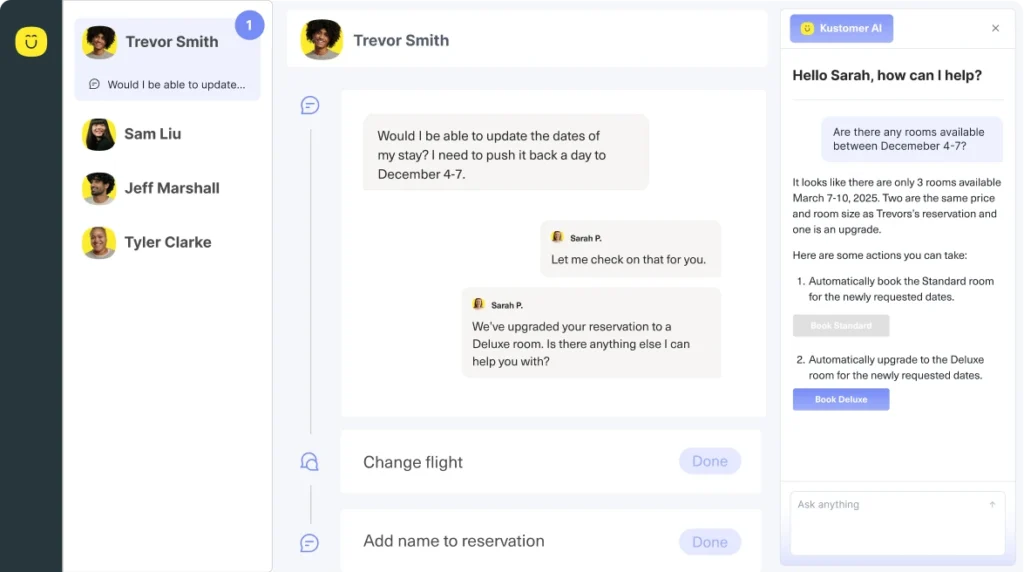
Kustomer is an AI-native customer service platform designed so that the AI and the agent see the same picture – a complete timeline of every order, conversation, and interaction the customer has ever had.
And unlike Zia, that picture is not confined to one ecosystem. Kustomer connects to Shopify, Stripe, HubSpot, and the rest of your stack. More importantly, it can act on what it sees. Process a return, issue a credit, update an order, all without waiting for a human to step in.
For teams that have been duct-taping around Zia's blind spots with manual lookups and workarounds, Kustomer is the most direct upgrade on this list.
Key features
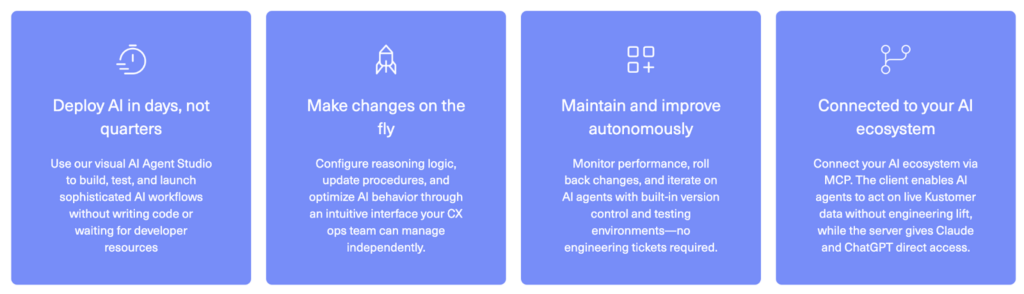
- Unified customer timeline: All customer interactions on email, chat, SMS, voice, WhatsApp, and social feed into a single timeline alongside order and billing data. When an AI or agent picks up a conversation, the full history is already available.
- AI Agents for Customers: AI agents that handle customer conversations on their own across every channel. They connect to Shopify, Stripe, and the rest of your stack to process refunds, look up orders, or update shipping details within the same conversation.
- AI Agents for Reps: When a conversation does reach a human agent, the AI stays in the background and helps. It pulls up relevant context, drafts responses, summarizes what happened so far, and handles real-time translation in 76 languages.
- AI Agent Studio: A no-code builder where support managers create and configure AI agents on their own. You define what each agent does, connect it to your knowledge base and tools, and test it against real scenarios before it goes live.
- Automated workflows: All the behind-the-scenes optimization that keeps support running smoothly, routing, SLA reminders, tagging, and quality checks, is handled by automated business rules and multi-step workflows.
- Kustomer AI for Zendesk: If your team runs on Zendesk, you do not need to move off it to use Kustomer's AI. It plugs in as a standalone product with the same AI agents, the same customer context, and the same configuration tools.
Advantages of using Kustomer
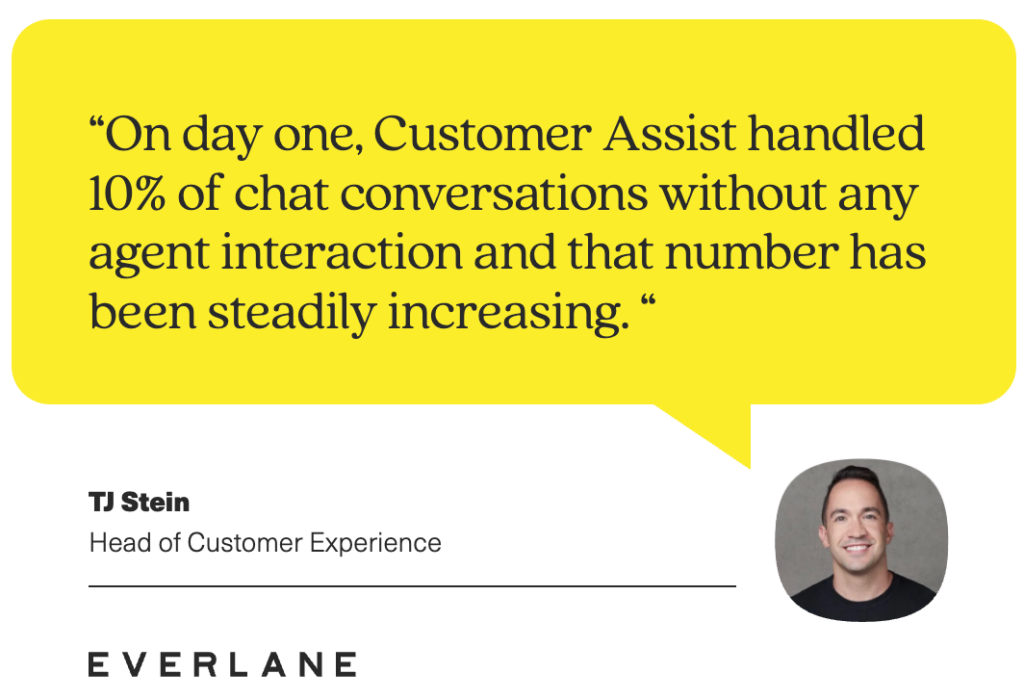
- Everlane was struggling with scalability and limited personalization on its previous platform. After switching to Kustomer, the team added AI to its self-service approach and measured a 4X increase in live service deflection.
- Jerome's Furniture, a 70-year-old Southern California retailer, had no unified view of the customer and nearly half of all requests were duplicates. After moving to Kustomer, they cut cost per contact by 40% and brought duplicates down to 8%.
"We've never had that reporting before, and it's given us the opportunity to change how we do business." — Marjorie Carlos, Senior Director of Consumer Experience
- Terra Kaffe, a luxury coffee machine brand, was on Zendesk, and customers had to repeat themselves every time they reached out because agents couldn't see past conversations. Kustomer put everything in one timeline, and the team saw immediate improvements in efficiency and collaboration.
“Throughout our relationship with Kustomer, we’ve been able to maintain a CSAT in the mid-90s for much of our growth, and we’re able to more effectively serve our community, even as it’s more than quadrupled in a relatively short period of time.” — Cate Marques, Chief Experience Officer
Pricing
You can use Kustomer as a standalone AI product on top of what you already have or go all in with the full platform, which includes the CRM, workflows, and omnichannel support.
Either way, pricing is flexible – per seat or per conversation, depending on what makes more sense for your team.
2. Salesforce Agentforce (formerly Einstein)
Agentforce is the AI agent layer inside Salesforce. It can plan and execute multi-step tasks in sales automation, service, and operations, all without a human operator.
The current release, Agentforce 360, also brings native voice support, a conversational agent builder, and the option to run models from OpenAI, Anthropic, or Google as the underlying engine.
Compared to Zia, which primarily assists agents with suggestions and summaries, Agentforce is designed to own tasks end-to-end and act on data points across Salesforce and connected external systems.
Key features
- Agentforce Voice: A native voice channel with real-time transcription and the ability for human agents to take over mid-conversation. The full interaction logs directly into Salesforce.
- Full audit trail via Data 360: Every agent action is logged with full traceability. This is a notable gap in most competing platforms, including Zia.
- Autonomous task execution: Agentforce can resolve support issues from start to finish on its own, whether that involves updating a record, kicking off a workflow, or calling an external system through an API.
Pros
- Easy initial setup: Getting an agent up and running doesn't take long. You name it, give it instructions and actions, and it's ready to go. One G2 reviewer specifically mentioned leaving Zoho because of how much easier the setup process was. [Read Full G2 Review]
- Context-aware responses: Agentforce pulls from actual customer records, past interactions, and open cases rather than giving generic answers. That makes its output noticeably more relevant than what you get from a general-purpose AI. [Read Full G2 Review]
- Flexible integration: It connects well with existing systems, including homegrown CRM solutions and third-party platforms like payment processors, without heavy custom development. [Read Full G2 Review]
Cons
- Responses need regular fine-tuning: Out of the box, the AI doesn't always match your tone or business logic perfectly. Expect to spend time adjusting prompts and flows before the responses feel right. [Read Full G2 Review]
- Limited customization compared to open frameworks: Because Agentforce operates within Salesforce's guardrails, it's less flexible than fully custom or open-source agent setups. [Read Full G2 Review]
- Still maturing as a product: Agentforce is relatively new, and some features are either limited or locked behind specific license tiers. Smaller teams in particular may find that not everything is accessible out of the box. [Read Full G2 Review]
Pricing
A free tier is available through Salesforce Foundations with 200,000 Flex Credits included.
Paid plans offer either $2 per conversation or Flex Credits at $500 per 100,000 credits. Per-user add-ons start at $125/user/month, with enterprise editions at $550/user/month.
Related reading → Top 10 Salesforce Service Cloud Alternatives for 2026
3. Zendesk (Zendesk AI)
Zendesk is one of the largest customer service platforms on the market. Their AI handles autonomous ticket resolution on chat, email, and voice, while a copilot layer helps human agents work faster with drafts, summaries, and recommendations.
For teams coming from Zia, the biggest upgrade is how much Zendesk can connect to outside its own ecosystem. It works with a far wider range of tools, channels, and data sources out of the box.
Key features
- Intelligent triage: Automatically detects customer intent, language, and sentiment on incoming tickets and routes them to the right team or agent based on those signals.
- AI Agents: Resolve routine tickets on their own through chat, email, and voice. They pull from your knowledge base, help center, and any connected data sources.
- Action Builder: A low-code tool that you can use to create custom workflows and connect AI agents to external systems without developer support.
Pros
- Flexible AI responses: Users mentioned how much better Zendesk's generative AI has gotten since it dropped the rigid scripted model. Conversations feel more natural now, and the bot recovers well when customers don't follow the expected path. [Read Full G2 Review]
- Full ticket history in one place: It's easy to pull up a customer's complete interaction history, which gives agents the context they need to pick up where a previous conversation left off. [Read Full G2 Review]
- Extensive self-service foundation: Zendesk has one of the largest and most developed knowledge base ecosystems in the space. [Read Full G2 Review]
Cons
- Not plug-and-play: Don't expect to be up and running in a day. Reviewers say getting workflows right often requires a dedicated admin or outside help, especially for more complex configurations. [Read Full G2 Review]
- Hard to budget for at scale: The base price looks reasonable, but adding agents, AI, and Copilot quickly pushes the monthly total into enterprise territory. [Read Full G2 Review]
- Limited shift-based assignment: Teams with rotating engineers say it's harder than it should be to route tickets to the right person based on who's currently on shift. [Read Full G2 Review]
Learn more → Is Zendesk Worth It? Hmm... See The Pros & Cons
Pricing
Zendesk pricing starts at $19/agent/month for a standalone Support Team for basic ticketing only.
- Suite Team starts at $55/agent/month
- Suite Professional at $115/agent/month
- Suite Enterprise at $169/agent/month, all billed annually
Basic AI agents and generative replies are included in Suite plans. Advanced AI and Copilot are available as add-ons at roughly $50/agent/month each.
Learn more → Top 20 Zendesk Alternatives & Competitors (Ranked & Rated) | Kustomer
4. HubSpot Service Hub (Breeze)
HubSpot Service Hub is the customer support arm of HubSpot's CRM platform, and its AI features all fall under Breeze.
Breeze includes a Customer Agent that can resolve tickets on its own using your knowledge base and CRM data, plus an assistant that helps human agents with summaries, drafts, and context.
Because it all runs on HubSpot's shared data model, Breeze has visibility into customer engagement, marketing, sales, and service in a way that Zia does not.
Key features
- Customer Agent: Resolves support inquiries on its own through nine or more channels using your knowledge base and CRM data.
- Knowledge Base Agent: Identifies gaps in your help content by analyzing past tickets, calls, and emails, then drafts new articles to fill them automatically.
- Breeze Intelligence: Runs in the background to fill gaps in your CRM with firmographic data, buyer intent, and company details.
Pros
- Strong automation for routine tasks: Reviewers point out how much time the platform saves by automating repetitive work like ticket assignment, follow-up emails, and status updates without manual input. [Read Full G2 Review]
- Effective self-service: The built-in knowledge base agent resolves routine questions on its own, which, according to reviewers, has freed up significant agent time. [Read Full G2 Review]
- Everything in one place: Because Service Hub is part of the broader HubSpot platform, teams can manage most of their day-to-day work from a single interface. [Read Full G2 Review]
Cons
- AI credits burn fast: The credit system sounds flexible, but reviewers warn that AI-heavy teams can burn through their allotment fast. [Read Full G2 Review]
- AI support responses can feel generic: HubSpot's own AI support replies can be vague. Several reviewers mention needing to follow up more than once before getting a useful response. [Read Full G2 Review]
- No dark mode and dated UI: Still no dark mode, and some reviewers find the color scheme and overall interface feel behind the times. [Read Full G2 Review]
Pricing
A free tier is available with basic ticketing, live chat, and contact management.
- Starter begins at $20/seat/month
- Professional at $100/seat/month
- Enterprise at $150/seat/month with a 10-seat minimum.
The full Breeze AI suite, including autonomous agents, is available on Enterprise.
Related reading → 10 Best HubSpot Service Hub Alternatives to Consider in 2026
5. Freshdesk (Freddy AI)
Freshdesk is Freshworks' help desk platform, and Freddy AI is the suite of AI tools built into it. That includes an autonomous agent for chat and email, a copilot for human agents, and a reporting layer for support managers.
Compared to Zia, Freddy leans more heavily into pre-built agentic workflows, with out-of-the-box integrations for tools like Shopify, Stripe, and FedEx that let the AI take real actions like processing refunds or tracking orders.
Key features
- Freddy AI Agent: Resolves routine inquiries on chat and email using your knowledge base and connected backend systems.
- Pre-built agentic workflows: Ships with 50+ ready-to-launch workflows for common use cases like order cancellations, subscription changes, and shipping updates, with native integrations for Shopify, Stripe, PayPal, and FedEx.
- Freddy Insights: Sends proactive alerts when metrics shift, like a CSAT drop or SLA spike, and lets managers ask questions in natural language to get instant answers from their support data.
Pros
- Multi-brand reply management: Useful for multi-brand teams that need consistent, fast replies. One G2 reviewer credited canned responses with a 37% improvement in first response time. [Read Full G2 Review]
- Flexible automation: The platform makes it easy to build custom automation scenarios that match how your team operates. [Read Full G2 Review]
- Quick to learn: The interface is clean enough that most users can get up to speed in a few days. One reviewer had the full platform figured out within two to three days. [Read Full G2 Review]
Cons
- Performance under load: The platform can feel sluggish when agents are working on multiple tickets at once, which adds up during high-volume periods. [Read Full G2 Review]
- Third-party integrations need work: Common integrations are fine, but connecting certain CRM or marketing tools takes more effort than expected and isn't always straightforward. [Read Full G2 Review]
- Poor mobile experience: The mobile app covers the basics but not much else. Reviewers say it doesn't come close to matching what the desktop version offers. [Read Full G2 Review]
Pricing
A free plan is available for up to 2 agents for 6 months. Growth starts at $19/agent/month, Pro at $55/agent/month, and Enterprise at $89/agent/month, all billed annually.
Freddy AI Agent is available on Pro and Enterprise with 500 sessions included, and additional sessions cost $49 per 100.
Related reading → 17 Best Freshdesk Alternatives for 2026 (Based on Real Users)
6. Intercom (Fin)
Fin is Intercom's AI agent, now on its third version. It manages customer conversations on chat, email, and voice on its own, and can do everything from answering a simple question to processing a return or changing a subscription.
Where Zia works inside a closed ecosystem and mostly helps agents do their jobs faster, Fin operates independently, connects to tools like Shopify and Stripe, and does the job itself.
Key features
- Fin AI Agent: Resolves customer conversations on its own through chat, email, and voice.
- Policy-aware task execution: You can teach Fin how to handle specific scenarios like returns or plan changes by writing instructions in plain English. It follows them precisely while still reasoning through edge cases on its own.
- Test before you go live: A built-in testing suite lets you throw real scenarios at Fin before it talks to real customers.
Pros
- Accurate out of the box: Users say Fin understands customer questions well and gives relevant answers from your help content without much manual tuning. [Read Full G2 Review]
- Customizable tone and personality: You can set specific guidance on how Fin communicates, including tone of voice and brand guidelines. [Read Full G2 Review]
- Rich, multi-source answers: Fin can pull from different knowledge sources in the same response and include images alongside text. Reviewers say this makes answers noticeably easier for customers to follow. [Read Full G2 Review]
Cons
- Unpredictable billing model: The $0.99 per resolution model works well at low volume, but reviewers warn it gets expensive fast once the AI starts handling a lot of conversations. [Read Full G2 Review]
- Struggles with some languages: The AI works well in English, but users say certain languages get less reliable results. [Read Full G2 Review]
- Hard to fine-tune individual responses: If Fin phrases something slightly wrong based on a help article, there's no simple way to correct just that detail. [Read Full G2 Review]
Pricing
Essential starts at $39/seat/month, Advanced at $99/seat/month, and Expert at $139/seat/month.
Fin AI Agent is priced at $0.99 per resolution on top of your plan, with no charge when it doesn't resolve. Copilot is $35/agent/month as an add-on. SMS, WhatsApp, and phone are all usage-based.
Related reading → Learn why customers are switching away from Intercom. See the most popular alternatives to Intercom with features, pricing, pros and cons.
7. Microsoft Copilot for Service
Unlike Zia, which essentially forces you to use Zoho’s ecosystem to access it, Microsoft Copilot for Service was designed to plug on top of whatever CRM your team already uses.
If you’re already on Microsoft 365 and don't want to rip out your current CRM, it's one of the more practical paths to AI-assisted support.
Key features
- Works with your existing CRM: Connects to Salesforce, ServiceNow, Zendesk, Genesys, and Dynamics 365 out of the box.
- AI-powered email drafting in Outlook: Generates context-aware email replies using case data and knowledge base content from your CRM.
- Embedded in Teams: Agents can access case information during calls, get suggested conversation scripts, and save interaction summaries back to the CRM directly from a Teams meeting.
Pros
- Turns meetings into action items: User reviews love that Copilot can summarize support calls, sales calls and long chat threads into clean recaps with decisions, owners, and follow-ups. [Read Full G2 Review]
- Easy to pick up: The interface feels familiar to anyone already in the Microsoft ecosystem, and users say the quality of responses holds up well compared to other AI tools they've tried. [Read Full G2 Review]
- CRM-aware responses: Because Copilot connects directly to your CRM, it can pull real-time data on leads, customer history, and market segments into the conversation without the agent having to look anything up. [Read Full G2 Review]
Cons
- Needs a lot of hand-holding: The AI doesn't produce polished, ready-to-use output right away. Users say it takes more prompting and refinement than other tools. [Read Full G2 Review]
- Struggles without clean input: When meeting transcripts are messy, or conversations are full of internal jargon and acronyms, Copilot tends to miss important context. The output gets noticeably more generic in those situations. [Read Full G2 Review]
- Confusing and expensive pricing: The licensing structure is hard to follow, and the total cost adds up fast once you factor in the base Microsoft 365 license, the Copilot add-on, and the Service-specific layer on top. [Read Full G2 Review]
Pricing
Copilot Chat is included at no cost for eligible Microsoft 365 users.
Microsoft 365 Business Standard + Copilot Business is currently $22/user/month, and the same bundle without Teams is $19.90/user/month.
8. Ada
If you can't leave Zoho Desk but need better AI than Zia provides, Ada is one of the few platforms designed for that scenario.
The tool works as a standalone AI agent that sits on top of your existing help desk, streamlines customer conversations independently, and creates a ticket only when the AI can't finish the job.
In practice, Ada can do things Zia doesn't come close to. A customer disputing a charge gets their account pulled up, the transaction reviewed, the credit issued, and a confirmation sent, all within the same conversation and without an agent involved.
Key features
- Reasoning Engine: A single AI layer that handles intent, context, and decision-making consistently on every channel. Whether the customer reaches out on chat, email, or voice, the agent behaves the same way.
- Playbooks: You define how the AI should handle complex tasks in plain language or by uploading a PDF of your SOPs.
- Coaching: You can flag issues in past conversations and tell the AI what to do differently. Those corrections carry forward automatically, so the agent gets better over time without any workflow changes.
Pros
- Smooth knowledge integration: Users say syncing support content from external platforms is one of the easier parts of setup, and the coaching layer on top makes it simple to adjust how the AI interprets it. [Read Full G2 Review]
- Genuinely useful onboarding: Ada has a dedicated academy that users say genuinely prepares you to work with the platform. Several reviewers went from no AI experience to managing agents on their own. [Read Full G2 Review]
- Great support team: Ada's support comes up a lot in positive reviews. Users say the team is helpful, responsive, and willing to put in real effort when something isn't working. [Read Full G2 Review]
Cons
- Reporting could be better: The analytics cover the basics, but users say it's hard to get nuanced insights from the built-in reports. CSAT in particular doesn't always reflect how well the AI is actually performing. [Read Full G2 Review]
- Customer-facing UI needs polish: The experience powered by Playbooks works functionally, but users say the interface customers see could look and feel better. [Read Full G2 Review]
- Bots have to be trained one by one: If you run more than one bot, each has to be trained separately. There's no way to sync training or updates between them. [Read Full G2 Review]
Pricing
Ada doesn't publish pricing publicly. Quotes are custom and based on volume, channels, and features. To get an accurate quote, you’ll need to contact their sales team.
9. Gorgias
Gorgias is a help desk AI platform built specifically for e-commerce brands on Shopify, WooCommerce, BigCommerce, and Magento.
Unlike general-purpose help desks that bolt on e-commerce support through integrations, Gorgias treats orders, products, and customer purchase history as first-class data.
Key features
- Deep Shopify integration: The AI pulls live store data and can cancel orders, start returns, apply discounts, and update shipping details directly from the conversation.
- Shopping Assistant: Proactively engages visitors with personalized product recommendations based on browsing behavior, cart contents, and purchase history.
- Custom AI instructions: You define how the AI should handle specific situations by writing instructions in plain language. Much easier to update than traditional chatbot scripts, and flexible enough to cover regional policies, customer tiers, and product-specific rules.
Pros
- Product-aware recommendations: The Shopping Assistant recommends products, links to them in the conversation, and maintains high CSAT, all without manual intervention from the team. [Read Full G2 Review]
- Shopify data in one place: Users say they no longer need to switch between Shopify Admin and their support tool. Orders, customer history, and product details are all within Gorgias. [Read Full G2 Review]
- Simple to get started: Users say getting Gorgias configured and running took less time and effort than they expected going in. [Read Full G2 Review]
Cons
- AI costs on top of ticket fees: You pay for your ticket volume and then pay again for every AI resolution. [Read Full G2 Review]
- Weak social media ad integration: The platform doesn't handle paid ad comments on social media platforms well, which was mentioned by e-commerce brands that rely heavily on social advertising. [Read Full G2 Review]
- Can't preview AI replies before they go out: Users want the ability to see what the AI plans to send and approve it first. Right now, there's no confirmation step before the response reaches the customer. [Read Full G2 Review]
Pricing
Gorgias uses ticket-based pricing, not per-agent.
- Starter is $10/month for 50 tickets
- Basic is $50/month for 300 tickets
- Pro is $300/month for 2,000 tickets
- Advanced is $750/month for 5,000 tickets.
Enterprise is custom-priced. AI Agent resolutions cost an additional $0.90 per ticket on annual plans and $1.00 per ticket on monthly plans.
Related reading → Top 17 Gorgias Alternatives & Competitors (Based on Real User Feedback)
10. Tidio (Lyro)
Tidio is a customer communication platform designed for small and mid-sized businesses.
Lyro is its built-in AI agent that runs Anthropic's Claude model, learns from your existing support content, and resolves customer questions. And unlike Zia, you're not locked into a single ecosystem.
If your team needs more than Zia can offer but doesn't need the weight of an enterprise platform like Ada or Zendesk, Tidio is the most practical entry point on this list.
Key features
- Smart Actions: Lyro can take real actions during a conversation, like updating an address, checking order status, triggering a refund, or logging a lead, all through secure API connections to your systems.
- Unanswered question tracking: When Lyro can't answer a question, it logs it in a suggestions list. This gives you a clear roadmap of what content to add next, so the AI improves with every gap you fill.
- Works with your existing stack: You don't need to move off your current tools. Lyro integrates with Zendesk, Intercom, Salesforce, Shopify, and WordPress and runs as an AI-driven layer on top of your existing ticketing system.
Pros
- Built for lean teams: Users say Lyro handles up to 70% of customer questions without a human, so small teams or a startup can provide full-time coverage without full-time staff. [Read Full G2 Review]
- Instant knowledge base from your site: Lyro can scan your website and build its own knowledge base automatically. [Read Full G2 Review]
- Adjustable tone: You can set Lyro's voice anywhere from buttoned-up professional to relaxed and conversational [Read Full G2 Review]
Cons
- Complex responses take time to get right: Simple questions work well out of the box, but users say it takes some effort to train the AI on more nuanced queries. [Read Full G2 Review]
- Limited visitor data: The platform doesn't always capture enough information about who's on your site. Users want better IP-based identification to qualify leads faster. [Read Full G2 Review]
- Free plan is very limited: The chatbot automation tools are locked behind paid plans, and the 7-day trial doesn't give most teams enough time to properly evaluate a tool this complex. [Read Full G2 Review]
Pricing
Every Tidio account starts with 50 free Lyro conversations. After that, the Lyro AI Agent add-on starts at $39/month for 50 conversations and scales up with volume. Tidio puts the cost at around $0.50 per conversation.
You don't need to subscribe to Tidio's help desk to use Lyro – it works as a standalone AI layer on top of Zendesk, Intercom, or Salesforce.
Kustomer — The #1 Zoho Zia Alternative
Zia is not a bad choice by any means, but if you need AI that can resolve tickets on its own, pull data from tools outside Zoho, or handle something as basic as a phone call, you will hit its limits quickly.
Kustomer brings the CRM, the AI, and every connected system into one shared view, so the AI resolves conversations with the same context a senior agent would have.
If you need a platform that replaces manual lookups and handoffs with end-to-end automation, Kustomer is the stronger choice.
With Kustomer, you get:
- A unified timeline with every order, conversation, and interaction in one view.
- AI agents that resolve issues end-to-end through Shopify, Stripe, and your other systems.
- A full audit trail on every AI action with plain-language explanations.
- A no-code AI Agent Studio that your managers can control without engineering involvement
The fastest way to know if Kustomer fits is to test it against your actual support volume. The AI comes with a 30-day free trial, and demos are available if you want someone to walk you through the platform with your specific setup in mind.
FAQs
Is Zia available as a standalone product?
No. Zia only works inside Zoho's ecosystem and cannot be separated from it.
If you want AI-powered support without committing to the full Zoho suite, Kustomer and Ada are the two strongest options — Kustomer because its AI runs as a standalone product on top of Zendesk, and Ada because it layers onto most major helpdesks through its API.
Can other AI tools integrate with Zoho Desk?
Yes, but not natively in most cases.
Ada can connect to Zoho Desk through its API, though it is not a turnkey setup. Tidio also integrates with a range of helpdesks, though Zoho is not one of its primary connections.
Which alternative is best for e-commerce?
Gorgias for pure Shopify stores that want deep store integration without a heavy setup. Kustomer for teams where e-commerce is one part of the picture and the AI needs to work in a broader stack.