
Customer service automation was supposed to make support teams faster and customers happier. Instead, most companies ended up with AI-powered chatbots that frustrate users, workflows that break when anything goes off-script, and “automated” systems that just create more work for agents cleaning up the mess.
The problem isn’t automation itself. But we have tools automating tasks instead of outcomes. They’ll route a ticket or trigger a canned response, but they can’t orchestrate the context, data, and workflows needed to actually resolve customer issues without human intervention.
The result is a patchwork of workflows that optimize individual steps while making the overall experience worse.
The gap between task automation and outcome automation is where most support organizations get stuck. You need tools that understand the difference between moving tickets around and moving customers toward resolution.
This guide breaks down 17 customer service automation platforms based on what they actually automate, where they fit best, and what kind of support organization they’re built for.
Not every tool here will work for your environment, but the right one will help change how your team operates.
How We Evaluated These Customer Service Automation Tools
We focused on whether the automation actually improves customer outcomes and agent efficiency in production environments.
Below are our criteria for selection:
Automation depth
We prioritized platforms that orchestrate complete resolutions rather than just automating individual tasks like ticket routing or canned responses.
The distinction here is important. Simple task automation just speeds up steps, but outcome automation actually resolves customer issues. We looked for systems that can handle multi-step problems requiring data from multiple sources without breaking down when customers deviate from expected paths.
Context awareness across interactions
Effective automation requires understanding who the customer is, what they’ve purchased, their support history, and their current issue across all channels.
We evaluated how well each platform maintains this context versus treating every interaction as isolated. Systems that force customers to repeat themselves or make agents hunt for information fail this test regardless of their other capabilities.
Channel consistency and continuity
When customers switch from email to chat to phone, the automation should maintain continuity. We assessed whether each platform operates as a unified system or as separate channel silos with disconnected workflows and data gaps.
Agent enablement
The best automation surfaces the right information so agents resolve issues faster. We distinguished between platforms that enhance agent effectiveness and those that try to block customers from reaching humans until automation fails.
Implementation timeline and complexity
We considered how long it actually takes to get value from each platform. Some require months of professional services and workflow mapping before you see results.
Others provide immediate automation with room to customize as you scale. Speed to value matters, especially when you’re solving urgent support challenges.
Scalability without maintenance overhead
We evaluated whether platforms can handle increasing volume without exponential increases in complexity.
Solutions that require custom development and constant tweaking for every new automation create operational debt that negates their efficiency gains.
Key Features to Look for in Customer Service Automation Software
AI capabilities (action-oriented bots)
Look for AI agents that integrate directly with your order management system, CRM, billing platform, and fulfillment tools to perform actual resolutions.
For example, processing refunds, updating subscriptions, modifying orders, applying credits—without requiring constant follow-ups with agents for approval.
Intelligent triage and routing
Not all tickets are equal, and modern automation needs to recognize that instantly. Intelligent triage uses natural language processing (NLP) and sentiment analysis to understand why a customer is reaching out and how urgent the issue is.
For example, the platform should distinguish between:
- “My package hasn’t arrived, and I need it for tomorrow,” versus “curious about tracking updates” and route accordingly.
Instead of sending everything into a general queue, the system routes each interaction to the right workflow, agent, or automation path from the start.
Related reading → 12 Best AI Ticket Routing and Triage Tools for 2026
Omnichannel support with unified workflows
Being available on email, chat, SMS, WhatsApp, and voice doesn’t mean you’re delivering omnichannel support. True omnichannel automation maintains context and continuity when customers switch channels mid-conversation.
The workflow you build should execute consistently, whether the customer reaches you through email or WhatsApp. Also, the system should recognize that the SMS message asking for an update is from the same customer who emailed yesterday.
Look for customer service tools with visual workflow builders that let you design automation logic once and deploy it across all channels.
Related reading → 15 Best Omnichannel Customer Support Platforms for 2026
Proactive engagement based on customer signals
Your preferred platform should trigger support actions based on behavioral signals and operational data.
For example:
- sending shipping delay notifications with compensation before customers complain,
- reaching out to high-value customers experiencing product issues,
- offering assistance when usage patterns indicate confusion.
This requires integrations that pull data from across your business systems and rules engines to determine when intervention adds value versus when it’s just noise.
Self-service system
Knowledge bases typically become outdated because maintaining them requires manual effort that customer support teams can’t prioritize.
Advanced platforms analyze incoming ticket patterns to identify gaps in self-service content, then either alert you to missing documentation or automatically draft help articles based on how agents are resolving those issues.
The system should track which knowledge base searches fail to deflect tickets and surface those gaps for remediation.
Real-time agent assist (Copilots)
Automation should also extend to human agents. Prioritize platforms that provide real-time guidance during calls and chats. E.g., surfacing relevant knowledge articles, suggesting troubleshooting steps, flagging policy exceptions, or recommending next-best actions based on the conversation context.
This “copilot” functionality makes agents more effective by eliminating the need to search multiple systems while talking to customers.
Top Customer Service Automation Software on the Market Right Now
- Kustomer
- Zendesk
- Freshdesk
- LiveAgent
- Hiver
- ProProfs Help Desk
- Help Scout
- HappyFox
- Zoho Desk
- Salesforce Service Cloud
- Intercom
- Gladly
- Gorgias
- Tidio
- Kayako
- Front
- HubSpot Service Hub
1. Kustomer
| Best for: Complex, high-context support operations that need automation tied to customer data, decisions, and actions. |
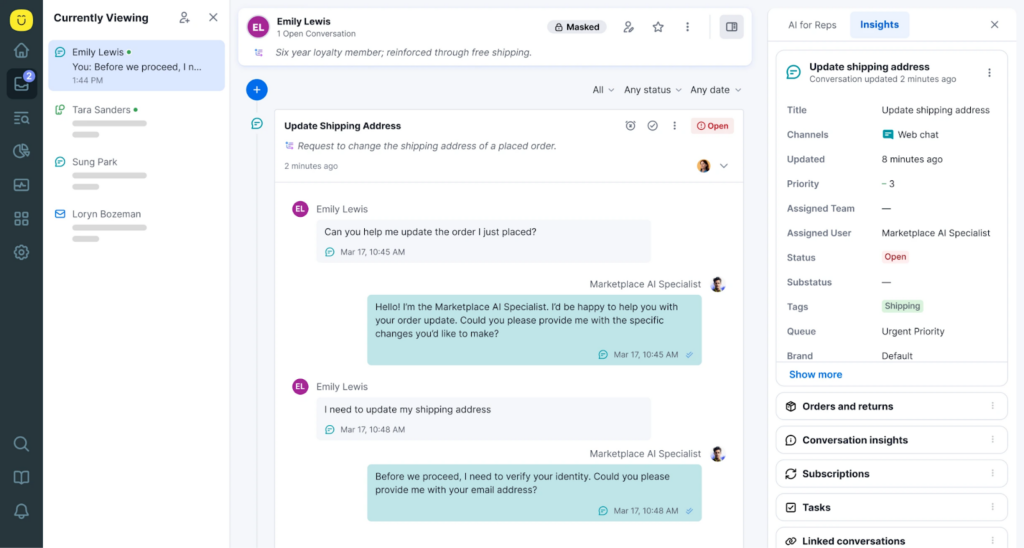
Kustomer treats customer service automation as an orchestration problem. It’s built around the idea that effective automation requires understanding the complete customer context.
In this case, knowing their purchase history, previous conversations, account status, order details—and making that intelligence available to both AI agents and human agents in a unified interface.
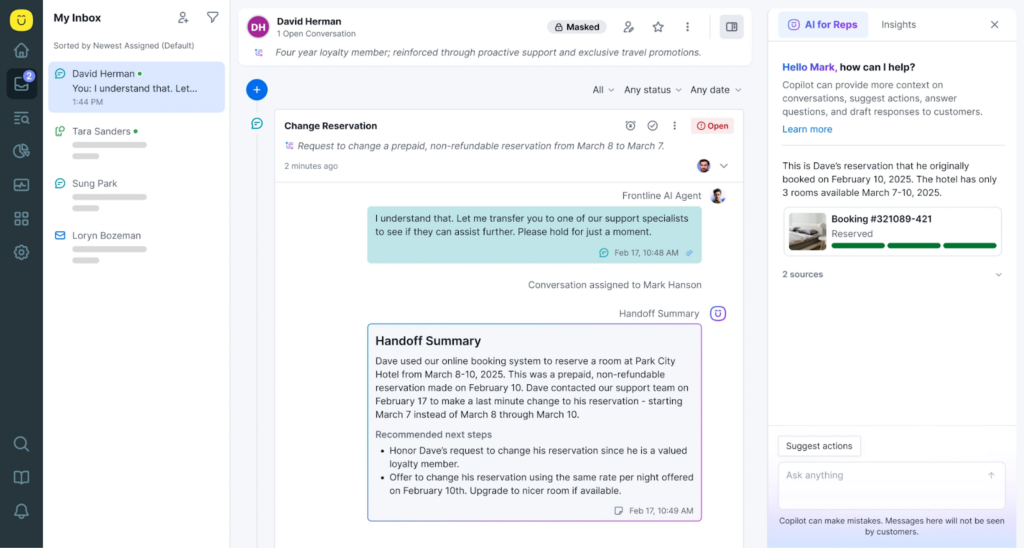
For example, with the Handoff Summary feature, agents get a quick rundown on the status of the customer—in this case, Dave, who is making a last minute change to their reservation. And the entire feel of this automation process is smooth because it’s embedded in how the entire system operates.
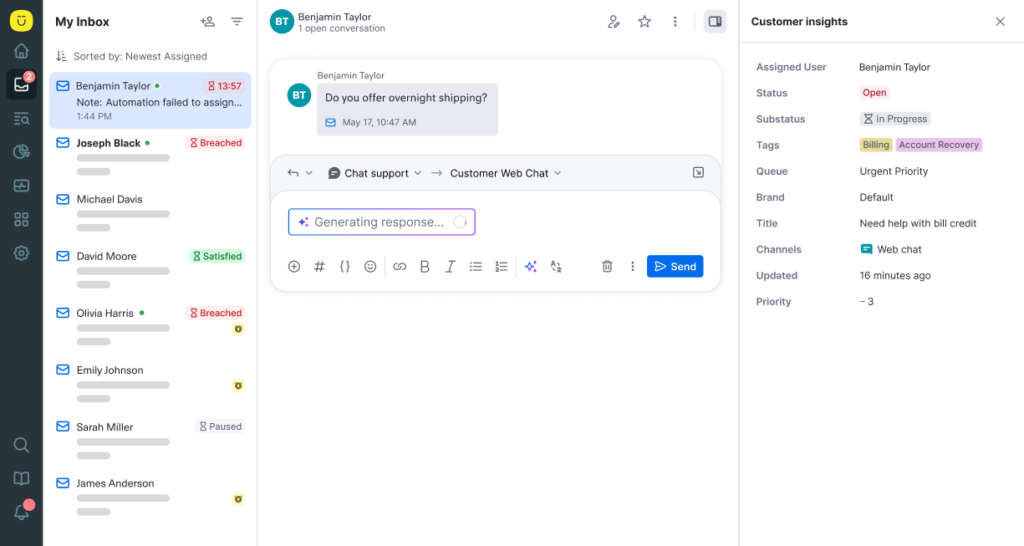
Kustomer also introduces the KIQ, which was designed to enhance both agent productivity and customer self-service experiences using AI.
A quick example is a customer asking to modify their subscription. Instead of routing them to a queue, the AI agent;
- access your billing system,
- validates the request against business rules,
- makes the change, and
- confirms it with the customer.
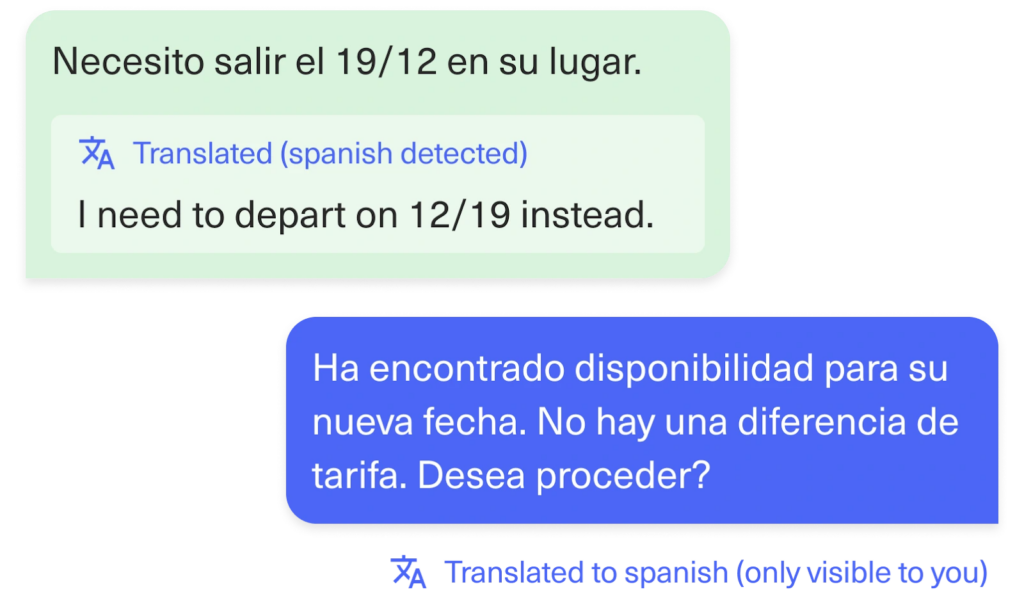
Kustomer’s automation system executes the outcome seamlessly. And when issues require human judgment, agents inherit the full conversation context and customer data without needing to ask customers to repeat themselves or dig through multiple systems to understand what’s happening.
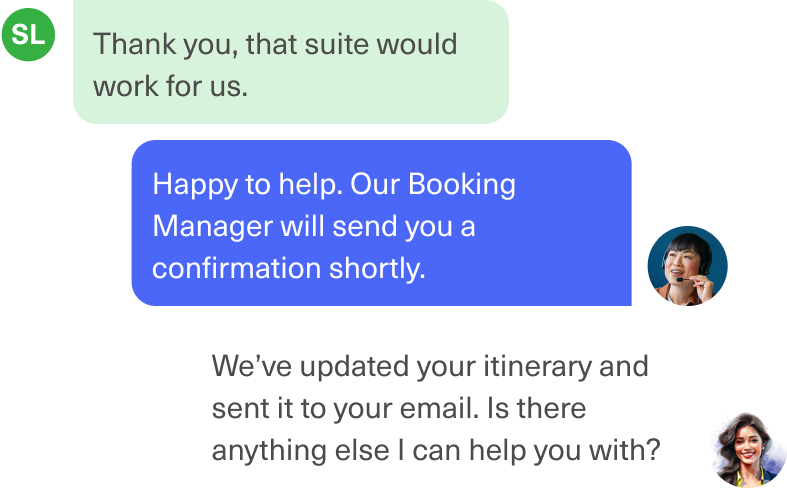
Plus, Kustomer can make intelligent decisions based on who the customer is and what resolution actually looks like for their specific situation. You simply have to define the logic once, and it executes consistently regardless of how the customer contacts you.
You can experience this with the AI Agents for Customers and AI Agents for Reps
Key features of Kustomer
- Unified customer timeline: Every interaction, purchase, support case, and behavioral signal appears in a single chronological view that both AI agents and human agents reference.
- Intelligent routing engine: Kustomer analyzes conversation content, customer sentiment, account value, and issue complexity to route requests to the optimal resource. This could be an immediate AI resolution, a specialized team, or a senior agent.
- 📌 Note: Routing decisions factor in real-time data like current queue depth and agent expertise.
- Omnichannel workflow builder: Visual workflow automation that lets you design resolution logic once and deploy it across multiple channels such as email, chat, SMS, WhatsApp, voice, and social media.
- Real-time agent assist: During live conversations, the platform surfaces relevant knowledge articles, suggests next-best actions, highlights applicable policies, and recommends responses based on similar resolved cases.
- Business rules and guardrails: Allows teams define when automation should trigger actions like tagging, status changes, escalations, or handoffs.
- Rules can be layered, conditional, and channel-aware.
What users are saying about Kustomer
Reviews from G2:
- “The tool itself is excellent, with one of its greatest strengths being the wide range of customization options that allow it to adapt to specific business needs. Its AI capabilities are a particularly valuable addition, helping future-proof both the platform and our operations.” [Marc Jandel P on G2]
- “I like that Kustomer speeds up the process for delivery dispatch and provides a stable platform for customer interactions and with the store. I really like how it tracks customer interactions and is able to hand off to different teams. Also, the initial setup of Kustomer was really easy.” [Kevin D on G2]
From lived experiences of support leaders:
- Tiffany Steinberg, Senior Manager of Customer Service at Lulus— “Kustomer has been the platform that allowed us to truly start with the customer first approach. Everything that we do is catered around knowing who our customer is, what their history looks like, are they a first time shopper, are they familiar with us? And being able to have just truly the Kustomer timeline to keep everything together to build your history. It saves a lot of time for our agents.. [..].”
- Michael Ludwig, Head of Customer Experience at Hexclad — “We pull every omnichannel customer touchpoint into Kustomer, which gives our agents a complete view of our customer. So, whenever someone reaches out with an issue, our agents can quickly see what’s going on and solve the problem.”
Read how Hexclad switched from Zendesk to Kustomer and increased CLV by 21%
How much does Kustomer cost?
Kustomer offers two pricing options:
- Enterprise: $89 per seat/month.
- Ultimate: $139 per seat/month.
And if you’re thinking of add-ons, Kustomer offers AI for Customers at $0.60 per engaged conversation and AI for reps at $40 per seat/month.
Still not sure if Kustomer fits your support model?
See how Turo answered that question.
Julie Weingardt, Chief Operations Officer at Turo, shares how the world’s largest car-sharing marketplace upgraded from a ticket-based CRM to a fully conversational customer service platform with Kustomer.
See what happens what happens after you ditch tickets →
2. Zendesk
| Best for: High-volume support teams that prioritize queue management, consistency, and predictable workflows. |
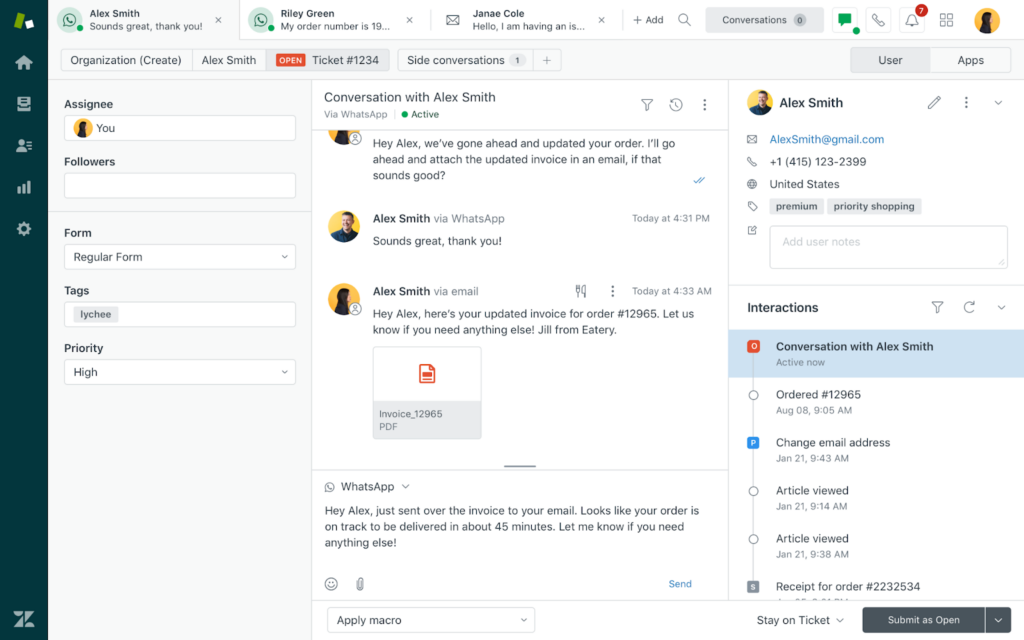
Zendesk is everywhere in customer service, and there’s a reason for that popularity.
The platform scales from small customer service teams handling basic ticketing to enterprise-grade operations running complex, multi-brand support across dozens of channels.
When you use Zendesk, you’re working with a mature ecosystem that’s had years to build integrations, refine workflows, and develop an app marketplace with thousands of extensions.
The platform’s automation model revolves around tickets and workflows. Conversations come in from different channels, get normalized into tickets, and automation steps in to sort, tag, prioritize, and route them.
There are also some AI features layered on top of this system. The Zendesk AI Copilot helps identify intent, recommend macros, surface help center articles, and deflect simpler questions through answer bots before they ever reach an agent.
Key features
- Answer bot: Zendesk’s self-service automation that suggests knowledge base articles to customers before they submit tickets. It also learns from which suggestions successfully resolve issues versus which ones get ignored, and improves accuracy over time.
- Intelligent triage: Uses AI to detect intent, language, and sentiment in incoming tickets. This helps categorize requests and apply the right tags, priorities, or routing logic early in the workflow.
- Agent workspace: Surfaces suggested replies, related tickets, and relevant help content inside the agent interface. This reduces context switching and helps agents resolve issues faster.
User reviews on Zendesk
- “Zendesk can feel a bit overwhelming at first because there are so many features and configuration options. It takes time to set up properly and can be confusing for new users.” [*]
- “When many tickets are coming in from email, chat, or web forms, Zendesk keeps everything organized in one place; nothing gets lost, and every conversation has a clear history.” [*]
Pricing
- Support team: $19 per agent/month.
- Suite team: $55 per agent/month.
- Suite professional: $115 per agent/month.
- Suite enterprise: $169 per agent/month.
Zendesk also offers extra add-ons for its copilots ($50 per agent/month), quality assurance ($35 per agent/month), workforce management ($25 per agent/month), and a few other bundles we honestly think are outrageous.
And your next question is: is Zendesk worth it?… We figured, so we wrote a detailed analysis of what you get using Zendesk.
Be the judge: Is Zendesk Worth It? Hmm... See The Pros & Cons
3. Freshdesk
| Best for: Growing support teams that want approachable automation without heavy operational complexity. |
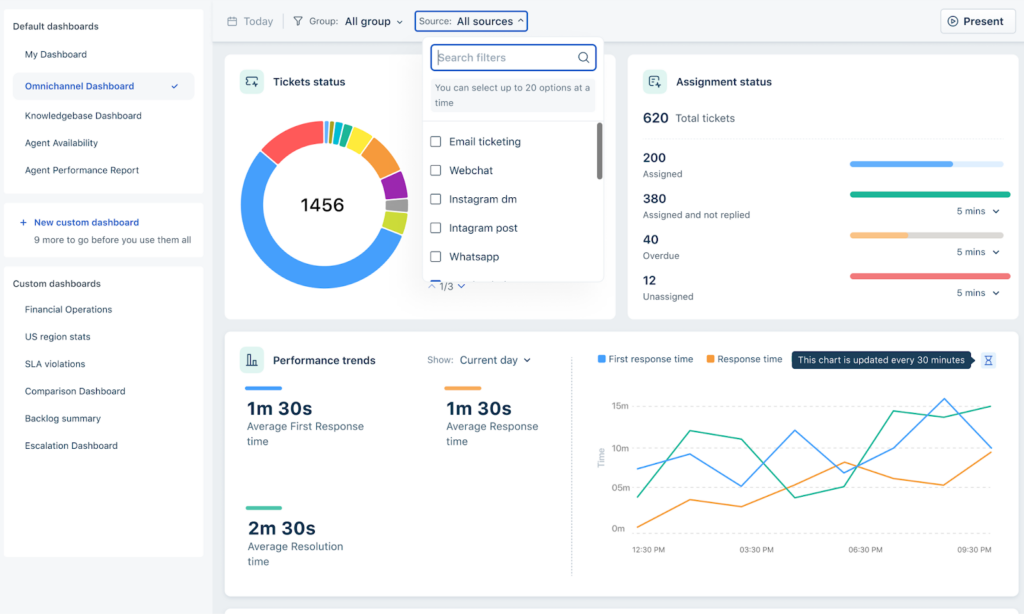
Freshdesk positions itself as the approachable alternative to enterprise support platforms. It’s easier to set up, simpler to manage, and more affordable to scale.
While the interface is not as great as Kustomer, it’s intuitive enough for you to get a functional support operation running as quickly as possible.
On the automation aspect, Freshdek focuses on eliminating repetitive work. For example, with the ‘Scenario Automation’ feature, support agents can perform actions like changing status, assigning a group etc.
Key features
- Freddy AI: Handles routine customer queries across chat and messaging channels. It understands customer questions, retrieves relevant knowledge base content, and provides answers in natural language.
- Automations (Dispatcher, Observer, Supervisor): A three-layer automation system that assigns tickets, watches for changes, and runs time-based actions.
- Collision detection: Automatic alerts when multiple agents open the same ticket simultaneously, preventing duplicate responses or conflicting resolutions.
User reviews on Freshdesk
- “Canned responses have been a game-changer for our team. We manage 15+ brands and can maintain consistent, brand-specific responses while dramatically reducing response time.” [*]
- “Reporting can be complex and sometimes difficult to navigate. I also experience occasional system lag, which can slow things down. Setting up automation is tricky and takes more effort than I expected.” [*]
Pricing
- Growth: $19 per agent/month.
- Pro: $55 per agent/month.
- Enterprise: $89 per agent/month.
Related → Freshdesk vs. Zendesk: 2026 Comparison & Better Options
4. LiveAgent
| Best for: Chat- and call-heavy support centers that need to be operational immediately with minimal learning curve. |
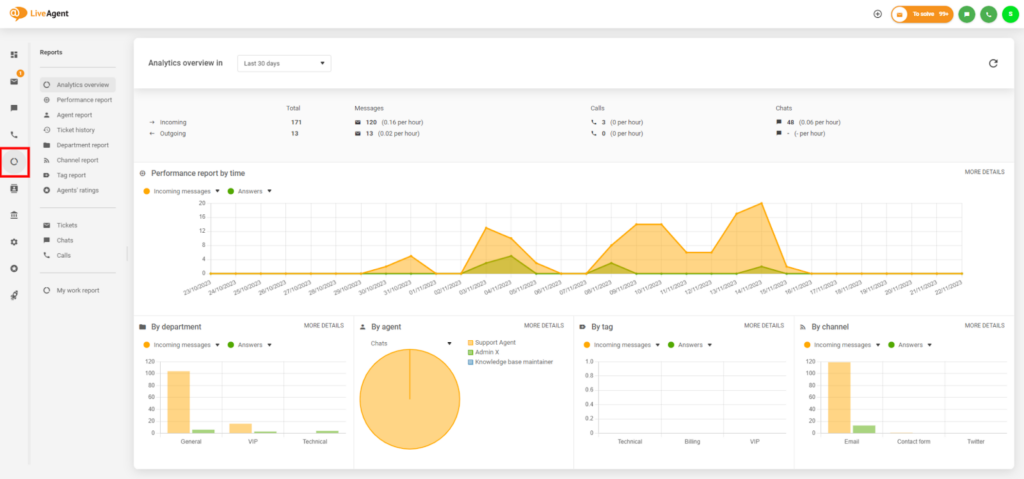
LiveAgent is built around speed—both in how fast you can respond to customers and how quickly you can get the platform operational. Plus, it feels very hands-on and operational.
It’s a perfect tool for call center support teams that need everything (tickets, chat, calls, and emails) to flow through one place.
Automation here isn’t flashy like in Zendesk, but rather practical and immediately visible in day-to-day work. When a conversation comes in, it automatically converts into tickets, then prioritized, and assigned based on rules you define.
Key features
- Hybrid ticket stream: Combines emails, chats, calls, and social messages into a single, unified ticket feed. Automation applies consistently once conversations enter the stream.
- IVR and call routing: Automates call handling through interactive voice response and routing rules. This reduces wait times and ensures calls reach the right team quickly.
- SLA rules and time tracking: Monitors response and resolution times automatically and triggers alerts when SLAs are at risk.
User reviews on LiveAgent
- “What I don’t like about LiveAgent is that its control panel interface is somewhat basic, and it would be better if the customization options were more flexible. I also dislike the slow page loading times during periods of high traffic.” [*]
- “Since, the software is entirely browser-based so, it can be accessed on various devices, whether iOS, Windows, or even Android phones.” [*]
Pricing
- Small business: $15 per agent/month.
- Medium business: $29 per agent/month.
- Large business: $49 per agent/month.
- Enterprise: $69 per agent/month.
5. Hiver
| Best for: Email-based teams that want automation inside Gmail without switching tools or workflows. |
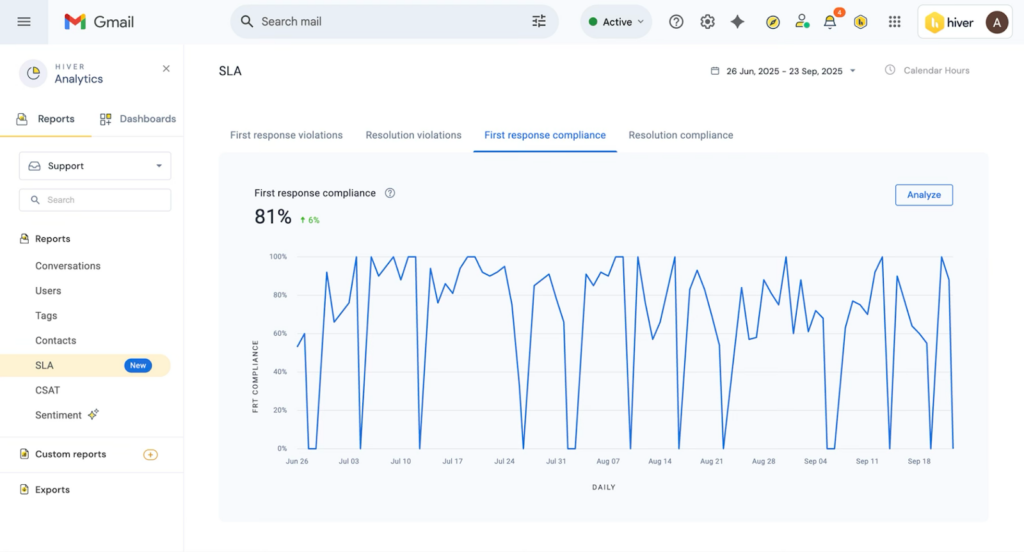
Hiver gives you Gmail with superpowers. Everything happens where teams already work — shared inboxes, internal notes, assignments, and automations live directly inside email. Basically, your inbox becomes your help desk.
There’s no separate platform to log into, no unfamiliar interface to train agents on, no context-switching between where customers email you and where you manage support operations.
For teams already living in Gmail and Google Workspace, Hiver eliminates the adoption friction that kills most support tool implementations.
Key features
- Shared inboxes: Turns Gmail inboxes like support@ or help@ into collaborative workspaces. Automation assigns ownership and prevents duplicate or missed replies.
- Hiver AI agent (Harvey): Handles repetitive, routine tasks such as tagging, routing, and prioritizing incoming queries.
- Email templates: Pre-written response library accessible through shortcuts while composing replies in Gmail. Templates support variable fields that auto-populate customer names, order numbers, or account details.
User reviews on Hiver
- “Hiver’s shared inbox and email collaboration features make it extremely easy for teams to manage support and sales inquiries without missing a thing.” [*]
- “The automatic labels that Hiver adds to Gmail can become very long and a bit cluttered in the sidebar.” [*]
Pricing
- Free: $0 per user/month.
- Growth: $25 per user/month.
- Pro: $65 per user/month.
- Elite: $105 per user/month.
Related → 16 Best AI-Powered Helpdesk Software on the Market Right Now
6. ProProfs Help Desk
| Best for: Small businesses and startups that need reliable SLA enforcement and basic automation features. |
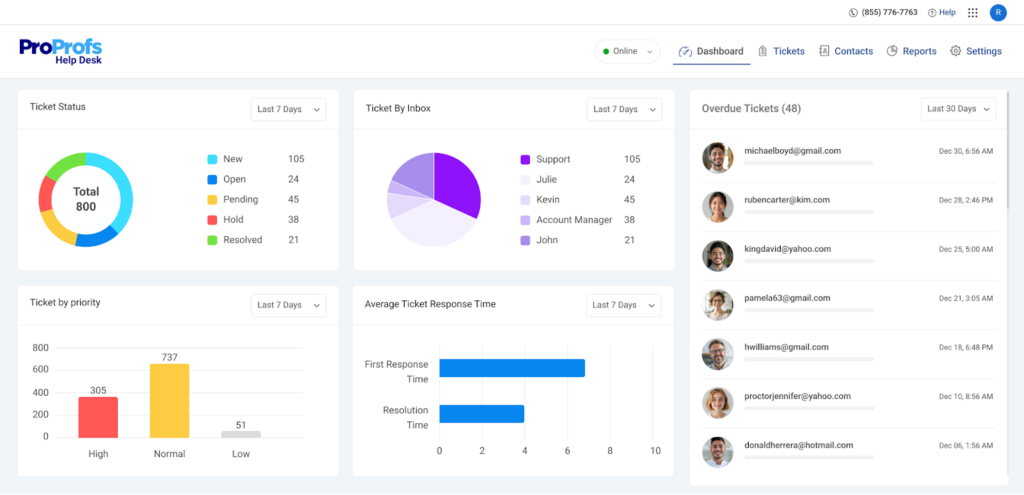
ProProfs Help Desk reflects an all-in-one ticketing system —but without the feature bloat of enterprise platforms. It’s designed for teams that want automation to quietly keep things organized in the background.
For example, you can custom-build chatbots from their library and train them on your website or help center’s content. You can also edit the conversation flow based on your needs without any technical knowledge required.
Key features
- Customer satisfaction surveys: Post-resolution surveys automatically sent after tickets close, collecting feedback (via CSAT) on agent performance and resolution quality.
- AI Ticket summary: Automatically condenses long, messy conversation threads into clear, actionable summaries. This helps agents quickly understand the customer’s intent and why they reached out.
- Business hours automation: Applies different rules based on working hours and holidays so teams can manage expectations.
User reviews on ProProfs Help Desk
- “The best part of being associated with ProProfs is that they offer incredible support. Unlike other help desk companies that reply on self-service or email, you can call their team anytime and have a meaningful interaction.” [*]
- “I am not much impressed with their integration options to third-party tools. This is something that needs to be improved.” [*]
Pricing
- Free: $0 per user/month.
- Teams: $19 per user/month.
- Customer delight suite: Starts at $499 per month.
- Customer growth suite: Starts at $499 per month.
7. Help Scout
| Best for: Brands that prioritize tone, trust, and human conversations over aggressive automation. |
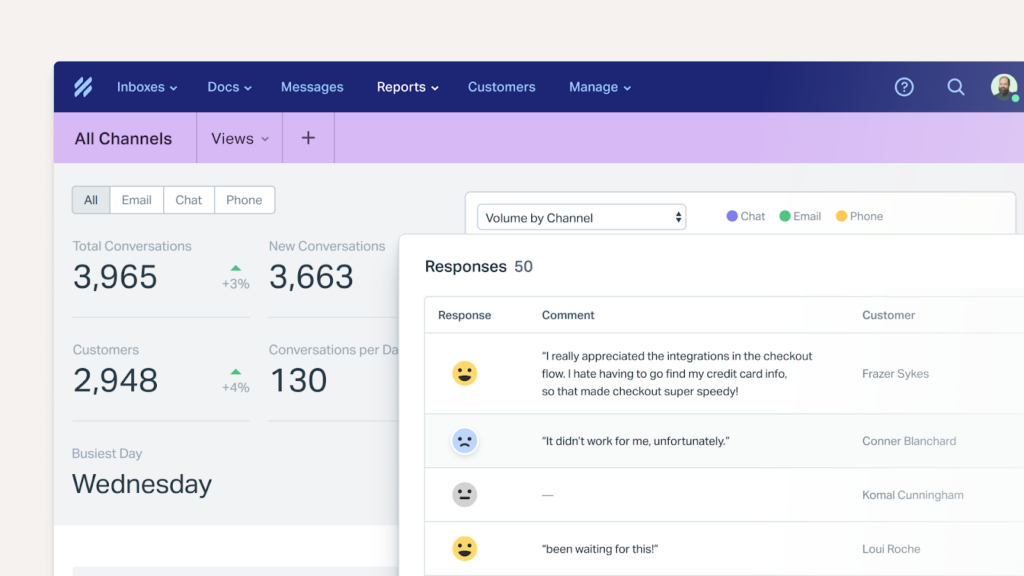
HelpScout runs customer support as an extension of human conversations rather than the popular ticketing model. It’s built for teams that care deeply about tone, clarity, and customer relationships.
The experience feels more like managing a really well-organized shared inbox than operating help desk software. Conversations appear as email threads, instead of thread records. And agents can write replies in natural language without dropdown menus forcing them to categorize everything.
Key features
- Saved replies: Template library for common responses, accessible through quick shortcuts and searchable by keywords.
- Docs integration with Beacon: Embedded help widget that surfaces knowledge base articles contextually based on which page customers are viewing or what they’re searching for.
- AI assist for agents: Writing assistance that drafts reply suggestions based on conversation context and historical resolutions. Agents can accept as-is, edit to add personalization, or ignore if they prefer writing from scratch.
User reviews on HelpScout
- “Customization for complex workflows can feel restrictive, and integrations or automations may require additional tools or workarounds. For fast-growing teams, costs can also increase as you add more users.” [*]
- “Whenever there is an email or chat, we are able to get instant updates, and it’s easy to assign conversations to everyone who is available.” [*]
Pricing
- Standard: $25 per user/month.
- Plus: $45 per user/month.
- Pro: $75 per user/month.
HelpScout offers AI Answers as an add-on that costs $0.75 per resolution.
8. HappyFox
| Best for: Organizations needing structured operations with clear accountability and defined escalation paths when needed. |
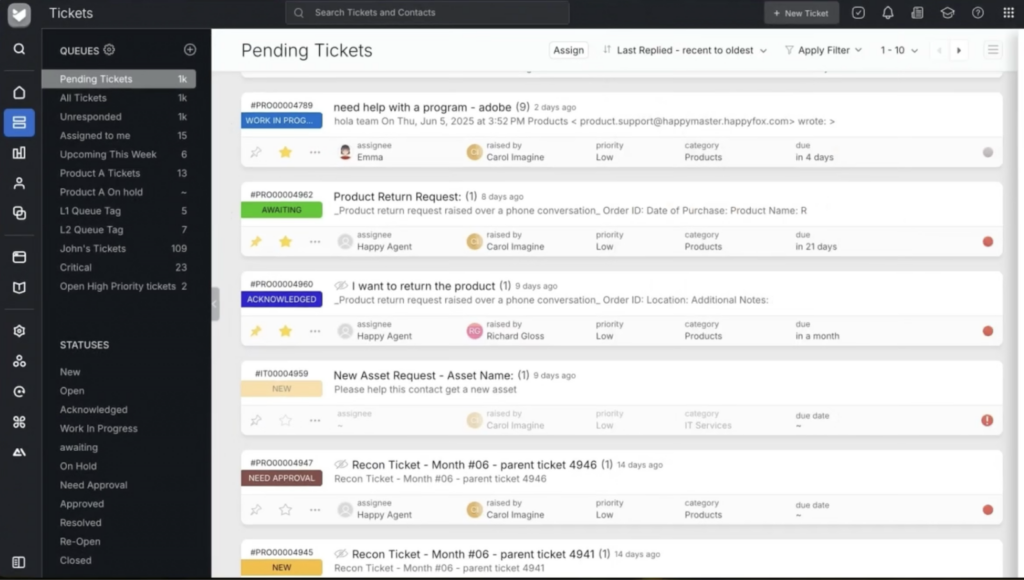
HappyFox follows a much more ‘disciplined’ approach compared to other tools we evaluated. From the moment a ticket is created, the platform applies logic around categorization, prioritization, ownership, and escalation.
As a user, you’re rarely wondering what should happen next because the system nudges support tickets forward based on the rules you’ve already defined.
It’s a support system that’s been carefully thought through for teams that want structure, clarity, and predictability.
Key features
- Assist AI: Suggests contextual responses, summarizes tickets, and surfaces relevant help articles to guide agents during live conversations.
- Also integrates with your internal tools like Microsoft, Slack, Notion, Google Drive, Okta, etc.
- Smart rules engine: Rule-based automation that triggers actions like ticket assignment, tagging, priority changes, or notifications.
- Task management and subtasks: Breaks complex issues into smaller, assignable tasks across the team, while the main ticket keeps track of overall progress and resolution as each piece gets handled.
User reviews on HelpScout
- “Managing contacts is not the best experience. It does it work, but it could be improved giving option such as disabling a contact without deleting it.” [*]
- “I love how easy and intuitive their software is to set up and configure, including customizing the knowledge base.” [*]
Pricing
HappyFox offers two main pricing tiers:
- Agent-based pricing:
- Basic: $24 per agent/month.
- Team: $49 per agent/month.
- Pro: $99 per agent/month.
- Enterprise: Contact sales.
- Unlimited agents:
- Growth: $1,999 per month.
- Scale: $3,999 per month.
- Scale plus: $5,999 per month.
- Ultimate: Contact sales.
9. Zoho Desk
| Best for: Businesses already using the Zoho ecosystem where support automation can leverage customer data, sales records, and business intelligence from across multiple Zoho applications. |
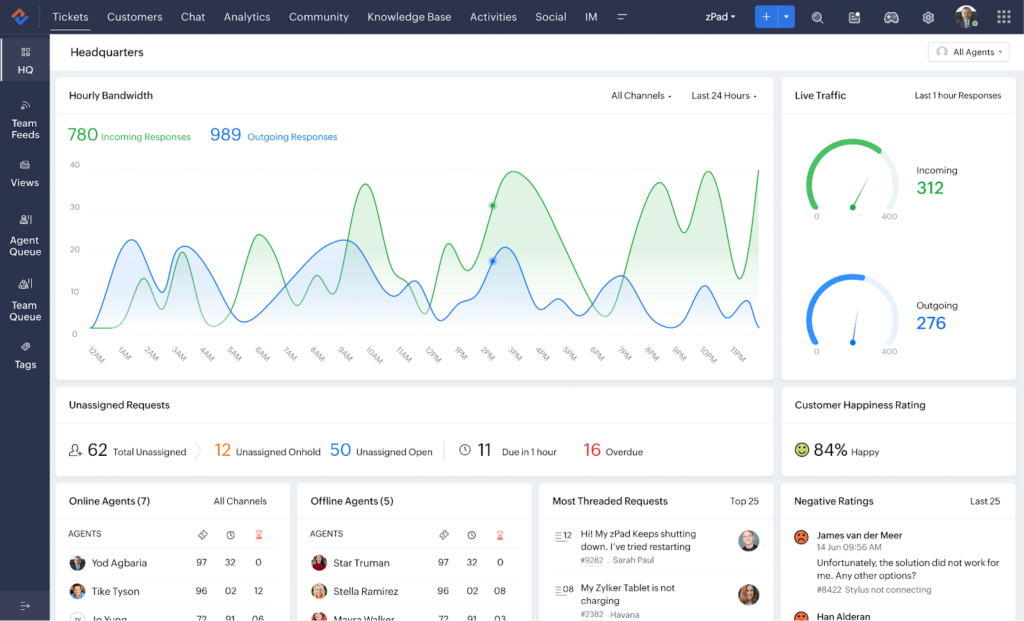
Zoho Desk sits inside the larger Zoho ecosystem, which means it naturally connects with Zoho CRM, Analytics, SalesIQ, Books, and dozens of other Zoho apps.
That setup opens the door to deeper automation possibilities. Now, your support team can pull in customer data, purchase history, and past interactions from systems that already understand the full context of your business relationships.
For example, tickets automatically create tasks in Zoho Projects when issues require development work.
But the tradeoff is that Zoho Desk works best when you’re already invested in the Zoho ecosystem or willing to adopt it. Otherwise, just stick to some other tool that provides similar use cases without the hassle.
Key features
- Zia AI Assistant: Analyzes incoming tickets to detect intent, sentiment, and urgency. Zia helps prioritize work and suggests responses without taking control away from agents.
- Blueprint: Visual process designer that maps multi-stage support workflows with conditional logic, approval requirements, and time-based actions.
- Guided conversations: Pre-built conversation flows for common support scenarios that walk customers through troubleshooting steps.
User reviews on Zoho Desk
- “The downside with Zoho Desk is that some automations and SLAs can take time to set up and require a bit of technical know-how.” [*]
- “It’s a robust, well-structured helpdesk platform that covers the core needs of ticket management, SLA control, automation, and customer communication.” [*]
Pricing
- Express: $7 per user/month.
- Standard: $14 per user/month.
- Professional: $23 per user/month.
- Enterprise: $40 per user/month.
10. Salesforce Service Cloud
| Best for: Enterprises requiring deeply customized support operations integrated with complex Salesforce environments. |
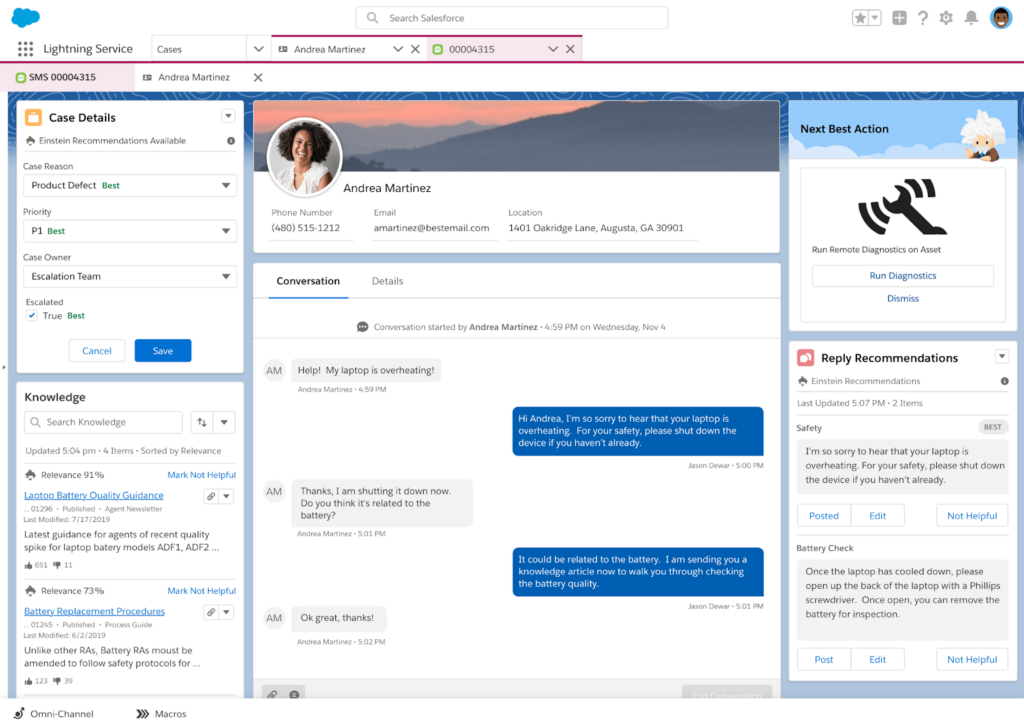
When you implement Service Cloud, you’re building a customized support operation on top of Salesforce’s platform. You can configure workflows that match your specific processes, and integrate it with your existing Salesforce data.
The power of Service Cloud even becomes clearer when you need automation that’s deeply integrated with your entire customer relationship.
Every support case has complete visibility into sales opportunities, contract terms, purchase history, marketing engagement, and account health scores that already exist in your Salesforce environment.
Key features
- Einstein AI for Service: Applies AI to case classification, intent detection, reply suggestions, and next-best actions.
- Flow builder: A visual automation tool used to design complex, multi-step service processes. Flows can span approvals, data updates, notifications, and cross-system actions.
- Einstein Bots: Handles routine inquiries through chat and messaging channels, with the ability to execute actions in Salesforce.
User reviews on Salesforce Service Cloud
- “This isn’t “plug-and-play.” In practice, you’ll usually need a dedicated admin or a consultant to keep everything running smoothly.” [*]
- “The flexibility to customize workflows and integrate with other tools also makes it a strong fit for growing support operations.” [*]
Pricing
- Free suite: $0 per user/month.
- Starter suite: $25 per user/month.
- Pro suite: $100 per user/month.
Related → Top 10 Salesforce Service Cloud Alternatives for 2026
11. Intercom
| Best for: Product-led companies that want conversational automation and handling the first interaction (e.g., answering, deflecting) before it turns to tickets. |
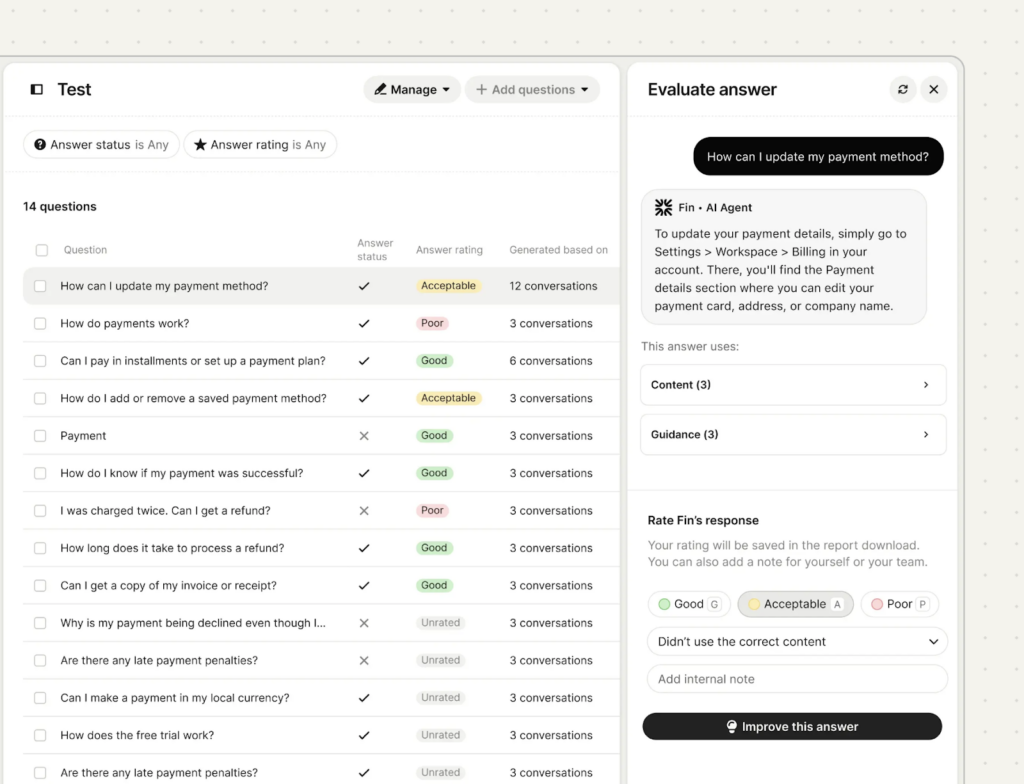
Intercom seamlessly blends proactive messaging, live chat, and asynchronous support into a unified experience.
Instead of case numbers, you get ongoing conversations with customers that can be handled by AI, humans, or both working together through the Fin AI.
With Fin, you can route conversations based on intent and customer data, with smooth handoffs between AI and human agents happening right inside the same thread.
The result is support that starts at the right moments, feels far less reactive, and is intentionally orchestrated around the customer journey.
Key features
- Inbox: Shows all customer conversations regardless of which team member started them or what the original topic was.
- Custom bots: Configurable bots that ask questions, collect information, and route conversations dynamically. These bots adapt flows based on user responses in real time.
- Proactive messaging: Behavior-based outreach that initiates conversations when customers take specific actions, reach certain milestones, exhibit specific usage patterns.
User reviews on Intercom
- “One thing I dislike about Fin by Intercom is that the quality of its answers depends heavily on the knowledge base. If the content isn’t well organized or kept up to date, the responses can end up being inaccurate or misleading.” [*]
- “We can customize easily and it's great for segmenting and targeting specific groups, allowing us to set expectations for different user tiers.” [*]
Pricing
- Essential: $29 per seat/month.
- Advanced: $85 per seat/month.
- Expert: $132 per seat/month.
The Fin AI Agent comes as an add-on and costs $0.99 per resolution—while copilot costs $29 per agent/month.
Related → 20 Best Intercom Alternatives & Competitors for 2026
12. Gladly
| Best for: Subscription businesses and premium brands where maintaining consistent customer relationships is critical. |
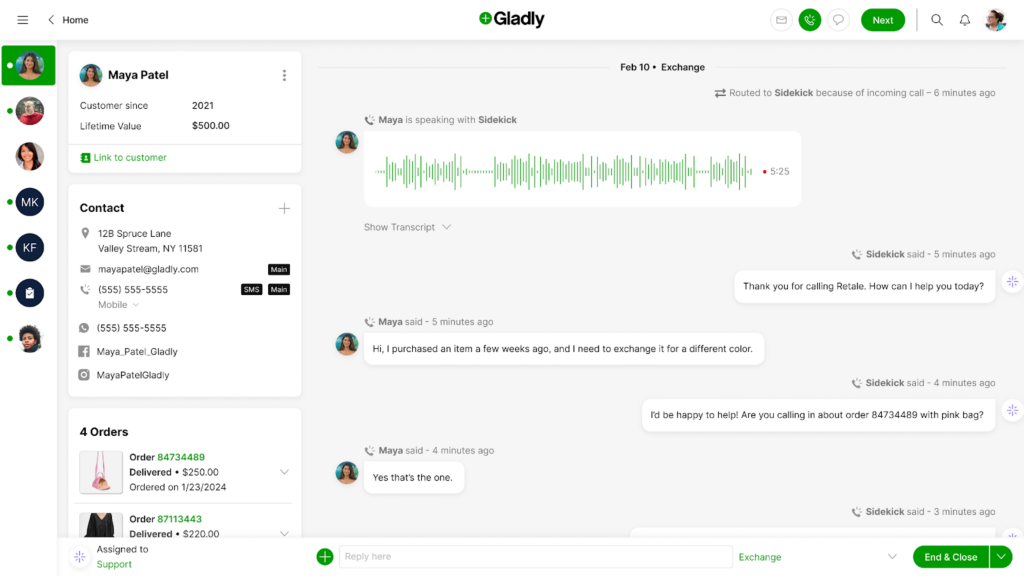
Gladly was built around a conviction that customer service should be organized around people and not tickets.
When you open a customer profile, you see one continuous conversation that captures every interaction they’ve had with your company across all channels and over time.
From there, automation uses that full context to power more personalized support. Conversations can be routed to agents who’ve helped the customer before, relevant details are surfaced automatically, and continuity is preserved.
Key features
- Channel independence: Customers can switch between phone, email, chat, and SMS mid-conversation without creating new ticket records or losing context.
- Hero scoring: Measures agent effectiveness based on one-touch resolution rates, customer satisfaction, conversation continuity, and relationship outcomes.
- People match: Ensures repeat customers can reconnect with familiar agents when possible.
User reviews on Glady
- “The low bar of entry and the ease of working with others inside the app make it very user-friendly.” [*]
- “I was disappointed that we didn't have an account manager and that the platform lacked a built-in CSAT solution.” [*]
Pricing
- Hero package: $180 per user/month.
- Superhero package: $210 per user/month.
Related → The Top 16 Gladly Alternatives & Competitors for 2026 (Updated)
13. Gorgias
| Best for: e-Commerce and DTC brands that need automation tied directly to orders and revenue actions. |
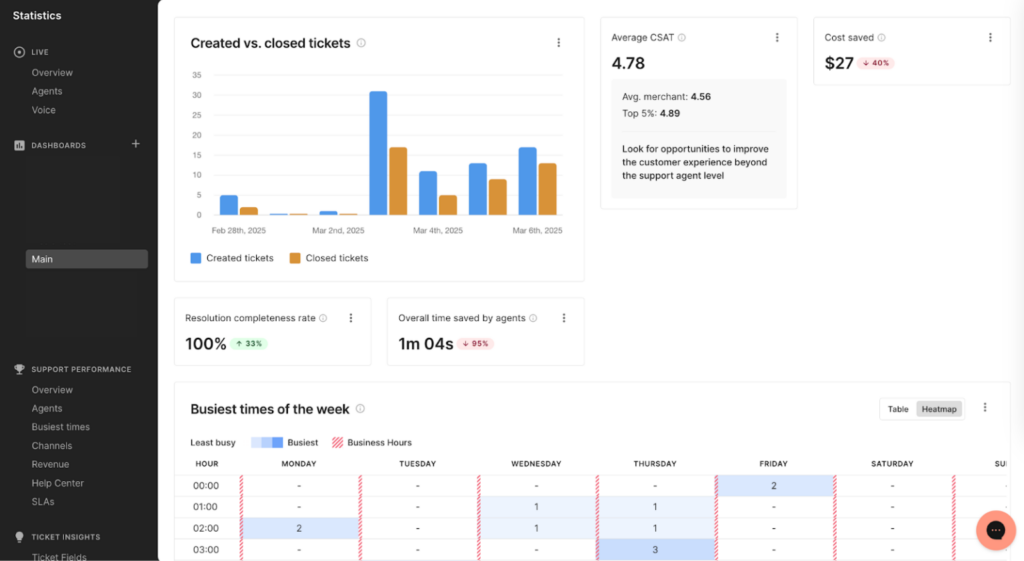
Gorgias is built specifically for e-commerce support teams, with native integrations for Shopify (including Shopify Plus), Magento, WooCommerce, and BigCommerce.
The interface is designed around how online stores actually operate. You can see customer inquiries along with order details, shipping status, and purchase history already loaded in the sidebar.
Macros can also trigger real actions like issuing refunds, canceling orders, or updating shipping details directly from the support view.
Key features
- Revenue statistics in tickets: Automatic calculation showing each customer’s lifetime value, average order value, and total revenue contribution directly within support conversations.
- SMS and WhatsApp support: Native messaging support for SMS and WhatsApp that lets customers reply directly to automated shipping updates with questions or issues.
- Shopify sidebar and order actions: Embedded order management that lets agents view complete Shopify order details.
- Agents can edit orders, process refunds, cancel subscriptions, apply discounts, generate return labels, or update customer information without leaving the ticket interface.
User reviews on Gorgias
- “Features like automated responses, intent detection, and macros allow teams to handle high-volumes of inquiries quickly without sacrificing personalization.” [*]
- “The analytics, from a team leader's perspective, can be a bit challenging. Whenever I have to share the agent's metrics, it's a bit more technical than what the customer support agents are used to.” [*]
Pricing
Gorgias’ pricing plans are typically based on ticket volume.
- Starter: Starts from $10/month for up to 50 tickets.
- Basic: Starts from $50/month for up to 300 tickets.
- Pro: Starts from $300/month for up to 2,000 tickets.
- Advanced: Starts from $750/month up to 5,000 tickets.
- Enterprise: Custom volume.
Related → Top 17 Gorgias Alternatives & Competitors for 2026
14. Tidio
| Best for: SMBs and online stores that want fast and simple automation with minimal setup. |
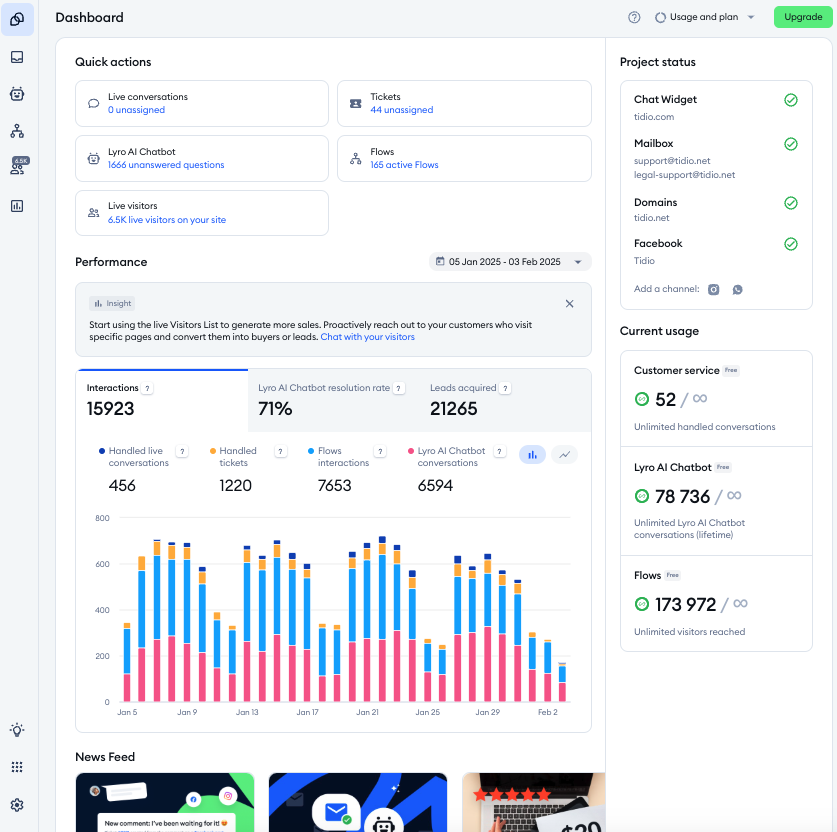
Tidio keeps customer service simple by putting humans and AI in the same place.
You add a lightweight chat widget to your website, answer visitor questions in real time, and let basic bots step in when you’re busy or offline. The focus is on fast, immediate customer connection.
The automation rules are built around easy-to-understand visual flows, so small teams can look responsive without technical setup. FAQs are handled automatically, freeing your agents to focus on sales conversations and more meaningful questions.
Key features
- Visitor tracking: Real-time visibility into who’s on your website—including pages they’re viewing, time spent, geographic location, and whether they’re new or returning visitors.
- Pre-chat surveys: Customizable questions that appear before live chat starts, collecting visitor information like name, email, inquiry topic, or specific details about their situation.
- Lyro AI agent: Handles common questions (e.g., explaining shipping policies, providing product information) using your existing content.
User reviews on Tidio
- “The configuration of which pages the chat widget should appear on can also be a bit confusing and less intuitive than expected.” [*]
- “I like that automatic reply and tell basic questions when the team is offline, but conversations can quickly switch to a real person without friction.” [*]
Pricing
- Starter: $29 per month for 100 billable conversations.
- Growth: Starts at $59 per month for 250 billable conversations.
- Plus: Starts at $749 per month for customer billable conversations.
- Premium: Contact sales.
There’s also the Lyro AI add-on, which starts at $39 per month for 50 billable conversations— and $749 per month if you want custom billable conversations.
15. Kayako
| Best for: Conversation-centric teams that want continuity and accountability without heavy AI. |
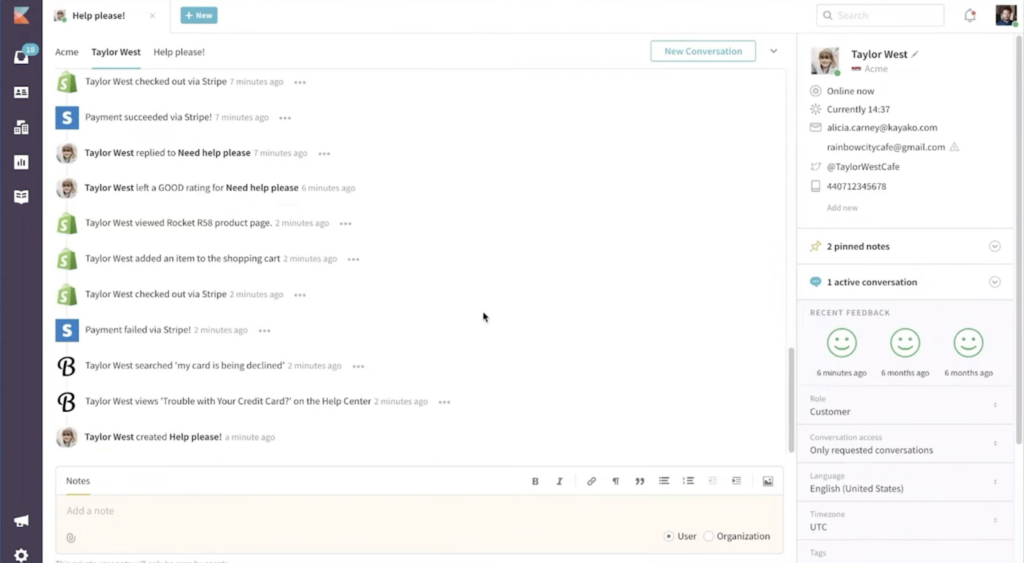
Kayako’s model is based on continuity—i.e., customers don’t “start over” every time they reply. Instead, it views every interaction as part of an ongoing relationship with a specific person.
For example, conversations don’t get ‘closed’ and reopened—they just continue whenever the customer needs help again.
In addition, Kayako’s use of generative AI focuses on reducing friction within live conversations rather than running fully autonomous agents. That makes it a good option for teams that want structure without losing the natural flow of dialogue.
Key features
- Collaborators: Agents can loop in colleagues, request input from specialists, or document context for future interactions.
- Self-service help center: Knowledge base with integrated search, community forums, and the ability for customers to submit requests or track conversation status.
- Multi-channel support: Native handling of email, live chat, Facebook, Twitter, and help center inquiries through a unified agent interface.
User reviews on Tidio
- “There is no auto refresh option. Since we need to use some third-party browser plugins for this specific use.” [*]
- “The AI Suggested Responses are incredibly helpful. agents barely have to start from scratch anymore. Plus, the Self-Learning Mode learns from our closed tickets, so over time, it just gets smarter.” [*]
Pricing
- Kayako One: $79 per month (+$1 for all AI-resolved tickets).
16. Front
| Best for: Cross-functional teams managing customer communication through shared inboxes. |
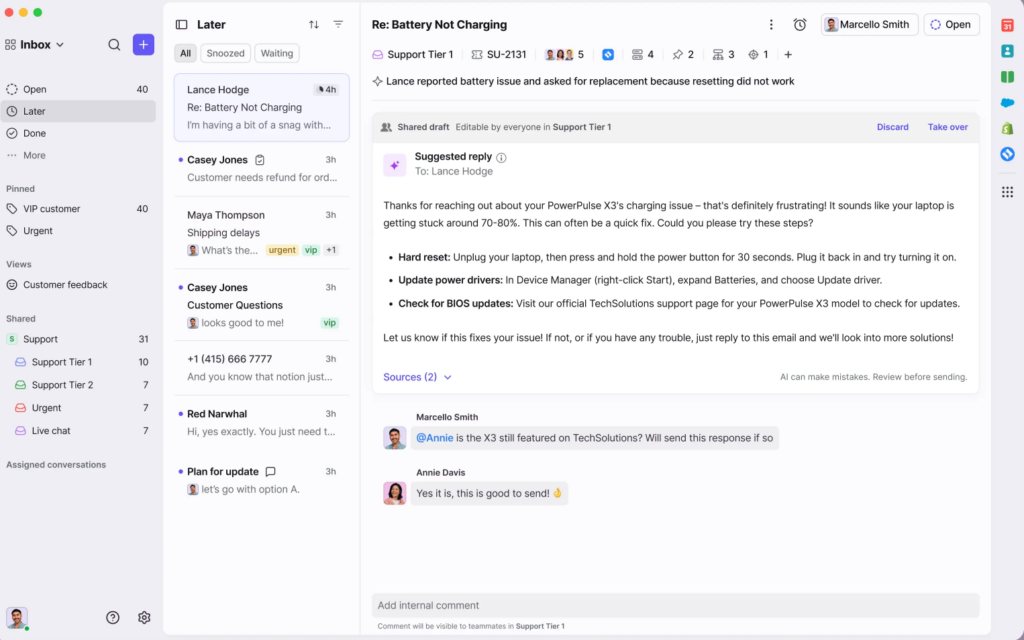
Front sits between shared inboxes and traditional help desk tools. It’s built for teams that want collaboration and workflow automation without giving up email as their main support channel.
While it looks and works like email, underneath, it adds routing, assignments, analytics, and integrations that turn email into a real support system.
Using Front doesn’t require retraining your team or pushing customers into portals and ticket forms. Conversations stay as email threads, replies are written like normal emails, and customers just message familiar addresses.
Key features
- Shared inbox: Collaborative email accounts where multiple team members view, assign, and respond to messages without forwarding or CC’ing.
- Assignment and ownership: Ensures every conversation has a clear owner. Messages can be assigned manually or automatically, helping teams avoid duplicate replies and missed responsibility.
- AI copilot: Assists agents in responding faster by drafting contextual replies using the conversation, customer history, and relevant knowledge base content.
User reviews on Front
- “The biggest issue for me is pricing. Front can become expensive as the team grows, especially when adding advanced features. Some automation feels limited for very complex workflows.” [*]
- “I have access to any updates/changes made by any of my teammates and the exact time and date when they are performed.” [*]
Pricing
- Starter: $25 per seat/month.
- Professional: $65 per seat/month.
- Enterprise: $105 per seat/month.
Other add-ons include:
- Autopilot: $0.89 per resolution.
- Copilot: $20 per seat/month.
- Smart QA: $20 per seat/month.
- Smart CSAT: $10 per seat/month.
Related → 19 Best Front Alternatives for 2026 (According to Real Users)
17. HubSpot Service Hub
| Best for: B2B and SaaS teams that want customer service automation tightly aligned with CRM and lifecycle data. |
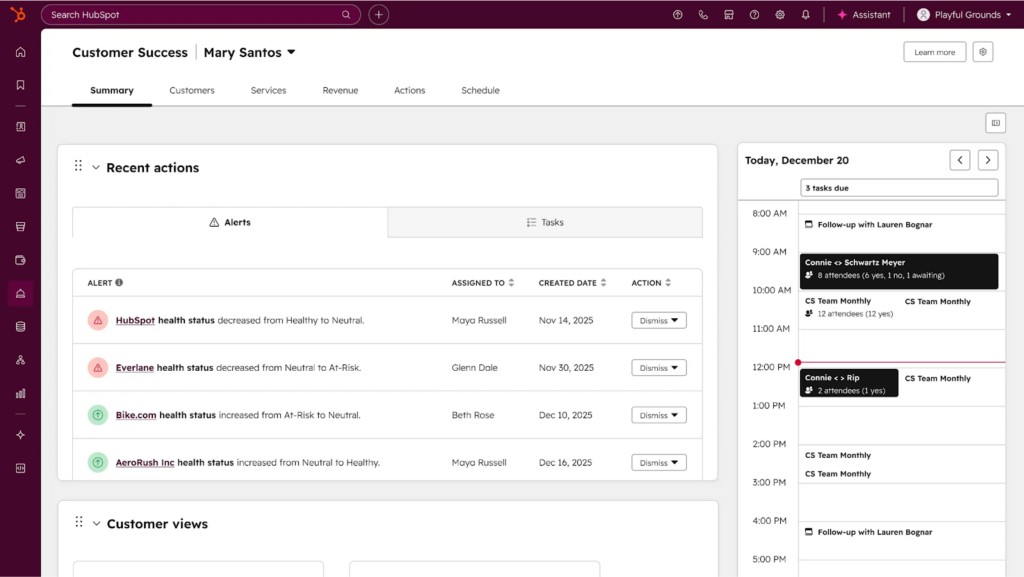
If you’re already using the HubSpot CRM, Marketing Hub, or Sales Hub, then the Service Hub is simply an extension of what you’re already used to.
The shared inbox resembles HubSpot’s deal pipeline views and marketing email interfaces because they’re all part of the same system. The reporting uses the same framework you’re already using for marketing attribution and sales forecasting. The contacts and companies are the same records referenced across departments.
You’re simply connecting customer service directly to the same contact and company records used by marketing and sales, so conversations, deals, and support history all live in one place.
Key features
- Breeze knowledge base agent: An AI assistant that helps improve and surface knowledge base content. It identifies gaps, suggests improvements, and makes sure your help articles stay useful as customer questions evolve.
- Customer portal: A branded portal where customers can submit tickets, track status, and find answers on their own.
- Customer feedback surveys: Prebuilt survey tools for CSAT and other feedback types. Responses are tied directly to customer profiles, making it easier to analyze satisfaction alongside support history.
User reviews on HubSpot Service Hub
- “The reporting dashboard gives a clear view of ticket volume, response time, and team performance, which helps improve customer service quality.” [*]
- “Some of the customization options feel more limited than I’d like, especially when trying to tailor views or build more advanced workflows.” [*]
Pricing
- Free: $0 per month.
- Starter: Starts at $15 per user/month.
- Premium: Starts at $100 per user/month.
- Enterprise: Starts at $150 per user/month.
Related → 10 Best HubSpot Service Hub Alternatives to Consider in 2026
How to Choose the Right Customer Service Automation Software for Your Business
Every customer service automation platform claims to reduce ticket volume and improve efficiency through AI. The marketing sounds identical.
But automation optimized for vendor demos (high deflection rates, fast first responses) often makes the actual support experience worse. Either customers get blocked from reaching humans. Or agents inherit problems AI couldn’t solve. The resolution takes longer despite faster initial contact.
To avoid automation that looks good in reports while frustrating everyone using it, focus on these critical factors.
Understand what you’re automating
Most evaluation processes focus on features—i.e., does it have AI, omnichannel support, workflow builders?
The better approach is to get specific on:
- Which questions agents answer repeatedly
- Which actions agents perform manually dozens of times a day
- Where delays or handoffs slow resolution down
For example, if agents spend hours answering “where’s my order?” questions, you need automation that integrates with order management systems and can provide tracking information.
On the flip side, if customers repeatedly contact you because they can’t find answers, you need intelligent self-service that actually deflects inquiries rather than just a knowledge base no one uses.
What to do:
- List the top 5-10 repetitive tasks your support team performs weekly.
- Separate “responses” from “actions” (answering vs. doing).
- Evaluate platforms based on whether they eliminate those tasks entirely or partially.
Know your integration requirements upfront
Automation only delivers value when systems can talk to each other.
If your support team relies on customer purchase history, subscription status, shipping updates, or account data, your automation platform must be able to access and act on that information in real time.
Another common mistake is assuming integrations are all the same. A platform claiming it “integrates with Shopify” doesn’t tell you whether it’s a deep native integration or a basic webhook.
What to do: Map which systems contain data your support operation requires, then verify integration depth during demos.
Platforms that can’t access the data agents need will force manual lookups that negate automation benefits.
Match the platform to your team’s technical capacity
Some platforms offer good flexibility, but that comes with additional operational cost. Customer support tools like Salesforce Service Cloud or Zendesk can be powerful—but only if you have the expertise to configure, and maintain them.
If you don’t have dedicated support operations people or access to developers, implementations can drag on for months and ongoing maintenance becomes a bottleneck.
On the other end of the spectrum, simpler platforms trade customization for speed and usability. You get up and running faster, with fewer moving parts, but less control over edge cases.
What to do: Evaluate your team’s internal capabilities:
- Do you have ops specialists or admins?
- Do you rely on developers for workflow changes?
It’s best to choose a complexity you can sustain 12-18 months down the line.
Align the automation with your customer relationship model
Not all businesses serve customers the same way, and automation should reflect that.
Transactional businesses handling thousands of one-time inquiries have different needs than subscription companies managing ongoing customer relationships.
- If most customers contact you once and never again, ticket-based platforms optimizing for resolution speed make sense.
- However, if customers interact with you repeatedly over months or years, relationship-focused platforms like Kustomer that maintain context across all interactions serve you better.
What to do: Analyze your interaction pattern to understand how customers engage with agents.
- How often do customers contact support more than once?
- Are issues connected over time (subscriptions, renewals, upgrades, disputes)?
Next, identify what context matters:
- Do agents need to see past conversations to resolve current issues?
- Does customer value, tenure, or history change how you should respond?
Finally, choose an automation model that can streamline that process.
For example,
- If interactions are mostly isolated, ticket-centric automation focused on speed is appropriate.
- If relationships span multiple touchpoints, prioritize platforms that maintain a persistent customer timeline.
Platforms like Kustomer are designed for this model, because automation operates on the customer record.
Consider the total cost of the tool
Platform subscription costs are just the starting point. Factor in implementation expenses, required integrations, ongoing maintenance, training, and whether you’ll need professional services or consultants.
Some platforms like Zendesk and Intercom look affordable until you realize you need add-ons for features you assumed were included, or that implementation requires expensive specialist expertise.
What to do: Request a complete cost breakdown from vendors.
- Ask for a realistic year-one cost estimate.
- Clarify what’s included vs. paid add-ons.
- Understand whether automation depends on premium tiers or usage-based pricing.
Continue the Conversation with Kustomer
Customer service automation works best when it doesn’t feel like a handoff between systems, rules, or teams — but like a conversation that naturally continues.
As support operations grow more complex, the real challenge becomes maintaining context while scaling.
That’s why we built Kustomer to help teams work from a shared understanding of the customer.
Our friends at Yummy saw this firsthand. As Noel Rodriguez, Director of Live Ops and Support at Yummy, puts it:
“With Kustomer, everything is in one place. Agents can see their performance metrics in real time, something we never had with Zendesk.”
And this is what it means for you:
- Context that travels with customers: Every interaction, purchase, support case, and behavioral signal appears in a unified timeline that both AI agents and human agents reference.
- AI tools that execute outcomes: Kustomer’s AI agent can process returns, generate the shipping labels, issue refunds, and confirm completion.
- Intelligence that makes agents better: When customers do reach human agents, the full context is already loaded. The AI has already attempted standard resolutions and documented what didn’t work.
Agents solve problems faster because automation handled everything it could and prepared everything it couldn’t.
Kustomer helps support teams scale without losing the human side of the conversation. It’s automation that remembers, prepares, and supports — so every interaction feels like a continuation.