20 Best Intercom Alternatives & Competitors for 2026

Intercom has earned its reputation as an innovative leader in messaging and customer engagement. With best-in-class tools for real-time chat, proactive messaging, and guided product tours, it’s a powerful solution for SaaS companies and startups focused on onboarding and acquisition.
But customer support is more than just chat.
If you are browsing this list, you have likely hit a ceiling with Intercom. Whether it’s the unpredictable, usage-based pricing, the lack of deep CRM capabilities, or the difficulty of managing complex, high-volume support tickets, you’re looking for a tool that scales with you, not against you.
While Intercom is excellent for messaging, growing service teams often need more structure, better reporting, and a true single view of the customer. Below, we review the top 20 Intercom alternatives that offer the scalability and depth your business requires.
Why Consider an Alternative to Intercom?
While Intercom is a fantastic messaging tool, growing businesses often hit a wall as their support volume increases. The decision to switch typically stems from four key frustrations:
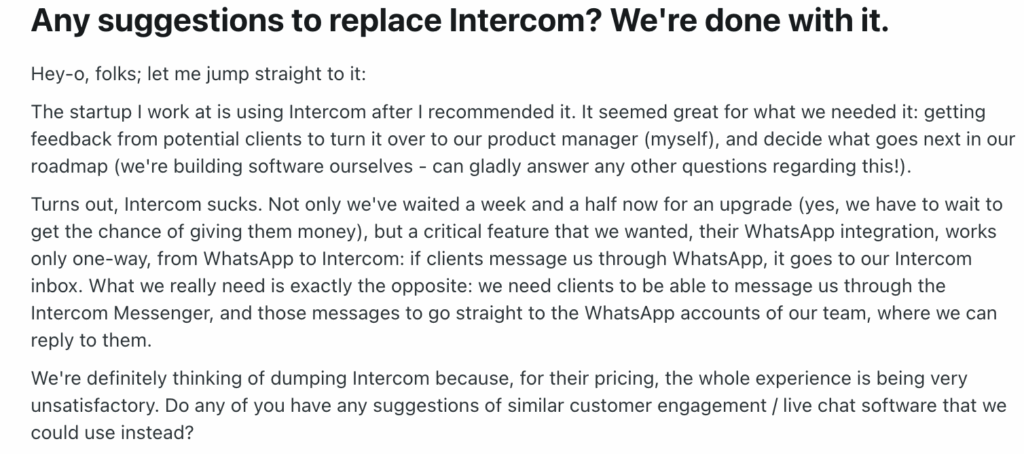
- Unpredictable, sky-high costs: This is the #1 complaint. Intercom’s pricing model—based on seats, "active people," and resolution bot volumes—can become prohibitively expensive as you scale. The distinction between "full seats" and "lite seats," combined with overage fees, often leads to surprise bills that startups and SMBs cannot justify.
- The chat-first limitation: Intercom is built for quick, conversational messaging. It struggles when you need robust ticketing capabilities for complex issues. If your team needs to manage long-form email support, SLAs, or multi-step resolutions, Intercom’s chat-bubble interface can feel cluttered and disorganized.
- Integration depth: While Intercom connects with many tools, it often lacks the deep, two-way data synchronization required by e-commerce and heavy-duty SaaS operations. Users frequently report needing third-party plugins just to get a clear view of customer data (like Shopify orders) that other platforms offer natively.
- Stability and uptime: Business continuity is critical. Some users have reported frustration with platform stability, noting that outages can leave customers thinking their requests were ignored. For a mission-critical support team, 99.9% uptime isn't just a goal; it's a requirement.
- According to one user on G2: “Intercom constantly has outages. In the past month alone I’ve had 4+ outages that lasted over a day. During these outages, customers would submit via Intercom and their submission was never logged! Completely unacceptable.”
In short: You might need an alternative if you want flat, predictable pricing and a platform that handles complex support tickets just as well as it handles live chat.
What Features and Functionalities Should You Look for in an Intercom Alternative?
When leaving Intercom, you shouldn't just look for a cheaper clone. You should look for a platform that fills the operational gaps Intercom leaves behind. Here is your checklist for evaluating a true upgrade:
Robust Ticketing & Help Desk Capabilities
Intercom is chat-first, which means complex issues often get buried in long conversation threads. Your alternative should offer a hybrid model: the speed of real-time chat combined with the structure of a ticketing system.
Look for features like ticket routing, status tracking, and SLA management to ensure no issue falls through the cracks.
Predictable, Scalable Pricing
Intercom’s usage-based pricing (charging per "active user" or "resolution") punishes you for growing. Look for an alternative with predictable, seat-based pricing. You should know exactly what your bill will be next month, regardless of how many customers talk to you.
True Omnichannel Support (Beyond the Website)
Intercom dominates the website widget, but modern support happens everywhere. Your alternative should natively unify email, SMS, WhatsApp, social media (Instagram/Facebook), and Voice into a single inbox. You shouldn't need third-party plugins just to answer an Instagram DM.
Deep CRM & Data Context
To resolve issues faster, agents need more than just a name and email address. Look for a platform with CRM capabilities that syncs real-time data—like recent orders, shipping status, and lifetime value—directly next to the conversation. This context prevents agents from asking repetitive questions.
Advanced AI & Automation
Intercom’s Fin AI is powerful but expensive. Look for a platform that offers generative AI that is included in the core platform or priced fairly. Features should include not just customer-facing bots, but also Agent Copilots that draft responses, summarize threads, and automate workflows to make your human team more efficient.
Actionable Reporting
Basic metrics like response time aren't enough. Look for advanced analytics and reporting that allow you to segment data by channel, customer type, and issue tag. You need to understand why customers are contacting you, not just when.
Top 20 Intercom Competitors On The Market Right Now
While Intercom tries to do everything—from marketing automation to help desk ticketing—most alternatives specialize in doing one thing exceptionally well.
Some of the tools below are built strictly for enterprise-grade support (like Zendesk and Kustomer). Others focus entirely on sales and lead generation (like Drift), or provide a budget-friendly shared inbox for startups (like Help Scout).
To help you find the right replacement, we have reviewed the top 20 alternatives for 2025, ranging from comprehensive CRMs to lightweight chat widgets.
- Kustomer
- Drift
- Zendesk
- HubSpot
- Freshdesk
- HelpCrunch
- LiveAgent
- HelpScout
- Crisp
- Tidio
- Olark
- Zoho
- Gorgias
- Salesforce Service Cloud
- HappyFox
- Nextiva
- Front
- Gladly
- Kayako
- Groove
1. Kustomer
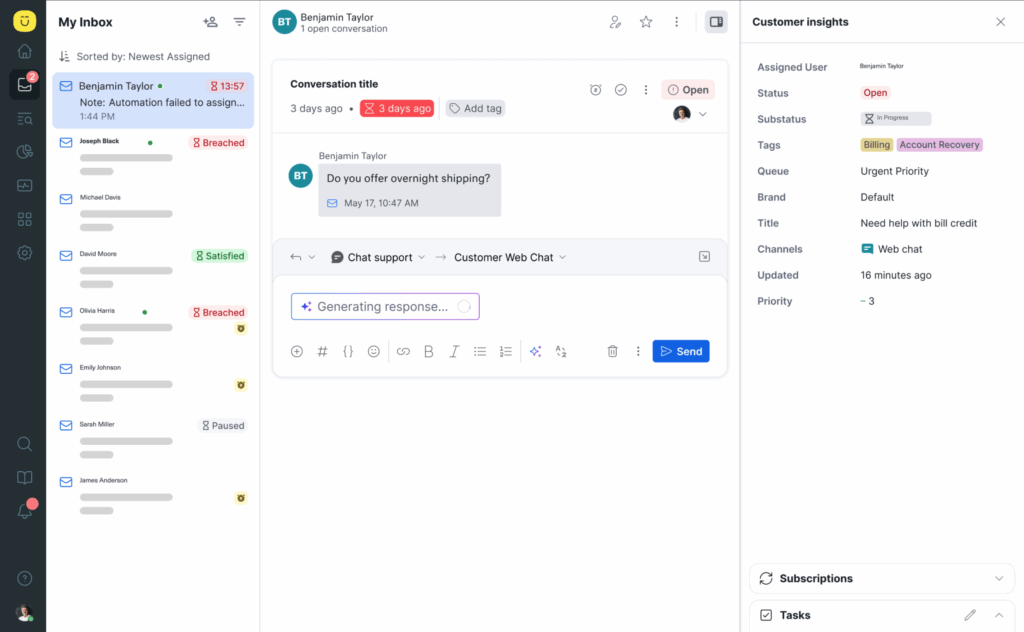
Intercom is built for messaging, but Kustomer is built for resolution. While Intercom treats customers as chat bubbles, Kustomer treats them as people with a history.
Kustomer is a CRM-first platform that unifies all your data—orders, loyalty status, flight details, and shipping info—into a single timeline. This allows you to route conversations based on data (e.g., "VIP customer with a cancelled flight"), not just "first-come, first-served." It is the ideal upgrade for teams that need the speed of chat but the power of an enterprise help desk.
Key Features
- Unified customer timeline: Agents see everything in one view—emails, chats, past orders, shipping status, and website visits. This eliminates the need to tab-switch or ask customers for data you should already have.
- Native omnichannel support: Unlike Intercom, which prioritizes its own messenger, Kustomer treats all channels equally. Manage Email, SMS, WhatsApp, Instagram, Facebook, and Voice from the same inbox with no loss of functionality.
- AI Agents & Copilot: Kustomer’s AI isn’t just a deflection tool. AI Agents for Customers can autonomously resolve complex transactional issues (like returns or subscription changes) 24/7. Meanwhile, AI Agents for Reps (Copilot) draft responses and summarize long threads to boost human efficiency.
- Proactive automation: Trigger workflows based on data, not just behavior. For example, automatically route a VIP customer to a priority queue if their recent order is marked "delayed" in Shopify.
Advantages of Using Kustomer Over Intercom
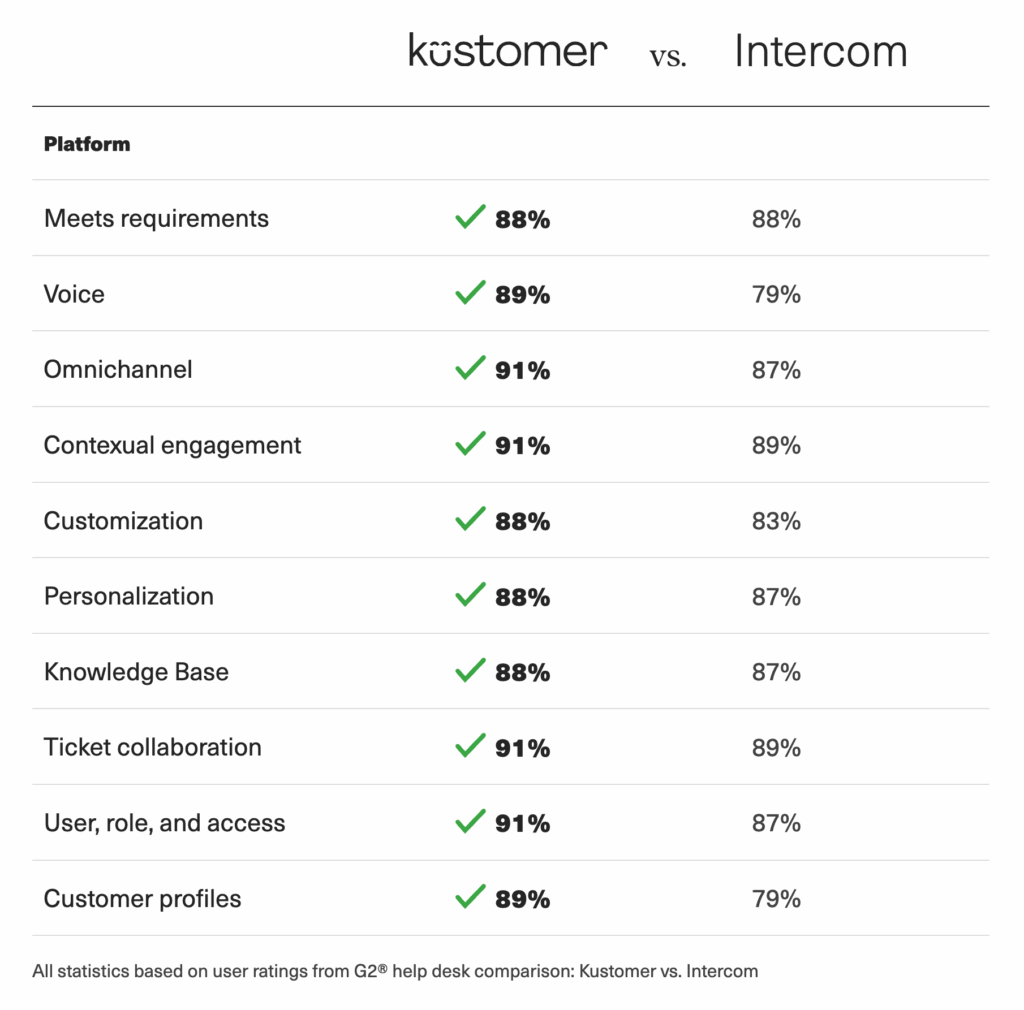
- Predictable pricing: One of the biggest complaints about Intercom is its unpredictable, usage-based pricing (charging per resolution or active user). Kustomer offers transparent seat-based pricing, so your costs don't skyrocket just because you grew.
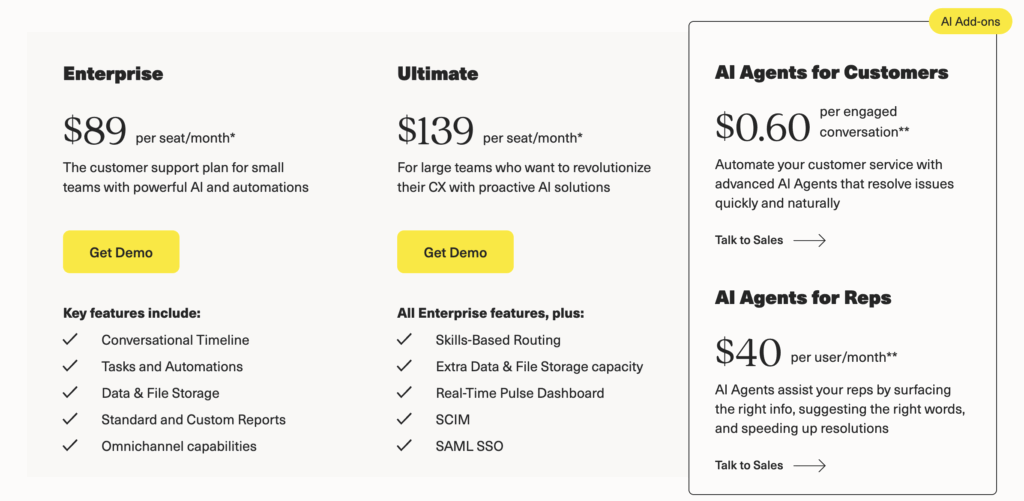
- Better for complex support: Intercom struggles when a quick chat turns into a complex, multi-day investigation. Kustomer combines the speed of chat with the structure of a full ticketing system, ensuring complex issues are tracked, owned, and resolved properly.
- Deeper data context: Intercom often requires third-party plugins to see external data. Kustomer ingests data natively, giving agents a single pane of glass view of the customer's entire relationship with your brand.
- Scalability: Intercom often crumbles under high volume. Kustomer is architected to handle massive spikes in demand without breaking your workflow or your budget.
- Better self-service: Kustomer’s knowledge base and AI deflect tickets before they ever reach an agent, allowing you to grow your business without linearly growing your support headcount.
What Real Users Are Saying
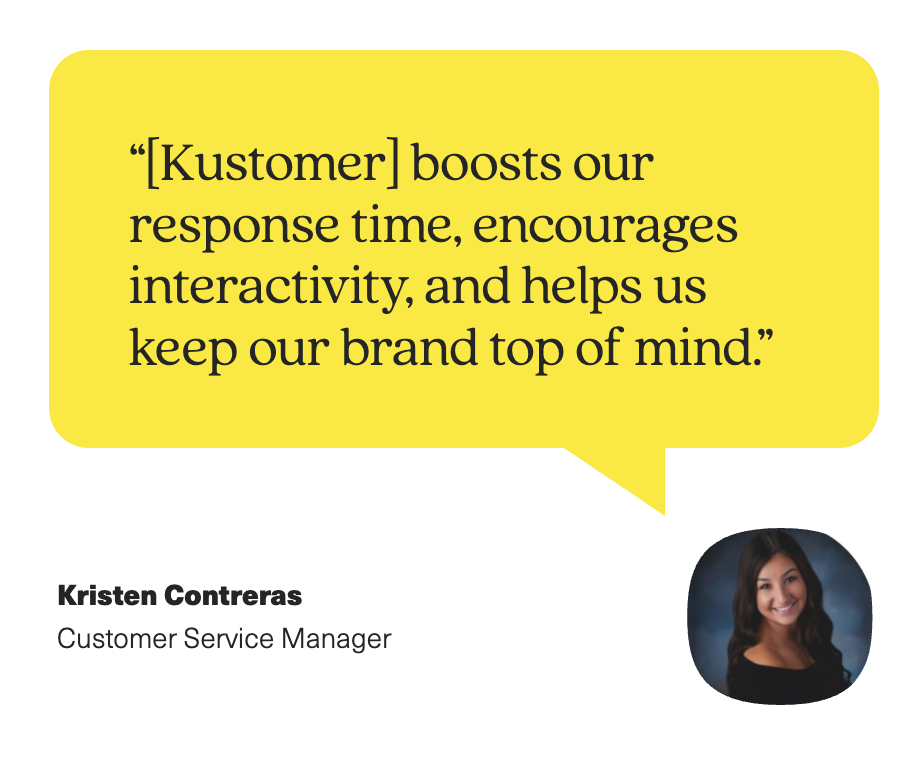
Brands switch to Kustomer when they realize their "chat tool" is holding them back from scaling.
- Hopper (Travel): When travel demand exploded, Hopper’s old tools couldn't cope with the volume, leaving travelers stuck. By switching to Kustomer, they gained the ability to prioritize urgent issues based on flight data. The result? A 50% reduction in first response times, a 20% reduction in software costs (consolidating 13 tools into one), and a 10% boost in CSAT.
“Kustomer was the perfect mix of being resilient for scale and built for the needs of a modern service team.” — Jo Lai, Head of CX
- Everlane (Retail): This sustainable fashion brand proved that "best service is no service." By leveraging Kustomer’s AI and self-service capabilities, Everlane achieved a 4X increase in automated deflection, allowing them to handle volume spikes without burning out their agents.
- Makesy (E-commerce): Before Kustomer, Makesy’s agents were manually selecting tickets, leading to "cherry-picking" and slow responses. Kustomer’s automated routing transformed their workflow, ensuring every customer got a timely response. Within just three months of launching Kustomer's self-service tools, they saw 71 tickets resolved autonomously per week, freeing agents to provide high-touch care.
2. Drift
Drift is one of the biggest Intercom Alternatives out there, and at one time they had a pretty serious rivalry going. To this day, Drift still shines with chatbots for lead generation that are specifically designed to convert website visitors into leads. Drift really excels when it comes to website lead gen and chat.
Pros:
- With over 50 integrations available, Drift syncs with major players like Salesforce, HubSpot, Zapier, Slack, and Google Analytics. This means you can plug Drift into your existing workflows and have all your tools talking to each other without much hassle.
- Drift’s customer service is generally well-regarded. They assign a dedicated success manager to help you get the most out of the product and provide sales training for your team. Regular meetings are part of the package, ensuring that you’re not just buying a product but a service that evolves with your needs.
Cons:
- Drift does come with some drawbacks. Feedback from some users suggests the quality of support from the dedicated customer manager can diminish over time.
- Additionally, the AI chatbots may not be as intelligent as advertised, functioning more on pre-programmed responses than genuine AI, which may disappoint those looking for more sophisticated interaction capabilities.
Pricing:
Drift’s pricing is geared toward mid-market and enterprise teams. The Premium plan starts at $2,500 per month (billed annually), which includes live chat, custom chatbots, and real-time notifications. For advanced features like A/B testing and role-based access, you will need the Advanced or Enterprise plans, which require a custom quote.
3. Zendesk
Zendesk is known for its strong customer support tools and help desk features. It integrates with social media platforms like Facebook messenger, offering a chat widget that can be customized and added to various platforms.
Pros:
- The platform is flexible, with many APIs that let you expand its capabilities.
- You can choose from 1,200 pre-built apps that are ready to use with Zendesk, which makes Zendesk a good choice for diverse business needs.
- Zendesk offers a comprehensive knowledge base and ticketing system, which is what they’re most famous for.
Cons:
- Aside from high costs, many customers complain that Zendesk’s support service is not what it should be. There are lots of complaints online citing the Zendesk support team seems to take a long time to reply to customer queries.
- Also, some customers complain that Zendesk has a steep learning curve. However, it offers a content academy to familiarize users with all of its features.
Learn more → The Biggest Zendesk Pros & Cons
Pricing
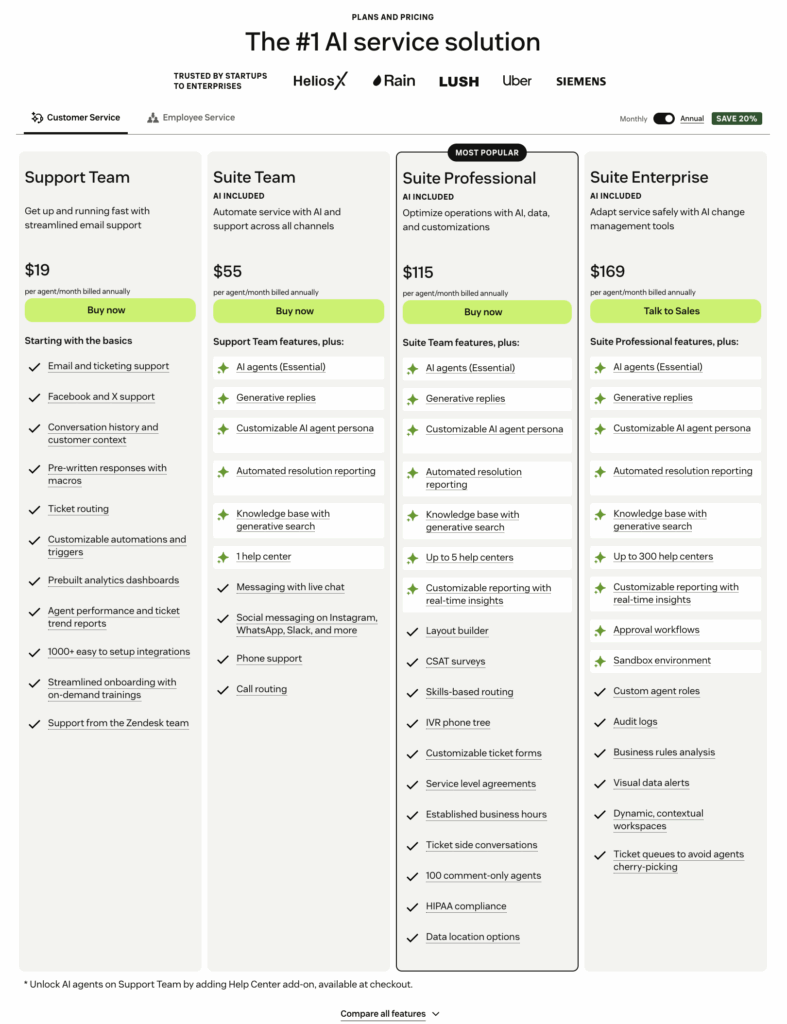
- Zendesk’s pricing begins with the Suite Team plan at $55 per agent each month. It comes with a core set of features and an analytics dashboard. If you’re unsure, Zendesk offers a 14-day free trial to test its services.
- The Suite Professional plan is the most popular at $115 per agent per month. It adds advanced AI tools to your support system in addition to the features of the Suite Team package.
- For large enterprises, the Suite Enterprise plan provides comprehensive features, with the pricing starting at $169 per agent per month.
4. HubSpot Service Hub
HubSpot Service Hub is an integral component of the broader HubSpot ecosystem. Therefore, you can easily integrate it with other HubSpot services that target marketing and sales operations.
Pros:
- The Service Hub stands out for its powerful email marketing capabilities, social media management, and advanced segmentation tools. You can use these features to create a personalized and responsive customer service experience.
- Most importantly, HubSpot supports several features not commonly found in other platforms like Intercom. For example, HubSpot offers exclusive functionalities such as playbooks, a customer portal, Omni-Channel Routing, and Conversational Intelligence.
- HubSpot Service Hub offers a variety of packages to fit different business requirements. You can start with a free plan that comes with a substantial suite of tools.
Cons:
- Customer feedback on HubSpot’s support services is mixed. Some find it not responsive enough, while others are satisfied with the technical support team.
- HubSpot Academy offers extensive educational content, so you can make the most of it by learning on your own.
Pricing:
HubSpot offers a free tools plan with basic features. For paid plans (billed annually):
- Starter: $15 per seat/month. Includes simple ticket automation and live chat.
- Professional: $90 per seat/month. Adds help desk workspaces, SLAs, and customer portals (requires a one-time $1,500 onboarding fee).
- Enterprise: $150 per seat/month. Adds advanced permissions and custom objects (requires a one-time $3,500 onboarding fee).
5. Freshdesk
Freshdesk is a cloud-based customer service solution that simplifies your support tasks. It provides a comprehensive ticketing system, a customer self-service knowledge base, and omnichannel communication to help you deliver personalized support efficiently. Because of platform similarities, Freshdesk is often compared to Zendesk, especially for SMBs seeking cheaper options.
Pros:
- With Freshdesk, your team can reduce repetitive work through AI-powered automation, enabling your service to run smoothly and on autopilot. This AI also boosts productivity and efficiency, making it easier for your team to provide excellent customer service.
- A standout benefit of choosing Freshdesk over Intercom is its simplicity and straightforwardness. It’s known for its low learning curve, affordability, and strong phone support, making it a user-friendly and cost-effective option.
- Customers praise Freshdesk for its ease of use and effective support, which helps new users get up and running quickly. And because it’s easy to learn, users typically have fewer questions than on other customer support platforms, allowing them to focus more on delivering quality customer service.
Cons:
- Some users have noted that Freshdesk's reporting and analytics features may not be as robust or detailed as they would like. Depending on your specific reporting needs, you may need to use additional 3rd-party integrations via Zapier.
- The free plan of Freshdesk may have limitations in terms of features and capabilities. Small businesses may need to upgrade to a paid plan to access advanced functionalities.
Pricing:
- You can try Freshdesk with their 14-day free trial and their pricing structure is transparent, as well.
- The Free Plan is suitable for up to 10 agents and includes essential features like Ticket Dispatch, a Knowledge Base, analytics and reporting, data center location options, team collaboration tools, and 24×7 email support.
- For a more robust set of tools, the Growth Package is available at $15 per agent per month. It expands on the Free Plan with access to over 1000 marketplace apps, advanced automation, Collision Detection, comprehensive helpdesk reports, and 24×5 phone support.
- There are two additional packages available. The Pro Package is priced at $49 per agent per month. The Enterprise Package costs $79 per agent per month.
6. HelpCrunch
HelpCrunch offers a comprehensive customer communication platform, combining SMS and email notifications with unlimited chat. Their pricing is transparent, based on your team size and email usage, ensuring you only pay for what you need without surprise fees for user reach and additional add-ons.
Pros:
- HelpCrunch is designed to respond to customer inquiries quickly and accurately, addressing one of the main concerns of Intercom customers. The platform’s integration capabilities span across various social media platforms.
- With each higher-tier package from HelpCrunch, you receive more of everything. More messaging channels to engage with customers, more widgets for customization, more pop-ups for interaction, more AI editor requests for communications, and more chatbot flows to streamline your service.
Cons:
- Customers are generally satisfied with HelpCrunch’s customer support and service quality.
- However, they do mention instances when some features don’t work, or the notification sounds do not go off.
- Moreover, some customers express concerns about the platform’s analytics features being insufficient.
Pricing:
HelpCrunch’s pricing plans are designed to suit different business needs.
- Basic Plan: At $12 per month per team member.
- Pro Plan: At $20 per month per team member.
- Unlimited Plan: At $495 per month.
- HelpCrunch also offers a 14-day free trial.
7. LiveAgent
LiveAgent is a customer service solution with a strong focus on live chat software, support tickets, and help desk functionality.
Pros:
- LiveAgent’s platform is user-friendly and boasts a customizable live chat widget that enhances real-time interactions through features like canned responses and a real-time typing view.
- Furthermore, it’s a fully multilingual system, ensuring that language barriers do not hinder customer support.
- LiveAgent provides easily accessible, comprehensive reports directly from your dashboard and maintains native applications for both Android and iOS devices, allowing support teams to deliver service from anywhere, at any time.
Cons:
- Client feedback suggests that LiveAgent delivers a robust service.
- However, a notable concern is its limited integrations with external tools, which can pose challenges for businesses that rely on a broad ecosystem of apps and services.
Pricing:
LiveAgent offers four pricing tiers (rates below are for annual billing):
- Small: $15 per agent/month. Includes email ticketing and basic reporting.
- Medium: $29 per agent/month. Adds live chat and call center support.
- Large: $49 per agent/month. Adds multi-channel support (WhatsApp, Instagram, etc.).
- Enterprise: $69 per agent/month. Adds assisted integration and priority support.
8. HelpScout
HelpScout is a customer support platform designed to enhance team collaboration and streamline customer conversations. It’s a simple and straightforward SaaS product and thrives regarding its simplicity and ease of use.
Pros:
- A shared inbox that helps teams collaborate and manage customer emails effectively.
- A knowledge base to empower customers to find answers independently.
- A help widget, known as Beacon, integrates with websites to offer immediate support assistance.
- Automated workflows to improve response times and streamline processes.
- Reporting capabilities for tracking performance and customer satisfaction.
Cons:
- Customer reviews generally highlight HelpScout’s ease of use and reliable performance, with a notable absence of bugs.
- However, some users have expressed that customization options for the help documentation are somewhat limited, which may be a drawback for teams requiring more integrated solutions.
Pricing:
HelpScout has three pricing packages.
- The Standard Plan is for growing teams at $20 per user per month, providing essential support tools and allowing for up to 25 team members.
- For more complex needs, the Plus Plan and Pro Plan are available at $40 and $65 per user per month respectively, each adding more features and capacity for larger teams.
- They also offer a free 15-day trial, allowing teams to test its features before committing to a plan.
9. Crisp
Crisp is a versatile chat tool designed to cater to the communication needs of startups and small businesses.
It offers live chat capabilities, email marketing options, and a variety of integrations to streamline customer interactions and enhance the support experience.
Customers have expressed satisfaction with Crisp’s service, citing minimal downtimes and appreciate features such as instant screen sharing and the ability to conduct video calls.
Pros:
The Crisp Shared Inbox is a key feature, centralizing various communication channels such as live chat, email, social media direct messages, WhatsApp, and phone calls into one unified inbox, making collaboration within teams more efficient.
- A website chat widget to engage visitors directly on your site.
- Contact forms to capture visitor information even when offline.
- Mobile applications to manage communications on the go.
- Unlimited conversations without caps on messages or contacts.
- Integrations with platforms like Shopify and WordPress.
- Chat triggers to initiate conversations based on visitor behavior.
- Knowledge base creation to provide self-service support for customers.
- Chatbot functionality to automate and scale conversations.
- Instant screen sharing and video call capabilities for a more interactive support experience.
Cons:
- You don’t get a knowledge base unless you upgrade to the unlimited plan, which is an annoyance for growing businesses.
- Generally speaking, their pricing plan seems to be manipulative in that you don’t get any of the best features unless you upgrade to their most expensive plan.
Pricing:
- Crisp offers a range of pricing packages starting with the Basic Plan, which is free and perfect for personal sites or those just needing a straightforward chat function.
- The Pro Plan at $25 per month per workspace, is suitable for most startups, although it is still quite restricted in its capabilities.
- For businesses seeking an advanced suite of tools, the Unlimited Plan is available at $95 per month per workspace.
- Crisp also offers a 14-day free trial for any plan, allowing users to test the full range of features before making a financial commitment.
10. Tidio
Tidio is a comprehensive solution that combines the power of chatbots, live chat software, and email marketing to optimize customer engagement and service for businesses.
It is particularly known for its robust integrations with e-commerce platforms, facilitating efficient interactions and automation.
Pros:
- With Tidio, businesses can leverage conversational AI to resolve up to 70% of customer inquiries, providing quick and efficient service.
- The platform also includes live chat and helpdesk features for more direct, hands-on customer support.
- Businesses can enhance their lead generation and tackle cart abandonment by using over 35 pre-designed chatbot templates.
- Tidio allows for the personalization of greetings for both new and returning visitors and aids in boosting sales through product recommendations and timely discounts.
- Tidio’s customer support is known to be responsive and helpful, assisting users in maximizing the platform’s capabilities.
- The service quality is held in high regard, with a focus on reliability and user-friendly experiences, making it a trusted choice for businesses looking to enhance their customer engagement strategies.
Cons:
- They charge you more if you want to get rid of the “Powered by Tidio” branding, which is cited as a common annoyance.
- You don’t get a dedicated customer success manager unless you pay for their most expensive pricing package which costs $400 per month.
Pricing:
Tidio offers a Free plan with 50 conversations/month. For paid features:
- Starter: $29 per month. Includes 100 conversations and live chat.
- Growth: $59 per month. Includes 250+ conversations and removes Tidio branding.
- Tidio+: $749 per month. A comprehensive plan for scaling teams with dedicated support.
Note: Tidio often prices add-ons (like Lyro AI) separately.
11. Olark
Olark is a live chat platform that lets agents interact directly with customers on the company website. Olark is a basic and straightforward tool that lets you quickly answer customer questions, provide support, and increase website conversion rates.
Pros:
- One of the standout features of Olark is its ability to show you chat analytics in real-time. This means you can see how many people are chatting, how satisfied they are, and how your support team is performing right away.
- You can customize your chat widget to align with your company’s design and branding, making it look like a natural part of your site.
- Olark can send automated messages to start conversations with customers, which is useful for generating leads when you’re not available to live chat.
- It integrates well with other tools — connecting with over 20 different CRM and sales software without the extra costs.
- Customers often say they get good value from Olark for the price, especially when compared to similar tools like Intercom. That’s because Olark offers many features without adding more charges for each one.
Cons:
- You have to pay more for various types of “PowerUps” which are optional add-on features that are priced individually from $29 to $99 per month.
- You can add a PowerUp to any account — the price does not change based on your team size or type of plan, but PowerUps will make your monthly bill more expensive, as the charges and fees can add up fast.
Pricing:
When it comes to pricing, Olark keeps it uncomplicated.
- They charge $29 per month for each person on your team who will be using the chat.
- There’s only one price for all the features, making it easy to understand what you’ll pay.
12. Zoho Desk
Zoho Desk is a cloud-based help desk solution that is part of the extensive Zoho software ecosystem. It’s designed to manage your customer support activities and help you offer support through various channels.
Pros:
- Zoho Desk provides a centralized platform where you can handle customer interactions through email, live chat, and social media platforms.
- The software includes AI-driven assistance to help support agents by suggesting solutions based on past tickets and customer queries.
- It allows you to build a comprehensive self-service knowledge base for your customers to find answers to common questions.
- Zoho Desk comes with advanced reporting features, enabling you to track and analyze your customer service performance and agent productivity.
- Customer feedback highlights the strong after-service support that Zoho provides. Your dedicated account manager will not only assist with the initial setup of your Zoho Desk environment but also offer ongoing support through phone and email.
Cons:
- You don’t get the live chat functionality unless you upgrade to their most expensive plan (Enterprise) starting at $50 per month.
Pricing:
- The Standard Plan offers multi-channel support and a Help Center at $20 per user per month.
- The Professional Plan enhances these offerings at $35 per user per month.
- If you’re looking for more advanced features, the Enterprise Plan at $50 per user per month covers a wide range of services.
13. Gorgias
Gorgias is a customer support platform specifically designed for eCommerce businesses. While it doesn’t offer the broad functionality of some competitors, it excels within its niche.
It integrates seamlessly with popular eCommerce platforms like Shopify, BigCommerce and Adobe Commerce, allowing agents to view a customer’s purchase history and preferences directly within the support ticket.
Gorgias leverages artificial intelligence (AI) to scan social media for customer comments about your products. This sentiment analysis helps you identify both positive and negative feedback and address any concerns quickly while at the same time capitalizing on positive customer experiences to boost customer loyalty and sales.
Ultimately, Gorgias streamlines your customer support workflows by managing all inquiries—email, chat, social media—in a single, unified platform. This centralized approach can significantly improve agent efficiency and ensure a seamless customer experience throughout the purchase journey.
Pros:
- Integrates with major ecommerce platforms, especially Shopify. Allow customers to place orders, request refunds, and cancel orders directly in Gorgias.
- Easy-to-use interface with built-in features for customer feedback and marketing are included at no extra cost
- Omnichannel support allows you to manage all customer interactions (SMS, WhatsApp, phone calls, live chat, email) from a single platform.
Cons:
- Strictly focused on ecommerce customers.
- Can be expensive for smaller businesses with tiered plans based on ticket volume.
- Very limited reporting options, having only canned reports with basic export options.
Pricing:
Gorgias offers tiered pricing plans based on the number of agents and monthly ticket volume. The starter plan starts at $10 per month but comes with limitations. Upgrading features and managing higher ticket volumes require additional fees.
Learn more → Top 17 Gorgias Alternatives & Competitors (+User Feedback)
14. Salesforce Service Cloud
Salesforce, the gold standard for Customer Relationship Management, goes beyond managing leads and sales with its powerful Service Cloud add-on. This cloud-based platform seamlessly integrates with your existing Salesforce system, offering a one-stop shop for exceptional customer support.
Service Cloud empowers you to centralize all customer interactions – calls, emails, chats, and even social media messages – in a single, user-friendly interface. As your business grows, Service Cloud scales alongside your needs. Salesforce Lightning technology allows for deep customization, ensuring the platform adapts to your unique workflows.
Pros:
- Integrates perfectly with your existing Salesforce platform.
- Manage all customer interactions (calls, emails, chats) in one place.
- Streamline workflows and accelerate issue resolution with automation.
- Benefit from a wide range of features and easy third-party app integration.
Cons:
- Pricing varies widely, potentially expensive for smaller businesses.
- Feature-rich nature might require a steeper learning curve for some users.
Pricing:
Salesforce Service Cloud offers tiered pricing plans, starting at $25 per user per month. You can explore its functionalities during a 30-day free trial.
15. HappyFox
HappyFox goes beyond basic help desk functionalities, offering features for project management and team collaboration. This cloud-based platform simplifies customer support by automatically converting emails and chats into tickets and providing a user-friendly interface with quick actions and clear list views. It also includes advanced automation tools, SLA management, and a knowledge base — all at a competitive price point.
Pros:
- Easy multi-step ticket management allows you to automatically convert a message from chats and emails into a ticket.
- Highly customizable user interface.
- Robust integration with Slack.
- Empower customers to self-serve with a comprehensive knowledge base.
Cons:
- May not be suitable for large enterprises with complex needs.
- Pricing requires subscribing to at least five agents per plan.
Pricing:
HappyFox offers tiered subscription plans starting at $39 per agent per month. However, each plan requires a minimum of five agents, which can be a drawback for very small teams.
16. Nextiva
Nextiva goes beyond a simple cloud contact center, offering an AI-powered, omnichannel platform designed to transform your customer experience. This unified platform provides a central dashboard and helpdesk for managing all your digital interactions – social media, messaging, chat, email, and online reviews – in one place.
Pros:
- Gain valuable customer insights through real-time analytics and sentiment analysis.
- Manage all customer interactions from a single, unified platform.
- Nextiva is known for its excellent customer support.
- Seamless integration with existing VoIP phone systems or call centers.
Cons:
- Specific pricing details might not be readily available on their website.
- Large enterprises may require more complex solutions.
Pricing:
Nextiva offers three core plans for its contact center solutions (rates below are for annual billing):
- Core: Starts at $30 per user/month. Includes voice, video, and basic integrations.
- Engage: Starts at $40 per user/month. Adds digital channels like SMS and website chat.
- Power Suite: Starts at $60 per user/month. Includes intelligent routing and advanced analytics.
17. Front
Front tackles a key challenge for B2B businesses: collaborating on complex customer inquiries. This cloud-based platform offers a shared inbox environment, allowing multiple teams to work together seamlessly. With Front, teams can assign tasks, comment internally, and discuss issues within the platform, ensuring everyone’s on the same page. This eliminates communication silos, leading to faster resolution times and improved customer satisfaction.
Pros:
- Teams can collaborate on customer issues with features like assigning tasks, commenting internally, and more within the platform.
- Shared inbox ensures all team members have visibility into customer communications, eliminating duplication and improving response times.
- User-friendly, email-like interface minimizes training time for agents.
- Built-in analytics tools are helpful to track and monitor various KPIs and metrics, including messages handled per user, response time, and messages handled per hour.
- Well-suited for B2B industries like manufacturing, logistics, software, and financial services.
Cons:
- May not be ideal for businesses requiring more advanced communication features.
- A minimum two-seat requirement and a per-seat starting price of $59 per month can be barriers for smaller teams.
- It could have a more comprehensive knowledge base.
Pricing:
Front has simplified its pricing into three tiers (billed annually):
- Starter: $25 per seat/month. Includes a shared inbox for email and SMS (limited to 10 seats).
- Professional: $65 per seat/month. Adds omnichannel support and advanced workflows.
- Enterprise: $105 per seat/month. Includes all features, unlimited automation, and advanced administration.
18. Gladly
Gladly redefines customer service by equipping agents with the right context for personalized interactions. It centralizes all communication channels – social media, messaging apps, email, and even built-in voice calls – into one platform. Forget traditional ticketing systems; Gladly fosters natural conversations through a single, chronological message history.
Unlike most helpdesks, Gladly prioritizes personalized support at scale. Automated routing ensures inquiries reach the best-suited agent, while proactive chatbots can handle initial queries. Collaboration tools and a built-in knowledge base empower teams to work together seamlessly.
Pros:
- Gain a holistic view of customer history, preferences, and purchase behavior for personalized support.
- Manage all channels (voice, chat, email) within a single, user-friendly interface.
- AI features help to prioritize tickets and automate repetitive tasks to improve agent efficiency.
- Intuitive interface minimizes training time for agents.
Cons:
- Might not be ideal for businesses outside of the ecommerce sector.
- The knowledge base interface is not intuitive enough and could be made easier to navigate.
Pricing:
Gladly offers two main packages for support teams (billed annually):
- Hero: Starts at $150 per hero/month (minimum 10 seats). Includes voice, IVR, and built-in AI for agents.
- Superhero: Starts at $180 per hero/month. Adds advanced compliance, task management, and dedicated support.
19. Kayako
Kayako takes a unique approach to customer service, focusing on conversations as the foundation of its platform. This means every interaction, whether initiated via chat widget, social media, or email, is treated as a single, ongoing conversation. Designed for affordability and ease of use, it primarily caters to small businesses and online stores.
Pros:
- Users can switch effortlessly between communication channels within the same conversation thread.
- Once an agent is needed, Kayako utilizes pre-defined rules to automatically route the conversation to the most suitable agent based on availability and expertise.
- Administrators retain the flexibility to manually assign conversations when necessary, ensuring the right agent addresses complex inquiries.
- Supports the implementation of customer satisfaction surveys.
- Reasonable pricing plans.
Cons:
- Hard to integrate with other tools.
- Creating tickets can sometimes be crude or very difficult to follow.
- The best features, such as multi-channel reporting, are available only on the most expensive plan.
Pricing:
Kayako has simplified its pricing into a single plan:
- Kayako Cloud: $79 per agent/month. This all-inclusive plan provides omnichannel support, the "Kayako One" unified inbox, and advanced reporting.
Note: There is no longer a low-cost $15 entry tier; Kayako has moved upmarket.
20. Groove
Groove simplifies customer support with a user-friendly platform designed for collaboration. Teams can work seamlessly together on emails and messages through a shared inbox, keeping track of every inquiry. A built-in ticketing system ensures organized prioritization of customer requests.
Beyond internal collaboration, Groove empowers agents to personalize the customer experience. Customers can get immediate support through a live chat widget embedded on your website or app. Additionally, a self-service knowledge base allows customers to find answers to common questions on their own. Affordable pricing plans cater to small and growing teams, making Groove a budget-friendly option.
Pros:
- Features a shared inbox for centralized management of customer inquiries across multiple channels (email, chat, etc.).
- An embedded knowledge base and live chat widget empower both agents and customers for self-service and immediate support.
- Customizable features and integrations with popular apps like Slack and Shopify
Cons:
- Might have a smaller selection of integrations compared to established solutions.
- While comprehensive, reports might have a slight delay.
Pricing:
Tiered subscriptions start at $19 per month per agent, making Groove a budget-friendly option for growing businesses seeking a user-centric and cost-effective customer service solution.
Kustomer — The #1 Intercom Alternative
Intercom revolutionized the chat widget, but high-growth teams eventually hit a wall. When you are managing complex orders, shipping logistics, and VIP travelers, a "chat-first" tool isn't enough. You need a platform built for resolution.
Kustomer replaces disjointed conversations with a single, continuous timeline of every customer interaction. We don't just tell you that a customer is messaging you; we show you who they are, what they bought, and exactly how to solve their issue—instantly.
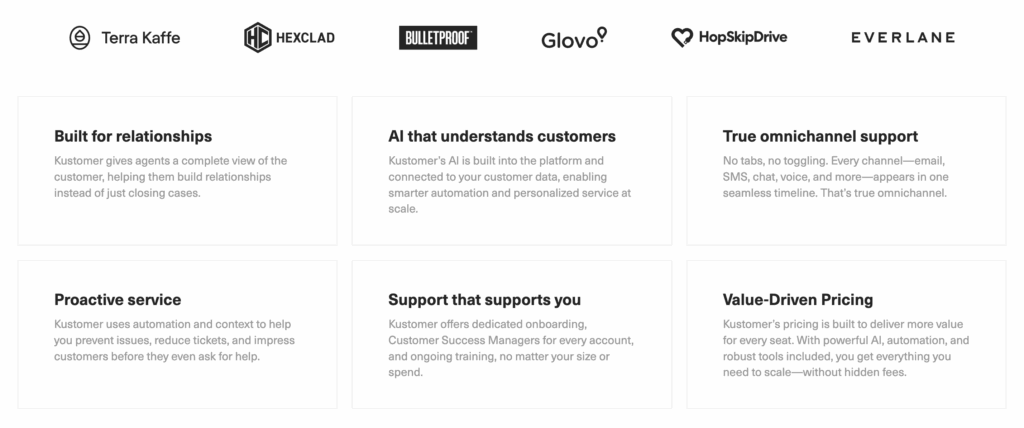
Stop just chatting. Start driving results with Kustomer:
- Route with intelligence: Hopper moved beyond Intercom-style "first-come, first-served" queues. By using Kustomer to route tickets based on urgency and flight data, they slashed first response times by 50% and cut overall software costs by 20%.
- Scale without the headcount: Everlane proved that better service doesn't require more agents. By leveraging Kustomer’s data-rich automation and self-service, they achieved a 4X increase in automated deflection, handling volume spikes with ease.
- Empower your agents: Makesy switched to Kustomer to eliminate the chaos of manual ticket selection. With intelligent routing and a unified view, they improved response times and launched a self-service assistant that resolves dozens of tickets a week without human intervention.
Ready to upgrade from a messaging tool to a complete support engine? Book a demo now.