There is nothing more frustrating for a customer than submitting a support request, waiting 12 hours, and finally getting a reply that says: "I have transferred you to the correct department."
Every time a ticket changes hands, your resolution time spikes and your customer satisfaction drops. Yet, without automated routing, your support inbox is essentially a chaotic waiting room. Your highly trained agents are forced to act like traffic cops—reading, tagging, and manually dragging tickets into the right folders—instead of actually solving problems.
This manual triage creates a massive bottleneck. It burns out your team, buries urgent VIP requests under piles of routine questions, and destroys your service level agreements (SLAs).
Hiring more agents to sort the inbox is an expensive, temporary band-aid. Modern support teams are eliminating the bounce entirely by deploying automated, AI-driven routing. By instantly analyzing the intent of a message and matching it with live customer data, you can bypass the general queue and drop every request onto the exact right desk the moment it is submitted.
What is Automated Ticket Routing?
Automated ticket routing—often called intelligent orchestration—is the process of using artificial intelligence and machine learning to analyze the intent, sentiment, and historical CRM context of an incoming request, instantly matching it to the most equipped human agent or automated workflow.
Legacy routing relies on customers pressing buttons or systems scanning for exact keywords (like routing any email with the word "broken" to tech support). This method is rigid and often fails when a customer's phrasing is messy or complex. AI-driven routing solves this by using natural language processing to actually read the message, understand the nuances of the customer's problem, and predict the exact backend action required.
Instead of a ticket landing in a general "Support@..." inbox, the system acts as an invisible, highly intelligent dispatcher. It evaluates the issue the second it arrives, bypasses the general queue, and drops the fully contextualized request onto the exact right desk.
Manual vs. Automated Ticket Routing: Key Differences
If your team is still manually sorting the inbox, you are bleeding time and money. Here is a quick breakdown of exactly why modern teams are leaving manual triage behind:
| Feature | Manual Routing | Automated Routing |
| Speed | Customers sit in an unassigned queue waiting for human triage. | Tickets are assigned to the right desk instantly in real-time. |
| Accuracy | Prone to human error, misrouting, and cherry-picking. | Data-driven matching ensures objective, precise assignments. |
| Scalability | Triage bottlenecks break down during high-volume spikes. | Processes 10,000 tickets just as quickly as it processes 10. |
| Agent focus | Wastes highly paid agent time on administrative sorting. | Frees agents to focus exclusively on complex problem-solving. |
How Does an Automated Ticketing System Work?
An effective routing system acts as an invisible dispatcher that analyzes incoming requests and immediately matches them to the right resource. Here is how the underlying technology handles the workflow:
- Ticket analysis and intent detection: As soon as a request arrives via email, chat, or social media, the system scans the content. Modern AI uses natural language processing to understand the customer's actual sentiment and intent, even if their phrasing is messy.
- Rule application and CRM integration: The software applies your predefined routing rules while instantly pulling the customer's live data. It checks for things like VIP status, recent purchases, or language preferences to provide the agent with full context.
- Real-time ticket assignment: The system bypasses the general inbox and drops the fully categorized ticket directly into the correct agent's dashboard or a specific departmental queue.
- Continuous SLA monitoring: Once assigned, the system continuously tracks the ticket against your service level agreements. If an agent does not respond fast enough, the system automatically triggers an escalation workflow to notify a manager.
5 Key Benefits of Automated Ticket Routing
- Slash your resolution times: When you route tickets instantly, you eliminate the "waiting room" phase. This drastically lowers your first response time because the ticket lands immediately on the desk of someone who can actually solve it. In fact, Gartner predicts that by 2029, agentic AI will autonomously resolve 80% of common customer service issues without human intervention.
- Eliminate agent burnout: Support agents want to help customers, not act as data entry clerks. A Salesforce report on the State of Service found that 77% of service agents report increasingly complex workloads, and more than half are experiencing burnout. Automating the time-consuming triage process protects your teams from administrative exhaustion.
- Protect your SLAs: Human error inevitably leads to buried tickets and missed deadlines. Automated workflows track your performance metrics in real-time and trigger instant escalations before an SLA is ever breached. This is critical, as research reveals that 32% of all customers would stop doing business with a brand they love after just one bad experience.
- Drive massive cost savings: Paying humans to manually sort an inbox is an incredible waste of payroll. By streamlining your support operations with AI routing, you can handle massive spikes in ticket volume without hiring additional headcount. A McKinsey analysis shows that implementing AI-powered experiences can successfully reduce the total cost-to-serve by 20% to 30%.
- Skyrocket customer satisfaction: Customers hate repeating themselves to three different agents. By ensuring every new ticket goes to the exact right team on the first try, you eliminate the frustrating ticket bounce and deliver a seamless support experience. As PwC reports, nearly 80% of American consumers point to speed and convenience as the most critical elements of a positive customer experience.
Related → 7 Benefits of Using AI in Customer Service
6 Use Cases for Ticket Routing in Customer Service
How does intelligent automation actually look in practice? Here are six examples you can implement immediately to transform your support operations.
Skill-based Routing
Not every agent is equipped to handle every problem. A highly technical software bug should not land on the desk of a billing specialist. Skill-based routing analyzes the incoming ticket and matches it to the exact right agent based on their specific product knowledge, language fluency, or technical expertise.
Real-world example 💡
Bulletproof used Kustomer’s intelligent routing and custom workflows to automatically identify and resolve complex delivery problems. By routing specific transactional issues instantly, they drastically reduced their inbound volume and freed up their advocates to focus on high-value customer interactions.
Priority and VIP Routing
All customers are important, but some tickets carry a higher financial risk. Priority routing instantly flags support requests from high-value enterprise accounts, VIP loyalty members, or users who have just experienced a critical billing error, moving them to the absolute front of the line.
Real-world example 💡
Vuori, a premium performance apparel brand, relies on Kustomer to scale their support during massive volume surges. By intelligently routing tickets and providing agents with a holistic CRM timeline view, Vuori ensures its highest-value customers always receive a rapid, highly personalized experience, rather than being buried in a generic queue.
Workload Balancing
If your routing system just dumps every general inquiry onto your best agent, that agent will inevitably burn out. Workload balancing ensures incoming tickets are distributed evenly and sequentially among all available team members. Advanced systems even track real-time agent capacity, pausing assignments if an agent is currently overwhelmed with a complex escalation.
SLA-based Routing
Service level agreements are the backbone of a professional support team. SLA-based routing acts as a safety net. The system continuously monitors the unassigned or pending queue; if a ticket is dangerously close to breaching its response time limit, the software automatically tags it, bumps its priority, and routes it directly to a manager or the next available agent.
Sentiment-based Routing
Sometimes, it is not what the customer is asking, but how they are asking it. Modern AI uses natural language processing and machine learning to analyze the emotional tone of a message. If the system detects intense frustration, anger, or an explicit threat to cancel a subscription, it triggers an immediate escalation to a specialized retention team to de-escalate the situation.
Omnichannel Routing
Your customers do not care if they message you on Instagram, send an email, or use your live chat—they expect a unified experience. Omnichannel routing funnels all of these disparate communication channels into a single, automated workflow.
Related read → Check out the leading omnichannel customer support platforms to unify your communication channels and better serve your customers.
Real-world example 💡
Aplazo, a leading Buy Now, Pay Later platform, deployed Kustomer to unify its support across WhatsApp and in-app chat. Instead of having agents switch between different tools, Kustomer intelligently routed all omnichannel requests into one workspace. This allowed them to seamlessly automate routine queries and pass complex issues directly to the right agent, driving a 40% increase in CSAT.
Learn more → 12 Real-World Applications of AI in Customer Support
How to Set Up Automated Ticket Routing in 5 Steps
Implementing an automated ticketing system requires a strategic approach to ensure your routing rules actually improve the customer experience rather than creating new bottlenecks.
Follow this five-step framework to transition from manual triage to AI-powered orchestration.
1. Audit Your Current Support Operations and Data
Before you can route tickets effectively, you must understand your current baseline. Analyze your historical data to identify which incoming tickets consume the most time and where ticket bounces occur most frequently.
- Identify bottlenecks: Look at your metrics to see which departments have the longest resolution time and which agents are currently overwhelmed.
- Map common customer requests: Export the last 90 days of support requests and categorize them by intent. This helps you decide which workflows to prioritize for automation.
- Review your SLAs: Ensure your service level agreements are clearly defined so the system knows exactly when to trigger an escalation or a manager notification.
2. Build a Comprehensive Ticket Categorization Hierarchy
An automated ticket routing system is only as accurate as the categories you provide. You need to create a structured tagging system that the software can use to triage issues instantly.
- Define your tiers: Create a hierarchy of support tickets, ranging from simple self-service inquiries (like password resets) to high-priority technical escalations.
- Utilize pre-chat surveys: Use functionality like intake forms or pre-chat bots to ask customers to select their department or issue type upfront.
- Standardize your tagging: Ensure your team members are using consistent labels so the machine learning models can recognize patterns in customer requests more accurately.
3. Configure Your Routing Logic and Business Rules
This is where you define the brain of your ticketing system. You need to establish the specific logic that dictates exactly how new tickets move through your AI help desk.
- Establish skill-based routing: Map out the specific expertise of your support agents. For example, ensure any ticket tagged with "API" goes to your technical service teams, while "Refund" goes to billing.
- Set up workload balancing: Use round-robin ticket assignment to distribute ticket volume evenly, preventing burnout among your top performers.
- Implement time-based rules: Configure routing rules that account for different time zones and business hours, ensuring faster responses by directing tickets to the right team that is currently online.
4. Deploy and Train Your AI Routing Engine
While basic rules handle simple tasks, artificial intelligence handles the nuance. This step involves teaching your help desk software to recognize the sentiment and intent behind customer requests.
- Upload historical transcripts: Feed the AI engine your best-resolved historical tickets and knowledge base articles so it learns your brand’s specific language.
- Refine intent detection: Use natural language processing to help the system distinguish between a "billing question" and a "billing emergency" (which requires a priority ticket status).
- Connect your CRM: Ensure your AI routing has access to real-time customer data. This allows the system to recognize a VIP customer or a repeat caller and route them to a senior agent immediately.
5. Test in a Sandbox Environment and Monitor Your Dashboards
Never launch complex workflow automation directly to your entire customer base. You must validate the logic in a controlled environment first.
- Run pilot tests: Have a small group of customer support agents process tickets through the new automated ticketing system to catch any misrouted requests or broken logic.
- Monitor real-time dashboards: Once live, track metrics like first response time and customer satisfaction (CSAT) closely.
- Optimize based on feedback: Regularly review tickets that the AI couldn't categorize correctly. Use these "failed" deflections to update your routing rules and knowledge base, ensuring the system gets smarter with every interaction.
Recommended read → The Complete Guide to AI-Powered Ticket Deflection for 2026
Best Practices for Effectively Automating Ticket Routing
To get the most out of your automated ticketing system, you need to look beyond the initial setup. Implement these operational strategies to optimize your support operations and ensure your AI-powered workflows actually streamline the customer experience:
- Rely on tiered service level agreements (SLAs): Configure your help desk to automatically trigger an escalation or a manager notification if a priority ticket sits untouched for too long.
- Balance automation with the human touch: Never trap a frustrated customer in a bot loop. Ensure your workflow automation always includes a frictionless path to a human support agent for complex or highly sensitive support requests.
- Leverage full omnichannel context: Use a ticketing system that pulls from a unified knowledge base and CRM. This ensures that whether a new ticket comes from social media, email, or chat, the right agent has the full history to provide a faster resolution.
- Monitor real-time dashboards and metrics: Regularly audit your first response times and customer satisfaction scores. Use these dashboards to identify dead ends in your routing rules where tickets frequently get stuck or miscategorized.
- Enable dynamic after-hours routing: Configure your service desk to automatically route tickets to international team members or specialized on-call flows outside of your primary business hours to maintain 24/7 response times.
- Audit and retrain your AI models: Machine learning isn't a set-it-and-forget-it process. Regularly review tickets that require manual re-assignment to categorize them correctly and improve the system’s natural language processing accuracy.
- Implement sentiment-based prioritization: Use artificial intelligence to detect angry or frustrated customer requests in real-time. Automatically move these to the front of the queue to prevent churn and improve the overall support experience.
Recommended read→ How to Automate Ticket Resolution Using AI in 2026
Top 3 Customer Service Tools with AI Ticket Routing Capabilities
Choosing the right technology determines whether your support operation remains a bottleneck or becomes a driver of growth. Here are the top platforms that use artificial intelligence to orchestrate incoming requests.
1. Kustomer
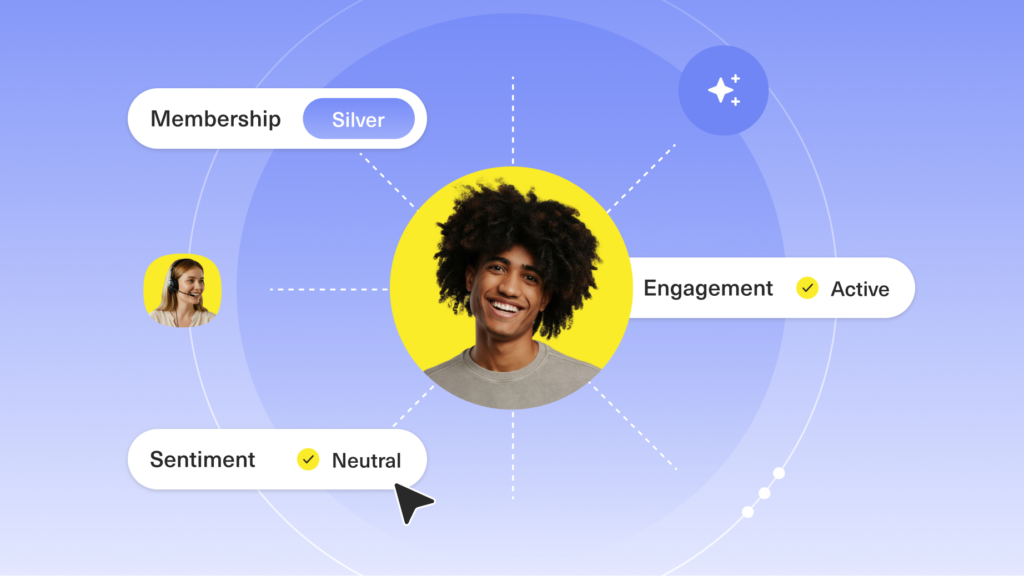
Kustomer is a CRM-first platform designed to resolve tickets instantly, not just move them around. Because it uses a unified timeline rather than isolated tickets, its AI engine routes requests based on real-time customer data (like live order status, VIP tier, or browsing history) instead of relying on basic keyword triggers.
Key features
- AI-driven intent detection: Automatically analyzes the nuance, sentiment, and urgency of incoming messages to route them to the exact right agent or autonomous bot.
- Omnichannel intelligent routing: Funnels emails, live chats, and social media messages into a single automated workflow, ensuring customers never wait in the wrong queue.
- No-code automation builder: Allows your support leaders to deploy complex, data-driven routing rules and SLA escalations without needing a developer.
Why Kustomer stands out
- Contextual routing over keyword tags: Legacy systems route based solely on what the customer types. Kustomer routes based on who the customer is, using their entire unified history to inform the AI's destination choice.
- Zero swivel-chair triage: Instead of an agent opening a ticket, checking Shopify, and manually re-routing it to the returns desk, Kustomer's AI evaluates that commerce data natively and routes the ticket to the returns team the second it arrives.
- Autonomous resolution handoffs: Kustomer doesn't just route to humans. It seamlessly routes routine inquiries to AI agents for instant resolution, instantly passing the complete conversation context to a human only when empathy or complex problem-solving is required.

2. Zendesk
Zendesk is a legacy leader that provides a massive suite of tools for global support teams. It is built for scale, offering deep customization for companies that need to manage huge volumes across every imaginable channel. While powerful, it often requires a dedicated admin to maintain its complex routing rules and app integrations.
Key features
- Skill-based routing: Assigns incoming requests to agents based on their specific language or product expertise.
- Side conversations: Enables agents to collaborate with other departments without leaving the ticket interface.
- Extensive marketplace: Offers thousands of pre-built integrations for external apps and services.
Top advantages
- Built for enterprise scale: Handles millions of tickets efficiently for the world's largest organizations.
- Deep reporting: Provides granular analytics to help managers track agent performance and compliance.
Related → Zendesk AI Agent Features Teardown for 2026
3. Freshdesk
Freshdesk is an AI-powered CRM platform favored by mid-market companies seeking to move away from shared inboxes. It focuses on ease of use, making it simple for teams to set up basic automation and collaboration tools without a steep learning curve or high implementation costs.
Key features
- Automated ticket assignment: Distributes new requests using round-robin or load-balancing logic.
- Collaborative ticketing: Allows multiple agents to work on a single issue without duplicating efforts.
- Gamification features: Uses leaderboards and points to keep support teams engaged and productive.
Top advantages
- Short time-to-value: Lets teams go live with basic routing and automation in hours rather than weeks.
- Cost-effective: Provides essential help desk functionality at a price point accessible for growing businesses.
Related → 17 Best Freshdesk Alternatives for 2026 (Based on Real Users)
Streamline Your Ticket Management with Kustomer
Your support team was hired to solve complex problems, not manually sort emails. Legacy help desk software traps your agents in isolated tickets and forces them to constantly hunt for context across different tabs and tools.
Kustomer takes a CRM-first approach to customer service. By combining powerful artificial intelligence with a unified customer timeline, Kustomer instantly analyzes the intent of every incoming request and orchestrates it perfectly. Your agents get the full context—including order history, sentiment, and past conversations—delivered on a single screen the second a ticket opens.
Stop letting manual triage destroy your response times. Try Kustomer free for 30 days to see how intelligent routing can eliminate your backlog today.