Reporting That Shows You What’s Happening, Why, and What to Do Next
With Data Explorer, leaders can finally stop guessing and start making fast, confident decisions grounded in real-time customer data.
Billy Bateman
Dec 10, 2025
5 min read
CX leaders have no shortage of dashboards. Every day, they’re surrounded by charts and KPIs that describe what happened, but rarely explain why it happened or what to do next. And when the meaning behind a metric lives in one place, the data powering it lives in another, and the analysis lives in someone’s spreadsheet, even simple questions become slow, frustrating, and ambiguous.
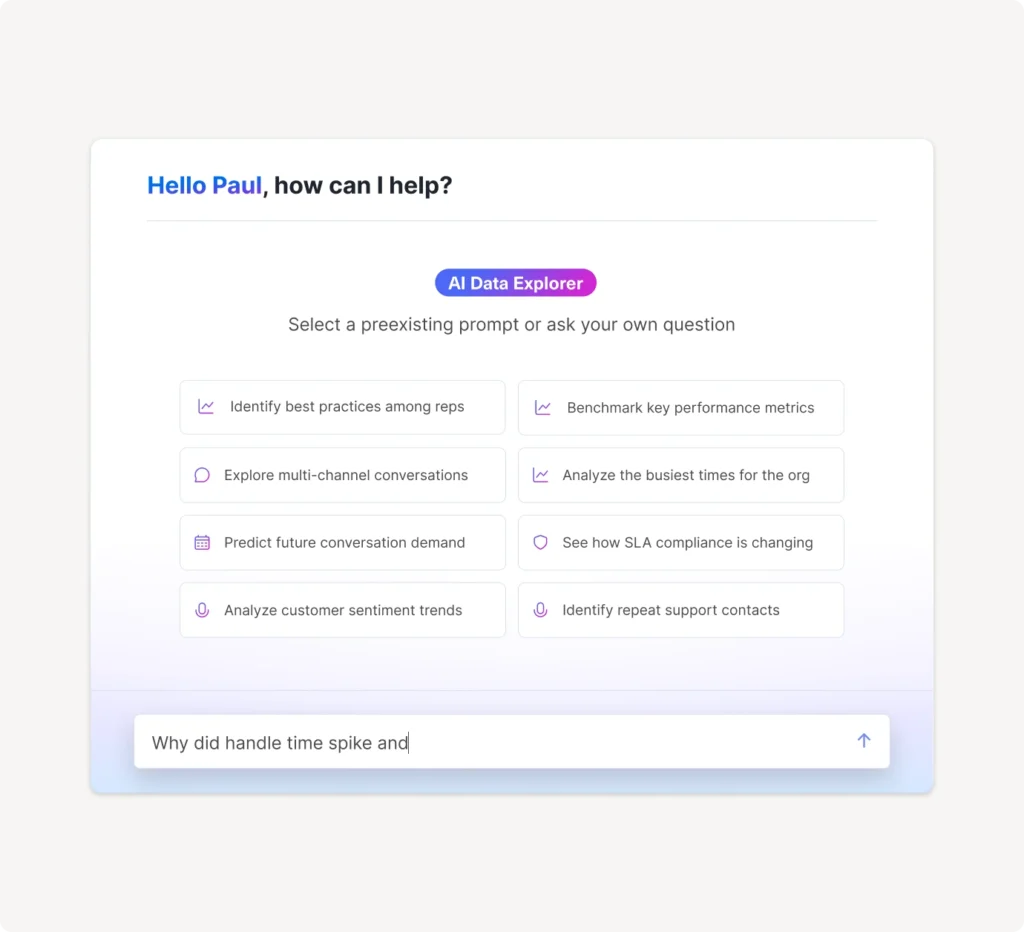
The new Kustomer Data Explorer changes that. It’s built to make reporting conversational, transparent, and instantly actionable. Instead of hunting for answers across multiple tools, you can ask a question, and Data Explorer will look at your live customer data, analyze the patterns, and give you clear insights and recommendations in seconds.
Hear what an early user has to say:
“The new Data Explorer feature in Kustomer has quickly become one of my favorite tools. It gives me the ability to deep-dive into any metric I need, which has made my analysis faster, more accurate, and far more actionable. What I appreciate most is how intuitive and powerful the tool is. It centralizes complex analytics in a way that feels accessible, saving me hours every week while improving the clarity of our operational insights. It has truly elevated how we understand our customers and support our team.”
Marissa Sherwood, Senior Manager of Customer Experience, Goody
To support this next generation of insight, the new Custom Report Builder is also now generally available. It’s faster, more intuitive, and gives CX leaders far greater control over how they explore and structure their data.
The AI reporting assistant is launching in beta inside Custom Reports. It’s a conversational analysis tool that explains your charts, highlights what’s driving changes, and recommends what to do next—all through a simple “Analyze” action.
Additional reporting assistants will roll out across Standard Reports in the coming weeks.
The Reporting Problem: No Time for Guessing
For most teams, reporting has been stuck in a pattern of passive metrics and manual interpretation. Dashboards tell you the “what,” but they leave you alone with the “why.” When spikes, slowdowns, or anomalies appear, the burden is entirely on the CX leader to figure out the story behind the numbers, and to do so quickly enough to keep operations running smoothly.
This gap leads to inconsistent decision-making, delayed reactions, and wasted time. Even when teams trust the numbers, they often lack certainty about their meaning. And that uncertainty slows down everything from staffing to coaching to customer-facing improvements.
We created Data Explorer to solve exactly these issues.
One Engine, Two Seamless Experiences
The power of Data Explorer now exists in two places: as a standalone conversational workspace and built directly into your Standard and Custom reporting as the AI reporting assistant.
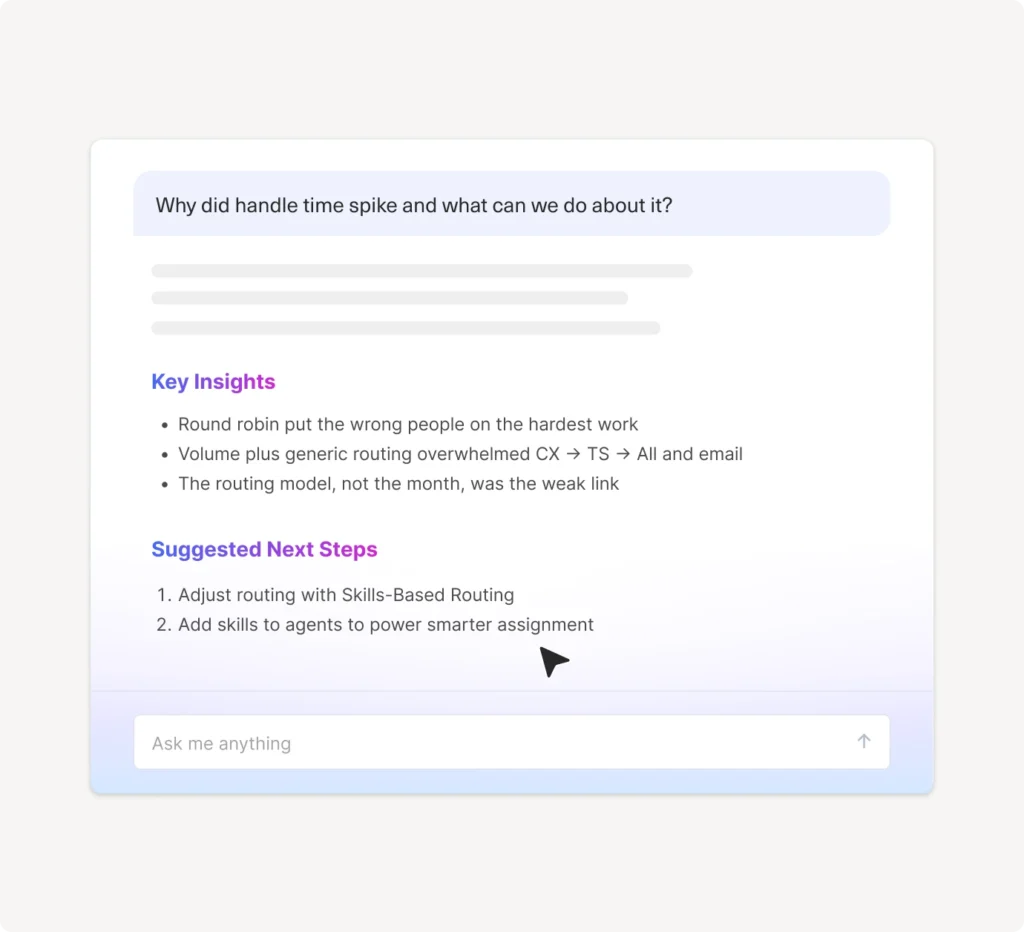
In the dedicated Data Explorer experience, you simply ask a question, “Why did the backlog increase last week?” or “Where are customers running into trouble this month?” and the system analyzes your customer conversations, events, and trends to generate a full explanation. It doesn’t stop at charts. It tells you what’s driving the change, what operational factors matter most, and what actions you should take next. Coaching suggestions, staffing adjustments, workflow improvements are all laid out clearly and tied directly to the data.
The AI reporting assistant brings that same intelligence into your Standard and Custom Reports. When you’re looking at a chart and the numbers raise a question, you don’t have to leave the page. Click “Analyze,” and the system shows you exactly how the metric is built, what influenced the trend, what’s unusual, and what the implications are. Instead of a static graph, you get context, interpretation, and direction right where you need it.
Together, these two features create a continuous analysis experience. You can move from dashboards to deep exploration without switching tools or losing context.
Why Now? Because Speed and Clarity Matter More Than Ever
CX operations are faster, more complex, and more interconnected than at any time in the past decade. Leaders need to understand what’s happening in their queues, teams, channels, and workflows, and they need to understand it quickly.
Data Explorer was built for this pace. It takes the unified customer data inside Kustomer, which spans every conversation, event, and customer interaction, and uses it to interpret what’s happening across your entire operation. Instead of relying on overnight syncs or manual exports, Data Explorer generates insights from live data. And instead of waiting on analysts, leaders get immediate clarity in everyday language.
This shift toward real-time, conversational insight isn’t just an enhancement—it’s a fundamental rethinking of how teams should interact with their data. As Jeremy Suriel, our CTO & Co-Founder, explains:
"The Data Explorer represents a fundamental shift in how customer service teams interact with their data. For years, getting answers meant waiting on custom reports or struggling with complex dashboards. We've engineered the Data Explorer to eliminate that friction. Now, you can chat with your data and get actionable insights in seconds. The Data Explorer predicts trends and generates the right visualizations automatically. We're helping customers realize more value from their data and make faster decisions than ever before."
AI Reporting Assistant: Clarity Where You Already Work
The AI reporting assistant brings transparency to the surface. Every report becomes self-explanatory. You no longer have to ask, “What does this metric mean?” or “How exactly is this calculated?”
Click “Analyze,” and the AI reporting assistant reveals the data powering the:
Chart
Definitions
Filters & Attribution logic
Then, it explains the movement you’re seeing. It identifies what changed, why it changed, and what the implications are for staffing, workflows, or customer experience.
You Ask a Question. It Looks at Your Data. You Get the Answer.
This is the heart of what makes Data Explorer different.
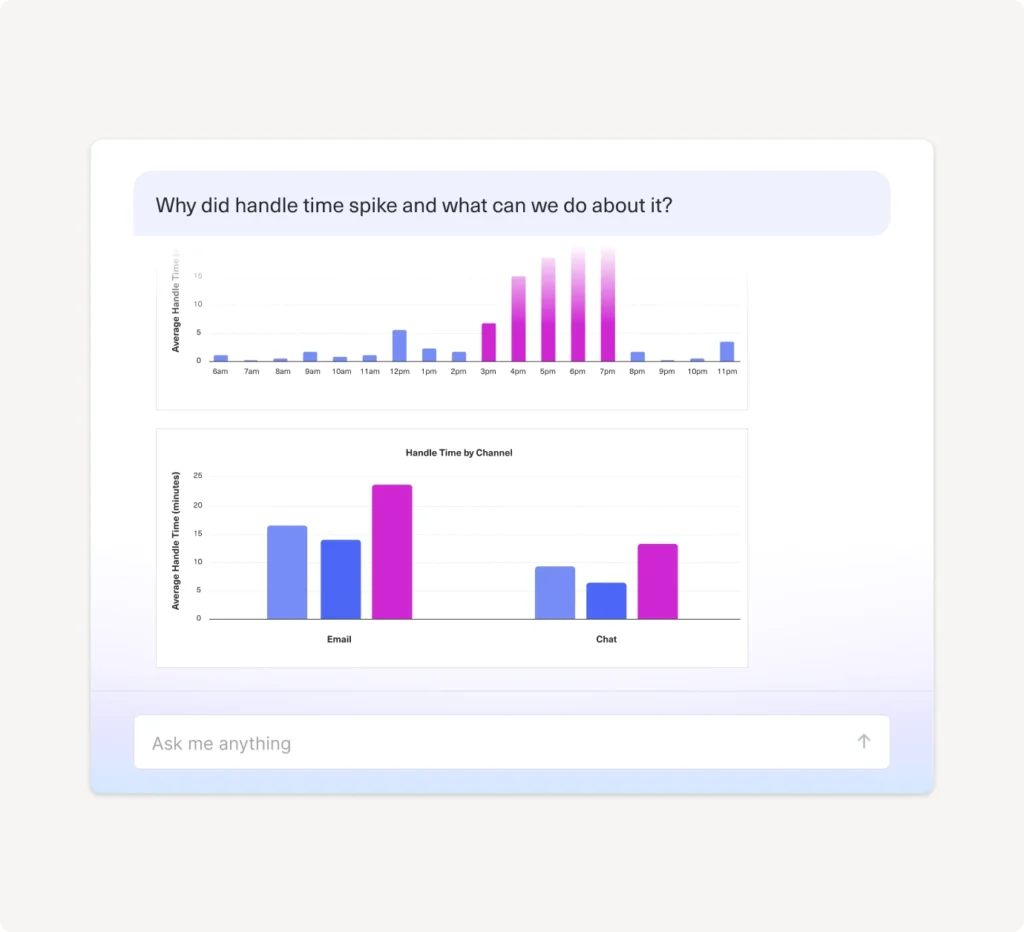
Ask a question, and the system translates the intent, finds the right data, and examines it through a CX lens. It looks for patterns, outliers, anomalies, and correlations. It checks what changed, when it changed, who was impacted, and what factors mattered most. Then it explains all of it in the language in which your Kustomer instance is configured, with visualizations and recommendations to help you act.
If handle time spikes, you’ll understand the root causes - maybe unfamiliar workflows, new contact types, or a surge in a particular channel. If CSAT drops, you’ll quickly see which teams, segments, or topics contributed most. If backlog rises, you’ll know whether it’s staffing, routing, or volume that’s responsible.
Instead of pulling data and piecing together theories, you get the story behind the trend delivered instantly.
The Impact: Confidence, Clarity, and Better Decisions
With Data Explorer and the AI reporting assistant, teams report clearer decision-making, faster reactions to operational shifts, and deeper trust in the metrics they rely on.
As a result, CX leaders can react more quickly to issues, prioritize coaching based on real evidence, plan staffing with confidence, and understand customer sentiment without digging through raw transcripts. Every part of CX management becomes easier, faster, and more grounded in reality.
Most importantly, Data Explorer gives CX leaders what they’ve always needed but rarely had: a true understanding of what’s happening inside their customer experience, why it’s happening, and how to improve it.
Ready to Turn Your Data Into Direction?
The Kustomer Data Explorer and the AI reporting assistant are included in our Enterprise and Ultimate plans. If you’re ready to start using it, reach out to your Customer Success Manager today. The sooner you begin, the faster you’ll see Data Explorer transforming how your teams understand performance, make decisions, and serve your customers.
Not using Kustomer yet? Schedule a demo to see how easily your teams can tap into the full power of your customer data and how Data Explorer turns every question into immediate, actionable insight.
Looking for the latest CX insights?
Subscribe for weekly updates from experienced CX leaders