According to Gartner’s 2026 CS Leaders Survey, 91% of support managers report pressure from upper management to implement AI in their workflows.
Zendesk wants to be an answer to that pressure with their AI agents. They market them as service-ready workers that can be deployed today and left to work your backlog on their own.
But once you're inside the product and trying to get the AI agents to handle real conversations on their own, you'll see that the reality is far more complicated than a simple "plug-and-play”.
It’s something support managers on Reddit have been vocal about, with the same pain points coming up in thread after thread.

Between the tiered pricing, the per-resolution billing, and the UX complaints, there's a lot to sort through before you can make an informed call. That’s exactly why we created this guide.
We’ll walk you through every pricing tier, explain how the automated resolution fees add up in practice, and explain the friction points that users keep running into after deployment.
What Are Zendesk AI Agents?
Zendesk AI Agents are the platform's built-in bots for handling support conversations. They are marketed as autonomous support workers that handle customer experience on chat, email, web on their own, and only escalate to a human agent when necessary.
Unlike the rigid, scripted chatbots of the past, these agents use machine learning and NLU (Natural Language Understanding) to interpret customer intent and generate responses from your content base and connected knowledge sources.
Zendesk also says the models were pre-trained on more than 18 billion real customer interactions, so they come with a built-in understanding of common support patterns.
That said, Zendesk’s AI Agents come in two different tiers, Essential and Advanced, and what you can do with them changes depending on which one you're on.
With Essential (included with all Zendesk Suite plans), you get:
- Generative responses that pull answers directly from your knowledge base and help center content
- Persona and tone customization so you can match the AI agent's tone to your brand voice
- Instructions that let you guide how the AI customer service agent responds to specific topics or situations
- Escalation and data capture that collect context during handoff, so human agents don't start from scratch
- Channel support for messaging (web widget, mobile SDK, WhatsApp, Facebook Messenger, Instagram, LINE), email, and web forms
Put simply, Essential is more of a smart FAQ layer than a fully autonomous support agent. It can answer questions and hold a back-and-forth, but it can't take action in your systems or follow a process from start to finish.
To get any of that, you need to upgrade to Advanced AI. Zendesk doesn’t put the price up front, but third-party reports put it somewhere around $50/agent/month. It includes:
- AI agent builder for creating custom conversation flows, including hybrid flows that mix generative AI with scripted responses
- API integrations and actions that connect to external systems, apps, and CRMs like Shopify, Salesforce, and Jira, so the AI-powered agent can take action like processing refunds, looking up orders, or updating records.
- Reasoning controls for fine-tuning how the AI agent makes decisions and handles complex scenarios.
- Advanced analytics and reporting with deeper visibility into automation rates, CSAT, conversation outcomes, and overall AI agent performance
- Voice AI agents that can handle phone conversations autonomously, though this is still in early access and only available if you also have Zendesk Voice
Zendesk AI Agents Feature & Capabilities Teardown
Zendesk AI Agents come with a wide feature set, but what you can actually use depends on your tier, and some features work better than others in practice.
Here's what to expect from each one:
- Generative replies from your knowledge base: The AI agent pulls from your help center and connected content to generate conversational answers. Works well when the answer is already in your help center, but struggles with anything that isn't explicitly covered there.
- Behavioral instructions for the AI agent: Simple, plain-language rules that tell the AI agent what to do (or not do) in specific situations. You get this on Essential, but it's a lighter version of the fine-tuned reasoning controls that come with Advanced.
- AI agent persona and tone customization: You can set the AI agent's name, personality, and voice to match your brand. It makes the experience feel more on-brand, though it's strictly cosmetic and has no effect on how the agent processes or responds to requests.
- Escalation and data capture on handoff: When the AI agent hits its limit, it gathers customer needs, details, intent, and a conversation summary before handing the ticket to a human agent.
- Intelligent triage and ticket routing: Reads incoming tickets and tags them with intent, language, and sentiment so they get routed to the right agent automatically. Many people expect ticket routing and triage to be part of AI Agents, but it falls under Copilot, which is a separate add-on.
- Custom conversation flow builder: A visual editor where you design flows that combine generative replies with scripted steps. Only available in the higher tier and is widely called out on Reddit as one of the more frustrating interfaces on the platform.
- Voice AI agents: Handles phone calls end-to-end with natural language. Still in early access, though, and you'll need both Zendesk Voice and the Advanced AI add-on to even try it.
Zendesk AI Agents Pricing Teardown
Pricing is one of the biggest pain points with Zendesk AI Agents.
Not because the numbers are necessarily high (though some users mention this as well), but because the billing structure makes it almost impossible to predict what you'll pay at the end of the month. As this redditor explained:

This is because Zendesk AI Agents are billed through automated resolutions (ARs).
One AR is counted every time the AI resolves a problem without a human stepping in, and each resolution is verified by an LLM to confirm the issue was handled.
Since AI Agents are not standalone products, you’ll need to get a base Zendesk plan first, which comes with its own per-agent cost. However, every plan also comes with a set number of ARs free of charge.
But in practice, that’s not nearly enough for most teams, so you'll almost always end up paying for additional ARs on top. Here’s a quick table with a cost breakdown of each plan and different AR rates:
| Plan | Base Price (Annual) | Included ARs | Committed AR Rate | Pay-As-You-Go AR Rate |
| Support Team | $19/agent/month | 5 per agent/month | $1.50 | $2.00 |
| Suite Team | $55/agent/month | 5 per agent/month | $1.50 | $2.00 |
| Suite Professional | $115/agent/month | 10 per agent/month | $1.50 | $2.00 |
| Suite Enterprise | $169/agent/month | 15 per agent/month | $1.50 | $2.00 |
And this is before the Advanced add-on. If you need the AI agent builder, API integrations, or other advanced features, expect to add roughly $50/agent/month to the numbers above.
Pros and Cons of Zendesk AI Agents
By now, you have a good sense of what Zendesk AI Agents bring to the table, but the question is whether the trade-offs make sense for your team. To get a clearer picture, we looked at what support managers and admins who've used the product have to say about it.
Pros of Zendesk AI Agents
- Granular control over AI tone and voice: You get solid control over how the artificial intelligence agent talks to your customers, from tone to personality to custom descriptions. Users say that it makes a noticeable difference in how the bot comes across to customers. [Read Full G2 Review]
- Built-in knowledge base deflection: This comes up a lot in positive reviews. Users love how well the AI picks up on common questions and resolves them through help center content before a human ever sees the ticket. [Read Full G2 Review]
- Solid training and onboarding resources: Zendesk's AI training is something that saves teams weeks of fumbling through the setup on their own. The platform has a steep learning curve, and users say the structured onboarding helped them get the value of the platform faster. [Read Full G2 Review]
- AI-assisted replies and ticket summaries: The AI summarizes long ticket threads and suggests replies that agents can optimize before sending. A small feature on paper, but users say it's one of the biggest time-savers in their daily workflow. [Read Full G2 Review]
Cons of Zendesk AI Agents
- Unpredictable billing: Users say the math never quite adds up. Conversations get tagged as resolved that their team wouldn't have counted, and by the time the invoice arrives, the number is always higher than expected. [Read Full G2 Review]
- Works best for simple, high-volume tickets: If your support is mostly quick, repetitive questions, the AI handles it well. Users with more complex B2B workflows say the experience isn’t great once customer issues need deeper context and longer resolution timelines. [Read Full G2 Review]
- Zendesk's own support is hard to reach: Ironically, a company that sells customer support software gets a lot of criticism for its own support experience. Users say response times are slow, and the help they get is often a link to a help article. [Read Full G2 Review]
- Oversold during the buying process: Users say Zendesk oversold what the platform and AI agents could do during the sales process, and the actual product experience didn't come close to what was discussed and agreed on before signing. [Read Full G2 Review]
The Better Alternative: Kustomer AI Agents
Most of the issues that users have with Zendesk’s AI Agents come from the fact that their AI was built on top of a ticketing system.
Because of that architecture, AI's entire view of the customer is limited to whatever is inside the current ticket. There's no native access to past conversations, purchase history, or cross-channel behavior.
Kustomer takes a more practical approach.
The platform keeps every interaction, transaction, and data point in a single customer timeline, and the AI draws on all of it in real-time. That gives it enough context to handle more complex requests, and it gives your team direct control over the logic behind every decision.
Here's how that difference looks like in practice:
Specialized AI Agent Teams
With Kustomer, you don't get one AI bot trying to cover every scenario. You build a team of purpose-built AI agents, each one assigned to a specific area of your support operation. They each have their own scope, their own data access, and their own logic.
A typical setup might include agents like these:
| Agent | What it does | What it pulls from |
| Refund Agent | Takes care of damaged items, wrong orders, and late deliveries | Order history, return policy, payment records |
| Booking Agent | Helps with reservations, date changes, and room upgrades | Availability system, loyalty status, customer preferences |
| Order Status Agent | Responds to "where's my order" questions with live tracking data | Order records, carrier data, past interactions |
| Billing Agent | Handles billing questions, payment issues, and subscription changes | Billing system, payment history, subscription details |
You build all of these inside the AI Agent Studio, a visual no-code builder where you configure the reasoning logic, connect APIs, set guardrails, and test each agent independently.
What makes the agents effective in practice is that they can combine hard rules with generative AI within the same flow. A refund agent, for example, can follow a strict approval policy up to a certain threshold and then use generative AI to explain the outcome to the customer in natural language.
PRO TIP 💡Start with your highest-volume, simplest use case (like order status) as your first agent. It builds internal confidence, gives you clean performance data to show leadership, and lets your team learn the builder before tackling more complex flows like refunds or billing.
Advanced Reasoning & Action
Zendesk's AI agents can answer questions from your help center, but they can't process refunds, change bookings, or check inventory on their own. For any of that, you need the Advanced add-on, a custom flow, and a human-in-the-loop.
But with Kustomer's built-in system integrations and adaptive reasoning engine, its AI agents can handle the full sequence themselves.
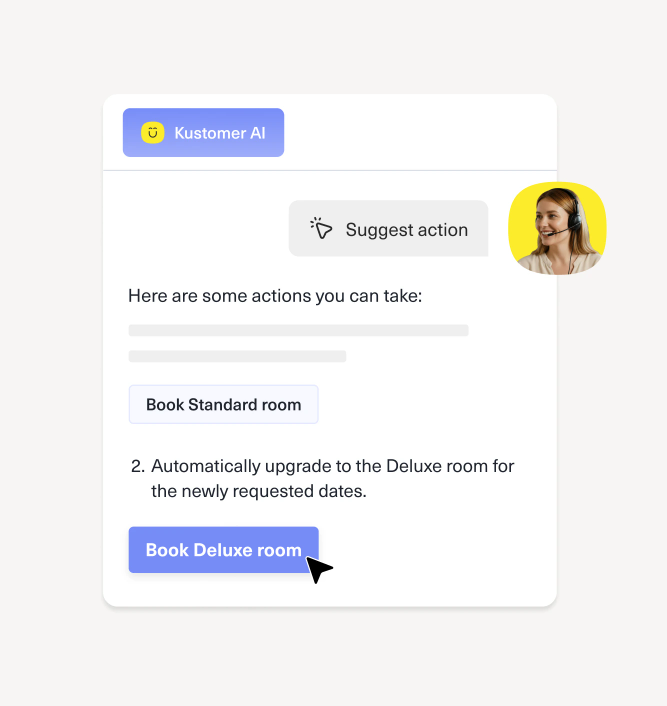
To see what that looks like, take a wrong-item complaint where the original product is out of stock:
| What the customer sees | What the AI does behind the scenes |
| "I got the wrong item in my order." | Pulls up the order and confirms the item mismatch |
| "Is the right one in stock?" | Calls the inventory API, sees a 3-week wait on the original item |
| "What can we do about it?" | Checks customer profile, sees high lifetime value, applies a business rule for full refund + 15% discount |
| "Yeah, let's do that." | Processes the refund through the payment system and generates the discount code |
| Receives a confirmation with the refund timeline and discount code | Generates a personalized, on-brand message pulling together all of the above |
So, the customer walks away with everything handled in one conversation. They didn't have to repeat themselves to a human, wait for a callback, or check their inbox for a follow-up that may or may not come.
AI for Reps
Not every conversation should be fully automated. Complex issues, frustrated customers, and high-value accounts still need a human on the other end. But that human is only as effective as the context they have when the conversation starts.
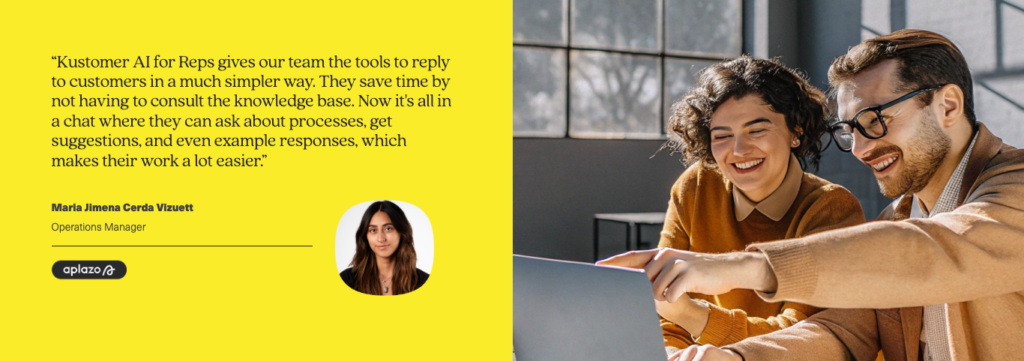
Kustomer's AI for Reps handles that by arming your team with context, suggestions, and pre-drafted responses from the moment a conversation comes through.
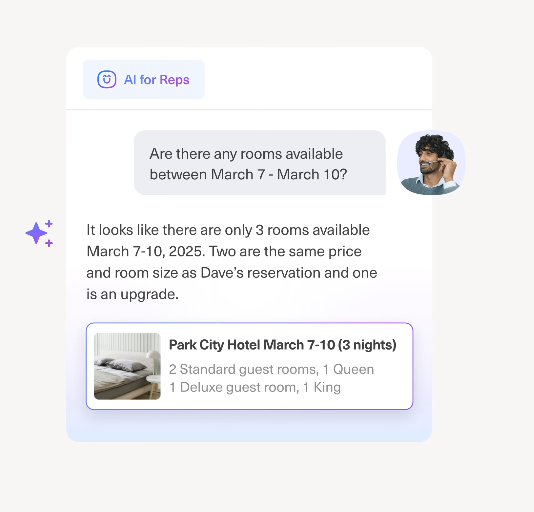
Zendesk offers something similar through an agent Copilot tool, but it's a separate add-on at $50/agent/month on top of your base plan. With Kustomer, it's built into the platform.
Here's what happens when a rep opens an escalated conversation:
- Before the rep says anything, the AI pulls together a summary of the issue, the steps it already took, and the customer's full history. The rep doesn't need to read through transcripts or ask the customer questions to start over.
- During the conversation, the AI suggests specific next steps based on the customer's account, the nature of the request, and your internal policies. That could be a relevant policy to reference, a discount to offer, or an escalation path to follow.
- When it's time to respond, the AI drafts a reply that reflects the customer's situation and your brand's tone. The rep can then edit it and send it over to the customer.
- After the conversation ends, the AI updates records, applies tags, and writes a closing summary that any future rep or manager can reference. The rep's only job at that point is to pick up the next conversation.
AI Assistant Suite
Once your AI agents are live and your reps are using the tools daily, the operational side still needs attention. Someone has to diagnose why an agent gave the wrong answer, what's behind a sudden spike in refund requests, or build a new automation rule independently of your engineering team.
And unlike many other AI tools, Kustomer has a purpose-built solution for this:
- Observability Assistant: If an AI agent gets something wrong, you can open the full decision trail and see exactly what happened. That gives your ops team enough detail to fix the issue on their own, usually the same day it shows up.
- Data Explorer: You can ask "why did escalations double last week?" the same way you'd message a colleague, and Data Explorer comes back with charts and explanations based on your CX data. And if you're not sure what to ask, there are over 250 guided prompts already built in.
- Workflow Assistant: Ops teams can create automations by describing what they need in plain language. Something like "auto-close conversations after 24 hours of inactivity" or "tag every email about a damaged item" is enough for the assistant to generate a working workflow.
- Knowledge Base Assistant: Handles the creation and upkeep of help center articles directly inside the platform. The AI agents pull from this content every time they respond to a customer, so the accuracy of the knowledge base has a direct effect on customer satisfaction and the accuracy of every automated conversation.
Transparent, Lower Pricing
Between per-agent pricing, per-resolution fees, and paid add-ons, Zendesk gives teams many line items to manage but very little clarity on what the final number will be each month.
Kustomer keeps it simpler. Pricing scales with conversation volume; there are no per-seat costs, and the AI features we covered above are all included out of the box.
Here's how the two models compare side by side:
| What you're paying for | Zendesk | Kustomer |
| Base cost | $19-$169/agent/month, depending on plan | Per-conversation, no per-seat fee |
| AI agent features | Basic tier included; Advanced is ~$50/agent/month extra | Included with the platform |
| Rep-facing AI | Copilot at ~$50/agent/month extra | Included with Kustomer AI + Platform |
| Per-resolution/conversation fees | $1.50-$2.00 per automated resolution | Starting at $0.60 per conversation |
| Observability, analytics, assistants | Split between multiple add-ons and tiers | Included with both plans |
| Free trial | No | 30 days, works alongside your existing helpdesk |
As you can see, most of the functionality Zendesk bills separately for comes included with Kustomer at a lower per-interaction rate.
Plus, there's a 30-day free trial that you can use alongside your current helpdesk, so you can run both side by side on the same ticket volume and compare the results directly.
Or, if you'd rather see the platform's full potential, book a demo and get a firsthand look at what it can do for your team.

FAQs
Do I need to switch platforms to try Kustomer AI?
No. Kustomer has a separate AI product that plugs into your existing helpdesk, Zendesk included. It connects to your knowledge base and can start handling conversations without a full platform migration.
Can Zendesk AI Agents handle complex, multi-step issues?
On the Essential tier, not really. It can answer questions from your help center and have a back-and-forth with the customer, but that's about it.
If you need to use AI for something more complex, like processing a refund or pulling up an order, you'll need to upgrade to the Advanced tier.