Salesforce Service Cloud is the undisputed giant of the CRM world. It generates billions in revenue and powers some of the largest enterprises on the planet. For a massive organization with a dedicated IT team and an unlimited budget, it is a powerful tool.
But for everyone else, that power often comes at a steep price.
Many scaling support teams find themselves trapped in a "Salesforce Paradox": they bought the tool to be more efficient, but the sheer complexity of the system is slowing them down. Users consistently report frustration with clunky interfaces that require five clicks to close a ticket, deployments that drag on for months, and a total reliance on developers to make even basic changes to a workflow.
You shouldn't need a computer science degree to manage your helpdesk.
If you are tired of fighting your own tools to support your customers, you are ready for a change. This guide reviews the best Salesforce Service Cloud alternatives for 2026—platforms like Kustomer, Zendesk, and others—that offer the enterprise power you need without the enterprise headaches.
Why Look for an Alternative to Salesforce Service Cloud?
The decision to leave Salesforce is rarely about a lack of features—it's about the difficulty of using them. For many teams, the platform's "complexity tax" — including its reliance on developers, slow interface, and high administrative burden—eventually outweighs its benefits. Here are the specific operational frustrations that drive businesses to switch:
- Slow and clunky user interface: Users often find Salesforce Service Cloud’s interface to be inefficient and frustrating to use. One reviewer stated, "The user interface is insanely clunky... clicking five things just to close a case is a painful exercise in frustration." Additionally, users report slow page loads, which increases downtime and negatively impacts productivity [*]
- Overly complicated setup and configuration: Another common complaint is how difficult it is to configure Salesforce without technical help. The same reviewer mentioned, “You almost need to be a programmer to make any administrative changes.” This steep learning curve can be a barrier, especially for small businesses or teams without dedicated IT resources [*]
- Inconsistent and poor support: Users have also pointed out the inconsistent support provided by Salesforce. One user mentioned, "Changes to Service Cloud required work from Salesforce developers, which could take time," leading to long delays in resolving technical issues. This inconsistency can be particularly frustrating when urgent problems arise [*]
- Buggy and unreliable features: Several users have flagged issues with core functionality in Salesforce Service Cloud. For example, one reviewer noted that “triggers only work about half the time,” and case search functionality is poor, making it difficult to locate tickets quickly. These bugs hinder team efficiency and customer support quality [*]
- High costs and vendor lock-in: Many users also express frustration over the high pricing of Salesforce and the difficulty of canceling contracts. One reviewer described the company’s practices as predatory, stating, "Salesforce will sucker you in, promise the moon... but when you realize how much it sucks, they maintain an iron vise-like grip on you." This issue is particularly concerning for businesses that feel trapped after investing in the platform [*].
1. Kustomer
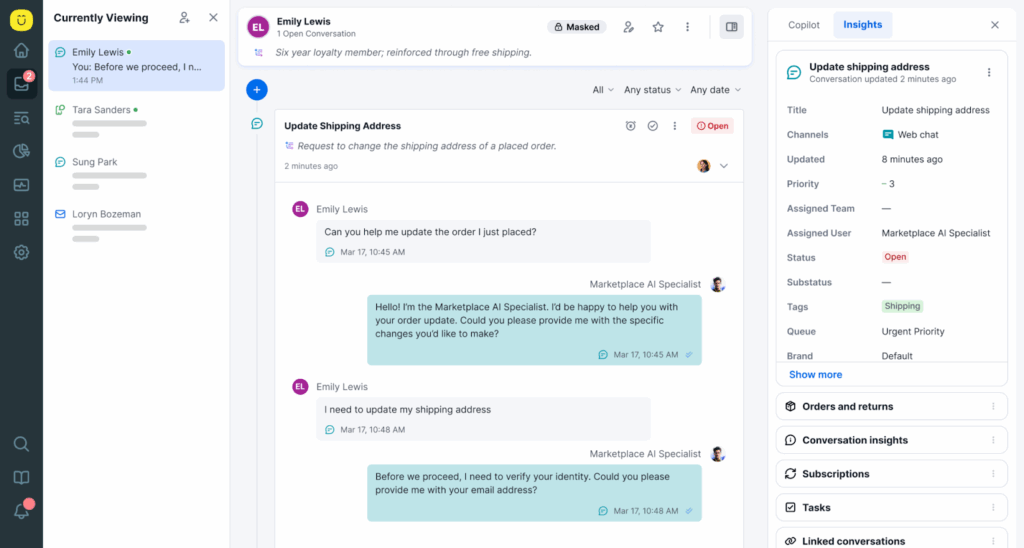
Kustomer is a CX platform that provides personalized customer support by unifying customer interactions across channels into a single view. It’s designed for businesses that want to deliver fast, efficient service by leveraging automation and AI-powered tools.
Unlike traditional help desks, Kustomer offers a 360-degree customer view, allowing agents to see a full history of interactions, which helps in offering more personalized support. This makes it an ideal platform for e-commerce, retail, and other businesses that rely heavily on customer service for success.
Key Features
- Unified customer view: Kustomer offers a single, centralized view of all customer interactions, whether from email, chat, phone, social media, or other channels. This makes it easier for agents to handle queries and provide personalized responses.
- Omnichannel support: The platform allows businesses to communicate with customers across multiple channels, including email, social media, SMS, and live chat, without switching between different apps.
- AI-powered automation: Kustomer uses AI to automate repetitive tasks like routing and ticket assignment. This helps reduce response times and frees up agents to focus on more complex inquiries.
- Customizable workflows: Businesses can create custom workflows to streamline operations and improve efficiency. This includes setting up automation rules, routing tasks to specific agents, and ensuring no time is wasted on manual processes.
- Real-time analytics: The platform provides detailed real-time analytics to monitor agent performance, track ticket volume, and assess customer satisfaction, helping businesses improve service quality.
Why Do Companies Choose Kustomer Over Salesforce Service Cloud?
While Salesforce Service Cloud is powerful, its legacy architecture often requires expensive developers to manage. Compared to Salesforce, Kustomer offers a modern, data-first platform that delivers superior AI performance and measurable efficiency gains without the administrative burden.
- A modern, native AI architecture: Unlike Salesforce, where AI can feel like a complex add-on, Kustomer’s AI is native to the platform. Because it is fueled by a unified view of the customer, Kustomer's AI agents can deliver instant, accurate resolutions and summarize conversations more effectively than Salesforce's legacy tools.
- Freedom from the "admin tax": Salesforce is notorious for its difficult setup and reliance on specialized administrators. Kustomer allows support leaders to manage their own destiny. You can deploy bots, change workflows, and manage channels using visual, no-code builders—without needing to hire a dedicated Salesforce developer or third-party consultant.
- True omnichannel vs. multi-tab chaos: Salesforce often fragments channels into different tabs or windows, leading to a disjointed agent experience. Kustomer unifies email, social, voice, and SMS into a single, continuous conversation timeline. This allows agents to switch channels instantly to meet the customer where they are, without losing context.
- Proven efficiency gains: The move to a streamlined, service-first platform delivers immediate operational ROI. By eliminating the friction of a clunky UI, brands like UNTUCKit [*] saw a significant improvement in overall productivity.
Here is What Real Users Are Saying About the Benefits of Kustomer
With its customizable workflows and powerful analytics, Kustomer is a popular alternative to more complex CRM software like Salesforce.
- Streamlined omnichannel CRM: Kustomer integrates multiple communication channels into a single, easy-to-use interface, allowing businesses to manage email, social media, and live chat all in one place. This feature enhances efficiency by providing a full view of all customer interactions in one dashboard [*].
- Intuitive and easy to use: The platform’s user-friendly interface is often highlighted as one of its best features, with reviewers noting its sleek design and ease of navigation, especially compared to other CRM systems like Salesforce or Zendesk [*].
- Advanced reporting and analytics: Kustomer provides in-depth reporting tools that give insights into customer data and team performance, helping businesses monitor productivity and make informed decisions. Users appreciate the platform’s robust analytics for tracking customer satisfaction and retention [*].
- Strong automation features: Kustomer’s AI-powered automation features allow companies to automate routine tasks like ticket routing and customer responses, reducing manual work for agents and improving response times [*].
- Customizable and flexible for different use cases: Kustomer’s flexibility allows it to be tailored to specific business needs, whether for integrating with other tools or configuring workflows. This high level of customization is valuable for businesses across different industries, such as retail and e-commerce [*].
2. Zendesk
Zendesk is a widely used customer service and enterprise help desk software designed to help businesses manage customer interactions efficiently. It provides tools for handling customer inquiries, support tickets, and communication across multiple channels, such as email, social media, and live chat.
Zendesk is known for being highly customizable and scalable, making it suitable for both small businesses and large enterprises. Its intuitive interface and powerful automation tools enable companies to streamline their customer support operations and deliver faster responses. Many users value its robust reporting features and seamless integration with other apps.
Key Features
- Ticket management: Easily organize, prioritize, and resolve customer support requests across multiple channels.
- Omnichannel support: Integrate communications from email, live chat, social media, and phone, allowing teams to respond quickly without switching platforms.
- Automation: Automate repetitive tasks, such as assigning tickets to the right agent or sending follow-up messages, improving response times and agent productivity.
- Customizable workflows: Set up tailored workflows to meet specific business needs, helping teams handle tasks efficiently.
- Reporting and analytics: Detailed reports on ticket volume, agent performance, and customer satisfaction, offering insights for improving customer support.
Why Do Users Like Zendesk?
- Great for managing customer communication via email, chat, and calls
- Accurately tracks support tickets, improving IT processes
- User-friendly and easy to navigate for daily tasks
What Are Some Limitations of Zendesk?
- Chat software slows down website performance
- Customer support is often unresponsive and difficult to work with
- The interface is clunky, making it difficult to manage tickets
Learn more: Is Zendesk really worth it? We did the research, so you don't have to. Here are the biggest pros & cons.
Pricing
Zendesk pricing starts at $19/month for small businesses. The plan also allows them to build their own package based on their specific needs.
For more advanced features, the Suite Team plan starts at $55 per agent/month, with other plans like Suite Growth at $89 and Suite Professional at $115 per agent/month, all billed annually.
Larger enterprises can opt for Suite Enterprise, which starts at $169 per agent/month.
3. Zoho Desk
Zoho Desk is a cloud-based customer service software designed to help businesses manage customer inquiries and enhance customer engagement. As a user-friendly interface and omnichannel support platform, Zoho Desk allows small businesses and large enterprises to streamline their customer support processes.
It offers advanced automation features, customizable dashboards, and seamless integration with other CRM platforms like Salesforce and Microsoft Dynamics. Known for its ease of use, it provides solutions for companies looking to improve workflow automation and customer satisfaction through AI-powered tools.
Key Features
- Omnichannel support: Manage customer interactions across email, social media, chat, and phone.
- Automation features: Automate repetitive tasks like ticket assignment and routing to improve efficiency.
- Knowledge base & self-service: Create a comprehensive knowledge base, allowing customers to resolve issues through self-service.
- Customizable dashboards: Visualize key metrics and monitor team performance in real time.
- AI-powered tools: Use AI-powered chatbots and features to enhance the customer service experience.
- Integration with CRM: Seamlessly integrates with popular CRM platforms like Salesforce and Microsoft Dynamics for better customer data management.
Why Do Users Like Zoho Desk?
- It offers a clean, user-friendly interface
- Various tools, including ticketing, knowledge base, and automation
- Seamless integration with CRM tools
What Are Some Limitations of Zoho Desk?
- Configuration of custom SMTP is time-consuming
- Tech support is not very responsive
- Too many apps and products can complicate the experience
Pricing
Zoho Desk offers flexible pricing options for businesses of all sizes, including a Free Plan for up to 3 agents.
For paid plans (billed annually):
- Express: Starts at $7 per user/month, offering basic multi-channel support.
- Standard: Starts at $14 per user/month, adding social channels and SLA management.
- Professional: Starts at $23 per user/month, which includes multi-department ticketing and telephony.
- Enterprise: Starts at $40 per user/month, providing advanced AI (Zia), live chat, and customization.
4. HubSpot Service Hub
HubSpot Service Hub is a powerful customer service software that integrates seamlessly with the HubSpot CRM platform. It is designed to help businesses manage customer interactions and improve customer satisfaction through efficient ticketing, automation, and self-service solutions.
This cloud-based tool is ideal for small businesses and large enterprises, offering scalable solutions for customer engagement and workflow automation. It ensures a smooth and user-friendly experience, facilitating better customer relationship management while providing insightful reporting and analytics to track service performance.
Key Features
- Help desk workspace: A centralized space for agents to manage tickets, track real-time updates, and handle omnichannel conversations, improving overall workflow.
- Advanced automation: Includes AI-powered tools like chatbots, automated ticket routing, and real-time reply suggestions to speed up responses.
- Customer success management: A dedicated workspace that helps Customer Success Managers track account health, identify risks, and take proactive steps to prevent customer churn.
- Integration with popular apps: Supports easy integration with tools like Slack, Salesforce, and Google, enabling seamless workflows.
- Robust reporting: Advanced analytics and custom dashboards to track key metrics like SLA adherence and agent productivity.
Why Do Users Like HubSpot Service Hub?
- Easy to manage tickets and assign team members
- Great automation system for surveys and chat flows
- Efficient integration with live chat and CRM
What Are Some Limitations of HubSpot Service Hub?
- The ticket system isn't suited for high-volume requests
- The site crashes frequently, which disrupts daily operations
- Lacks public access for customers to view their cases, which limits usability
Pricing
HubSpot Service Hub’s Starter plan begins at $15 per seat/month (billed annually), providing basic tools like live chat, simple ticket automation, and email support.
The Professional plan starts at $100 per seat/month (billed annually) and includes advanced features such as playbooks, customer portals, and SLA management. Note that this plan typically requires a mandatory one-time onboarding fee of $1,500.
The Enterprise plan starts at $150 per seat/month (billed annually), offering robust features like admin notifications, custom objects, and sandboxes, with a mandatory one-time onboarding fee of $3,500.
5. Genesys Cloud CX
Genesys Cloud CX is a powerful cloud-based contact center solution that enhances customer experience (CX) through automation, AI-driven features, and omnichannel communication. It enables businesses to seamlessly engage with customers across various voice, chat, SMS, and social media channels.
This platform is scalable and highly customizable, making it suitable for small and large enterprises aiming to optimize their customer support and engagement strategies.
Key Features
- Omnichannel support: Engage with customers through voice, email, chat, SMS, and social media in real-time, ensuring a seamless experience across all channels.
- AI-powered automation: Automate customer interactions with AI tools, including chatbots, predictive engagement, and routing, which help deliver faster, more accurate customer service.
- Workforce engagement: Includes tools for workforce forecasting, scheduling, performance management, and gamification to boost employee productivity and satisfaction.
- Analytics and reporting: Get insights into customer interactions through advanced analytics and reporting, enabling businesses to optimize workflows and improve decision-making.
- Integrations: Easily integrates with popular CRMs like Salesforce and other enterprise tools, enhancing overall functionality and streamlining operations.
Why Do Users Like Genesys Cloud CX?
- Easy to use and customizable for building workflows
- Seamless omnichannel support for voice, email, and chat
- Integrates well with third-party tools like Salesforce
What Are Some Limitations of Genesys Cloud CX?
- Dropped calls and frequent microphone issues
- Customer support is slow and often lacks expertise
- A steep learning curve and configuration can be complex
Pricing
Genesys Cloud CX 1 starts at $75 per user/month, providing voice channels, call routing, IVR, outbound campaigns, and unified communications. Genesys Cloud CX 2, at $115 per user/month, includes all CX 1 features, plus digital channels, omnichannel routing, and quality assurance.
Genesys Cloud CX 3 is priced at $155 per user/month, adding workforce engagement management (WEM), speech and text analytics, and advanced AI-powered tools for scheduling and forecasting. All plans are billed annually.
Genesys Cloud CX 4 is priced at $240 /user/month. It adds comprehensive AI features like Agent Copilot, advanced knowledge surfacing, and higher allotments of AI tokens.
Important things to note:
- "Digital only" options: If a user does not need voice capabilities, lower-cost "Digital" versions exist for CX 2 ($95/mo) and CX 3 ($135/mo).
- AI token limits: While plans include AI tools, they often run on a token system (e.g., 250 named tokens/mo included). Heavy use of AI features like predictive engagement or agent copilot may incur overage fees.
6. Sprinklr Service
Sprinklr Service is an AI-powered, omnichannel customer service platform that provides seamless support across various digital, social, and voice channels. It integrates customer interactions into a unified dashboard, making it easier for agents to manage communications without switching between tools.
The platform's advanced AI and automation tools help streamline workflows, enabling faster resolution times and improved customer engagement. Sprinklr's flexible, cloud-based solution is suitable for both small businesses and large enterprises.
Key Features
- Omnichannel Support: Handles customer interactions across 30+ channels, including email, social media, and live chat.
- AI-powered automation: Includes chatbots, automated routing, and predictive analytics to enhance efficiency and customer satisfaction.
- Unified agent desktop: A single interface for agents to manage interactions across all channels, improving productivity.
- Analytics and reporting: Offers built-in analytics and dashboards for monitoring customer satisfaction and agent performance.
- Workforce management: Tools for managing agent schedules, performance, and quality assurance.
Why Do Users Like Sprinklr Service?
- Easily integrates with various social platforms
- Reporting and dashboards are highly customizable
- All-in-one platform for publishing, analytics, and customer care
What Are Some Limitations of Sprinklr Service?
- Sentiment metrics are unreliable and require manual adjustments
- Lacks the ability to automate pre-recorded responses
- Difficult to work with and acquire the necessary information
Pricing
Sprinklr Service's Self-Serve Plan is priced at $199 per seat/month, offering omnichannel support across 15+ channels, AI chatbots, and essential customer service tools. For larger teams, the Enterprise Plan comes with custom pricing and includes advanced features like omnichannel support on 30+ channels and AI-powered agent assistance.
7. Oracle NetSuite
Oracle NetSuite is an all-in-one cloud-based software platform designed to streamline and manage various core business processes, such as enterprise resource planning (ERP), customer relationship management (CRM), financial management, and e-commerce.
As a fully integrated solution, it allows companies of all sizes to automate routine tasks, enhance business efficiency, and scale operations globally. Its robust functionality supports financial management, order processing, inventory tracking, and customer engagement while offering real-time data insights through customizable dashboards and reporting.
Oracle NetSuite is also highly flexible, making it ideal for businesses seeking to unify their operations in a cloud-based environment.
Key Features
- ERP integration: Offers full-fledged ERP integration to streamline financial management, procurement, and order management.
- CRM functionality: Manages customer data and interactions to enhance customer relationship management, sales, and marketing.
- Analytics and reporting: Provides real-time dashboards and custom reports for data-driven decision-making.
- Subscription management: Automates billing and subscription processes, ideal for service-based businesses.
- Omnichannel commerce: Integrates e-commerce with back-office systems to create a seamless online shopping experience.
- AI-Powered automation: Includes AI tools for automating routine tasks, improving efficiency across departments.
- Global scalability: Supports businesses with multi-subsidiary, multi-currency, and multi-country operations
Why Do Users Like Oracle NetSuite?
- Flexible and scalable, adapts to business needs
- Provides insightful reporting and efficient workflows
- Great for integrating multiple business processes in one place
What Are Some Limitations of Oracle NetSuite?
- Expensive and overly complex
- Customer support is unhelpful and lacks knowledge
- Misleading promises were made during the sales process
Pricing
For more detailed information, it’s best to contact Oracle for customized pricing based on your business needs.
8. Freshdesk
Freshdesk is a cloud-based customer service software designed to streamline ticketing and customer support across multiple communication channels like email, phone, chat, social media, and more. It converts all incoming requests into tickets, allowing businesses to manage and resolve queries efficiently in a unified view.
Freshdesk offers automation features that help manage workflows, enhance team collaboration, and provide self-service options to customers, such as knowledge bases and community forums. With AI-driven insights from its "Freddy" assistant, Freshdesk helps organizations of all sizes improve customer and user experiences.
Key Features
- Multi-channel support: Manage customer interactions from various channels (email, phone, chat, social media) in one dashboard.
- Ticketing system: Automatically converts customer requests into tickets, prioritizes them, and routes them to the right agents.
- Automation & workflow management: Automate repetitive tasks like ticket assignments, ensuring faster response times.
- AI-powered support: The "Freddy" AI assists in automating responses and provides predictive support for faster resolutions.
- Self-service portal: Offers a comprehensive knowledge management base and community forums where customers can find solutions independently.
- Collaboration tools: Allows teams to collaborate on tickets and resolve issues collectively.
- Analytics & reporting: Provides advanced analytics for tracking team performance and customer satisfaction metrics.
Why Do Users Like Freshdesk?
- Easy to set up and customize for business needs
- Consolidates multiple customer service channels
- The user-friendly interface facilitates ticket management
What Are Some Limitations of Freshdesk?
- Reporting is very basic and requires heavy manual work
- The ticketing system is buggy, with frequent outages and performance issues
- Billing support is nearly impossible to reach, and account changes take months
Learn more: 17 Best Freshdesk Alternatives for 2026 (Based on Real Users)
Pricing
The Free plan is available for up to 2 agents at no cost. The Growth plan starts at $15/agent/month, while the Pro plan, the most popular, is priced at $49/agent/month, both billed annually. The Enterprise plan costs $79/agent/month, also billed annually.
Additional features like Freddy AI tools can be added, such as Freddy Copilot for $29/agent/month and Freddy Self-Service, which includes the first 500 sessions for free, with additional sessions costing $100 per 1,000 sessions.
9. Intercom
Intercom is an AI-powered customer communication platform that integrates live chat, bots, email, and more into one system. It's designed to help businesses offer personalized customer support, improve engagement, and boost conversions.
This tool is especially effective for small to mid-sized companies and SaaS businesses looking to automate workflows and interact with customers in real-time. It also includes tools for sales and marketing, offering a robust solution for managing customer interactions at every stage of the user journey.
Key Features
- Live chat support: Engage with customers instantly through an intuitive chat interface, streamlining real-time support.
- Automated chatbots: Customizable bots handle lead qualification, basic queries, and support tasks, reducing the need for human intervention.
- Multi-channel support: Manage communications across various platforms like social media, email, and your website.
- Knowledge base: Provides self-service solutions by integrating FAQs and articles directly into the chat system.
- CRM integration: Integrates seamlessly with popular CRM software, centralizing customer data for a personalized experience.
Why Do Users Like Intercom?
- Live chat is easy to use and supports customer articles well
- Excellent support tools
- Targeted messaging and help desk integration
What Are Some Limitations of Intercom?
- Costly and difficult to manage
- Customer support is slow and unhelpful
- Canceling the service is frustratingly complex
Pricing
Intercom offers three core pricing plans (rates below are for annual billing):
- Essential: Starts at $29/seat/month. Includes the shared inbox, live chat, and a public help center.
- Advanced: Starts at $85/seat/month. Adds powerful automation workflows, multiple team inboxes, and a multilingual help center. Includes 20 free Lite seats for internal collaboration.
- Expert: Starts at $132/seat/month. Adds enterprise-grade features like HIPAA compliance, workload management, and SLAs. Includes 50 free Lite seats.
Note: The Fin AI Agent is a separate add-on priced at $0.99 per resolution. Channels like SMS and WhatsApp are supported but typically incur additional usage-based fees.
10. Social Intents
Social Intents is a cloud-based live chat and messaging platform that allows businesses to interact with website visitors in real-time, improving customer engagement and satisfaction.
Designed for both small businesses and large enterprises, it integrates seamlessly with popular tools like Slack and Microsoft Teams. Social Intents enhances team collaboration and streamlines customer support across multiple channels, including websites, social media, and internal chats.
Key Features
- Live chat integration: Enables real-time communication with website visitors, enhancing customer support.
- Slack and Microsoft Teams integration: Seamless integration with these tools helps teams manage customer inquiries directly from familiar platforms.
- Multiple channel support: Supports various platforms, including social media and website chat, ensuring omnichannel customer communication.
- Customizable widgets: Allows businesses to create custom pop-ups and forms to engage visitors and collect leads.
- Team collaboration tools: Facilitates easy internal communication between team members to resolve customer issues more efficiently.
Why Do Users Like Social Intents?
- Easy to create multiple groups and chats with no lag
- Real-time customer support
- Helps stay in contact with coworkers effectively
What Are Some Limitations of Social Intents?
Pricing
Social Intents offers several pricing plans to meet various business needs, starting with the Starter plan at $39/month, which includes 1 chat widget and 200 chat conversations per month.
The Basic plan is priced at $69/month, offering 2 chat widgets and 1000 chat conversations, while the Pro plan, at $99/month, supports 5 widgets and up to 5000 conversations.
The top-tier Business plan costs $199/month and allows 10 chat widgets with 10,000 conversations, along with advanced features like real-time auto-translation and white labeling.
Kustomer — The #1 Salesforce Service Cloud Alternative
Salesforce Service Cloud was built for a different era. Its complex, legacy architecture often forces teams to rely on expensive developers just to make simple changes, turning your support operation into a slow-moving cost center.
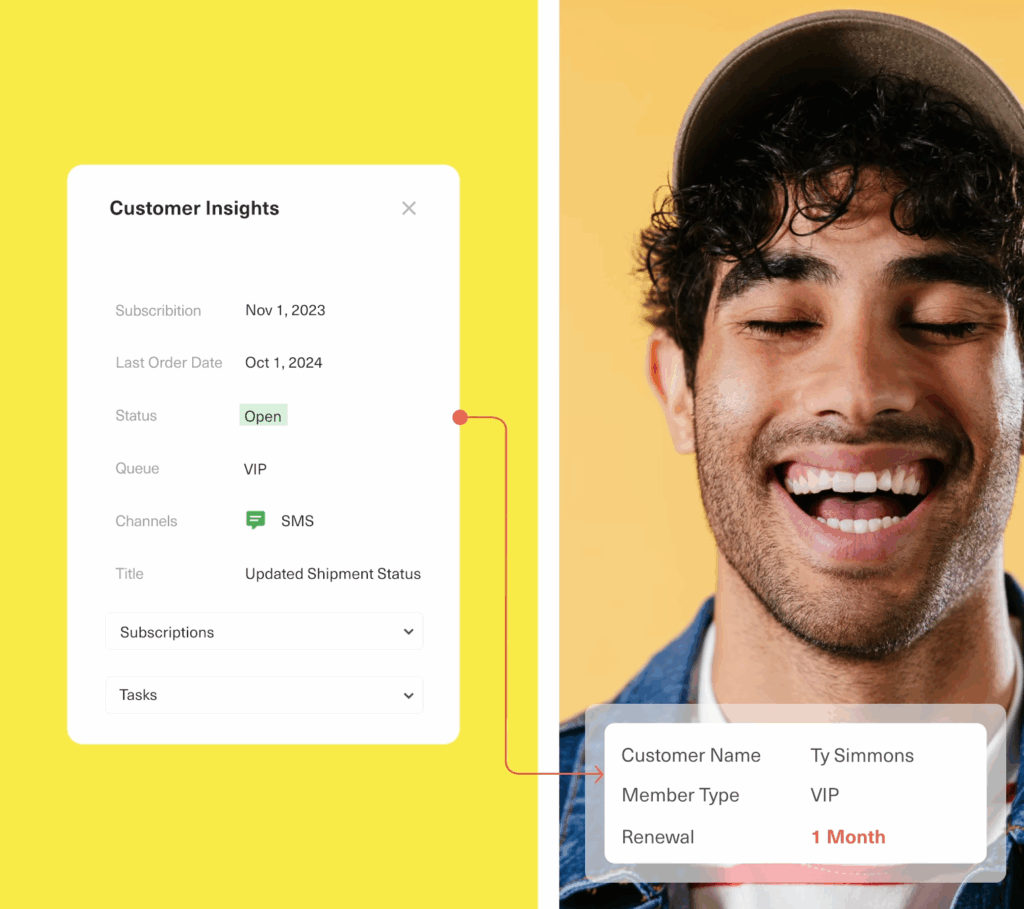
Kustomer is the antidote to this complexity. We are the modern, data-first CRM designed to give you enterprise power without the "admin tax." By unifying Data, AI Agents, and Humans on a single platform, we help brands move from reactive ticketing to proactive, efficient service.
Experience the difference of a platform built for results:
- Fuel AI with unified data: Kustomer creates a single, real-time timeline of every customer interaction. This rich context allowed Everlane to increase their automated resolution of customer requests by 4X, using Kustomer AI to handle repetitive tasks so agents could focus on high-value conversations.
- “We have a unique mandate to build a true, world-class customer experience. Kustomer is instrumental in how we build that service experience. We really feel like we have a great technology partner and are excited to keep building upon that relationship.“ — Ashley Julison, Senior CX Specialist
- Slash operational costs: Stop paying for inefficiency. By centralizing conversations and integrating directly with their POS, Jerome’s Furniture reduced duplicate requests from 42% to 8% and cut their cost per contact by 40%, transforming their support from a cost burden into a lean, efficient engine.
- “Kustomer allowed us to achieve the best possible outcome: maintaining a lean, cost-effective team while significantly improving customer satisfaction. We reduced our cost per contact by 40% and improved our NPS to be two times higher than the industry average.” — Marjorie Carlos, Sr. Dir. of Consumer Experience
- Deliver speed at scale: Eliminate the lag of clunky interfaces. Yummy, a fast-growing super app, switched to Kustomer to escape slow workflows. The result was an 80% reduction in response times and a boost in customer satisfaction to over 90%.
- “We operate twenty-four hours, 7 days per week. At peak times, our support team receives up to 6,000 chats in a single day. We needed a customer service platform that could keep up. ...With Kustomer, everything is in one place. Agents can see their performance metrics in real time." — Noel Rodriguez, Dir. Live Ops and Support
Book a demo today and discover how Kustomer can turn your customer service into another reason customers love to buy from you.