
Your customers don't care about your support channels. They care about their one conversation.
Yet, most support platforms are still built around disconnected channels. A customer emails you, gets frustrated with the wait, and then starts a live chat. That new agent is blind—they have no context on the first request, forcing the customer to repeat their entire story.
This isn't omnichannel. It's multi-channel chaos, and it's costing you. It destroys the customer experience, inflates your Average Handle Time, and makes First Contact Resolution nearly impossible.
A true omnichannel support platform unifies every interaction—from email to SMS to social DM—into a single, chronological conversation. To help you find a platform that actually solves this problem, we’ve compiled the 15 best solutions that move beyond silos.
What is Omnichannel Customer Service?
Omnichannel customer support is a customer service approach that uses multiple channels and touch points to give customers access to agents and enable them to get their issues resolved as soon as possible through their preferred channel.
This can include channels like:
- Phone
- Live chat
- Social media platforms
- Self-service portals (like an FAQs section on a website)
- WhatsApp group
Platforms used for omnichannel support are software solutions that integrate all the channels customers may use to communicate with your business into a single, consolidated system.
They act as a central hub for customer interaction management and are all about building a unified system that will benefit both you as a service provider and your customers:
| The customer… | Your customer support team… |
| Can switch between channels without losing track of their conversation or needing to repeat information | Has a single view of all past interactions with a customer |
| Gets a solution for their issue faster and with fewer touch points | Can provide a more efficient and personalized experience |
| Receive the same level of service and quality of information no matter which channel they choose | Maintains a consistent experience, tone, and message across all channels |
Top Features to Look for in Omnichannel Customer Support Platforms
A true omnichannel platform is defined by its ability to unify conversations, not just collect them. While many tools claim to be omnichannel, the must-have capabilities for an enterprise team are more specific.
- Single, unified conversation timeline: This is the most critical feature. It means that when a customer contacts you via email, then social media, then text message or chat, all those interactions appear in one single thread for the agent.
- Contextual and intelligent routing: The platform must be able to route the entire conversation—not just the first inbound ticket. It should use customer data, intent, and agent skills to ensure the issue always goes to the right specialist.
- Native CRM or deep data integration: The platform must provide a complete 360-degree view of the customer. This means either having a built-in CRM or seamlessly integrating with your existing CRM (like Salesforce) and e-commerce platforms (like Shopify) to display order history and customer value alongside the conversation.
- Unified self-service and AI agents: Customers should have a consistent self-service experience on any channel. This includes AI-powered agents that can access customer data to provide real answers (like "Where is my order?") rather than just deflecting to an FAQ page.
- Enterprise-grade security and compliance: This is non-negotiable for a senior audience. Look for platforms with robust security protocols, data encryption, access controls, and certifications like SOC 2, GDPR, and HIPAA to protect sensitive customer data.
- Actionable reporting and analytics: You must be able to track performance across the unified customer journey. This includes reporting on agent performance, key metrics like AHT and FCR, and customer satisfaction (CSAT) by channel, topic, and intent.
- Scalability and customization: The platform must be able to grow with your business and adapt to your complex workflows. This includes the ability to add custom objects, build automated rules, and manage a high volume of interactions across multiple departments or locations.
What to Consider When Choosing an Omnichannel Customer Support Platform
Choosing an omnichannel platform is a critical infrastructure decision that will impact your team and customers for years. A simple feature checklist won't uncover a platform's true power or its hidden weaknesses.
Use this strategic framework to ask the right questions during the evaluation process.
Is it True Omnichannel or Just Disguised Multichannel?
This is the most important consideration. Many platforms are multi-channel, meaning they simply bolt different channels (like email and chat) onto an old ticketing system. This looks unified, but the data is still siloed, forcing customers to repeat themselves.
- What to ask: Is your platform built on a single, unified data model, or is it an aggregation of different tools?
- What to look for: Demand to see a demo of a customer starting a conversation on email, then moving to chat, then sending an SMS. Does this appear as one single, chronological conversation for the agent, or does it create three separate tickets that need tobe manually merged?
💡 Why it matters: A fake omnichannel platform doesn't solve your core problem; it just gives your agents a different screen to manage the same old chaos.
Total Cost of Ownership (TCO) and Time-to-Value
The per-seat license fee is just the beginning. A platform that is difficult to use or integrate will have a much higher TCO due to implementation fees, agent re-training, and low adoption.
- What to ask: What is the all-in cost, including implementation, training, and fees for essential integrations? What is the average ramp-up time for a new agent?
- What to look for: Look for a platform with an intuitive interface that doesn't sacrifice power. A high TCO isn't just about money; it's about the hours your agents will waste on a clunky UI and the engineering resources you'll need just to keep it running.
💡 Why it matters: A lower TCO and a faster time-to-value mean a quicker, more measurable return on your investment and less friction for your team.
Platform Scalability and Extensibility
You aren't just solving for today's problems. The platform you choose must be able to evolve with your business, whether you're adding new channels, supporting new brands, or handling more complex workflows.
- What to ask: How does the platform handle complex enterprise needs like multi-brand support, custom workflows, and high-volume data? How robust and open are your APIs?
- What to look for: An extensible platform with robust APIs, a wide marketplace of integrations, and the ability to handle custom data objects. If the vendor's answer to customization is always "that requires custom development," it's a red flag.
💡 Why it matters: You are choosing a foundation, not a temporary fix. A non-scalable platform will force you into a painful and expensive re-platforming project in 2-3 years.
The Vendor as a Strategic Partner
For an enterprise, you are not just buying software; you are entering a multi-year partnership. The vendor's quality of support and product vision are just as important as the tool itself.
- What to ask: What does enterprise-level support actually mean for you? Do we get a dedicated customer success manager? What is your product roadmap for the next 18 months, and how does it align with our goals?
- What to look for: A vendor that understands your business and can provide strategic guidance, not just technical help-desk support. Ask for references from companies of a similar scale and complexity to your own.
💡 Why it matters: A good partner will provide proactive support and a product that evolves with your needs. A bad partner will leave you stranded with a "service unavailable" message during your busiest season.
15 Best Omnichannel Customer Support Platforms on the Market Right Now
Now that you know why you need an omnichannel support platform and what to look for in one, we’re giving you a solid foundation to start your research.
Below, you’ll learn about the best-rated omnichannel customer support platforms, their top features, and pros & cons, so you can easily compare them and make an informed choice.
- Kustomer
- Freshdesk
- HubSpot
- Zendesk
- Help Scout
- LiveAgent
- Drift
- Zoho Desk
- Groove
- Intercom
- Gorgias
- Nextiva
- Hiver
- Tidio
- JivoChat
1. Kustomer
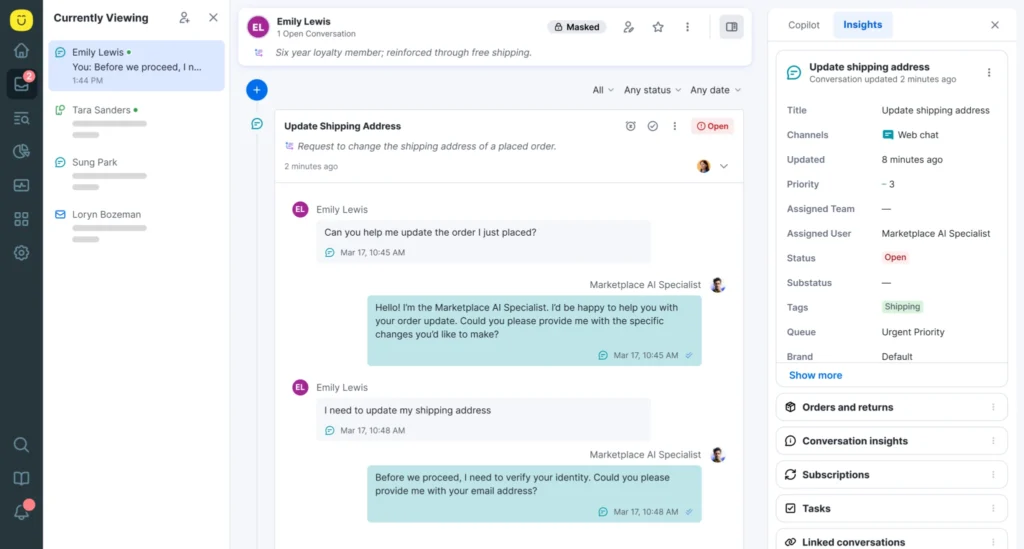
Kustomer is a true omnichannel customer service platform designed to solve the core problem of multi-channel customer service. Unlike traditional help desks that are built around tickets, Kustomer is built on a native CRM.
This data-first architecture is its key advantage, allowing it to unify every customer interaction—from an email to an SMS to a social media DM—into a single, chronological conversation timeline.
For agents, this means they see the customer's entire history, not just a single ticket. For customers, it means they never have to repeat themselves or ask, "Did you get my last email?" Kustomer's platform is designed for high-volume, B2C enterprise teams that need to manage complex, data-rich customer relationships at scale.
Key Features of Kustomer
- Unified conversation timeline: This is the core of the platform. It displays every interaction from every channel (email, chat, SMS, social, and voice) in one single, threaded conversation.
- Native CRM for a 360-degree view: Because Kustomer is a CRM, the agent workspace displays rich, contextual data (like order history from Shopify, customer value, or past preferences) directly alongside the conversation, eliminating the need to switch systems.
- Intelligent and contextual routing: The platform's routing goes beyond simple keywords. It uses all the data from the CRM and AI-detected intent to route the entire conversation to the right agent or team, ensuring the issue is handled by the correct specialist.
- Enterprise extensibility and integrations: Kustomer is built to be a central data hub. It has a robust API and a wide marketplace of integrations (like Shopify, Salesforce, and Magento) to pull in external data and create a true single source of truth.
- Actionable omnichannel reporting: Kustomer's reporting tracks performance across the entire, unified customer journey, not just by siloed channels. This allows leaders to measure key metrics like FCR and AHT accurately and identify operational bottlenecks.
Advantages of Using Kustomer
- Powerful omnichannel experience: Excels at managing a wide range of communication channels and offers a truly unified experience for both agents and customers.
- Deep data analysis: Offers comprehensive reporting and analytics with advanced data visualization tools to remove the guesswork and enable data-driven decision-making.
- Openness and customization: Apart from the 60+ plug-and-play apps to connect Kustomer with, the team will even build you a custom integration if necessary to create a truly unique and completely tailored platform that matches your business needs.
- Scalability for enterprise needs: Kustomer is well-suited for handling high volumes of inquiries, and thanks to AI-powered automation, its enterprise help desk solution can manage the growing needs of large businesses.
Why Users Prefer Kustomer
- User-friendliness and easy navigation of every conversation ticket.
- Real-time ticket notifications reminding you to take action.
- In-depth reporting with full visibility of customer insights.
What are real customers saying about Kustomer
- Replacing siloed tickets with a complete, unified customer timeline. Terra Kaffe, a luxury coffee brand, switched from Zendesk because its segmented, ticket-based system failed to provide the full visibility their high-touch service model required. By adopting Kustomer's timeline layout, their agents can now see the entire customer relationship in one place, enabling them to deliver a premium experience and maintain CSAT scores in the mid-90s. [Read Case Study]
“The most persuasive feature Kustomer offered was the timeline layout. We prefer to handle customers within the full context of their relationship with us, not through siloed tickets that provide little insight into their overall experience with the Terra Kaffe brand.”
— Cate Marques, CXO, Terra Kaffe
- Consolidating multiple disconnected systems into one central platform. Alex and Ani's team was running on separate, disconnected platforms for calls, emails, and reporting, forcing them to use Google Docs and group chats to track customer history. Kustomer replaced this entire "homegrown" setup, providing one singular, user-friendly platform that gives them unified customer profiles and makes it easy to onboard seasonal staff and handle high-volume periods efficiently. [Read Case Study]
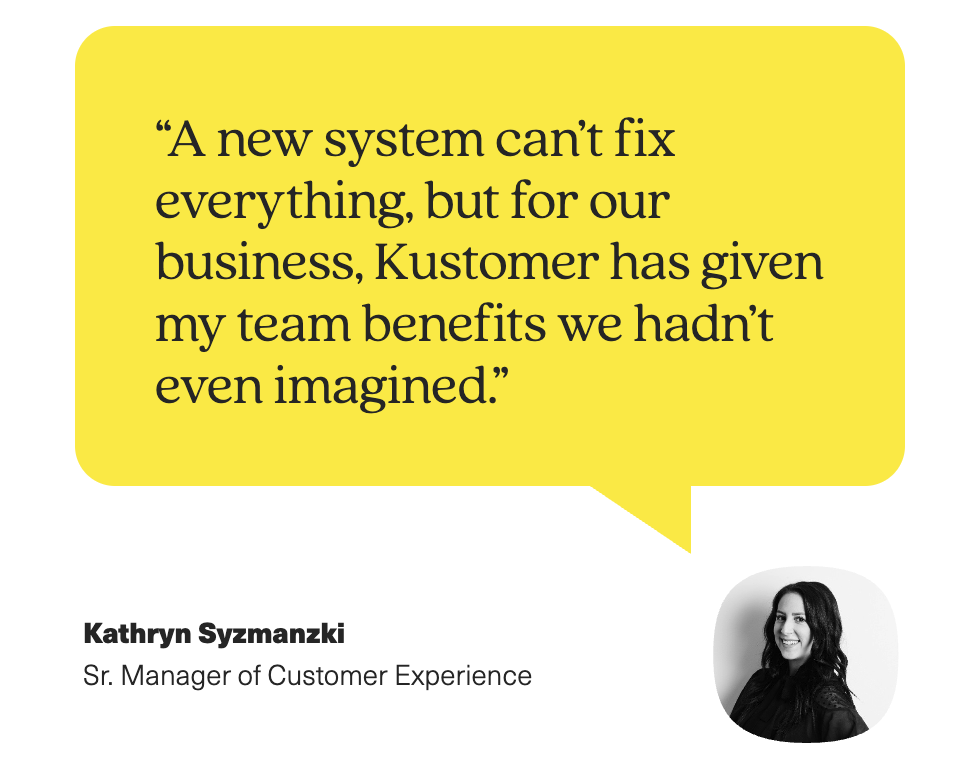
“We requested demos from various platforms, but Kustomer stood out because it was everything I had envisioned in a customer engagement tool.”
— Kathryn Syzmanski, Sr. Manager of Customer Experience, Alex and Ani
- Unifying e-commerce and support data into a single source of truth. Nathan James, a 100% online furniture company, found its agents wasting time switching between multiple systems just to gather context. Kustomer became their single source of truth, pulling Shopify order data, reviews, and all communication channels into one timeline, freeing agents to focus on the customer. [Read Case Study]
“Kustomer pulls all customer information on one timeline. We see a customer’s full history right there, without switching around. That’s been a game-changer for us.”
— Taylor Johnson, Director of CX, Nathan James
- Creating a single, scalable platform for cross-company collaboration. As a fast-growing insurance company, Kin's teams were managing interactions in silos, creating knowledge gaps and slow responses. Kustomer was implemented as the central hub for all departments—including sales, support, and claims—providing total visibility into the customer journey and aligning the entire company. [Read Case Study]
“Everyone in the company, including the claims team, now uses Kustomer… Kustomer has changed how Kin operates, aligns with customers, manages schedules, and makes decisions.”
— Eli Gratz, VP of Growth, Kin
2. Freshdesk
Freshdesk is a user-friendly, cloud-based help desk solution from Freshworks Inc. that caters to omnichannel customer support needs. It allows businesses to manage various communication channels and provide a unified experience for their customers. With advanced automation options and diverse data visualizations, Freshdesk is undoubtedly an end-to-end tool for managing customer support, particularly suitable for smaller teams.
Key Features of Freshdesk
- Various communication channels, including email, phone (through integration), chat, and social media messaging (Facebook messenger, Twitter (X), WhatsApp Business).
- Management of all customer interactions (tickets, chats, emails) from a central dashboard, with complete conversation history readily accessible.
- Workflows with automation rules and pre-defined responses for faster resolutions and improved CSAT.
- Features like internal notes and shared ticketing to facilitate teamwork.
Pros of Using Freshdesk
- A user-friendly interface with a relatively gentle learning curve.
- A free plan with basic features for up to 10 agents.
- Some level of customization to tailor functionalities to specific needs.
Cons of Using Freshdesk
- The free plan offers basic functionality and limited reporting capabilities.
- Native phone support requires additional integrations with third-party solutions.
- Customer support can only be reached through a specific channel or on specific days.
Freshdesk Pricing
- Free: Limited features for up to 10 agents
- Growth: Starts at $15/month per agent
- Pro: Starts at $49/month per agent
- Enterprise: Starts at $79/month per agent
What Users Like About Freshdesk
- A good range of features for a small price for basic plans.
- Easy to set up, integrate, and use.
- Clients can also view tickets and monitor progress.
3. HubSpot Service Hub
HubSpot Service Hub is customer service software designed to help businesses retain customers and provide value through customer support. The platform turns your customer service into a 24/7 hub for your customers to ask questions and get help with any issues. What’s unique about this tool is that it also focuses on providing you with proactive tools to discover opportunities to improve customer health.
Key Features of HubSpot Service Hub
- Management of live chat, email, social media messaging, phone calls (through integration), and a self-service knowledge base from a single platform.
- AI-powered features for noting down details from calls with your customers to reveal areas of improvement.
- Streamlined workflows with features like automatic ticket routing and advanced SLAs for better agent efficiency.
- Tracking calls, customer details, and interactions in one place.
Pros of Using HubSpot Service Hub
- Can accommodate more digital channels and higher inquiry volumes.
- Integrates seamlessly with other HubSpot products for marketing and sales.
- Customer satisfaction and feedback surveys are available on the platform.
Cons of Using HubSpot Service Hub
- Increased costs when adding more agents, potentially expensive for larger teams.
- Phone support may need additional integrations.
- Lack of customization options for reporting.
HubSpot Service Hub Pricing
- Free: Limited features for up to 1 user.
- Starter: Starts at $20/month per seat
- Professional: Starts at $100/month per seat
- Enterprise: Starts at $130/month per seat
What Users Like About HubSpot Service Hub
- Easily integrates with your processes if you already use other HubSpot products.
- User-friendly, even for those unfamiliar with the tool.
- Plenty of automation available for easy management of large volumes of tickets.
4. Zendesk
Zendesk is a customer service platform that relies heavily on AI to deliver efficient, personalized experience to your customers. It’s key features are designed for agile teams — Zendesk uses open standards and common languages, so you can create highly tailored experiences for the unique needs of your customers, at the same time ensuring compliance and data security even at scale. It’s suitable for large businesses thanks to enabled cross-team collaboration and elevated data security.
Key Features of Zendesk
- Comprehensive ticket and case management with SLA management, ticket collaboration, and automated responses.
- AI-powered evaluation of 100% of customer conversations, spotting areas for improvement.
- The Agent Workspace for managing all interactions in a single dashboard and easy collaboration with other teams.
- User, role, and access management for high-level data security and compliance.
Is Zendesk really worth it? Learn more about Zendesk’s top pros & cons.
Pros of Using Zendesk
- Easy centralization of all customer interactions in one dashboard.
- Chatbots can deliver customer support 24/7 across all service channels.
- Proactive messaging through WhatsApp and SMS to prevent escalations.
Cons of Using Zendesk
- The prices may not be affordable for smaller teams with limited budgets.
- Lack of adequate customer support from the Zendesk team.
- No option to customize the UI or revert to a previous one.
Zendesk Pricing: Is Zendesk Really Worth the Cost?
- Support Team: Starts at $19/month per agent
- Support Professional: Starts at $55/month per agent
- Support Enterprise: Starts at $115/month per agent
Read this full teardown of Zendesk’s pricing model.
What Users Like About Zendesk
- An excellent number of seamless integrations with other tools.
- Easy to implement, use, and train staff on how to use it.
- Good visibility of your most important metrics.
5. Help Scout
Help Scout unifies all customer, client, vendor, and partner conversations into a single platform, allowing businesses of all sizes to manage communication more easily and quickly. The platform boasts simple implementation, giving you fast access to the dashboard that feels like a simple inbox. Eliminating the usual clutter and helping teams collaborate internally through notes, avoiding collisions and improving productivity, Help Scout also relies on AI and automation to boost support agents’ efficiency and free up their time for building customer relationships.
Key Features of Help Scout
- Customizable workflows with email filtering and custom folder options.
- A shared inbox that allows all customer support agents to make sure they’re on the same page.
- Dozens of keyboard shortcuts to make your workflows more efficient.
- Comprehensive reporting tools allow you to track diverse metrics, from agent productivity to customer happiness.
Pros of Using Help Scout
- Improved collaboration between customer support and sales teams thanks to the shared inbox.
- The user interface is clean and easy to navigate, making the learning curve gentle.
- 50+ integrations to facilitate communication across platforms.
Cons of Using Help Scout
- Lack of some handy features, like email scheduling.
- The knowledge base template gallery could be more diverse.
- Might not be suitable for enterprises due to a lack of customization options.
Help Scout Pricing
- Standard: Starts at $20/month per user
- Plus: Starts at $40/month per user
- Pro: Starts at $65/month per user
What Users Like About Help Scout
- It’s easy on the eyes and not too overwhelming for new users.
- Separate inboxes and folders for each team.
- Affordability of the tool, compared to high-priced competitors.
6. LiveAgent
LiveAgent empowers businesses to build stronger customer relationships and elevate their service across all channels, from email to Viber to Slack. This platform allows you to streamline your workflow and resolve tickets faster without breaking the bank. LiveAgent’s efficient ticketing system offers a multi-channel toolbox, letting you provide exceptional support through email, live chat, social media, and more. You can use over 130 built-in features and 200+ integrations to streamline every step of the customer service journey.
Key Features of LiveAgent
- Integrations with most social media platforms (Facebook, X, Viber, and more).
- Offers a built-in call center software (including video calls).
- Customizable email templates and canned messages.
- Task automation for more streamlined workflows.
Pros of Using LiveAgent
- Easy to set up and navigate, even for inexperienced agents.
- 24/7 customer support to guide your team.
- A free trial is available before you decide to commit.
Cons of Using LiveAgent
- The email spam filter isn’t as refined as it could be and lets some spam through.
- Some useful analytics features enterprises need may be missing.
- Bigger teams probably won’t consider it affordable.
LiveAgent Pricing
- Small: Starting from $9/month per agent
- Medium: Starting from $29/month per agent
- Large: Starting from $49/month per agent
- Enterprise: Starting from $69/month per agent
What Users Like About LiveAgent
- Great for smaller teams on a budget, as the prices for starter plans are affordable.
- You can easily navigate the system and find tickets and emails through the search. functionality.
- The customer support team from LiveAgent is top-notch.
7. Saleloft (Formerly Drift)
Salesloft is an AI-powered customer engagement platform that automatically listens, understands, and learns from buyers to create the most personalized experiences possible. Other than use cases for marketing and sales, it can be used as a tool for customer service, allowing you to easily distinguish customers from net-new prospects and deliver personalized experiences that lead to high customer satisfaction. Drift offers knowledge base integrations and AI-powered customer service chatbots, so your customers can self-serve the help they need.
Key Features of Salesloft
- AI-powered knowledge base and chatbots provide immediate answers to your customers.
- Custom routing, response timers, and message templates allow agents to be quick and efficient and deliver seamless experiences.
- A clean-looking dashboard with metrics like CSAT, deflection rate, and time-to-resolution allows you to monitor and analyze your performance.
- You can get a 360-degree view of your customers, including their details and interaction history.
Pros of Using Salesloft
- Easy installation on your website and simple use.
- Ability to create personalized chat experiences that customers love.
- Responsive and helpful customer support and onboarding agents.
Cons of Using Salesloft
- Not a specialized customer support platform.
- The pricing is not very friendly for smaller businesses.
- The system is prone to glitches, causing disruptions in customer conversations.
Salesloft Pricing
- Premium (for small businesses): Starting at $2,500 per month
- Advanced & Enterprise: Custom pricing
What Users Like About Salesloft
- Integrates with the leading CRMs in the market.
- Excellent chatbot with speedy, real-time connection and a personalized approach.
- The number of features available is astonishing.
8. Zoho Desk
Zoho Desk is a comprehensive help desk software designed to simplify and improve customer service operations. It offers omnichannel support, allowing businesses to manage customer inquiries from email, social media, and live chat in one platform. The software includes AI-powered tools for customer sentiment analysis and automated workflows to boost efficiency. Zoho Desk also provides built-in analytics for tracking performance and customer satisfaction.
Key Features of Zoho Desk
- Centralized customer inquiries from email, social media, and live chat, enabling effective ticket management.
- Zia, an AI-powered assistant, improves response accuracy and efficiency with features like sentiment analysis and auto-tagging tickets.
- The self-service includes a multi-brand help center, community forums, and a knowledge base.
- Automation features for ticket assignment, notifications, and workflows.
Pros of Using Zoho Desk
- SLA’s supervisor rules and time-based actions and reminders keep agents on top of cases.
- User-friendly interface and comprehensive support features for an overall positive user experience.
- Fast implementation with minimal workflow disruptions.
Cons of Using Zoho Desk
- The speed and quality received was not always up to customer expectations.
- Poor and unhelpful tech support.
- Lack of customization options, unless you’re an enterprise user.
Zoho Desk Pricing
- Standard: €14/month per user
- Professional: €23/month per user
- Enterprise: €40/month per user
What Users Like About Zoho Desk
- Ease of use, powerful functionality, easy management systems, and handy automation.
- You get all the great features of a more expensive service built into the Zoho Desk.
- A variety of integrations with other business tools facilitate centralizing all customer data.
9. Groove
Groove is a customer support platform that simplifies and enhances customer service management through a shared inbox that consolidates all customer inquiries. With features like a knowledge base, automated workflows, and AI-powered tools, Groove helps businesses resolve issues quickly and effectively. The platform also provides advanced reporting and analytics to track performance and optimize support strategies and is known for its user-friendly design and cost-effective pricing.
Key Features of Groove
- A shared inbox feature for centralized customer communications and managing orders, subscriptions, alerts, and conversations directly from the inbox.
- Seamless integrations with Gmail, Slack, Shopify, Stripe, and Facebook, keeping customer interactions organized in one place.
- 24/7 smart, self-service, customizable Knowledge Base reduces support volume and enhances customer satisfaction.
- Live chat feature with extensive customization options, matching your brand’s look and feel, including colors, notification sounds, and logos.
Pros of Using Groove
- Simple and intuitive interface that’s easy to navigate.
- The support team is responsive and helpful.
- Features like internal notes and ticket assignments improve team collaboration.
Cons of Using Groove
- Reporting features may be too basic and lack customization options.
- Some users experience problems with integrations, particularly with CRM systems like HubSpot.
- The search functionality can be difficult to use; it requires specific queries to find emails or tickets.
Groove Pricing
- Standard: $16/month per user (up to 25 users)
- Plus: $36/month per user
- Pro: $56/month per user
What Users Like About Groove
- Canned replies allow quick responses to frequent support tickets.
- Pricing isn’t based on email volume, so you can keep a growing ticket archive without extra costs.
- It facilitates building and managing a ticketing system and a knowledge base.
Related Reading → Top Zoho Desk Alternatives & Competitors
10. Intercom
Intercom is a customer support platform that integrates powerful messaging and automation to provide in-context support within your product, app, or website. It features a Messenger tool that offers self-serve and live support options, improving the customer experience. Intercom’s Resolution Bot automates answers to common questions, reducing the workload on support teams. The platform also includes a ticketing system to deliver personalized, contextual resolutions for various customer queries.
Read more about how Intercom compares to top competitors.
Key Features of Intercom
- Business Messenger provides customizable, brand-consistent messaging that integrates seamlessly into your product or website.
- Customizable, code-free chatbots that automate tasks, prioritize and route conversations
- AI-powered chatbot, Fin, instantly resolves up to 50% of support questions with accurate, conversational answers based on your support content.
- The Product Tours feature helps onboard new users and drive feature adoption through interactive, guided experiences.
Pros of Using Intercom
- User-friendly interface, intuitive, and easy to navigate.
- Robust communication tools, including message viewing, conversation history, and tagging features.
- Over 350 integrations with other apps and tools.
Cons of Using Intercom
- Sometimes, the platform can be slow to load, causing delays.
- Certain advanced features and workflows can have a steep learning curve.
- The pricing for some of the advanced features can be quite high, probably unaffordable for small businesses.
Intercom Pricing
- Essential: $39/month per seat
- Advanced: $99/month per seat
- Expert: $139/month per seat
What Users Like About Intercom
- Modern UX, UI, and offers countless customization options
- Managing inbound, outbound, help articles, notifications, and more in one platform
- Streamlining the process of submitting and responding to tickets
11. Gorgias
Gorgias is an AI-powered customer experience platform designed to help eCommerce brands grow by automating over 60% of customer support tasks. It unifies customer conversations across various channels into one helpdesk, improving support efficiency. Gorgias connects with over 100 apps, allowing seamless data sharing and updates within a single platform. It aims to turn shoppers into repeat customers by proactively engaging with them at key moments.
Read more about how Gorgias compares to top competitors.
Key Features of Gorgias
- Management of all customer interactions, including email, chat, social, and phone, from a single tab.
- Access comprehensive customer details like previous conversations, orders, reviews, and subscription information.
- Integrations with over 100 apps to share customer data and make updates across different tools directly from within Gorgias.
- AI-powered workflows automatically route tickets and personalize responses with templates and custom variables.
Pros of Using Gorgias
- Agents can manage multiple digital channels like Shopify, Facebook messenger, and TikTok from one platform.
- The automation features, such as macros and triggers, help reduce response times and increase productivity.
- Well-tailored to fit the needs of an e-commerce business.
Cons of Using Gorgias
- The pricing structure can be high, especially for small businesses with limited budgets
- First-time users may find the initial setup overwhelming
- Lack of comprehensive notification settings for new tickets, which can lead to missed customer inquiries
Gorgias Pricing
- Starter: Only available for the monthly subscription (50 monthly tickets)
- Basic: Starting at $50/month (300 monthly tickets)
- Pro: Starting at $300/month (2,000 monthly tickets)
- Advanced: Starting at $750/month (5,000 monthly tickets)
- Enterprise: Price available upon request (custom ticket volume)
What Users Like About Gorgias
- Integration of eCommerce platforms allows customer support to instantly resolve issues without switching to another tool
- 5 days free trial, and you can get a refund if you’re not satisfied after the first month
- Customers can check the status of their order on the Gorgias widget on the website
12. Nextiva
Nextiva is a multi-channel CX platform that provides a centralized support dashboard and helpdesk for managing all your digital interactions across social media channels, collaboration and messaging, live chat, email, and online reviews — all in one place.
Key Features of Nextiva
- Its UCaaS capabilities separate Nextiva from the pack, bundling instant messaging, video conferencing, and other collaboration tools into a single place for managing SMB communications for one low bundled price.
- Call Analytics: Detailed reports and analytics on call volumes, durations, and other key metrics.
- Interactive Voice Response (IVR): Automated system for directing calls based on user input.
Pros of Using Nextiva
- Users report excellent customer service from Nextiva — “hold times for support have been very short”
- Users report a positive experience with Nextiva’s VoIP features such as call logs, call recording, call pop and VoIP number porting.
Cons of Using Nextiva
- While Nextiva is quite feature-rich, the extensive capabilities of Nextiva might be overwhelming for small businesses that do not need all the advanced functionalities.
- If you just need a basic system for managing support, Nextiva’s bundle offerings can lead to paying for features that are not utilized.
Nextiva Pricing
- Core: $99/month per user
- Premium: $119/month per user
- Elite: $139/month per user
What Users Like About Nextiva
- “The customer service is outstanding and they have a team of technicians that understand the ins and outs of the products and really care about your own personal success.” — Capterra
- “I like the consistency of call quality. Dropped and garbled calls are very rare. Voice quality is consistently reliable. Customer service has been knowledgeable, friendly, and quick. Desktop and mobile app integration is very intuitive, requiring minimal training and support for staff.” — Capterra
13. Hiver
Hiver is a multi-channel help desk software that integrates seamlessly with Gmail to simplify and scale customer support by consolidating emails, chats, voice calls, and WhatsApp messages into one inbox. Trusted by over 10,000 teams, Hiver enhances collaboration with features like conversation IDs, tags, labels, notes, and mentions, ensuring timely and accurate responses. With Hiver, you can manage phone calls, create a self-service knowledge base, and deliver personalized support across all channels.
Key Features of Hiver
- Hiver’s AI Summarizer condenses lengthy emails into concise notes, speeding up issue resolution.
- Emails are automatically assigned to team members based on predefined rules
- Agents can use pre-written, customizable email templates and canned responses to quickly address common queries.
- Hiver’s chatbots provide round-the-clock support, handling repetitive queries and boosting agent productivity.
Pros of Using Hiver
- You can tag and route emails efficiently so the appropriate team member handles each message.
- Multiple team members can access and manage shared inboxes, which improves collaboration.
- Email templates streamline responses and make communication quicker.
Cons of Using Hiver
- Users may receive too many notifications, so important messages get buried.
- Emails can only be assigned to one person, which can be problematic when multiple people need to handle the same email.
- Occasional glitches, such as emails showing up as “unassigned” or slow loading times.
Hiver Pricing
- Lite: $19/month per user (up to 10 users)
- Pro: $49/month per user
- Elite: $79/month per user
What Users Like About Hiver
- Multiple team members can access different inboxes and work together
- Automates mundane work, saving time and effort and eliminating communication lags
- Smooth integration with G-Suite
14. Tidio
Tidio is an AI-driven customer service platform designed to help businesses accelerate growth by automating up to 70% of customer inquiries, allowing companies to convert more leads and provide stellar support. Tidio offers a comprehensive solution that includes a conversational AI chatbot, live chat, helpdesk tools, and powerful automation features to enhance customer interactions. The platform’s advanced analytics and user-friendly interface help businesses improve response times, increase customer satisfaction, and drive revenue growth.
Key Features of Tidio
- Tidio’s live chat tool allows real-time customer interaction, featuring live typing previews, canned responses, and the ability to handle offline messages.
- Lyro AI chatbot can resolve up to 70% of customer inquiries automatically, offering data-backed answers and natural conversations.
- Tidio’s visual automation builder enables businesses to create automated workflows without coding.
- You can easily manage conversations, sales, and processes with over 35 eCommerce templates.
Pros of Using Tidio
- User-friendly interface and easy setup process, making it accessible even for beginners.
- A wide range of chatbot functionalities that can handle various tasks, from customer inquiries to lead generation.
- Seamless integrations with popular platforms like Shopify or WooCommerce and over 120 other tools.
Cons of Using Tidio
- Some users have found Tidio’s integration options with external platforms limited, which can restrict its functionality.
- While Tidio offers a free plan, advanced features and higher chat limits can become expensive.
- Users have reported issues with notifications and being logged out of the mobile app.
Tidio Pricing
- Free: Locked at 50 conversations per month
- Starter: $29 per month (100 handled conversations)
- Growth: $59 per month (250 handled conversations)
What Users Like About Tidio
- Consistently provides accurate and relevant answers
- Highly customizable chatbots that save time and enhance customer support efficiency
- Easy to set up, configure, and manage, and looks good on the website
15. JivoChat
JivoChat centralizes all customer interactions across multiple channels, including live chat, social media, messengers, and phone calls. The platform helps streamline communication and improve response times by integrating chatbots to handle frequently asked questions, allowing live operators to focus on more complex issues. JivoChat also offers robust features for monitoring and enhancing the quality of customer service, including detailed analytics and secure management of customer data. With JivoChat, businesses can protect their social media accounts, improve lead conversion rates, and provide a seamless support experience tailored to customer preferences.
Key Features of JivoChat
- A fast, responsive live chat allowing you to engage with website visitors in real time, also available on mobile devices.
- AI-powered chatbot handles frequently asked questions and support requests 24/7, letting your team focus on more complex customer needs.
- Proactive invitations use smart triggers to automatically invite visitors to chat based on their website behavior.
- Numerous integrations with different types of platforms, including CRM systems, email marketing tools, and social media channels.
Pros of Using JivoChat
- Intuitive design for quick training and onboarding.
- A range of features that enhance not only customer support but also improve engagement with website visitors.
- You can use the feedback feature to collect information about how your customers feel about you.
Cons of Using JivoChat
- Some users have reported issues with certain features, such as the telephony channel, which don’t work as expected.
- JivoChat’s customer support is not available 24/7 and can take a long time to respond to tickets.
- Despite its user-friendly interface, some users find the initial setup process confusing and time-consuming.
JivoChat Pricing
- Basic: Free
- Professional: Starting at $19/month per agent
- Enterprise: Starting at $38/month per agent
What Users Like About JivoChat
- Simple installation, customizable settings, and easy and fast operation
- Identifies website visitors and their locations
- Connection with a corporate phone allows receiving calls directly from the app
Trust Kustomer to Handle Your Omnichannel Customer Experience

A traditional omnichannel platform just puts all your disconnected channels into one inbox. It doesn't solve the core problem. Your agents are still managing tickets, your customers are still repeating themselves, and your data is still siloed.
Kustomer is the only all-in-one platform built on a native CRM. This data-first architecture is our core advantage. It allows us to unify your Data, AI Agents, and Human teams into a single, proactive system.
- We deliver a single, unified timeline that shows every customer's full history—including orders and past conversations—not just isolated tickets.
- Our AI uses this rich, contextual data to autonomously resolve complex issues, not just deflect simple questions.
- We empower your human agents with the full picture, eliminating the need to switch systems and allowing them to focus on high-value, empathetic service.
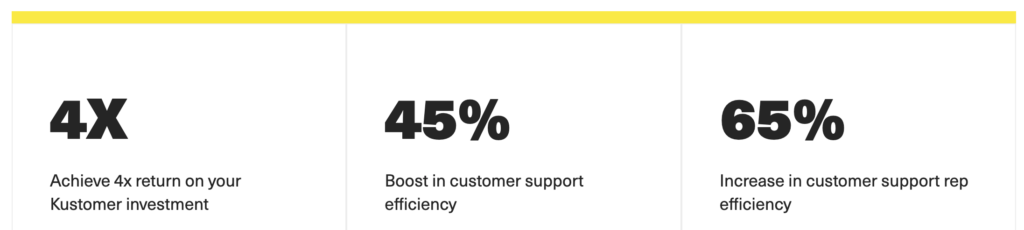
This unified approach is how our clients achieve a 4x return on investment. It’s how they boost overall support efficiency by 45% and increase individual rep efficiency by 65%—turning customer service from a cost center into a proactive growth engine.
Ready to see the difference a true data-first platform makes? Get a demo now.
Omnichannel Customer Support Platforms FAQs
When Do You Need an Omnichannel Customer Service Strategy?
The following signs may indicate that your business could benefit from implementing an omnichannel customer service strategy:
- Your customers are already using multiple channels to contact you
- You’re facing siloed operations and data
- Your customer satisfaction scores are low
- You’re experiencing long wait times and slow response rates
- Your business is growing or expanding into new markets
What Are the Benefits of Using Omnichannel Support Tools?
A true omnichannel platform provides tangible business outcomes by fixing the broken, siloed customer experience.
- Provides accurate, actionable business insights: By unifying all channels, you can finally track the entire customer journey. This allows you to accurately measure key metrics and identify the real bottlenecks in your operation, rather than relying on skewed data from separate, siloed reports.
- Dramatically improves the customer experience: Customers never have to repeat themselves. A unified conversation timeline ensures that when a customer switches from email to chat, the agent has the full context instantly. This leads to faster, one-touch resolutions and directly boosts CSAT.
- Reduces Average Handle Time: It eliminates the wasted time agents spend switching between systems, hunting for customer data, or manually merging tickets. With all customer history and order data in one view, agents can resolve issues far more efficiently.
- Significantly lowers your cost-to-serve: Higher agent efficiency and a better First Contact Resolution (FCR) rate mean you can handle more conversations with the same number of agents. This directly reduces the labor cost associated with each interaction.
What is the Difference Between Omnichannel and Multichannel Customer Support?
Some people use multichannel and omnichannel support interchangeably, but these concepts are different. Multichannel support uses multiple channels that function independently, with limited or no integration, whereas the omnichannel approach highlights the interconnection between these channels, providing a unified experience without losing track of customer conversations.
How Omnichannel Platforms Use Customer Behavior Data to Improve Loyalty and Retention?
Omnichannel platforms move beyond just offering multiple channels; they focus on unifying data from all of them. This gives you a complete, historical view of customer behavior every time they interact with your brand.
Instead of seeing a single, isolated complaint, your agents see that customer's entire journey. By understanding this customer behavior, your team can provide a faster, more empathetic, and personalized experience. This seamless service is what builds true customer loyalty. When customers feel understood and don't have to repeat themselves, they are far more likely to stay, which is the key to improving long-term retention.