For many businesses, HubSpot Service Hub is the obvious choice. It’s the path of least resistance, living right inside the sales and marketing ecosystem you already use.
But what happens when your service volume scales and that path gets rocky?
Suddenly, the all-in-one convenience feels like a compromise. Your support team starts hitting the limitations of a platform designed to be part of a sales-centric CRM, rather than a platform purpose-built for the complexities of a service-first operation.
You start to notice the clunky ticketing workflows, the frustrating workarounds, and the pricing model that locks critical, high-volume service features behind expensive enterprise-level plans.
This is a classic scaling problem. It’s the moment your team has graduated from an ecosystem-first tool and needs a true service-first solution. This guide reviews the 10 best alternatives built for teams that are ready for that next step.
HubSpot Service Hub Overview
HubSpot Service Hub is the customer service component of the integrated HubSpot CRM platform. Its primary value proposition is not its power as a standalone tool, but its native connection to the Marketing Hub and Sales Hub.
This design is highly appealing for businesses that are already using the HubSpot CRM for contact management and want to align their inbound marketing, sales, and support data in one place.
Core Features and Functionality
Service Hub is built around a central "Tickets" system that connects directly to the main customer record. Its main features are designed to provide an all-in-one solution for a growing business:
- Help desk and ticketing: A standard ticketing system to manage, track, and resolve customer issues. It's built to work seamlessly with the sales pipeline and contact management database.
- Conversational tools: This includes live chat and basic chatbots that can be used for both support and lead generation, connecting directly to the HubSpot CRM.
- Basic automation: It offers automation features to help teams manage their workflows, such as sending notifications, triggering follow-ups using email templates, or escalating tickets.
- Self-service portal: A built-in knowledge base tool for creating a self-service FAQ and article library to deflect common questions.
The Ecosystem Advantage
The main reason teams choose Service Hub is its all-in-one ecosystem. A service ticket is visible to the account manager, and a customer's support history can be used by the Marketing Hub for segmentation. This single-platform approach is effective for aligning B2B lead management and customer relationship management.
The friction begins as support operations scale. The platform's automation features, while solid for marketing automation, often feel basic for the dynamic, high-volume needs of a dedicated service team. This lack of scalability and service-first depth is what leads teams to look for a HubSpot alternative.
Why Look for an Alternative to HubSpot Service Hub?
That feeling of outgrowing HubSpot Service Hub isn't just a hunch; it's a common experience backed by hundreds of user reviews.
These frustrations highlight a clear gap between what a scaling service team needs and what the platform delivers. According to G2, the core issues center on fundamental problems with ticketing, customization, and missing features.
- A confusing and inefficient ticketing system. This is a core complaint from support teams. Users (with over 150 reviews) describe the ticket management system as unintuitive. A specific, major pain point is the ticket merging feature, which complicates workflows and makes it difficult to maintain a clear view of a single customer issue, leading to agent frustration and duplicate work.
- Critical features are missing or limited. The most common complaint (with over 300 reviews) is that the platform has missing or limited features tailored for a true support operation. This forces teams to create complex, manual workarounds for processes that should be simple.
- Limited customization and complex reporting. The platform's rigidity is a significant problem. Users report that limited customization options make it difficult to adapt the tool to their specific workflows. This limitation extends to reporting, where a lack of customization makes it difficult to get deep, actionable insights.
- A steep learning curve for a "simple" tool. Despite being positioned as user-friendly, many users (70+ reviews) find the platform has a steep learning curve. Navigating the various features, especially without prior HubSpot knowledge, can be challenging and time-consuming, slowing down agent onboarding and adoption.
10 Best HubSpot Service Hub Alternatives to Consider
The 10 alternatives below are all built to solve the scaling challenges of ticketing, customization, and complex support that HubSpot struggles with.
Here are the 10 alternatives we will review:
- Kustomer
- Zendesk
- Salesforce Service Cloud
- Freshdesk (By Freshworks)
- Intercom
- Gorgias
- Zoho Desk
- Help Scout
- Front
- Gladly
Here is a quick overview of how the top HubSpot alternatives compare.
| Best For | Core model | Key differentiator | Starts at | |
| Kustomer | High-volume B2C teams needing a service-first CRM. | Customer-Centric (Timeline) | A single, unified timeline of all customer data and interactions. | $89/user/mo (8-seat min) |
| Zendesk | Scaling teams needing a powerful, service-first helpdesk. | Ticket-Centric (Advanced) | Deeply customizable ticketing workflows and a massive app marketplace. | $55/agent/mo |
| Salesforce | Enterprises (especially those in the Salesforce ecosystem). | Case-Centric (Advanced) | Infinite customization and a true 360-degree view of the customer. | $100/user/mo (Pro Suite) |
| Freshdesk | Teams wanting a user-friendly, all-around helpdesk. | Ticket-Centric | An intuitive, easy-to-use interface for traditional ticketing. | $15/agent/mo |
| Intercom | Teams prioritizing a "chat-first" and proactive AI model. | Conversational | Best-in-class live chat and proactive, AI-driven bot engagement. | $25/seat/mo (+ AI fees) |
| Gorgias | E-commerce brands using Shopify, BigCommerce, or Magento. | Ticket-Centric (E-com) | Deep, native integration with e-commerce platforms (e.g., "edit order" in-app). | $50/mo (Ticket-based) |
| Zoho Desk | Teams (especially in the Zoho ecosystem) wanting great value. | Ticket-Centric | A powerful, full-featured suite for a highly competitive price. | $14/agent/mo |
| Help Scout | SMBs wanting a simple, collaborative, human-first tool. | Shared Inbox | An exceptionally user-friendly "shared inbox" feel; great knowledge base. | $25/user/mo |
| Front | B2B teams needing high internal collaboration (sales, success, etc.). | Shared Inbox | Unifies personal and team inboxes for cross-department collaboration. | $25/seat/mo |
| Gladly | High-touch B2C brands prioritizing customer relationships. | Customer-Centric (Timeline) | A "people-first" model; organizes all channels by customer, not ticket. | $180/user/mo (10-seat min) |
1. Kustomer

Best for: Scaling B2C teams that need a powerful, service-first CRM to manage complex, high-volume support.
Kustomer is designed to solve the exact problems teams face when they outgrow HubSpot. Instead of a sales-centric platform with a service module, Kustomer is a CRM for customer service, meaning its core purpose is to manage the entire customer relationship, not just a series of disconnected tickets.
Its platform architecture is built around a unified customer Timeline, not HubSpot's deal-and-ticket structure. This is its key advantage, as it provides a single view of the customer that enables the advanced customization and service-first workflows that scaling teams require.
Key Features:
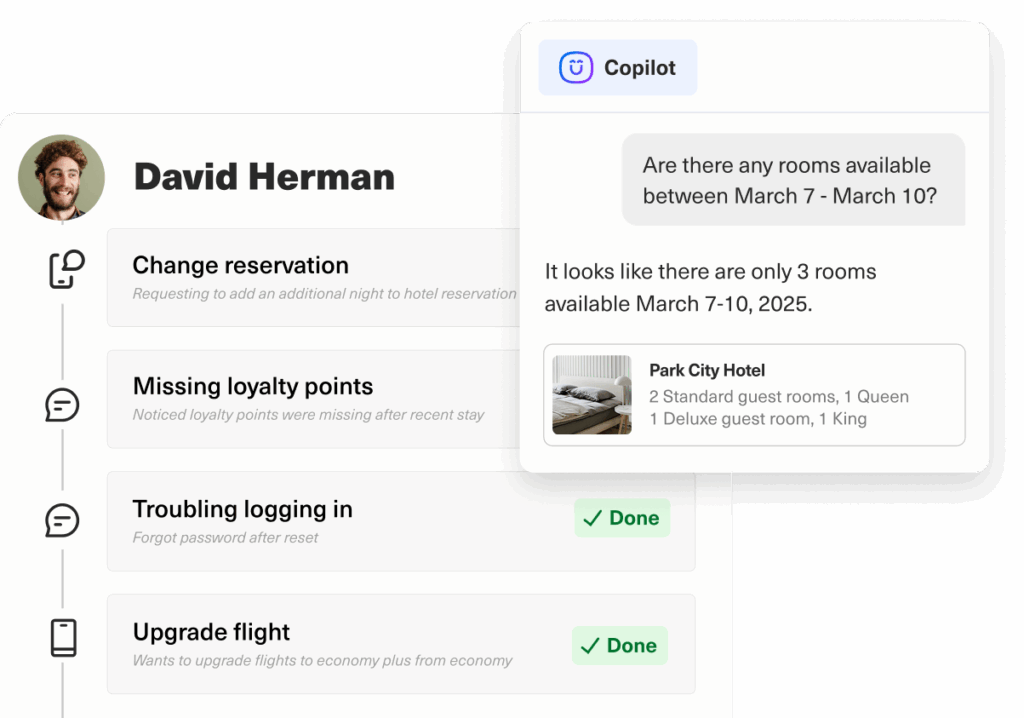
- A single, unified timeline: This core feature shows a chronological list of all customer interactions (email, chat, social) and data (orders, appointments) in one view, giving agents the full context without managing separate tickets.
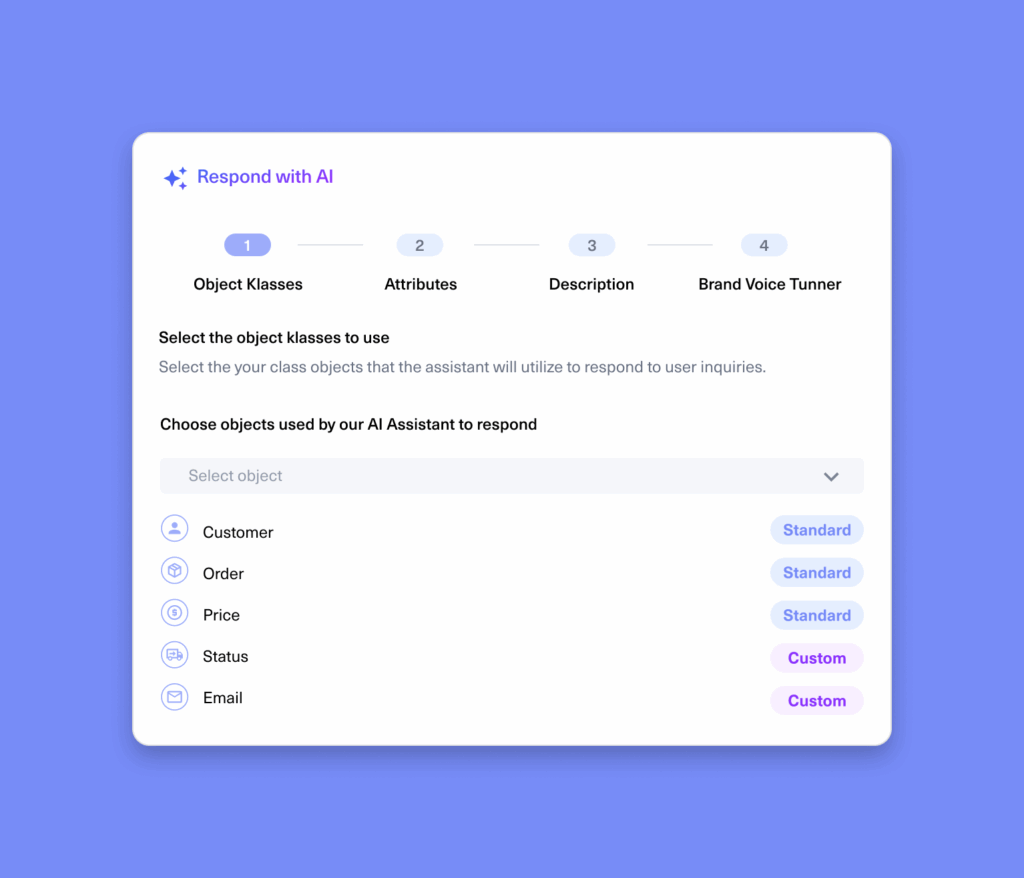
- Deep CRM customization: Kustomer allows you to create custom objects and attributes to track information unique to your organization (e.g., subscription status, order details, or member ID) in a flexible, scalable way.
- AI agents for customers and reps: Kustomer's AI is built on its unified data model. It offers AI agents to instantly resolve customer issues across all channels, and an AI assistant to handle busy work for human reps (like summarizing conversations) so they can focus on complex relationships.
- Service-first workflows: Kustomer's workflows are built for support teams. You can automate repetitive tasks, create complex processes, and intelligently route conversations based on rich CRM data, not just simple ticket fields.
- Granular data permissioning: You get total control over what every user can see and do in the platform. This allows you to mask sensitive data based on user roles, a critical feature for scaling teams with more complex compliance and security needs.
Advantages of using Kustomer
Kustomer's primary advantage is its foundational design, which is built to be proactive and anticipatory, not reactive. It directly solves the limitations of a Frankenstack or ticket-based model (like HubSpot's) by unifying Data, AI Agents, and Humans on a single platform:
- A 4x return on investment: By moving support from a reactive cost center to a proactive, efficient operation, Kustomer's platform is designed to deliver a 4x return on investment.
- A data-first foundation: Unlike HubSpot's sales-centric model, Kustomer is a service CRM that captures all data (from purchases to support history) in one place. This complete customer view is the core advantage; it's the fuel for both the AI and human agents, enabling proactive, personalized service.
- AI built for anticipation: Kustomer's AI agents use this rich, unified data to anticipate customer needs before they become problems. Instead of just reacting to a ticket, the platform can identify issues (like a problem with a recently shipped item) and proactively start a resolution.
- Proven, measurable efficiency: The platform is designed to make your entire operation more efficient. By connecting agents with the right data and AI insights, Kustomer delivers proven results, including a 65% increase in customer support rep efficiency and a 45% boost in overall support efficiency.

What Real Users are Saying about the Value of Kustomer
- Unifying e-commerce and support data into a single source of truth. Nathan James, an online furniture company, needed a platform that could pull in data from Shopify and other systems. Kustomer became their single hub, eliminating the need for agents to switch systems to find order information or customer history. [Read the Full Case Study]
“Kustomer pulls all customer information on one timeline. We see a customer’s full history right there, without switching around. That’s been a game-changer for us.” — Taylor Johnson, Director of CX, Nathan James
- Creating a single, scalable platform that aligns the entire business. As a fast-growing company, Kin needed to move beyond a patchwork of disparate tools. Kustomer was able to replace 13 different systems, creating a central hub for all teams—including sales, support, and claims—to get a unified view of the customer. [Read the Full Case Study]
“Everyone in the company, including the claims team, now uses Kustomer… Kustomer has changed how Kin operates, aligns with customers, manages schedules, and makes decisions.” — Eli Gratz, VP of Growth, Kin
- Replacing a siloed, ticket-based system with a unified timeline. Terra Kaffe, a luxury brand, switched from a ticket-centric platform because it "made customers feel like we had no insight into their broader relationship with us." Kustomer's timeline layout provided the full context their high-touch service model required. [Read the Full Case Study]
“The most persuasive feature Kustomer offered was the timeline layout. We prefer to handle customers within the full context of their relationship with us, not through siloed tickets that provide little insight into their overall experience...” — Cate Marques, CXO, Terra Kaffe
Pricing
- Enterprise: $89 per seat/month
- Ultimate: $139 per seat/month*
Kustomer's pricing per user is based on a minimum of 8 seats and is paid annually. In case you have a smaller team, talk to our sales team for available packages.
AI add-ons:
- AI Agents for Customers: $0.60 per engaged conversation
- AI Agents for Reps: $40 per user/month
2. Zendesk Support Suite
Best for: Growing or enterprise-level teams that need a powerful CX platform built to handle high-volume, complex support operations.
Zendesk is a direct and powerful competitor, often considered the industry standard for a dedicated, service-first help desk software. While HubSpot's service tools are an extension of its sales-centric CRM, Zendesk is purpose-built for support. Its core strength lies in its deeply customizable ticketing and workflow automation. Teams that find HubSpot's ticketing unintuitive or its customization limited will find Zendesk's platform is designed to handle precisely that kind of complexity at a massive scale.
Key Features
- Advanced ticketing and workflows: This is Zendesk's core advantage. It allows for granular control over ticket fields, statuses, and automation rules (triggers and automations) that are far more powerful and flexible than HubSpot's.
- Native, robust omnichannel support: Zendesk was engineered to handle support across all channels, including native voice (Talk), SMS, and social messaging, all within a unified agent workspace. This is often more seamless than HubSpot's reliance on integrations for similar functions.
- Deep customization and extensibility: The platform is built to be customized. It supports multiple brands, languages, and complex agent-routing rules, allowing large teams to manage separate support operations from a single account.
- Extensive integration marketplace: Zendesk's app marketplace is one of the largest in the industry, with a deep focus on service-specific tools (like QA, workforce management, and advanced telephony) rather than HubSpot's sales-and-marketing focus.
Learn more → Zendesk Features Mega Teardown: Advantages & Disadvantages
Pros
- Efficient ticketing and channel integration: Users overwhelmingly praise its user-friendly interface for ticket management and its ability to seamlessly integrate multiple channels (email, chat, social) into one view.
- Strong tracking and collaboration: Users value the platform for its effective customer support tracking, which enhances team collaboration and streamlines agent workflows.
- Ease of use: Despite some complex features, the day-to-day agent interface is consistently described as intuitive and easy to use for managing customer queries.
Cons
- Missing/limited features: A top complaint is that critical features, especially related to reporting, are either missing or limited, requiring extensive setup.
- Steep learning curve and complex setup: Users report that the initial setup and customization are challenging and time-consuming, with a steep learning curve for non-technical admins.
- High price and poor support: Users frequently cite the high price as a major con, especially since licenses are required for all agents.
Learn more → Is Zendesk Worth It? Hmm… See The Pros & Cons
Pricing
Zendesk's pricing is per-agent, per-month. The Suite plans (which are the most comparable to Service Hub) are:
- Suite Team: $55/agent/month (billed annually)
- Suite Growth: $89/agent/month (billed annually)
- Suite Professional: $115/agent/month (billed annually) Crucially, critical AI features are an Advanced AI add-on, which costs an additional $50/agent/month.
3. Salesforce Service Cloud
Best for: Enterprises already in the Salesforce ecosystem, or large-scale teams that need a platform with powerful, AI-driven customization and deep reporting.
Salesforce Service Cloud is the enterprise-grade solution for customer support. As a direct competitor, its primary advantage over HubSpot is its sheer power and customizability. While both are part of a larger CRM, Service Cloud is a best-in-class product with a much deeper feature set for complex service operations, including more robust AI, advanced reporting, and granular case management. It's designed for large organizations that need to tailor every aspect of their service process.
Key Features
- Deep CRM integration: Like HubSpot, its strength is its native connection to the core CRM (Salesforce). This provides a 360-degree view of the customer, linking service interactions with sales history and marketing campaigns.
- Advanced case management: Service Cloud's case model is more flexible than HubSpot's ticket system, allowing for complex parent-child relationships, milestone tracking, and entitlement management (SLAs).
- Powerful AI (Einstein): Salesforce's Einstein AI is deeply integrated, offering features like predictive case routing, AI-generated response recommendations, and automated case summarization that are typically more advanced than HubSpot's.
- Extensive customization: The platform can be customized to handle almost any business process, with advanced workflow rules, approval processes, and the ability to build custom applications directly on the Salesforce platform.
Pros
- Powerful, feature-rich platform: Users praise the sheer volume of features and the extensive capabilities for automating complex workflows and managing cases.
- Deep customization and integration: Its ability to be customized to fit any business process and integrate with thousands of other apps is a core strength.
- 360-degree customer view: Agents value having all customer information (sales, service, marketing) in one unified place.
Cons
- Overwhelming complexity and steep learning curve: The most common complaint is that the platform is extremely complex, with a steep learning curve that makes onboarding time-consuming and difficult.
- Very expensive and complex pricing: The total cost of ownership is a significant barrier. Pricing is high, and the licensing structure is notoriously complicated, with many essential features (like AI and certain channels) costing extra.
- Clunky and unintuitive UI: Despite being powerful, many users find the user interface clunky, cluttered, and overwhelming, which can hinder day-to-day agent productivity.
Pricing
Salesforce Service Cloud pricing is per-user, per-month and billed annually.
- Professional: $75/user/month
- Enterprise: $150/user/month
- Unlimited: $300/user/month
Similar to Zendesk, this base price does not include everything. Many critical add-ons for AI (Einstein), digital engagement (chat/SMS), and advanced reporting are sold separately, significantly increasing the total cost.
4. Freshdesk
Best for: Teams looking for a direct, service-focused competitor to HubSpot that offers mature ticket management and a wide range of support-specific features.
Freshdesk by Freshworks is a strong, all-around alternative that is consistently rated as a support-first platform. For teams frustrated by HubSpot's sales-centric design, Freshdesk feels like a dedicated helpdesk, offering more mature and diverse ticket management capabilities. It also has more flexible SLA management and, in many cases, a wider range of out-of-the-box, multi-channel support options.
Key Features
- Advanced ticketing: Provides robust ticketing features, including team-based routing, SLA management, and customizable ticket fields.
- AI-powered assistance (Freddy AI): Offers AI tools for ticket summarization, response suggestions, and intelligent ticket classification.
- Omnichannel support: Natively supports email, phone, chat, social media, and messaging apps within its agent workspace.
- Self-service portal: Includes tools to build a comprehensive, customizable knowledge base and community forum for customers.
Pros
- User-friendly and easy setup: Users consistently praise its intuitive, clean interface, making it easy for agents to learn and start managing tickets quickly.
- Efficient ticket management: The platform is highly valued for its effective ticketing system, which helps teams stay organized, track customer data, and collaborate.
- Good automation capabilities: The automation rules for routing tickets and streamlining workflows are cited as a major benefit for enhancing productivity.
Cons
- Limited and missing features: The most common complaint is that essential features, like advanced reporting or asset management, are missing or locked behind higher-priced plans.
- Problematic ticketing issues: Users report frustrations with how the system handles child tickets (treating them as separate) and other bugs that can lead to duplicate tickets.
- Slow performance: Many users note frustrating lag and slow loading times, especially when handling a large volume of tickets.
Pricing
Freshdesk offers a free plan, with paid plans (billed annually) starting at:
- Growth: $15/agent/month
- Pro: $49/agent/month
- Enterprise: $79/agent/month
Be aware that AI features like "Freddy AI Copilot" are an additional add-on, costing $29/agent/month.
5. Intercom
Best for: Teams prioritizing a chat-first, conversational, and AI-driven support model for proactive engagement.
If your team's main frustration with HubSpot is its clunky chat or bot features, Intercom is the specialized leader. It is built for real-time, in-app support and proactive, bot-based automation. G2 ratings show Intercom's live chat and AI/bot features are far superior to HubSpot's. This is a top choice for SaaS and B2C teams who are scaling their conversational support and want a best-in-class tool for it.
Key Features
- Best-in-class messenger: A modern, proactive live chat widget for web and mobile apps.
- Fin AI Agent: A powerful, generative AI bot that can hold natural conversations, understand complex intent, and resolve issues autonomously.
- Proactive engagement tools: Allows you to send targeted, outbound messages, product tours, and surveys to users based on their behavior.
- Shared inbox: A unified inbox for managing conversations from chat, email, and social channels.
Pros
- Excellent live chat functionality: Users unanimously agree that Intercom's live chat and in-app messenger are intuitive, responsive, and the best on the market.
- Powerful AI and automation: The Fin AI agent is highly praised for its ability to resolve conversations, and the Workflows builder is effective for automation.
- Strong proactive engagement: The ability to send outbound messages and product tours is a key strength for sales and support.
Cons
- Extremely expensive and complex pricing: This is the #1 complaint. Pricing is usage-based (per AI resolution, per message) on top of high per-seat costs, leading to unpredictable and rapidly escalating bills.
- Weak for traditional ticketing: Users report that while Intercom is great for chat, it is clunky and less effective for managing traditional, long-form email support.
- Steep learning curve: The sheer volume of features can be overwhelming for new users, and it takes time to navigate and set up everything.
Pricing
Intercom's pricing is notoriously complex and modular, combining per-seat costs with usage fees.
- Essential: Starts at $29/seat/month (billed annually) for basic chat and ticketing.
- Advanced: Starts at $85/seat/month (billed annually) to add workflow automation.
- Expert: Starts at $132/seat/month (billed annually) for SLAs and HIPAA compliance.
This does not include key add-ons like Fin AI Agent (at $0.99 per AI-resolved conversation) or Proactive Support (at $99/month).
6. Gorgias
Best for: B2C and e-commerce brands on Shopify, BigCommerce, or Magento that have outgrown HubSpot's generic tools.
HubSpot Service Hub is a generic, B2B-centric tool. Gorgias is a helpdesk designed specifically for e-commerce. Its primary advantage is its deep, native integration with Shopify, which pulls all order data, shipping information, and customer history directly into the support view. For a scaling e-commerce brand, this solves the missing features and limited customization complaints common with HubSpot.
Key Features
- Deep e-commerce integration: Natively connects to Shopify, BigCommerce, and Magento, allowing agents to view and edit order details (e.g., issue refunds, cancel orders) directly from the helpdesk.
- Social media integration: Built to handle high-volume social commerce, including Instagram/Facebook comments and DMs, in the same inbox.
- Automation rules and macros: Powerful pre-built automations (Rules) and canned responses (Macros) designed for e-commerce, such as "Where is my order?"
- Ticket-based pricing: Pricing is based on the number of "billable tickets," not the number of agents, which can be cost-effective for large teams with low ticket volume.
Pros
- Unbeatable Shopify integration: Users state this is the platform's biggest strength, saving agents enormous amounts of time by centralizing all e-commerce data.
- Ease of use: The platform is praised for being user-friendly, with straightforward navigation and a simple setup process.
- Consolidates all channels: Users value having all customer communications (email, chat, social DMs) in one centralized, user-friendly platform.
Cons
- Expensive and unpredictable pricing: The ticket-based pricing is the most common complaint. Users are frustrated by high costs, expensive add-ons, and unexpected overage fees for exceeding ticket limits.
- Limited reporting and features: Some users report that reporting features are basic and lack the ability to create custom reports. Many also note missing CRM or data management features.
- Platform instability and bugs: A significant number of users mention frequent glitches, caching problems, and features that randomly stop working, which hinders productivity.
Pricing
Gorgias's pricing is based on monthly ticket volume (unlimited seats are included on most plans).
- Basic: $60/month (billed annually) for 300 billable tickets.
- Pro: $360/month (billed annually) for 2,000 billable tickets.
- Advanced: $900/month (billed annually) for 5,000 billable tickets.
AI automation is an add-on, and users are billed twice for an AI-resolved ticket (once for the ticket itself, and once for the automation fee).
7. Zoho Desk
Best for: Teams (especially those in the Zoho ecosystem) needing a powerful, context-aware platform at a highly competitive price.
Zoho Desk is a powerful, well-regarded alternative that competes directly with the entire HubSpot ecosystem. Its service platform is known for its strong ticketing, powerful help center creation tools, and context-aware AI. For teams that are not tied to the HubSpot marketing/sales tools, Zoho Desk offers a robust, scalable, and often much more cost-effective service-first platform.
Key Features
- Context-aware AI (Zia): Zoho's AI assistant can provide response suggestions, analyze customer sentiment, and automate tasks for agents.
- Strong ticketing and SLAs: Offers a robust, multi-department ticketing system with advanced workflow automation, blueprints (for process automation), and SLA management.
- Part of the Zoho ecosystem: Natively integrates with Zoho CRM, Analytics, and 40+ other Zoho apps, providing a complete, unified ecosystem alternative to HubSpot.
- Advanced self-service: Includes a highly customizable knowledge base, community forum, and a Gallery to build custom-themed help centers.
Pros
- Excellent value for money: This is Zoho Desk's most-cited advantage. Users feel it offers a vast and robust feature set for a price that is significantly lower than its competitors.
- Ease of use and setup: A high number of users find the platform easy to set up, with an intuitive interface that is simple to navigate for daily tasks.
- Seamless integration with other Zoho apps: For businesses using Zoho CRM or Zoho One, the native integration is a massive benefit for unifying customer data.
Cons
- Steep learning curve for advanced features: While basic use is easy, users report a challenging learning curve for advanced features, customization, and hidden UI elements.
- Limited features on lower-tier plans: Many users note that critical features are locked in the higher, more expensive plans, forcing an upgrade.
- Limited customization: A common complaint is that the platform's customization options are restrictive, making it difficult to tailor the experience effectively.
Pricing
Zoho Desk is known for its highly competitive pricing (billed annually).
- Standard: $14/agent/month
- Professional: $23/agent/month
- Enterprise: $40/agent/month
There is also a free plan for up to 3 agents.
8. Help Scout
Best for: Teams looking for a simple, user-friendly platform that prioritizes a great agent and customer experience over complex enterprise features.
Help Scout is a strong alternative for teams that find HubSpot's interface clunky and its feature-gating frustrating. It's built on the philosophy of human-first support and a shared inbox, making it feel less like a complex ticketing system and more like a collaborative email workspace. It's known for its simplicity, ease of use, and a strong, integrated knowledge base (Docs).
Key Features
- Shared Inbox (Mailbox): A clean, collaborative inbox that allows teams to manage email, chat, and social messages, with features like private notes for internal collaboration.
- Integrated Knowledge Base (Docs): A highly-rated, user-friendly knowledge base builder that integrates directly with the help widget.
- Proactive Messaging (Beacon): A modern help widget that can be embedded on any website or app, offering live chat, self-service article suggestions, and proactive messages.
- Customer Properties: A simple, built-in CRM that tracks all conversations and key data for each customer in a single profile.
Pros
- Exceptional ease of use: This is Help Scout's most-praised feature. Users find the interface intuitive, clean, and extremely easy to learn, which massively speeds up agent onboarding.
- Excellent for team collaboration: The shared inbox model, with its private notes and @mentions, is highly valued for making team collaboration simple and efficient.
- Strong self-service portal: The Docs feature is consistently highlighted as a simple yet powerful way to build and maintain a high-quality, customer-facing knowledge base.
Cons
- Limited reporting capabilities: A common con is that the built-in reporting is too basic. Users want more advanced analytics and the ability to create more granular custom reports.
- Limited customization and automation: Teams with complex needs find the workflow automation and customization options to be too limited compared to more advanced competitors.
- Lacks robust omnichannel support: While it handles email and chat well, users report it is not a true, unified omnichannel platform and can be clunky for managing voice or advanced social media support.
Pricing
Help Scout's pricing is per-user, per-month (billed annually).
- Standard: $20/user/month
- Plus: $40/user/month
- Pro: $65/user/month
Note that proactive messaging and advanced AI features (like AI-powered summaries and drafts) are included in the Plus and Pro plans.
9. Front
Best for: B2B teams whose support process is highly collaborative and involves non-support departments like sales, success, or finance.
Front is not a traditional helpdesk; it's a customer communication hub. Its core difference is that it replaces both your helpdesk and your email client (like Gmail or Outlook). It's built for teams that need to collaborate around a customer conversation with other departments. If your support tickets in HubSpot constantly require input from an account manager or a finance person, Front is designed to solve that specific problem.
Key Features
- Universal shared inbox: Brings email (both individual and team, like support@), chat, SMS, and social media into one unified inbox.
- Internal collaboration: Allows you to @mention teammates from any department to collaborate on a draft or discuss an issue in the context of the customer conversation, without messy forwards or CCs.
- Advanced workflow automation: Powerful, multi-step Rules engine to automate routing, responses, and tagging based on any criteria.
- CRM and integration panels: Displays rich context from your CRM (like Salesforce) and other tools directly alongside the conversation.
Pros
- Unbeatable for cross-team collaboration: This is its #1 strength. Users rave about the ability to @mention any teammate (even non-agents) and collaborate on customer emails in real-time.
- Powerful and flexible automations: The Rules engine is praised for its power and flexibility, allowing teams to automate almost any workflow.
- Unified inbox for all communications: Users love that it manages all channels (email, chat, SMS) and all inboxes (personal and team) in one single, fast interface.
Cons
- Not a traditional ticketing system: Teams accustomed to HubSpot's ticket model (with open/closed statuses) can find Front's inbox/archive model confusing at first.
- Expensive per-seat cost: The per-seat price is significantly higher than most competitors, making it a major investment for large teams.
- Basic reporting: Similar to other modern tools, users find the built-in analytics to be too basic and wish for more advanced, customizable reporting dashboards.
Pricing
Front's pricing is per-seat, per-month (billed annually), with a minimum seat requirement for each plan.
- Starter: $59/seat/month (min 2 seats)
- Growth: $99/seat/month (min 5 seats)
- Scale: $149/seat/month (min 20 seats)
- Premier: $229/seat/month (min 50 seats)
10. Gladly
Best for: High-touch, B2C brands in retail, hospitality, or travel that want to build long-term relationships and prioritize a people-first service model.
Gladly is built on a philosophy that is the polar opposite of a traditional ticketing system. Its entire platform is "radically personal" and customer-centric, not ticket-centric. It organizes everything around the customer, with a single, continuous conversation timeline. For teams that find HubSpot's ticket-merging clunky and impersonal, Gladly offers a complete, relationship-focused alternative.
Key Features
- People-centric timeline: The platform's core feature. It shows a single, unified timeline of all communication with a customer (call, email, chat, SMS) across their entire lifetime.
- Native omnichannel support: Built from the ground up to handle all channels, including native voice, IVR, SMS, and social, in one seamless conversation.
- Tasks for internal work: Allows agents to create and assign internal tasks (like "follow up on shipping") that are linked to the customer but don't clutter the conversation.
- Customer profile: A rich, central profile that displays customer details, preferences, and all historical data in one place.
Pros
- Excellent for a true customer view: Users love the single conversation timeline, saying it provides an unparalleled, holistic view of the customer relationship.
- Intuitive and easy-to-use interface: The agent-facing UI is praised for being user-friendly, clean, and simple to learn, making it easy to manage multiple channels.
- Strong, native omnichannel: The ability to seamlessly handle a phone call, then an email, then an SMS from the same customer in one thread is a key strength.
Cons
- Missing features and poor reporting: The most common complaint. Users are frustrated by missing features (like advanced ticket merging or case management) and find the reporting and analytics to be very limited and basic.
- Platform instability and bugs: A significant number of users report frequent bugs, call/chat issues, slow loading times, and technical glitches that disrupt workflow.
- Steep learning curve for admins: While the agent UI is simple, users report that the admin backend for setup, routing, and customization is complex and has a steep learning curve.
Pricing
Gladly's pricing is per-user, per-month, with a minimum of 10 seats.
- Hero: $180/user/month (billed annually) for all core features.
- Superhero: $210/user/month (billed annually) to add advanced features like Proactive Voice, advanced routing, and WFM integrations.
Kustomer — The #1 HubSpot Service Hub Alternative
When your service team scales, you need a platform that scales with you. Kustomer is the service-first platform CX leaders choose when they're ready to move from a sales-centric tool to a true, service-first CRM.
This fundamental difference in design is what allows Kustomer to unify your Data, AI Agents, and Human teams on a single platform.
- A unified data foundation: Where HubSpot scatters information across tickets and deals, Kustomer provides a single, unified Timeline for every customer. This gives your agents the full context—from purchase history to past conversations—instantly.
- Proactive, anticipatory AI: Kustomer's AI uses this rich, unified data to anticipate customer needs and resolve issues proactively, instead of just reacting to tickets.
- Empowered, efficient humans: By automating repetitive work and providing full context, Kustomer empowers your team. This is how our platform delivers a proven 4x return on investment and boosts agent efficiency by 65%. [*]
Kustomer turns your support team from a reactive cost center into a proactive, relationship-building engine.
Ready to switch to a platform that's actually built for service? Try Kustomer now.
FAQs
HubSpot offers free tools that are great for startups. Are these alternatives suitable for small businesses?
The HubSpot CRM is very popular with startups and small businesses because its free tools are a great entry point. However, as your business needs change (e.g., higher support volume or more complex B2C e-commerce), you may find its service features limiting. Many alternatives on this list are also great for small businesses that have complex service needs right from the start.
If I replace Service Hub, do I also have to stop using HubSpot's marketing automation tools?
Not at all. A key advantage of modern CRM software is its ability to integrate. Most of the best HubSpot alternatives on this list are designed to connect with popular email marketing tools and marketing automation tools (Mailchimp, ActiveCampaign, or even the HubSpot Marketing Hub itself). You can adopt a best-in-class strategy, using a specialized tool for service and connecting it to your existing marketing stack.