If you’ve ever been at the receiving end, you know great customer support feels effortless. Customers get fast, accurate answers from agents who actually understand their issue.
No transfers, or agents repeating themselves. Just a smooth, efficient resolution that makes people want to do business with you again.
Behind that effortless experience is smart ticket routing and triage. A complex system that ensures every support request lands with the right person, at the right time, with the right context.
Today, you have artificial intelligence powering that system. It handles the invisible work of sorting, prioritizing, and distributing tickets based on intent, urgency, and expertise before a human ever sees them.
This guide breaks down the tools that make that possible—what they do, how they work, and which one actually fits how your team operates.
Key Features to Look for in AI Ticket Routing and Triage Solutions
The difference between AI that saves time and AI that just adds complexity comes down to which capabilities the platform actually delivers.
Here’s what matters when you’re evaluating tools:
Intent detection (using NLP)
Top-tier platforms use advanced natural language processing (NLP) and machine learning to interpret customer intent, nuance and implied meaning. This involves understanding what the customer is trying to achieve beyond the keywords used.
For example, a customer saying:
- “Where is my order?” needs tracking information.
- “I want to cancel my order” needs order management.
- “My order still hasn’t arrived and I needed it yesterday” needs both tracking and urgent escalation.
What to look for: The platform should handle variations in phrasing (“refund,” “money back,” “return,” “get my payment back”) with the same intent.
Sentiment analysis
Advanced AI tools can detect the emotional tone of customer messages (e.g., frustration, anger, satisfaction, confusion, urgency) and use that emotional context to inform routing and prioritization decisions.
It does this by reading linguistic cues (word choice, punctuation, capitalization, phrasing) to assess how the customer feels.
For example a neutral-toned billing question can wait. However, the same billing question written in ‘ALL CAPS!!’ with multiple exclamation points can’t.
What to look for: The platform should score sentiment accurately (positive, neutral, or negative,) and use those scores to influence routing decisions automatically.
Bonus points if it can detect sarcasm or passive-aggressive language, which often gets misclassified as neutral by basic sentiment tools.
Data-driven and contextual routing
You should opt for a platform that makes routing decisions based on who the customer is and what their relationship with you looks like.
In this case, the routing logic pulls in customer and ticket data from your CRM, order history, subscription status, support history, account value, location, product owned, and any other attribute that should influence how the ticket gets handled.
For e-commerce brands, this is a critical feature that impacts customer satisfaction. A VIP customer with $100K in lifetime value asking about a delayed shipment should not sit in the same queue as a first-time buyer with a generic question.
Context-aware routing ensures your most valuable customers, most at-risk accounts, or most time-sensitive issues get prioritized.
What to look for: The platform should integrate natively with your CRM (Salesforce, HubSpot, Kustomer) and pull customer attributes in real-time.
Routing rules should also support complex logic. For example:
“If customer LTV > $10K AND sentiment is negative AND this is their second ticket this week, route to Tier 2 immediately.”
Automated tagging
Consider solutions that use AI to eliminate manual tagging by automatically classifying tickets by issue type, product, or priority.
This keeps your dashboards clean and also improves reporting accuracy. This way, support leaders can track important metrics and analyze performance trends without having to go through inconsistent data.
What to look for: The platform should support multi-label tagging (tickets can have multiple relevant tags: “billing” + “refund” + “urgent”).
It should learn from corrections—i.e., if human agents manually change tags, the AI should adjust its classification model.
AI agent copilots
Modern AI ticketing systems now include ‘Copilots’ or AI assistants that help agents in real time. They summarize lengthy ticket histories, pull relevant knowledge base articles, or even draft suggested replies.
This reduces response time dramatically while maintaining tone consistency and factual accuracy across your team.
What to look for: The copilot should integrate with your knowledge base and suggest articles or macros based on ticket content. It should also handle summarization of both customer-facing threads and internal notes.
Self-service deflection
Not every contact needs an agent. Simple questions like password resets, order tracking, account updates can often be resolved faster through self-service.
AI that recognizes these patterns and offers instant answers reduces ticket volume, frees agents for complex issues, and gives customers faster resolutions.
What to look for: The platform should analyze incoming messages and surface relevant KB articles or automated flows before escalating to an agent.
It should track deflection success rates to identify which topics self-serve well vs. which always require human help—and refine recommendations accordingly.
Omnichannel support and unified routing
Customers don’t care which channel they used, they just want their problem solved. If they emailed yesterday, then followed up on Twitter (now X) today, those should be treated as one continuous conversation, not two unrelated tickets.
Omnichannel routing ensures context doesn’t get lost when customers switch channels. It also prevents duplicate tickets, and allows agents to see the full picture regardless of how the customer reached out.
What to look for: The platform should consolidate messages from all channels into unified customer timelines. Routing rules should work identically across channels—i.e., a high-priority customer gets fast service whether they email, chat, or tweet.
Related → 15 Best Omnichannel Customer Support Platforms for 2026
Top 12 AI Ticket Routing and Triage Tools on the Market Right Now
- Kustomer
- Zendesk
- Salesforce Service Cloud
- Freshdesk
- Intercom
- Gorgias
- HubSpot Service Hub
- Jira Service Management
- Zoho Desk
- Gladly
- Front
- Tidio
1. Kustomer
Kustomer is a customer service CRM platform built specifically for modern support teams that need to manage conversations across multiple channels (including email, voice, SMS, social media) while maintaining complete context on every customer interaction.
Unlike traditional ticketing systems that treat each inquiry as an isolated case number, Kustomer organizes support around the customer timeline. It provides a unified view showing every conversation, purchase, support history, and account detail in one interface.
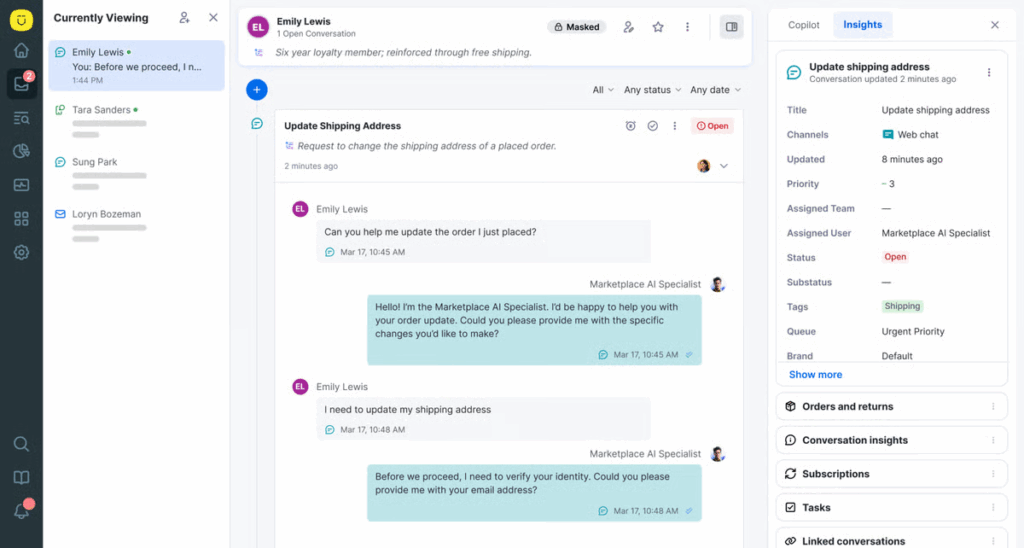
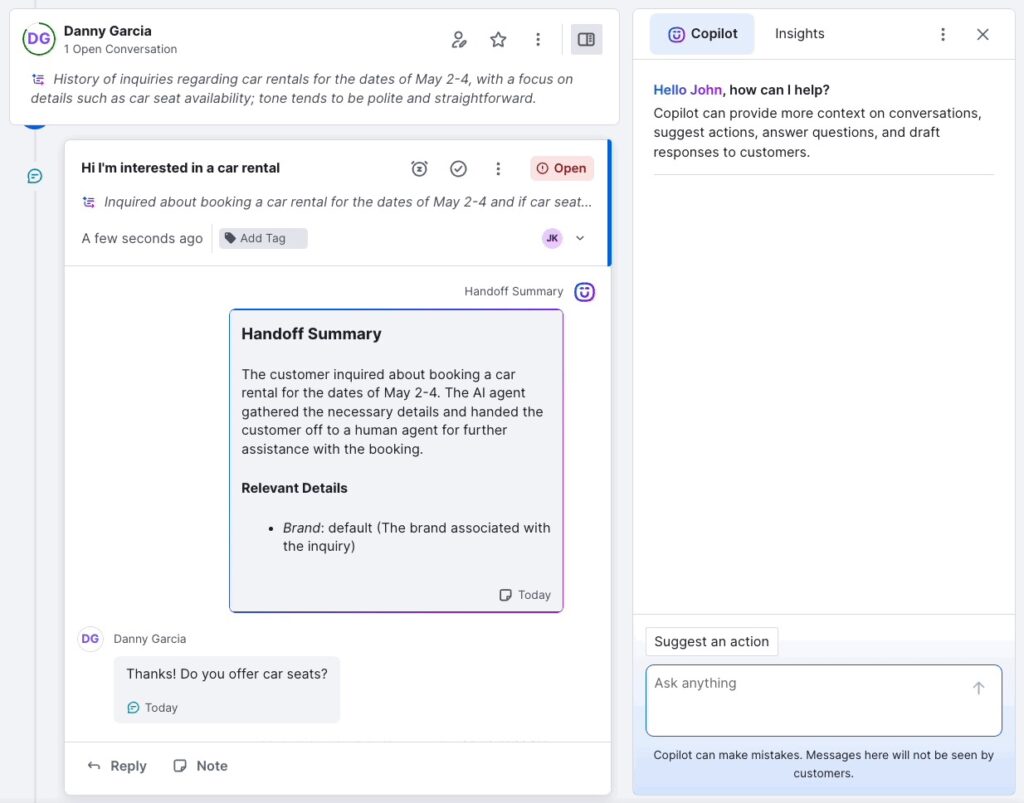
With its AI-powered routing and ticket triage capabilities, Kustomer work learns to understand intent, assess urgency, distribute work intelligently, and assist agents with contextual recommendations. For example, agents get ‘Handoff summary’ when a customer request is transferred to them.
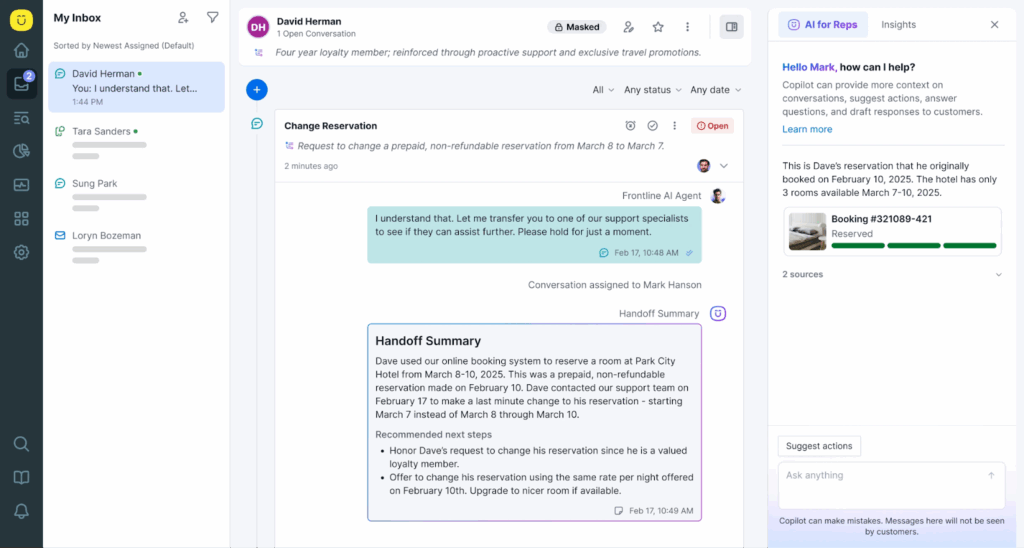
One major advantage to using Kustomer is its conversational approach to support operations.
Rather than forcing customers into rigid ticket workflows, Kustomer allows fluid, multi-channel conversations that feel natural. Customers can start on chat, follow up via email, and continue on social media without losing context or repeating themselves.
For high-growth companies handling thousands of daily interactions across different channels (e.g., e-commerce, SaaS, financial services, healthcare) Kustomer provides the scalability and intelligence needed to deliver personalized support without the operational chaos that typically comes with volume.
Key features of Kustomer
Kustomer offers four new AI-native features embedded directly into its unified customer timeline. This includes AI assistants across agents, workflows, knowledge, and search to operate with shared context.
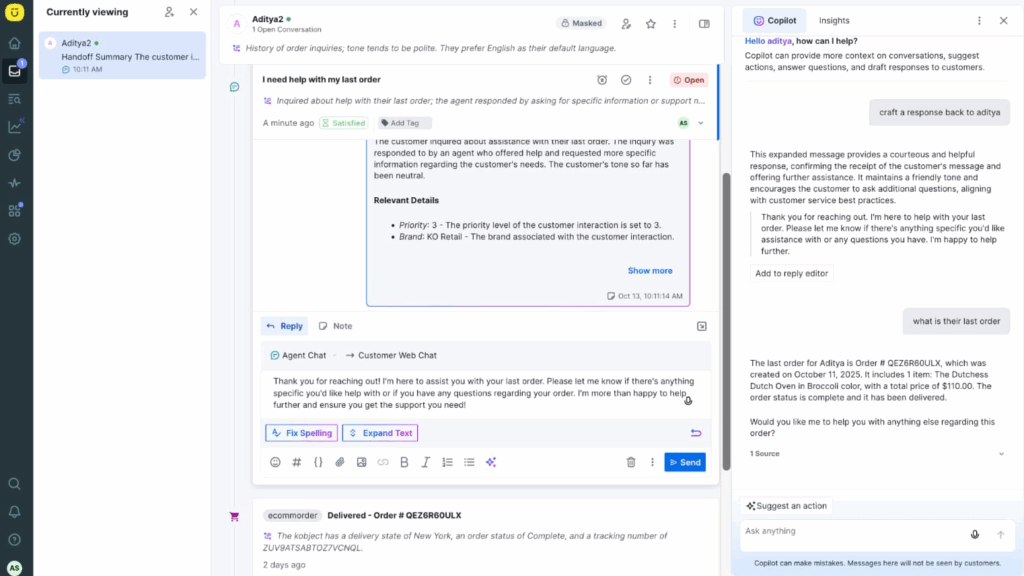
You have:
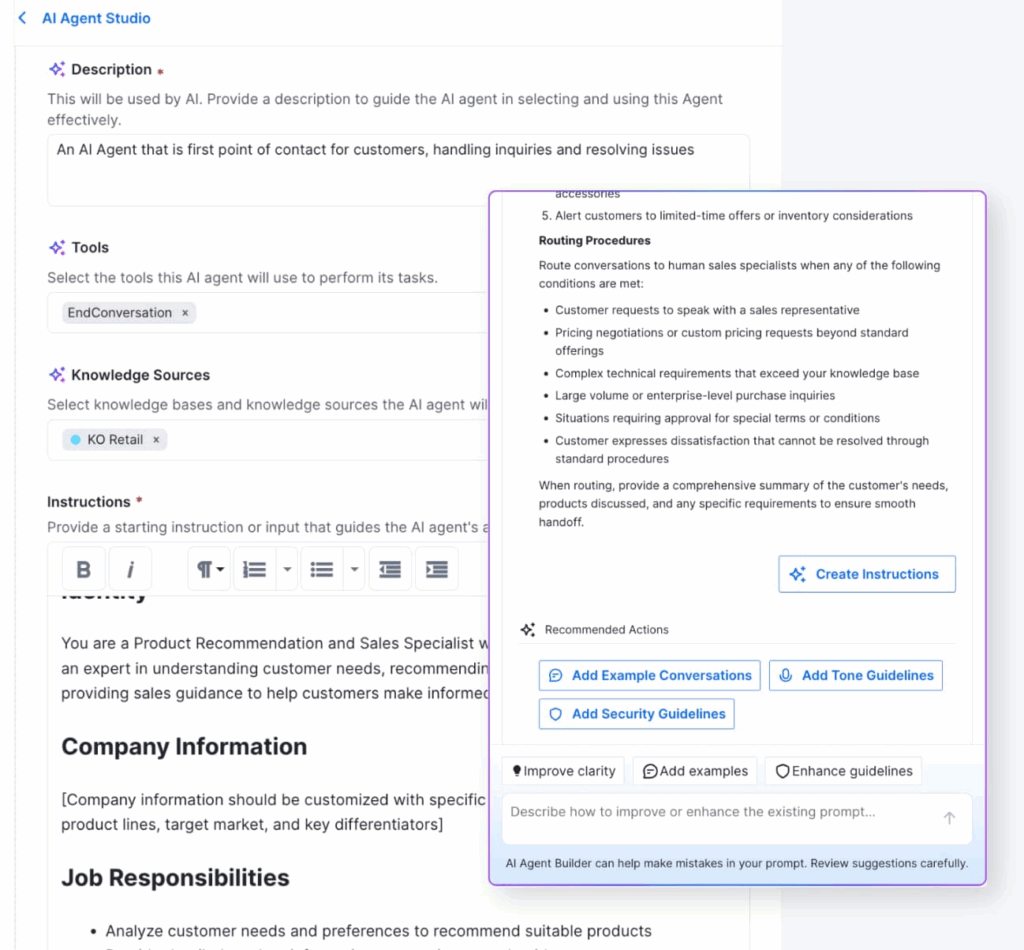
- AI agent assist: Lets teams design and manage modular AI agent “org charts” that handle real CX work (e.g., refunds, escalations, and compliance actions) with full customer context.
Note: Each agent operates autonomously but transparently, with every action logged, auditable, and governed by human-defined guardrails.
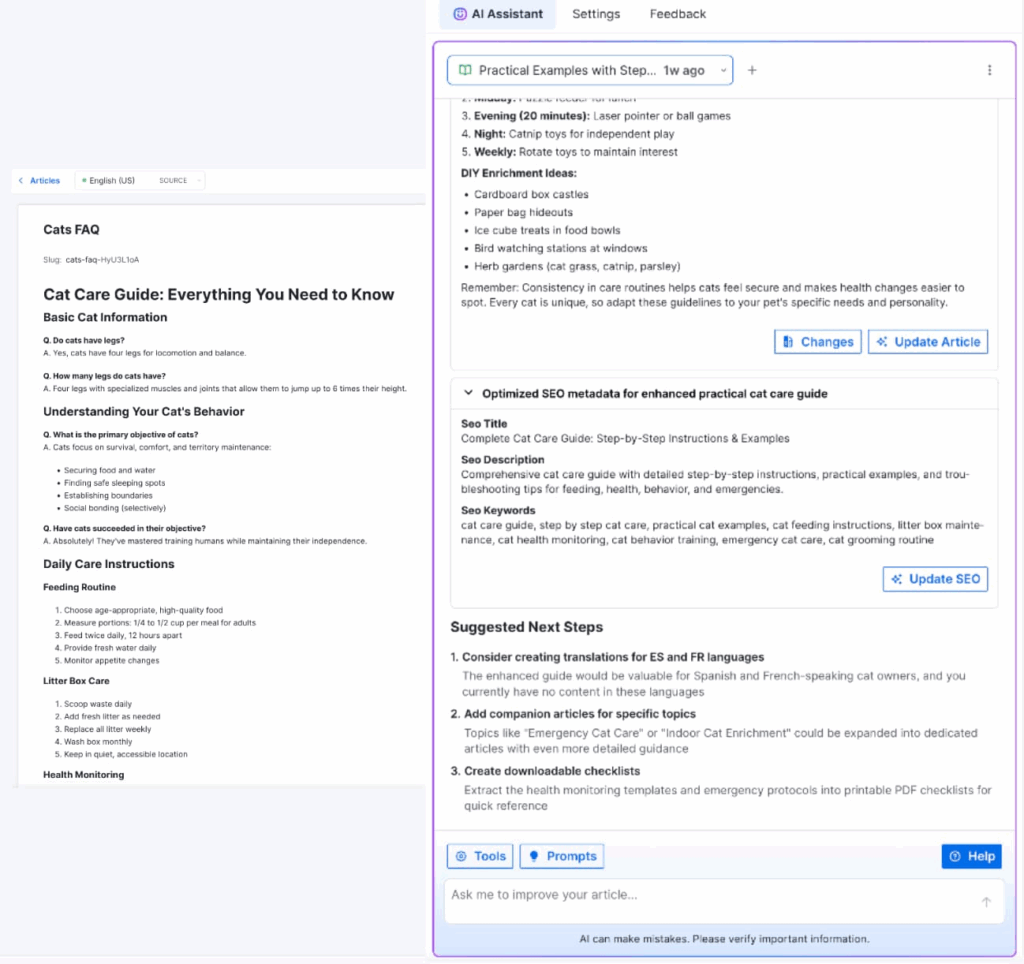
- AI knowledge base: Continuously ingests and understands internal help content, policies, and past resolutions, allowing agents and automation to retrieve accurate answers instantly. Unlike static KB search, it adapts to conversational queries and evolves as content changes.
- AI-powered workflow automation: Enables teams to build, test, and deploy workflows through natural language instead of manual configuration.
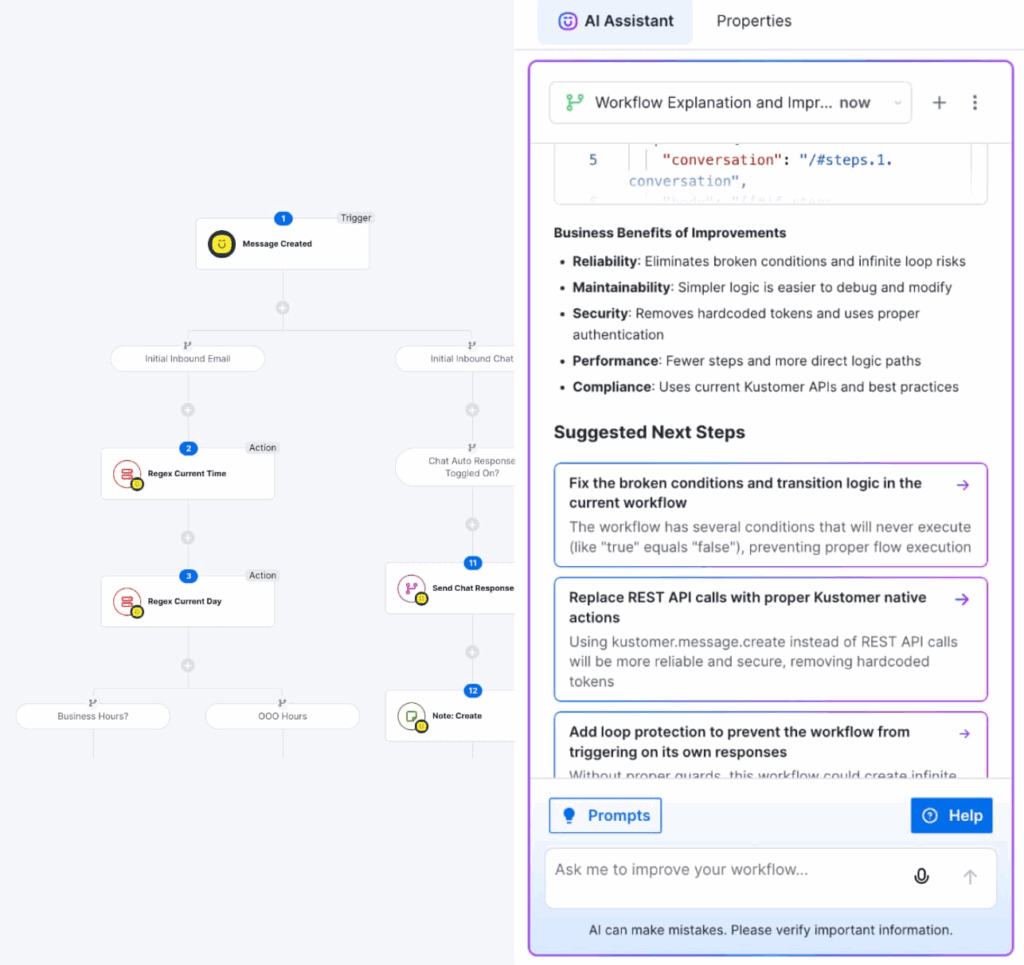
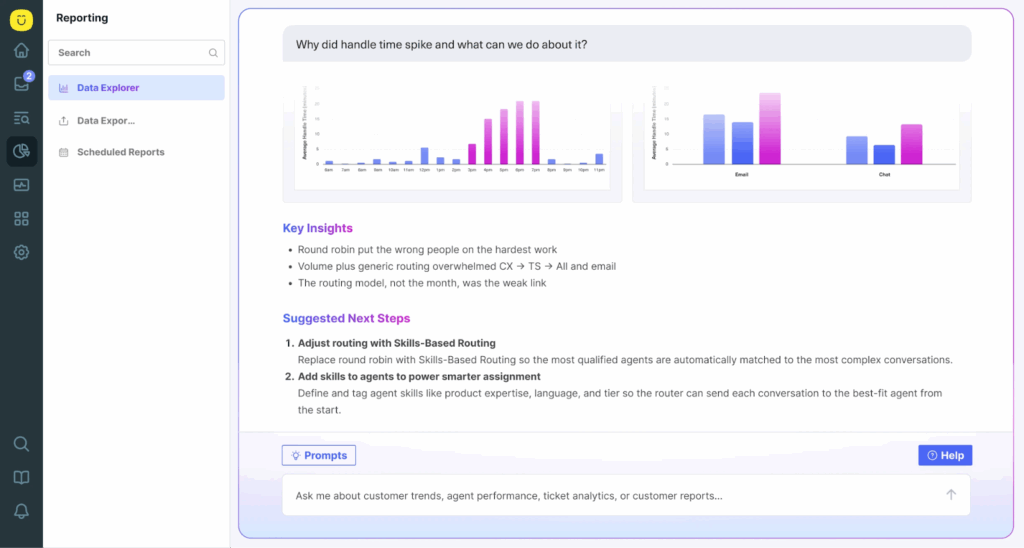
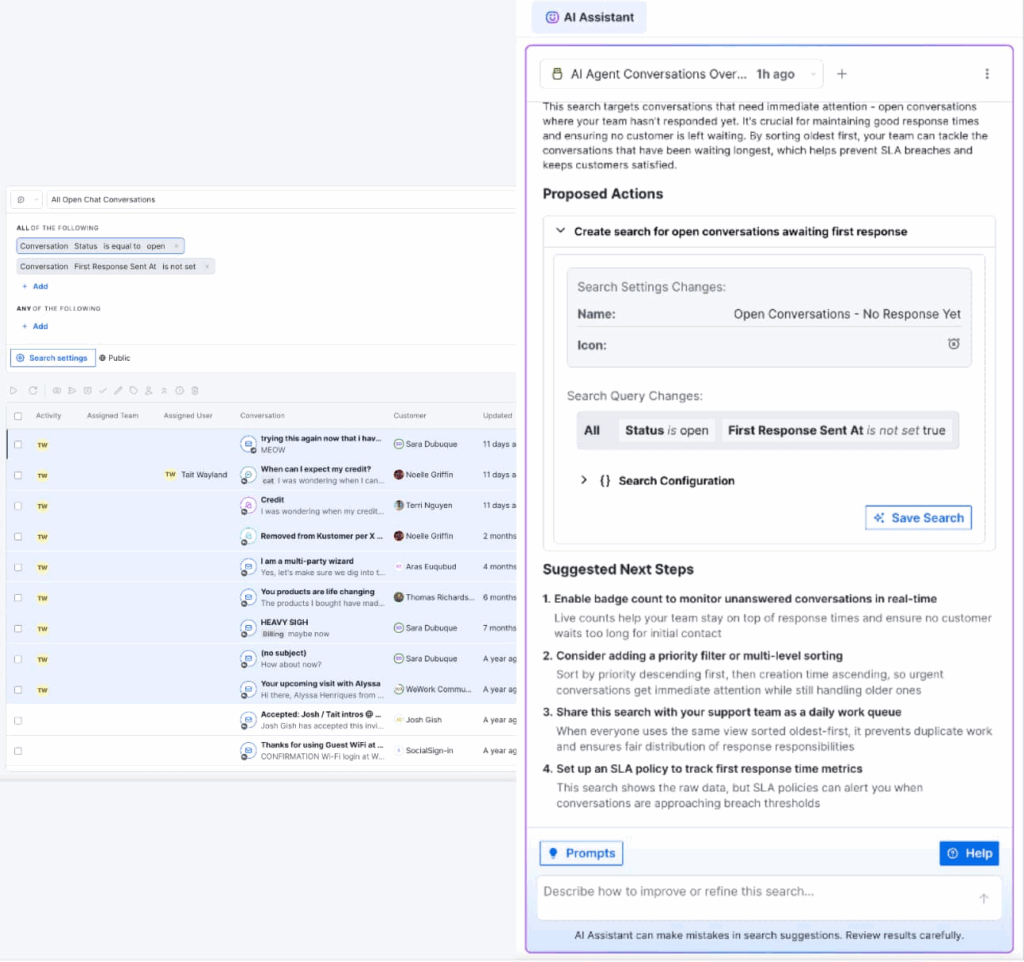
- AI-search assistant: Lets you ask questions about your support data the same way you’d ask a teammate.
- For example, instead of digging through dashboards or waiting on analysts, you can type questions like “Why did refunds increase this month?” or “Which team handles the most escalations?” and get clear answers right away.
Some other features include:
- AI agents for reps (Kustomer IQ Copilot): This built-in AI copilot helps internal agents work smarter. It can summarize conversations, suggest on-brand replies, triage incoming tickets, categorize intent and sentiment, and handle busy work behind the scenes.
- AI agents for customers: These are automated AI-driven assistants that interact directly with customers across channels (chat, email, social, SMS). They can answer common questions, fetch order statuses, initiate returns, and resolve issues without requiring a support agent.
- Integrations: Kustomer supports deep integrations with external systems like e-commerce platforms (Shopify, Magento), CRMs, webinar tools, marketing platforms, and analytics systems.
Recommended → Introducing KIQ Customer Assist: A Next-Gen AI Customer Service Bot Driving Efficiency by 45%
Why do customers choose Kustomer?
- “If you look at what it means to be in a great relationship with someone, it’s remembering their favorite things, remembering what they said to you last week, and Kustomer allows you to do that because of the timeline view.” — Chad Warren, Sr. Manager of Customer Service at Vuori.
- “The thing I love the most about AI agents for reps is that you can actually include your tone and manner in how the AI responds to the agent. And the setup is way easier. It’s much more customizable. You can add—like in my case that we use Mexican-Spanish. The translations are much better and you can use the same knowledge base.” — Maria Jimena Cerda, Operations Manager at Aplazo
- “On day one, Customer Assist handled 10% of chat conversations without any agent interaction and that number has been steadily increasing.” — TJ Stein, Head of Customer Experience at Everlane. [Case study]
Kustomer pricing
Kustomer offers two pricing options:
- Enterprise: $89 per seat/month.
- Ultimate: $139 per seat/month.
There are also two add-on options:
- AI agents for customers: $0.60 per engaged conversation.
- AI agents for reps: $40 per user/month.
Note: Pricing per user is in consideration of at least 8 seats and paid annually. If you have a smaller team, there are packages available. Talk to sales to find out more.
Kustomer: Your all-in-one AI-powered service platform
Unite your entire customer service experience—seamlessly combining CRM, ticketing, and AI into one powerful platform for the future.
2. Zendesk
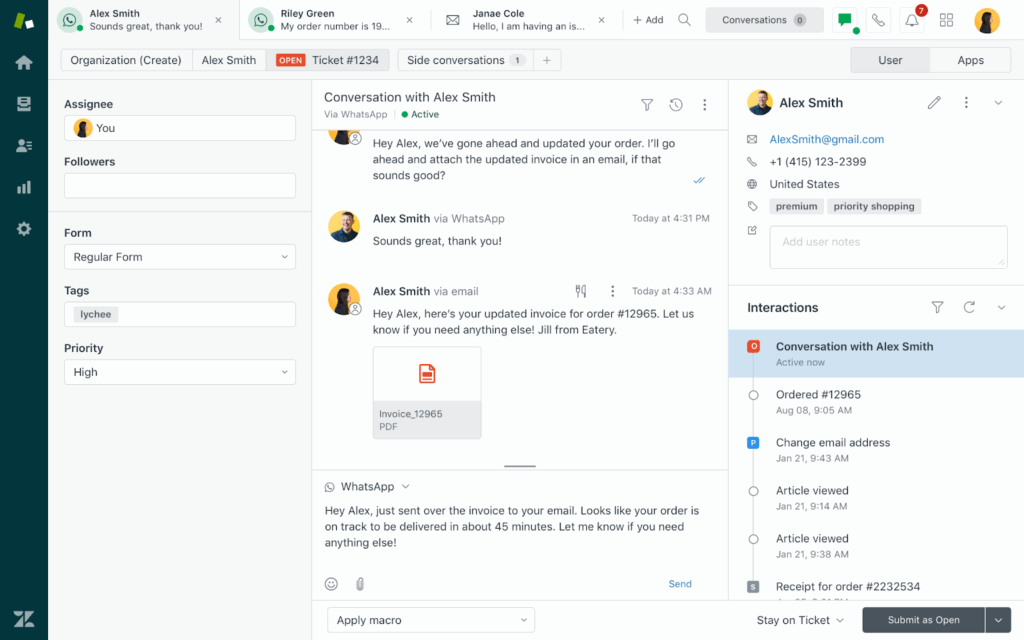
Zendesk is a cloud-based customer service and CRM platform. It provides businesses with an integrated set of tools to manage customer interactions across all major communication channels. This includes email, live chat, voice, messaging, and self-service content.
Beyond the typical ticketing system, Zendesk offers a comprehensive omnichannel solution.
It features the ‘Zendesk Suite’ which bundles modules like Support, Guide, Chat, and Talk into one seamless experience.
This lets agents work in a unified workspace, respond through the customer’s preferred channel, and understand the full history of each relationship.
Key features of Zendesk
- Answer Bot: Zendesk’s AI-powered automation assistant that suggests relevant Help Center articles or automated responses to customer queries. This reduces agent workload and speeds up resolution times.
- Sunshine Conversations: Extends Zendesk’s messaging capabilities through a unified API that connects messaging channels and third-party bots. It lets teams integrate chat apps (like Apple Messages for Business, SMS, and more) into Zendesk.
- Explore: This is Zendesk’s built-in analytics and reporting engine that provides dashboards, insights, and custom reports. It helps teams monitor performance (e.g., ticket volume, agent response times, customer satisfaction) and uncover trends to optimize operations and customer experience.
Pros
- “Zendesk simplifies my work because all I need to do is select the appropriate options, choose the title, set the dispositions, and indicate whether a case is pending or solved.” (Read full review).
Cons
- “Zendesk support suite has advanced and complex features that require IT resources for configuration and customization according to the company’s which also needs Budgets and extract costs.” (Read full review).
Pricing
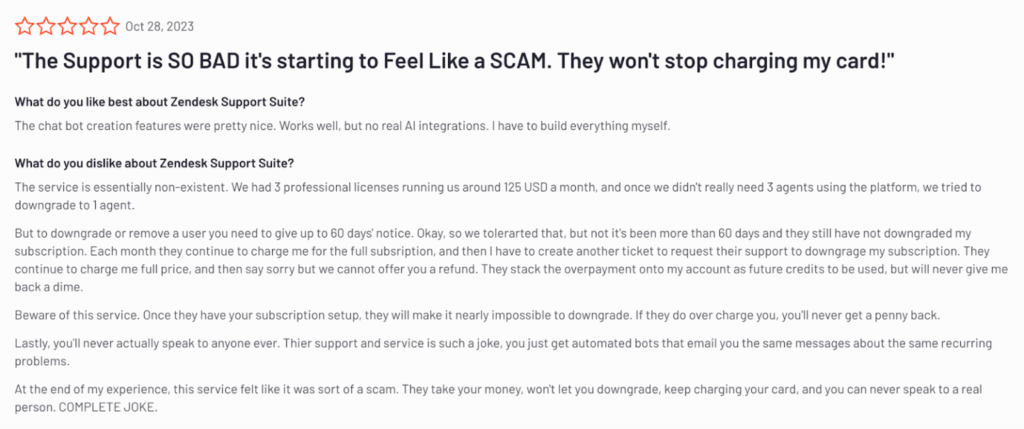
Zendesk has quite a complex pricing structure. This has raised several concerns even amongst it users with many unable to stop the platform from charging their card from the exorbitant prices [*].
For example, with a new update, Zendesk features two new complicated pricing models—namely, customer service, and employee service.
For the sake of this post, we’ll only cover ‘customer service.’ But if you’d like a more detailed breakdown of Zendesk’s pricing and what it actually cost, please check out the post below.
- Support team: $19 per agent/month.
- Suite team: $55 per agent/month.
- Suite professional: $115 per agent/month.
- Suite enterprise: $169 per agent/month.
You also have add-ons like:
- Copilot at $50 per agent/month
- Zendesk quality assurance: $35 per agent/month.
- Zendesk workforce management: $25 per agent/month.
- Advanced data protection: $50 per agent/month.
- Contact center: $50 per agent/month.
- Workforce engagement bundle: $50 per agent/month.
- Advanced AI agent: Talk to sales.
| Best for: Organizations wanting proven, enterprise-scale infrastructure with extensive integrations and mature feature sets. |
Recommended → How Much Does Zendesk Really Cost in 2026?
3. Salesforce Service Cloud
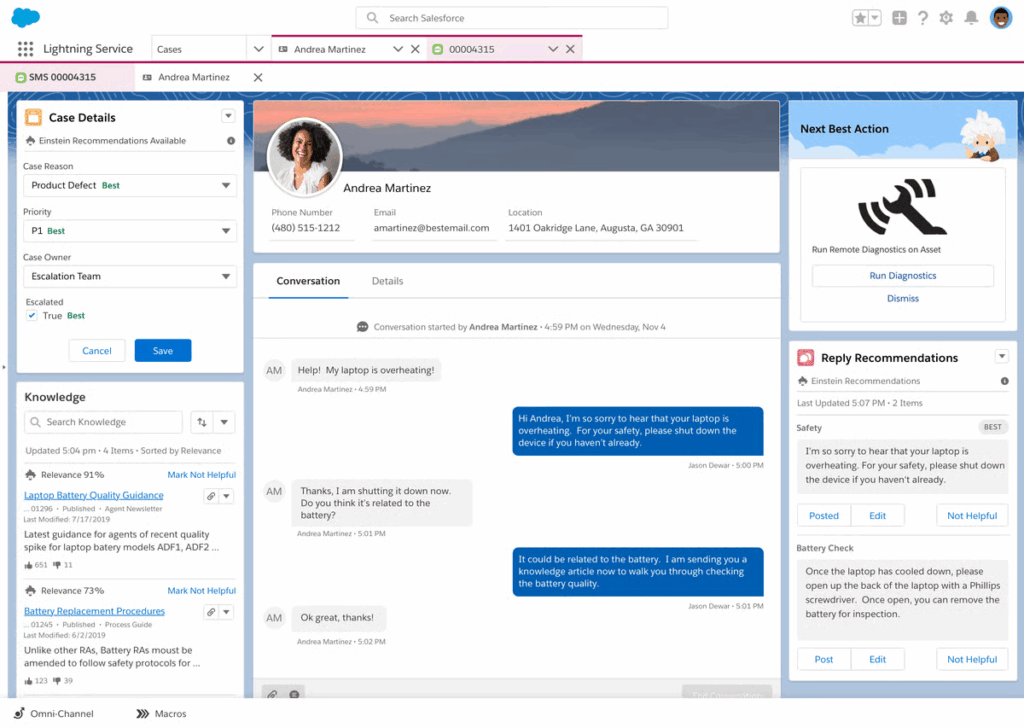
Salesforce Service Cloud is another customer service and support CRM platform built on the Salesforce Customer 360 architecture.
It equips support teams with tools to manage cases, automate service processes, streamline workflows, and deliver personalized, omnichannel support efficiently.
As a core part of the Salesforce platform, Service Cloud integrates natively with sales, marketing, analytics, and collaboration tools (like Sales Cloud, Marketing Cloud, Slack, and Tableau).
This unified experience gives teams context-rich customer insights, including interaction history, purchase data, support cases, and sentiment.
Key features of Salesforce Service Cloud
- Case management: Consolidates every customer inquiry into a structured record that agents can track, prioritize, escalate, and resolve. Also offers visibility into status, SLA timers, and related history.
- AI and automation (Einstein): Offers Einstein bots for automated customer conversation handling, AI-powered routing, next-best-action recommendations, sentiment scoring, and predictive insights.
- Self-service portals: Enables companies to build branded customer communities and support sites where customers can log in, search knowledge articles, submit cases, track status, and interact with peers or experts.
Pros
- “I love how Salesforce keeps all my cases and tasks in one spot, so I’m not bouncing around trying to remember who needs what.” (Read full review).
Cons
- “Customizations sometimes require technical expertise, and some advanced configurations can be time-consuming. [Also], the licensing cost is also on the higher side compared to other tools.” (Read full review).
Pricing
- Free: $0 per user/month.
- Starter: $25 per user/month.
- Pro suite: $100 per user/month.
- Enterprise: $175 per user/month.
- Unlimited: $350 per user/month.
- Agentforce 1 service: $550 per user/month.
| Best for: Enterprises already invested in Salesforce ecosystem needing native CRM integration across sales and service. |
Related → Top 10 Salesforce Service Cloud Alternatives for 2026
4. Freshdesk
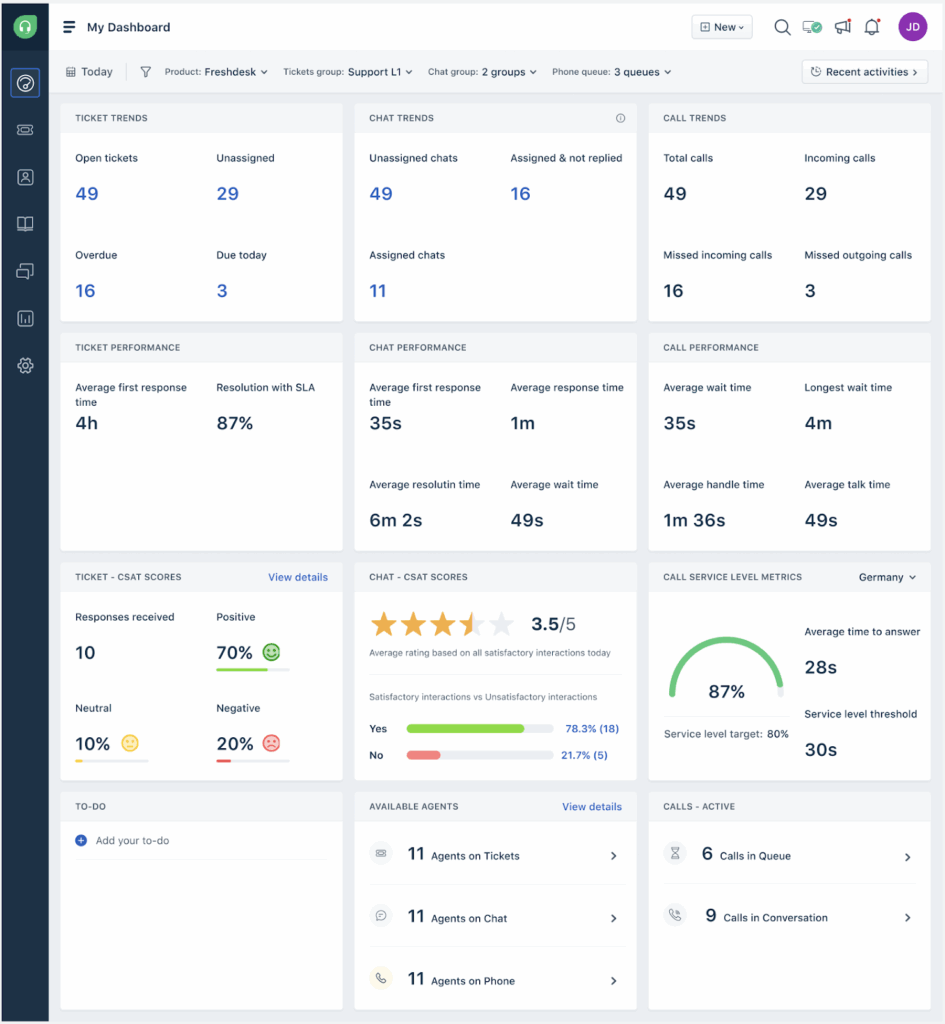
Freshdesk is an AI-enhanced customer support and help desk platform from Freshworks. It helps organizations deliver seamless, efficient support across multiple communication channels.
Similar to Kustomer, Freshdeks converts incoming customer inquiries from all supported channels (email, phone, chat, social, messaging) into tickets that agents can view, categorize, prioritize, assign, and resolve within a unified system.
As part of the Freshworks suite of business software, Freshdesk integrates tightly with the ecosystem (Freshsales CRM, Freshchat, Freshcaller) and 1,000+ third-party applications (e.g., Microsoft Teams, Slack, Jira Shopify). This allows organizations to build comprehensive support operations without complex custom development.
Key features of Freshdesk
- Freddy AI: This AI automates repetitive tasks, boosts agent productivity, and delivers intelligent assistance. It also offers automated responses, suggestions, summarizations and workflow triggers.
- Shared inbox: Provides a central workspace where support teams can work together —e.g., add internal notes, share ownership, link related tickets, and collaborate on complex cases.
- Custom portals: Organizations can create and configure their own customer support portals with branded layouts, forms, and workflows.
Pros
- “Freshdesk makes it easy to handle live chat conversations from a single team inbox. We can see new and unassigned chats clearly, assign agents quickly, and reply without switching tools.” (Read full review).
Cons
- “Some integration require higher tier plans, which can be limiting for smaller teams. Also the mobile app feels slightly less responsive compared to the web version.” (Read full review).
Pricing
You have the Freshdesk and the Freshdesk Omni:
Freshdesk
- Growth: $15 per agent/month.
- Pro: $49 per agent/month.
- Enterprise: $79 per agent/month.
Freshdesk Omni
- Growth: $29 per agent/month.
- Pro: $69 per agent/month.
- Enterprise: $169 per agent/month.
| Best for: Mid-market companies and growing teams wanting enterprise features without complexity or enterprise pricing. |
Related → 17 Best Freshdesk Alternatives for 2026 (Based on Real Users)
5. Intercom
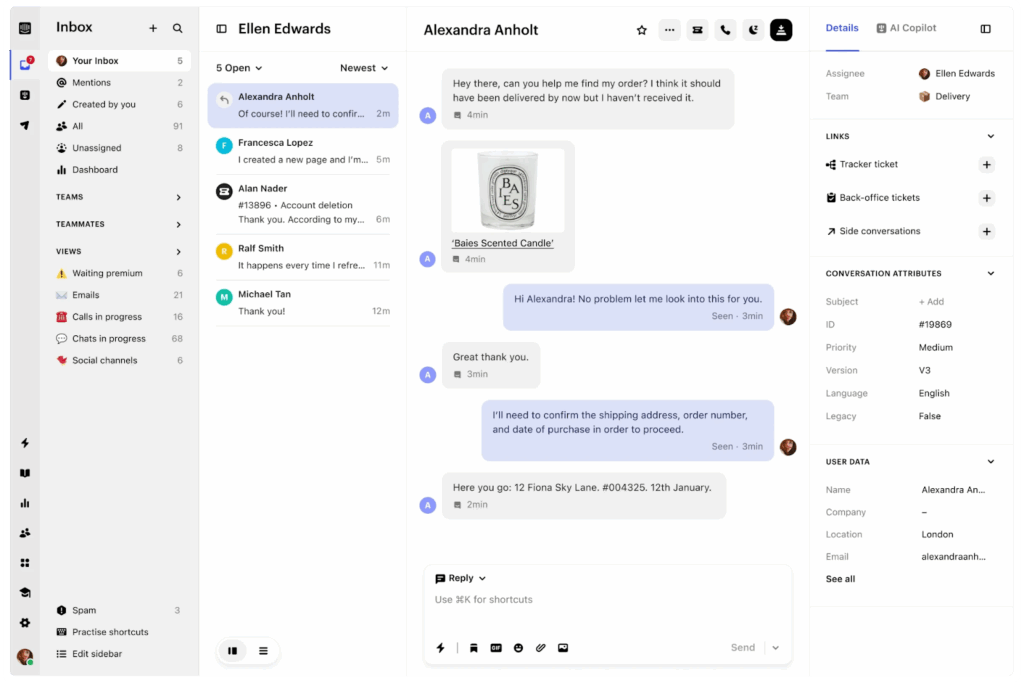
Intercom is a conversational support and engagement platform built around real-time messaging. It focuses on conversational experiences, blending live chat, messaging, automation, and generative AI to create personalized interactions across the customer journey.
Intercom also enables outbound messaging. This means, instead of waiting for customers to submit a ticket, it reaches out based on user behavior, product usage, lifecycle stage, or custom triggers. For example, support teams can reach out when customers hit a friction point.
Key features of Intercom
- Fin AI agent: Handles customer conversations end-to-end across chat, email, and messaging channels. Also helps resolve customer queries without human intervention by pulling answers from your knowledge base, help center articles, and product documentation.
- Live chat: Businesses can embed a responsive chat widget on websites or apps so teams can engage visitors and users in real time.
- AI-powered inbox: Provides context-rich views of customer histories, conversation threads, tags, and workflows, enabling teams to respond faster and consistently. Also offers the AI-copilot that auto-translates agent messages in 45+ languages.
Pros
- “Fin has been a great addition to our support workflow. It provides fast, accurate answers and helps reduce response times significantly.” (Read full review).
Cons
- “Fin is a helpful tool, but there’s still room to grow. Sometimes the answers feel too generic or lack the right context for specific client questions. Better control over tone and more training options to align it with our brand voice would make a big difference.” (Read full review).
Pricing
- Essential: $29 per seat/month.
- Advanced: $85 per seat/month.
- Expert: $132 per seat/month.
Also features add-ons such as
- Fin AI: $0.99 per resolution.
- Proactive support plus: $99 per month.
- Copilot: $29 per agent/month.
| Best for: SaaS and product-led growth companies prioritizing real-time messaging and proactive engagement over traditional ticketing. |
Related → 20 Best Intercom Alternatives & Competitors for 2026 | Kustomer
6. Gorgias
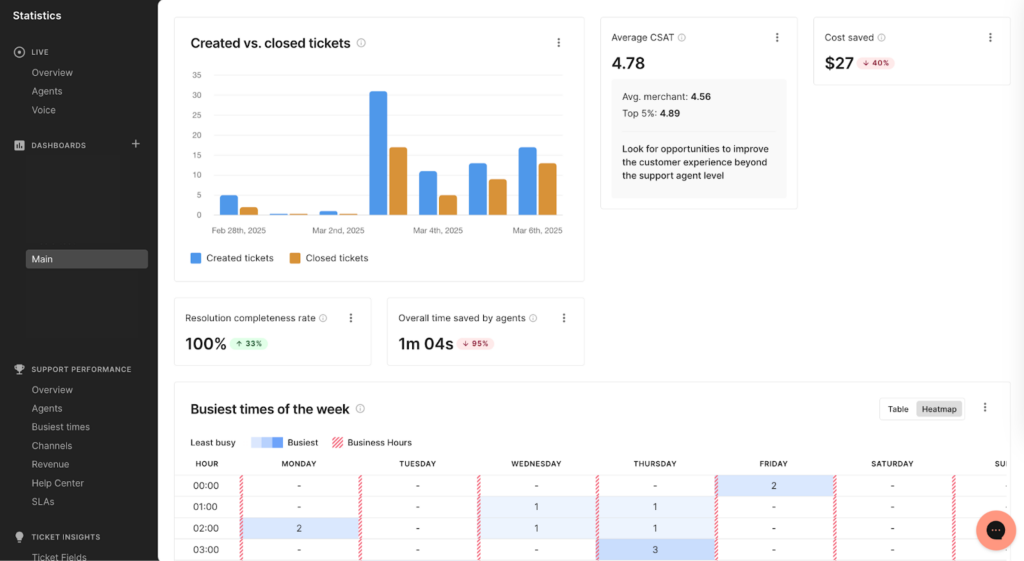
Gorgias is purpose-built for online retail, giving support agents access to orders, shipping details, refunds, subscription management, and customer histories from within the helpdesk interface.
Every feature on Gorgias is designed around e-commerce operations—for example, the inbox displays order values alongside conversations,
Gorgias also pulls product catalogs, order histories, subscription details, loyalty program data, and customer lifetime value directly into the agent workspace.
Key features of Gorgias
- Analytics: Tracks revenue impact of support interactions—e.g., showing how many sales were saved through retention conversations or generated through upsell opportunities.
- Macros and automated rules: These are pre-built response templates and automation triggers that let agents respond to common questions in a click and automate repetitive tasks (like tagging, routing, auto-closing, or escalating tickets).
- Deep e-commerce integrations: Native, real-time integration with Shopify, BigCommerce, Magento, WooCommerce, and other commerce platforms that allows agents to view complete order details.
Pros
- “I find Gorgias incredibly valuable as it seamlessly handles our help desk needs, particularly for its ease of implementation and excellent integration with Shopify. The setup process was straightforward, thanks in part to the user-friendly UX, which made getting started a breeze.” (Read full review).
Cons
- “The analytics, from a team leader's perspective, can be a bit challenging. Whenever I have to share the agent's metrics, it's a bit more technical than what the customer support agents are used to.” (Read full review).
Pricing
Gorgias’ pricing plans are typically based on ticket volume.
- Starter: Starts from $10/month for up to 50 tickets.
- Basic: Starts from $50/month for up to 300 tickets.
- Pro: Starts from $300/month for up to 2,000 tickets.
- Advanced: Starts from $750/month up to 5,000 tickets.
- Enterprise: Custom volume.
| Best for: E-commerce businesses (especially Shopify merchants) needing commerce-native support with revenue tracking. |
Related → Top 17 Gorgias Alternatives & Competitors for 2026
7. HubSpot Service Hub
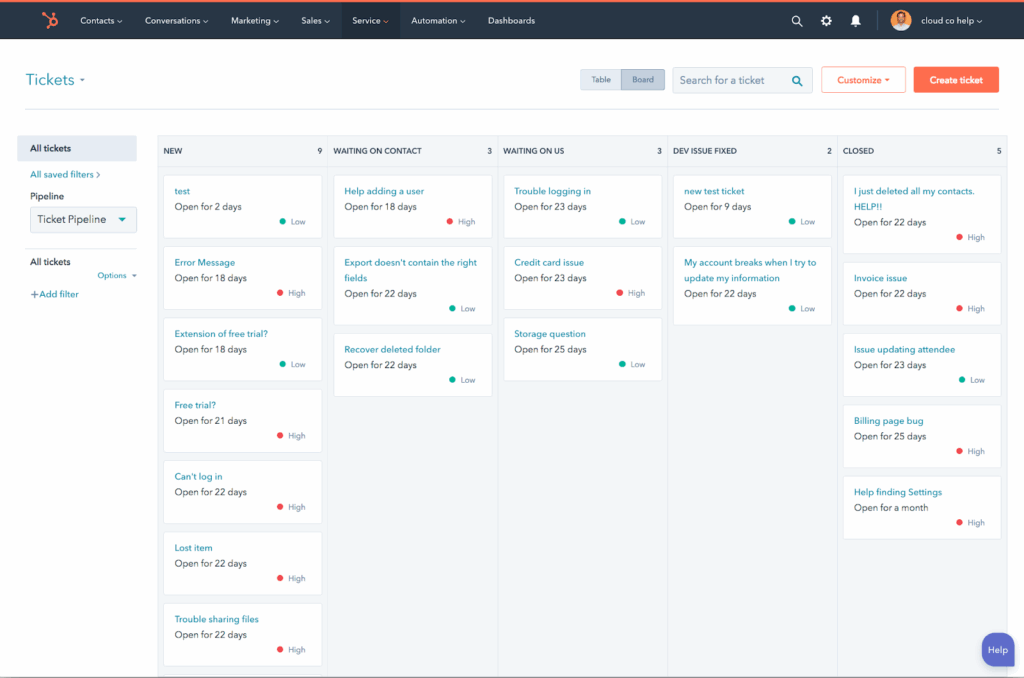
HubSpot Service Hub is the customer service platform. It lives inside the same CRM as HubSpot’s Sales Hub and Marketing Hub, so all customer data is shared in one place.
It features AI capabilities called ‘Breeze AI’ that helps route tickets to the right team, detect customer sentiment, summarize conversations, suggest knowledge base content, and surface insights. And unlike standalone support tools, this AI uses full customer history from sales and marketing.
It’s also a good choice if you already use HubSpot for sales or marketing, because everything connects natively and customer data stays consistent across teams.
Key features of HubSpot Service Hub
- Conversation intelligence: Real-time sentiment detection that evaluates the emotional tone of customer messages (positive, neutral, negative, frustrated, urgent) and uses that emotional context to inform prioritization, routing, and escalation decisions.
- Knowledge base (powered by Breeze AI): Enables support teams to publish help articles, tutorials, FAQs, and other self-service content. Also supports rich content (videos, embedded media), hierarchical organization by topic, and multilingual content for global audiences.
- CSAT surveys: Automated post-interaction surveys that gather customer satisfaction scores, Net Promoter Scores, and qualitative feedback immediately after ticket resolution.
Pros
- “The ticketing system and automation tools streamline our workflows, and the shared inbox helps our team stay aligned without things slipping through the cracks.” (Read full review).
Cons
- “Most of the really good features and templates are only available in the premium plan, which is quite expensive.” (Read full review).
Pricing
For individual and small businesses:
- Free: $0 per month.
- Starter: $9 per seat/month.
- Professional: $90 per seat/month.
For large businesses and enterprise:
- Professional: $90 per seat/month.
- Enterprise: $150 per seat/month.
| Best for: Companies using HubSpot for sales and marketing who want unified customer data across the entire lifecycle. |
Related → 10 Best HubSpot Service Hub Alternatives to Consider in 2026
8. Jira Service Management
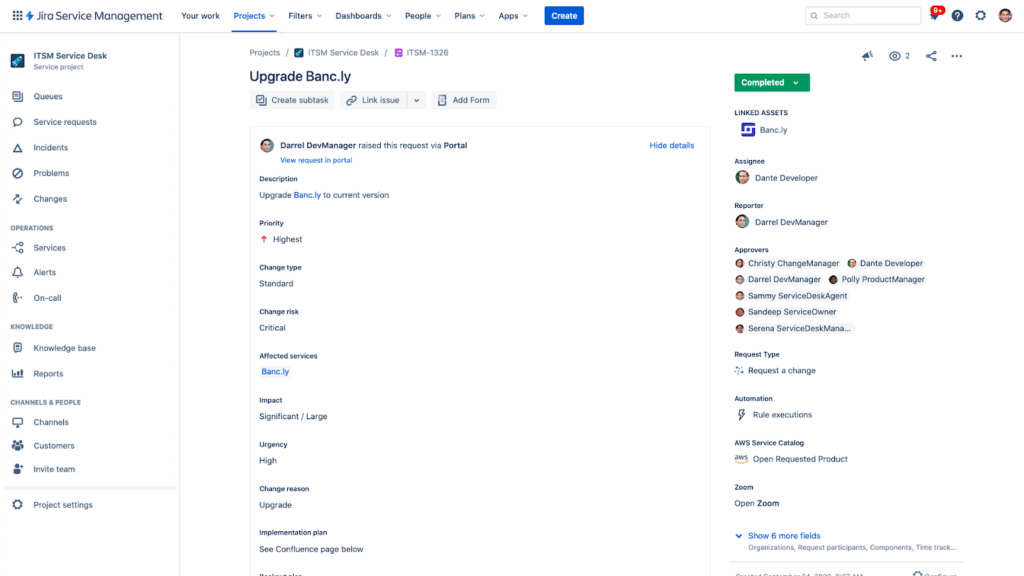
Jira Service Management (JSM) is Atlassian’s modern IT Service Management (ITSM) and service desk platform.
It enables organizations to receive, track, prioritize, automate, and resolve service requests across internal (IT teams, HR onboarding, legal intake) and external customers through structured workflows.
In addition, JSM is deeply rooted in ITIL practices (incident, problem, change, service request, and configuration management) but flexible enough to support custom workflows and cross-functional collaboration.
Key features of Jira Service Management
- Service requests: These are structured records representing requests for help, access, or actions (e.g., password reset, resource provisioning).
- For example, in JSM, incoming customer requests submitted via portals, email, or widgets automatically become service tickets that can be tracked, assigned, and resolved with context.
- Queues: Organizes work for agents by categorizing and prioritizing requests based on filters, SLA rules, and service policies. Agents interact with queues to triage and tackle the right items at the right time, helping teams manage workload efficiently while focusing on high-priority issues first.
- Incident and change management: Helps teams detect, respond to disruptions, and orchestrate controlled changes with approval workflows, impact assessment, and risk controls.
Pros
- “What I like best about Jira Service Management is the ease of use for both IT (and even non-IT teams) to provide great customer support, easily integrating all the number of features Atlassian has to offer, into our environment.” (Read full review).
Cons
- “I find the complexity of Jira Service Management a bit challenging. There’s definitely a steep learning curve which users and admins deal with. Also, the costs can be unpredictable at times, and there are specific limitations when it comes to integration.” (Read full review).
Pricing
- Free: $0 per month.
- Standard: Starts from $20 per agent/month (for up to 75 agents).
- Premium: Starts from $57.30 per agent/month (for up to 75 agents).
- Enterprise. Contact sales.
| Best for: IT support teams requiring tight integration with engineering and DevOps workflows. |
Related → 16 Best Jira Service Management Alternatives Right Now
9. Zoho Desk
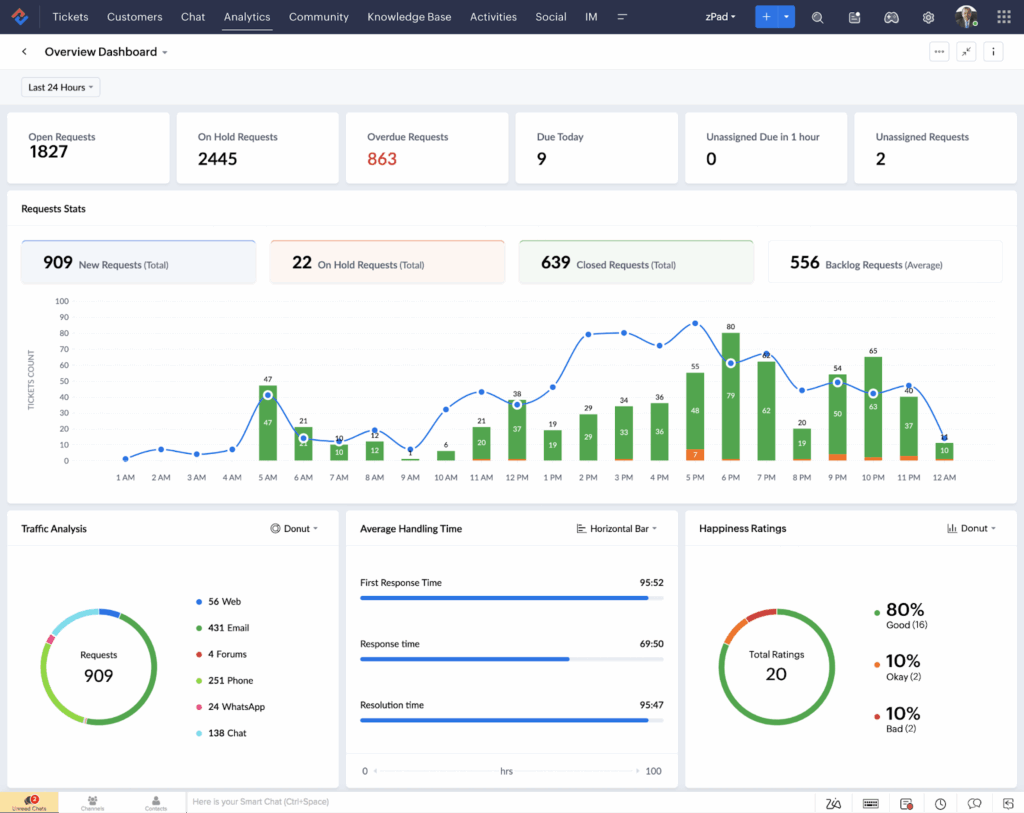
Zoho Desk is a cloud-based customer service platform that’s part of Zoho’s suite of business applications. It provides help desk ticketing, multi-channel support, automation, and AI-powered assistance.
There’s also seamless integration across Zoho CRM, Zoho Analytics, Zoho Campaigns, and 40+ other Zoho products.
The platform is designed for small to mid-sized businesses that need robust support capabilities without the complexity or cost of enterprise solutions.
Key features of Zoho Desk
- Zia AI: Built-in AI assistant that helps automate and augment support operations. It can analyze sentiment, prioritize tickets, suggest relevant knowledge base articles, auto-tag and categorize tickets.
- Self-service portal: Enables companies to publish searchable help articles, FAQs, and tutorials so customers can find answers on their own
- Blueprint (visual workflow automation): A drag-and-drop workflow builder that automates complex, multi-stage support processes (e.g., escalation protocols, approval chains) without requiring code or technical expertise.
Pros
- “I'm configuring Zoho Desk for our 5-person team, and I expected the automation part to be a nightmare, but it's actually pretty intuitive - even the Deluge script automations are manageable for someone like me who isn't technical.” (Read full review).
Cons
- “Despite being an out of the box integration, to create a customer in Desk does not automatically create a mirror customer in the FSM module, which requires an automation to be created separately in Zoho Flow.” (Read full review).
Pricing
- Express: $7 per user/month.
- Standard: $14 per user/month.
- Professional: $23 per user/month.
- Enterprise: $40 per user/month.
| Best for: Startups or mid-sized businesses wanting affordable enterprise functionality with multilingual and global support capabilities. |
Related → 10 Best Zoho Desk Alternatives & Competitors for 2026
10. Gladly
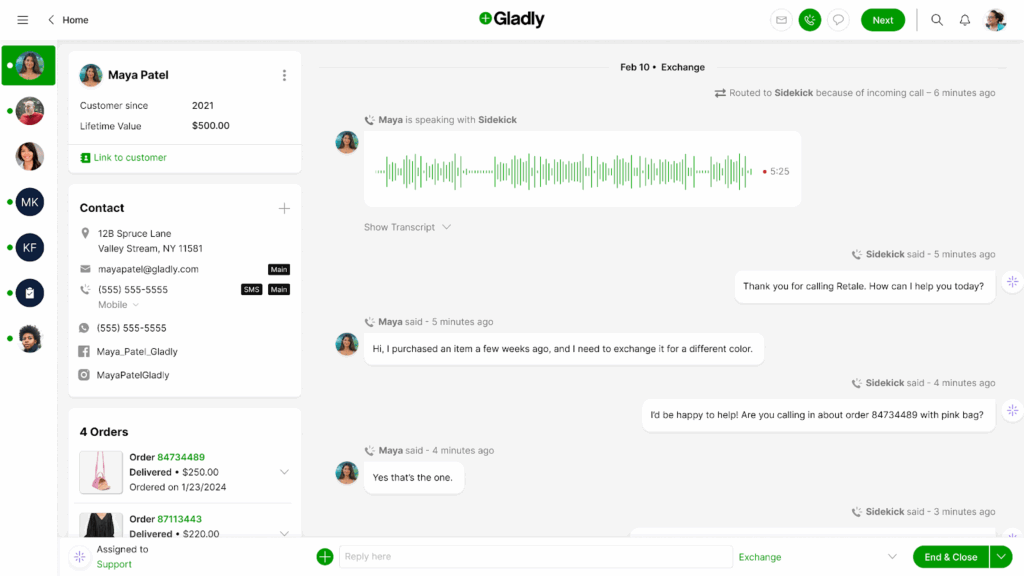
Gladly is a customer-centric support platform that organizes all interactions around people rather than support tickets. It treats each customer as a continuous conversation thread across their entire relationship with your brand.
If a customer called six months ago about a product issue, emailed three months ago about shipping, and is now chatting about a return, all three interactions appear in one chronological timeline.
Gladly consolidates everything into a single, lifelong customer conversation that persists across all channels (voice, email, SMS, chat, social media) and spans years of interactions.
Key features of Gladly
- Customer profiles: Rich customer records that consolidate demographic information, purchase history, communication preferences, past conversations, sentiment patterns, lifetime value, subscription status, and custom attributes.
- Sidekick AI for agents: An AI copilot embedded in the agent workspace that provides real-time support during customer conversations. It can surface relevant information from past interactions, recommend responses based on customer history and preferences, and detect sentiment shifts.
- PeopleMatch: When customers contact support, Gladly checks if they’ve interacted with specific agents previously and whether those agents are currently available—if so, the conversation routes to that familiar agent, creating continuity.
Pros
- “The system's interface is super clean, making it seamless to navigate and use. The knowledge base is also well-organized, allowing me to find the necessary information with just a few simple keyword searches.” (Read full review).
Cons
- “I was disappointed that we didn't have an account manager and that the platform lacked a built-in CSAT solution. Additionally, I found it frustrating that some important metrics were difficult to locate and had to be calculated manually, which was quite a hassle.” (Read full review).
Pricing
- Hero package: $180 per user/month.
- Superhero package: $210 per user/month.
| Best for: Premium brands and customer-centric companies prioritizing lifelong relationships over ticket-based transactions. |
Related → The Top 16 Gladly Alternatives & Competitors for 2026 (Updated)
11. Front
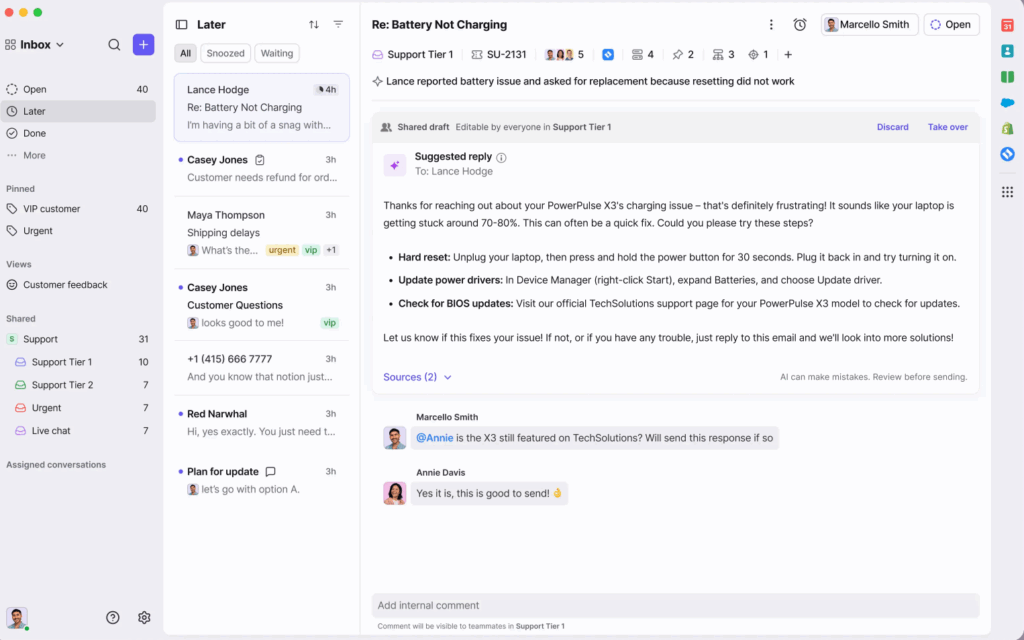
Front is a collaborative communication platform that reimagines the shared inbox, combining email, SMS, chat, social media, and messaging apps into a unified workspace.
With Front, customer support teams can collaborate on customer conversations, assign ownership, add internal comments, and manage communication workflows without forwarding emails or using BCC threads.
For example, if customers send messages to ‘support@company.com’, they receive responses from that address. Internally, teams see shared inboxes with assignment, tagging, commenting, status tracking, and workflow automation, but externally, customers just experience responsive email communication.
Key features of Front
- Internal comments: Allows teammates to collaborate privately within a conversation thread. Agents can ask questions, add context, loop in subject-matter experts, or hand off work.
- Assignment and ownership: Ensures every conversation has a clear owner. Messages can be manually or automatically assigned to teammates, preventing duplicate replies and accountability gaps.
- AI copilot: Helps agents compose responses faster by drafting contextual replies based on conversation content, customer history, and knowledge base articles.
Pros
- “What I like best about Front is that it keeps all communications in one shared inbox, which makes it much easier to stay organized and work as a team.” (Read full review).
Cons
- “The Front sometimes crashes with the Slack system, where it disconnects on its own. I receive messages from Slack, but occasionally it disconnects from my login and doesn't allow me to send messages through Front.” (Read full review).
Pricing
- Starter: $25 per seat/month.
- Professional: $65 per seat/month.
- Enterprise: $105 per seat/month.
Other add-ons include:
- Autopilot: $0.89 per resolution:
- Copilot: $20 per seat/month.
- Smart QA: $20 per seat/month.
- Smart CSAT: $10 per seat/month.
| Best for: Teams managing shared email inboxes who need collaboration features without abandoning the email paradigm. |
Related → 19 Best Front Alternatives for 2026 (According to Real Users)
12. Tidio
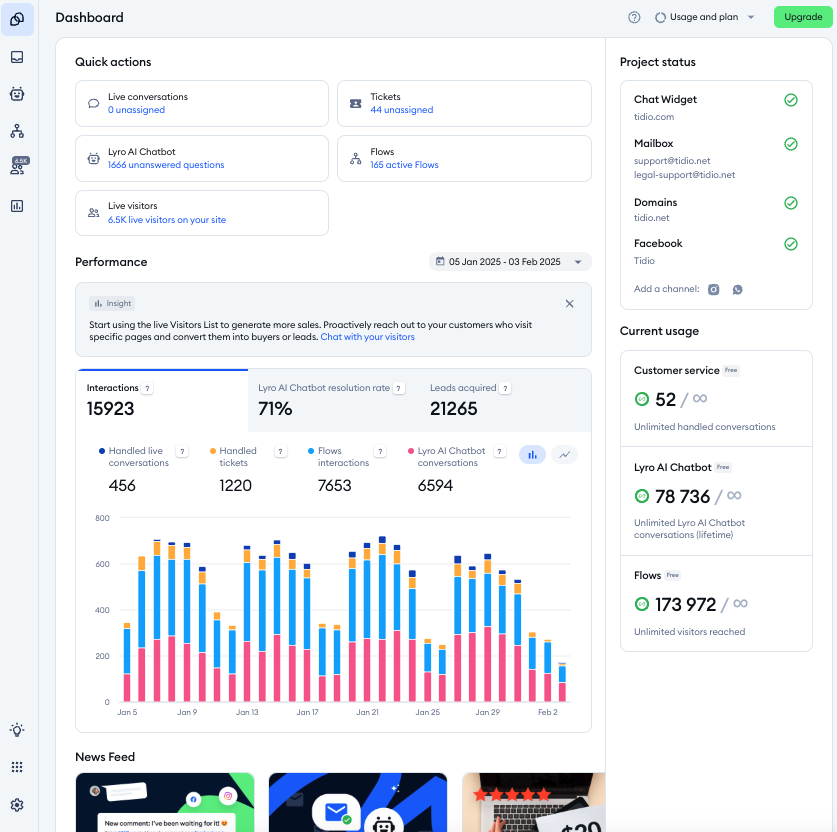
Tidio is a customer support platform designed primarily for small businesses, solopreneurs, and growing e-commerce stores that need fast, accessible live chat and chatbot capabilities without the complexity or cost of enterprise help desk systems.
Plus, the platform works out of the box. Simply install the widget, customize the appearance to match your branding, activate pre-built chatbot flows, and you’re live. It also offers a mobile-friendly interface that lets small teams manage conversations on-the-go.
This makes Tidio especially attractive for teams with limited support resources that still want to deliver fast, modern customer experiences.
Key features of Tidio
- Lyro AI: AI chatbot that learns from your website content, FAQ pages, and product information to answer customer questions across live chat, Messenger, Instagram DMs, and email.
- Live chat widget: Customizable chat interface that embeds on websites, allowing visitors to initiate conversations with operators in real-time. Also includes proactive chat triggers that automatically message visitors based on behavior (time on site, pages viewed, cart value, exit intent, repeat visits).
- Automated workflows and chatbot templates: Pre-built conversation flows for common e-commerce and small business scenarios—e.g., abandoned cart recovery, order tracking.
Pros
- “Tidio provides real time customer chatting and support from it’s AI based system for our business and website.” (Read full review).
Cons
- “The free plan offers only a limited set of features, and advanced automation is accessible exclusively in the higher-tier plans. I also find that customization options feel somewhat restricted.” (Read full review).
Pricing
Tido offers two pricing models:
Customer service platform
- Starter: $24 per month for 100 billable conversations.
- Growth: $59 per month for 250 billable conversations.
- Plus: $749 per month for custom billable conversations.
- Premium. Talk to sales.
You also have add-ons such as:
- Lyro AI agent: $39 per month for 50 Lyro AI conversations.
- Flows: $29 per month starts from 2,000 visitors reached.
| Best for: Small businesses, solopreneurs, and e-commerce stores needing simple, affordable live chat and chatbot capabilities. |
How to Pick the Right AI Ticket Routing and Triage Tool for Your Needs
When it comes to choosing the right platform, focus on finding a system that solves your support operation problems without creating new ones.
Here’s how to make that decision:
Start with your ticket volume
Before you start comparing vendors, you need to get clear about how much volume you’re handling and where it comes from.
- Are you triaging hundreds of tickets a day or tens of thousands? Are most requests repetitive (order status, access issues, password resets), or highly specific?
AI routing delivers the most value when volume and repetition are high. If your team handles mostly complex, one-off issues, you’ll want AI that assists agents rather than fully automates decisions.
Meanwhile, if your volume is exploding, then opt for tools offering intelligent auto-classification and routing.
Look at how the AI makes decisions
Not all “AI routing” works the same way. Some tools rely on basic keyword matching and rules, while others use natural language understanding, intent detection, and sentiment analysis to make routing decisions.
Evaluate these:
- Can the system distinguish why a customer is contacting you (context + intent), not just what words they used (content)?
- Does it factor urgency, sentiment, or customer value into routing?
- Can it learn and improve over time, or does it require constant manual tuning?
Understand that AI triage and routing tools rely on decision logic. The better the logic, the less cleanup your team has to do later.
Evaluate integration requirements based on what you actually use
AI routing is only as ‘smart’ as the data it can access. If the platform can’t pull customer context from your CRM, or order details from your e-commerce system, then it’s making routing decisions blind.
For example, HubSpot Service Hub integrates seamlessly with HubSpot’s ecosystem but requires more work for non-HubSpot tools.
It’s the case too with Gorgias as it’s built for Shopify but weaker with other e-commerce platforms. Jira Service Management connects well with Atlassian products but less smoothly elsewhere.
However, if you’re looking for tools that can serve you across multiple vendors, choose platforms known for strong API support and extensive marketplace integrations like Kustomer or Front.
Test the AI capabilities with your data
Every vendor will show you polished demos where the AI perfectly routes tickets, detects sentiment, and suggests responses. But that doesn’t necessarily mean anything.
What matters is whether the AI works with your data, language and issue types.
During evaluation:
- Ask to test the platform with a sample of your real tickets (anonymize customer data if needed).
- See its ticket handling accuracy to understand how it how it classifies your specific issue types.
- Check whether intent detection handles how your customers phrase questions (industry jargon, abbreviations, non-native English)
- Verify that sentiment analysis catches frustration in your communication patterns (are your customers direct? passive-aggressive? overly polite even when upset?)
While some platforms learn and improve quickly with your data (e.g., Kustomer); others require extensive manual training or customization.
Best to ask vendors how long it takes for their AI to reach acceptable accuracy with your specific use cases, and what that training process involves.
- “Kustomer allowed us to achieve the best possible outcome: maintaining a lean, cost-effective team while significantly improving customer satisfaction. We reduced our cost per contact by 40% and improved our NPS to be two times higher than the industry average.” — Marjorie Carlos, Sr. Dir. of Consumer Experience, Jerome’s Furniture
Read case study: How Jerome’s Furniture elevated CX with Kustomer →
Assess whether your team can use the platform
If your agents can’t use or trust the AI, they’ll override it — and your investment will fail.
Your preferred platform should explain why a ticket was routed a certain way, allow easy manual correction, and learn from those corrections over time.
When evaluating options, ask:
- Can agents see and understand routing logic?
- Can they correct misroutes easily?
- Does the system learn from those corrections?
For example, enterprise platforms like Salesforce Service Cloud or Jira Service Management deliver incredible power but require dedicated administrators and technical expertise.
If you don’t have those resources, simpler platforms like Kustomer or Tidio might deliver better results because your team can actually use them effectively.
- “Everyone in the company, including the claims team, now uses Kustomer… Kustomer has changed how Kin operates, aligns with customers, manages schedules, and makes decisions.” — Eli Gratz, VP of Growth, Kin
Read case study: How Kin makes customer-first insurance possible with Kustomer
Match the platform to your growth trajectory and budget reality
What works at 100 tickets per day won’t work at 10,000. And what’s affordable at $5K MRR isn’t always sustainable at $500K MRR.
You need to choose a platform that fits where you are now but can scale with where you’re going—without forcing a painful migration in 18 months.
- For early-stage or small teams:
Tidio, Freshdesk, or Front provide immediate value without requiring full-time administrators or large upfront investment. You can deploy quickly, get results fast, and upgrade as you grow.
- For growing mid-market companies:
Kustomer, Zendesk, Gorgias, or HubSpot Service Hub offer the scalability and sophistication you’ll need as volume increases, while still being accessible enough to implement without enterprise-level resources.
- For enterprises with complex requirements:
Salesforce Service Cloud, Jira Service Management, or Gladly provide the customization, compliance, and integration depth that large organizations require. But expect longer implementation timelines and higher total cost of ownership.
🔖 Note: Also consider pricing models.
Some platforms charge per agent (expensive as teams grow), others per conversation (expensive as volume grows), others flat-rate (predictable but potentially overpaying at low volume).
Best to model your costs at 2x and 5x current scale. If the platform becomes expensive as you grow, find one that fits better.
Measure what actually improves
Automation alone doesn’t equal improvement. You need to know whether AI routing leads to better outcomes.
Make sure the tool gives you visibility into:
- First-response time improvements
- Resolution time by route or intent
- Misrouted or manually reassigned tickets
- Agent workload balance and burnout signals
If you can’t measure impact clearly, you won’t know whether the AI is helping or quietly hurting your support experience.
“Primarily from our increased efficiency with Kustomer, we’ve seen a significant reduction of $3 to $4 for every cost per contact." — Michael Callahan, Head of Customer Care and Experience, Bulletproof
Read case study: Bulletproof’s customer care achieves peak performance →
AI Can’t Replace Great Agents. But It Can Free Them to Be Great.
And that’s what Kustomer does better than most: it gets out of your agents’ way while doing the invisible work that slows down support operations.
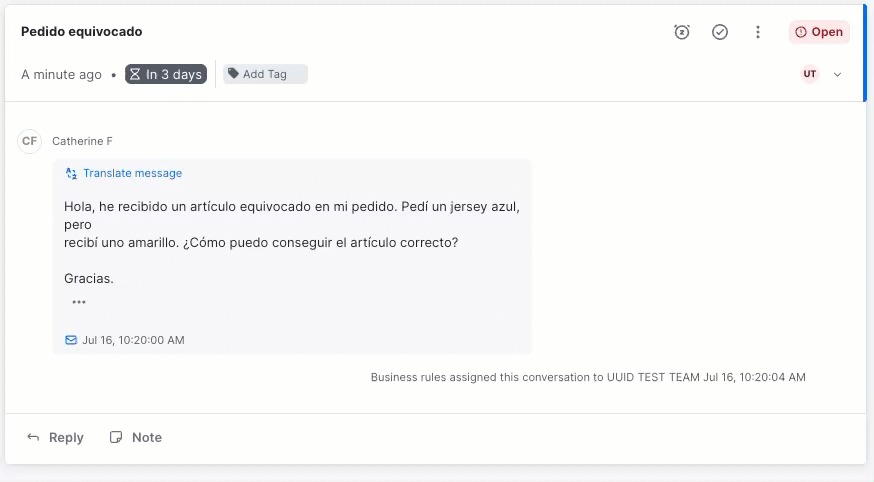
We don’t think your agents should spend half their day piecing together customer history, manually tagging conversations, or asking for information that’s already in your CRM.
Kustomer handles that work. It reads every message, understanding what customers need, pulling complete context from your systems, detecting urgency, and routing to the right agent
Agents open conversations already knowing who they’re talking to, what the issue is, and what happened before.
But don’t take it from us, here’s what our friends at SMALLS had to say:
“Kustomer’s search and custom attributes give us the ability to double click into emerging customer issues to diagnose patterns, and fix problems faster.” — Sarah Inbar, Director of Customer Support, Smalls [Read case study]
That’s what good routing does. It lets your team focus on what actually matters, and scales without burning people out.
If that sounds like your team—or the team you’re trying to build, then Kustomer is your best bet.
Great support feels effortless. Smart routing makes it possible.