Artificial intelligence has quietly reshaped what people expect from a CRM. It’s no longer enough for a CRM to store contacts, track deals, or log tickets.
Teams now expect their CRM to surface actionable insights automatically, streamline routine tasks, reduce manual data entry, anticipate next steps, and support faster decision-making.
All of this without adding more complexity to their day.
When that doesn’t happen, adoption drops and the CRM becomes just another system teams work around instead of with.
That shift in expectations has also created a new problem. “AI-powered” has become a marketing shorthand. And nearly every CRM vendor now claims AI capabilities. That can mean anything from lightly rebranded automation rules to genuinely intelligent systems that adapt to how your business operates.
This guide focuses on 11 CRMs where AI does real work that users actually notice in their day-to-day work. These are tools recommended by people running sales teams, managing customer success operations, and building revenue processes.
For each one, we look at what the AI actually does, where it delivers real value, and which type of team it’s best suited for.
Key Features to Look for in AI CRM Software
Unified customer timeline across all touchpoints
One of the biggest sources of friction in customer-facing teams is context switching. Agents jump between the CRM, help desk, e-commerce tools, billing systems, and marketing platforms just to understand what’s going on.
A strong AI-powered CRM brings all of that into a single, unified customer timeline. It shows conversation history, orders, payments, campaigns, and past issues in one place.
AI then uses that context to suggest next steps or surface relevant insights, so agents don’t have to piece the story together themselves.
| 😄 Kustomer tip: Your preferred CRM should integrate natively with your core systems and update in real time. Your team should also be able to filter the timeline by type, date, or team to find relevant information quickly. |
Generative AI for content and communication
Reps spend significant time crafting follow-up emails after calls, proposals addressing customer requirements, responses to common objections, internal updates for stakeholders.
Generative AI tools fix this acting as an intelligent sales assistant that accelerates workflows. It handles the first draft, incorporating relevant context and maintaining appropriate tone. This allows reps to review and personalize the tone for each customer.
It also accelerates response times and ensures communications reference relevant information without manual searching.
| 😄 Kustomer tip: Ensure it pulls contextual information from the CRM automatically (e.g., customer pain points discussed, products of interest, etc. ), allows customization of tone and style, and maintains your brand voice. |
Predictive analytics that support planning
Predictive analytics uses historical data for sales forecasting, support volume spikes, churn risk, or which customers may need proactive outreach.
For customer service and success teams, this means better staffing decisions, earlier intervention for at-risk accounts, and fewer surprises during peak periods.
| 😄 Kustomer tip: Consider solutions that can forecast at multiple levels (individual rep, team, region, company) and allow scenario modeling (what if we add two sales reps? what if average deal size increases 10%?). |
Omnichannel support
Look for platforms that offer true omnichannel support, where communications from email, SMS, voice, WhatsApp, live chat, Instagram DMs, Facebook Messenger, and other social messages all flow into a single system with shared context.
AI should be able to follow the conversation across channels and maintain continuity. This is critical for maintaining a consistent customer experience.
| 😄 Kustomer tip: Opt for solutions that provide channel-appropriate response options —e.g., templated quick replies for chat, and detailed responses for email. |
Real time sentiment analysis
AI sentiment analysis helps teams understand what a customer is saying, and how they’re feeling in real time.
It reads customers’ emails, chat messages, call transcripts, support tickets, social media posts and detects their emotional tone (frustrated, satisfied, angry, neutral, confused). It can then use that signal to make informed decisions such as prioritizing tickets, triggering escalations, or guiding agent responses.
| 😄 Kustomer tip: Track sentiment trends over time to know whether customer satisfaction is improving or declining across the relationship. |
Next-best action recommendations
Reps often know a deal needs attention but not specifically what to do next. AI recommendations provide concrete guidance based on what worked in similar situations previously.
It analyzes where each customer or deal stands using CRM enrichment data (engagement history, recent activity) and recommends specific actions most likely to advance the relationship.
| 😄 Kustomer tip: Recommendations should be specific and actionable. For example, instead of ‘follow up with #client 1’ —it can way ‘send an email to #client 1 referencing their complaint, progress on the resolution, and next steps.’ |
Top AI-Powered CRM Software on the Market Right Now
- Kustomer
- Salesforce Customer 360
- Zendesk
- Gladly
- Microsoft Dynamics 365 Customer Service
- HubSpot Service Hub
- Intercom
- Gorgias
- Dixa
- Freshworks Customer Service Suite
- Zoho Desk
1. Kustomer
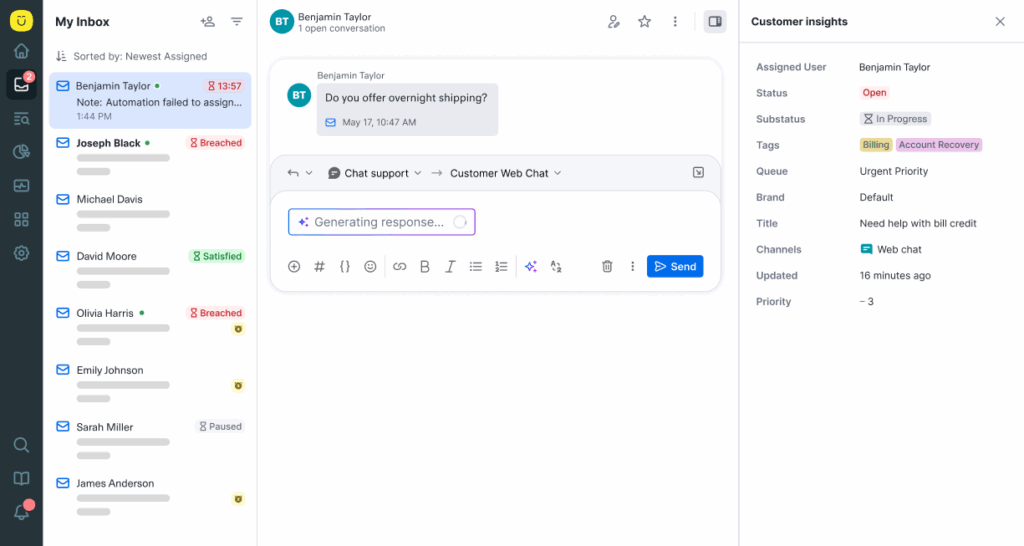
Kustomer is a customer service CRM that abandons traditional ticket-based systems entirely. It’s built on the simple idea that support teams should work to solve customer problems.
So instead of treating every interaction as an isolated case, Kustomer unifies conversations, events, and data points into a single, continuously updated customer record.
This allows teams to see the full customer journey in real time, including conversations, orders, payments, subscriptions, and historical behavior, all in one place.
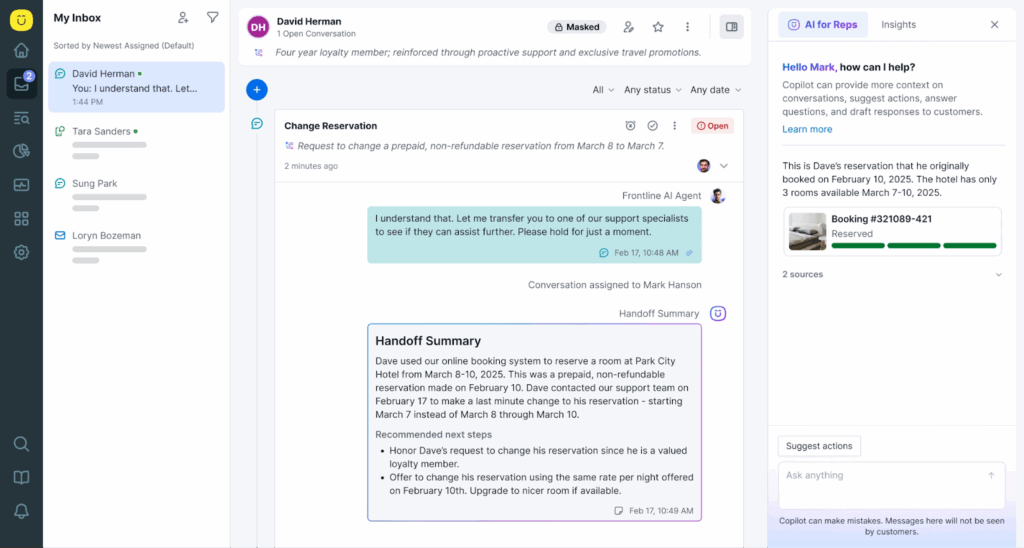
With Kustomer, every interaction — whether it’s a message, refund, status change, or system event — becomes part of a living timeline.
This structure enables agents to pick up exactly where previous conversations ended, with complete context instantly visible, regardless of how much time has passed or which channels customers used.
All new Kustomer AI for Reps: Your agent’s favorite personal assistant
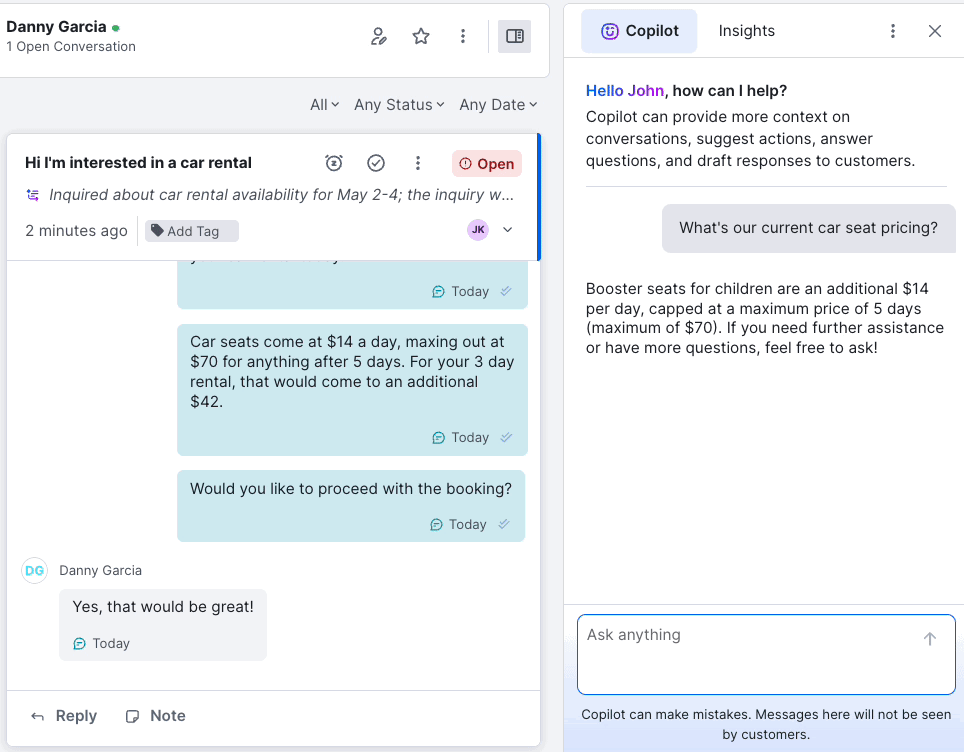
Kustomer AI for Reps is the kind of copilot your agents actually feel in their day-to-day work.
The moment a conversation lands in an agent’s queue, it starts doing the busywork that normally eats up the first few minutes of every interaction.
It figures out who the customer is, what happened last time, what’s already been tried, what’s most likely going wrong, and what policy or process applies.
Another subtle win is it reduces the “mental load” of support. Your best agents can usually solve anything—but they burn energy doing repetitive context gathering and rewriting the same explanations all day.
Kustomer AI takes on that repetitive prep work and response drafting, so agents can spend their attention where it matters.
Here’s what that means for you:
- Customer and conversation summaries: Clean, context-rich summaries at the top of the timeline so the rep can start mid-story without rereading threads.
- Copilot-style Q&A (chat-based): Reps can ask questions in a conversational interface and get answers grounded in CRM objects and your internal knowledge (policies, help center, docs).
- Suggested responses (drafts): A tailored draft reply based on the customer’s situation, tone, and aligned to brand policies. Rep only has to edit and send.
- Suggested actions with “agent-in-the-loop” execution: It recommends what to do next and can automate repetitive steps with rep approval.
- On-brand messaging help: Agents can expand or shorten text, clean up grammar, and keep replies consistent with your tone.
- Seamless handoffs: Summaries travel across AI-to-human (and human-to-human) so transfers don’t reset context. When a case needs escalation, the next person doesn’t have to re-triage from scratch, and the customer doesn’t have to repeat themselves.
When you add all of that up, Kustomer AI for Reps is a workflow upgrade. You get faster ramp for new agents, fewer mistakes from context gaps, more consistent answers across the team, and a smoother customer experience because the agent is confident from the first message.
Plus, our friends from Aplazo thinks the same —

Key features: What do you get from Kustomer?
- AI agent studio: A no-code workspace for building and customizing your own AI agents. Teams can create, fine-tune, and deploy multiple specialized AI agents with prebuilt personas, guided prompts, and API connections (no developer required).
- AI automation assistant: Reviews workflows, business rules, and routing paths to identify conflicts, redundancies, and opportunities for improvement.
- AI search assistant: Enables teams to query support data, tickets, conversations, and knowledge base content using natural language.
- AI workflow assistant: Teams can describe what they want to happen (e.g., escalation logic or automation triggers) and the assistant translates that into executable workflows. It also suggests workflow enhancements based on patterns in support data.
- AI knowledge base assistant: Analyzes customer conversations to detect missing, outdated, or unclear content and recommends updates. Over time, it improves answer accuracy by learning from real customer questions, ensuring both AI agents and human reps rely on high-quality, relevant knowledge.
Why do customers love Kustomer?
- “Kustomer pulls all customer information on one timeline. We see a customer’s full history right there, without switching around. That’s been a game-changer for us.” — Taylor Johnson, Director of CX, Nathan James
- “Everyone in the company, including the claims team, now uses Kustomer… Kustomer has changed how Kin operates, aligns with customers, manages schedules, and makes decisions.” — Eli Gratz, VP of Growth, Kin
- “Kustomer was the perfect mix of being resilient for scale and built for the needs of a modern service team.” — Jo Lai, Head of CX, Hopper
- “We have a unique mandate to build a true, world-class customer experience. Kustomer is instrumental in how we build that service experience. We really feel like we have a great technology partner and are excited to keep building upon that relationship.” — Ashley Julison, Senior CX Specialist, Everlane
Smarter support. Happier reps. Better outcomes.
Unite your entire customer service experience—seamlessly combining CRM, ticketing, and AI into one powerful platform for the future.
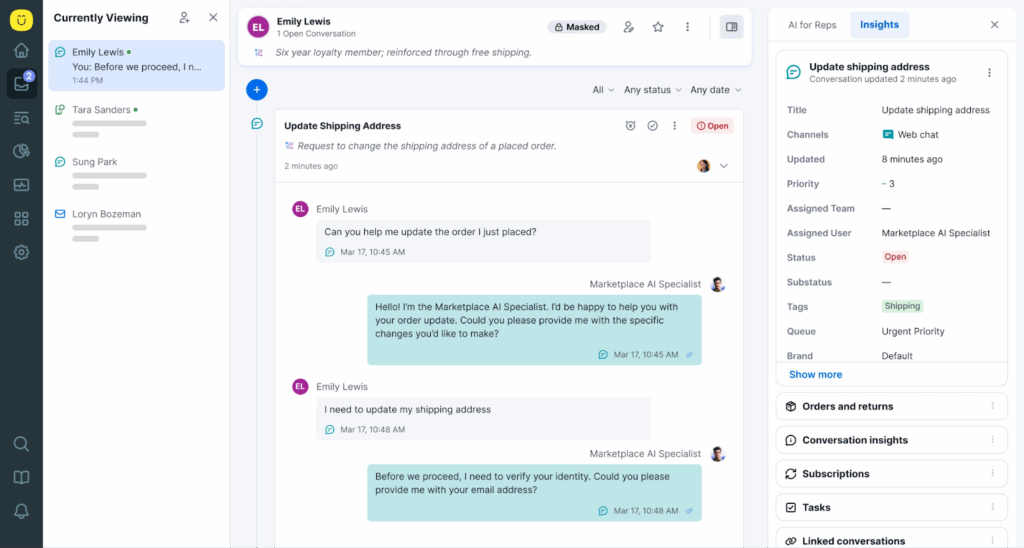
Your all-in-one AI powered service platform. All with Kustomer →
2. Salesforce Customer 360
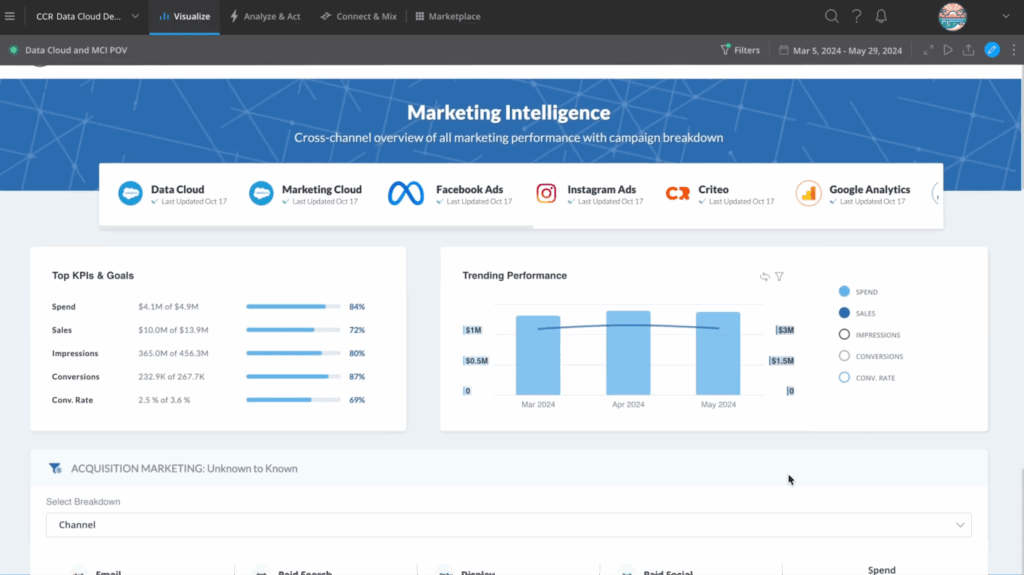
Customer 360 is Salesforce’s unified customer data platform (CDP) that powers all of its clouds, including Service, Sales, Marketing, and Commerce.
This creates a single ecosystem where customer data, interactions, and workflows sync automatically across every department touching the customer journey.
The Einstein AI layer operates throughout this unified architecture, providing;
- Predictive lead management in Sales Cloud,
- Intelligent case routing in Service Cloud,
- Journey optimization in Marketing Cloud, and
- Personalized recommendations in Commerce Cloud
For organizations, it means your sales teams can see support ticket history during deals, and service agents can access purchase records without having to switch tabs or tools.
Key features
- Einstein bots: Conversational AI handling routine service inquiries, performing actions like password resets or order lookups. It can also seamlessly escalate complex issues to human agents with full context.
- Einstein next best action: Suggests specific actions for each customer based on current situation, past outcomes with similar accounts, and business priorities.
- Einstein conversation insights: Transcribes sales calls to analyze conversation content for key topics and objections, talk-to-listen ratios, and surfaces coaching opportunities based on what’s discussed during customer interactions.
Customer reviews on Salesforce Customer 360
- “Setting up integrations, configuring data models, and leveraging AI-driven insights may “require significant initial investment in time and skilled resources.” [*]
- “The zero-copy functionality has proved its value time and time again. Allowing a seamless, cheap and easy way to bring data into your Salesforce instance for segmentation, analytics, AI, or any other purpose.” [*]
Pricing
- Free suite: $0 per user/month.
- Starter suite: $25 per user/month.
- Pro suite: $100 per user/month.
To explore Salesforce Einstein AI, please contact sales.
| Best for: Enterprises already invested in Salesforce ecosystem needing unified AI across sales, service, marketing, and commerce operations. |
Related → Top 10 Salesforce Service Cloud Alternatives for 2026
3. Zendesk
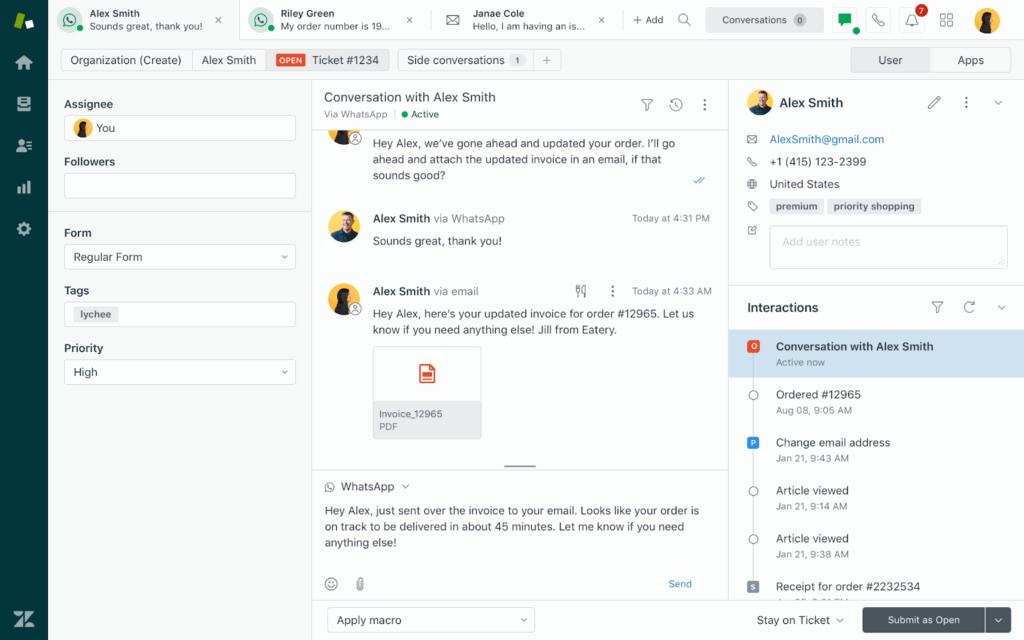
Zendesk is a customer service platform that has evolved from its ‘help desk’ origins into a comprehensive CRM. It now serves support, sales, and customer engagement teams through its interconnected products.
You have the Zendesk Support for ticketing, Zendesk Sell for sales pipeline management, and Zendesk Sunshine for unified customer data.
The platform’s AI capabilities, branded collectively as ‘Zendesk AI’, focuses on reducing resolution times and improving agent efficiency through intelligent ticket routing, suggested macros based on ticket content, and sentiment detection that flags frustrated customers for priority handling.
Key features
- Answer bot: Intercepts tickets as they’re submitted, and suggests relevant help center articles to agents and customers. Once customers confirm the articles resolved their issues, it automatically closes it.
- Agent and admin copilot: AI-powered assistant that supports both frontline agents and support leaders with real-time, contextual guidance. It helps agents respond faster by suggesting replies, summarizing tickets, and surfacing relevant knowledge, while giving admins AI-driven insights to optimize workflows, automations, and overall support performance.
- Intelligent triage: Uses intent and context signals to direct inquiries to the most appropriate teams or agents.
Customer reviews on Zendesk
- “I find Zendesk to be a very convenient tool. It is easy to access, and everything is clearly detailed and well organized.” [*]
- “I noticed that the main downside is that some of the advanced settings can be hard to find and take time to learn. Also, if you want to add extra features or more users, the cost can start to get expensive for a smaller business.” [*]
Pricing
Zendesk offers a complicated pricing model. But for this post, we’ll be covering the pricing for the customer service solution.
- Support team: $19 per user/month.
- Suite team: $55 per user/month.
- Suite professional: $115 per user/month.
- Suite enterprise: $169 per user/month.
It also comes with add-ons that cost extra to access. You have the AI copilot @ $50 per agent/month, Zendesk quality assurance @ $35 per agent/month, and a few others.
| Best for: Organizations wanting proven, easy-to-deploy customer service with extensive integrations and accessible AI that works out-of-the-box. |
Related → Is Zendesk Worth It? Hmm... See The Pros & Cons
4. Gladly
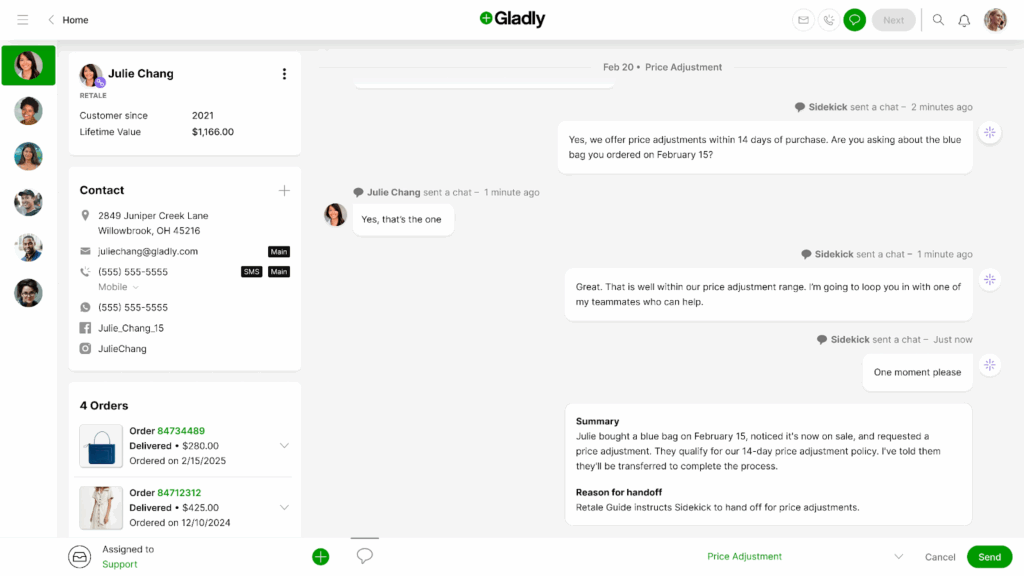
Gladly rebuilds customer relationships around people rather than tickets. It creates a single lifelong conversation thread for each customer that persists across years and channels. This way, it doesn’t generate new case numbers every time someone contacts support.
When customers reach out, they continue an existing conversation with complete history visible. Agents also see every past interaction chronologically regardless of whether those conversations happened via phone six months ago, email last week, or chat today.
Gladly’s Sidekick AI enhances this relationship continuity by surfacing relevant context from past conversations, recommending personalized responses based on customer preferences and history.
Key features
- Customer profiles: Surfaces key customer details (lifetime value, priority status, order history, notes) within the conversation view.
- People match: Allocates conversations to the right team or agent using customizable rules, customer priority, and historical service patterns
- Integrated voice: Embeds telephony directly into the CRM experience, linking calls to the same customer timeline used for digital conversations and enabling seamless handoffs.
Customer reviews on Gladly
- “I was disappointed that we didn't have an account manager and that the platform lacked a built-in CSAT solution. Additionally, I found it frustrating that some important metrics were difficult to locate and had to be calculated manually, which was quite a hassle.” [*]
- “Gladly has helped us redefine our entire approach to CX, allowing us to move away from the age-old ticketing mindset and putting customers at the center of the experience.” [*]
Pricing
- Hero package: Starts at $180 per month.
- Superhero package: Starts at $210 per month.
| Best for: Premium brands and customer-centric companies prioritizing lifelong relationships and personalized service. |
Related → The Top 16 Gladly Alternatives & Competitors for 2026 (Updated)
5. Microsoft Dynamics 365 Customer Service
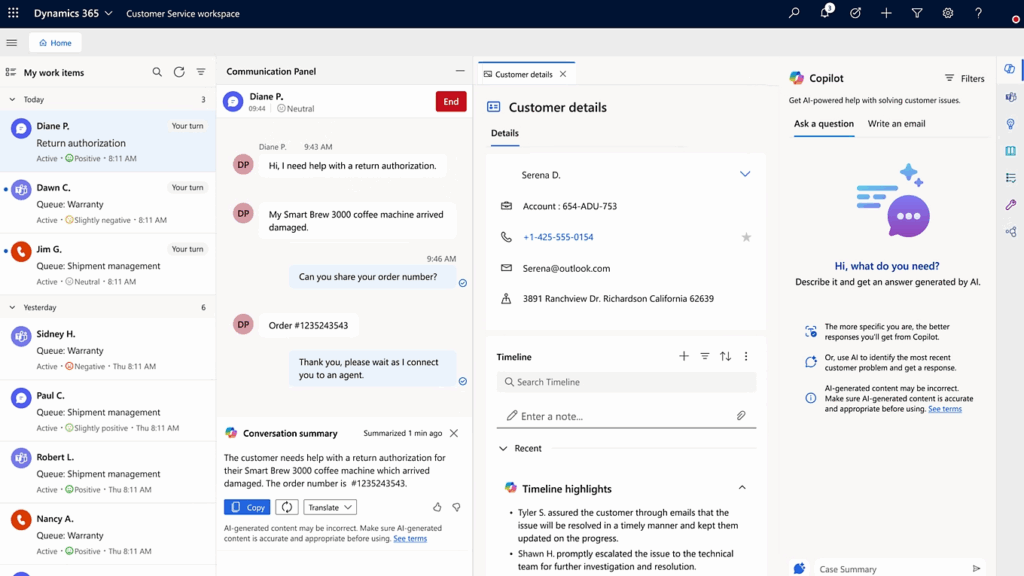
Microsoft Dynamics 365 Customer Service is a comprehensive enterprise-grade service CRM built to help organizations deliver consistent, efficient, and intelligent customer support.
It tightly integrates with the Microsoft ecosystem including Dynamics 365 Sales, Field Service, Marketing, and the entire Microsoft Power Platform.
For example, the ‘Copilot’, which is Microsoft’s generative AI assistant, embeds directly into agent workflows.
It can draft contextual email responses, summarize long case histories, translate conversations between languages, and suggest knowledge articles. It also pulls information from SharePoint documentation, Teams conversations, and connected business systems without agents leaving the service console.
Key features
- Customer service workspace: A role-based, productivity-focused interface that brings cases, knowledge, customer data, and AI insights into one configurable agent desktop.
- Case management: Structures each customer issue as a managed entity with status, priority, SLA timers, and parent–child relationships. This makes it easier to track complex service scenarios from start to finish.
- Service-Level Agreements (SLA) management: Automates SLA tracking, timers, and escalation rules to ensure cases meet response and resolution commitments without manual oversight.
Customer reviews on Microsoft Dynamics 365 Customer Service
- “The metric charts are helpful, that all I feel like.” [*]
- “The performance of lookup fields (selection boxes) is noticeably slower compared to other platforms. More restrictively, the search function requires matching the query from the beginning of the entry (e.g., the exact start of the phrase).” [*]
Pricing
- Free: $0 per user/month.
- Professional: $50 per agent/month.
- Enterprise: $105 per agent/month.
- Premium: $195 per agent/month.
| Best for: Enterprises standardized on Microsoft infrastructure wanting native integration with Teams, Power Platform, and Microsoft 365. |
6. HubSpot Service Hub
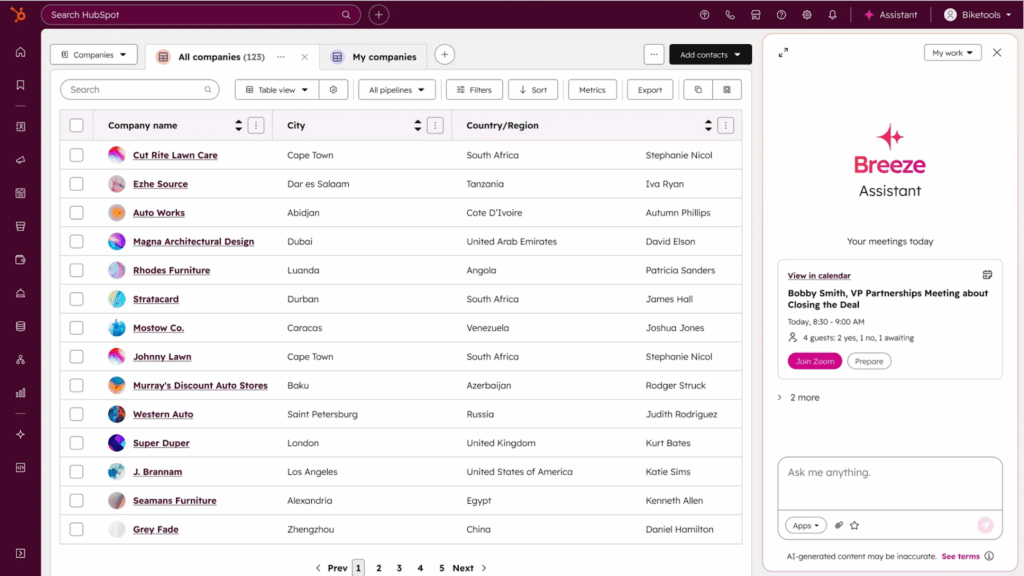
Service Hub functions as the customer service component within the HubSpot CRM platform. It can access contextual signals from sales, marketing, and even product behavior, allowing it to connect service delivery with the full customer lifecycle.
Every interaction, from initial inquiry to ongoing support, lives in the same system that tracks deals, marketing engagement, and product usage, giving agents and leaders a complete view of the customer journey.
Additionally, Service Hub layers HubSpot’s AI (Breeze) and automation capabilities across common service scenarios. This helps teams surface relevant insights quickly, automate repetitive tasks, and improve response quality.
Key features
- Playbooks: Offers templated, repeatable interaction frameworks that standardize agent responses, capture key information, and ensure consistent customer engagement across the team.
- AI ticket summaries and reply suggestions (via Breeze assistant): Automatically condenses long ticket threads and suggests context-aware responses, helping agents resolve issues faster without re-reading entire conversations.
- Shared inbox: Unifies emails, chats, and connected messaging channels into a single workspace so agents can collaborate without switching tools or losing conversation context.
Customer reviews on HubSpot Service Hub
- “Some of the customization options feel more limited than I’d like, especially when trying to tailor views or build more advanced workflows.” [*]
- “I use HubSpot Service Hub to manage customer interactions, track tickets, and ensure all communication is recorded in one place. I like the ticketing feature as it helps to solve customer queries effectively.” [*]
Pricing
HubSpot offers two pricing options for the service hub.
- Individual and small teams:
- Free: $0 per seat/month.
- Starter: $9 per seat/month.
- Professional: $90 per seat/month.
- Businesses and enterprises:
- Professional: $90 per seat/month.
- Enterprise: $150 per seat/month.
| Best for: Growing companies wanting customer service tightly aligned with sales and marketing. |
Related → 10 Best HubSpot Service Hub Alternatives to Consider in 2026
7. Intercom
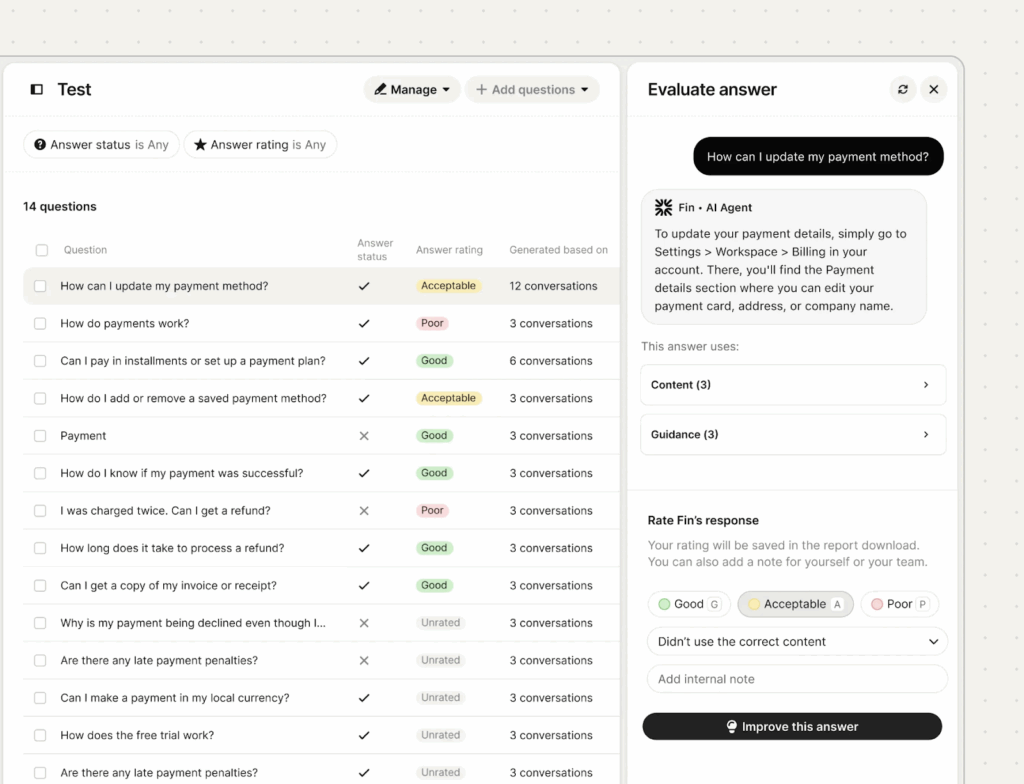
Intercom is a conversational relationship platform built around real-time messaging. It’s built around the modern expectation that customers want quick, personalized responses across chat, email, and in-app messaging.
As such, Intercom treats every customer touchpoint as part of an ongoing conversation accessible through a unified messenger that handles support questions, product onboarding, marketing campaigns, and sales inquiries.
Intercom also features an autonomous resolution bot called ‘Fin AI’ which resolves complete customer requests end-to-end.
Fin works by analyzing incoming messages to understand intent and route to appropriate teams. It also detects customer sentiment to prioritize frustrated users.
Key features
- Live chat: Provides real-time engagement via embeddable widgets on web and mobile interfaces. This lets teams address questions, guide users, and capture leads as they’re actively browsing or engaging with a product.
- Proactive support: Enables teams to initiate conversations based on behavior signals (like abandonment or inactivity), delivering timely assistance or nudges that improve conversion and satisfaction.
- Product tours: Allows teams build interactive walkthroughs inside web or mobile apps to guide users through key features and onboarding flows
Customer reviews on Intercom
- “I like that Fin by Intercom is very versatile and easy to adapt, with just a good prompt, FIN can attend to customers as if it were another support agent.” [*]
- “The cost can quickly add up as you are being charged by resolution as opposed to a flat unlimited monthly rate, which can make it hard to anticipate.” [*]
Pricing
- Essential: $29 per seat/month.
- Advanced: $85 per seat/month.
- Expert: $132 per seat/month.
The Fin AI Agent comes as an add-on and costs $0.99 per resolution—while copilot costs $29 per agent/month.
| Best for: Product-led and SaaS companies that rely on real-time, conversational support and engagement. |
Related → 20 Best Intercom Alternatives & Competitors for 2026 | Kustomer
8. Gorgias
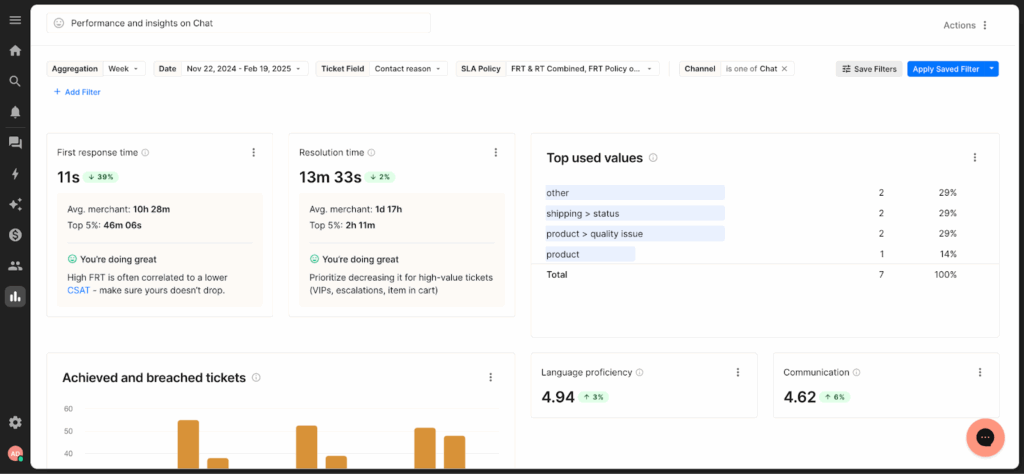
Gorgias is a helpdesk CRM built specifically for e-commerce brands that want customer support to feel faster, more personal, and directly tied to business outcomes.
The platform integrates deeply with e-commerce platforms such as Shopify, BigCommerce, and Magento, pulling in order history, payment details, fulfillment status, subscription data, and customer tags directly into every conversation. This makes it possible for support teams to take action from within the helpdesk.
The Gorgias ‘Automate’ is the platform’s AI feature that handles high-volume, repetitive e-commerce inquiries. For example, for a query such as ‘Where’s my order’ it pulls the tracking data in real-time, and provides product availability updates.
Key features
- Macros and automated rules: Teams can create templates for responses and trigger actions based on specific criteria like order status, keywords, or customer attributes.
- Revenue statistics and performance tracking: Analytics showing financial impact of support interactions. It features revenue saved through retention, additional sales generated via upsells, refund rates, and lifetime value of supported customers.
- Self-service with order tracking integration: Automated help center allowing customers to check shipment status, initiate returns, and find answers without submitting tickets.
Customer reviews on Gorgias
- “I find the integration with Aircall to be problematic. It seems to be competing with the voice or VoIP product, which suggests that the features are not fully compatible.” [*]
- “For me, Gorgias is an incredibly convenient helpdesk solution for eCommerce businesses, thanks to its powerful integration with platforms like Shopify, Magento, and BigCommerce.” [*]
Pricing
- Starter: From $10 per month for up to 50 tickets.
- Basic: From $50 per month for up to 300 tickets.
- Pro: From $300 per month for up to 2,000 tickets.
- Advanced: From $750 per month for up to 5,000 tickets.
- Enterprise: For custom volume, please contact sales.
| Best for: E-commerce brands (especially Shopify merchants) that need support tightly integrated with order management, refunds, shipping, and subscriptions. |
Related → Top 17 Gorgias Alternatives & Competitors for 2026
9. Dixa
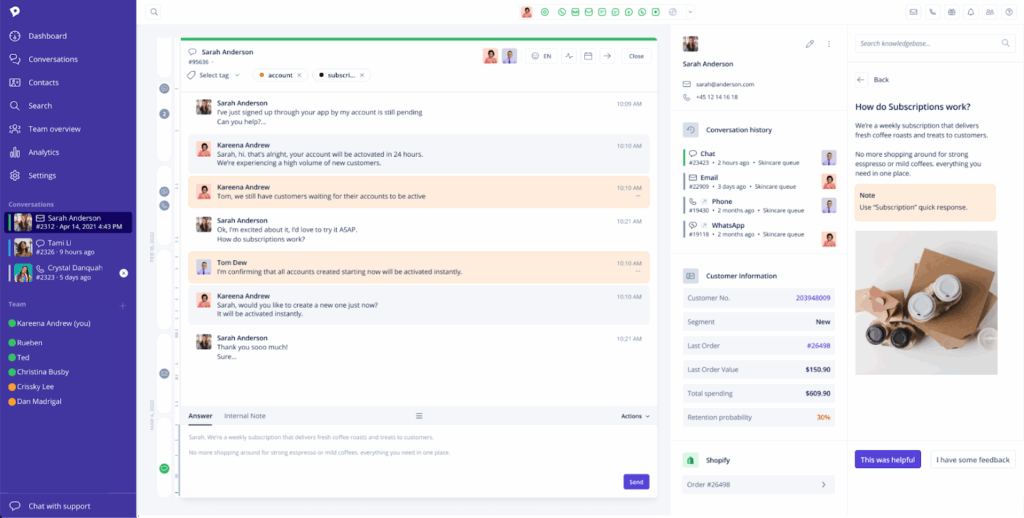
Dixa is a conversational CRM platform that unifies phone, email, chat, messaging apps, and social media into a single interface (called Agent Hub). It automatically threads all conversations by customer rather than channel—so when someone calls after emailing yesterday, agents see both interactions in one timeline.
This is because Dixa prioritizes conversational intelligence and flow. It applies real-time logic and orchestration so that inquiries are routed intelligently based on customer history, priority, and agent availability.
This means customers are more likely to speak with someone who already knows their story, while agents can focus on resolution.
Key features
- Dixa Mim (AI agent): Intelligently routes, prioritizes, and queues conversations based on rules, availability, and customer context. It ensures agents handle the right message at the right time.
- Dixa channels: Lets you manage customer conversations across voice, email, chat, and social messaging (like WhatsApp and Facebook Messenger) from one centralized platform.
- Dixa intelligence: Provides clear, easy-to-read dashboards that give real-time visibility into team performance, customer demand, and service levels across all channels.
Customer reviews on Dixa
- “The skill‑based routing and queue management help ensure customers are connected to the right agent quickly.” [*]
- “A software company operating in 2025 that enforces a one-year contract commitment, along with a three-month notice period for termination, appears to be adhering to an outdated business model.” [*]
Pricing
- Growth: $89 per agent/month.
- Ultimate: $139 per agent/month.
- Prime: $179 per agent/month.
| Best for: Contact centers and service teams where voice remains critical and building customer relationships. |
10. Freshworks Customer Service Suite
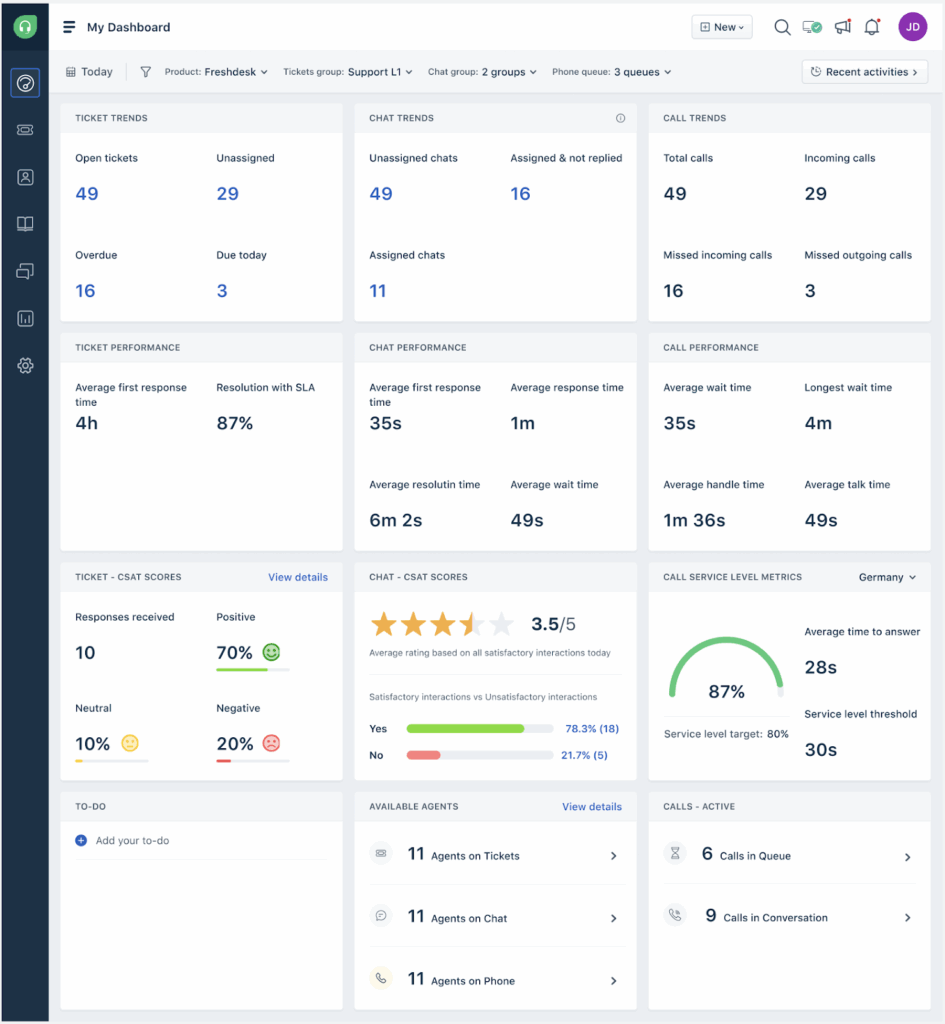
Freshworks Customer Service Suite brings ticketing, messaging, and AI together in one platform. It combines Freshdesk for managing support tickets, Freshchat for real-time conversations, and Freddy AI to automate and assist across the entire support workflow.
For example, Freddy AI works behind the scenes and alongside agents. It automatically routes tickets based on urgency and topic, powers chatbots that handle common questions, suggests replies from your knowledge base, and helps forecast support demand.
For agents, Freddy Copilot summarizes long conversations, drafts responses, translates messages, and surfaces helpful articles in real time.
Key features
- Team collaboration tools: Allows agents to @mention colleagues for input, add internal notes, create child tickets for sub-task.
- Freddy self-service bot: Admins can create custom portals, allowing customers to search knowledge base and forums or reach out for help. The bots can also answer common questions automatically without creating a ticket.
- Advanced workflows: Teams can build rules that automatically trigger assignments, updates, notifications, and escalations based on customer behavior, tags, or ticket conditions
Customer reviews on Freshworks Customer Service Suite
- “The integration with WhatsApp and other software relies on third-party tools, as there’s no built-in support, making it a frustrating and time-intensive process.” [*]
- “The tool was simple, not too many fields/custamization” [*]
Pricing
- Growth: $19 per agent/month.
- Pro: $55 per agent/month.
- Enterprise: $89 per agent/month.
| Best for: Mid-market companies wanting enterprise-grade AI features with fast deployment and accessible pricing. |
Related → 17 Best Freshdesk Alternatives for 2026 (Based on Real Users)
11. Zoho Desk
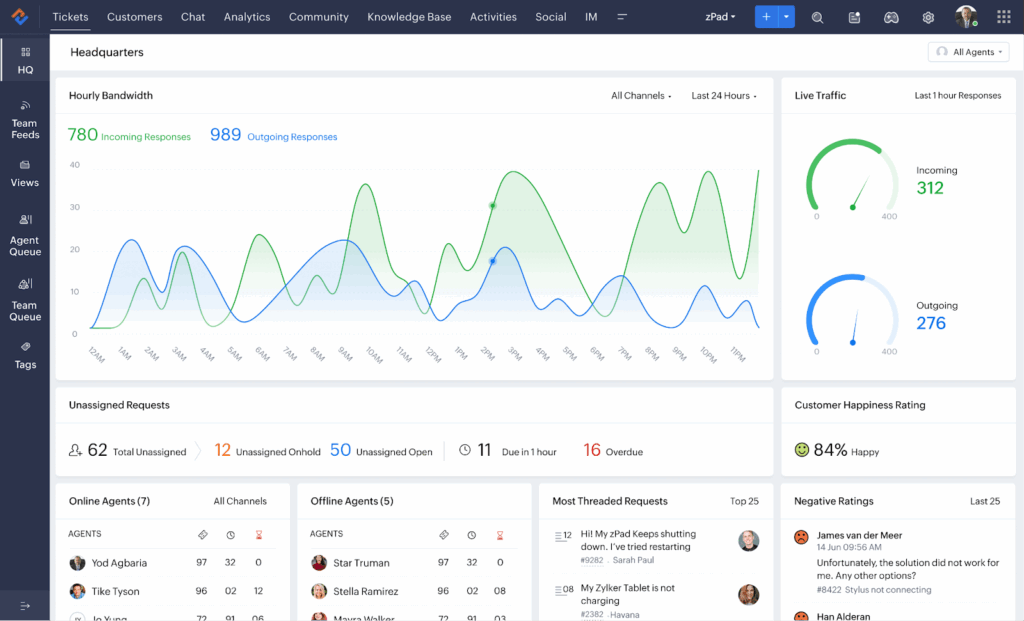
Zoho Desk is a cloud-based help desk designed for businesses that already rely on Zoho’s ecosystem and want customer support tightly connected to the rest of their operations.
The platform brings email, chat, phone, and social support into a single ticketing system, with native integrations across Zoho CRM, marketing, analytics, finance, and dozens of other Zoho apps. This makes it easy for support teams to see customer context without switching tools.
There’s also Zia, Zoho’s built-in AI assistant, which helps automate and prioritize daily support work. It assigns tickets based on content and agent expertise, detects customer sentiment to highlight urgent or frustrated requests, and suggests responses using knowledge base articles and past tickets.
Key features
- Blueprint workflow automation: Visual workflow (drag-and-drop) builder that guides tickets through defined stages with rules, approvals, required fields, and automated actions.
- Zia sentiment analysis: Analyzes the tone of customer messages in real time, flags negative sentiment for quick follow-up, and summarizes overall customer happiness directly within customer profiles.
- Zia answer bot: AI-powered bot for help centers and live chat that answers common questions using knowledge base content and escalates to agents when needed.
Customer reviews on Zoho Desk
- “Setting up your help desk can be daunting given the complexity of many software solutions. Advanced users might observe that some features are more limited than in other systems, especially when it comes to CRMs and the constraints on fieldsets.” [*]
- “The most helpful part of Zoho Desk is its ticketing & workflow automation where it automatically assign tickets, sets SLAs & routing request based on priority which helps ensure timely responses and reduces manual work for the support team.” [*]
Pricing
- Express: $7 per user/month.
- Standard: $14 per user/month.
- Professional: $23 per user/month.
- Enterprise: $40 per user/month.
| Best for: Small to mid-sized businesses already using Zoho products or needing feature-rich customer service at budget-friendly price points. |
Related → 10 Best Zoho Desk Alternatives & Competitors for 2026
How to Pick the Right AI CRM System for Your Needs
Choosing a CRM tool affects your entire organization for years. Pick right and teams work better, customers have smoother experiences, and revenue grows.
Pick wrong and you’re managing adoption problems, paying for unused features, or replacing everything in 18 months.
Here’s how to make a decision you won’t regret:
Identify your primary pain point
Before you start comparing vendors, understand what problem you’re trying to solve.
- Are customers waiting too long for responses because inquiries sit in the wrong queues?
- Are agents overwhelmed switching between systems to find information?
- Are you losing deals because reps lack context on customer history?
Your primary pain point determines which advanced AI capabilities actually matter.
- If response speed is the issue, you need aggressive automation and intelligent routing.
- If context is missing, you need unified customer views and integration with your existing tools.
- If adoption is the problem, you need interfaces agents will actually use without resistance.
The best AI CRM for your team should align with your specific business needs and use cases.
Map your integration requirements
AI in CRM only works if it can access your data. If the customer relationship management tool can’t pull from your e-commerce platform, billing system, or product database, agents will still ask customers for information that exists elsewhere.
Here’s how to fix that:
- List every system holding customer information your teams need.
- Priority integrations typically include:
- E-commerce platforms (Shopify, BigCommerce, WooCommerce) for order history and customer behavior
- Communication tools (Slack, Microsoft Teams) so updates flow to the people who need them
- Automation platforms (Zapier, Make) for connecting specialized tools your team already relies on
- Payment processors (Stripe, PayPal) for transaction data and billing context
- Marketing automation platforms (Mailchimp, HubSpot, ActiveCampaign) to see the full customer journey.
- Priority integrations typically include:
This will help you determine which integrations are critical versus nice-to-have.
- Understand the type of integration your system needs: Vendors often claim connections that are just overnight data syncs. Instead, opt for real-time, bidirectional.
- This means when orders update in Shopify, the CRM reflects it instantly—and when agents update information, it flows back to source systems.
For example, if you’re deep in Microsoft, Dynamics offers integration third-party CRMs can’t match. Same goes for companies using multiple Zoho products—they gain efficiency from Zoho Desk.
Assess whether your team will use it
This is more on assessing whether your team can operate complex systems or needs something that works immediately.
For example, Salesforce delivers power but needs dedicated administrators. Meanwhile, Kustomer or Freshworks provide strong features with gentler curves.
What matters here is compatibility—i.e., what feels familiar. If your team uses email-based support, jumping to pure messaging might face resistance. If they’re used to ticketing, conversational models require mindset shifts.
Evaluate fit with your channels and customer journeys
Your CRM should reflect how customers already communicate with you. If your business relies heavily on messaging, chat, or in-app conversations, a conversation-first platform will feel more natural.
On the flip side, if voice, email, or structured case management dominates, a more traditional service CRM may be a better fit.
From a buyer’s standpoint, it’s critical to see how well the platform maintains conversation continuity across channels.
Understand the total cost of ownership (TCO)
Base pricing often excludes what you actually need—like we’ve seen in Intercom and Zendesk. Their AI features require premium tiers, and integrations also need add-ons.
For enterprise platforms, implementation costs extra. There’s data migration, configuration, integration setup, training. And all of these can cost as much as the software.
This also doesn’t account for platforms needing dedicated administrators or CRM specialists. Others work with minimal attention.
A rule of thumb is to model costs at future scale to ensure your solution remains scalable as your team grows. Pricing working at 20 agents for a startup might become expensive at 100 when they expand. Whether you’re going for a ‘per-user’ or ‘per-conversation’ pricing, understand the economics before committing.
Run a structured evaluation
Build 5-10 scenarios representing actual situations your team handles daily.
For example, complex multi-touch customer conversations, routine inquiries that should be automated, urgent escalations requiring immediate attention, cases requiring information from multiple systems.
Ask every vendor to demonstrate handling these scenarios specifically to see how it fits with your needs.
Define success metrics before you buy
Without clear metrics, it’s impossible to tell whether AI is actually improving outcomes or simply shifting work around. Teams should identify a small set of success indicators tied directly to their goals.
- For customer support teams, this might include first response time, resolution time, ticket deflection rate, CSAT, or escalation frequency.
- For revenue or retention-focused teams, it could be churn risk reduction, repeat contact rate, or customer lifetime value trends.
The key is to ensure the CRM can surface, attribute, and track these metrics natively, without heavy manual reporting.
Kustomer: The CRM That Remembers Your Customers So Your Team Doesn’t Have To
Every CRM on this list solves real problems. Enterprise integration, conversational messaging, e-commerce workflows, ecosystem advantages. They’re all capable platforms.
But none of them come close to Kustomer. It’s the only platform that refuses to treat each customer contact as a separate event.
There are no ticket numbers or case IDs. Just one continuous conversation that picks up exactly where it left off, whether that was yesterday or six months ago.
When customers reach out, agents see everything including past conversations, purchases, support history, and account changes.
The complete story is there, allowing conversations to flow naturally because the system remembers.
“We love the Kustomer timeline. It’s one simple place where we can view data across email, live chat, telephone, SMS, Facebook and sales data.
By having a 360 degree view of the customer, it enables us to respond to them more quickly and with more relevant information.
Our products are highly technical, so by tracking our customer experience with our product, we can better serve them and better learn from their experiences.” — Dave Weiner, Founder & CEO, Priority Bicycles
Your customers deserve better than ticket #47382. So does your team.
See how conversational CRM works when context is automatic.
Frequently Asked Questions About AI-Powered CRMs
What’s the difference between a traditional CRM and an AI CRM?
Traditional CRMs are essentially databases that store customer information and require manual effort to update records, route tickets, and extract insights.
AI CRMs go further by automating routine work, surfacing patterns you’d otherwise miss, and recommending next steps based on what’s worked before. The AI technology handles the heavy lifting—analyzing customer sentiment, predicting churn risk, drafting responses, and routing conversations intelligently.
How does AI help you close deals faster?
Most deals slow down because reps miss timing, lose context, or follow the wrong next step.
When you use AI, the system can:
- Highlight the best accounts to prioritize
- Recommend next actions based on past wins
- Reduce manual work that delays follow-ups
- Keep pipeline data clean
That combination shortens the sales process and increases your chances of closing deals.
Is AI CRM worth it for small businesses?
Yes, especially for small businesses that don’t have dedicated ops teams to clean data, build workflows, or manage reporting.
A strong AI CRM reduces busywork (like data hygiene and follow-ups), improves prioritization, and helps a small team operate like a larger one. The key is choosing a tool that improves the user experience instead of adding complexity.
How does lead scoring work in an AI CRM?
Traditional lead scoring is usually rule-based (e.g., +10 for downloading a guide).
AI-based scoring goes further: it uses machine learning to weigh multiple signals at once (behavior, engagement, firmographics, past conversions) and predict which leads or accounts are most likely to convert.
The result is scoring that helps teams make more data-driven decisions.