For enterprise CX leaders, the era of buying software just to "manage tickets" is over. In 2026, your help desk is no longer just a cost center—it is the frontline of your brand's retention strategy and a critical source of revenue data.
But most legacy enterprise platforms were built for a different time. They trap your data in silos, force agents to toggle between a dozen tabs, and charge you a premium for "AI" that is little more than a glorified FAQ bot.
If you are running an enterprise-level organization, you don't need a tool that just organizes complaints. You need a resolution engine. You need a platform that unifies customer data from every touchpoint, empowers agents with genuine AI co-pilots, and proves its ROI to the C-suite.
To help you cut through the noise, we have evaluated the top 10 enterprise help desk solutions on the market—ranking them not just by features, but by their ability to scale, integrate, and actually solve problems for your customers.
Enterprise vs. SMB Help Desk Software: Key Differences
It is tempting to look at the lower price tag of an SMB tool and ask, "Can't we just make this work?"
But cost optimization often leads to technical debt. While an SMB tool might handle your ticket volume today, it will likely buckle under the weight of enterprise complexity tomorrow—leading to data silos, security risks, and broken workflows.
Here are the three critical distinctions you need to factor into your decision.
Scope and Scale: Complexity vs. Volume
It’s not just about how many tickets you get; it’s about the complexity of resolving them.
- SMB tools: Built for speed and simplicity. They excel at managing a shared inbox where every agent has similar permissions and workflows are linear (e.g., "If email contains 'refund', assign to Billing").
- Enterprise platforms: Built for governance and logic. They handle complex, non-linear workflows across global teams. This means granular role-based access controls (RBAC), multi-brand architecture, global compliance (GDPR/SOC2), and the ability to route tickets based on real-time data from external systems, not just static rules.
Ecosystem and Integrations
An SMB tool is a destination; an enterprise platform is a hub.
- SMB tools: Typically offer "plug-and-play" integrations that are easy to set up but shallow in functionality (e.g., viewing a Shopify order in a sidebar). They often hit hard API rate limits when data volume spikes.
- Enterprise platforms: Designed to sit at the center of your tech stack. They offer bi-directional data syncing with ERPs, OMS, and logistic systems. They support custom objects, high API throughput, and webhooks that allow the help desk to trigger actions in other software (e.g., processing a refund in Netsuite directly from the help desk).
Support as a Strategic Partnership
When your system goes down, an SMB tool offers a help article; an enterprise platform offers a dedicated human.
- SMB tools: Support is usually reactive—ticketing systems, community forums, and chat bots. The goal is to fix the software when it breaks.
- Enterprise platforms: Support is proactive and strategic. Enterprise contracts typically include Service Level Agreements (SLAs) for uptime and response speed, along with a dedicated Customer Success Manager (CSM). Your CSM isn't just tech support; they are a strategic partner who helps you roadmap new features, optimize your workflows, and benchmark your performance against industry leaders.
Top 10 Enterprise Help Desk Solutions for 2026
Finding a platform that can handle enterprise volume without creating enterprise drag is no small feat. From legacy giants to modern disruptors, here is how the leading platforms stack up on features, scalability, and real user feedback.
- Kustomer
- Zendesk
- Freshdesk
- Salesforce Service Cloud
- Jira Service Desk
- SolarWinds Service Desk
- Service Now
- Zoho Desk
- Happy Fox
- Help Scout
1. Kustomer
Best for: High-volume, complex B2C enterprises (Retail, Fintech, Travel) that need to unify customer data and automate resolutions at scale.
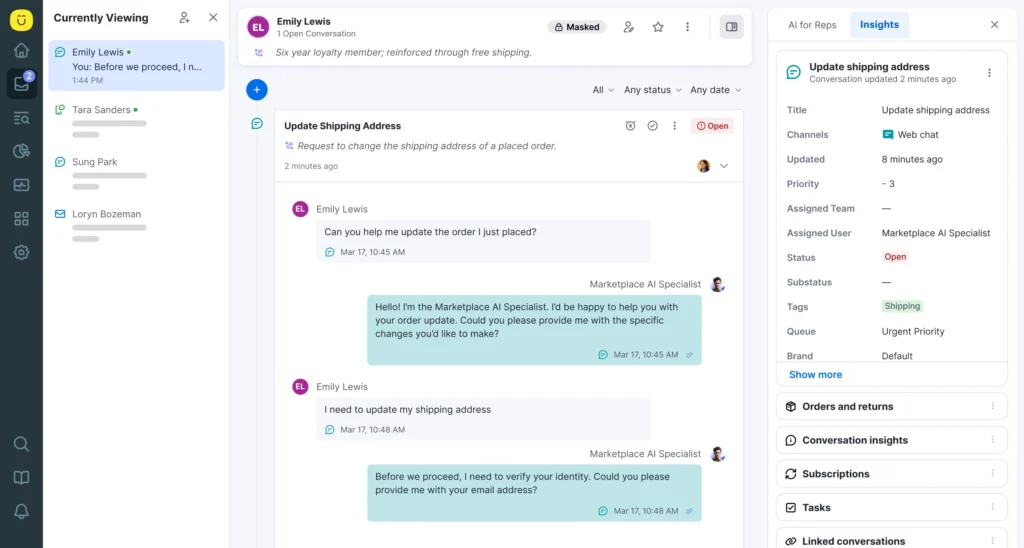
Kustomer replaces the legacy ticket with a CRM-first, AI-native platform. While traditional enterprise help desks often trap data in silos—forcing agents to toggle between ERPs, order management systems, and payment gateways—Kustomer ingests all that data into a single, actionable timeline.
For enterprise CX leaders, Kustomer transforms support from a reactive cost center into a proactive retention engine. It is built to handle massive global volume, offering enterprise-grade security (SOC 2, HIPAA), multi-brand architecture, and the ability to route conversations based on real-time business data (like Lifetime Value or Flight Status) rather than just static queues.
Key Features
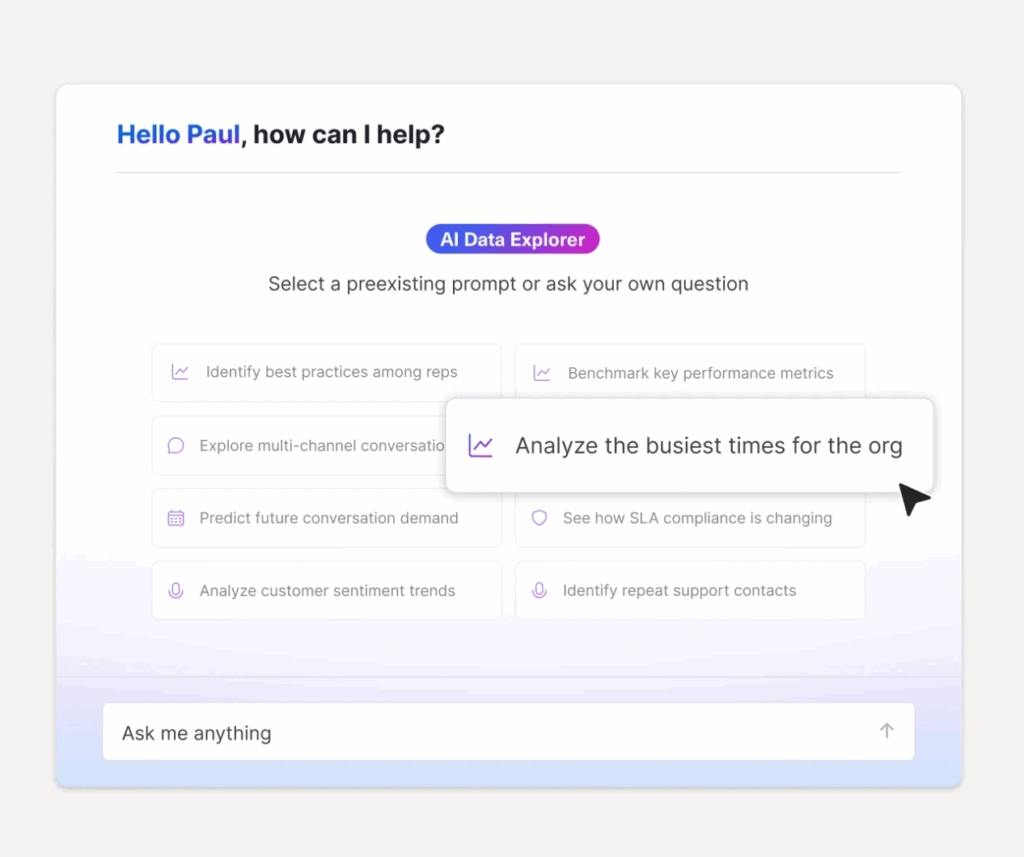
- Unified customer timeline: A single pane of glass view that aggregates every interaction, order, and backend event. Agents never have to ask, "What is your order number?"
- Data-driven routing: Intelligent routing engines that prioritize customers based on real-time attributes (e.g., routing a VIP with a "lost package" tag to a specialized team instantly).
- AI agents & Copilot: Generative AI that is safe for enterprise use. AI Agents resolve complex transactions autonomously, while Copilot assists human agents by summarizing threads and drafting on-brand responses.
- Global scalability: Native support for real-time translation in over 70 languages, allowing centralized teams to support global markets without hiring native speakers for every region.
Pros
- Actionable data: Unlike legacy tools where data is just for viewing, Kustomer allows you to trigger automation based on that data (e.g., "If refund > $100, trigger approval workflow").
- High-deflection AI: AI Agents can fully resolve 40%+ of inbound conversations by hooking into backend systems to process returns or check status.
- Modern Interface: A clean, intuitive UI that significantly reduces agent onboarding time compared to clunky legacy platforms.
Cons
- Implementation depth: To get the full ROI (the magic of the timeline), you must integrate it with your core backend systems. It is not a plug-and-play tool for teams with no tech resources.
- Not ideal IT help desk: It is specialized for external customer experience, not internal IT ticketing (ITSM) for employees.
Pricing
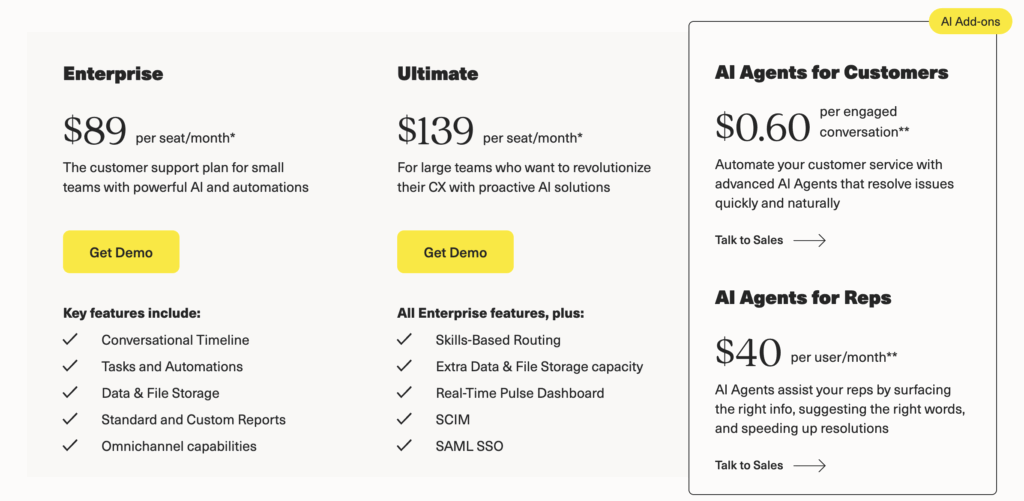
Kustomer offers transparent pricing plans (billed annually):
- Enterprise: $89/user/month. Includes the core CRM, omnichannel timeline, and workflow automation.
- Ultimate: $139/user/month. Adds enhanced routing, unlimited collaboration users, sandbox access, and extended API limits.
What Real Users Say about the Value of Kustomer
Enterprise leaders choose Kustomer when they need to scale efficiency without sacrificing the customer experience.
- Hopper: When travel demand exploded, Hopper’s legacy tools couldn't cope. By switching to Kustomer to route tickets based on urgency and booking data, they slashed first response times by 50%, cut software costs by 20% (consolidating 13 tools), and increased CSAT by 10%.
“Kustomer was the perfect mix of being resilient for scale and built for the needs of a modern service team.” — Jo Lai, Head of CX
- Jerome’s Furniture: By moving from a disjointed system to Kustomer’s centralized platform, Jerome’s Furniture reduced duplicate requests from 42% to 8% and cut its overall cost per contact by 40%.
“Kustomer allowed us to achieve the best possible outcome: maintaining a lean, cost-effective team while significantly improving customer satisfaction. We reduced our cost per contact by 40% and improved our NPS to be two times higher than the industry average.” —Marjorie Carlos, Sr. Dir. of Consumer Experience
- Kin Insurance: As a fast-growing carrier, Kin needed an enterprise-level solution to unify communication. Kustomer allowed them to align sales, support, and claims teams around a single source of truth, eliminating the friction of transferring customers between departments.
“Everyone in the company, including the claims team, now uses Kustomer… Kustomer has changed how Kin operates, aligns with customers, manages schedules, and makes decisions.” —Eli Gratz, VP of Growth
2. Zendesk
Best for: Large, mature B2C support teams that need a reliable, platform with a massive ecosystem of integrations.
Zendesk is the industry standard for a reason. It offers a robust, highly customizable ticketing system that scales well for most B2C enterprises. However, its shift upmarket means that many essential enterprise features (like advanced security or custom data retention) are now locked behind their most expensive Suite Enterprise plans.
Key Features
- Zendesk AI (Advanced): Includes Macro Suggestions for agents and AI Agents for customers. Note that true autonomous resolution often requires the "Advanced AI" add-on package.
- Skills-based routing: Ensures tickets are routed not just by queue, but by agent proficiency (e.g., language, technical skill).
- Side conversations: Allows agents to collaborate with internal teams (via Slack or email) without leaving the ticket, keeping the audit trail clean.
Pros
- Massive ecosystem: With 1,200+ pre-built apps, if you need to integrate a tool, Zendesk likely has a connector ready.
- Reliability: Proven track record of uptime and stability at enterprise scale.
Cons
- Add-On fatigue: To get the full enterprise value (WFM, QA, Advanced AI), you often have to purchase separate add-ons, inflating the total cost of ownership.
- Support for support: ironically, Zendesk’s own customer support is frequently cited by enterprise users as slow and impersonal.
Learn more → Is Zendesk Worth It? Hmm... See The Pros & Cons
Pricing
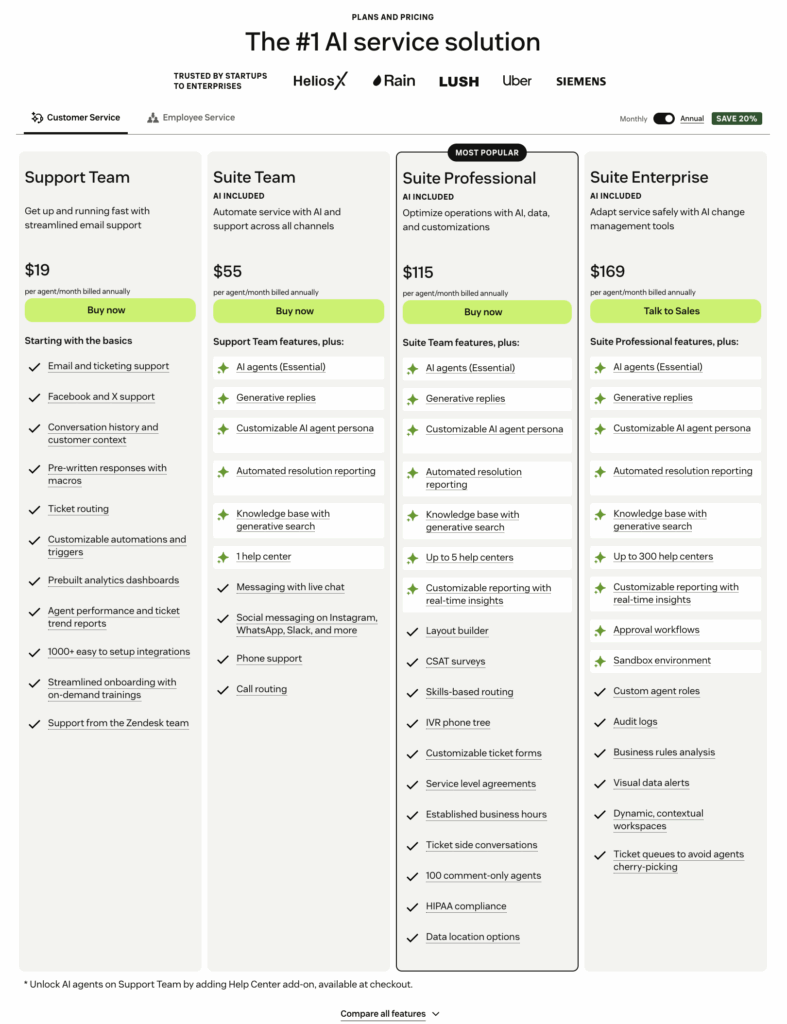
- Suite Team: $55/agent/mo.
- Suite Professional: $115/agent/mo (Most popular for mid-market).
- Suite Enterprise: Custom pricing (starts ~$169+).
Note: Advanced AI is typically an additional $50/agent/mo.
Learn more → How Much Does Zendesk Really Cost in 2025? We Did The Math.
What Real Users Say
- G2 Review "As a user what I like the best about ZenDesk is its comprehensive feature that allows Customer support and has capabilities of integration with other systems like Google Suite (Google Sheets), frequency use, and automation systems for responding to some tickets. Additionally, due to its advanced features, it allows customization according to the company's specific needs and is easy to set up."
- G2 Review: "The customer support and account management teams are extremely lacking in knowledge:
- Our SMB account manager regularly does not respond to emails in a timely manner.
- The platform knowledge of the support team/account manager is extremely lacking.
- We have had an outstanding problem since February that required us to upgrade subscription, yet our problem is still unresolved.
- Despite multiple requests to the team working on our issues and communication that Zendesk is not working for us and preventing us from meeting our business goals, the account management team still does not respond to emails in a timely manner."
3. Freshdesk
Best for: Cost-conscious enterprises that want 80% of the functionality at 50% of the price of Salesforce or Zendesk.
Freshdesk positions itself as the user-friendly alternative to legacy giants. For enterprises, it offers a Freshdesk Omni package that unifies channels effectively. While it lacks the deep, custom data architecture of Kustomer or Salesforce, it is faster to deploy.
Key Features
- Freddy Copilot: Generative AI that summarizes tickets and rephrases responses.
- Freddy AI Agent: Customer-facing bots that can be deployed across WhatsApp and web chat.
- Field Service Management: Built-in capabilities to dispatch field technicians, which is unique for a help desk in this price range.
Pros
- Speed of Implementation: You can roll out Freshdesk to 500 agents in weeks, not months.
- Affordability: Generally 30–40% cheaper than Zendesk for similar core feature sets.
Cons
- Siloed Architecture: Freshchat (messaging) and Freshdesk (ticketing) can sometimes feel like two separate products stitched together.
- Enterprise Depth: Reporting and custom objects are often less granular than what power users need.
Pricing
- Free: Basic ticketing for up to 10 agents.
- Growth: $15/agent/mo.
- Pro: $49/agent/mo (Adds "Freddy" AI features).
- Enterprise: $79/agent/mo (Adds Sandbox and Audit Logs).
Note: Freddy Copilot add-on is ~$29/agent/mo.
What Real Users Say
- G2 Review: "Freshdesk offers an intuitive interface and excellent api support, making it easy to integrate with other tools in our workflow. I really like how customizable the automation and workflows are from ticket routing to SLA setup; everything can be tailored to fit our exact needs. The ability to connect with Slack, Jira, and CRM tools saves tons of time for our support team."
- G2 Review: "After a year or so of fast growth, we found Freshdesk lacking in additional features. Higher Freshdesk plans solved some of our pain points, but in my opinion, Freshdesk isn't ideal for use cases beyond ticketing. For example, we tried Freshdesk as a pseudo-CRM and license management system using custom objects and custom contact and company fields, but the limits on number of fields made this virtually impossible. Additionally, portal customization is limited; I suspect this is to encourage the pricy third-party customization/development services."
Learn more → 17 Best Freshdesk Alternatives for 2026 (Based on Real Users)
4. Salesforce Service Cloud
Best for: Massive, complex organizations where the support team must be deeply integrated with the Sales and Marketing teams.
Salesforce Service Cloud is not just a help desk; it is a beast of a platform. If you are already all in on the Salesforce ecosystem, it makes sense. It offers unparalleled power and customization but comes with the highest complexity tax on the market.
Key Features
- Einstein 1 Service: Their latest AI layer that unifies Data Cloud with generative AI to offer hyper-personalized service.
- Service Process Studio: A powerful visual builder for designing complex, cross-departmental workflows (e.g., fraud alerts).
- Case Swarming: Native integration with Slack to swarm complex cases with experts from engineering or legal.
Pros
- Unmatched Power: If you can dream it, a developer can build it in Salesforce.
- 360-Degree View: Native access to Sales Cloud data means agents know exactly where a customer is in the buying cycle.
Cons
- Hidden Costs: The license fee is just the start. You will need a specialized Salesforce administrator and likely external consultants to implement it.
- Speed: The UI can be clunky and slow (loading time is a common complaint).
Pricing
- Starter: $25/user/mo (Very limited).
- Professional: $80/user/mo.
- Enterprise: $165/user/mo (The standard for most large teams).
- Unlimited: $330/user/mo.
- Einstein 1 Service: $500/user/mo (Includes full AI suite).
What Real Users Say
- G2 Review: "Salesforce Service Cloud centralizes all our customer and service information, making it much simpler to track requests and respond promptly. I appreciate that every message, note, and case update is linked to each individual's record, ensuring that nothing is overlooked. The automation features are a real time-saver, as they automatically route tickets to the appropriate person or department. Additionally, the dashboards are very useful for monitoring response times and identifying any areas where delays might be occurring."
- G2 Review: "The integration between the Salesforce ecosystem and other clouds is not always as simple or included as I expected. Additionally, the initial startup was not very easy; it took about a year to get up to speed and involve all the stores in the data acquisition phase."
Learn more → Top 10 Salesforce Service Cloud Alternatives to Consider in 2026
5. Jira Service Management
Best for: High-velocity teams that need to bridge the gap between Customer Support and Engineering/DevOps.
Originally built for IT, Jira Service Management (JSM) has expanded into customer support. It is the ideal choice if your support tickets frequently require engineering work (e.g., bug reports, software incidents). It allows you to link a support ticket directly to a Jira software issue, creating a seamless loop between front-line agents and back-end developers.
Key Features
- DevOps Integration: Instantly escalate a customer ticket to a Jira software bug and track the fix status in real-time.
- Atlassian Intelligence: Generative AI that summarizes tickets and helps draft responses using your Confluence knowledge base.
- Asset Management: Native database to track customer assets (e.g., servers, laptops, software licenses).
Pros
- Developer Alignment: No other tool bridges the "Support vs. Engineering" gap better.
- Price-to-Value: Significantly cheaper than ServiceNow for ITSM capabilities.
Cons
- Not "Customer First": The UI feels like an IT tool. It lacks the polish and conversation-centric feel of Kustomer or Intercom.
- Complexity: Configuring workflows requires knowledge of Jira’s complex administration backend.
Pricing
- Standard: ~$22/agent/mo.
- Premium: ~$49/agent/mo (Includes Asset Management & AI).
- Enterprise: Custom pricing (Requires annual commitment, includes Atlassian Analytics).
What Real Users Say
- G2 Review: "What I like best about Jira Service Management is how seamlessly it helps manage IT support tickets through customizable workflows, automation, and SLAs. It improves visibility across teams and keeps everything well-organized in one place. The ability to integrate with other Atlassian products like Confluence and Jira Software adds a lot of value and streamlines collaboration between development and operations teams."
- G2 Review: "Learning all the features can be tough at first—there’s a lot to take in, and it might feel overwhelming. The interface can look busy, which makes it harder for new users to get started. Pricing can add up, especially if you go for advanced options."
Learn more → 16 Best Jira Service Management Alternatives Right Now
6. SolarWinds Service Desk
Best for: Internal IT Service Management (ITSM) and Asset Management for mid-to-large enterprises.
SolarWinds is strictly an ITSM tool, not a customer service platform for B2C brands. It excels at helping internal IT teams manage employee tickets, hardware assets, and change management requests.
Key Features
- ITIL Alignment: Pre-built modules for Incident, Problem, Change, and Release management.
- Asset Discovery: Automatically scans your network to detect and catalog hardware and software assets.
- Employee Service Portal: A clean interface for employees to request new laptops or password resets.
Pros
- Asset Management: Best-in-class features for tracking hardware inventory.
- Stability: Rock-solid performance for internal IT operations.
Cons
- Not for External Support: Lacks social channels, e-commerce integrations, or customer-facing features.
- UI: Functional, but dated compared to modern SaaS tools.
Pricing
- Essentials: $39/technician/mo.
- Advanced: $79/technician/mo.
- Premier: $99/technician/mo (Includes visual CMDB).
What Real Users Say
- G2 Review: "Solarwinds Service Desk (SWSD) is my historical memory. That is its greatest feature. With so many small and unique application tickets coming, this is my go-to repository for recalling steps toward resolution. Its features allow the relating of similar tickets, problems, and solutions, all leading toward quick solving of problems."
- G2 Review: "SolarWinds is not a fast-working tool for integrations, but the field-level configurations handle all of the issues. But the field we configure is trickier and not user-friendly to understand."
Learn more → Top 11 SolarWinds Service Desk Competitors (2025 Update)
7. ServiceNow
Best for: Fortune 500 enterprises that want a single platform to run entire business workflows (IT, HR, CSM).
ServiceNow is the heavy artillery of the help desk world. It is designed for massive organizations that want to centralize IT, HR, and Customer Service on one platform. It is expensive, complex, and powerful.
Key Features
- Now Assist (GenAI): Enterprise-grade generative AI that can automate complex workflows (e.g., "Reset password and provision new laptop").
- Workflow Automation: Can automate processes that touch multiple departments (e.g., onboarding a new hire involves IT, HR, and Facilities).
- Governance: unmatched security and compliance controls for regulated industries.
Pros
- Scalability: Can handle millions of tickets without breaking a sweat.
- Consolidation: Replace 10 different tools with one platform.
Cons
- Cost: Extremely expensive. Implementation alone can cost hundreds of thousands of dollars.
- Complexity: You need a dedicated team of ServiceNow developers to maintain it.
Pricing
- Custom quote only: Typically starts at $100+ per agent/month, but implementation fees often 3x the license cost.
Note: AI features are moving to a consumption-based pricing model.
What Real Users Say
- G2 Review: "I appreciate ServiceNow's unified case management that captures all customer interactions, reducing the risk of lost tickets. The automation in routing ensures tasks are assigned to the right agents, improving response times. The real-time visibility and analytics provide critical insights into case trends and team performance. Additionally, the platform's scalability and multichannel support enable consistent service across various platforms as our business grows. These features enhance operational efficiency and customer satisfaction."
- G2 Review: "I find the data fields or views and user experience in ServiceNow Customer Service Management could be better. Additionally, I had difficulties fitting my custom solution into the Customer Service Management system, which required quite a lot of iterations."
8. Zoho Desk
Best for: Cost-conscious businesses that already run on the Zoho ecosystem (Zoho CRM, Books, etc.).
Zoho Desk is a capable, budget-friendly option. It offers a surprising amount of depth (including AI and process automation) for a fraction of the price of Zendesk. However, its "enterprise" capabilities (like live chat and advanced AI) are often gated behind the highest tier.
Key Features
- Zia AI: Zoho’s AI assistant that can tag tickets, analyze sentiment, and suggest answers.
- Blueprint: A visual process builder that forces agents to follow specific steps (good for compliance).
- Multi-Department: Run separate help desks for Support, Sales, and Billing under one license.
Pros
- Value: Hard to beat the feature-to-price ratio.
- Ecosystem: Seamless integration if you use Zoho CRM.
Cons
- Support: Enterprise support is often cited as slow or unhelpful compared to premium competitors.
- Gated Channels: You must pay for the Enterprise plan just to get Live Chat.
Pricing
- Standard: $14/user/mo.
- Professional: $23/user/mo.
- Enterprise: $40/user/mo (Required for Zia AI and Live Chat).
What Real Users Say
- G2 Review: "What stands out to me is how easy it is to use, thanks to its intuitive interface. I was able to set up an effective system within just a few days. It delivers a professional experience not only for the end user, but also for the technician and the customer."
- G2 Review: "Some of the configuration can be confusing at first, especially around user roles, permissions and the difference between regular users and team users. It took us a bit of trial and error (and reading documentation) to understand what each licence type is allowed to do, for example sending emails and owning certain records. I would also like a simpler, more guided setup for small teams who don’t have a dedicated IT person."
Learn more → 10 Best Zoho Desk Alternatives & Competitors for 2026
9. HappyFox
Best for: Teams that prefer ticket-based pricing or unlimited agent models to avoid per-seat costs.
HappyFox is a solid, no-frills ticketing system known for its clean interface and robust automation. It is unique in offering Unlimited Agent pricing plans (at higher tiers), which can be a massive cost saver for teams with many part-time support users.
Key Features
- HappyFox Workflows: A standalone automation product that connects HappyFox to 3rd party tools without code.
- Asset Management: Built-in IT asset tracking (in Enterprise plans).
- Agent Scripting: Guides new agents through complex calls with step-by-step scripts.
Pros
- Simplicity: Very easy to set up and use.
- Unlimited Agents: A strategic pricing option for large, shifting teams.
Cons
- No Monthly Billing: Most plans require annual commitments.
- Pricing Gates: Essential features like Custom Ticket Queues are pushed to higher tiers.
Pricing
- Basic: $24/agent/mo.
- Team: $39/agent/mo.
- Pro: $89/agent/mo.
- Enterprise PRO: Custom pricing.
Note: Also offers Unlimited Agent bundles starting at ~$1,500/mo.
What Real Users Say
- G2 Review: "We have been using HappyFox Help Desk software for about five years. Not only was it easy to implement, it is easy for our employees and our client success agents to use. The software works flawlessly and we have reporting setup to monitor the ticketing workflow processes."
- G2 Review: "They were starting to make a big push into AI. I believe that people need to check AI responses before they are sent, and sometimes, the right thing for customers is a human touch. Computers are not great at empathy, and people make the right choice more often than not when given time."
10. Help Scout
Best for: Human-centric support teams that want to avoid the ticket number feel, even at scale.
Help Scout is the anti-enterprise enterprise tool. It is designed to look and feel like a standard email inbox to the customer (no "Reply above this line" clutter). While simple, it has added enterprise features like SSO, SAML, and "light users" to support larger organizations.
Key Features
- Light Users: Allow non-support staff (like engineers or product managers) to view and comment on tickets for free.
- AI Answers: A knowledge base bot that deflects routine questions.
- Docs: A beautiful, built-in knowledge base that is easy to manage.
Pros
- User Experience: The cleanest, most intuitive UI on the list.
- Customer Experience: Emails feel personal, not robotic.
Cons
- Lack of Depth: Lacks the deep routing, asset management, and complex workflow logic of Kustomer or Salesforce.
- Pricing Jumps: The Pro plan (needed for enterprise security) is a significant price jump from the lower tiers.
Pricing
- Standard: $22/user/mo.
- Plus: $42/user/mo.
- Pro: $65/user/mo (Required for Enterprise security/SSO).
Note: AI Answers is priced per resolution ($0.75).
What Real Users Say
- G2 Review: "Technical support is #1. They're team is constantly updating features and notifying their customers with new information and products in a way that isn't salesy or pushy, but purely informative."
- G2 Review: "Sometimes I wish it had more advanced functionality in the HelpDocs module like team collaboration in edit mode and article filtering to search and the ability to download a list of all articles for example"
How to Choose the Best Enterprise Help Desk Software
Selecting enterprise software is high-stakes. A wrong choice doesn't just waste budget; it creates technical debt that can cripple your support operations for years.
Don't rely on the feature list on a pricing page. Instead, evaluate platforms against these five strategic criteria.
1. Internal vs. External Focus
Most platforms claim to do both, but they are usually DNA-coded for one.
- If you need IT Service Management (ITSM): You need asset tracking, change management, and employee portals. Choose tools like ServiceNow, Jira Service Management, or SolarWinds.
- If you need Customer Experience (CX): You need omnichannel timelines, e-commerce integrations, and sentiment analysis. Choose tools like Kustomer, Zendesk, or Salesforce.
Important note: Using an ITSM tool for customer support often leads to robotic, impersonal service. Using a CX tool for IT often leads to security and asset management gaps.
2. The Hidden Total Cost of Ownership (TCO)
Enterprise software pricing is rarely just the license fee.
- Implementation: Will you need to hire a $200/hour consultant for six months to set it up? (Common with Salesforce and ServiceNow).
- Administration: Can your existing Ops manager run it, or do you need to hire a full-time certified administrator?
- Add-Ons: Does the Enterprise price include AI, or is that a separate consumption-based fee? (Zendesk and Freshdesk often charge extra for advanced AI).
3. Integration Depth (Not Just Breadth)
Don't ask "Does it integrate with Shopify/NetSuite?" Ask "How does it integrate?"
- Shallow Integration: Shows a view-only sidebar of the customer's last order. The agent still has to open the other app to fix anything.
- Deep Integration: Allows the agent to perform actions (refund, cancel, upgrade) directly within the help desk. This is the key to true efficiency.
4. AI Maturity
Every vendor says they have AI. Test it with these two questions:
- Is it safe? Can I control exactly what data the AI uses to generate answers, or will it hallucinate policies?
- Is it actionable? Can the AI actually do things (like process a return), or does it just summarize text?
Look for: Platforms that offer AI Agents (autonomous resolution) rather than just "copilots" (drafting assistance).
5. Security & Governance
For an enterprise, a breach is an existential threat. Ensure your shortlist checks these boxes:
- SOC 2 Type II / HIPAA / GDPR: Non-negotiable basics.
- Granular Permissions: Can you restrict specific agents from seeing PII (Personally Identifiable Information) or credit card data?
- Audit Logs: Can you see exactly who viewed a specific ticket and when?
6. Demand a "Day in the Life" POC
Never buy based on a generic demo. Ask the vendor to build a Proof of Concept (POC) using your data and your workflows.
- Give them 5 difficult scenarios (e.g., "A VIP customer returns a damaged item and demands a refund to a different card").
- Watch how many clicks it takes to resolve. If the vendor struggles to configure it during the sales cycle, your team will struggle to use it in production.
Kustomer — The Enterprise Help Desk for the AI Era

Most enterprise help desks were built a decade ago. They were designed to manage tickets, not customers. In 2026, treating your customers like ticket numbers is a fast track to churn.
Kustomer allows modern enterprises to move beyond the queue. By unifying data from your ERP, order management, and core business systems into a single, real-time timeline, we empower your team to solve problems faster—or let AI solve them automatically.
Don't just buy software. Buy results:
- Scale AI with Confidence: Everlane didn't just add a chatbot; they integrated Kustomer’s AI Agents into their core data. The result was a 4X increase in automated resolution, allowing them to handle massive enterprise volume without linearly increasing headcount.
- Drive Hard ROI: Jerome’s Furniture proved that better service is cheaper service. By unifying their fragmented systems into Kustomer, they reduced duplicate requests by nearly 80% and slashed their total cost per contact by 40%.
- Empower Leadership: Lulus uses Kustomer to give their executive team visibility they never had before. Instead of basic "response time" metrics, they use Kustomer’s deep reporting to spot product trends and operational bottlenecks, turning support into a strategic asset.
Ready to stop managing tickets and start driving revenue? Book a demo now.