
The average support agent toggles between 10-15 applications during a single shift. Each switch costs seconds. Those seconds compound into minutes per ticket, and thousands of dollars in wasted productivity across teams.
Worse than the time cost is the cognitive load. Agents have to remember where information lives, which system contains what data, and how to navigate between platforms without losing your place.
A unified agent workspace solves this by bringing everything agents need into a single interface. One screen with complete customer context. All the tools required to resolve issues without switching, or reconstructing information from multiple platforms.
This guide breaks down what unified workspaces unify, which problems they solve versus which they don’t, and how to evaluate platforms that claim to improve your support operation.
What is an Agent Workspace?
An agent workspace is the primary interface where customer service agents handle all their daily work.
It typically includes:
- The active conversation (email, chat, voice transcript, social message)
- The customer profile (purchase history, subscriptions, account status, prior tickets)
- Workflow tools (status changes, tagging, routing, escalation)
- Action controls (refunds, order updates, cancellations, notes)
It’s the software ‘environment’ agents spend their entire shift operating within, and its design determines how efficiently they can help customers.
Benefits of a Unified Agent Workspace
Faster resolution times
When agents have everything needed to resolve issues in one place, they stop wasting time searching for information or switching between systems.
They don’t need to open a CRM tab to verify account status, or check a billing system to confirm payment. The context is already there.
This eliminates the minutes agents typically spend looking for order details, navigating to separate platforms to process refunds, or asking customers to repeat information that should already be available.
Plus, the impact shows directly in handle time. Issues that typically took 8 minutes with fragmented tools now take 4 minutes when agents work from a unified context.
Improved first-contact resolution
Many issues require multiple contacts because agents don’t have complete information during the initial interaction.
For example, for a customer refund up to pre-defined amounts (e.g., above $1,000), the agent might need to escalate because they can’t execute the necessary action.
Unified workspaces help by ensuring agents have the knowledge, context, and capabilities to resolve issues completely the first time.
When the workspace surfaces complete customer history, and direct access to execute solutions, fewer issues get kicked down the road for follow-up.
Reduced agent burnout
Support work today is mentally demanding. Agents must remember policies, navigate systems, and interpret incomplete information—all under time pressure.
This cognitive overhead leads to mistakes, and eventually burnout. Unified workspaces removes this mental juggling by consolidating information and tools agents need. The reduced mental strain leads to longer agent tenure and better performance throughout shifts.
Better customer experience through personalization
Customers expect agents to know who they are and what their history with your company involves.
When workspaces automatically surface purchase history, previous interactions, account status, and preferences, agents can personalize service immediately. This makes the interaction feel like continuing a relationship rather than starting from scratch.
Easier onboarding and training
New agents typically need weeks to learn where information lives across multiple systems, and which tools to use for different tasks.
Unified workspaces shorten this learning curve. New hires work from one interface where customer context, knowledge, and actions are readily available.
The workspace presents what they need contextually, letting them handle real customer issues competently much faster.
Key Features of a Unified Agent Workspace
Complete interaction history
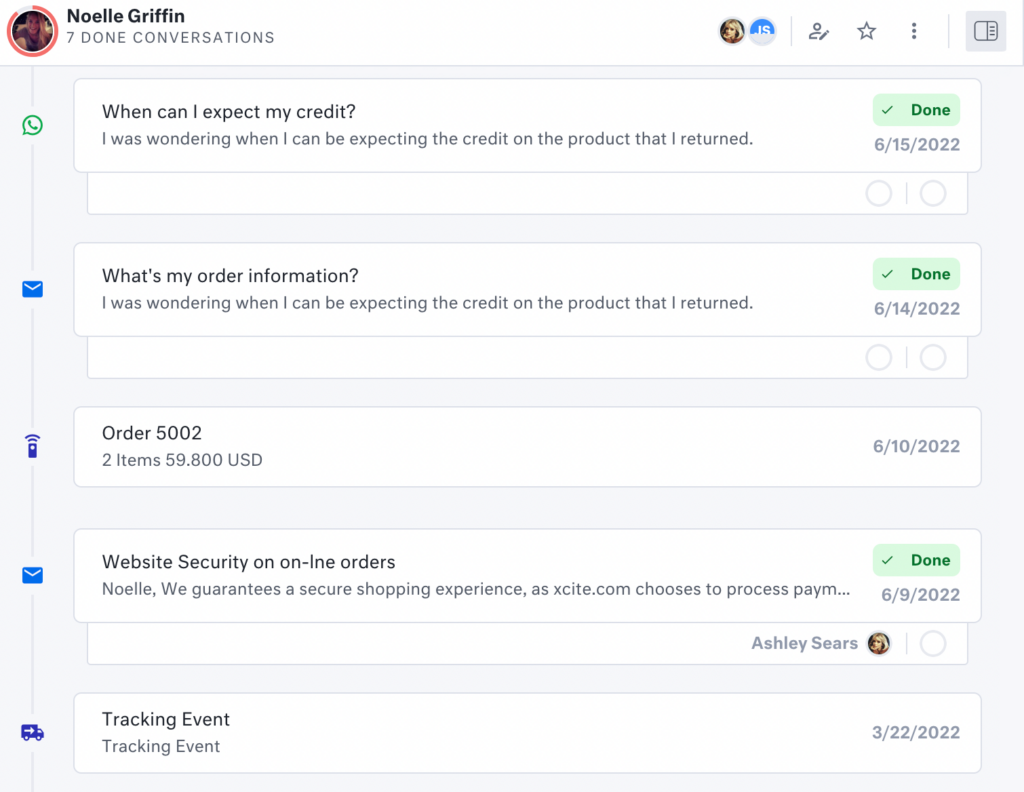
This is a chronological timeline combining every touchpoint (emails, chats, telephony logs, social media interactions) into one unified customer view.
Agents can see the full customer history when conversations start. For example, for e-commerce brands, the agents should see what the customer bought, when they last contacted you, how previous issues were resolved, and any commitments your team made.
| 🔖Note: A customer who emails Monday, chats Wednesday, and calls Friday about the same issue should appear as one continuous conversation. The workspace should connect these interactions automatically based on customer identity, and not require agents to manually link them. |
Integrated self-service visibility
When customers reach agents, they’ve often already tried to resolve issues themselves (e.g., reading help articles, or going through chatbot flows).
Without visibility into these attempts, agents start from scratch while customers repeat everything they’ve already done.
The workspace should show:
- which self-service paths customers took before escalating,
- what the chatbot attempted,
- which knowledge articles they read, and
- where self-service broke down.
This context prevents redundant troubleshooting and immediately shows agents where the actual resolution gap exists.
Smart notifications and priority alerts
Real-time signals that surface what agents need to pay attention to without overwhelming them with noise.
Quick examples include SLA countdowns, VIP or churn-risk indicators, escalation warnings, and compliance prompts.
Good notification systems are contextual and actionable. They should tell agents exactly what requires immediate attention and why.
Internal collaboration tools
Customer-facing conversations are only part of the work. Agents frequently need input from colleagues, approval from managers, or coordination with other departments.
The workspace should facilitate this internally without creating separate communication threads that fragment context.
| 🔖 Note: Look out for solutions that offer private notes visible only to teammates, internal comments, mentions, escalation workflows, and capability to loop in specialists. |
Knowledge integration
Help documentation, policy guides, FAQs, troubleshooting procedures, and internal resources should be searchable from within the workspace.
More importantly, relevant content should surface proactively based on what’s being discussed rather than requiring agents to initiate searches.
For example, when a customer asks about return windows, the relevant policy should appear automatically. This proactive knowledge delivery reduces resolution time and ensures agents provide consistent, accurate information.
Real-time AI assistance
Beyond static information retrieval, modern workspaces include AI that actively assists during conversations.
They can help in drafting response suggestions based on customer context, recommending next-best actions based on resolution patterns, detecting sentiment shifts, and summarizing long conversation histories so agents get context quickly.
| 🔖 Note: The AI should work within the workspace naturally, and provide relevant assistance at the right moments without interrupting conversation flow. |
9 Best Unified Agent Workspace Tools for 2026
1. Kustomer
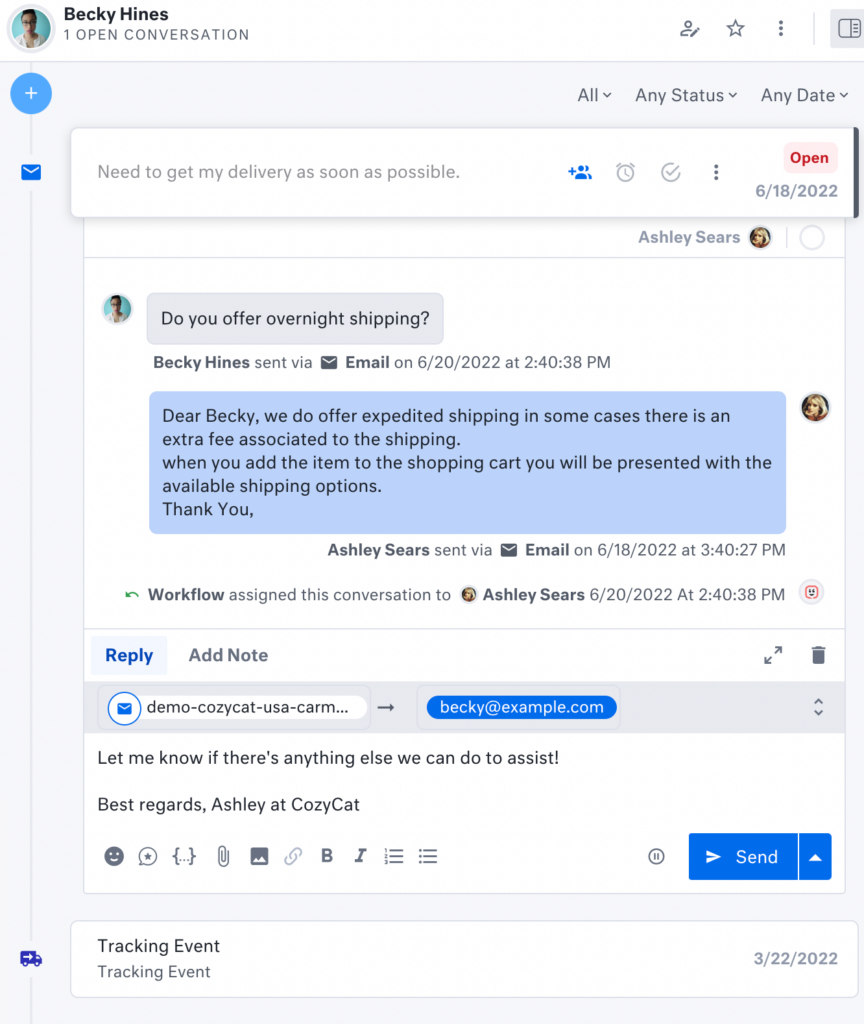
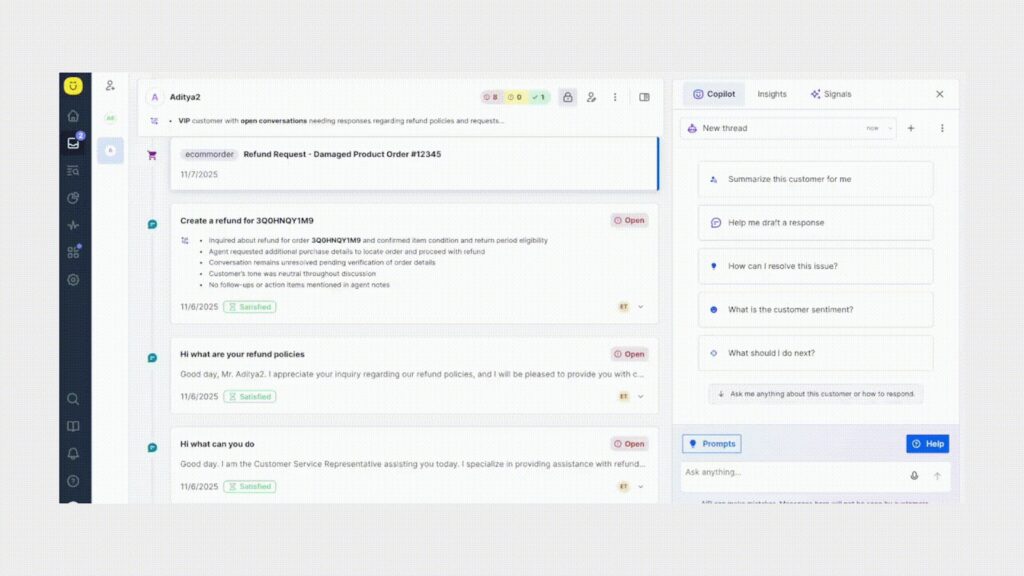
Kustomer’s unified agent workspace gives you the complete view of the customer’s journey from the initial point of contact.
The interface shows the active conversation alongside a chronological history that blends prior conversations, operational events, and internal activity into one continuous stream.
This means an agent can see that:
- The customer placed an order three days ago
- Contacted support via chat
- Received an automated response
- Triggered a return request
- Had a refund partially processed
All without leaving the workspace.
In addition, the execution layer is embedded within the same interface. If you’ve configured all integrations, agents can perform actions like issuing refunds, canceling subscriptions, or updating shipping information.
Plus, Kustomer’s workflow engine governs permissions, routing, and automation logic behind the scenes, but the agent doesn’t need to toggle into a separate tool to complete the task.
| 💡Quick tip: Kustomer allows teams to model custom objects inside the platform. For businesses that rely on subscriptions, multi-account hierarchies, or complex order structures, your agents can view and interact with those entities inside the workspace instead of referencing external admin dashboards. |
Key features of Kustomer’s unified agent workspace
Kustomer is moving from its static, chronological record into a dynamic, AI-interpreted experience. The goal is to guide agents towards making the right decision in every interaction.
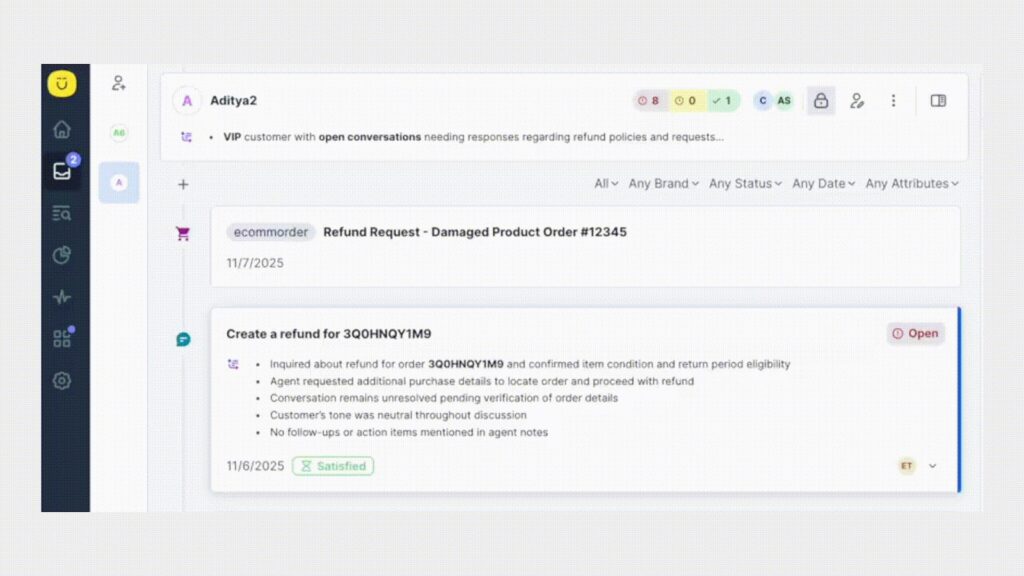
Summaries
When a rep opens a conversation, they should not have to scroll to understand the customer. AI-powered Summaries provide clear, scannable bullet points that instantly orient reps to what is relevant.
Copilot
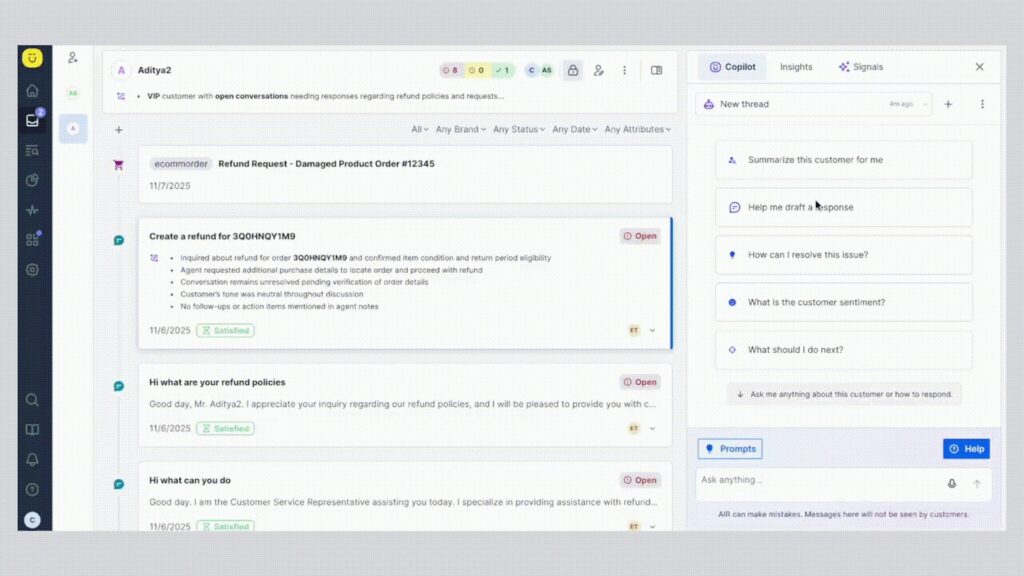
Copilot helps reps draft responses, optimize tone and clarity, suggest next steps, and execute actions directly within their workflow.
Signals
Signals add a real-time intelligence layer that constantly evaluates customer behavior, conversation history, and operational context to highlight what matters in the moment.
It detects sentiment changes, recurring issues, escalation risk, loyalty patterns, and early signs of churn—so teams can act before problems grow.

Why companies are switching to Kustomer
- “Kustomer’s search and custom attributes give us the ability to double click into emerging customer issues to diagnose patterns, and fix problems faster.” — Sarah Inbar, Director of Customer Support, Smalls [Read the Full Case Study]
- “Kustomer pulls all customer information on one timeline. We see a customer’s full history right there, without switching around. That’s been a game-changer for us.” — Taylor Johnson, Director of CX, Nathan James [Read the Full Case Study]
Kustomer Pricing
- Enterprise: $89 per seat/month.
- Ultimate: $139 per seat/month.
You also enjoy AI for customers ($0.60 per engaged conversation) and AI for reps ($40 per seat/month).
Thinking of making a switch?
Retain customers with seamless omnichannel service experiences.

Kustomer for your customers. See how it works →
2. Salesforce Service Cloud
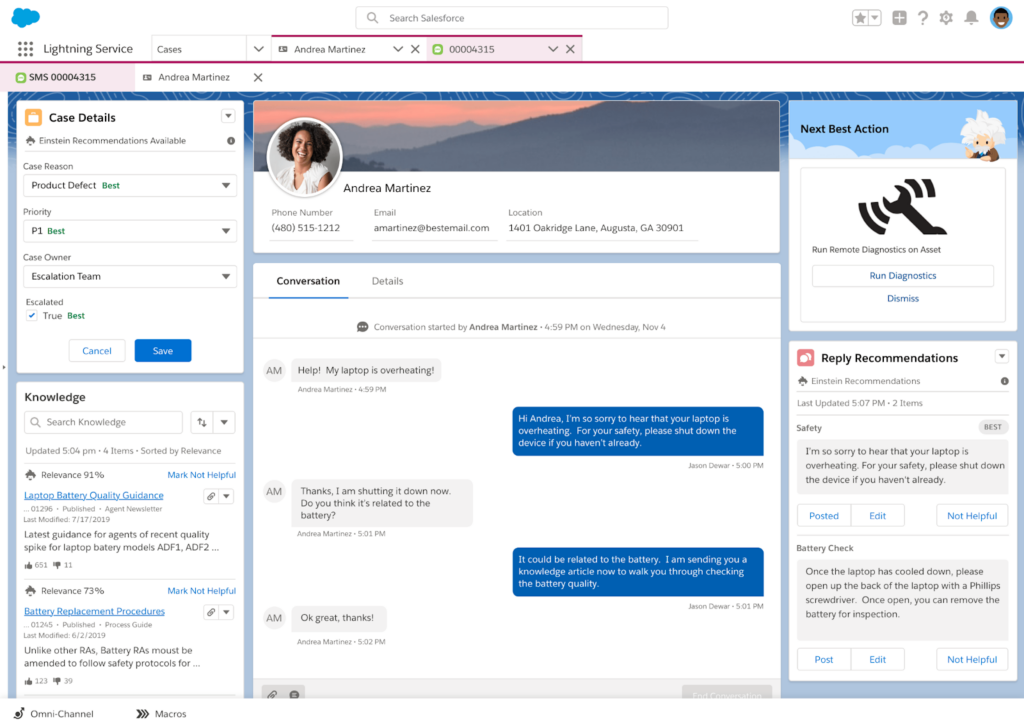
As an agent, when you open a case in Service Cloud, you enter what Salesforce calls the Service Console. This console is designed as a structured, multi-panel environment where the active case, customer record, related objects, and knowledge resources sit within the same screen.
While the ‘case’ is central, it’s still deeply tied to the Account, Contact, Entitlements, Assets, and any custom objects defined in the organization’s Salesforce instance.
This means agents can view conversation history, opportunity data, contract details, subscription entitlements, installed products, and prior cases in context.
Key features
- Lightning knowledge: Embeds searchable help articles directly in the console. Agents can surface relevant documentation without leaving the case view.
- Agentforce (formerly Einstein AI): Provides automated summaries, response suggestions, and next-best-action recommendations grounded in CRM data. It operates directly inside the console environment.
- Macros and quick text: Agents can execute predefined actions or insert standardized responses using Macros and Quick Text, streamlining repetitive tasks without switching tools.
User reviews on Salesforce Service Cloud
- “Some configurations, such as advanced automations, reporting, and integrations, can feel overly complex and take a lot of time to set up properly.” [*]
- “The flexibility to customize workflows and integrate with other tools also makes it a strong fit for growing support operations.” [*]
Pricing
- Starter suite: $25 per user/month.
- Pro suite: $100 per user/month.
- Enterprise: $175 per user/month.
- Unlimited: $350 per user/month.
- Agentforce 1 service: $550 per user/month.
Related → Top 10 Salesforce Service Cloud Alternatives for 2026
3. Zendesk
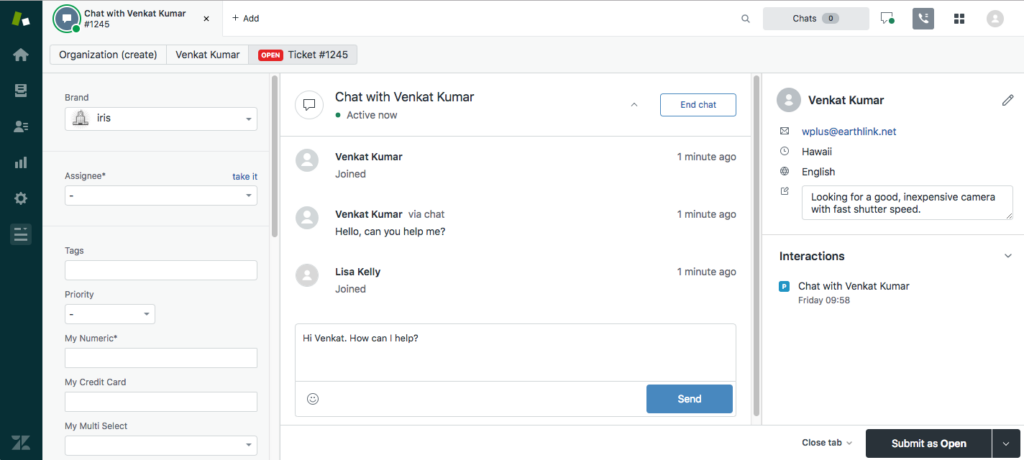
Zendesk is the platform most support teams have either used, evaluated, or migrated away from at some point. And that’s because it’s an all-in-one helpdesk solution for helping simple five-person startups to enterprise operations handling millions of interactions monthly.
The agent workspace reflects this range. It’s familiar enough that new agents become productive quickly. For example, conversations from different channels appear in one queue. When customers switch channels, context transfers with them.
On the side, you have panels displaying customer profile data, prior tickets, app integrations, and relevant help articles. The idea here is to reduce tab-switching by surfacing connected information alongside the conversation.
Key features
- Customer context panel: Sidebar displaying ticket history, customer details, account information, and previous interactions alongside active conversations.
- Omnichannel routing: Automated ticket distribution based on agent skills, availability, workload, and business rules.
- The routing handles priority escalations, VIP customer assignment, and overflow distribution during volume spikes.
- Side conversations: Internal threading that lets agents coordinate with other teams or external partners without exposing those exchanges to customers.
Learn more → Zendesk Features Mega Teardown: Advantages & Disadvantages
User reviews on Zendesk
- “Zendesk’s automation tools and AI features also help improve response times and reduce repetitive work, allowing agents to focus on what really matters — the customer experience.” [*]
- “At times, the admin settings can feel a bit complex or unintuitive, especially when setting up advanced workflows or automation rules.” [*]
Pricing
- Support team: $19 per agent/month.
- Suite team: $55 per agent/month.
- Suite professional: $115 per agent/month.
- Suite enterprise: $169 per agent/month.
Extra add-ons like the Copilot costs $50 per agent/month, and for Advanced AI capabilities, you’ll need to contact sales.
Recommended → Is Zendesk Worth It? Hmm... See The Pros & Cons
4. Freshdesk
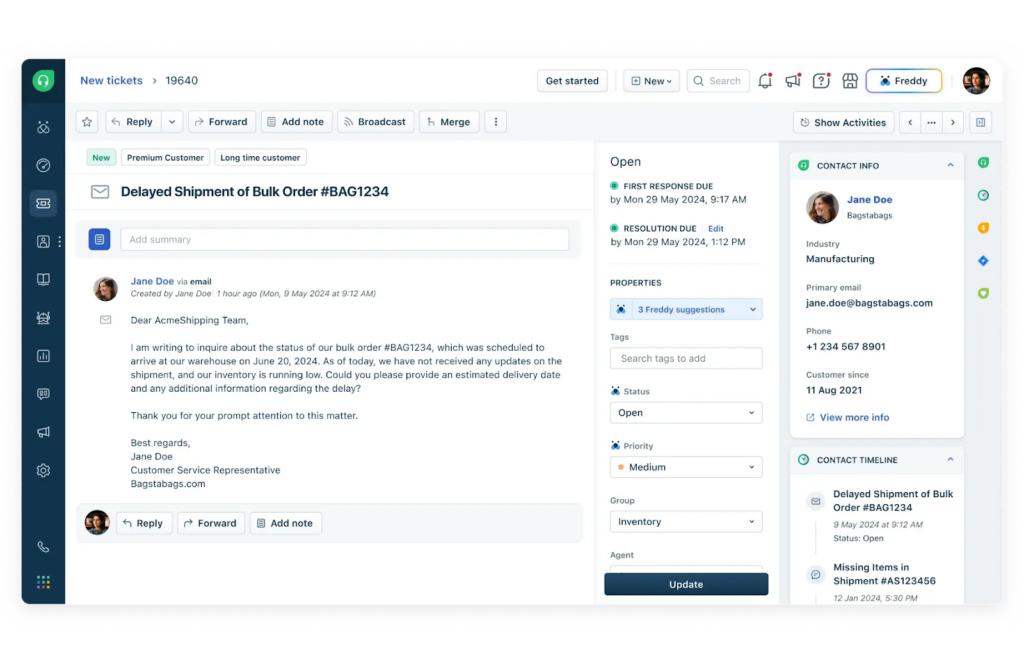
Freshdesk built its reputation on being the approachable alternative to enterprise help desk software. It’s easier to implement and offers a better price point for teams that can’t justify Zendesk or Salesforce budgets.
Agents using Freshdesk work inside a structured interface that brings email, chat, phone, and social messaging conversations into one threaded view.
Also, when your customers switch channels, they attach to the same ticket stream. This provides continuity across touchpoints, even though the system is still organized around tickets rather than customer timelines.
Key features
- Freddy AI assist: Real-time AI assistance suggesting responses, surfacing knowledge articles, and recommending next actions based on conversation content.
- Canned responses: Pre-written response templates accessible through shortcuts during conversations.
- Unified customer record: Pulls from Freshdesk’s CRM capabilities to surface relevant customer context automatically when conversations open.
User reviews on Freshdesk
- “The customizable dashboard and real-time analytics are outstanding - I can track ticket volumes, response times, and SLA compliance across multiple brands at a glance.” [*]
- “One limitation I’ve noticed is that Freshdesk doesn’t follow a traditional queue-based structure like some contact center systems, particularly when it comes to ticket intake and assignment.” [*]
Pricing
- Growth: $19 per agent/month.
- Pro: $55 per agent/month.
- Enterprise: $89 per agent/month.
Related → 17 Best Freshdesk Alternatives for 2026 (Based on Real Users)
5. ServiceNow
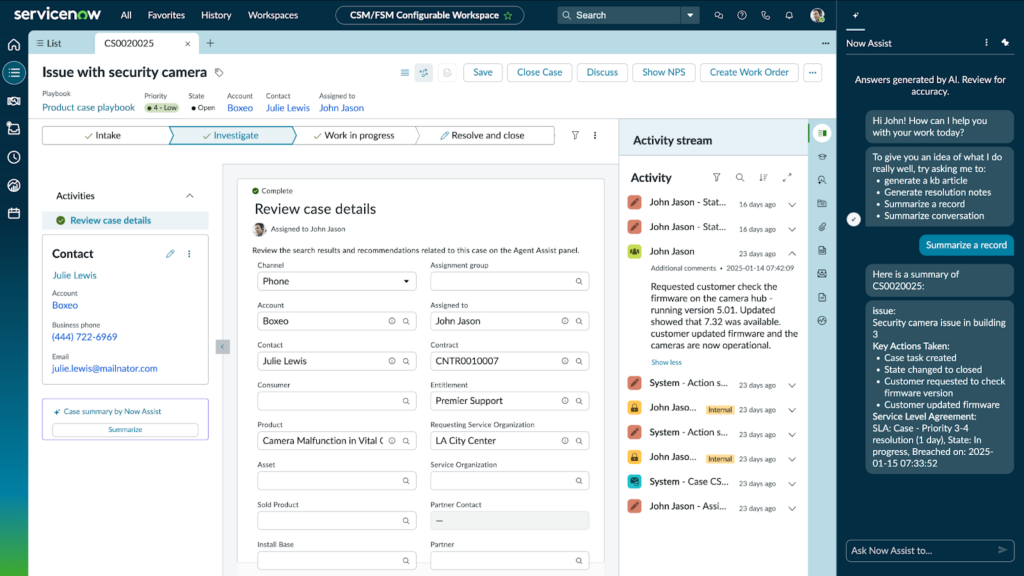
ServiceNow operates as part of a broader workflow platform where customer service, IT, operations, and other departments share a common data and process foundation.
Inside the platform, you have the Customer Service Management (CSM) that connects customer issues to internal operations. For example, a customer reporting a product defect triggers an engineering ticket. Same goes for a billing dispute triggering finance approval workflows.
And for the workspace, agents can see case details, customer records, related assets, service entitlements, and connected internal workflows in a configurable interface. When customer issues require backend coordination (e.g., field service dispatch) those workflows initiate directly from the agent workspace without leaving the platform
Key features
- Connected digital workflows: Automated multi-step processes that coordinate actions across departments, systems, and teams when case resolution requires cross-functional involvement.
- Predictive intelligence: Categorizes incoming cases, suggests assignment routes, and recommends resolution approaches based on historical case data.
- Knowledge management: Includes article versioning, approval workflows for content publishing, and feedback loops tracking which articles successfully resolve specific case types.
User reviews on ServiceNow
- “What I like most is that it’s very user-friendly and can be customised to fit our needs.” [*]
- “The learning curve can be steep for new users, especially when configuring advanced automation or reporting.” [*]
Pricing
- Please contact sales.
6. Gladly
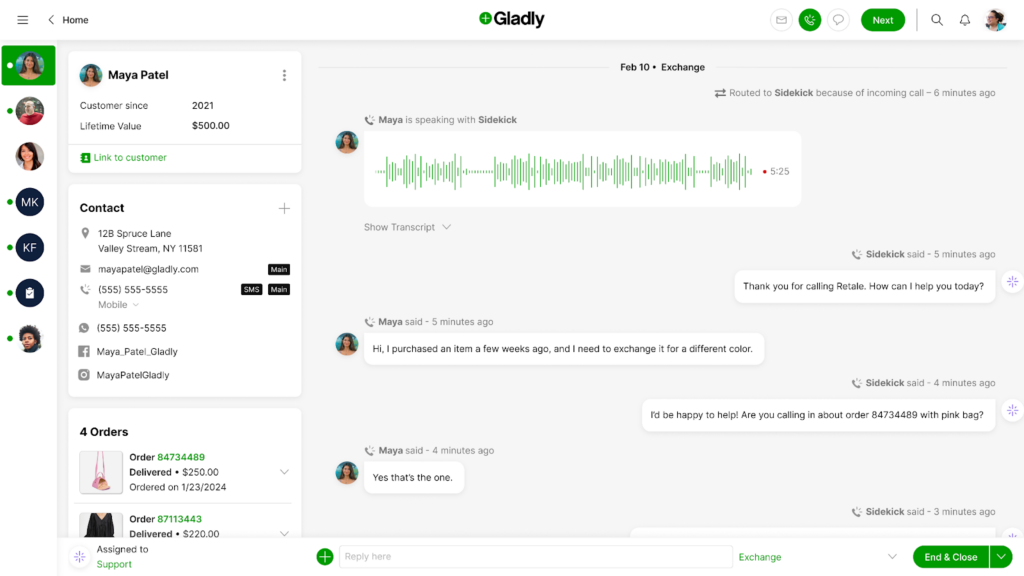
Gladly offers a different model that separates it from every other platform we’ve covered so far. The core focus is based on organizing everything around people instead of tickets.
When an agent opens a conversation in Gladly, they enter a Customer Profile view. This profile acts as the central workspace. So every time a customer contacts you, agents see a single ongoing conversation thread containing every interaction that person has ever had with your company—across all channels.
If a customer chats today, emails tomorrow, and calls next week, Gladly treats those interactions as part of the same history.
Key features
- People match: Intelligent assignment that prioritizes connecting customers with agents they’ve worked with successfully before.
- Follow-up tracking: Built-in task system for scheduling callbacks, monitoring promised resolutions, and tracking commitments made during conversations.
- Agent status: Keeps track of agents workday by allowing them to select a status that reflects what they are working on.
User reviews on Gladly
- “The knowledge base is also well-organized, allowing me to find the necessary information with just a few simple keyword searches.” [*]
- “I was disappointed that we didn't have an account manager and that the platform lacked a built-in CSAT solution.” [*]
Pricing
- Hero package: ~$180 per user/month.
- Superhero package: ~$210 per user/month.
Related → The Top 16 Gladly Alternatives & Competitors for 2026 (Updated)
7. Microsoft Dynamics 365
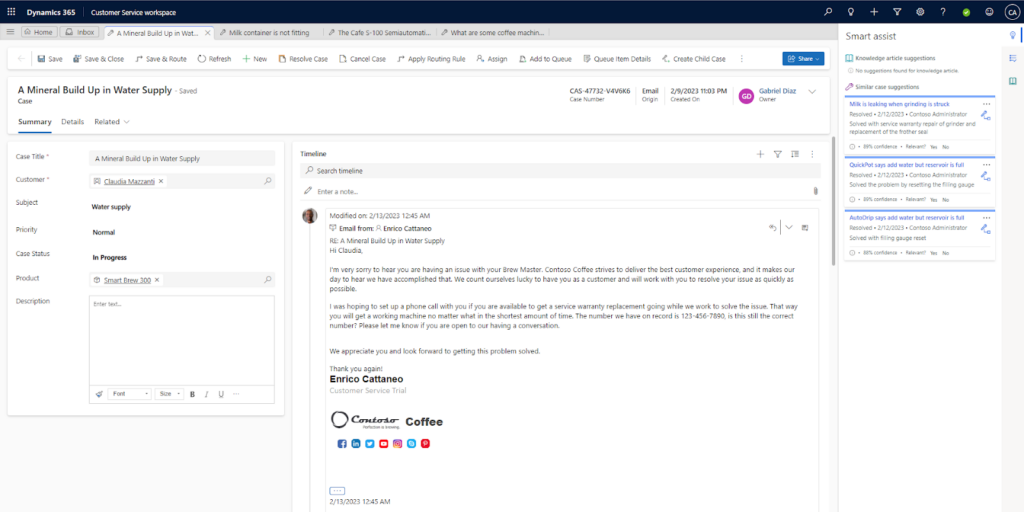
For organizations already operating inside the Microsoft ecosystem, Dynamics 365 Customer Service delivers a unified agent workspace that feels like a natural extension of tools teams use every day.
Customer cases are tightly connected to Microsoft Teams, Outlook, SharePoint, and Power Automate, so support work doesn’t live in isolation.
An agent can move from a case to a Teams conversation, reference an Outlook thread, trigger an automated workflow, or access documentation in SharePoint without breaking context.
Key features
- Copilot: AI assistance integrated throughout the workspace that drafts email responses, summarizes case histories, suggests knowledge articles, and recommends next actions based on case context.
- Embedded workflow automation: Agents can trigger case updates, escalate issues, and initiate automated processes directly from the workspace using Dynamics workflows.
- Account records: Cases are tied to structured customer entities such as accounts, contacts, entitlements, and service agreements, ensuring business context is visible during resolution.
User reviews on Microsoft Dynamics 365
- “Dynamics CRM is relatively easy to use and easy to set up with documentation from Microsoft Learn, and if you are stuck, Microsoft Support is easy to approach.” [*]
- “Sometimes, to do some advanced customisation, you need basic Javascript knowledge.” [*]
Pricing
- Professional: $50 per user/month.
- Enterprise: $105 per user/month.
- Premium: $195 per user/month.
Related → 11 Best AI-Powered CRM Solutions for 2026 [Real User Reviews]
8. Genesys Cloud CX
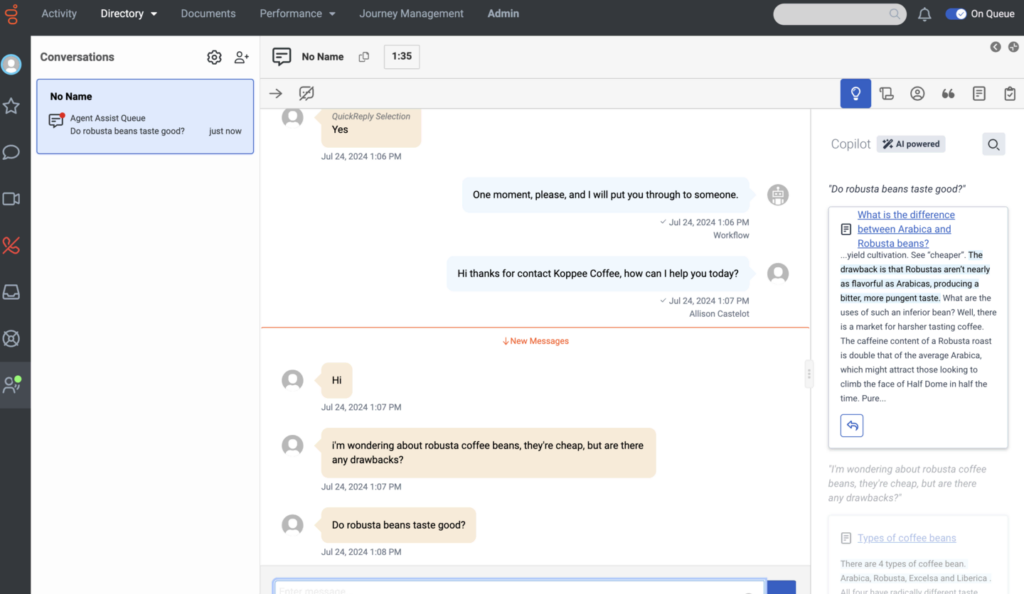
Genesys Cloud CX approaches the unified agent workspace from a contact center perspective. Everything on the platform supports live conversations, whether voice or digital.
If a customer moves from chat to voice or from messaging to a scheduled callback, those touchpoints can be tied together within a single customer record. Agents can access previous call transcripts, chat logs, and case notes directly in the workspace.
Also, because Genesys Cloud CX is built as a cloud-native contact center platform, real-time performance is core to the agent experience. Live transcription, call controls (mute, hold, transfer), queue visibility, and agent performance metrics are integrated into the same interface.
Key features
- Customer journey analytics: Live visibility into customer interaction patterns showing how people are contacting you, which self-service paths they attempted before escalating, and where they are in their overall journey.
- Quality management and coaching: Allows supervisors to evaluate interaction quality using configurable scorecards, provide feedback directly tied to specific conversations, and track coaching effectiveness over time.
- Predictive routing: AI-powered routing that matches customers with agents based on predicted issue complexity, customer value, agent performance on similar interaction types, and real-time availability.
User reviews on Genesys Cloud CX
- “It integrates real-time data and allows you to layer your own AI and automation without breaking agent workflows.” [*]
- “Too many options and settings for someone new, and not everything is intuitive.” [*]
Pricing
For named licence:
- Genesys Cloud CX 1: $75 per user/month.
- Genesys Cloud CX 2: $115 per user/month.
- Genesys Cloud CX 3: $155 per user/month.
- Genesys Cloud CX 4: $240 per user/month.
For concurrent licence:
- Genesys Cloud CX 1: $110 per user/month.
- Genesys Cloud CX 2: $170 per user/month.
- Genesys Cloud CX 3: $230 per user/month.
- Genesys Cloud CX 4: $360 per user/month.
9. HubSpot Service Hub
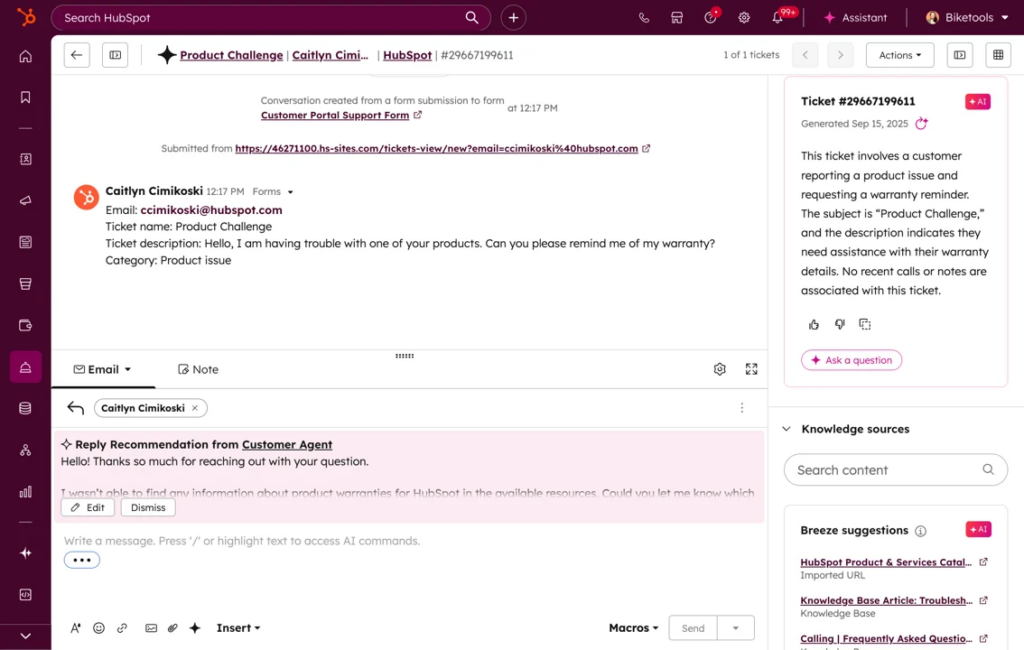
HubSpot Service Hub exists as one piece of HubSpot’s larger business platform encompassing marketing, sales, CRM, and operations.
Agents work primarily inside HubSpot’s ‘Help Desk’ workspace, where for every conversation that comes in, it attaches directly to a Contact record inside the HubSpot CRM.
The active conversation sits alongside the full contact profile. That profile can include marketing engagement history, sales activity, deals, company information, and prior service interactions. They can see how the customer has interacted with marketing, what deals are open, and what subscriptions or products are active.
Key features
- Shared inbox: Unified conversation queue handling email, live chat, WhatsApp & Facebook Messenger, and form submissions
- Customer feedback and surveys: Post-interaction satisfaction surveys and NPS measurement that automatically trigger after ticket resolution.
- Knowledge base: Self-service documentation built on HubSpot’s CMS with article management, search functionality, and customer feedback collection.
- The knowledge base integrates with the support inbox, letting agents insert article links into responses or use content to inform replies.
User reviews on HubSpot Service Hub
- “Some of the customization options feel more limited than I’d like, especially when trying to tailor views or build more advanced workflows.” [*]
- “The reporting dashboard gives a clear view of ticket volume, response time, and team performance, which helps improve customer service quality.” [*]
Pricing
- Starter: $15 per seat/month.
- Professional: $100 per seat/month.
- Enterprise: $150 per seat/month.
Related → 10 Best HubSpot Service Hub Alternatives to Consider in 2026
The Right Workspace Changes Everything
The workspace determines whether support feels manageable or overwhelming. Or whether agents stay for years or burn out in months.
When agents are forced to juggle systems, re-check customer data, and reconstruct context before they can act, the work becomes heavier than it needs to be. Even strong teams feel that drag over time.
Kustomer removes that drag by building a unified agent workspace, with the ability to execute actions without leaving conversations.
Kustomer removes that drag by building a unified workspace where customer intelligence, conversation history, and action execution exist in one place.
As one Director of CX puts it:
“Since integrating with Kustomer, we’ve actually been able to track our AOV for customer generated through our CX team. And every week, we’re increasing the AOV by a few percentage points. And it’s been great to see that grow alongside marketing efforts.”
And you can even do more with Kustomer:
- Execution is embedded: With proper integrations, refunds, subscription updates, and workflow triggers happen inside the workspace.
- Channel continuity is native: Email, chat, SMS, and social interactions attach to the same customer record, preventing fragmented cases.
- Automation operates on structured data: Routing, prioritization, and AI assistance (via Kustomer IQ) work on the full customer record.
- Collaboration stays connected: Internal notes and escalations remain tied to the customer timeline, preserving clarity during complex cases.
One customer. One timeline. One workspace.