Your agents are spending half their day answering "Where is my order?" while your customers are forced to repeat their issue every time they switch from chat to email.
This isn't just a sign of a busy support team; it's a symptom of using outdated tools in an environment of instant expectations.
This is where AI-powered customer service software comes in. It’s no longer just about basic chatbots that deflect tickets. Modern AI customer service solutions act as a copilot for your agents, summarizing complex issues in a click and suggesting on-brand replies. They automate the repetitive, manual work like routing and tagging, and provide intelligent self-service that actually solves problems.
But AI customer service is a broad term. Some AI solutions just offer a simple FAQ bot, while others use generative AI to transform your entire operation. To help you find the right fit, we’ve put together a list of the best AI customer service solutions available today.
What is AI Customer Service Software?
AI customer service software uses machine learning and generative AI to automate repetitive support tasks, empower agents with real-time assistance, and provide customers with fast, accurate self-service.
Instead of thinking of it as one single thing, it's more helpful to break AI's role in customer service into three main categories:
- Intelligent self-service: This is the artificial intelligence your customers interact with. It has evolved far beyond basic, rule-based chatbots. Modern AI agents use generative AI to understand customer intent, hold natural conversations, and even take action—like processing a return, updating an order, or booking an appointment—without needing a human.
- AI customer service agents (copilots): This is the AI that helps your human agents. It works in the background as a copilot to make their jobs easier and faster. Key features include real-time conversation summaries (so agents don't have to read long histories), AI-suggested replies (ensuring on-brand and accurate answers), and automatic knowledge base surfacing (so agents have the right info instantly).
Behind-the-scenes automation: This is the invisible AI that optimizes your whole workflow. It automatically analyzes and routes incoming conversations based on topic, urgency, or customer sentiment. It can auto-tag issues for better reporting and even perform quality assurance by scoring agent interactions.
Modern AI software handles the repetitive, manual work so your human agents can focus on the complex, high-value customer relationships that build loyalty.
Benefits of AI in Customer Service
AI in customer service has evolved from simple chatbots to a core operational tool. When implemented correctly, it moves beyond basic ticket deflection to drive tangible business results across your entire service operation. Here are the key benefits for CX leaders.
- Drives operational efficiency and lowers cost-to-serve. AI automates the high-volume, low-complexity tasks that consume agent time—like routing new cases, summarizing long conversation histories, and suggesting replies. This frees human agents from repetitive manual work, which directly lowers your Average Handle Time (AHT) and cost-per-contact.
- Delivers instant, 24/7 support and scales personalization. AI agents can resolve common customer queries instantly, at any time of day, and in multiple languages. By connecting to your CRM and e-commerce data, AI can provide a personalized, correct answer based on a customer's history, not just a generic link to an FAQ.
- Unlocks actionable, at-scale customer insights. AI can analyze 100% of your customer conversations in real-time. This uncovers trends, product pain points, and shifts in customer sentiment that would be impossible to find through manual spot-checking, giving you a clear, data-driven view of what your customers really think.
Top Features and Functionalities to Look for in AI Customer Service Tools
To make a practical assessment, it's best to categorize the features by their core business function. The key capabilities fall into three main areas: tools that automate customer-facing service, tools that assist your human agents, and tools that optimize backend operations.
Customer-Facing Self-Service
Conversational AI agents: Advanced, generative AI-powered bots that understand natural language and customer intent to hold human-like conversations, replacing rigid, rules-based chatbots.
Automated resolutions: The AI's ability to integrate with backend systems (like Shopify, Salesforce, or proprietary systems) to take action and resolve issues without human intervention, such as process a refund or check order status.
Conversational knowledge base: An AI-powered search for your help center that allows customers to ask questions in their own words and receive a synthesized answer, rather than just a list of article links.
Agent-Facing Assistance (Copilot)
AI-powered conversation summaries: Generative AI that instantly provides a concise summary of a long or complex customer conversation history, giving agents immediate context.
Agent assist tools: Real-time, contextual suggestions that pop up for agents during an interaction, including recommended responses, on-brand phrasing, or relevant knowledge base articles.
Real-time translation: The ability to automatically translate both incoming customer messages and outgoing agent replies across dozens of languages.
Operational and Workflow Automation
Intelligent triage and routing: AI that automatically analyzes and categorizes 100% of incoming messages based on their intent, topic, and sentiment, then routes them to the correct agent or department.
Automated quality assurance (Auto-QA): The ability to programmatically monitor and score all agent interactions against your company's specific quality and compliance standards, replacing the need for manual spot-checking.
Sentiment analysis: Real-time detection of customer emotion (e.g., frustration, urgency) that can be used to escalate high-risk conversations or provide feedback to agents.
Predictive analytics: AI models that analyze customer data to identify trends, forecast support volume, or predict which customers are at a high risk of churning, enabling proactive outreach.
Backend system integration: Deep, no-code API capabilities that allow the AI to connect to your other critical business systems (CRM, ERP, e-commerce) to pull data and execute actions.
15 Best AI Customer Service Platforms on the Market Today
The market is saturated with solutions claiming to be "AI-powered", but their actual strengths vary significantly.
The following list breaks down the 15 leading AI customer service platforms. We will review each based on its core AI functions—whether in customer-facing automation, agent-assist tools, or operational intelligence—to help you find the right solution for your business.
1. Kustomer
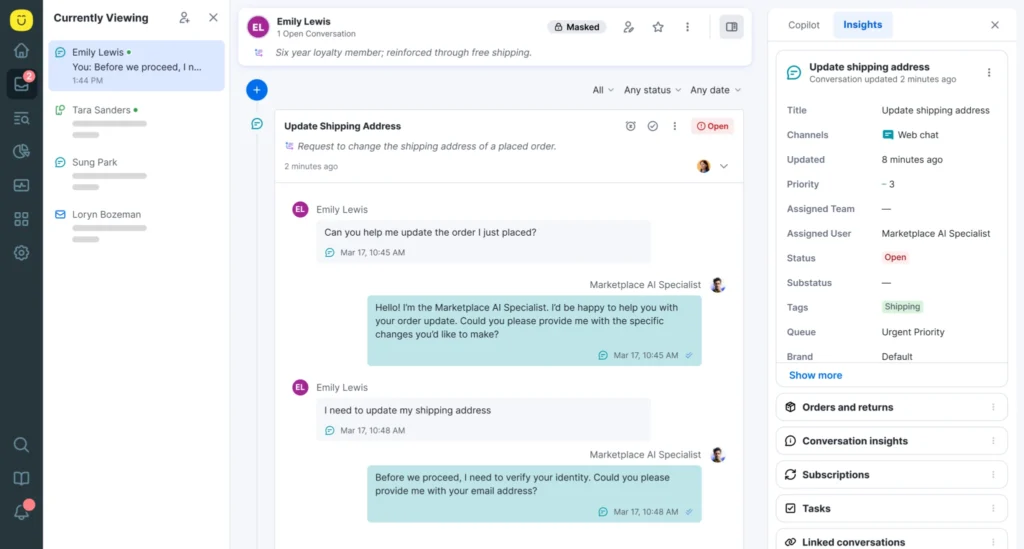
Kustomer is an all-in-one, AI-powered service platform that seamlessly combines a native CRM, ticketing, and AI into a single solution. Its core philosophy is to use rich, unified customer data from its CRM to fuel its AI, enabling more accurate and personalized automations. This "data + AI + humans" approach allows businesses to resolve issues with AI agents, assist human reps with a copilot, and optimize all workflows on one platform.
Top Features
AI agents for customers: This is Kustomer's generative AI for self-service. The agents are designed to resolve customer issues autonomously across all channels (email, chat, social, etc.) by connecting to backend systems to perform actions like checking an order status or processing a return.
AI agents for reps: This is the internal AI copilot that assists human agents. It handles repetitive tasks like summarizing conversations, suggesting on-brand replies, and intelligently triaging incoming issues based on customer intent and sentiment.
AI agent studio: A no-code interface that allows non-technical teams to build, train, and deploy custom AI agents. This lets managers create specific agents for different workflows (e.g., a "returns agent") without developer resources.
Unified CRM for AI context: Unlike tools that bolt AI onto a separate ticketing system, Kustomer's AI is built on its native CRM. This gives both AI and human agents a complete, single timeline of every customer's past interactions and transaction data for more personalized and accurate service.
Automated workflows and routing: The platform uses AI to automate backend processes. It can intelligently route conversations to the right team, trigger proactive service messages, and handle repetitive, multi-step tasks to improve overall team efficiency.
Why Companies Prefer Kustomer's AI Agents
“We always use Kustomer as it is really helpful for us agents as it is our way to leave internal notes for every interactions which can be seen as well by the next agent who will assist the customer.” — Jannice Gwen A. (Read full review)
“What I like best about Kustomer is the easy navigation of every conversation ticket, the side panel tools, plus the capability to use pre-made email macros for quick messaging to customers.” — Deseree S. (Read full review)
“Kustomer is customizable and the most user-friendly option we have seen, and we have tried them all. Plus, it is not overly expensive for everything that you get. They were with us every step of the way with implementation.” — Venessa P. (Read full review)
“I like that I can see my productivity, scores, and help customers in one go!”— Tancy John M. (Read full review)
“I like how Kustomer displays all of the Customer’s history and facts (chat, call, emails, and SMS), making it easier to deliver information to customers, and all of this in an easy and welcoming user-face experience with a really easy and adaptable interface.” — Job J. (Read full review)
What Real Customers Are Saying About the Value of Kustomer
- A single source of truth for all customer interactions. Kustomer ends the frustration of siloed systems by unifying every customer interaction and e-commerce datum from Shopify, email, chat, and social media into one single timeline. [Read Full Case Study]
“Kustomer pulls all customer information on one timeline. We see a customer’s full history right there, without switching around. That’s been a game-changer for us.”
— Taylor Johnson, Director of CX, Nathan James
- Drastic improvements in operational efficiency and cost-to-serve. Jerome's Furniture moved beyond a simple ticketing system by converting 8,000 weekly interactions into a streamlined "Task" workflow, cutting their cost per contact by 40% and increasing agent output. [Read Full Case Study]
“Kustomer allowed us to achieve the best possible outcome: maintaining a lean, cost-effective team while significantly improving customer satisfaction. We reduced our cost per contact by 40% and improved our NPS to be two times higher than the industry average.”
— Marjorie Carlos, Sr. Dir. of Consumer Experience, Jerome's Furniture
- A scalable, central hub that aligns the entire business. As a fast-growing company, Kin consolidated 13 separate tools into Kustomer. This created a unified platform for all teams—from sales to support to claims—providing full visibility and aligning the entire organization. [Read Full Case Study]
“Everyone in thecom, including the claims team, now uses Kustomer… Kustomer has changed how Kin operates, aligns with customers, manages schedules, and makes decisions.”
— Eli Gratz, VP of Growth, Kin
2. Zendesk AI
Zendesk AI is an AI-powered solution integrated within Zendesk’s customer service platform. It automates routine customer service tasks, assists agents with real-time recommendations, and enhances self-service capabilities for customers.
The platform also streamlines support operations by routing tickets, analyzing intent, and offering valuable insights that help agents resolve issues more effectively.
For example, Zendesk AI can predict and track customer satisfaction, allowing support teams to proactively manage interactions and improve customer experiences.
Additionally, Zendesk AI supports various use cases, including ticket classification, chatbot automation, proactive customer service, and predictive analytics, ensuring that customers receive fast and accurate responses.
Top Features
Answer Bot. Integrated with Zendesk’s knowledge base, Answer Bot automates responses to frequently asked questions and guides customers toward self-service solutions.
Auto-Suggestions for Knowledge Base. Zendesk AI identifies gaps in the knowledge base by analyzing customer queries that aren’t adequately addressed by existing articles.
Flow Builder. Allows companies to design automated conversational flows for bots without requiring coding expertise.
Automated Ticket Tagging. Automatically categorizes and tags incoming tickets based on their content, helping teams organize, prioritize, and route cases more efficiently.
Macros. Recommends macros (predefined responses) based on ticket type and context, enabling agents to quickly respond to common issues with a click.
What Do Users Like About Zendesk AI?
Customization and Flexibility. Users appreciate the platform’s ability to handle various intents, flows, and conditions, allowing for tailored responses to customer needs [*].
Ease of Use. Users find the interface user-friendly and appreciate the flexibility it offers, making it accessible to a broad range of users, regardless of their technical expertise [*].
Integration Capabilities. The tool integrates smoothly with various platforms, even those that are less commonly supported [*].
What Do Users Dislike About Zendesk AI?
Poor Documentation. Some users find the documentation in the ‘Help Center’ lacking, which can pose challenges for less technically adept users [*].
Technical Restrictions and Bugs. The platform sometimes experiences responsiveness issues and bugs, particularly in the Dialogue Builder. Users also face restrictions in workflow design, such as not being able to chain API calls directly without inserting conditional or message blocks in between [*].
Localization Challenges. There are difficulties in managing multilingual content, especially when translating intents. Users have also noted that links within replies do not automatically update to the new language during translation, which can complicate the process and reduce efficiency [*].
Zendesk AI Pricing
Zendesk pricing is complex and custom. Contact them for more information on the plan and add-ons that suit your needs.
3. Freshdesk AI
Freshdesk AI, known as ‘Freddy AI,’ is an advanced virtual agent designed to streamline customer support operations by automating repetitive tasks.
In addition to handling routine inquiries like answering FAQs, processing common service requests, and directing customers to relevant knowledge base articles, Freddy AI can proactively engage with users, offering personalized recommendations and predictive insights.
It is particularly effective for companies looking to handle large volumes of support requests, enhance scalability, and improve customer satisfaction without increasing agent workloads.
Freddy AI also integrates with various channels, enabling omnichannel support across chat, email, and social media platforms.
Learn more: 17 Best Freshdesk Alternatives Heading Into 2025
Top Features
Freddy Self-Service. Uses natural language understanding (NLU) to guide users through the support process, offering knowledge base articles or FAQs that address their concerns.
Freddy Insights. Provides support agents with contextual information about the customer, their previous interactions, and the nature of the issue. It also suggests relevant solutions or knowledge base articles, allowing agents to offer accurate responses quickly.
Freddy Chatbots. Freshdesk allows businesses to deploy AI-powered chatbots to handle customer inquiries across chat and messaging platforms.
Auto-Triage. Tags and categorizes tickets automatically based on content. The system recognizes patterns from previous tickets and applies appropriate tags or categories to new incoming tickets, saving agents the time and effort of manual classification.
Freddy Smart Suggestions. Provides agents with real-time response suggestions based on past interactions and similar queries. The system learns from successful customer support responses and uses that data to suggest effective solutions for current tickets.
What Do Users Like About Freshdesk AI?
Comprehensive Support. Users highlight Freshdesk’s reliability —especially their 24/7 support team for their expertise and responsiveness, adding significant value to the user experience [*].
Effective Workload Distribution. Features like ‘Omniroute’ help distribute customer support workloads efficiently, improving overall service delivery [*].
Automation Flexibility. Freshdesk offers strong automation capabilities, particularly with Freddy Copilot, which handles repetitive tasks efficiently. This allows customer service teams to focus on more complex issues, improving both productivity and customer satisfaction [*].
What Do Users Dislike About Freshdesk AI?
Restrictions in Data Accessibility. There are frustrations related to accessing comprehensive data, particularly with limitations on downloading detailed interaction reports, which can hinder in-depth analysis and decision-making [*].
Complexity in Reporting and Data Retrieval. The recent changes to the reporting system have made it difficult for users to obtain essential data easily, with some finding the new analytics features overly complex and less user-friendly than previous versions [*].
Complex Setup for Advanced Automation. Setting up advanced automation rules and workflows can be complex and time-consuming, particularly for teams without technical expertise [*].
Freshdesk AI Pricing
This pricing is for Freshdesk Omni, which covers the Freddy AI.
Growth. $29 per agent/month.
Pro. $69 per agent/month.
Enterprise. $109 per agent/month.
4. Intercom Fin
Fin is Intercom’s customer service tool designed to streamline customer interactions through automation, real-time assistance, and self-service options.
The platform leverages AI technology on two of its core features: Fin AI agent for supporting customers — and Fin AI copilot for supporting customer service agents. Both solutions integrate seamlessly with Intercom’s existing platform, enhancing live chat, messaging, and customer support workflows.
Intercom also recently upgraded the Fin AI agent to Fin 2 — which boasts of resolving up to 82% of support volume with human-quality, personalized, conversational answers.
For example, it can resolve complex questions like explaining what’s included in a customer’s pricing plan, updating them on their order status, or changing a booking on their behalf.
Top Features
Fin AI Bot. Conversational bot that automates responses to common customer questions and offers solutions based on a business’s knowledge base.
Human Handoff. Analyzes the content of incoming messages, determines the nature of the request and assigns it to the right team or agent.
Workflow Automation. Allows businesses to set up customizable workflows and templates that automate various support tasks, such as ticket creation, assignment, and follow-up.
Multilingual Support. Can automatically detect and resolve issues in more than 45 languages.
Inbox Automation. Reduces the manual effort needed to process incoming tickets. Fin automatically organizes and categorizes tickets, assigns them to the appropriate agents, and sets priorities based on keywords, customer sentiment, and past interactions.
What Do Users Like About Intercom Fin?
Cost-Effective Solutions for Startups. The platform offers significant cost savings through programs like the ‘Intercom Startup Program’, which is particularly beneficial for early-stage companies looking to enhance their customer support without a substantial initial investment [*].
Reliable Communication Tool. The platform makes it easy to manage multiple conversations and integrate multimedia seamlessly into chats. This functionality improves the overall efficiency of communication processes [*].
User-Friendly Design. With comprehensive help articles and guides readily at hand, users can get up to speed quickly, ensuring a smooth experience right from the start [*].
What Do Users Dislike About Intercom Fin?
Limitations in Email Support. Issues such as the lack of email threading can complicate customer service processes, making management of email support more challenging and less efficient [*].
Variable Support Response Times. While generally positive, some users experience slower response times from Intercom’s support team, which can be a source of frustration, especially when urgent issues arise [*].
Search Functionality Issues. The search function within the platform sometimes lacks precision, particularly in sorting conversations by date, which can hinder the ability to quickly locate specific interactions [*].
Intercom Fin Pricing
Offers a 14-day free trial, but for more information, please contact Intercom.
5. HelpScout
HelpScout is a customer service and support platform designed for businesses to manage customer interactions with ease.
It offers a unified inbox that allows teams to collaborate on customer queries, streamline responses, and provide personalized support. Unlike traditional ticketing systems, HelpScout emphasizes human-centered support, making customer interactions feel more like natural conversations.
It also integrates with knowledge bases, customer data, and workflows, allowing teams to be more productive without sacrificing the quality of service.
HelpScout’s focus is on creating a seamless customer support experience by combining the simplicity of email with powerful collaboration tools.
Top Features
Beacon. Combines live chat, self-service, and messaging into a single widget that can be embedded on websites. The widget can be customized to fit a company’s brand and integrates directly with HelpScout’s support workflows.
Shared Inbox. Allows support agents to view, assign, or respond to customer queries. Conversations are tracked in a way that provides full context, helping agents pick up from where another left off without any confusion.
Docs. Enables teams to draft and publish helpful articles that customers can access directly through Beacon or other channels.
Collision Detection. Notifies agents when another team member is viewing or responding to a customer conversation.
Customer Profiles and Data. Generates customer profiles based on their past interactions, providing agents with valuable context when responding to new queries. Profiles include data such as previous conversations, purchase history, and other customer-specific details.
What Do Users Like About HelpScout?
Effective Knowledge Base and Live Chat Features. HelpScout is effective in setting up knowledge bases and live chat options for clients, enhancing self-service support capabilities [*].
- Quick Query Resolution. The live chat option significantly reduces the turnaround time for client queries, enhancing the efficiency of customer service operations [*].
Enhanced Functionality for Docs. HelpScout offers functionalities like callouts, video embedding, and image insertion to improve documentation and ticket management processes [*].
What Do Users Dislike About HelpScout?
Workflow Management Issues. The platform's workflow settings can be tricky, with minor toggles potentially triggering unintended mass email responses [*].
Restrictions in Data Handling. Limitations in exporting data, such as the inability to download CSV files after applying email tags, can hinder effective data management [*].
Challenges with Document Formatting. Users find formatting documents within HelpScout to be frustrating at times, particularly with spacing, numbering, and aligning content [*].
HelpScout Pricing
Standard. Starts from $75 per month for 100 contacts.
Plus. $Starts from $200 per month for 100 contacts.
Pro. Starts from $850 per month for 100 contacts.
6. Tidio
Tidio is an all-in-one live chat, chatbot, and customer messaging platform designed for businesses to engage with their customers in real-time.
It provides businesses with tools to manage customer support, sales, and communication across multiple channels, including live chat, chatbots, email, and even Facebook Messenger.
With Tidio, businesses can set up and deploy chatbots quickly without any coding experience. It also integrates seamlessly with a range of e-commerce platforms such as Shopify and WordPress, making it a popular choice for online stores looking to improve customer engagement and automate customer service workflows.
Top Features
AI Chatbots. Handles customer queries automatically, helping businesses offer instant responses to frequently asked questions or provide customer assistance during non-business hours.
Automated Chat Flows. Features a drag-and-drop interface that enable businesses to automate conversations based on predefined triggers or conditions. For example, a chat flow can be set up to offer discounts to returning visitors or direct them to specific products.
Email Integration. Enables businesses to manage email conversations alongside live chat and chatbot interactions within a single dashboard.
Visitor Insights and Tracking. Gives agents real-time insights into who is visiting their website, how they interact with it, and what pages they are viewing.
Proactive Chat Invitations. Businesses can set up proactive chat invitations that automatically engage website visitors. These invitations can be triggered based on user behavior, such as time spent on a page or certain actions (e.g., visiting a product page), offering assistance before the customer even asks for help.
What Do Users Like About Tidio?
- Value for Small Businesses. Tidio provides robust features that are budget-friendly, making it an excellent tool for small businesses looking to improve customer service and operational efficiency [*].
- Automation and Support. Tidio’s automation features are easy to set up and effective, particularly in customer engagement. Users have reported successful outcomes with the chatbot in driving deals and seamless integration with other platforms [*]
- Effective Sales Tool. The mobile app is particularly liked for enabling real-time customer interactions, which have directly contributed to increased sales [*].
What Do Users Dislike About Tidio?
- Connectivity Issues. Users have encountered connectivity issues that disrupt the chat service [*].
- Limited Customization. While Tidio offers customization, some users find these options limited for specific needs [*].
- Steep Learning Curve. Setting up the chatbot can initially be challenging for some users, although it becomes easier with familiarity [*].
Tidio Pricing
- Starter. Starts from $29 per month for 100 conversations.
- Growth. Starts from $59 per month for 100 conversations.
- Plus. Starts from $749 per month for 100 conversations.
- Premium. Starts from $2999 per month for 100 conversations.
7. HappyFox Assist AI
Assist AI is an advanced support tool integrated into the HappyFox help desk platform, designed to enhance support teams’ productivity by automating routine tasks and delivering intelligent assistance.
It empowers agents by providing contextual suggestions, automating ticket resolutions, and offering self-service solutions directly to customers.
Assist AI can interpret and respond to common inquiries, escalate complex issues when necessary, and provide real-time insights based on historical support data.
The platform’s deep integration with internal knowledge bases and ticketing systems ensures that employees and customers receive accurate and helpful responses, enhancing efficiency while improving satisfaction.
Top Features
Automated Ticket Creation. When a user submits a query that requires IT support or customer service intervention, Assist AI intelligently processes the request and creates a support ticket without requiring manual input from agents.
Integration with Slack and Microsoft Teams. Employees can request support or access information directly from these platforms, reducing friction by eliminating the need to switch between multiple applications.
Intelligent Ticket Assignment. When Assist AI encounters issues that require human intervention, it intelligently assigns tickets to the appropriate team based on the nature of the issue and the expertise required.
Self-Service Capabilities. Empowers users to resolve common IT and customer support issues independently through its self-service capabilities. For example, troubleshooting and resolving problems like resetting passwords or accessing applications.
Ticket Summarization. Generates concise summaries of lengthy conversations, helping agents quickly grasp the context of each ticket.
Advanced Analytics and Reporting. Businesses can track performance metrics like the number of tickets resolved by AI, response times, and user satisfaction, enabling them to optimize workflows and improve the overall support experience.
What Do Users Like About HappyFox Assist AI?
Ease of Setup. Users appreciate how straightforward it is to set up and customize HappyFox, particularly its knowledge base [*].
User-Friendly Interface. The organization and simplicity of the app align with industry standards, making it easy for customer service personnel to adopt and use daily. The customization options add value, providing a comprehensive tool that caters to all tiers of customer service [*].
Collaboration and Tracking. HappyFox facilitates effective communication across various teams, allowing for efficient issue resolution. Its tracking capabilities ensure transparency and ease in monitoring the progress of each ticket [*].
What Do Users Dislike About HappyFox Assist AI?
Web-Based Limitations. The web-based nature of HappyFox does not always provide a seamless experience, particularly when transitioning from other systems like GSuite [*].
- Cost Concerns. The cost of HappyFox can be a barrier for extending its use to more team members or smaller organizations [*].
- Limited Functionality Without Add-Ons. Basic plans have restricted features, particularly concerning smart rules and custom fields. While more advanced functionalities are available through add-ons, this requires additional investment [*].
HappyFox Assist AI Pricing
HappyFox’s help desk solution offers general pricing tiers.
Agent-based Pricing.
- Basic. $9 per agent/month.
- Team. $49 per agent/month.
- Pro. $99 per agent/month.
- Enterprise PRO. Contact sales.
Meanwhile, this doesn’t include the AI feature as this comes at an extra cost.
Assist AI:
Free. $0
Pro. $1 per user/month.
Enterprise. $2 per user/month.
8. Salesloft (formerly Drift)
Following its acquisition by Salesloft, Drift's powerful conversational AI is now a core part of the wider Salesloft Revenue Orchestration Platform. While still a leader in engaging website visitors, its primary focus has shifted from a standalone chat tool to an integrated engine for identifying and accelerating B2B pipeline.
The platform's AI agents engage with buyers in real time, understand their intent, and automatically route high-intent leads directly to the right salesperson or into an automated nurture flow. This integration of chat, sales engagement, and AI-driven insights allows revenue teams to act on buyer signals instantly.
Top Features
- AI-powered Conversational Agents: Engages website visitors with natural, human-like chat, understands complex questions, and qualifies leads autonomously 24/7.
- Intelligent Meeting Scheduler: The AI identifies high-intent visitors and automatically books meetings for the correct sales reps, right in the chat window, removing all friction from the handoff.
- Real-time Personalization: Uses intent data from Salesloft and your CRM to recognize returning visitors or target accounts, tailoring the conversation and experience to their specific needs and stage in the buyer's journey.
- Real-time Buyer Signal Routing: Instantly identifies if a visitor is an in-market buyer and connects them to a live sales rep, bypassing traditional forms and wait times.
- AI-powered Conversation Summaries: Just like in its call-coaching tools, Salesloft's AI can summarize chat interactions, providing context for sales reps and helping managers spot trends.
What Do Users Like About Salesloft?
Integration and CRM Linking. Drift’s integration with CRMs and the quick access to essential customer background information streamline the sales process, making interactions more informed and efficient [*].
Meeting Scheduling Flexibility. The platform allows leads to schedule meetings directly, with customizable settings for meeting times and buffer periods [*].
Conversational Engagement. Users love the conversational interface of Drift, particularly its effectiveness in capturing inbound leads and facilitating easy navigation for sales reps to schedule meetings and pre-qualify leads [*].
What Do Users Dislike About Salesloft?
Routing Logic. Some users find the routing logic for meetings to be insufficient, particularly in larger enterprises where leads may be assigned to the wrong sales representative [*].
Scheduling Issues. Despite setting working hours, some users encounter scheduling errors that allow leads to book meetings outside of designated times [*].
Glitchy Interface. Users have reported occasional glitches in the prospector dashboard, particularly with expanded view pop-ups not loading properly, which can disrupt the customer service experience and reduce efficiency [*].
Salesloft Pricing
Contact Salesloft for more information.
9. HubSpot Service Hub
HubSpot Service Hub is a customer service software platform designed to help businesses deliver exceptional customer support while enhancing overall customer experience.
Built as part of HubSpot’s CRM ecosystem, Service Hub integrates seamlessly with HubSpot’s marketing, sales, and CRM tools, allowing businesses to provide a unified, end-to-end customer journey. The platform focuses on improving customer retention and satisfaction through features like ticket management, knowledge bases, live chat, and feedback collection.
Service Hub also centralizes customer communications, offering teams a complete view of customer interactions. It automates repetitive tasks, routes tickets intelligently, and provides self-service options, allowing support teams to focus on high-value interactions while ensuring fast and accurate resolutions for common queries.
Top Features
Knowledge Base. Enables support teams to create and manage help articles, FAQs, and guides, which customers can access directly. The platform also offers insights into the most viewed articles, helping businesses identify gaps in their support content and improve self-service capabilities.
Customer Feedback Tools. Includes tools for collecting customer feedback through CSAT (Customer Satisfaction) surveys, NPS (Net Promoter Score) surveys, and custom surveys.
Customer Portal. Allows customers to log in to view the status of their tickets, access previous conversations, and track the resolution process.
Help Desk Reporting and Analytics. Users can track metrics like ticket response times, resolution rates, and customer satisfaction scores, all of which are presented in customizable dashboards. These insights allow managers to optimize workflows and improve the overall efficiency of their service operations.
Service Level Agreement (SLA) Management. Ensures that tickets are handled within the agreed-upon timeframes, improving accountability and customer satisfaction. SLAs can be customized based on ticket priority, type, or customer segment, ensuring that high-priority issues are resolved quickly.
What Do Users Like About HubSpot Service Hub?
Visibility and Integration. HubSpot provides excellent visibility into team activities, which facilitates better management and follow-up on sales and customer interactions[ *].
Effective Reporting. The extensive data reporting capabilities allow for deep insights into customer interactions and support effectiveness [*].
Comprehensive Features. The integration of various features such as Knowledge Hub, CRM, and proposal tools within HubSpot makes it a useful platform that supports a wide range of customer relationship management activities [*]
What Do Users Dislike About HubSpot Service Hub?
Access Limitations. Some features, like the knowledge base, are restricted to higher pricing tiers, which can limit smaller businesses from accessing potentially valuable tools [*].
Limited Customization Options. HubSpot’s lack of customization, particularly in areas like surveys, has been noted as a drawback [*].
Frequent Upgrade Requirements. Users find it frustrating that certain useful features, such as bulk cleanup of duplicates, require upgrades, even when they are already on a paid version [*].
HubSpot Service Hub Pricing
HubSpot Service Hub has flexible pricing to fit your needs. Start with a free plan or upgrade to a paid plan for as low as $20 per user per month to access more advanced features.
10. Custify
Custify is a customer success platform that helps businesses manage customer relationships, reduce churn, and improve customer lifetime value.
It provides customer success teams with the tools they need to manage customer relationships more effectively by tracking customer behavior, engagement, and health scores in real time.
Custify's platform automates many of the manual processes involved in customer success, such as onboarding, health checks, and renewals, allowing teams to focus on high-value interactions that improve retention and growth.
The platform also integrates CRM systems, billing platforms, and product usage data, providing a 360-degree view of each customer, enabling proactive outreach and personalized engagement.
Top Features
Customer Health Scoring. Uses multiple data points to calculate a customer’s health score. This includes product usage, engagement levels, support interactions, and subscription history.
Task Management and Automation. Automates task creation and management for CSMs by identifying when customer interactions are needed based on predefined criteria. For example, the system can create tasks for CSMs to reach out when a customer’s usage drops below a certain threshold, when renewal dates are approaching, or when a health score declines.
Revenue Expansion Opportunities. Provides insights into upsell and cross-sell opportunities by analyzing customer data and engagement patterns.
Churn Alerts and Notifications. Notifies customer success teams when a customer’s behavior indicates they may be at risk of leaving. These alerts are triggered by changes in key health indicators, such as reduced product usage, negative feedback, or support issues.
Product Usage Tracking. Captures data on user activity, such as how often they log in, which features they use, and how engaged they are with the product over time.
What Do Users Like About Custify?
Efficient Workload Management. Users appreciate Custify’s playbooks and health scores for their flexibility and detailed insights, which greatly enhance workload efficiency and process management [*].
Robust Reporting Capabilities. The platform’s strong reporting features, particularly in customer interaction and churn metrics, allow for clear, actionable insights that help in strategic decision-making and operational efficiency [*].
Detailed Customer Health Assessment. Custify’s structured data presentation and ability to drill down into specifics make it invaluable for assessing global customer health and individual customer details [*].
What Do Users Dislike About Custify?
Slow Metric Processing. Users note a delay in processing times for metrics and health scores when new data is added [*].
Email Delivery Delays. There are concerns about the timeliness of email triggers from Custify, which can affect the sending of time-sensitive communications [*].
User Interface Complexity. Some users find the user interface not very intuitive, which can create a learning curve and occasional confusion in navigating the platform [*].
Custify Pricing
Contact Custify for more information.
11. Balto
Balto is a real-time conversation intelligence platform specifically designed for contact centers to optimize agent performance during live calls.
The platform leverages AI and NLP to listen to conversations between agents and customers in real time, offering guidance, reminders, and actionable insights to help agents stay on script, handle objections, and ensure compliance. Unlike traditional call monitoring tools that offer post-call analysis, Balto provides live coaching, helping agents make adjustments as they engage with customers.
It also helps managers track team performance and spot trends across customer interactions. Balto integrates with major contact center platforms, providing a seamless experience for both agents and supervisors.
Top Features
Live Call Scoring. Metrics such as script adherence, customer satisfaction indicators, and upsell attempts are tracked and displayed to both agents and supervisors.
Automated Call Scripts. Automatically suggests scripts to agents based on customer responses and the context of the conversation. It dynamically adapts the script as the conversation progresses, ensuring agents always know what to say next.
Objection Handling. Recognizes when a customer raises an objection during a call and immediately prompts the agent with the best responses.
Manager Alerts. Notifies managers or supervisors when certain high-priority issues occur during a call, such as compliance violations, customer escalations, or sales opportunities.
Post-Call Analytics. Offers detailed insights into areas such as average call length, conversion rates, objection resolution success, and adherence to scripts. This helps managers refine training programs, optimize sales processes, and improve overall call quality.
What Do Users Like About Balto?
Efficient Setup and Reliable Support. The hassle-free installation process and the reliability of Balto in integrating with other tools like Zoom make it a preferred choice for many [*].
Real-Time Coaching. The real-time coaching feature is a highlight for many users, providing immediate feedback and guidance during calls [*].
Convenience and Integration. Users find Balto convenient for reducing post-call work, such as call summaries, and appreciate the ease of integration with existing systems, which simplifies their workflow [*].
What Do Users Dislike About Balto?
Script Accessibility Issues. There are concerns about script and troubleshooting guide accessibility, especially when automatic pop-ups fail [*].
Overwhelming Real-Time Suggestions. While real-time suggestions are generally helpful, they can sometimes overwhelm users during fast-paced calls [*].
Occasional Technical Issues. Some users experience technical glitches, such as the application freezing, which can disrupt the workflow [*].
Balto Pricing
Contact Balto for more information.
12. Yuma AI
Yuma AI is an AI-powered customer support solution that streamlines and automates interactions between businesses and their customers.
The platform processes and responds to customer inquiries in real-time, allowing businesses to offer 24/7 support without needing human agents. It excels at handling repetitive queries, troubleshooting, and escalating complex issues when necessary. This is due to the platform’s NLP capabilities that enable it to understand and respond to natural language inputs, making interactions more conversational and human-like.
Yuma AI also provides detailed analytics and insights into customer interactions, helping businesses optimize their customer service strategies.
Top Features
- Conversational Chatbots. Uses advanced NLP to understand customer queries, even if they’re phrased in complex or unconventional ways. This capability allows Yuma AI to handle a wide variety of customer inquiries and respond in a natural, human-like manner.
Knowledge Base Integration. The AI can automatically pull from the knowledge base to answer customer queries, helping resolve issues without needing to escalate to human agents.
Workflow Automation. Allows businesses to automate repetitive customer service tasks, such as ticket creation, status updates, and follow-up reminders.
Smart Ticketing System. Automatically creates, prioritizes, and routes support tickets based on customer queries. The AI can identify the urgency and nature of a request, ensuring that it is assigned to the appropriate team or department for resolution.
Customizable AI Workflows. Allows businesses to create customizable workflows that automate repetitive tasks and customer interactions.
What Do Users Like About Yuma AI?
Advanced Automation Capabilities. Users appreciate Yuma for its ability to handle multiple queries, and automating a significant volume of inbound communication [*].
Ease of Use and Integration. Yuma offers a user-friendly interface and seamless integration with existing systems. This ease of implementation facilitates a smooth transition and quick adaptation by customer support teams [*].
Responsive and Supportive Team. Yuma's customer support team is highly responsive, providing fast and effective solutions to queries and issues [*].
What Do Users Dislike About Yuma AI?
Occasional AI Errors. Yuma sometimes produces hallucinations or errors in its responses [*].
Limited Integration with Help Desk Tools. Some key features on Yuma (e.g., ‘conversations’) don’t integrate directly with other helpdesk solutions (e.g., Gorgias) for a more streamlined experience [*].
Complex Setup Process. Users complain about the difficult setup process, particularly the platform’s AI and copilot agents [*].
Yuma AI Pricing
- 500 automated resolutions: $350 per month.
- 1000 automated resolutions: $650 per month.
- 1,500 automated resolutions: $900 per month.
- 15,000+ automated resolutions per month: Contact Yuma AI for more information.
13. Zoho Desk
Zoho Desk is a cloud-based customer service and helpdesk platform that enables businesses to streamline customer support operations.
As part of the Zoho ecosystem, Zoho Desk integrates with other Zoho apps and third-party platforms, providing a unified solution for handling customer inquiries, managing tickets, automating workflows, and tracking key service metrics.
One of its standout features is ‘Zia’, Zoho’s generative AI assistant that can perform a wide range of tasks, prioritizing tickets based on urgency to providing real-time notifications for critical issues.
It also integrates with ChatGPT to handle more complex conversations and generate human-like responses, making interactions more natural and engaging for customers.
Top Features
- Customer Happiness Ratings. Built-in customer satisfaction rating system that allows businesses to collect feedback from customers after each interaction.
Ticket Peek. Allows agents to preview a ticket’s contents without opening it. This enables support teams to quickly assess the nature of the ticket and prioritize it accordingly.
Work Modes for Tickets. Categorizes tickets based on priority, status, or due time, allowing agents to focus on the most urgent and critical tickets first.
Zia AI Assistant. Assists agents by analyzing incoming tickets and suggesting solutions based on past interactions and the knowledge base. It can also predict response times, flag anomalies, and identify trends in customer queries, helping businesses address potential issues before they escalate.
- Self-Service Portal. Allows customers to find answers to their questions without contacting support agents. Businesses can create and maintain a knowledge base filled with FAQs, how-to guides, and troubleshooting articles.
- This feature is integrated with Zia, which suggests relevant knowledge base articles to customers during live chat or when they submit a ticket, reducing the number of inquiries requiring human intervention.
- This feature is integrated with Zia, which suggests relevant knowledge base articles to customers during live chat or when they submit a ticket, reducing the number of inquiries requiring human intervention.
What Do Users Like About Zoho Desk?
Robust Features. Zoho Desk is commended for its comprehensive features, including advanced ticket management, workflow automation, and strong analytics tools [*].
Customization and Flexibility. The platform offers extensive customization options, allowing users to tailor ticket fields, automate routing, and create personalized workflows [*].
Improved Response Times. The built-in AI assistant, Zia, and other automation tools are noted for improving response times and automating routine tasks [*].
What Do Users Dislike About Zoho Desk?
Mobile App Limitations. The mobile version of Zoho Desk lacks some of the key features available on the desktop version, which can hinder productivity for users who need to manage customer support on the go [*].
Integration Challenges. Although Zoho Desk integrates well within its ecosystem, users face difficulties when trying to connect with non-Zoho applications, often requiring additional integration tools or custom solutions [*].
AI Functionality Limitations. The chatbot features can be ineffective without proper training, and some advanced functionalities, like AI-bot for live chats, require external API keys, which may not be accessible to all users [*].
Zoho Desk Pricing
Standard. $20 per user/month.
Professional. $35 per user/month.
Enterprise. $50 per user/month.
14. Salesforce Einstein
Salesforce Einstein is an AI-powered platform embedded within Salesforce’s suite of CRM tools, designed to help businesses make smarter decisions by automating processes, providing intelligent insights, and predicting future outcomes.
For example, Einstein can forecast sales performance, predict which leads are most likely to convert, and recommend products based on customer purchase history.
The AI also offers prescriptive insights, such as suggesting the next best action for sales reps or providing intelligent responses for customer service agents.
Top Features
- Einstein Next Best Action. Uses AI to analyze customer data and recommend the next best action for sales, service, or marketing teams.
- For example, it can suggest upsell opportunities for sales reps or recommend specific follow-up actions for customer service agents based on previous interactions.
- For example, it can suggest upsell opportunities for sales reps or recommend specific follow-up actions for customer service agents based on previous interactions.
- Einstein Prediction Builder. Uses data from Salesforce to make predictions on key business metrics, such as the likelihood of customer churn or product returns. Users can define specific outcomes they want to predict, and the system generates predictive models based on the data within Salesforce.
- Einstein Bots. These bots can handle routine customer inquiries, guide users through workflows, and escalate complex issues to human agents when necessary.
- Einstein Activity Capture. Tracks emails and calendar events, syncing them with Salesforce to ensure that every customer interaction is logged accurately.
- Einstein Lead Scoring. Analyzes historical sales data and assigns scores to leads and opportunities based on their likelihood of converting or closing.
What Do Users Like About Salesforce Einstein?
Enhanced Feature. Users appreciate specific functionalities like the ‘Einstein Opportunity Score’ and ‘Einstein Prediction’ for their practical advantages over other Salesforce AI tools [*].
Advanced Reporting Capabilities. The ‘Einstein Discovery for Reports’ feature helps significantly enhance business reporting capabilities [*].
What Do Users Dislike About Salesforce Einstein?
Integration and Effectiveness Concerns. There is notable dissatisfaction with the initial versions of Salesforce AI, where users face difficulties with integration and overall effectiveness [*].
Restricted Functional Value. Certain features, such as autocomplete, are considered as only minimally beneficial, with users finding interactions with code less meaningful than expected [*].
Salesforce Einstein Pricing
Einstein for Service: $75 per user/month.
15. ADA
ADA is an AI-powered customer experience platform designed to help businesses automate and scale personalized customer interactions through conversational AI, intelligent automation, and omnichannel support.
It specializes in providing businesses with chatbots and virtual assistants that handle customer queries, automate tasks, and deliver personalized support across various digital channels. This includes websites, mobile apps, and messaging platforms like WhatsApp and Facebook Messenger.
The platform also provides tools for creating custom workflows and automations, allowing businesses to tailor their customer service processes to meet specific needs.
Top Features
Ada Reasoning Engine. Provides accurate, context-aware responses by learning from past interactions and continuously improving over time.
Ada Email. Integrates with traditional email support systems, allowing Ada to autonomously handle customer email queries. It parses incoming emails, extracts key information, and formulates intelligent responses based on predefined workflows and machine learning models.
Ada Messaging. Offers omnichannel support by integrating with popular messaging platforms such as WhatsApp, Facebook Messenger, and SMS.
Ada Voice. Uses speech recognition and voice synthesis to understand spoken queries and provide accurate responses.
Contextual Escalation. When a query requires human intervention, Ada seamlessly escalates the conversation to live agents. The platform provides agents with the full context of the conversation, including customer history and previous interactions, ensuring a smooth handoff and a more efficient resolution process.
What Do Users Like About ADA?
User-Friendly and Intuitive Setup. Ada’s platform is considered easy to use, with a drag-and-drop interface that simplifies the process of setting up automated responses [*].
Efficient for Small Teams. Ada has helped smaller support teams manage a high volume of inquiries by handling easy-to-resolve issues, allowing agents to focus on more complex tasks and reduce their backlog [*].
Insightful Reporting. Users appreciate the simplicity and utility of Ada’s platform, as well as the insightful reports it generates, providing valuable data for improving customer support operations [*].
What Do Users Dislike About ADA?
Complex Implementation. Ada’s implementation can be a heavy lift, especially when generating complex intents, which require technical knowledge of placeholders and APIs [*].
Inconsistent Reporting. Some users rely heavily on Ada’s reports for training and reporting, but conflicting data has made it difficult to gauge the bot’s effectiveness [*].
Lack of Data Aggregation Across Multiple Bots. Users managing multiple chatbots with Ada report that the bots do not connect or share data, leading to a fragmented experience [*].
ADA Pricing
Contact ADA for more information.
Why Kustomer is the Smartest Choice for AI-Powered Customer Service
Customer service leaders are struggling to meet surging requests and high expectations with a patchwork of disconnected, ticket-based tools. This traditional, reactive approach often fails to satisfy customers or save money, creating a frustrating experience for both your team and your customers.
Kustomer is built on a different philosophy: the power of anticipation. We believe in unraveling and addressing the customer story before it unfolds, moving your entire operation from reactive to proactive.
We deliver on this promise with a single, unified platform built for the synergy of Data + AI Agents + Humans.
- Data: It starts with a native CRM that captures and leverages real-time data at every touchpoint. This provides a complete, actionable view of the customer, enabling personalized, proactive service before an issue even arises.
- AI Agents: This rich data fuels our AI Agents, allowing them to handle tasks with precision, anticipate needs, and optimize every interaction for efficiency and accuracy.
- Humans: We empower your human agents, who remain at the heart of service. By connecting them with the right data and AI insights, we ensure every interaction is personalized, empathetic, and effortlessly addresses customer needs.
This unified approach is how our customers achieve a 4x return on investment, boost overall support efficiency by 45%, and increase support rep efficiency by 65%—turning customer service into a powerful engine for growth and loyalty.
Ready to see the Kustomer equation in action? Book a demo today.
FAQs
How does modern generative AI differ from the traditional chatbots we've been using?
Traditional chatbots are rule-based. They rely on pre-written scripts and keyword matching to answer a limited set of questions. If a customer's query falls outside the script, the bot fails.
Modern generative AI agents are conversation-based. They use large language models (LLMs) to understand a customer's true intent, sentiment, and context. More importantly, they can be connected to your business data to take action—like processing a refund, checking an order status, or updating an address—to fully resolve an issue, not just deflect it.
How does implementing AI affect the role of human support agents?
AI is designed to elevate, not eliminate, human agents. AI excels at handling high-volume, repetitive, and low-complexity tasks (like "Where is my order?"). This automation frees your human agents to focus on what they do best: handling complex, high-empathy, and high-value customer interactions. The agent's role evolves from a simple ticket-solver to a true customer advocate or relationship manager.
How should a CX leader measure the ROI of an AI customer service platform?
You should measure ROI based on three core areas:
- Operational efficiency: Look for a reduction in your cost-per-contact and an increase in agent efficiency (Kustomer clients see up to a 65% boost in rep efficiency).
- Agent productivity: Track metrics like average speed of answer (ASA) and first-contact resolution (FCR). For example, Jerome's Furniture used Kustomer to cut its ASA from 32 minutes to under one minute. [*]
- Customer experience: Monitor your key customer metrics like CSAT and Net Promoter Score (NPS). A successful AI implementation, like at Jerome's, can result in an NPS score two times higher than the industry average. [*]
How do modern AI-powered CX platforms prevent AI hallucinations and ensure brand safety?
This is one of the most critical aspects of enterprise AI. The best platforms, including Kustomer, do not let their AI agents access the open internet for answers. Instead, the AI is grounded exclusively in your own verified, business-specific data. This includes your knowledge base, your product catalogs, your historical customer conversations, and your company policies. This ensures the AI's answers are accurate, on-brand, and secure.
What does Kustomer's data-first approach mean in practice?
It means that our platform is a native CRM first. Before our AI or your agent interacts with a customer, they have the full picture.
In a traditional ticketing system, a query like "Where is my order?" arrives with no context. On Kustomer's data-first platform, that same query is instantly unified with the customer's entire purchase history, their past conversations on every channel, and their customer loyalty status. This allows the AI agent to give a specific, personalized, and correct answer (e.g., "I see your treadmill order #12345 is out for delivery today") instead of a generic, unhelpful one.
The next revolution in customer service tech is AI Agents. They harness the power of AI to supercharge your brand’s resolution times - not just response times from chatbots. Get our guide on AI agents for e-commerce brands so you can set them up successfully and scale smarter.