Support teams are drowning in excess information. You have knowledge bases with hundreds of articles. Policy documentation scattered across wikis. And conversation histories buried in old tickets.
Everything an agent needs to help customers exists somewhere, they just can’t find it fast enough while someone’s waiting on the line.
AI copilots are supposed to solve this. They watch conversations happen, understand what customers need, and surface the right answer at the right moment. …That’s the promise, anyway.
But it’s not how it plays out. Some AI copilots make agents faster and more confident. While others generate generic suggestions or interrupt at exactly the wrong moment. The difference comes down to whether the AI fits how your team actually works or just adds friction.
This breakdown covers 12 platforms based on how they actually perform for support teams using them every day, according to people doing the work.
What is an AI Copilot?
An AI copilot is a support-focused assistant that works alongside human agents, helping them process information, make decisions, and take action while a conversation is happening.
Think of it as the customer service equivalent of GitHub Copilot for coders.
The AI copilot stays in the background listening to the conversation, understanding context, and surfacing what the agent needs in the moment. That might be relevant customer history, a suggested response, the next best action, or a reminder of what’s already been tried.
In practical terms, an AI copilot reduces the mental and operational load on support agents. It minimizes searching across tools, prevents repetitive tasks, and helps agents stay consistent even as volume, channels, and complexity increase.
| 📌 Note: The agent remains in control; the copilot simply makes it easier to do the job well. |
How does an AI copilot for service work?
An AI copilot for service works by observing, understanding, and assisting during live customer interactions.
The process occurs in four stages throughout the conversation, adapting as the discussion evolves.
Ingestion
As soon as a customer reaches out (via chat, email, voice, or messaging), the AI copilot performs instant data analysis to process the interaction. It reads the message, detects intent, notes urgency or sentiment, and tracks how the conversation evolves.
Importantly, it considers the entire interaction thread, including what’s already been asked, answered, or attempted.
Retrieval
Next, the copilot retrieves relevant information (usually via API) in the background, such as:
- Past conversations and outcomes
- Customer profile details
- Orders, subscriptions, or account status
- Policies, datasets, knowledge base articles, or internal notes
This context is assembled into a single working view so the agent doesn’t have to manually stitch things together mid-conversation.
Suggestion
Based on the conversation and context, the copilot suggests what to do next. That might include:
- Drafting a response the agent can edit
- Recommending a specific workflow or resolution path
- Highlighting what’s already been tried
- Warning against actions that may violate policy or SLA
The agent stays in control, but the copilot reduces guesswork and supports faster decision-making.
Execution
In more advanced setups, the copilot can prepare actions such as refunds, returns, account updates, or escalations.
Depending on the platform and permissions, these actions may be suggested for agent approval, or executed automatically within defined guardrails.
Either way, the copilot ensures actions are context-aware and consistent.
Benefits of Using AI Copilots for Customer Service
Faster resolution without rushing the customer
AI copilots shorten resolution time by eliminating the dead space in conversations. Agents no longer pause to search for account details, policies, or past interactions—the copilot surfaces that context instantly.
This means agents can respond faster without cutting corners or sounding robotic. Customers get timely, informed responses, and agents don’t feel pressured to trade quality for speed.
Reduced cognitive load for agents
Customer service is mentally demanding. Agents are expected to remember policies, follow workflows, handle edge cases, and maintain tone.
AI copilots act as a second brain. They track what’s already happened, suggest next steps, and surface relevant information at the right moment. This reduces mental fatigue, helps agents stay focused, and makes complex interactions easier to manage.
More consistent answers across the team
Without support, agents rely on memory, experience, or guesswork— which leads to inconsistency. Two customers can ask the same question and get different answers.
AI copilots standardize responses by grounding suggestions in approved knowledge, policies, and past resolutions.
Agents still personalize replies, but the underlying guidance stays consistent, improving trust and reducing follow-up contacts.
Faster onboarding and training for new agents
AI copilots act as on-demand training systems that help new agents perform at higher levels much faster. When they encounter an unfamiliar product question, the copilot guides them through decision paths, suggests responses, and flags potential mistakes.
This shortens onboarding time, reduces dependency on senior agents, and allows teams to scale without sacrificing quality.
Better customer experience through personalization
Customers expect agents to recognize them and understand their history with the business. But in many customer support setups, agents see very little (often just a name or email) while trying to help someone with years of purchases and past interactions.
That gap creates a problem. Agents ask basic questions, customers repeat themselves, and the conversation starts to feel transactional instead of personal.
AI copilots change that by surfacing context automatically, pulling from integrated systems like your help desk, CRM, order management, and support docs.
Key Features to Consider in AI Copilot for Support Teams
Generative response drafting
The copilot should write complete, context-aware responses that agents can send with minimal editing.
This means drafting full email replies based on conversation context (e.g., previous interactions) without agents manually adding them, and creating messages in your brand voice that sound like your team wrote them.
| 🔖 Quick test: Can your agents send AI-drafted responses 80% of the time with only minor personalization, or do they need to rewrite everything because suggestions are too generic to be useful? |
Conversation summarization
When agents inherit long email threads, transferred calls, or complex ongoing issues, they need to understand the situation quickly.
Effective copilots condense conversation history into actionable summaries showing what the customer needs, what’s already been tried, what the current blocker is, and what context agents need to proceed.
| What to look for: These summaries should appear automatically when agents open tickets or receive transfers, and update in real-time as conversations continue. |
Real-time sentiment analysis
The copilot should detect when customers are frustrated, angry, or when the situation is escalating and needs human agents.
But detection alone isn’t enough—the AI should suggest specific de-escalation tactics appropriate to the situation.
For example, it can recommend when to offer compensation or adjust its own response suggestions to match the emotional context.
| Pro tip: Track sentiment shifts during conversations so agents can see whether their approach is improving or worsening the situation. |
Backend action execution
Your preferred AI copilot should be able to prepare or execute backend actions. That includes issuing refunds, canceling orders, or updating accounts directly from the support interface.
For example:
- Basic copilot: “Here’s the refund policy.”
- Good copilot: “I’ve processed your $47.82 refund, it’ll appear in 3-5 business days.”
Even when agent approval is required, having those actions pre-built saves time and reduces error.
Tone adjustment and response refinement
Agents often know what to say but struggle with how to say it appropriately. Effective copilots let agents rewrite messages with different tones using one-click controls.
A few examples include:
- Shifting from casual to professional when the situation requires formality.
- Adding apologetic language when the company is at fault.
- Making blunt technical explanations friendlier and more accessible.
- Adjusting responses to match customer communication style.
This feature particularly helps newer agents who understand policies but haven’t developed the communication skills to deliver difficult messages in a more acceptable way.
12 Best AI Copilots to Consider in 2026
- Kustomer (Kustomer IQ)
- Microsoft 365 Copilot for Service
- Salesforce Agentforce (formerly Einstein Copilot)
- Intercom (Fin AI Copilot)
- Zendesk AI
- Tidio Copilot
- HubSpot Service Hub (Breeze)
- Help Scout
- GrooveHQ
- Zoho Desk (Zia)
- Talkdesk Copilot
- Genesys Agent Copilot
1. Kustomer (Kustomer IQ)
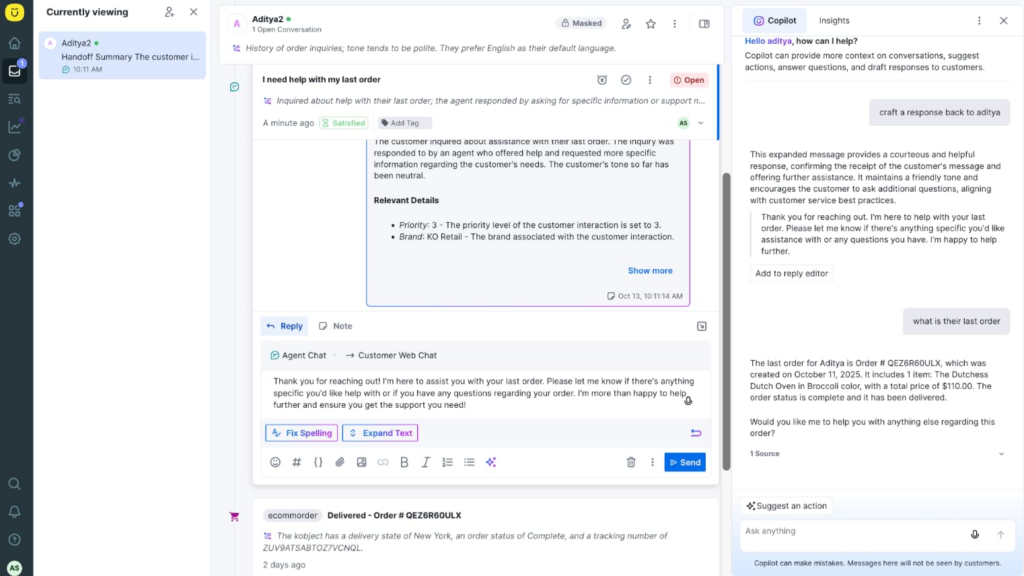
Topping the list is the Kustomer IQ (or Kustomer AI Copilot), and if you’ve used the platform, it offers more beyond being a ‘side panel’ that suggests nicer wording.
It’s embedded into how conversations are classified, routed, assisted, and resolved inside Kustomer’s customer timeline.
When a customer reaches out, Kustomer IQ immediately reads the message and uses the customer record as context. E.g., prior conversations, orders, account status, tags, sentiment history, and any ongoing workflows.
That context becomes the input for everything the copilot does next.
From there, the copilot operates across three layers at the same time:
- Understanding the situation: Kustomer IQ detects intent, urgency, and sentiment, but it does so against the customer’s history. A “refund request” from a long-term customer with previous issues is treated differently from the same request from a first-time buyer. This is important because it affects routing, priority, and what actions are even appropriate.
- Assisting the agent in real time: As the conversation goes on, the copilot surfaces relevant context automatically, and prepares suggested responses that reflect what’s already been tried.
- Preparing and executing outcomes: Where permissions allow, Kustomer IQ can prepare or trigger backend actions—like processing refunds, updating orders, or applying account changes—within defined rules.
- In cases that require human judgment, it organizes everything so the agent can approve and complete the action with minimal effort.
With Kustomer IQ, your agents spend less time figuring out what’s going on and far more time finishing the job. Automation handles the repeatable work and the preparation; we let your agents handle judgment and edge cases.

Key features of Kustomer IQ
- Conversation summaries: Automatically condenses long, multi-agent threads into actionable summaries that highlight the issue, attempted steps, and current status.
- AI suggested replies: Generates response drafts based on the live conversation, prior resolutions, and policy context.
- Smart routing: Uses AI signals (intent, urgency, customer attributes, history) to route conversations to the right agent or workflow automatically. This avoids generic queues and reduces unnecessary handoffs.
- Sentiment detection and alerts: Real-time analysis of customer messages identifies frustration, urgency, or satisfaction shifts during conversations. The system alerts agents when sentiment changes so they can adjust their approach, escalate if needed, or offer appropriate remediation before situations escalate further.
- Real-time suggestions: Automatically displays relevant help documentation based on conversation content and detected customer intent. Kustomer learns which articles successfully resolve specific issue types and prioritizes those in future suggestions.
What support teams say about Kustomer
- “We have a unique mandate to build a true, world-class customer experience. Kustomer is instrumental in how we build that service experience. We really feel like we have a great technology partner and are excited to keep building upon that relationship.” — Ashley Julison, Senior CX Specialist, Everlane [Read the Full Case Study]
- “The most persuasive feature Kustomer offered was the timeline layout. We prefer to handle customers within the full context of their relationship with us, not through siloed tickets that provide little insight into their overall experience with the Terra Kaffe brand.” — Cate Marques, CXO, Terra Kaffe [Read the Full Case Study]
- “We use several AI tools that we’ve integrated into Kustomer. We have an agentic AI agent that handles a lot of our order management topics. One of the things that’s been really useful for us is canceling orders or canceling subscriptions. It allows us to respond in hyper-speed, and doesn’t require a customer to have to wait for one of our agents to handle the conversation.” — Rebecca Blount, Senior Manager, CX Strategy & Operations, Coterie Baby
How much does Kustomer cost?
- Enterprise: $89 per seat/month.
- Ultimate: $139 per seat/month.
There are also two available add-ons: AI for customers at $0.60 per engaged conversation and AI for reps at $40 per user/month.
Looking to switch to Kustomer?
Kustomer IQ works because it treats the copilot as part of the service system. It understands the customer first, assists agents with relevant context, and supports real outcomes when automation is appropriate. For teams that need AI to think with the agent and act with guardrails, this is one of the most complete copilots available going into 2026.
2. Microsoft 365 Copilot for Service
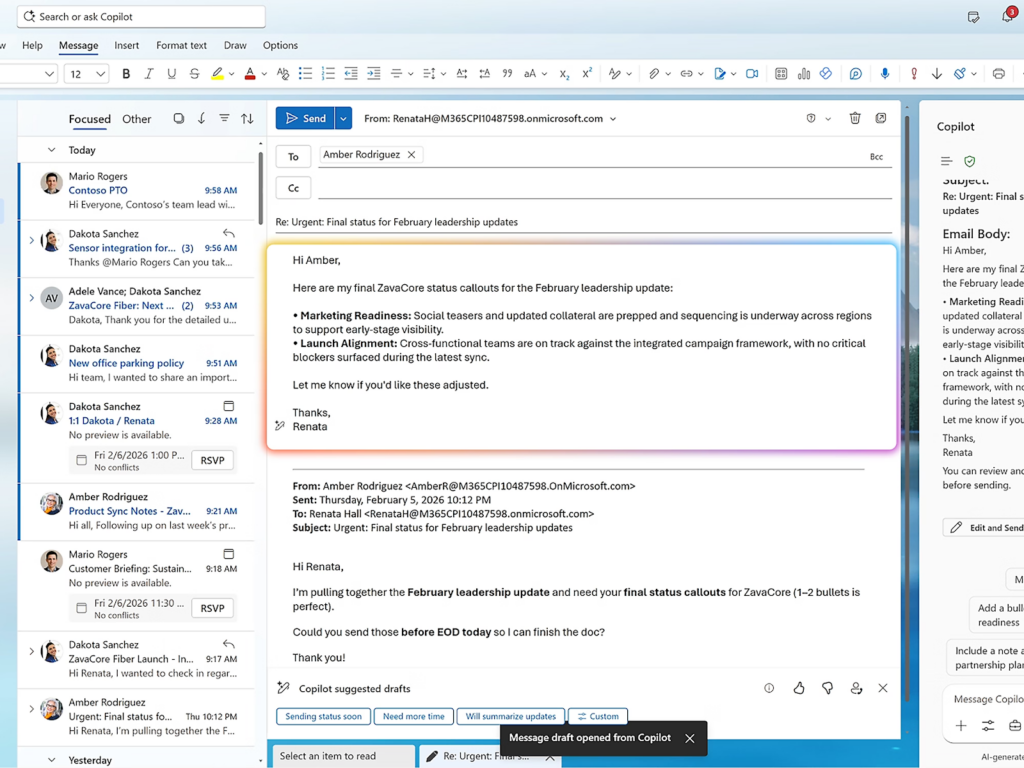
Microsoft Copilot for Service is built to sit inside the tools support agents already use to read, collaborate, and respond within the Microsoft ecosystem.
The copilot appears as a sidebar in Dynamics 365 Customer Service where agents can ask questions in natural language and get responses from connected knowledge sources.
For example, it can pull information from Microsoft Teams conversations, email threads with customers, and CRM records in Dynamics without requiring separate integrations or API connections.
At the same time, it can reference internal documentation stored in Microsoft systems (SharePoint, internal KBs) and approved external sources (e.g., Salesforce, ServiceNow) if configured.
Key features
- WorkIQ: Combines large language models with enterprise data grounding to assist agents with understanding, drafting, and summarizing service interactions.
- Email-to-case drafting: Creates response drafts directly inside Outlook or Dynamics 365, using case context and connected knowledge sources. Agents can edit, refine, or regenerate drafts as needed.
- Notebooks: Unifies Copilot chats, files, meeting notes, and project materials—then builds on it. For example, you can also use its generative AI capabilities to create podcast-style summaries of your content.
User reviews on Microsoft 365 Copilot for Service
- “It helps me save time by drafting content, summarizing long documents, and quickly answering questions without needing to jump between different apps.” [*]
- “Sometimes it works well for organizing and rewriting content, but other times the suggestions feel basic and need manual improvement. This inconsistency can slow down work during busy days.” [*]
Pricing
The Microsoft 365 Copilot for Service offers three tiers for its individual plans:
- Personal: $99.99
- Family: $129.99
- Premium: $199.99
Then you have the business and enterprise plans that start from $18 per user/month. To explore the Copilot Studio option, it has a price tag of $30 per user/month, but it is included for the higher-priced tiers.
3. Salesforce Agentforce (formerly Einstein Copilot)
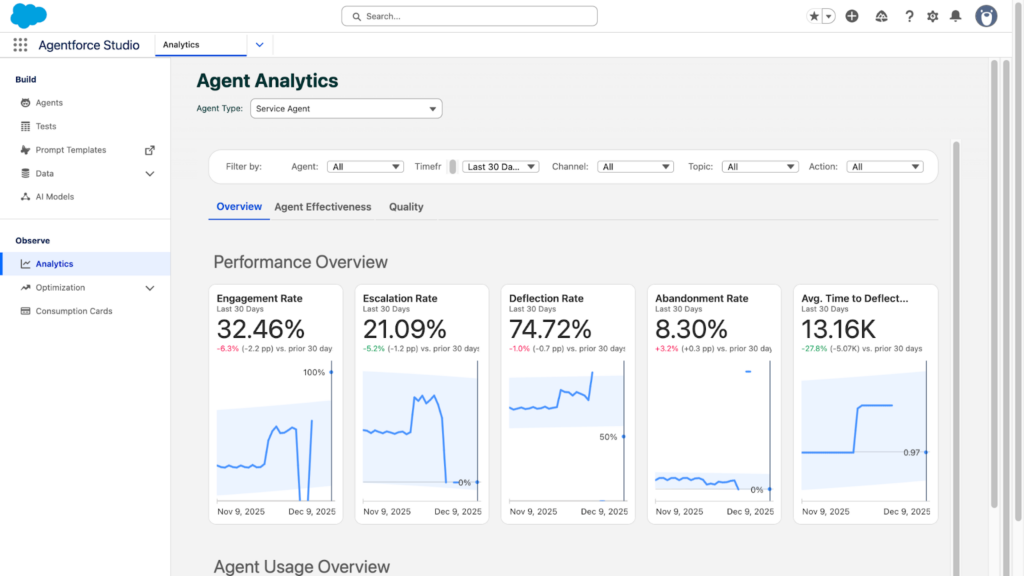
Salesforce Agentforce represents Salesforce’s upgrade from Einstein AI into a more comprehensive agent assistance platform built into Service Cloud.
Similar to Microsoft Copilot, the Agentforce also operates within the Salesforce environment. It analyzes incoming cases and suggests classifications, priority levels, and which team should handle them based on historical patterns.
It also features an Agentforce 360 platform that comprises Builder, Voice, Script, and Intelligent Content. This gives it access to the complete Salesforce data model, allowing the suggestions reflect support history, sales relationships, contract terms, and account health scores that influence how issues should be handled.
Key features
- Agentforce builder: Low-code AI agent builder using natural language. Teams can create and customize agents for any industry or use case via the templates on the platform.
- Next best action: Recommends the most appropriate next step based on business rules, customer value, and case state.
- Flow integration: Integrates directly with Salesforce Flow, allowing AI insights to trigger or support complex, multi-step service workflows within governance boundaries.
User reviews on Salesforce Agentforce
- “The setup can be confusing without clear guidance. Also, it sometimes feels too complex for simple tasks that should be quicker to do. This can slow down the work at the beginning.” [*]
- “I really like how it integrates seamlessly with Salesforce CRM, making it easier to manage leads, cases, and customer queries in one place.” [*]
Pricing
- Salesforce foundation: $0 with limited capabilities.
- Flex credits: $500 per 100k credits.
- Conversations: $2 per conversation.
Compare → Kustomer vs Salesforce Service Cloud
4. Intercom (Fin AI Copilot)
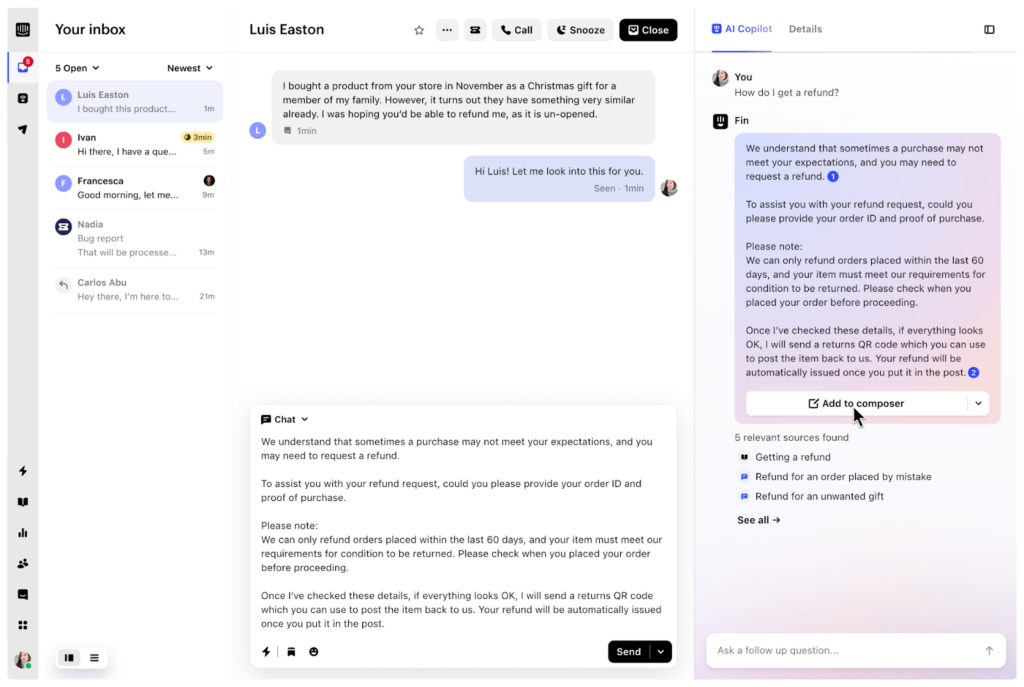
Intercom’s Fin AI Copilot engages customers directly inside Intercom’s messenger and help center, with the goal of resolving issues before an agent ever joins.
When a customer starts a conversation, Fin immediately grounds itself in Intercom’s connected knowledge sources (help articles, FAQs, and approved content). It interprets the customer’s question in natural language, asks clarifying follow-ups when needed, and attempts to resolve the issue end-to-end.
Where Fin becomes a “copilot” how it hands off and supports agents when automation can’t complete the job. If Fin can’t resolve the issue confidently, it escalates the conversation to a human with context already attached.
Compare → Kustomer vs Intercom
Key features
- Source-linked answers: Every response Fin generates includes direct links to the most relevant source material. Agents can instantly open, review, and verify the information inside the inbox.
- AI-assisted training and onboarding: Fin accelerates onboarding by using internal training documents and past support conversations to guide new agents in real time.
- Knowledge hub content control: Gives teams a centralized Knowledge Hub where you control exactly what content the copilot can access. This prevents outdated, incomplete, or off-policy information from influencing AI responses.
User reviews on Intercom (Fin AI Copilot)
- “It can instantly answer common customer questions using existing knowledge, which helps reduce agent workload and improve response times.” [*]
- “The pricing model creates some uncertainty, since costs depend on resolution. I never really know how many conversations it will handle in a given month, which makes it harder to predict expenses.” [*]
Pricing
- Essential: $29 per seat/month.
- Advanced: $85 per seat month.
- Expert: $132 per seat/month.
- Add-ons:
- Copilot: $29 per seat/month.
- Proactive support plus: $99 per seat/month.
All plans include Fin AI agent that costs $0.99 per resolution.
Related → 20 Best Intercom Alternatives & Competitors for 2026
5. Zendesk AI
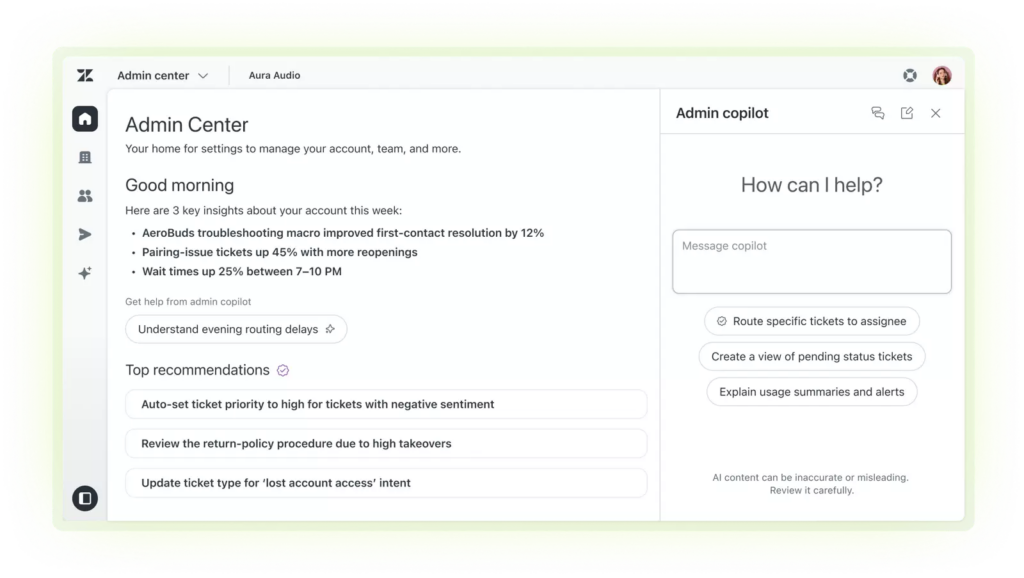
Zendesk AI is built to optimize ticket-heavy support operations by reducing the work agents do inside each ticket.
For each new ticket created, Zendesk AI immediately analyzes the message using intent detection, language understanding, and historical ticket data.
That analysis is used to classify the ticket, apply tags, set priority, and route it to the appropriate queue. This happens before an agent ever opens the ticket, which reduces misrouting and manual triage.
Once an agent opens the ticket, the copilot shifts into assist mode. It surfaces relevant macros, knowledge base articles, and suggested replies based on the issue type and past resolutions. Agents can accept, edit, or ignore suggestions.
Key features
- Zendesk Copilot: Provides inline guidance to agents, including response suggestions, automating actions, and knowledge surfacing, directly within the Zendesk interface.
- AI-powered macros: Recommends the most relevant macro based on ticket context, reducing time spent searching or selecting responses manually.
- Content cues: Analyzes ticket trends to identify gaps in help center content, helping teams improve self-service coverage over time.
User reviews on Zendesk AI
- “Zendesk simplifies my work because all I need to do is select the appropriate options, choose the title, set the dispositions, and indicate whether a case is pending or solved.” [*]
- “I noticed that the main downside is that some of the advanced settings can be hard to find and take time to learn.” [*]
Recommended → Learn Why People Are Ditching Zendesk for Kustomer
Pricing
- Support team: $19 per agent/month.
- Suite team: $55 per agent/month.
- Suite professional: $115 per agent/month.
- Suite enterprise: $169 per agent/month.
Extra add-ons like the Copilot costs $50 per agent/month, and for Advanced AI capabilities, you’ll need to contact sales.
Learn more → Is Zendesk Worth It? Hmm... See The Pros & Cons
6. Tidio Copilot
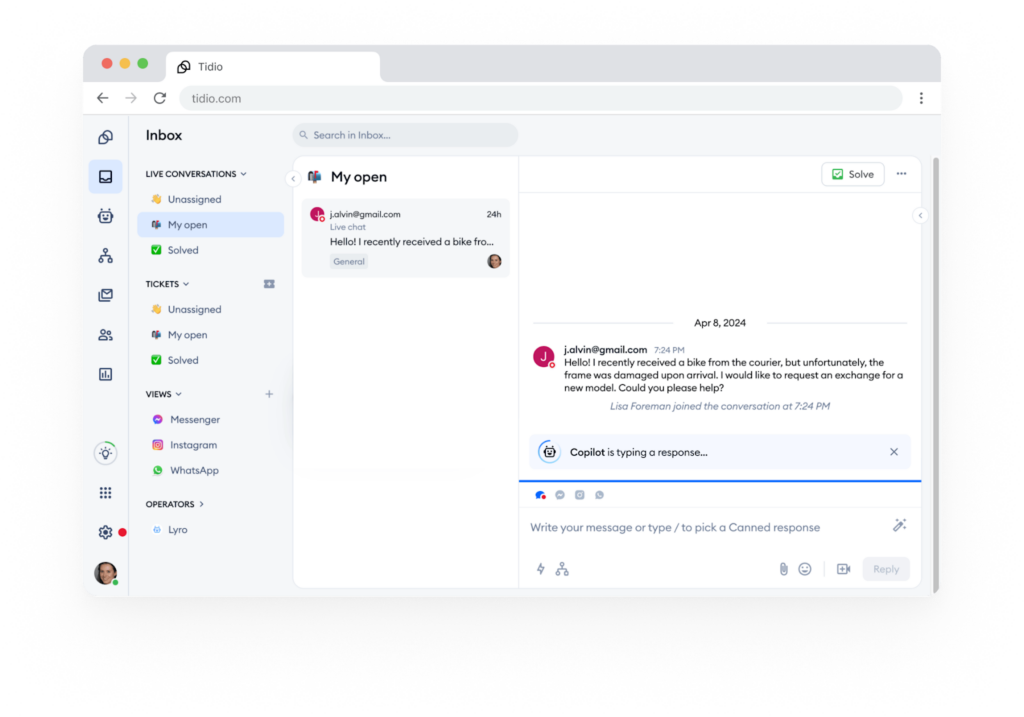
Tidio Copilot is a Chrome extension that lives primarily inside website chat and messaging flows, helping businesses respond instantly to customer questions and guide visitors toward resolution or conversion.
As customers message, Tidio’s AI suggests quick responses based on conversation context and your help documentation (FAQs, help content, product data). Agents can send suggestions with one click, modify them quickly, or type their own responses when AI suggestions don’t fit.
Tidio Copilot is practical for small businesses and lean support teams that need AI assistance without enterprise complexity or pricing.
Key features
- Multi-platform chat support: Supports chat-based interactions across live chat, email, social media, and third-party apps like Gorgias, Zendesk, and Intercom—and keeps all unified within Tidio.
- Lyro AI chatbot: Answers customer questions using configured frequently asked questions (FAQs) and knowledge sources, adapting responses based on how the conversation unfolds.
- Workflow automation rules: Combines AI responses with rule-based triggers to route conversations, send follow-ups, or tag interactions based on customer behavior.
User reviews on Tidio Copilot
- “The configuration of which pages the chat widget should appear on can also be a bit confusing and less intuitive than expected.” [*]
- “I like that automatic reply and tell basic questions when the team is offline, but conversations can quickly switch to a real person without friction.” [*]
Pricing
- Starter: $29 per month for 100 billable conversations.
- Growth: $59 per month for 500 billable conversations.
- Plus: $749 per month for custom billable conversations.
- Premium: Contact sales.
Tidio offers two add-ons: Lyro AI agent for $39 per month for 50 Lyro AI conversations. And Flows for $29 per month for 2,000 visitors reached.
7. HubSpot Service Hub (Breeze)
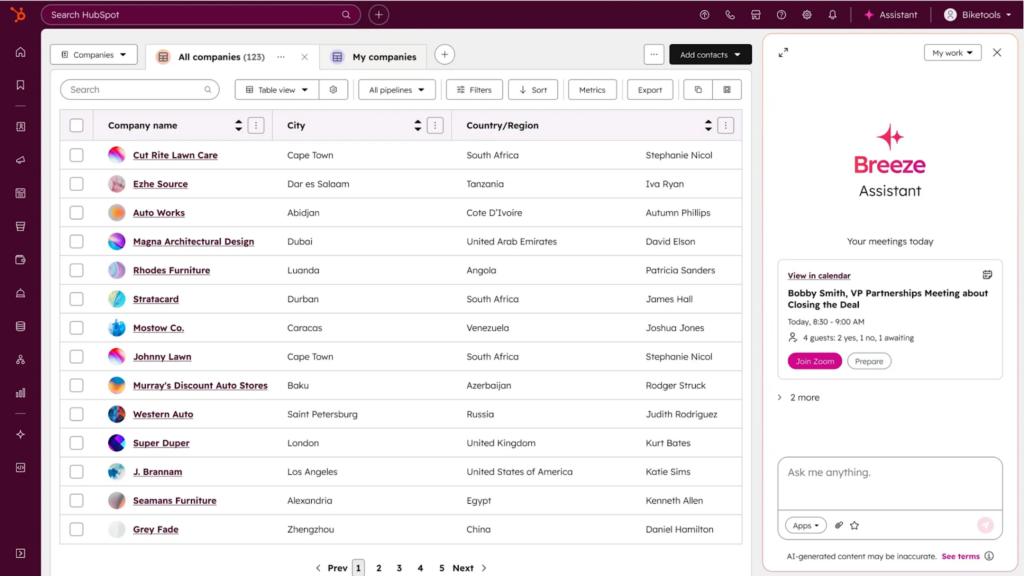
HubSpot’s Breeze AI operates across Service Hub as part of HubSpot’s unified customer platform. It brings copilot capabilities to teams already using HubSpot for CRM, marketing, or sales.
That means its primary job is to help support teams resolve issues with full awareness of the customer’s lifecycle, from first touch to renewal.
Breeze reviews every incoming issue, summarizes the problem, and highlights relevant CRM details (e.g., deal stage, product usage data (if connected)) before the agent responds. Agents see who the customer is, what they’ve bought, where they are in the lifecycle, and what’s already been discussed.
And inside the Service Hub inbox, Breeze generates response drafts, rewrites tone, and suggests knowledge articles based on ticket content and CRM context.
Key features
- Customer agent: Responds to customer inquiries using AI trained on your website, blog, and knowledge base content.
- Breeze studio (beta): Allows teams to configure and customize AI agents without writing code. You can modify workflows, adjust prompts, and create role-specific AI assistants across marketing, sales, and customer service.
- Content remix: Repurposes existing high-performing content into multiple formats (emails, social posts, landing page snippets).
User reviews on HubSpot Service Hub (Breeze)
- “The ticket system is very useful for managing patient queries and follow ups. Each request can be tracked properly with status and priority, so nothing important is missed.” [*]
- “A few features that seem essential require jumping up to higher subscription tiers, which can make scaling costly.” [*]
Pricing
- Starter: $9 per seat/month.
- Professional: $90 per seat/month.
- Enterprise: $150 per seat/month.
Related → 11 Best AI-Powered CRM Solutions for 2026 [Real User Reviews]
8. Help Scout
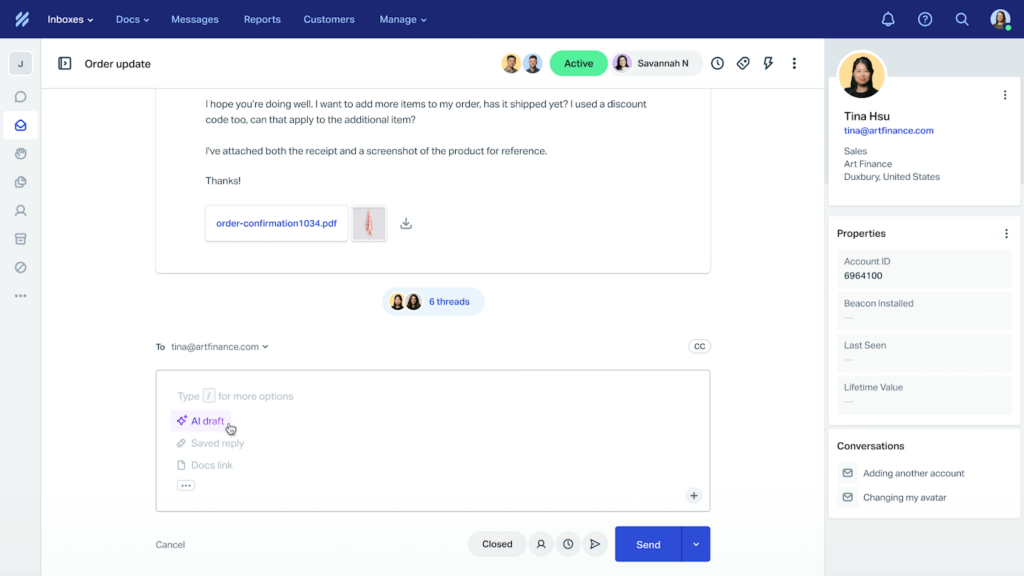
Help Scout’s AI capabilities focus on maintaining the platform’s human-first approach to customer service while adding intelligence that makes agents more effective.
On the Help Scout’s interface, you get the AI Summarize and AI Assist features that appear contextually during conversations.
Agents can open long email threads or pick up conversations other teammates started, and the AI Summarize compresses the history into key points.
And for the AI Assist, it drafts response suggestions based on conversation content and how your team typically handles similar issues. Agents can use drafts as-is, edit them for high-quality personalization, or request rewrites in different tones when the first suggestion doesn’t quite fit the situation.
Key features
- Saved replies: When conversations match scenarios your team has created saved replies for, the AI recommends which templates might apply.
- Beacon: Embeddable website widget that lets customers search your knowledge base, get instant answers, and contact your team through chat or email.
- Conversation tagging assistance: The AI suggests appropriate tags for conversations based on content analysis and historical tagging patterns.
User reviews on Help Scout
- “Customization for complex workflows can feel restrictive, and integrations or automations may require additional tools or workarounds.” [*]
- “Whenever there is an email or chat, we are able to get instant updates, and it’s easy to assign conversations to everyone who is available.” [*]
Pricing
- Standard: $25 per user/month.
- Plus: $45 per user/month.
- Pro: $75 per user/month.
Help Scout offers AI-Answers add-on at $0.75 per resolution.
9. GrooveHQ
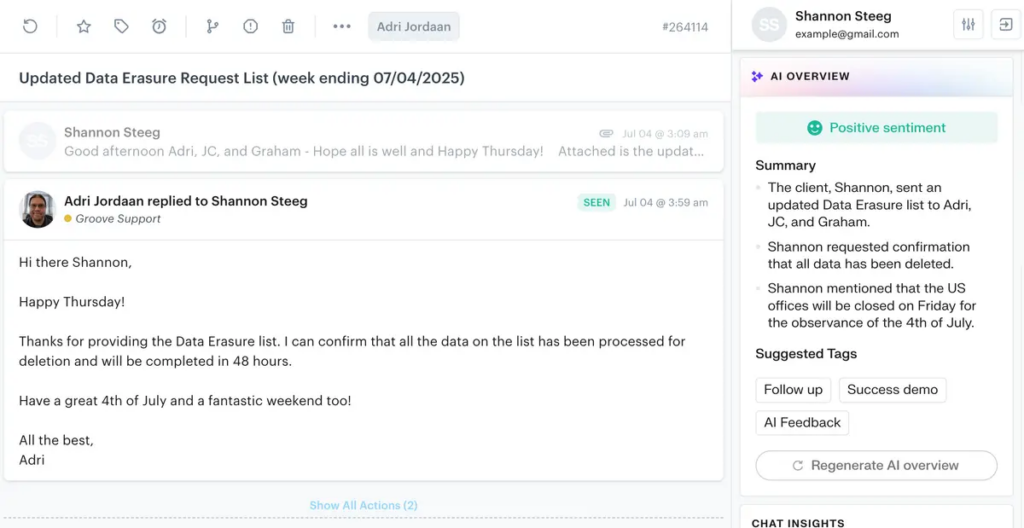
Groove is built for email-based support teams that value speed and clarity without heavy automation layers.
Its AI works directly inside the shared inbox, following conversations as they unfold and suggesting responses based on message content. It can draft replies using the customer’s question, previous messages in the thread, and the tone of the exchange.
Because Groove is centered on a clean inbox model, the copilot operates mainly at the conversation level. There’s no advanced sentiment dashboard or intricate routing logic, which keeps setup fast and commitment low.
Key features
- Real-time collaboration: As teammates collaborate on a ticket, the AI assists with summarizing threads and maintaining structured context so handoffs are smoother.
- Multilingual support: Work across multiple languages, allowing global support teams to draft and refine responses regardless of the customer’s language.
- Smart drafts: Generates draft replies automatically, allowing agents to review and send instead of starting from scratch.
User reviews on GrooveHQ
- “When you close a ticket, it’s moved to the date it was received. If you close something in error it can take forever to figure out what it was, it also doesn’t show up at the top of recent updates.” [*]
- “The flexible and configurable self-service support options provided by the Knowledge Base with its easy-to-build FAQs and guides, and seamless integration into our new IT system is a game changer for us.” [*]
Pricing
- Standard: $24 per user/month.
- Plus: $36 per user/month.
- Pro: $56 per user/month.
10. Zoho Desk (Zia)
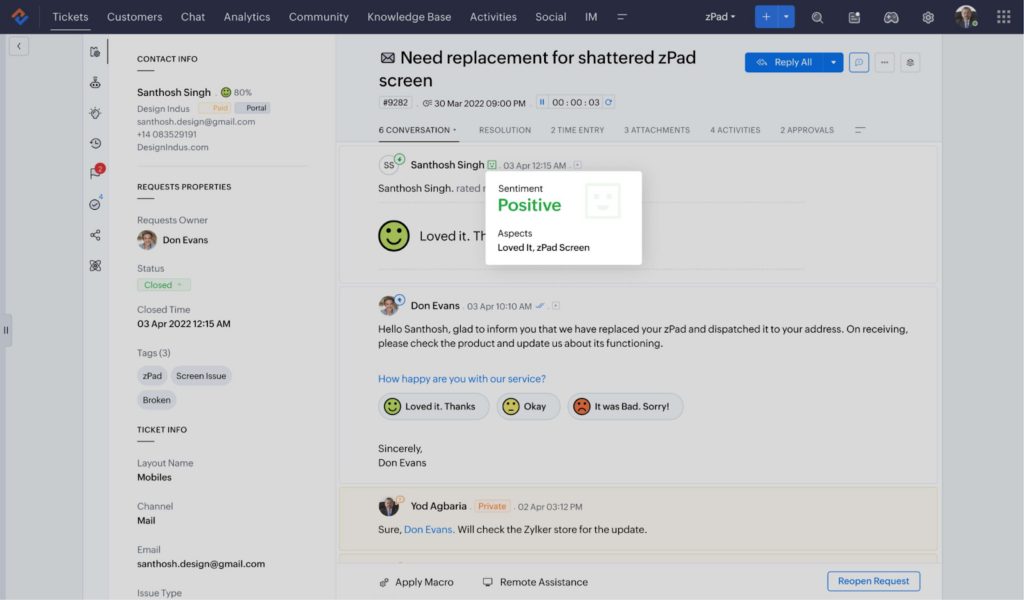
For teams already using Zoho CRM, Analytics, or other Zoho applications across their workspace, Zia benefits from accessing data across these connected systems.
Agents can ask Zia questions like “what’s this customer’s order history?” or “how do we handle international returns?” and receive answers from connected Zoho systems and documentation.
And because Zoho Desk often serves structured support teams with defined processes, Zia’s recommendations are aligned with configured workflows and SLA rules.
Key features
- Zia insights: Provides analytics-driven insights into ticket trends, recurring issues, and performance anomalies.
- SLA prediction and alerts: Warns agents and managers when tickets are at risk of breaching service-level agreements.
- Anomaly detection: Identifies unusual patterns in ticket volume or response behavior, alerting supervisors to potential issues.
User reviews on Zoho Desk (Zia)
- “I found Zoho Zia very helpful. One is when I search leads on Zoho CRM through Zia search; I can easily see leads information & data.” [*]
- “The unified user interface enhances the overall user experience, making it simple to navigate and access relevant information.” [*]
Pricing
- Express: $7 per user/month.
- Standard: $14 per user/month.
- Professional: $23 per user/month.
- Enterprise: $40 per user/month.
Related → 10 Best Zoho Desk Alternatives & Competitors for 2026
11. Talkdesk Copilot
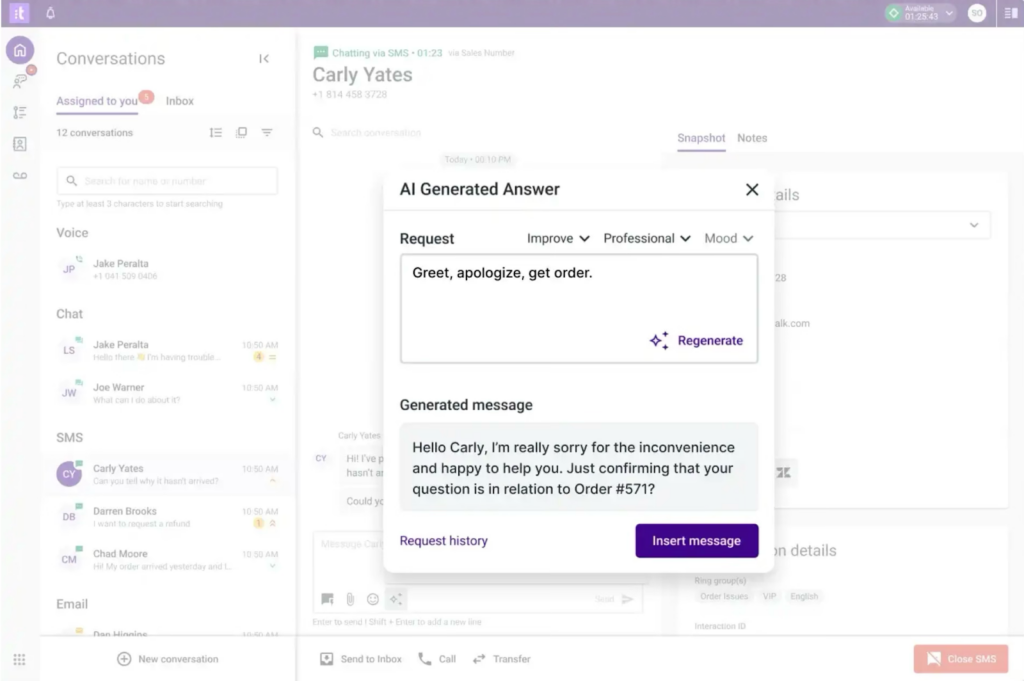
Talkdesk Copilot is built for contact centers, where the primary interaction is a live phone call.
When a customer call begins, Talkdesk Copilot starts listening and transcribing the conversation in real time. It uses natural language processing to detect intent, extract key entities (like account numbers or order references), and monitor sentiment as the conversation unfolds.
If the customer expresses frustration or risk signals (for example, mentioning cancellation), the copilot can suggest de-escalation tactics or retention scripts immediately. And after the call ends, Talkdesk Copilot generates summaries and call notes automatically, reducing after-call work.
Key features
- Smart scripts: Based on the customer’s issue and conversation flow, agents receive structured prompts to resolve queries correctly.
- AI trainer: Allows non-technical customer service teams to continuously improve automation models. Support staff can apply practical expertise to refine AI workflows and automation logic without coding.
- Call transcription: Using advanced speech-to-text and NLP, Talkdesk transcribes calls live as they happen. It also creates searchable records for future reference and quality review.
User reviews on Talkdesk Copilot
- “Licensing becomes complex as you scale: when moving from a basic voice-only setup to omnichannel + co-pilot + workforce-management features, the cost model requires planning ahead to avoid surprise bills.” [*]
- “Talkdesk is a fantastic system that offers the best options and tools to solve any problem related to customer service for your business, reducing complexity and operational difficulties across your entire filed of work.” [*]
Pricing
- Digital essentials: $85 per user/month.
- Voice essentials: $105 per user/month.
- Elite: $165 per user/month.
- Industry experience clouds: $225 per user/month.
12. Genesys Agent Copilot
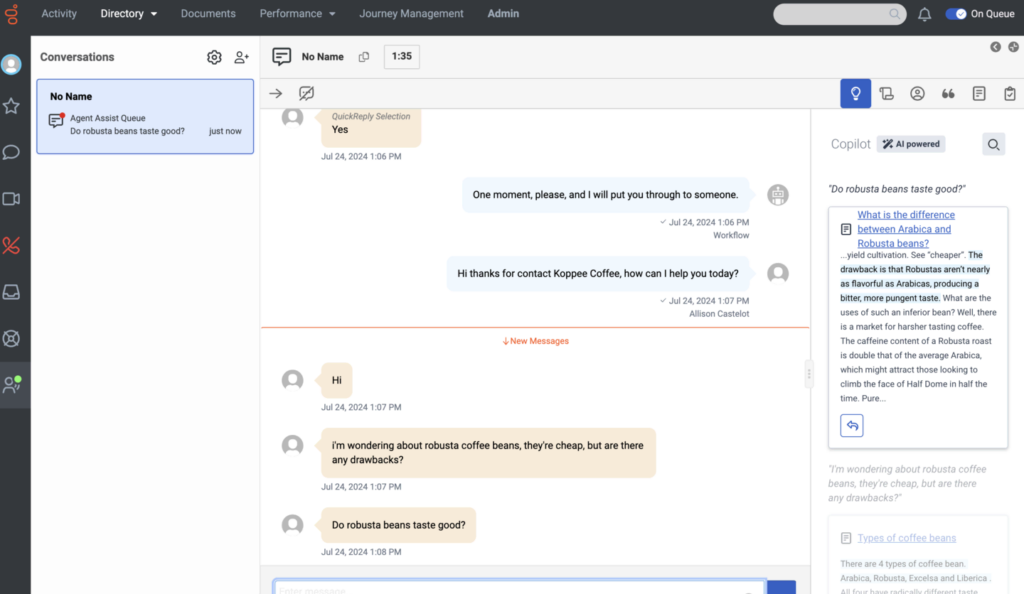
Genesys Agent Copilot is similar to Talkdesk Copilot, the only difference is that it’s aimed at enterprise contact centers handling complex, high-volume customer interactions across voice, chat, email, and messaging channels.
It runs inside the Genesys Cloud CX environment, which means it’s directly connected to interaction data, customer journey context, and workforce management systems.
During voice calls, it transcribes conversations in real time and surfaces relevant information as the discussion unfolds. In chat and messaging, it drafts responses and pulls documentation based on customer intent.
Context is preserved across channels, so if a customer moves from chat to phone, the agent picks up with full history and AI support without restarting the conversation.
Key features
- Dynamic script prompts and forms: These prompts adapt to the interaction flow, helping agents ask the right questions, follow proper procedures, and complete required fields without switching tools.
- Post-call notes: When interaction ends, agents are presented with automatically generated notes summarizing what occurred. They can review, edit if needed, and save.
- One-click wrap-up codes: Copilot suggests the most accurate wrap-up code after each interaction. Agents apply it with one click, ensuring consistent and reliable reporting data.
User reviews on Genesys Agent Copilot
- “It offers limited advanced features, and its reporting feels weak for the level of detail these industries often require.” [*]
- “The system is robust enough to manage six separate utility services while still allowing for personalization.” [*]
Pricing
For named licence:
- Genesys Cloud CX 1: $75 per user/month.
- Genesys Cloud CX 2: $115 per user/month.
- Genesys Cloud CX 3: $155 per user/month.
- Genesys Cloud CX 4: $240 per user/month.
For concurrent licence:
- Genesys Cloud CX 1: $110 per user/month.
- Genesys Cloud CX 2: $170 per user/month.
- Genesys Cloud CX 3: $230 per user/month.
- Genesys Cloud CX 4: $360 per user/month.
How to Choose the Right Copilot for Your Needs?
Where the work happens: Live calls or written conversations
The first decision is structural: does most of your support work happen in live voice conversations, or in written formats like email and chat?
- If you run a call-heavy contact center, the copilot must operate in real time. It needs live transcription, in-call guidance, compliance prompts, and automatic post-call summaries.
In that environment, tools like Talkdesk or Genesys make sense because they are designed for live interaction performance.
- But if your support is email- or chat-dominant, drafting quality, conversation continuity, and contextual retrieval matter more than second-by-second prompts.
In those cases, platforms like Kustomer or Intercom are better aligned.
| Pro tip: Teams handling mixed channels should test the copilot across all channels during evaluation. Many platforms work brilliantly for their primary channel and offer generic help everywhere else. |
How much context the copilot must understand
Not all support decisions are equal. Some interactions require only the current message. Others depend heavily on the customer’s history, contract terms, entitlements, or past escalations.
- If your agents need access to order history, subscription details, product usage, or account value to resolve issues correctly, the copilot must be deeply connected to your CRM.
A CRM-native copilot like Salesforce Agentforce or Kustomer IQ can reason within customer records, understanding that a VIP account with an open renewal deserves different handling than a free trial user.
- Meanwhile, if your support is mostly FAQ-based or transactional, lighter tools may be sufficient.
| Pro tip: Map out the five most common support scenarios your team handles and identify which customer data points are essential for each. Use this to evaluate whether integrations provide the depth you need or just surface-level contact info. |
Whether you need advice or execution
Some copilots primarily assist with drafting and summarizing. Others prepare or execute backend actions like refunds, cancellations, or workflow updates.
- If your goal is reducing writing time, almost any modern copilot can help.
- But if your goal is reducing operational workload, you need a system that connects AI to real workflows and guardrails.
For example, Kustomer’s Copilot can support action execution within defined rules. However, many inbox-centric tools stop at suggestions, leaving agents to manually complete the actions in separate platforms.
| Pro tip: Evaluate approval workflows for AI-driven actions. You need guardrails that prevent expensive (e.g., compliance) mistakes without creating so much friction that agents bypass the copilot entirely. |
Your team’s technical capacity
Enterprise copilots embedded in platforms like Salesforce or Genesys are powerful. But they require clean data, defined workflows, and often technical resources to configure properly.
If your support team doesn’t have a dedicated operations lead or admin, complex AI configurations can become unusable. You’ll get more value by switching to simpler copilots like Tidio or Help Scout.
| Pro tip: Instead of rolling out AI everywhere, automate one high-volume, predictable issue first. Validate ROI before expanding scope. |
Your tolerance for autonomy
Some organizations are comfortable letting AI handle customer interactions directly. Others prefer AI to stay in assist mode, with humans reviewing every action.
For example, copilots like Intercom’s Fin are designed to resolve issues independently when confidence is high. Contact-center copilots like Talkdesk typically stay assistive and compliance-focused. CRM-native copilots like Kustomer execute routine actions within guardrails while escalating edge cases to humans.
Your industry regulations, customer relationship model, and risk tolerance determine which approach fits.
| Pro tip: Test confidence thresholds during pilots. If the AI only acts autonomously when 95% confident, how many interactions actually qualify versus getting escalated to humans anyway? |
Your growth considerations
As your support operation grows, your copilot needs to scale with you. Scalability here is about maintaining performance, accuracy, and customer satisfaction as volume increases and complexity grows.
Enterprise-grade platforms like Kustomer, Salesforce, and Genesys are built for this, offering robust infrastructure that supports thousands of agents and millions of conversations.
Smaller tools may struggle when you move from 10 to 100 agents or when seasonal spikes hit.
| Pro tip: During evaluation, ask vendors about their largest customer deployments. If their biggest client has 50 agents and you’re planning to reach 200, that’s not a plan to rely on—at least not for a long time. |
When the Copilot Feels Like a Teammate, You Know It’s Kustomer

Kustomer ensures your support feels continuous, personal, and connected—no matter how much you scale.
It operates with complete customer context of every purchase, interaction, and account detail in one timeline. Plus, response suggestions include real details like order numbers and previous resolutions without agents searching.
That’s why brands like Caraway have shared that switching to Kustomer felt like finally finding a help desk that works the way their team actually operates.
Most copilots add AI on top of traditional help desk software. Kustomer built a platform where intelligence, context, and execution work together from the ground up.