


Zoho Desk is often the default choice for budget-conscious teams. But as your support operations scale, "good enough" often stops being good enough.
Many teams find themselves hitting a hard ceiling with Zoho due to its steep learning curve, disjointed interface, and pricing tiers that lock essential features—like live chat or custom reports—behind expensive enterprise paywalls.
If your agents are spending more time fighting the tool than helping your customers, it’s time to look for a solution that actually supports your growth. We have compiled the top 10 Zoho Desk alternatives that offer the scalability, ease of use, and reliability your team deserves.
Why Look for an Alternative to Zoho Desk?
Although Zoho Desk claims it’s a suitable solution for both small businesses and enterprise clients, there seems to be a misalignment between the company’s aspirations and how actual users see it.
Here’s what most Zoho Desk customers highlight as the platform’s shortcomings:
- Tough learning curve: For users unfamiliar with this type of tool, it may be too demanding to learn how to use it quickly due to new features popping up on a regular basis. “Sometimes less is more,” says a user. “There are constantly new features, and it’s hard to keep up.” [*]
- Unbalanced pricing tiers: The platform seems to offer an unbalanced range of features in each tier. Users have complained about “the number of differences between the subscription tiers” [*], calling it overwhelming. So, as a startup or an SMB, you might lack some essential features you’d like to have in a customer support tool. “There are some features we need, but they’re not available,” [*] one user complains. “For example, we need to deactivate users, but this is not possible in Zoho Desk.” At the same time, for enterprises, the plans offering all the features you need may be too expensive, especially when you’re trying to scale. For instance, live chat is only available in the Enterprise plan.
- Subpar customer support: A lack of timely and adequate customer support can reduce customer satisfaction and damage the overall experience when using an app — which happened for some Zoho Desk customers, who eventually decided to switch to another vendor. The decision was made, according to an ex-user, because their support request wasn’t addressed for 20+ days. [*]
In light of these complaints, below is our selection of customer service platforms that successfully overcome the challenges users face with Zoho Desk.
Top 10 Zoho Desk Alternatives & Competitors on the Market Right Now
- Kustomer
- Zendesk
- Freshdesk
- LiveAgent
- HelpScout
- Kayako
- GrooveHQ
- HappyFox
- Intercom
- Salesforce Service Cloud
1. Kustomer
Kustomer is the only alternative on this list that replaces the traditional ticketing model with a CRM-first, AI-native platform. Instead of treating customers as isolated ticket numbers, Kustomer unifies all data—orders, subscription status, and lifetime value—into a single, real-time timeline.
In 2025, Kustomer has evolved into a powerhouse for AI Agents. Unlike simple chatbots, Kustomer's "AI Agents for Customers" can autonomously resolve complex issues (like modifying an order or checking loyalty points) by accessing real-time data. Simultaneously, AI Agents for Reps act as a co-pilot for your human team, drafting responses, summarizing long threads, and suggesting the next best action to resolve cases faster.
Key Features
- AI Agents for customers: These aren't just FAQ bots. They are autonomous agents that can handle end-to-end resolutions across chat, SMS, and WhatsApp. They can check order status, process returns, and answer complex queries 24/7 without human intervention.
- AI Agents for reps (Copilot): For issues that do reach a human, this co-pilot instantly summarizes the conversation, suggests the perfect on-brand response, and even automates wrap-up tasks, boosting agent efficiency by up to 30%.
- CRM-based unified timeline: The core differentiator. Agents see a single, continuous view of the customer's entire journey—every email, chat, order, and website visit is visible in one chronological timeline. No more tab-switching or asking "What is your order number?"
- Native omnichannel support: Connect with customers on the channels they actually use. Kustomer has deep, native integrations for WhatsApp, Instagram, Facebook Messenger, SMS, and even native Voice, all fed into the same unified inbox.
- No-code workflow builders: You don't need a developer to make changes. Operations leaders can build complex automation workflows, routing rules, and AI bot flows using a simple drag-and-drop visual editor.
Advantages of Using Kustomer
Companies switch from Zoho Desk to Kustomer to escape the ticket silo and the steep learning curve.
- Unified timeline vs. disjointed tickets: Zoho Desk treats every interaction as a separate ticket, often losing context. Kustomer’s Timeline View gives agents the full story immediately, eliminating the need to ask customers to repeat themselves.
- True AI automation vs. basic scripts: While Zoho offers standard automation rules, Kustomer’s AI is generative-native and data-driven. It can trigger actions based on customer data (e.g., "VIP customer with a late order"), not just keywords.
- Intuitive workflow builders vs. steep learning curve: Users frequently complain that Zoho is difficult to configure. Kustomer offers no-code visual builders for chatbots and routing, allowing support leaders to make changes without IT help.
- Native omnichannel vs. gated features: Zoho Desk often locks essential channels (like live chat) behind expensive enterprise tiers. Kustomer is built as a native omnichannel platform from the ground up, ensuring a seamless experience across all digital channels.
What Real Users Say about the Value of Kustomer
Leading brands report significant efficiency gains and cost reductions after switching to Kustomer’s data-driven model:
- On reducing costs: Jerome’s Furniture transformed its customer experience by integrating Kustomer with its POS system. The change helped reduce duplicate requests from 42% to 8%, cut cost per contact by 40%, and boosted agent efficiency.
“Kustomer allowed us to achieve the best possible outcome: maintaining a lean, cost-effective team while significantly improving customer satisfaction. We reduced our cost per contact by 40% and improved our NPS to be two times higher than the industry average.” ⎯ Marjorie Carlos, Sr. Dir. of Consumer Experience
- On AI & automation: Everlane increased automation of customer requests by 4X using Kustomer AI, allowing their team to handle higher volumes without increasing headcount.
“We have a unique mandate to build a true, world-class customer experience. Kustomer is instrumental in how we build that service experience. We really feel like we have a great technology partner and are excited to keep building upon that relationship." ⎯ Ashley Julison, Senior CX Specialist
- On speed & satisfaction: Yummy, Latin America’s fast-growing super app, transformed customer support by switching from Zendesk to Kustomer—cutting response times by 80%, boosting efficiency, and delivering 90%+ satisfaction.
“With Kustomer, everything is in one place. Agents can see their performance metrics in real time, something we never had with Zendesk.” ⎯ Noel Rodriguez, Dir. Live Ops and Support
- On unified data: Nathan James transformed its customer experience with Kustomer. By unifying channels like Shopify, Reviews.io, and Klaviyo into a single source of truth, the team eliminated inefficiencies and empowered agents to focus on customers.
“Kustomer pulls all customer information on one timeline. We see a customer’s full history right there, without switching around. That’s been a game-changer for us.” ⎯ Taylor Johnson, Director of CX
2. Zendesk
Zendesk is a cloud-based help desk solution designed to improve customer support by centralizing customer interactions across multiple channels such as email, phone, live chat, and social media.
Known for its ease of use, Zendesk helps support teams manage tickets efficiently with powerful automation tools and customizable workflows. Its ability to integrate seamlessly with CRM systems and various business apps makes it ideal for businesses of all sizes, including startups and larger enterprises.
Key Features
- Omnichannel support: Zendesk provides unified management of customer communication across channels like email, chat, phone, and social media, ensuring no inquiries slip through the cracks.
- AI-powered chatbots: Automate repetitive tasks, like routing support requests and managing ticketing inquiries, to enhance agent productivity and reduce response times.
- Customizable workflows: Tailor workflows to match your team's needs, simplifying ticket management and improving overall service efficiency.
- Real-time reporting: Get insights with performance metrics such as response times, SLAs, and customer satisfaction, allowing businesses to make data-driven improvements.
- Seamless integration: Connect easily with other business tools and CRM systems to enhance functionality and create a more streamlined experience for your support team.
Why Do Users Like Zendesk?
- User-friendly and easy to use
- Easily tracks every customer interaction
- Highly customizable ticket system
What Are Some Limitations of Zendesk?
- Customer support is terrible and unresponsive
- Advanced features are hard to implement
- The payment methods and structure are convoluted and inflexible
Learn more → Is Zendesk Worth It? See the Pros & Cons.
Pricing
Zendesk pricing consists of four annual plans:
- Suite Team at $55/agent/month
- Suite Growth at $89/agent/month with added SLAs and multilingual support
- Suite Professional at $115/agent/month with skills-based routing and custom analytics
- Suite Enterprise at $169/agent/month with custom roles and advanced AI
Add-ons like Advanced AI and Workforce Management are available for extra fees.
3. Freshdesk
Freshdesk is a cloud-based help desk software designed to streamline customer support by managing multi-channel support through email, chat, phone, and social media. It offers robust ticketing and automation features, enabling businesses to improve response times and customer satisfaction.
Freshdesk is particularly popular due to its user-friendly interface, customizable workflows, and flexible pricing options, including a free plan for basic needs. It's a preferred choice for businesses looking for flexible onboarding, efficient read functionalities, and scalable support.
Key Features
- Multi-channel support: Manage customer interactions across email, phone, live chat, and social media from a single platform, ensuring quick and efficient responses.
- Ticketing system: Freshdesk’s automated ticketing system organizes customer inquiries and assigns them to the appropriate agent for faster resolution.
- Automation tools: Using powerful automation features, streamline repetitive tasks, such as ticket assignments and follow-up emails, improving overall agent productivity.
- Self-service portals: Create customizable self-service knowledge bases and FAQs. This will enable customers to find answers independently, reducing the load on support agents.
- Real-time reporting: Track performance with detailed metrics on ticket resolution times, agent productivity, and customer satisfaction, enabling data-driven improvements.
Why Do Users Like Freshdesk?
- Intuitive and user-friendly interface
- It’s highly customizable and integrates well with other apps
- Automation features help streamline processes and save time
What Are Some Limitations of Freshdesk?
- Often slow and laggy, making basic tasks frustrating
- The pricing adds up quickly as essential features are considered add-ons
- Customer support is poor, and responses take days
Pricing
Freshdesk offers four annual plans:
- Free at $0 for up to 2 agents
- Growth at $15/agent/month with added reports and automation
- Pro at $49/agent/month with advanced ticketing and custom portals
- Enterprise at $79/agent/month with audit logs and enhanced security.
Freddy AI tools can be added for $29/agent/month.
Learn more → 17 Best Freshdesk Alternatives for 2026 (Based on Real Users)
4. LiveAgent
LiveAgent is a comprehensive help desk software that provides multi-channel support, allowing businesses to manage customer interactions across email, chat, phone, and social media in one platform.
LiveAgent’s robust ticketing and real-time messaging systems ensure no customer inquiry is missed. It offers templates to standardize responses and integrates smoothly with other business tools via its API integration, making managing customer communications and internal projects easier. With a focus on real-time customer support, LiveAgent is suitable for businesses of all sizes, including startups and enterprises, offering flexible pricing plans and a user-friendly interface.
Key Features
- Omnichannel support: Centralize communication from email, live chat, phone, and social media in one platform, ensuring a seamless customer experience.
- Ticketing system: LiveAgent automatically converts inquiries into tickets, allowing for better organization and faster resolution of support requests.
- Automation tools: Automate repetitive tasks such as routing tickets, setting up SLAs, and triggering notifications, enhancing overall efficiency and agent productivity.
- Self-service portals: Provide customers with a customizable knowledge base and FAQs to find answers independently, reducing the need for direct support.
- Real-time chat and reporting: Offer real-time live chat for immediate customer support and monitor key metrics such as response times, customer satisfaction, and agent performance.
Why Do Users Like LiveAgent?
- It allows handling emails, chats, and social media in one place
- Internal notes help everyone stay on the same page
- It makes multitasking and merging tickets simple
What Are Some Limitations of LiveAgent?
- It doesn't have some basic ticketing features
- Support is almost non-existent and unhelpful
- You have to log in every month, or they will delete your account
Pricing
LiveAgent offers four pricing plans billed annually:
- Small Business at $9 per agent/month
- Medium Business at $29 per agent/month
- Large Business at $49 per agent/month
- Enterprise at $69 per agent/month
Each plan includes progressively more features, such as email accounts, live chat buttons, departments, and advanced tools like AI Answer Assistant, call center support, and priority support for Enterprise users.
5. Help Scout
Help Scout is a help desk software designed for businesses that prioritize customer communication through email-based support. Help Scout’s shared inboxes and templates allow customer service teams to handle multiple inquiries efficiently.
The tool’s intuitive design makes onboarding fast, and integrations with messaging apps like WhatsApp provide real-time support. It offers live chat, a knowledge base, and integrations with popular CRM and business tools. With its intuitive interface and focus on customer experience, Help Scout is ideal for small businesses and teams looking for a simple yet powerful customer support solution. Its flexible pricing makes it accessible to companies of various sizes.
Key Features
- Shared inbox: Manage multiple inboxes with ease, ensuring that customer inquiries are properly assigned and handled by the right agents.
- Automation tools: Use automation to streamline tasks like ticket assignments, follow-ups, and customer notifications, improving response times and team efficiency.
- Knowledge base: Create a self-service portal where customers can find answers to common questions, reducing the need for direct support.
- Live chat support: Offer real-time customer communication through live chat, ensuring timely responses to customer queries.
- Real-time reporting: Monitor key performance metrics such as response times, customer satisfaction, and agent productivity, allowing for continuous improvement in support quality.
Why Do Users Like Help Scout?
- The interface is very intuitive and user-friendly
- It's simple to use, not overwhelming like other tools
- It helps set up a Knowledge Base and live chat for self-service support
What Are Some Limitations of Help Scout?
- Saved replies stripped images, which adds extra work
- Support is unhelpful, often responding with canned replies
- UI is clunky and unpleasant, making it less enjoyable to use
Pricing
Help Scout offers three plans billed annually:
- Standard: $22 per user/month, which includes 2 mailboxes, a Docs knowledge base, and live chat.
- Plus: $42 per user/month, which includes 5 mailboxes, custom fields, teams, and API access.
- Pro: $65 per user/month, designed for larger teams, offering 25 mailboxes, tiered permissions, and enterprise security.
6. Kayako
Kayako is a feature-rich help desk software designed to provide seamless customer support across multiple channels like email, live chat, social media, and phone. It focuses on automation, ticketing, and real-time customer interaction.
Businesses can manage support requests efficiently through self-service portals and intuitive workflows. Kayako is suitable for companies of all sizes, from small businesses to large enterprises, especially those dealing with a high volume of support tickets. Its mobile app makes managing customer inquiries easy on the go, enhancing customer satisfaction and team productivity.
Key Features
- Omnichannel support: Manage customer communication across email, live chat, social media, and phone from one unified dashboard, ensuring no missed interaction.
- Automation and workflows: Automate repetitive tasks such as ticket routing, reminders, and notifications to save time and improve agent productivity.
- Self-service portals: Allow customers to access a knowledge base and resolve common issues independently, reducing the workload on support agents.
- Real-time reporting: Track performance metrics like ticket resolution times and customer satisfaction, enabling data-driven improvements.
- Mobile accessibility: Kayako’s mobile app allows agents to manage tickets and customer interactions anytime, anywhere, making support more flexible.
Why Do Users Like Kayako?
- Easy to assign tickets and switch between departments smoothly
- The interface is smooth and loads quickly
- It helps prioritize tickets efficiently based on urgency
What Are Some Limitations of Kayako?
- Lack of customer support and unethical sales tactics
- High upgrade fees and expensive licensing costs
- Poor customer support and unreliable phone service
Pricing
- The Essential plan costs $39 per agent/month (billed annually) and includes a ticketing system and unlimited AI-suggested responses.
- The Professional plan costs $99 and adds a self-learning mode for 100 tickets/month, multiple chatbots, and integrations.
- The Enterprise plan offers full automation with unlimited self-learning mode, AI-driven content, and advanced reporting, with pricing available upon request. All plans include a 14-day free trial.
7. GrooveHQ
GrooveHQ is a user-friendly help desk software designed for small to medium-sized businesses looking to streamline customer support operations. It simplifies communication through a shared inbox, integrating live chat, knowledge base, and multiple communication channels.
GrooveHQ is particularly valued for its intuitive design and automation, allowing teams to collaborate efficiently. It’s ideal for businesses that want a simple but powerful solution to manage ticketing and provide excellent support without the complexity of larger platforms like Zendesk.
Key Features
- Shared inbox: Manage all customer emails in one place, assign tickets, and collaborate with team members through private notes and @mentions, ensuring no conversation is missed.
- Live chat: Offer real-time support on your website, with options for automated responses and chat-to-email continuation.
- Knowledge base: Build a self-service portal where customers can find answers to common questions, reducing the number of incoming support requests.
- Automation and workflows: Automate repetitive tasks like ticket assignments and follow-ups, improving response times and team efficiency.
- Reporting: Access real-time performance metrics, including response times and customer satisfaction, helping you monitor and optimize your support operations.
Why Do Users Like GrooveHQ?
- Easy-to-use ticket system that improved workflow
- Simple task management, only showing important tickets
- Fast setup and helpful customer support
What Are Some Limitations of GrooveHQ?
- The "Free Forever" plan is misleading; it requires payment
- The platform gets cluttered quickly without a smooth workflow
- Reporting lacks customization, and extracting data is difficult
Pricing
Groove offers three pricing tiers billed annually:
- Standard: $12 per user/month, which includes unlimited shared inboxes, live chat, and a knowledge base.
- Premium: $20 per user/month, which adds reporting, rules (automation), and API access.
- Advanced: $40 per user/month, which includes SAML SSO, team permissions, and advanced integrations.
8. HappyFox
HappyFox is a versatile help desk software that provides robust ticketing, automation, and omnichannel support. It streamlines customer communication by managing inquiries from multiple channels, including email, live chat, phone, and social media.
Designed to enhance team productivity, it also features advanced reporting tools and customizable workflows, making it an ideal solution for businesses of all sizes, from small businesses to large enterprises. HappyFox also supports self-service options, allowing customers to resolve common issues through a knowledge base.
Key Features
- Omnichannel ticketing: Manage and organize tickets from various channels, such as email, live chat, social media, and phone calls, within a single platform.
- Automation and smart rules: Automate repetitive tasks such as ticket assignments, status updates, and notifications to improve agent productivity.
- Self-service portals: Build a knowledge base and FAQ section to help customers resolve issues independently, reducing the load on your support team.
- Customizable workflows: Tailor workflows with custom rules, priorities, and statuses to meet your specific business needs, making support more efficient.
- Advanced reporting and analytics: Monitor support performance through real-time metrics such as response times, ticket resolution, and customer satisfaction, helping to make data-driven improvements
Why Do Users Like HappyFox?
- The 24/7 support team was invaluable during setup and customization
- Efficient ticket management and automation features improve workflow
- Easy to use, cost-effective, integrates seamlessly with Magento
What Are Some Limitations of HappyFox?
- Steep learning curve and high pricing for small businesses
- The tool to build out knowledge Base articles is a little lackluster
- Reports can be hard to create
Pricing
HappyFox offers four agent-based pricing tiers (rates below reflect annual billing):
- Basic: $21 per agent/month. Includes unlimited tickets, SLA management, SSO, and a knowledge base (capped at 5 agents).
- Team: $39 per agent/month. Adds multi-brand helpdesk, custom domains, and 24/5 email support.
- Pro: $89 per agent/month. Adds asset management, task management, proactive agent collision, and 24/7 email support.
- Enterprise PRO: Contact Sales. The top tier adds agent scripting, 24/7 phone support, and a dedicated customer success manager.
9. Intercom
Intercom is a versatile help desk software that combines live chat, ticketing, and an AI-powered inbox to streamline customer support operations. Known for its omnichannel capabilities, Intercom allows businesses to manage customer conversations across channels like email, live chat, social media, and phone, all within a single platform.
Intercom’s customizable workflows, smart automation, and detailed reporting make it a popular choice for medium to large businesses looking to enhance customer communication and team productivity.
Key Features
- Omnichannel support: Manage customer conversations seamlessly across email, chat, phone, and social media in one unified inbox.
- AI-powered automation: Use AI to automate repetitive tasks like ticket routing, personalized responses, and auto-filling ticket details.
- Workflows and team collaboration: Automate workflows, set SLAs, and collaborate efficiently across teams by assigning tickets and sharing context effortlessly.
- Help Center integration: Build a customizable self-service help center with articles, FAQs, and guides, empowering customers to find answers independently.
- Advanced reporting: Monitor key metrics like response times, ticket resolution, and customer satisfaction in real time with customizable dashboards.
Why Do Users Like Intercom?
- Ticketing and automation features improve customer service
- User-friendly with great tools like Fin AI
- Seamless integration with various channels
What Are Some Limitations of Intercom?
- Very expensive and locks you into a 12-month contract
- Customer service is unresponsive, and sales inquiries go unanswered
- Unnecessary limitations on features
Pricing
Intercom offers three core pricing plans (prices reflect annual billing):
- Essential: Starts at $29 per seat/month.
- Advanced: Starts at $85 per seat/month (includes powerful automation and workflows).
- Expert: Starts at $132 per seat/month (includes advanced security and reporting).
Intercom’s AI bot, Fin, is priced separately per resolution.
10. Salesforce Service Cloud
Salesforce Service Cloud is a comprehensive help desk software built on Salesforce’s renowned CRM platform. It empowers businesses to deliver personalized and efficient customer support by managing inquiries across multiple channels like email, live chat, phone, and social media.
With advanced automation, AI-powered tools, and seamless integration with other Salesforce products, Service Cloud is designed to enhance agent productivity and improve the overall customer experience. It's suitable for businesses of all sizes, offering flexible features to meet various support needs.
Key Features
- Omnichannel support: Centralize communication from various platforms like email, chat, and social media into one unified dashboard to provide a seamless support experience.
- AI-powered automation: Automate repetitive tasks such as ticket assignment, routing, and workflows, allowing agents to focus on resolving complex issues.
- Case management: Get a 360-degree view of customer data to resolve tickets with all necessary information at your fingertips quickly.
- Self-service portals: Empower customers with knowledge bases and FAQs, enabling them to find answers independently and reduce support ticket volume.
- Advanced reporting and analytics: Access real-time insights to track key performance metrics like resolution time, agent productivity, and customer satisfaction, enabling data-driven improvements.
- ERP integration: Connecting Salesforce with your ERP system helps you gain a complete view of customer information, including order history, billing details, and inventory levels, for faster and more efficient support resolutions.
Why Do Users Like Salesforce Service Cloud?
- Streamlines operations and integrates website forms directly into cases
- Flexible and integrates well with Gmail, saving time by sharing data easily
- Efficient case management and omnichannel support
What Are Some Limitations of Salesforce Service Cloud?
- The customizable features can be overwhelming to manage
- It cancels subscriptions without notice, blocking access to data
- The interface is clunky and can feel slow at times
Pricing
- Starter: $25 per user/month (billed annually). Includes all-in-one sales, service, and marketing tools for small teams.
- Professional: $80 per user/month (billed annually). Includes complete service CRM features and case management.
- Enterprise: $165 per user/month (billed annually). Adds workflow automation and API integration capabilities.
- Unlimited: $330 per user/month (billed annually). Includes advanced AI, premier support, and unlimited power.
- Einstein 1 Service: $500 per user/month (billed annually). The complete AI-powered suite.
Related reading → Top 10 Salesforce Service Cloud Alternatives for 2025
Kustomer — The #1 Zoho Desk Alternative
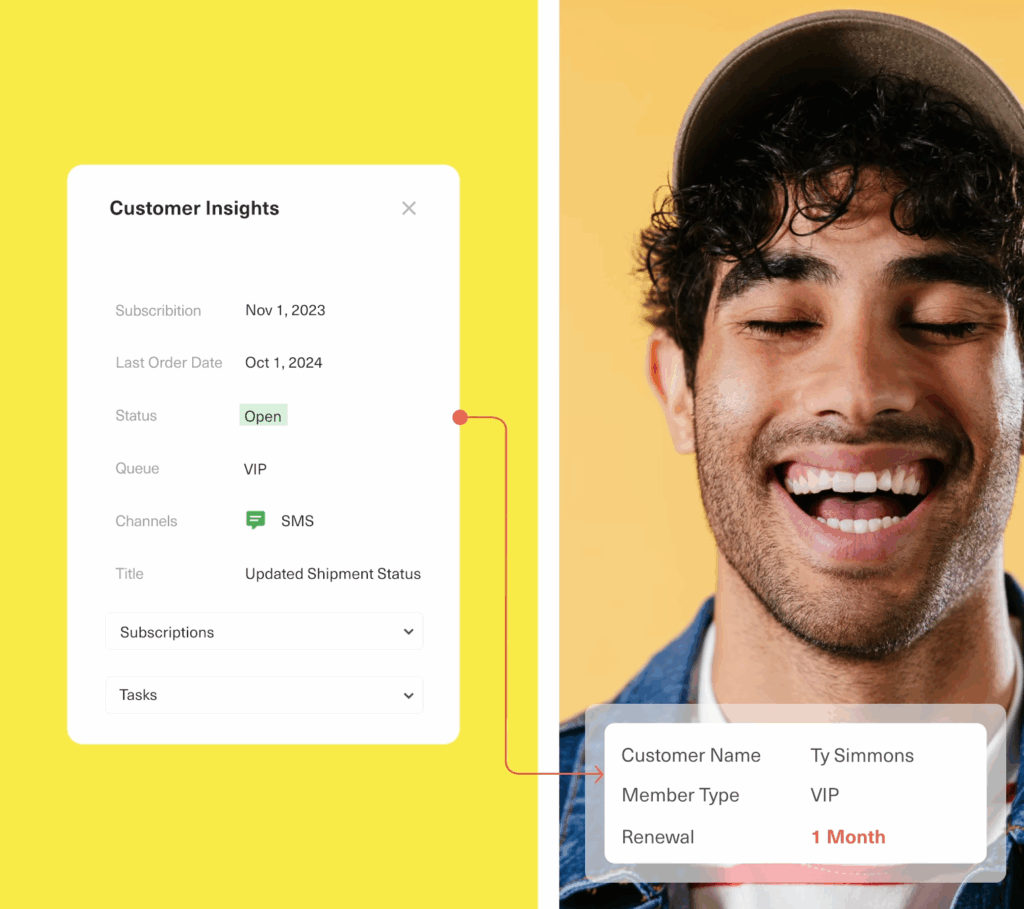
Zoho Desk is built on a legacy ticketing model that traps data in silos. If your team is tired of asking customers to repeat themselves because they can't see the full story, it's time to upgrade to a CRM-first platform.
Kustomer replaces the traditional ticket with a single, real-time timeline of every customer interaction. This data-first architecture is what powers our industry-leading AI Agents, allowing them to resolve complex issues autonomously—not just deflect them.
Stop managing tickets. Start driving results with Kustomer:
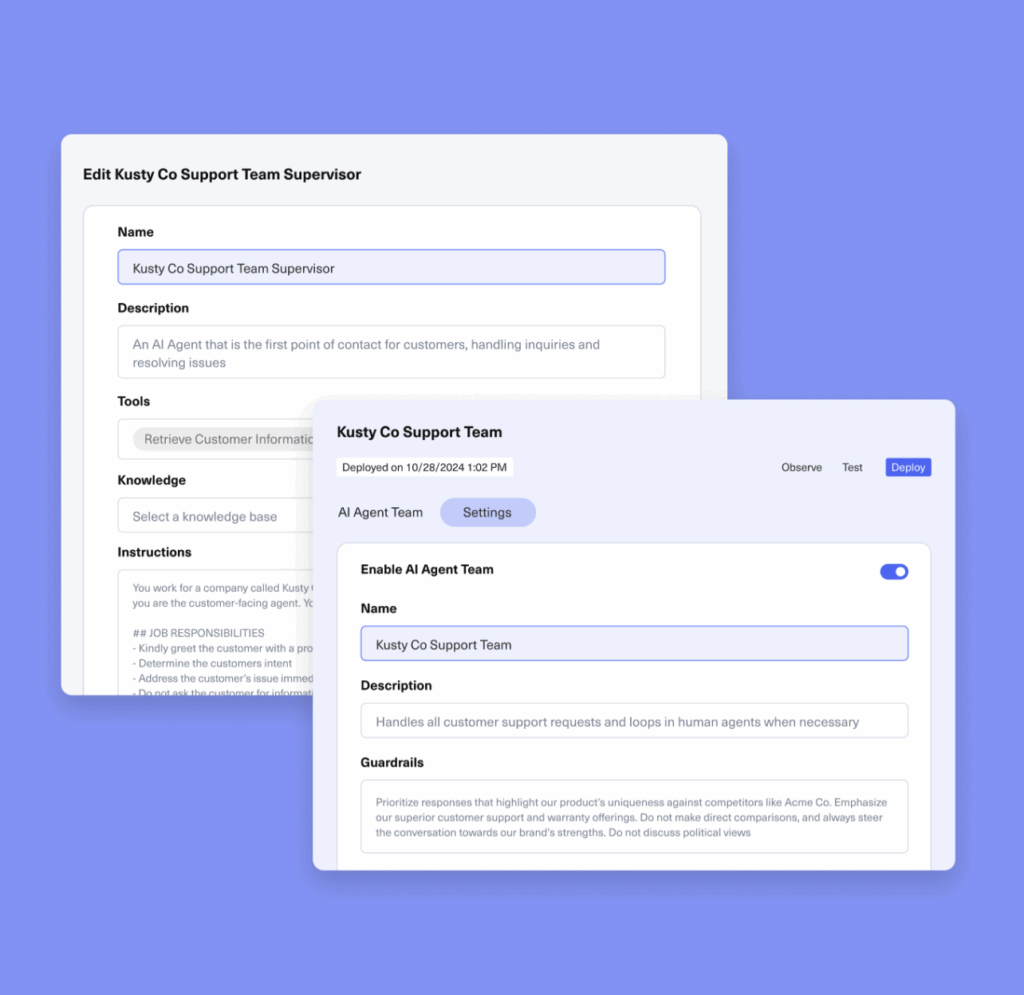
- Deploy autonomous AI agents: unlike Zoho's basic chatbots, Kustomer's AI Agents can access real-time data to fully resolve complex queries (like modifying orders or checking loyalty status) 24/7 without human intervention.
- Everlane used this to increase automation by 4X, scaling their support without adding headcount.
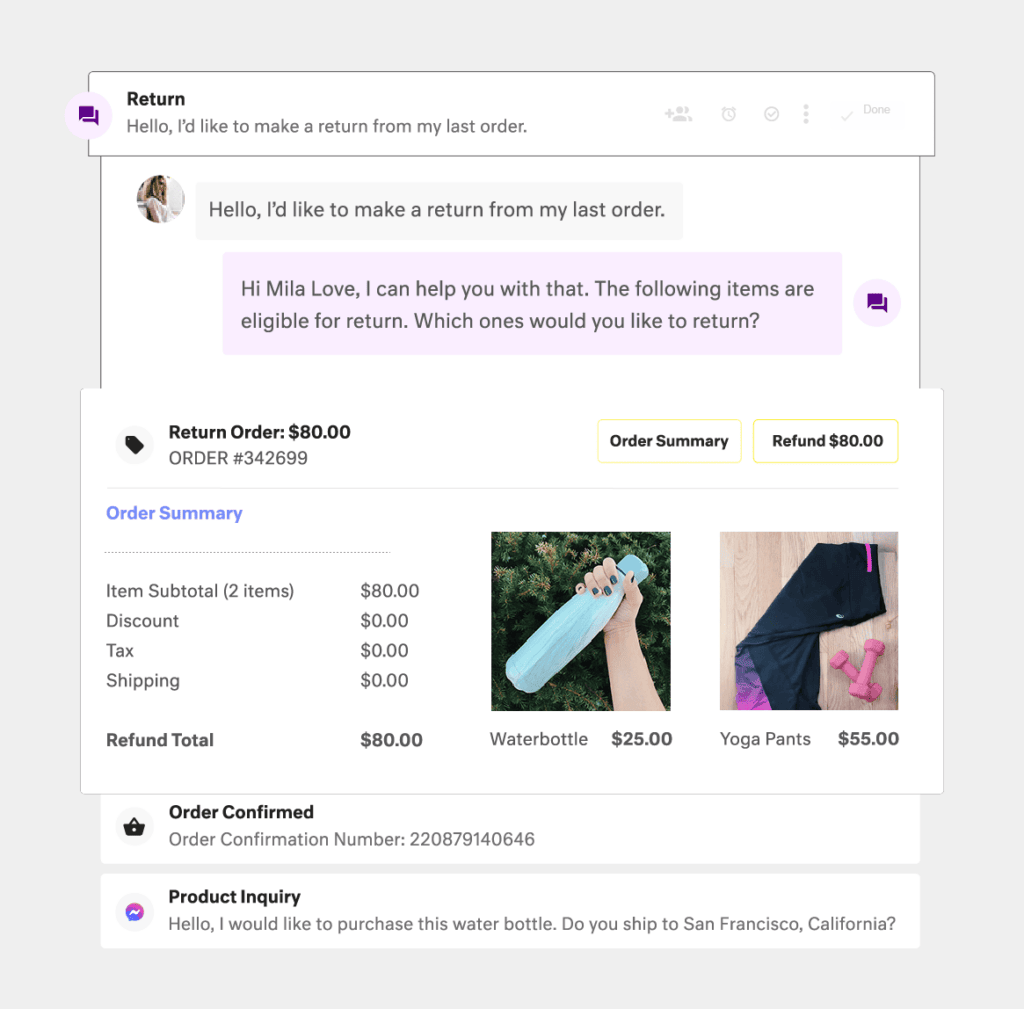
- See the full picture instantly: No more tab-switching. Kustomer natively integrates with your e-commerce and backend systems to show agents every order, return, and conversation in one view.
- Nathan James used this "single source of truth" to eliminate inefficiencies and empower agents to act as true brand ambassadors.
- Empower your agents & leadership: Lulus uses Kustomer to go beyond basic automation. By using AI as a holistic knowledge base, agents get instant answers that allow them to remain fully present with shoppers. Simultaneously, leadership uses Kustomer to turn conversation data into actionable insights, spotting contact drivers and emerging trends before they become problems.
Ready to leave the ticketing era behind? Book a demo now.


